



Amazon to Introduce Streaming Music Service This Summer, Only Offering Songs 6-Months or Older [iOS Blog]
 Amazon will be launching a music streaming service offered free to customers paying for its $99/year Amazon Prime service. The service will launch in June or July according to a new report from Buzzfeed.
The news follows yesterday’s acquisition of Beats Music by Apple, and a report from February that claimed Amazon was investigating the possibility of a music service to accompany Prime.
Amazon’s streaming catalog will only include songs older than six months, likely saving the company on royalty costs. Spotify, Beats and Rdio all offer new releases to their subscribers.
The company will expand its Prime membership offerings by adding a stockpile of old and newish music for subscribers to stream on demand. The Prime music service, which is scheduled to launch this June or July, will not include recent releases but instead restrict its catalog to songs and albums that are 6 months old and older, five music industry sources familiar with the company’s plans confirmed to BuzzFeed.
Amazon has some 20 million paying Prime members and offers them a library of movie and TV shows via its Netflix-esque Prime Instant Video service along with free 2-day shipping on most items the company sells.
Recently, Amazon signed a deal with HBO to stream older original content from the cable network to Prime subscribers.

Apple Nears Completion of WWDC Decorations at Moscone Center
Apple is nearly finished decorating the Moscone Center ahead of its annual Worldwide Developers Conference in San Francisco next week. Decorations began appearing earlier this week with a larger banner that says “Write the code. Change the world.”
MacStories editor Federico Viticci has shared selection of images from San Francisco. Giant Apple logos are nearly finished on the sides of Moscone, with large square panels in the same style as the other banners have appeared on the Metreon building across the street.



Finally, MacRumors reader Joseph sent in this image of an empty banner bracket inside Moscone West. In past years, Apple has draped black tarps over banners that were then revealed following the Monday morning keynote address.

Apple’s WWDC keynote kicks off on Monday at 10:00 AM Pacific Time, and the company will be providing a live video stream of the event.

Google Maps 8.1.0 update brings terrain view

Google has updated their Maps app bringing the version number to 8.1.0 from the previous 8.0.0 having already updated their camera app to version 2.2.
With the update comes terrain view which will display 3D elevation of various geographic features such as mountains, making it extremely useful for hiker or cyclists to determine a route elevation directly on the Maps mobile application.
The Google Maps update is steadily rolling out to various countries in the Google Play Store so if you haven’t got the update yet then check back soon as you may not have been involved in the initial wave.
Let us know what you think of the new terrain view in the comments below.
The post Google Maps 8.1.0 update brings terrain view appeared first on AndroidGuys.
Enable “OK Google” on 3rd party launchers on any device

One of the cool features of the Moto X is the always listening “Ok Google” feature which allows you to prompt a voice command in Google Now without even having to touch the device.
Now a mod for the Xposed Framework has been created over at XDA Developers to enable “OK Google” on all 3rd party launchers on KitKat and above, and also on a per app basis.
The requirement is that you need the Xposed Framework and also version 4.4+ of the Google Search app for it to work properly.
The developer has said it has been tested on the following stock devices/launchers with no issues, and mentions that pretty much every 3rd party launcher is supported:
- Xperia Stock Launcher
- HTC Sense 6 / Blinkfeed
- TouchWiz (S5 has this built in)
- LG (untested – G3 has this built in)
So if you want to implement “Ok Google” on your device with a 3rd party launcher then just download the .APK package from here, run the App, and enjoy the handsfree Google Now control.
VIA: XDA
The post Enable “OK Google” on 3rd party launchers on any device appeared first on AndroidGuys.
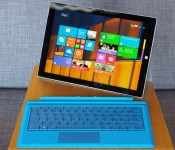
Ditching the MacBook Air for Microsoft’s Surface Pro 3

I, like many others, participated in what could be called the unofficial Surface Pro 3 challenge: trading in my regular laptop for the company’s new device for a week, with the intent of doing all my work on the new notebook-tablet hybrid. Well, here I am, six days in, back writing on my MacBook Air. I didn’t want to give up or cheat, but there are deadlines to meet, and I simply don’t have enough hours in a day to pound out posts on the Pro 3′s flimsy Type Cover keyboard.
Those may sound like fighting words, placing me firmly in the “not a fan” camp when it comes to Microsoft’s latest, productivity-focused product. But I actually think this is a great device for everything except typing. For someone who writes for a living, the Pro 3 is — for lack of a better description — a great laptop that’s just missing its keyboard.

I have the $999 model, with a Core i5 processor and 128GB of storage, and the Type Cover that will retail for an additional $130. That’s not cheap, but this is supposed to be your laptop and your tablet, and Redmond has refined the design a ton compared to the previous generation. Though the keyboard itself is mushy, with barely any travel, the trackpad is actually quite solid this time around. Microsoft made it bigger than the version on the Surface Pro 2, for one thing, and gestures such as swiping and pinch-to-zoom work well. The only glitch came on the day when two-finger scrolling stopped working, and the problem couldn’t be solved with anything short of a full system update. Harmless enough, I suppose, but I did spend about an hour trying to fix the issue by tinkering with settings in the control panel to no avail.
It’s a great laptop that’s just missing its keyboard.
I encountered one other strange bug while using the Surface Pro 3 on a flight: The WiFi driver appeared to be missing until I rebooted the machine. After that, I was able to connect to Gogo, but the problem itself was pretty confusing. It’s a lot easier to forgive such hitches in a tablet, rather than a laptop, too. If Microsoft has its way, this is the only gadget you’ll be traveling with, and it would be a pretty big problem if critical functions weren’t working reliably.
Speaking of using the Pro 3 on a plane, the kickstand design was a bit difficult to handle with a tiny tray table; it would only fit if I propped it up at a very steep angle or titled it to the right or left. Luckily, though, the machine’s made to be comfortable in your lap — remember that whole “lapability” spiel at the Microsoft event last week? — with a magnet system that allows the Touch Cover to be used at an angle.
Finally, that 12-inch, 2,160 x 1,440-pixel display is gorgeous, and I especially enjoyed it when watching HD video. Watching something in standard resolution, on the other hand, wasn’t as great; an episode of the original House of Cards streamed on Netflix looked soft and pixelated. It’s the same problem you’ll encounter with any high-res screen like Apple’s Retina panel, though, and I’m certainly not complaining that Microsoft made this one so bright and crisp.

Over the course of six days, I wrote countless emails, sent several tweets and wrote one Engadget post on the Surface Pro 3. The fact that I could do that much says a lot about how much progress Microsoft has made in its quest to reduce our dependency on two separate gadgets: one for work and one for play. That said, I still had to cheat when I needed to get work done quickly. If I had copious amounts of time and patience, I could probably train myself to be a great typist on the Surface Pro 3′s keyboard cover. I have neither, though, so that’s why I won’t be packing the device when I leave for a work trip tomorrow.
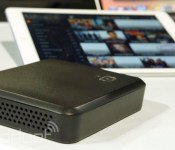
Simple.TV’s streaming DVR now sends shows to your Chromecast

Simple.TV’s streaming DVR is handy if you want to catch up on shows while on the road, but what if you want to watch on a friend’s TV, or don’t have an internet connection at all? Neither should be a big issue following an update to the company’s Android, iOS and web apps. You can now send both live and recorded TV to a Chromecast, so that big-screen experience will follow you outside of the home. And if you travel to a place where internet access isn’t guaranteed, you won’t be deprived of viewing material — it’s now possible to download recordings to a computer (sadly, not mobile devices) in advance. They’re not the biggest improvements, but they make all the difference if you’re scrounging for something to watch while on vacation.
Filed under: Cellphones, Home Entertainment, HD
Source: App Store, Google Play
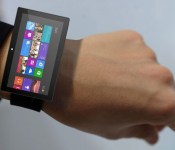
Surprise: Microsoft’s working on a smartwatch of its own

Apple’s reportedly working on one, Google’s developing an entire ecosystem and hundreds of smaller companies either have products already on the market, or currently under development. The question isn’t who’s building a smartwatch, it’s who isn’t building one. And as expected, you can count Microsoft out of that latter camp. The software giant turned computer manufacturer is working on its own wearable concoction (not pictured above), according to a Forbes report, with Kinect engineers even pitching in with the project.
The unannounced device will reportedly collect health data day and night, such as your heart rate, and will work with Android, iOS and Windows Phones alike. It’s also said to sport a design similar to Samsung’s Gear Fit, a color touchscreen facing a wearer’s wrist and a two-day battery. Opening the device up to multiple platforms would be a key selling point, and continuous monitoring could make the Microsoft wearable a fit for casual users and fitness buffs alike.
Filed under: Wearables, Microsoft
Source: Forbes
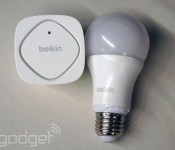
Apple’s smart home plan rumored to be a boring certification program

When rumors of Apple’s smart home efforts broke Monday, expectations for the future of home automation began to soar. According to sources speaking with Gigaom though, Cupertino’s connected household project has more to do with fragmentation and the “Made for iPhone” label portion of the initial rumor. It seems that the focus of the program is to certify those smart devices that are scattered around residences rather than building automation controls into iOS or some such. The process is said to keep both WiFi and Bluetooth connectivity alongside voice control as key items for linking all those gadgets together, but as of now, a universal control system or a list of partnerships doesn’t seem to be on tap for WWDC next week.
Filed under: Household, Software, Mobile
Source: Gigaom
 AIVAnet