



Amazon invites customers to try Fire TV free for a month

Amazon is emailing some of its customers with an offer to try out the $99 Fire TV box free-of-charge for 30 days. If they don’t get along with the little Android-powered streamer and gaming console, they can return it without obligation and without being left out of pocket — so long as they follow the conditions of Amazon’s returns policy, which includes keeping the hardware in new condition. Of course, a regular customer could get a similar end result without the invite, by dabbling with the Fire TV for a month and then using the normal returns procedure to get a full refund, but they’d have to pay upfront and possibly also pay for return shipping costs.
Update: We incorrectly linked the 30-day trial with Amazon’s standard returns policy, when the former might have some genuine advantages. The post has been changed to reflect that.
[Thanks, Jeffrey]

A week with Leica’s T, the most beautiful mirrorless camera money can buy

Leica’s cameras have always been good-looking, and they’ve always been expensive. You might expect the German camera maker’s most visually stunning model yet to cost more than a pretty penny, and it does, but at $1,850 (body only), it’s also one of the company’s most affordable interchangeable-lens cameras to date. The Leica T, machined from a single block of aluminum and hand-polished for 45 minutes, is not going to be produced by the millions and marketed around the world. And considering the nearly $2,000 you’ll pay for each of the camera’s brand-new lenses, you can definitely invest in a more capable camera system for less. But the T is a work of art, and people will pay ridiculous sums for a desirable piece. This one just also happens to take pictures.
Shooting with the Leica T was quite an experience. It’s not inconspicuous — everyone from partygoers to construction workers noticed the camera every few minutes. Tourists stopped walking so I could finish taking a picture. One gentleman nearly tripped trying to duck below my subject. It’s clear that to passersby, I was no longer just another schlub taking pictures. I was a photographer. The T will definitely attract attention, making it either the best or worst camera for street photography on the market, depending on what you’re going for.
It’s clear that to passersby, I was no longer just another schlub taking pictures. I was a photographer.
One Leica rep I spoke to envisions the T being a hit with design-oriented professionals. Architects may use it to photograph their buildings, or an advertising executive could use it for casual shots while filming a campaign. Professional photographers could carry the T, too — it’ll certainly fit in at a high-end destination wedding — and for consumers that have the cash to spare, it’s without a doubt one of the most desirable mirrorless cameras you can buy.

Clearly, Leica’s primary focus is on the T’s physical design, but its capture capabilities have not been overlooked. There’s a 16.3-megapixel APS-C CMOS sensor — the same size you’ll find in many other mirrorless cameras, like Fujifilm’s X-T1 (another pricey model) or Sony’s Alpha 6000. It can shoot 1080p video at 30 frames per second and still photos at 5 fps (for up to 12 consecutive frames). Physical controls are limited to a power toggle, shutter release and two dials on the top, so you’ll use the 3.7-inch 1.3-million-dot touchscreen to frame shots and control nearly all of the camera’s settings.
The screen is relatively bright (it adjusts automatically based on ambient light), but limited viewing angles make it difficult to use in sunlight. Fortunately, you can add on an electronic viewfinder, but that accessory will run you a whopping $600. Part of Leica’s justification for the shocking price tag is that the EVF includes an integrated GPS module (the T’s all-aluminum housing wouldn’t make it easy to find a signal otherwise), but WiFi connectivity is integrated within the body. Compared to other mirrorless cameras, image quality is excellent. Details were sharp; exposures were typically spot-on; and the T focused quickly. Again, glare can definitely be an issue in bright daylight, so you’ll want to add on the EVF in order to confirm settings and verify proper exposure when shooting outdoors.
I tested the camera with the versatile 18-56mm f/3.5-5.6 Vario-Elmar-T lens. Normally, you’d receive such a lens as part of a kit, included in a camera’s price tag. Leica’s equivalent, however, costs $1,750 — almost as much as the T body itself. Granted, that lens is of much higher quality than its “free” counterparts from Samsung or Sony, but Leica’s glass pushes the camera out of reach for many consumers. You’ll probably also want to add on the 23mm f/2 optic, which retails for $1,950, or the $395 adapter you’ll need to use Leica M-mount lenses with the T. Of course, more lenses are coming later this year — eventually, you could expect to spend $10,000 or more to build out a complete collection.

Should you buy the Leica T? That’s tough to say. It’s an absolutely gorgeous camera that shoots great photos, but it costs a ton, and skimps on features that many pros need, like 1080/60p video, audio inputs and super-fast consecutive-shooting speeds. And while I love the clean design, the lack of physical controls is absolutely a dealbreaker for serious photographers. If you’re shooting outside on a sunny day, the touchscreen and its minimalist interface can really throw a wrench in your workflow. For casual users with (very) deep pockets, though, the T is a great option. It looks fantastic; it’s a ton of fun to use; and it’ll garner more attention than a fancy handbag or a piece of flashy jewelry. For what Leica set out to create, the T is definitely a winner.
Filed under: Cameras

Moonlight as a DJ using Spotify tracks and an iPad

We’ve living in an age of on-demand music and high-power hardware everywhere. That means (among other things) that it’s never been easier to play at being a DJ… especially if the streaming audio buffs have anything to say about it. You see, Spotify and Algoriddim — the makers of the popular iPad DJing app djay 2 — have partnered up to give would-be turntablists access to Spotify’s extensive audio archive, just in time for all those early summer shindigs.
In addition to just making those myriad tracks available for your mix, djay 2 can now suggest songs that would mesh nicely with what’s already playing (thanks to some help from Spotify-owned Echo Nest). And if you want your DJing experience to be even more laissez faire? A new Automix Radio feature will craft an entire mix for you — transitions included — so you can nip off for a drink and mingle while the tunes play on. Just note that you’ll still have to pay Spotify $9.99/month for that access, though djay 2 users get a 7 day free trial to whet their proverbial whistles. If this turn of events sounds just a little familiar, well, you’d be right. Spotify inked a similar deal with the folks behind the Pacemaker DJ app earlier this year too, but djay 2 has been downloaded some 10 million times to date — maybe appealing to those mobile DJs will help the streaming giant finally turn a profit.
Via: CNET
Source: Algoriddim

Amazon is giving away $10 in Amazon Coins

Amazon has been a giving mood lately with their previous $22 Amazon coin giveaway and now they’ve come back with another Amazon freebie. All you need to do is head over to this Amazon’s AppStore and download the five apps at this link.
Here is a list of the five apps for download:
- Food Network In The Kitchen
- Strawberry Shortcake Bake Shop
- iHeart Radio
- Dr. Panda’s Restaurant
- Don’t step the white tile
Each app you download equals 200 free Amazon Coins ($2). After you download the apps you can get rid of them or keep them at your leisure. Remember though: Amazon Coins can only be used for apps/in-app purchases in Amazon’s Appstore. So get our there and get some free Amazon Coins!
Via: Android Police Source: Amazon
The post Amazon is giving away $10 in Amazon Coins appeared first on AndroidGuys.

KitKat rolling out to Sony Xperia Z, ZL, ZR and Tablet Z

Earlier today we’ve reported that HTC One (M7) is getting updated in Europe and now we have another major manufacturer doing the updating as announced earlier this year.
Sony is rolling out Android 4.4 KitKat to Sony Xperia Z, ZL, ZR and Tablet Z devices. Sony pointed out that the rollout will vary depending on the market, which is expected of course. When done with the listed devices this Japan based giant plans on giving the KItKat treatment to its midrange offerings such as Xperia E1, Xperia T2 Ultra and Xperia M2. Sony is usually extremely late when updating its devices so this is a good sign.
Full update changelog:
- Google’s Android 4.4; KitKat as standard – bringing improved performance & user interface (UI) optimisation…
- If you’ve got a Sony PlayStation 4, you might recognize our new user interface – we’ve added the same sleek launch animation and live wallpaper across the lock and home screens. You’ll also spot a revamped Status Bar and Quick Settings… now more intuitive and customisable (also with a fresh new look)… cleaned up to ensure you only get the notifications you really need
- As you might expect, we’re also uplifting Sony’s entire native app portfolio to the latest versions bringing tweaked / improved / current experiences for one and all… some of our favourites look like:
- Messaging – a few UI adjustments here & there, including a slicker “send” animation, and deeper Emoji support for some expressive fun… also worth noting, you’ll find smileys wherever there’s an app with a keyboard
- Email – you’ll be able to both load and see more mails… but don’t fret, navigation of said load is easier with a more responsive viewing pane – split screen modes divide info for easy digest… especially useful / works a treat on Xperia Tablet Z
- Smart Social Camera – our social imaging experience makes its debut on our first Z Series devices; a selection of Xperia Camera apps directly accessible from your viewfinder… including personal favourite “Creative Effect”, and more for download to boot!
- Battery STAMINA Mode – level-upping our unique power management feature, bringing smarter data management & more for prolonging your juice
- Sony’s Media apps: WALKMAN, Album and Movies, with Sony Entertainment Network cloud service integration* – a more converged and full Sony entertainment experience – Sony Entertainment Network & PlayMemories integration with a more intuitive UI, better download speeds, and more…
- And proving pretty popular, now totaling over 2 million downloads (!) – our unique custom interface experience: “Xperia Themes”, with downloadable UI packs from Sony Select – skin up to 280 assets across your Xperia smartphone with a variety of styles…
- Compatibility with our SmartWear Experience; SmartBand SWR10 and Lifelog app– enabling you to record social, physical and entertainment activities and have them all visualised in a beautiful interface… reminisce at that past, make the best of the present and plan for the future
SOURCE: Sony
The post KitKat rolling out to Sony Xperia Z, ZL, ZR and Tablet Z appeared first on AndroidGuys.
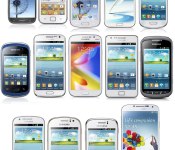
Samsung: good vs bad and what I’d change [EDITORIAL]

No matter whether you love or hate Samsung, you have to admit they’re one of the strongest brands in smartphone industry. When it comes to Android they have consistently been perceived as the strongest one, particularly when we look at the market share.
According to Localytics Samsung owns 63.3% of Android market, followed by HTC with 6.5% and LG with 5.9% share. I wouldn’t be exaggerating if I used the phrase „undisputed king of Android (share)“. Said data is dating back to November 2013, but not much has changed in half a year.
NOTE THAT THIS ARTICLE IS SPREAD OVER TWO PAGES

I personally don’t like Samsung’s take on Android… at all. I consider their TouchWiz skin to be extremely buggy, cartoonish and quite frankly crappy. There, I said it. All that considered, Samsung has one big thing going for them, an established brand. They quickly and steadily managed to put two words on the tongues of smartphone users around the world. The words? “Samsung Galaxy“.
As soon as people hear those words they know what you’re talking about – even if their knowledge of smartphone industry is almost non-existent. Heck, even the word “Galaxy“ on its own now makes people think about Samsung and their smartphone business.
 A quick trip down memory lane reminds us that the “Galaxy“ brand came to life in 2009 when Samsung released their first Samsung Galaxy device running Android. Since then every Samsung’s phone running Google’s Android operating system was dubbed Galaxy. That first device, the Samsung Galaxy i7500, was released in April and came with Android 1.5 Cupcake out of the box. I had the pleasure of handling that very same device. At the time I was rather impressed by it; it was a nice piece of technology.
I don’t think Samsung realized that what they created back then would go on to be as big as it is today. Jump to today and we see that Samsung has released over 200 models carrying the “Galaxy” name. That’s a lot of stars.
We can separate Samsung’s Galaxy devices in a few categories:
- Smartphones (Ace, S, etc.)
- Phablets (Note and Mega lines)
- Tablets (Tab and Note lines)
- Other (Camera line, Gear line)
I did allow myself some freedom categorizing devices considering there are so many. What’s more, some really don’t belong anywhere, like the Galaxy Camera.
Samsung’s flagship “S” line is the iconic flagship line, having moved more than 210 million units since 2010. In the 1st quarter of 2014 alone Samsung shipped 85 million smartphones, with at least 80% of those being Galaxy devices. In comparison, Apple shipped 43.7 million smartphones, while Lenovo, Huawei and LG all shipped between 12 and 14 million units each. I believe these numbers speak for themselves.

Taking all of this into consideration it is obvious that Samsung is the king of Android and nobody seems poised to wrestle away the crown any time soon. But, as you know quantity does not equate to quality. And, even though the Galaxy S5 is already selling like crazy, it doesn’t mean they’re doing things 100% right.
I am sure that I am not the only one to think that Samsung has stopped pushing us forward. They’ve slowed down on innovation and most of what they do are gimmicks to appeal to people who are amused by them. Unfortunately, that is a vast majority of market today.
Some of you may disagree with me, that is just fine. Maybe you find Samsung’s gimmicks useful. I am not saying that some of their features are not useful but a lot of what I see is stuff that typical consumers don’t use on a daily basis. For all of the marketing done and the hype around the announcements, it feels like stuff that’s only there because Samsung could do it – not because users ask for it or need it.
It may seem like I’m hating on Samsung, but I’m not. I’m just disappointed in how things seem to evolve. There’s less “revolution” in today’s models and the last few cycles are more “evolution”. Maybe I demand a bit too much but it has been a while since I saw something that made me say, “WOW!”
Personally, and if nothing else, I would appreciate if they’d at least pay more attention to finer details and stop pushing buggy versions of TouchWiz.
Let me elaborate on the Good, Bad and the Bottom Line on the next page.
The post Samsung: good vs bad and what I’d change [EDITORIAL] appeared first on AndroidGuys.
Any.DO makes a serious push toward bigger screens with new web app

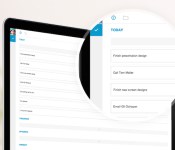
Task-managing applications like Any.DO are known for helping you stay on top of things, like reminding us to pick up that milk on the way home — because we all know how important it is to do that. But while the service has made its presence be felt on mobile, a dedicated web app is something that Any.DO users have long been waiting for. And now it’s here. As of today, you can start using Any.DO outside of iOS and Android and on any browser, not just via a Chrome extension. For the most part, it’ll be the same on your web browser as it is on the smartphone app, but there are some new features that Any.DO has tailored specifically for bigger screens. Focus Mode, as seen above, lets you quickly glance at what to-do’s you have coming up; Planning Mode, meanwhile, shows multiple folders and allows tasks to be moved across one another.
As part of this announcement, Any.DO also let it be known that it has now reached 10 million users worldwide, and it is hoping the newly minted web app will only help it grow further. “There’s a world of people who haven’t considered us because they need a full web experience, right on their computer screens. They’re going to use Any.do for the first time and that’s what I’m most excited about,” said Any.DO CEO Omer Perchik.
Filed under: Misc, Internet, Software
Source: Any.DO

Apple to fix iMessage bug that causes ex-iPhone users to lose their texts

Apple says it’s fixed a server bug that was affecting “some” former iMessage users who had tried to switch to Android or another OS. However, it admits there’s another problem with its messaging platform that it still hasn’t managed to address. According to Re/code, the first bug was making it difficult for Apple staff to keep track of which phone numbers are currently associated with an iPhone — information that is essential for the proper running of the iMessage. Without an accurate database, ex-iPhone users could find that some of their SMS messages are mistakenly treated as iMessages and sucked into the bowels of an Apple’s datacenter, from whence they may never return. As for the remaining flaws, and iMessage’s broader dependence on up-to-the-minute record-keeping, Apple says it’s working on a fuller solution that will come in a “future software update.” In the meantime, the best advice for any iPhone leaver is still to manually disable iMessage and return to regular SMS before they power down for the final time.
Filed under: Cellphones, Mobile, Apple
Source: Re/code
Facebook stops oversharing, defaults status updates to just friends

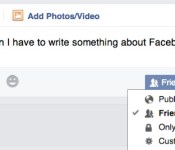
Previously, when you first joined Facebook, all of your posts would be shared with the world by default. Anyone who stumbled upon your profile could read anything you previously shared, be it a short update or a personal photo, unless you deliberately clicked away from “Public.” Now, the social site’s switched things up for the better, making “Friends” the new default for status updates. You don’t have to do anything to take advantage, but now’s as good a time as any to pay very close attention to your Facebook privacy settings. And maybe be a bit more selective when it comes time to add a new friend.
Filed under: Internet, Facebook
Source: Facebook

Apple’s iMessage Delivery Problems Worsened by Server Glitch
iPhone owners switching from their iPhone to another device often encounter an issue with lost messages that are incorrectly delivered to their inactive iPhone, instead of their new phone. This issue is a long-standing problem that was recently made worse by a server glitch, claims Apple in a statement provided to Re/Code.
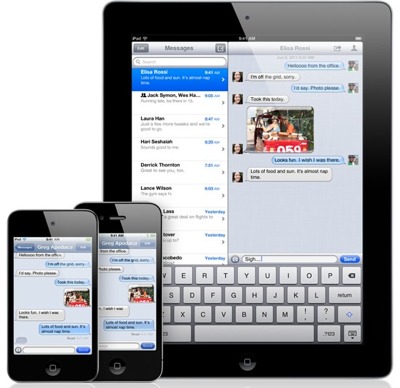
Apple’s iMessage service allows iPhone owners to exchange messages using Apple’s iMessage servers, instead of the carrier’s text messaging network. The system relies on the accurate identification of the originating and recipient devices as iPhones. When this identification fails, the message delivery system falls apart.
The lost messages problem arises when an iPhone owner switches to another smartphone, such as an Android device, and keeps their existing number. In select cases, Apple’s iMessage service continues to recognize the phone number as being attached to an iPhone, instead of the new Android device. This recognition mistake causes a problem with messaging as Apple’s iMessaging servers will route the message as an iMessage instead of converting it to a standard text message.
Apple advises iPhone owners to turn off iMessage on their phone and uncheck the number in other iMessage-compatible devices attached their iCloud account before switching devices. This method doesn’t always remove the phone number from Apple’s iMessage server, forcing former iPhone owners to contact Apple to remove them from the iMessage system manually. A recent server glitch has disabled this manual removal, leaving Apple support representatives temporarily unable to fix this problem for some customers.
“We recently fixed a server-side iMessage bug which was causing an issue for some users, and we have an additional bug fix in a future software update,” Apple told Re/code in a statement. “For users still experiencing an issue, please contact AppleCare.”
Apple has not provided a time-frame for the release of this software update. Until a fix is in place, customers will have to contact AppleCare for further guidance on how to handle this troublesome issue. 
 AIVAnet