



Apple Forging Deals with ISPs to Bolster Delivery of iTunes, Apps, and iCloud Content to Users
Apple is moving forward on plans to develop its own content delivery network (CDN), reports well-known CDN and Internet Services analyst Dan Rayburn (via Ars Technica). The Cupertino company is reportedly negotiating deals with Internet Service Providers in order to ensure the efficient delivery of content to its customers.

Apple may control the media for iTunes and iCloud customers, but it currently outsources the delivery of this media to third-party companies like Akamai, ceding control over the quality of service to these other companies. Apple reportedly has been working for five years on its own CDN that would bring content delivery in house, ensuring its customers can access data reliably and quickly regardless of ISP or geographic location.
Apple has been deploying the necessary network hardware and recently started forging interconnection deals with Internet Service Providers as it prepares to shift content to its own CDN soon, claims Rayburn.
Apple has been very busy with their build out deploying a lot of boxes running Apache Traffic Server and buying a ton of transit, co-location, wavelengths and other infrastructure services. Their CDN is quickly growing, and it won’t be long before we start seeing a portion of their content getting delivered from their new CDN.
As part of their build out, Apple is currently negotiating paid interconnection deals with some of the largest ISPs in the U.S. I’m not going to disclose which ISPs they are talking to and what deals they have already done, but it’s interesting to note that with all the talk lately of net neutrality, peering and interconnect relationships, Apple isn’t out in the market making any complaints.
Despite concerns about net neutrality, these priority access deals are becoming common among big companies, such as Netflix, Microsoft and Google, that move large volumes of data across the Internet.
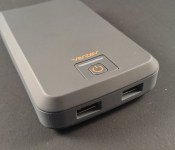
Wall Charger + Portable Battery Creates The Ventev Powercell 6000+ [Review]
Keeping our devices charged is, and sadly always will be, a battle. Until the day when our phones and tablets can remain on indefinitely, we will always need a way to charge the internal batteries. The market for such accessories is rather large. Nearly every company that can and plans to make accessories will be turning out car and wall chargers right along side portable battery banks. While I see plenty of innovation in design, number of ports, number of amps and watts, one thing seems to be consistent, very few companies ever try to break the mold. Why on earth should I have to have a separate accessories for the same job? Ventev has been working on consolidating our needs and I must say, I am rather impressed and happy to see it. So what happens when a wall charger and a portable battery bank get married? They create a hybrid dual-port wall charger that is also a portable battery bank.
What’s in the box
- Ventev Powercell 6000+
- User manual
 The Ventev Powercell 6000+ is a 6000 mAh packing portable battery bank that goes beyond traditional battery banks. It offers dual-port charging, like others on the market. Both ports are 5v while one is a 1A (5W) an the other is a 2.1A (10W). On the top of the Powercell is a power button that you press and hold to turn on the battery pack. Just above the button is series of lights, in typical Ventev orange, that offers up the remaining battery levels at a glance.
 On the rear is where you start to notice the difference between most of the current battery banks on the market. Ventev integrated a flip down wall plug allowing you to directly charge the Powercell from the wall without the need for a USB cable or some other proprietary charging cable. It is quite brilliant really.

 Ventev went a step further though. The unit also offers built-in bypass circuitry that will pass the power through the unit to your device before it charges up the internal battery. In a nutshell, plug it in and your device and both will be charged in the morning. Leaving you with a full device and 6000 mAh of power on the go.
The testing
I put the Powercell 6000+ through my usual testing using Battery Monitor Widget from 3c. I set it to track every 1% charge and let each test run for approximately 15 minutes each. Starting with 2.1A Rapid Charge port first. I used the T-Mobile Sony Xperia Z which houses a 2330 mAh battery.
Here are the results with the Xperia Z on the 2.1A Rapid Charge port for 15 minutes.

 Seems pretty rapid to me. It boosted the battery 22%. That is 1.46% charger per minute. If the rate holds, and I left everything on, it should charge from 0% to 100% in 68 minutes. This is all math and not perfect by any means, but gives you a general idea.
Now the 1.0A port for 15 minutes.

 As you can see, and like we would expect, the 1.0 amp port charged at a slower rate. It only pulled in 8% battery in the 15 minute charge. I am certain their are devices out there that charge better or are designed to charge off 1.0 A.
I also charged up the Lenovo Yoga 8 tablet which houses a 6000 mAh battery. With the internal battery being the same size as this portable battery, it should come as no surprise that it charged a little slower. The charge rates were the same, the % increase over the 15 minute window was slower. More so to the tune of 5% or so in the 15 minute time frame on the 2.1A Rapid Charge port. I wouldn’t rely in the Ventev Powercell 6000+ if I were in a pinch with my tablet, or any other battery bank/tablet for that matter, but if I needed it to have sufficient charge from lunch until I was off work, 4 hours would give me a nice bump.
The next test I ran with just the battery portion was dual charging. Utilizing the numbers above and the same 15 minute window, I came out with similar results. The 2.1 port charged up the Xperia Z by 21% and wasn’t hindered by a second device being connected. (yes, it is 1% off. THat could be attributed to notifications, 45 second variance or a number of other potential factors.) I didn’t think screenshots of that were really necessary.
The final test I did have to run one set of tests on the charger its self when plugged into the wall. Just to see if the ports made a difference in charge rates. While my brain said that it shouldn’t matter because the Powercell is set to pass the charge through, I was still curious to see if the 2.1A and 1.0A rated ports was also the output while plugged in. It didn’t make a difference which port I used, the charge rate was the same. Also, when charging a device the light will stay constant until your device, or devices, are fully charged. Once charged the light will blink as it charges the internal battery of the Powercell. A constant light could be irritating to some, but the light is orange and not overly bright.
What I like about the Ventev Powercell 6000+
- The style and design matches all their other products. They keep with the same logo, same color scheme and same materials. It makes them easily recognizable and keeps them from blending in with all the other black and white boxes out there.
- The 2.1A port is also a Rapid Charge port that delivers the fastest charge possible for your phones and tablets. After the initial round of testing it is clear the Rapid Charge port is ideal for those quick fix charging needs.
- A 15 minute charge with my Xperia Z powered on, with Bluetooth and Wi-Fi active, delivered a fair amount of charge. Enough to boost me up XX%.
- I am very fond of the integrated flip down prong. It is stiff and after flipping it open and closed 75+ times, I didn’t notice or feel any degradation in its ability to click open and stay clicked closed.
- Paired with the battery size and the pass through technology makes this the perfect travel charger to take with you everywhere.


What I don’t like about the Ventev Powercell 6000+
- While the style and design are nice, I feel like they could have made it a little smaller. I didn’t tear it open to see how much wasted space might be inside, but compared to other battery banks of similar mAh or larger, the Powercell seems like it could have been a little more compact.
- I would like to see future models offer two universal rapid charge ports.
- The lack of micro USB charging. While I find the prong a positive, it can also be a negative. For instance, I won’t be able to charge this battery bank from a solar panel that offers USB out charging. I would like to see both charging options. Although I am not sure that is practical or cost effective.
Overall thoughts:
If you travel often having a dual port wall charger not only saves on space in your bag, but saves space on wall sockets. hotels are getting better, but there are often never enough outlets near where you want to actually charge things. Freeing up one socket and ditching one more charging block is a bonus. Cutting back on needing to carry a battery bank with you too also cuts down on needing to waste a wall socket to charge it up as well as the added weight and space that it takes up in your bag. I think Ventev did a great job with the product.
If the Ventev Powercell 6000+ sounds like exactly what you have been looking for o need, hit the Amazon link below to get one ordered. While you are at it, check out their flat band cables and the powerdash r900 car charger with a small battery bank inside too.
//<![CDATA[
ord = window.ord || Math.floor(Math.random()*1E16);
document.write('’);
//]]>

Google+ introduces Stories and Movies feature

Not only has Gmail received a very welcome update today, but now Google+ is also receiving some love with several updated features. The two most notable are Stories and Movies.
Stories (Auto Awesome Stories) combines all your photos, videos and the places you visited into a really cool travelogues. The sample provided by Google is really awesome, just make sure you take some quality pics and vids. Click on the Google+ Story below to see what its all about.

Movies (Auto Awesome Movies) is also available for Android, iOS, and the web. Google+ Movies can produce a highlight reel of your photos and videos automatically—including effects, transitions and a soundtrack. It is a really neat feature and the video below shows an example of how it is used!
To get started with Stories and Movies, simply back up your photos and videos to Google+. And that’s it. Auto Awesome will get to work in the background, and you’ll get notified when a story or movie is ready. If you’ve already got photos backed up, you probably have a few stories waiting on you!
Source: Google
The post Google+ introduces Stories and Movies feature appeared first on AndroidGuys.

Samsung Galaxy Note 4 display details leak

If Samsung is going to stick to its usual Galaxy Note release dates we still have over 3 months until the Note 4 sees the light of day. It’s definitely time for the rumors to start and in that light we have a rather big one to kick things off, although the kind of did with this possible design leak.
According to GSMArena’s tipster, Galaxy Note 4′s codename is “T (Muscat)”. Galaxy Note 4′s expected model name should be N910x, where the last digit (marked with an “x”) marks the subversion of the device (Exynos, Snapdragon, LTE, etc.). If this rumor is to be believed Note 4 should come with a 1,440×2,560 5.7″ QHD screen, which would make a 551 PPI. It is interesting that the screen remains the same size this time, not that we’re complaining though. Let us remind you that until now screens on the Note family were getting bigger by 0.2″ in each iteration. The screen on the Note 1 was 5.3″, Note 2′s screen was 5.5″ in size while the Note 3 came around at 5.7″. Note 4 is rumored to to be powered by an Exynos Hexa or a Snapdragon 801 chipset.
Do you think there’s truth to this rumor and do you plan on buying the Note 4 once it launches?
SOURCE: GSMArena
The post Samsung Galaxy Note 4 display details leak appeared first on AndroidGuys.

Surface Pro 3’s accessories include a new Type Cover and a 4K-ready dock

A professional tablet like the Surface Pro 3 deserves some equally high-end accessories, don’t you think? Microsoft certainly thinks so, as it just introduced some add-ons built with demanding users in mind. To start, it has a new $130 Type Cover keyboard add-on with a much-improved trackpad — the new design has a 68 percent larger area than the Type Cover 2, and 78 percent less friction. It’s better for lap use, too; you can lock in the cover’s position so that it won’t wobble around so much while you’re typing on your legs.
The company has also unveiled a $200 docking station for those who want to use the new Surface as a makeshift desktop. Besides adding a bevy of extra connections (three USB 3.0, two USB 2.0, Ethernet and audio) to the tablet, the dock also lets you output video at 4K through its Mini DisplayPort. If you need an extra-sharp secondary display for Photoshop, you’ve got it. Both the station and the new Type Cover should be available when the Pro 3 launches in North America on June 20th, and there are promises of extra peripherals in the future.
Filed under: Peripherals, Tablets, Microsoft
Source: Microsoft (MarketWatch)
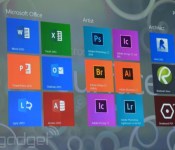
Adobe is working on a touch-friendly, full-powered version of Photoshop CC

Microsoft is breaking out the big guns for the launch Surface Pro 3. It trotted out creative software powerhouse Adobe to show off a new version of Photoshop CC it’s got in the works. This edition is designed specifically for use with a touchscreen and stylus. Icons and other UI elements have been doubled in size so that they’re easier to tap with a free finger and gestures like pinch-to-zoom work flawlessly. And this isn’t some hobbled, half-featured version like Photoshop Express or Photoshop Touch. What’s more, it should be ready to support high-density displays like the one found on the new Surface. While the focus today may have been on how the Creative Cloud app would work on Microsoft hardware, it should excite avid Adobe users regardless of what brand PC they rely on. The lack of touch and high-density display support has been a bit of a pain point. And don’t worry, there’s “more on the way” according to Michael Goff. Besides, the tiles for other Adobe CC apps that popped up during the demo kinda gave that away.
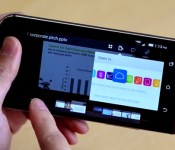
Box’s redesigned Android app opens almost any file you put in the cloud

Box overhauled its iOS cloud storage app early this year with a simpler, speedier interface; now, it’s Android’s turn. The just-launched Box 3.0 for Android shares much of its iOS cousin’s look and feel, including minimalist controls and a high-speed previewer that opens over 100 file types right in the cloud. In other words, you won’t have to fire up Office Mobile just to get a quick peek at that PowerPoint presentation. You can search text in any document, too, and it’s easier to open content in Box-friendly apps through a built-in OneCloud gallery. The upgrade won’t necessarily lure you away from the likes of Dropbox or Google Drive, but it may be welcome if you regularly deal with exotic file formats — or if you just have to catch up on work while on the road.
Filed under: Cellphones, Storage, Internet, Mobile
Source: Google Play, Box Blog
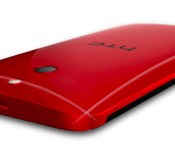
HTC’s One M8 Ace squeezes high-end specs into a prettier, cheaper body

HTC’s One M8 isn’t even two months old yet and it’s already sparked a few spin-offs. We’re not just talking about the One mini 2, either: a render of the oft-rumored One M8 Ace started making the rounds on Chinese tech blogs earlier today, and we’ve been able to confirm the image in fact depicts the real deal. Haven’t been keeping tabs on the M8′s myriad spawn? Well, the Ace (which could bear the Style or Fashion Edition moniker in China) seeks to cram top-tier performance into a more attractive, more affordable package.
Things to note: this device isn’t the sequel to the Butterfly S people have been talking about . No, it’s a rejiggered version of the existing One M8 that shares the same 2.5GHz Snapdragon 801 chipset and 5-inch 1080p screen as the version floating around in Asia. The big differences is that those components are packed into a more colorful chassis made of plastic… so much for the aluminum and liquid silicone mix that’s rumored to comprise the One M8 Prime’s body.
Not every one of the M8′s niceties made the leap into the Ace, sadly — the render seems to lack that fancy Duo camera and the IR blaster built into the sleep/wake button. There’s no word yet on when the Ace will make its grand debut, but expect it to launch in mainland China first before possibly trickling onto store shelves around the world down the road. For what it’s worth though, HTC’s been doing just a little teasing of its own — it warned its Twitter followers last night that “more beautiful curves are coming soon,” so the wait for something new and shiny shouldn’t be too long.
Source: ifanr
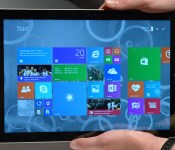
Hands-on with Microsoft’s Surface Pro 3

So, it wasn’t the Surface Mini we were expecting. But hey, we got fresh hardware, so that’s all that matters. The new Surface Pro 3 isn’t the smallest tablet Microsoft has made — in fact, it’s the biggest, with a 12-inch, 2,160 x 1,440 screen. But if you think it’s just a blown-up version of the old model, you’d be wrong. In addition to being the biggest, highest-res Surface, it also brings new pen tech, a new kickstand, and a new keyboard, to boot. Also, it’s surprisingly thin and light, considering this thing is big and powerful enough to replace a full-fledged Ultrabook. As a heads-up, we’re taking a device home from today’s press event, so you can expect to see a full review on our site soon. In the meantime, though, here are some early impressions to tide you over.
The Surface Pro is indeed thin, and it is indeed lightweight: at 0.36 inch thick, it’s about as skinny as an older-gen iPad, which is pretty impressive when you remember this is competing not with traditional tablets, but full-sized Ultrabooks. At 1.76 pounds, it’s definitely lighter than any Ultrabook you’ve ever carried; just don’t compare it to something like an iPad (not that you would: this is a bonafide computer replacement we’re talking about here). Throughout, the metal chassis feels similar to what we saw on the Surface 2 and Surface Pro 2, though Microsoft has retooled the kickstand so that it can now extend back 150 degrees, in addition to the usual two upright positions.
As ever, the kickstand has a sturdy hinge mechanism; it’s not difficult by any means to pull the kickstand out, but there’s just enough friction that it feels well-built. For all you Surface nerds out there, you just have to try out that near-flat, 150-degree position. The first time I pushed the stand out that far I actually felt a bit nervous, like I was about to break the thing. Such is the joy of using the newer model: you can indeed go farther with the kickstand, and you’ll be rewarded with a hands-free, almost Yoga-like experience if you do.

Taking a tour of the device, you’ll find the usual USB 3.0 port, along with a DisplayPort for adding an external monitor. There’s also a headphone jack, as you’d expect, along with an exposed full-sized SD card slot, in case the built-in storage (64GB to 512GB) isn’t enough.
But enough about ports: You’re here for the display, aren’t you? Sure you are. So let’s talk about the screen. First of all, it’s big. Duh. Twelve inches, up from 10.6 on the Surface Pro. The resolution has grown too, from 1,920 x 1,080 to 2,160 x 1,440. As you can imagine, the screen is quite sharp — it’s basically impossible to see any pixels without putting your face up against the screen and actively looking for them. The viewing angles continue to be good too, though the glossy finish means you will still encounter some screen glare.

More important than the higher pixel count, perhaps, is the new pen tech. With this generation, Microsoft ditched Wacom and instead used an N-Trig active digitizer. We know, we know: this probably sounds like inside baseball to all but our most hardcore readers. In truth, though, it’s a better experience. The pen, first of all, has been redesigned so that it feels more like a normal ink-based pen. Indeed, it does feel more substantial in the hand, not that I had many complaints about the pen that came with the Surface Pro 2. Also, the screen has just enough friction that when I write on it, I feel like I’m writing on paper (or as close as you can get, anyway). On the software side, Microsoft’s own OneNote app now sends your scribbles to the cloud as soon as you lay them down — yep, kind of like how Google Drive or some such will save your work as soon as you start typing.
Last thing — and yes, I saved the best for last — you can wake up your sleeping tablet by pressing the purple OneNote button at the top of the pen. Click that and the screen will light up, and you’ll be able to use OneNote from the lock screen — even without entering your log-in credentials. For the record, Windows 8 already has a camera app you can use from the lock screen, and that’s great, but this is better for people who actually need to get work done. In my quick test, it worked quickly and flawlessly. You can bet I’ll be trying it many more times once I take my review unit home.

One final word before I leave you to peruse all those hands-on photos: We need to talk about the keyboard. You know, the thing that allows you to use this as a laptop replacement. The touchpad here is bigger, and more precise, and now has a built-in touch button so that you can actually bear down on it. All good things. Also, you can now fold up the top of the keyboard so that it attaches magnetically to the tablet’s lower bezel, effectively creating the sort of wedge profile you’d expect to find on a proper laptop. Let me tell you, I will be using this feature generously, especially on my upcoming six-hour flight to California when the last thing I want to be doing is type on a completely flat surface (no pun intended). Again, more on that in the full review, but for now: I like.
Zach Honig contributed to this report.
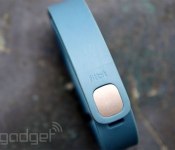
IFTTT now automates tasks based on your Fitbit activity

If you’re sporting one of Fitbit’s activity trackers, you can now automate tasks and reminders with the help of IFTTT (If This Then That). The recipe-based software announced a dedicated channel for the sporty gadgets today, handling duties based on goals, activity, sleep, weight and more. For example, you can now log a weigh-in via text message or automatically beam sleep stats to a Google Spreadsheet each morning. Of course, those are just a couple of the possibilities, and users can construct their own formulas as well. Those who prefer Jawbone’s wearables have already been privy to the automated life logging, with other wrist-worn devices like the Pebble smartwatch supported too.
Filed under: Wearables, Software, Mobile
Source: IFTTT
 AIVAnet