


Microsoft announces its biggest tablet yet, the 12-inch Surface Pro 3
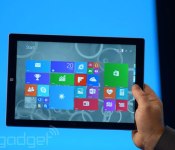

When Microsoft invited us to a “small gathering” here in New York City, we thought that meant a smaller-screened Surface Mini was in order. Instead, the company just announced a larger Surface, the 12-inch Surface Pro 3. Like the previous Surface Pro, it supports pen input, making it a good choice for creative professionals, especially with that extra screen real estate. In addition to being the biggest Surface yet, though, it’s also the thinnest-ever product with an Intel Core i7 processor. All told, the thing measures just 9.1mm (0.36 inch) thick, making it about as thick as one of the earlier iPads — incredible when you remember this is more akin to an Ultrabook than a tablet. What’s more, this thing is fanless, promising quiet performance throughout. Pretty standard for a regular slate, sure, but a fricking Core i7 laptop? Not quite.
In addition to being thin, the Surface Pro 3 is relatively lightweight, at 800g (1.76 pounds). And let’s be clear: when we say “relatively,” we mean compared to a comparable 12-inch laptop, or even a 13-inch Ultrabook; those would weigh somewhere in the neighborhood of three pounds. Even the 11-inch MacBook Air comes in at 2.4 pounds. Of course, the new Surface Pro 3 is still heavy next to an iPad Air or Samsung Galaxy Tab. But hey, the Surface Pro was never supposed to compete with those kinds of tablets anyway. No, this is and always was a laptop killer.
OK, so it’s just a bigger, surprisingly lightweight version of the last-gen Surface Pro, right? Not exactly. The third-gen model has a new kickstand on the back that allows the screen to sit at a near-flat angle of 150 degrees. The new Type Cover keyboard (that’s the one with the physical buttons) has been improved as well — especially with regard to the touchpad. Also, though the keyboard cover still “clicks in” the upper portion of the keyboard can now fold up and attach magnetically to the tablet’s lower bezel. We know, we know, this may be difficult to picture, but bear with us: By doing that, you’re effectively elevating the upper portion of the keyboard, creating a wedge profile similar to what you’d enjoy on a proper laptop. So, if you never got comfortable typing on the old Surface’s flat keyboard, maybe this is the ergonomic tweak you’ve been waiting for.
Developing…
 AIVAnet