


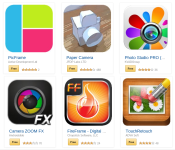
Shutterbug Delight! Amazon giving away 9 paid photo apps for free today

Each app comes with $1 worth of credit towards other apps, too
In what is becoming an almost weekly occurrence, Amazon is giving away a number of applications for free on Friday. As part of its Free App of the Day program, Amazon is offering up 9 apps centered around a common theme: photography. If you’re the type who likes to take unique photos or edit them with cool effects and filters then you’ll want to hop on these immediately.
And, as if that was not incentive enough, each of these apps comes with 100 free Amazon Coins. Yes, you get a $1.00 worth of credit to be used on other Amazon apps and games. A free app plus credit to be used on something else? Sign us up…nine times!
- PicShop – Photo Editor
- PicFrame
- Paper Camera
- Photo Studio PRO (Kindle Tablet Edition)
- Rhonna Designs
- Perfectly Clear
- Camera Zoom FX
- FireFrame (Digital Picture Frame)
- TouchRetouch
The post Shutterbug Delight! Amazon giving away 9 paid photo apps for free today appeared first on AndroidGuys.
HOW TO: Score $22 worth of Amazon Coins for free

Simple method earns you free credits plus 10 apps in the process
So you like free stuff, eh? How would you like to earn $22 worth of Amazon Coins? What if we threw in 9 premium photo apps and Grand Theft Auto: San Andreas, too? It’s easy, doesn’t long at all, and works like a charm. The catch? You have to act fast! Like today, May 16th fast! Here’s how you do it.
Head to Amazon and download the free app of the day. It just so happens that today (May 16) sees Amazon giving away 9 apps for free. On top of that, they are hooking you up with 100 Amazon Coins for each app. So, nine apps for free plus nine bucks worth of credit.
900 Amazon Coins = $9.00 CREDIT
Use 699 of those coins to purchase Grand Theft Auto: San Andreas. Once you do you’ll earn another 2,000 Amazon Coins.
900 – 699 = 201 Amazon Coins ($2.01 CREDIT)
When you are all said and done you will end up with 2,201 Amazon Coins which can be used to purchase other games and apps in the Amazon Appstore!
201 + 2,000 = 2,201 Amazon Coins ($22.01 CREDIT)
What will you buy with all of those credits?
The post HOW TO: Score $22 worth of Amazon Coins for free appeared first on AndroidGuys.
What you need to know about online advertisers tracking you
 Spend lots of time online? Then perhaps you’ve heard of targeted advertising, “Big Data” analysis and complaints of privacy violations by advertising companies. The ads above your Gmail inbox? Yeah, those. As it turns out, most people don’t like being tracked by advertisers. Surprise! As such, a variety of tools exist to protect individuals. But what about a solution that anyone could use, that didn’t require knowledge of cryptography or even a software install? That’s where the Do Not Track initiative comes in.
Do Not Track (DNT) is explained by its own name: Don’t track what I do online, including what I buy, what I read, what I say and who I communicate with. But how should it work? Therein lies the controversy. Since the subject is still being debated, now’s the perfect time to learn about it, voice your opinion and request more control over your data. If you want more control, that is.
What is it?
The idea of Do Not Track (DNT) was initially conceived in late 2007. Several groups, including the Center for Democracy and Technology (CDT) and the Electronic Frontier Foundation (EFF), asked the Federal Trade Commission (FTC) to help with the creation of something similar to the National Do Not Call Registry: a system to limit the amount of personally identifiable information a company can obtain without express authorization from an individual. More directly, DNT is a system to protect individuals from advertisers eager for personal info on consumers.
The proposed technology asked for online advertisers to submit web address information to the FTC, which the agency would publish and make accessible to the public. Why a list? So that web browsers (Firefox, Safari, Internet Explorer, etc.) could effectively block advertiser tracking on a wide scale. The list concept, however, was ultimately flawed: Every time an advertiser changed its web info, the DNT function became obsolete. It would require extreme vigilance to keep the system 100 percent effective. As such, it died.
In 2010, the idea of Do Not Track came back to life, albeit in a completely different form. Instead of relying on a list, web browsers would simply ask the advertising software (instantly, in the time it takes to load a webpage) to not track personal information. This is the Do Not Track initiative as we know it today.

Why should I care?
If you don’t care that websites and companies monitor your behavior, share what they know about you and generally act creepy about personal information, well, we’re impressed you got this far into a piece about Do Not Track. If you don’t want Amazon to show you ads about swimsuits, towels and sunblock because you mentioned you were excited about going to the beach on Facebook, you should care.
Not freaked out enough by that example? What if they know your daughter is pregnant before you know? For some people, this isn’t a big deal. For others, it’s extremely important.
We aren’t going to get into the implications of governments knowing everything about you; the Do Not Track initiative is only aimed at advertising companies. However, it’s not crazy to think that a government could request all the data an advertising company has in order to collect taxes, or worse: infringe on free-speech rights.
How does it work?
Modern browsers, such as Firefox, currently send something called “headers” to web servers (computers where websites are hosted). Say you’re visiting, I don’t know, this website. Say you’re on a PC, running Windows 7, and you’re using Firefox to read all about whatever happened to Netscape. The server hosting Engadget’s content needs to know how to present information (in this case, our website), to your particular setup. So your computer tells our web server how it’s set up and in turn, our web server returns a readable website. It also returns ad-tracking software.
The Do Not Track initiative simply adds an additional piece of information (the DNT header) to the initial request, which is set to 0 or 1. If the DNT header equals 1, the web browser knows it should not track the user’s behavior on the site, and a company knows not to use that data for advertising purposes.
You can see the DNT header turned on in the highlighted text below:

Most popular web browsers and at least the two most popular web servers (IIS and Apache) already offer support for Do Not Track. To enable this option on your browser of choice, just follow the steps dictated by the developers, linked below:
Firefox
Internet Explorer
Safari
Chrome
Opera
Can I start using it right now?
Yes — but not so fast, cowpoke. While the system is implemented in browsers and web servers, it’s not actually being used by advertising companies right now. A list of websites that honor the system is on donottrack.us, but not all advertising companies have agreed to abide by it. There are even conflicts between browser and web server developers as to how it should be used.
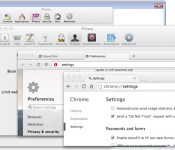
For example: Google, one of the biggest advertising companies on the internet, provides a warning about the Do Not Track setting in Chrome (seen below). Not exactly reassuring, is it?

What’s the argument?
One major point of contention is a concept known as “the tyranny of the default.” This idea is that a great majority of users never change the default settings, and thus, whatever the default settings were will most likely stay that way. Should browsers assume that users want DNT enabled by default? Microsoft thought so, and proceeded to enable DNT on Internet Explorer without user interaction. However, many believe that in order for the initiative to have any type of weight on advertising companies, the user should intentionally enable it.

Because of Microsoft’s decision to enable DNT by default in IE, the people behind the Apache web server patched out the setting. Wait, what? You see, according to the rules of DNT, the service can only be implemented if it “reflect[s] the user’s preference, not the choice of some vendor, institution or network-imposed mechanism outside the user’s control.” If there is “misuse” of the technology — such as Microsoft, an institution, turning it on by default — web servers can decide to ignore the header and the tool is useless.
The debate about enabling DNT by default started in 2012 and it hasn’t ended yet. Google, Facebook and now Yahoo all ignore DNT requests (at least for now).
Want even more?
Everything about Do Not Track is still open for debate. Technology companies are still discussing proper ways to implement it. Advertising companies are deciding if they want to respect it. There’s an ongoing debate as to whether DNT means “don’t save this information” or “don’t use this information.” And, of course, governments are considering enforcing the technology. This means that, as of right now, DNT is useless.
For now, the best you can do is precisely what you’ve already done by reading this article: Learn about Do Not Track. If you do want this technology or something that serves a similar purpose, be vocal about it. Take it directly to advertising companies on social networks. Contacting your senator wouldn’t hurt either! Maybe you love the benefits of targeted advertising and personalized web browsing? Express your opinion and let people know! The subject is still wide open for debate.
Filed under: Networking, Internet, Software, Microsoft
BBC brings its revamped iPlayer to Sky+HD boxes

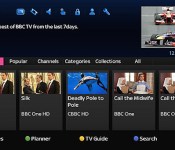
Sky’s in the middle of rolling out a big electronic programme guide (EPG) update to connected Sky+HD boxes. Part of that overhaul will see it present new ways to deliver online content, which has opened the door for the BBC to extend its latest iPlayer revamp beyond the desktop. The Beeb says it has worked closely with Sky to overhaul and update its aging iPlayer UI, making it easier for you to access programmes and navigate through listings, but also provide access to iPlayer exclusives and premieres (think Glastonbury or Radio 1′s Big Weekend) for the very first time. You’ll need to have the new ‘Homepage’ update installed to take advantage of the new streamlined interface — if you haven’t got it yet, sit tight, Sky says it will have completed the rollout by the end of May.
Filed under: HD
Source: BBC Internet Blog

Microsoft brings home automation app and devices to the Windows Store

Unlike Google with its new $3.2 billion Nest, Microsoft doesn’t have a lot of home automation products yet despite some interesting research. Redmond has now made a move to stock its shelves, albeit indirectly, via a partnership with home automation specialist Insteon. The pair just announced that an enhanced Insteon app will soon be available on Windows and Windows Phone 8.1 devices. It’ll feature multiple, full-screen video feeds, device control, a visitor mode to give limited control to others and Live Tile integration for status updates. In addition, Insteon will sell standalone devices in the Windows Store including a leak sensor, LED bulb and WiFi camera for $30 – $80, with kits starting at $200. Unlike Nest Products or the Philips Hue, Insteon’s system uses RF frequency and your home’s existing wiring (PowerLine) to communicate with devices. The app will arrive on June 1st, with the devices hitting Windows Stores in July, complete with educational demos and displays.
Filed under: Wireless, Microsoft
Via: CNET
Source: Insteon

After two years of prep, Formula E cars are here and ready to race

What does it take to create an entirely new motorsport? In Formula E’s case, two years, ten teams and ten city-street circuits, which will play host the first championship. Since the idea of Formula E started taking shape towards the end of 2012, several public demos have kept buzz for the all-electric racing series alive, but the atmosphere was different at the UK’s Donington Park circuit yesterday. Attendees of the official opening of Formula E’s operational headquarters and team facilities at Donington weren’t there to watch a traveling circus visit a racetrack, but to witness a milestone in a sport where, until now, petrol has been king.
Donington’s utilitarian HQ and team garages reflect the aggressive development timeline Formula E’s been working to, having been built from scratch in 15 weeks. But, there was more to look at: not the polished, logo-blazoned cars that’ve appeared at publicity events (a couple of which do sit in the new HQ’s reception), but raw, carbon fiber Spark-Renault SRT_01E vehicles that the teams will actually be competing in over the ten-race season.

Ever since Formula E’s inception, many motorsport insiders have shown “little belief” in the new class, as championship CEO Alejandro Agag put it. And, it won’t be until the teams arrive in Beijing in September for the first official race — following plenty of preparation and race testing at Donington — that they’ll get a chance to convince doubters an all-electric championship can be a success. If all goes well, the hope is Beijing will attract an army of fans, and plenty of sponsorship interest to boot. This is a business intended to make money from selling broadcasting rights and inking sponsor deals, after all, but Agag hopes it’ll add true value by accelerating R&D within the electric vehicle space.

“It’s not just about racing, but the development of new technology that’ll filter down to road vehicles,” he said at the event. For the first season at least, every team — several of which know something about performance EVs already — will use the same stock Spark-Renault SRT_01E and 200kW motor with minimal scope for modification. In later championships, Agag believes the teams will be under pressure to innovate as they’ll “have to develop the technology to win the races.” The principle impact Formula E’s CEO believes the championship will have on the mass market is in addressing issues with energy storage. “We need to find new ways, either with more efficient batteries, or with other devices like super capacitors and fuel cells. We need to find a solution for that. That’s why we’re doing Formula E.”
Filed under: Transportation
Push links, files, locations and more with Pushbullet! [App of the Day]

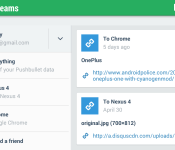
It’s always fun to see what kinds of apps are out there that push the boundaries of what our devices can do. For those of you who want to be able to share things between your smartphone and laptop or desktop computer, you should absolutely try Pushbullet. It’s a neat app that makes it easy to “push” a link, file attachment, street address, list, or a quick message between your phone and computer, and it’s all possible by downloading the app, creating an account, signing into that account on your computer, and voila! You are then able to quickly push all sorts of stuff from your laptops’s web browser to your phone and vice versa.

There are a number of situations that make Pushbullet very handy, such as pushing websites to your phone as you’re about to leave your desktop, or pushing a cool photo you took with your phone to your laptop for editing, or even pushing a street address really fast to a friend who you can add to your send list.
Probably my favorite part of the app is the mirroring feature, which displays your phones notifications at the bottom left corner of your computer when you get them. This allows you to see your phones activity while on your laptop, so you don’t miss something important while your phone is somewhere else. This is a great app that binds your smartphone to your computer or other devices so you don’t have to sweat about transferring data the hard way.
The post Push links, files, locations and more with Pushbullet! [App of the Day] appeared first on AndroidGuys.
ROM of the week: CyanogenMod 11

So if you’ve searched for any type of custom ROMs for your Android devices I am sure you have seen CyanogenMod. It is one of the most popular ROMs available for Android devices and probably the easiest to install for novice users.
Now you’re probably asking, “What is a ROM and why would I want it?” Well, you’re not the first and certainly won’t be the last! A ROM is customized version of the current Android OS running on your device. A new ROM can bring you the latest version of Android before your manufacturer does, or it can replace your manufacturer-modded version of Android with a clean, stock version. Or, it can take your existing version and just beef it up with awesome new features—it’s up to you.
Below is a list of top features I have gathered from Cyanogen’s website:
- CM Updater: Never miss an update!
- Privacy Guard: Control what your applications can learn about you and your contacts.
- Global Blacklist: Baked right into the OS is the ability to flag telemarketers, robo-callers, annoying people (yes even the in-laws) and blacklist them.
- Quick Setting Ribbon: Embed quick toggles (and even your camera) right in your notification drawer. Just one swipe away.
- Quick Settings Config: Whether using the ribbon view, or the larger grid view, customize the layout and order of your quick settings.
- Status Bar Behavior: Customize your status bar and unlock some additional behavior. Tap the time to quickly set an alarm or tap the date to access your calendar.
- CM Account: Get remote find and wipe capabilities (for free) so even if you lose your device, you still have some control.
- Display and Lights: Control brightness, rotation, wallpapers, remote displays, notification lights and battery lights. You decide what suits your tastes.
- Profiles: With profiles you can control application, sounds and even connectivity to quickly adapt to the environment in which you are using your phone. Go one step further and set up a profile to be location aware, or use NFC to trigger a profile change.
- Button Configuration: Enable additional functionality from your hardware keys, or even remap them altogether. Your choice.
- Navbar: Why stop at hardware buttons? Customize the software navigation bar to your liking as well.
- LockScreen: Add quick unlock targets to access your favorite apps directly from the lockscreen. Use our custom lockscreen widget to increase your productivity – show the weather and your calendar events without unlocking the device.
- Tethering: Share your device’s data connection with your PC, tablets, friends and families with built in tethering over USB, WiFi and Bluetooth.
- Superuser: Manage what apps you’ve granted root access to, check access logs, and revoke their when you are done.
- Root Access: Useful to developers and users alike, control your exposure to root applications and debugging tools.
- Performance Options: Push it up to eleven and access power tools to over-clock, manage device governors and more. Recommended for advanced users only.
- SMS Rate limit: There are bad apps out there, and one common vector is to make money off of spamming bogus SMS message services. Get a notice if your phone is sending higher than normal message counts. Or maybe you just have a teenager and this is perfectly normal.
These are just some of the great features CyanogenMod has to offer, a more detailed list with pictures can be found at their website here.
If you are interested in CyanogenMod, just head on over to their website, here and follow the easiest steps known to man, to get once of the best custom ROM experiences for your Android device. If you have CyanogenMod already installed or have any questions, let us know what you think of it!
The post ROM of the week: CyanogenMod 11 appeared first on AndroidGuys.
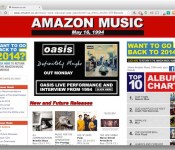
Amazon rewinds to 1994 to remind you how good music was back then

Jeff Bezos must be an Oasis fan, because Amazon UK has gone all retro to mark the 20th anniversary of the band’s iconic Definitely Maybe debut album. If you pop on over to Amazon’s Music section right now, you’ll see what the company thinks its store might have looked like back in the mid-nineties. Three Oasis videos are available in the Amazon Artist Lounge, including live performances of Digsy’s Dinner and Live Forever, which are also available as free music downloads. To keep things authentic, Amazon features the exact album chart from May 16th 1994 as well as “new and future releases” from the Manics, Pulp and The Prodigy. If it’s got you feeling nostalgic, then why not crack out that old Weezer CD and celebrate the very best nineties music had to offer, dodgy graphics and all.
Filed under: Home Entertainment, Amazon
Via: Unreality TV
Source: Amazon

Verizon announces 60, 80 and 100 GB shared data options for business

Verizon has become the first carrier to offered a shared data package for up to 50 devices. Along with this, they are also offering 60, 80, and 100 GB data plan options for the account. Some businesses require a combination of voice and data devices while others may need data-only devices such as tablets, USB modems and Jetpacks to run their business.
The plans give customers unlimited domestic and international messaging while in the US so businesses can maintain constant communication with global clients or suppliers. Shared voice minutes for calls to and from Canada and Mexico can also be added for an additional monthly access fee, as well as global data plans. Verizon is slowly trying to make their services more flexible and attract a new range of business customers.
Source: Verizon
The post Verizon announces 60, 80 and 100 GB shared data options for business appeared first on AndroidGuys.
 AIVAnet
