


BlueAnt Pump HD Sportbuds Review

Bluetooth headphones have been gaining popularity, but some users may still be searching for great headphones that can withstand their daily routine. Enter BlueAnt, a company specializing in Bluetooth accessories, and their Pump HD Sportbuds. BlueAnt put a lot of time and thought into these rugged Bluetooth headphones, and it shows in every aspect, from the build quality to the usability.
Specs & Initial Impressions
- Bluetooth 3.0
- Up to 8 hours of play time (up to 2 weeks of standby time)
- Charges in less than 2 hours
- Supports APTX and AAC codecs
- 7 pairs of earbuds tips, varying sizes
- 12 month warranty
- Waterproof, thanks to Teflon and Kevlar coating
Now all that is interesting, but how does it translate into real-world usage? The short answer is that the Sportbuds are some of the best Bluetooth headphones for their value on the market.
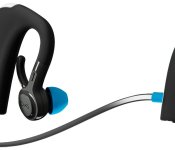
 In other words, these headphones get the job done, and that begins with the build quality. BlueAnt decided to make them behind-the-ear headphones, which is a love-or-hate decision. After a week of usage and testing, I found that I had no problem with their form factor. They were fairly easy to put on, and felt comfortable as I went about my day. Of course, it doesn’t hurt that the Sportbuds are mostly covered in a soft-touch matte material that just looks and feels great. They’re connected by a wire, so that users don’t lose one of the headphones. BlueAnt offers the SPortbuds in three colors: black, blue, and green. I got the chance to review the black version (pictured above), which is accented with blue highlights.
The bodies of the headphones look rather large and intrusive at first glance, but they fit behind the ear fairly well (with one exception, which we’ll discuss later). From the body, a slim arm connects the earpiece itself. The spine of each headphone is mostly covered in a shiny plastic, with small “Pump” logos embedded near the bottom. Along the bottom of the left headphone, you’ll find a small silicone cover, which pulls back to reveal the MicroUSB charging port. This cover serves to protect the port from dirt, sweat, and water. Despite being so small, the cover opens very easily.
Along the side of the right headphone are three buttons: play/pause, volume up, and volume down. These are still covered in the matte material, but are raised from the surface of the body of the headphone itself. These buttons serve multiple purposes, but we’ll get into that in just a moment. They are solid buttons, giving off a defined clicking feeling when pressed.
Usability
 One of the biggest concerns surrounding this style of headphones is the ease of getting them on and off the ears, and it seems that BlueAnt focused heavily on this area as they developed the Sportbuds. Out of the box, I had no trouble getting the Sportbuds on and off, and BlueAnt even includes a section in their user manual that shows users how to put the Sportbuds on properly. Once they’re on, the Sportbuds are stable and comfortable. BlueAnt intended for these headphones to be used in extreme conditions (i.e. going for a jog in the pouring rain and being chased by zombies), and they designed them to stay on the user’s ears very well. I went on several runs with the Sportbuds, and had no problems with keeping them on my ears. The wraparound design serves its purpose by keeping the headphones stationary, so that users never have to worry about them falling off or coming loose during a run/workout/zombie apocalypse. BlueAnt also included two pairs of “stabilizers,” which are meant to make the Sportbuds even more stable.
While they are very comfortable, I ran into a slight problem the first time I put them on. Because I wear glasses virtually all the time, the Sportbuds were nearly impossible to fit behind my ear. At first, I thought that this would prevent me from using the Sportbuds completely, which would have been an issue that BlueAnt might need to address, given the number of users who wear glasses (or Google Glass, of course). I quickly learned that I have to take the glasses off and put the Sportbuds on first, then put the glasses back on, so that the headphones rest under the legs of the glasses. Once I discovered this, it became easier (although slightly irritating) to put the Sportbuds on my ears. While it is somewhat bothersome, it was actually not that noticeable once I got into the habit.
 It’s worth mentioning that BlueAnt gives users seven pairs of earbud tips for the Sportbuds: two pairs of large tips, two pairs of medium tips, and two pairs of small tips. The seventh pair is labeled as “Comply Premium,” and unlike the rest of the rubberized earbud tips, these are covered in foam. While that does sound nice, I was sadly disappointed by these “premium” tips. They are covered in foam, but they’re supported in the middle by a small tube that appears to be made of some kind of heavy plastic. Because the foam is very pliable, the end result here is the tube pressing into the ear canal, which makes for a very unpleasant listening experience. After listening to one song with these tips, I had to take them out of my ears and replace them with the normal comfort seal tips. I appreciate BlueAnt trying to go the extra mile by giving users foam inserts, but the support tubes in them are far too uncomfortable to use. Other than this, I had no real issues with the comfort level that the Sportbuds provide.
So they fit well, but how easy are they to set up? This was one concern I had when I began using the Sportbuds, but BlueAnt again made sure that this process was as seamless as possible. Pairing the headphones with my Galaxy S4 was as simple as holding down the play/pause button and searching for them in the Bluetooth menu of my phone. The whole process took less than half a minute, and I was able to start playing music immediately. The play/pause and volume buttons work like a charm, with each having multiple functions. Holding down the volume up/down buttons will skip songs (up for Next, down for Previous, respectively), and the play/pause button serves to turn the Sportbuds on and off by holding down for three seconds. In addition, users can double-click this button and it will start a voice search in Google Now. The play/pause button also serves to answer or reject calls. All its functions are listed in the user manual.
 Battery life on the Sportbuds fits with the 8 hours that BlueAnt boasts. I had no trouble getting 7-8 hours of life out of the headphones, with music playing at nearly full volume. This was a nice bonus, as I worried that they would need charging after just a few hours. BlueAnt wanted to make sure that users were able to listen to music for as long as possible, and in harsh conditions. Charging the Sportbuds is as simple as opening the charging port cover and plugging in a standard MicroUSB cable (one is included with the headphones). That 2-hour charge time is also accurate based on my testing. After finally managing to run the battery all the way down, the Sportbuds charged completely in a little under two hours.
The specs mentioned that the Sportbuds are waterproof, which is one major advantage that they hold over many other Bluetooth headphones. Even so, they do have some limitations. Obviously the charging port cover must be fully closed before they’re subjected to water. In addition, BlueAnt recommends that users not shower with the Sportbuds (because the audio will sound garbled when the ears fill up with water), although they can certainly withstand it. The headphones can even be rinsed (in cold water) if they get dirty, which was a great addition on BlueAnt’s part. For the most part, I would imagine the waterproof aspect appeals most to users heavily focused on fitness, as the Sportbuds are designed to handle water, dirt, and sweat.
Sound and Range
The Sportbuds actually have a very high quality sound, which BlueAnt calls “Energize HD Audio.” They made sure that every level of sound got the proper attention, from the bass to the mids to the highs. Whatever they did, it gives users a great sound that doesn’t appear to compromise in any area. Every song I listened to, no matter the genre, came through crystal clear with strong bass and treble output. I was surprised by the bass that BlueAnt threw into the Sportbuds, which played even the most bass-heavy songs I have (namely some dubstep and remix tracks) with clarity and ease.
Interestingly BlueAnt claims that users can get up to 100 feet of range with these Bluetooth headphones. After testing, I was only able to get around 45 feet away from my phone before the audio began cutting in and out. 45 feet is still impressive, but it is a far cry from the 100 that BlueAnt is boasting.
What We Liked
- Build quality is great
- Form-fitting headphones that stay in the ear as advertised
- Waterproof
- Sound quality is fantastic
- Very easy to set up and use
- 8 hours of battery life and 2-hour charge time
Room for Improvement
- Range is not even close to the advertised 100 feet
- Slightly bothersome for users who wear glasses to put on the Sportbuds
- “Premium” earbud tips are highly uncomfortable
If you’re intrigued by the Pump HD Sportbuds, you can grab a pair directly from BlueAnt, or from Amazon for $129.99
The post BlueAnt Pump HD Sportbuds Review appeared first on AndroidGuys.
Epson now supports native printing in Android 4.4 Kitkat

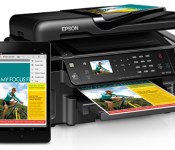
Epson has added native printing support for Android 4.4 KitKat. With Android printing, you can now print documents, photos, web pages, and emails without the need of a dedicated printing app. Users will be able to discover available printers, change papers sizes and choose specific pages to print. Over 60 new and legacy Epson Connect enabled printers and all-in-ones now offer built-in printing support from manufacturers including Google, HTC, and Samsung.
For more information, check out the source link below. What do you think? Would this be something useful for you? Let us know!
Source: Epson
The post Epson now supports native printing in Android 4.4 Kitkat appeared first on AndroidGuys.
New Kairo and Colourform HD Widgets Themes go live as the app reaches 100% Saturation
Over the last few weeks cloud.tv has been rolling out the mega rebuilt update of HD widgets to version 4 for all users. It was a slow process, but one that needed to happen to help ensure minimal issues across devices and OS versions. Now that the rollout is 100% complete, cloud.tv can kick in the theme packs that they intended to release when the update started. There are two pack, both have a free option and a paid option.
First up is the new Kairo:
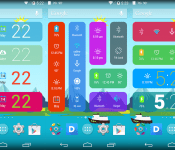
 Kairo offers up 40+ new colorful Android-style widgets that work and look great on phone and tablets. They are designed with todays ultra HD screens in mind with crisp fonts and vivid color choices. Kairo is free with 40+ widgets to choose from, but you can grab Kairo Xp for $0.99 and get access to over 60 widgets and a few other perks.
Next up is the new Colourform.
 This one offers up 30 color widget options and is free. There is Colourform XP paid version that is also just $0.99. The paid version offers up 50+ widgets to choose from and various other editing perks. Each of the new themes requires you to have HD Widgets 4.0 or newer installed, they have a 4.0.5 version floating about right now, and you must be on Android 4.0+. Feel free to check them out and let us know what you think.
HD Widgets ($1.99) – Play Store Link
Kairo – Play Store Link
Kairo XP ($0.99) – Play Store Link
Coulourform – Play Store Link
Colourform XP ($0.99) – Play Store Link
//<![CDATA[
ord = window.ord || Math.floor(Math.random()*1E16);
document.write('’);
//]]>
Newly announced Xiaomi MiPad sports NVIDIA Tegra K1 with all its 192 cores of graphic Goodness
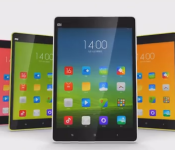
 Xiaomi announced a new tablet earlier today in Beijing that is certainly making waves. The new 7.9-inch tablet packs some specs, like a 2048 x 1,536 screen resolution, 6700 mAh battery, 2GB of RAM and either 16 or 64GBs of onboard storage with an SD card slot. It also offers up a 8Mp rear shooter and 5MP front shooter. While some of that might sound interesting, it all becomes even more interesting when you find out that the new MiPad is powered by the new NVIDIA Tegra K1 processor.
The ‘K’ stands for Kepler, and 192 GPU cores to the tablet. The Tegra K1 chip supports OpenGL 4.4, OpenGL ES 3.1 and DX12. In English, high-end PC and console game companies can bring some of that graphic quality mobile if they do so desire. Seriously, check it out:
The MiPad will go on sale in June in China as an open beta. Select fans will get the chance to go hands-on with pre-production units too. Where it gets interestingly better, they say the 16GB model will be $240 and the 64GB model will be $270.
Sorry Samsung, the Tab S line sounds great, but I bet I could buy 3 of these to one of yours. What do you guys think? Is the new MiPad from Xiaomi on your radar for import? Cause, you know, chances of the US getting their hands on it any other way is probably not plausible.
Source: NVIDIA Blog
//<![CDATA[
ord = window.ord || Math.floor(Math.random()*1E16);
document.write('’);
//]]>

Xiaomi debuts Tegra K1-powered tablet, MiPad

Today in Beijing, Xiaomi CEO Lei Jun has unveiled the combined efforts between Xiaomi and NVIDIA which have resulted in the MiPad. Compared to other tablets, the MiPad seems to be on par as far as screen size, 7.9 inch, and a resolution of 2048 x 1536. However, it is so much more.
At the heart of the MiPad is the latest and first tablet to adopt the Tegra K1 processor. The K1 packs a punch with a quad-core 2.2 Ghz Cortex A15 CPU, but the real beauty is the GPU. The GPU (Graphics Processing Unit) is packing 192 CUDA cores. The Tegra K1 already runs Unreal Engine 4, the world’s most advanced game engine. So, games with intense graphics play flawlessly. This means that developers can bring the latest games to mobile devices!
Check out the specs below:
- 7.9 inch display, 326 ppi
- 2GB LPDDR3 RAM
- 16/64 Flash storage
- microSD expansion to 128 GB
- 8 MP rear camera
- 5MP front camera
- 6,700 mAh battery
- Weighs 360 grams
- Wi-Fi ac
- Bluetooth 4.0
The MiPad will be available for Chinese users through a beta test program in June for $240 (16GB) and $270 (64GB). Xiaomi has not announced global availability, but it sure would be nice to get my hands it!
Source: Nvidia
The post Xiaomi debuts Tegra K1-powered tablet, MiPad appeared first on AndroidGuys.

‘iWatch in 60 Days or Bust’ Analyst Claims Apple Developing a 3D Printer
Global Equities Research analyst Trip Chowdhry has made a number of outlandish predictions when it comes to Apple, and his latest claim is that Apple is preparing to enter the 3D printer market. Chowdhry shared his thoughts with Benzinga, outlining his belief that Google is pursuing a 3D printer project based on its expectations that Apple will be making a similar move.
 Retro Apple Logo in 3D by arguncencen on Shapeways
Chowdhry provides little to no details on Apple’s 3D printing plans, citing only the company’s experience in hardware and its intellectual property covering the technology as substantiation for his prediction.
“It’s either Apple or Microsoft [that inspired Google],” Chowdhry told Benzinga. “But developers feel that Apple is probably the focus for Google because Google considers Apple to be its prime competitor, not Microsoft. And Google really sees Apple to be a strong competitor, not Microsoft, because Microsoft has a lot of issues to worry about.” […]
“Apple does have intellectual property [in that space],” said Chowdhry. “And they often have more expertise in hardware development than, say, Microsoft has.”
Chowdhry also points to Apple’s acquisition of PrimeSense last year, with that firm’s 3D sensors made famous for their role in the original Microsoft Kinect perhaps playing a role in Apple’s 3D printing ambitions.
As for timing, Chowdhry doesn’t specify anything for Apple but speculates that Google could announce its 3D printing intentions this June or October with product launches coming a full 12-18 months later.
As if the unsubstantiated claims and seemingly nonsensical predictions weren’t enough to essentially dismiss the report as fanciful thinking, Chowdhry has a history of making grandiose claims. Freshest in many people’s memories is his claim earlier this year that Apple had 60 days to introduce the iWatch or the company “will disappear” as it proves itself unable to innovate in the post-Jobs era. Chowdhry’s deadline comes next Monday, with no sign of an imminent iWatch announcement.

Apple Releases OS X 10.9.3 With Enhanced Support for 4K Displays, Syncing Improvements
Apple today released OS X 10.9.3, after two months of developer testing. The last 10.9.3 developer beta, build 13D61, was released just over a week ago.
The update, which is recommended for all Mavericks users, improves 4K display support on the late 2013 Mac Pro and 15-inch MacBook Pro with Retina display. According to the release notes, it also re-adds the ability to sync contacts and calendars between Macs and iOS devices using a USB connection and it improves the reliability of VPN connections using IPSec.
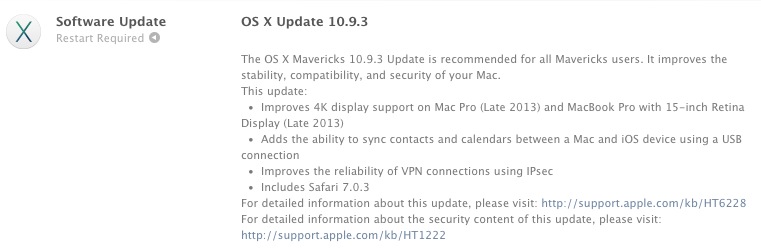
The OS X Mavericks 10.9.3 Update is recommended for all Mavericks users. It improves the stability, compatibility, and security of your Mac.
This update:– Improves 4K display support on Mac Pro (Late 2013) and MacBook Pro with 15-inch Retina Display (Late 2013)
– Adds the ability to sync contacts and calendars between a Mac and iOS device using a USB connection
– Improves the reliability of VPN connections using IPsec
– Includes Safari 7.0.3For detailed information about this update, please visit: http://support.apple.com/kb/HT6228
For detailed information about the security content of this update, please visit: http://support.apple.com/kb/HT1222
First outlined after the initial 10.9.3 beta, the improved 4K support enables HiDPI Retina scaling on 4K displays for the 2013 Mac Pro and Retina MacBook Pro with DisplayPort 1.2, which improves the size and readability of text and other on-screen elements. 10.9.3 also includes 60Hz 4K output for the 2013 Retina Macbook Pros and the higher refresh rates will improve response times for smoother game playing, video editing, and more.
OS X 10.9.3 can be downloaded through the software update function in the Mac App Store.

iTunes 11.2 Released With Podcast Improvements, Bug Fixes [Mac Blog]
 Apple today released iTunes 11.2 with several improvements to Podcast browsing, giving users a way to find new episodes with an “Unplayed” tab and the ability to save favorite episodes to a computer. Episodes can also now be deleted after they’re played, and episodes that are available to download or stream can be found in the “Feed” tab.
There’s also a fix for an issue that caused iTunes to become unresponsive when updating Genius, and there are also improvements for overall performance and stability. Apple also recommends users download Podcasts for iOS 2.1 or later to sync podcast episodes.
This update includes the following improvements:
Improved Podcast Browsing
-Quickly find episodes you haven’t listened to in the new Unplayed tab
-Browse episodes that are available to download or stream in the Feed tab
-Save your favorite episodes to keep them on your computer
-Episodes can now be automatically deleted after you play themThis update also resolves an issue where iTunes may become unresponsive when updating Genius and improves overall performance and stability. Podcasts for iOS 2.1 or later is recommended when syncing podcast episodes.
For information on the security content of this update, please visit: http://support.apple.com/kb/HT1222
iTunes 11.2 can be downloaded from the software update tool of the Mac App Store.

FCC votes in favor of new Net Neutrality rules, leaves room for ‘fast lanes’

Five months ago, the D.C. Circuit Court of Appeals came down hard and essentially neutered 2010′s Open Internet Order. Today, the FCC voted — in a split decision along party lines– to try again with a proposal for new Net Neutrality rules. Nothing’s set in stone yet (the final vote on the matter will take later this year) and that’s a good thing: it sounds like the FCC could use as much input as it can get.
Let’s back up for a moment, first. The Open Internet Order was designed to (among other things) prevent wired internet service providers from meddling with or blocking lawful traffic, but those two tenets were struck down in court earlier this year. The Committee’s new Notice of Proposed Rulemaking still maintains that traffic can’t be outright blocked, and Chairman Tom Wheeler essentially wants to set a “fast and robust” performance baseline that ISPs will be bound to. That said though, it wouldn’t be impossible (not verboten) for those companies to proffer pricier fast lanes to consumers so long as they’re “commercially reasonable.”
That certainly doesn’t mean the chairman is a fan of the notion, though. He added that “nothing in this item authorizes paid prioritization,” and that he’ll “work to see that does not happen.”
“There is one internet,” Wheeler said. “Not a fast internet, not a slow internet. One internet.”
Exactly what “commercially reasonable” means is still unclear, as are many of the most important facets of the proposal. That’s because the Commission basically wants as much input as it can get, be it on whether or not paid prioritization of traffic should be allowed at all, or what law could be invoked to best enforce its vision. To that end there’s going to be a 60 day period for public comment, followed by another 57 days for responses. Got a burning point to make at those in power? The Electronic Frontier Foundation will open its public comment tool to help get your voice heard once the FCC releases its proposal notice in full.

Wearhaus: If you love your social headphones, set them free

Wearhaus wants to crowdfund its dream, its vision: to create a brand of social headphones that let you share music with other wearers nearby. Essentially, it wants to make the world a silent disco, a world where people can choose to share music between Wearhaus headphones directly, without wires, perhaps creating meaningful interactions, friendships and more.
As you can imagine, at Engadget we receive countless emails pitching crowdfunding campaigns on sites like Kickstarter and Indiegogo. Some ideas are great, but, equally, most are lousy. Much more common are those ideas that are merit-worthy, if a little optimistic about the magnitude of the problem they are solving. Wearhaus’ idea is definitely not lousy. It’s way above merit-worthy, but is it overly optimistic? I’d love to say it wasn’t.
I personally love the idea. It’s fun, sanguine — utopian almost. I totally get it. I can see a future where flashmob-style silent rave-ups occur organically in cafes, where subway sing-alongs burst out of silence, where foot-tapping friends share their latest music in secret and in plain sight at the same time. Wearhaus has a vision, and it’s looking to crowdsourcing to make it happen. Sadly, I can’t see it catching on.
I can see a future where flashmob-style silent rave-ups occur organically in cafes, where subway sing-alongs burst out of silence, where foot-tapping friends share their latest music in secret and in plain sight at the same time.
Look on the street at the number of different headphones you see. All colors, brands, sizes and (importantly) prices. Headphones are a hot commodity right now (as recent industry chatter clearly illustrates), but cases like Beats are rare. Dr. Dre’s isn’t the only brand you’ll commonly see adorning ears, but the names that enjoy the level of market penetration Wearhaus needs for its “Arc” social headphones to work are rare. While I love the idea that friendships and interactions could arise through this technology, I fear they won’t. People want to wear their headphones, not be limited to one type or brand just to obtain one feature (that, in turn, relies on mass adoption).

There’s hope, though. What would make me love my own headphones more, Wearhaus, is having your social feature baked in. Patent it if you can/haven’t already, and definitely license it. Make this one of the featured highlights you see on the front of all wireless headphone packaging — somewhere way above the frequency response and the supported codecs. In big, silver writing. Let your idea explode into something dramatic by setting it free across different brands; don’t chain it to a fence post.
Let your idea explode into something dramatic by setting it free across different brands; don’t chain it to a fence post.
Let the established brands do all the hard work — the costly manufacturing part. You can sit back and collect a royalty, and users can simply choose to download the app if they want to make use of the feature. Like Highlight or, screw it, even Tinder for music lovers… with a bit of a disco thrown in. For your idea to really reach meaningful levels of impact, the number of people wearing the Arc would need to be significant. I worry that beyond a few metropolitan areas, the social feature would be hobbled by a lack of people with the right headphones. Lovely as it would be for you to shift enough units for that to be so, several years of obsessively monitoring what headphones people on public transport use tells me that this is something that even Sony, Sennheiser or Beats would struggle to make viable.
People are obviously into the idea, as your self-hosted funding seems to be going well. I imagine there’s still a very good chance you’ll meet your target. But, if you really love your idea, set it free. License it; work with partners; make headphone networking a standard feature (I’m assuming there’s no copyright issues with sharing music this way?). I’d buy a pair of headphones that had this feature. But, as lovely as the Arc looks, everyone’s got their own style, just like everyone’s got their own taste in music, and locking your idea into your own hardware feels like caging a falcon.
As for those that think I’m wrong? You can prove it by funding the campaign directly right here.
Filed under: Home Entertainment, Wearables
 AIVAnet