



Nexus 8 and Nexus 6 spotted in latest Chromium Code
 Last week, we were alerted to the fact that a certain codename “Flounder” might refer to an upcoming Nexus device, possibly the Nexus 8. In yet another twist, fresh Chromium code has revealed not only should the Nexus 8 be included in rumour talks, but the Nexus 6 should be too as references to the Nexus 8 and Nexus 6 were spotted in a recent code review.
 Based on previous rumours, the Nexus 8 will be the device to succeed the Nexus 7 tablets, sporting what is likely to be an 8-inch display. Previous rumours have pegged either ASUS or HTC to manufacture the tablet, but we’ve yet to see any concrete evidence to support either rumour.
 Similarly, the Nexus 6 is expected to be this year’s successor to the Nexus 5, which is traditionally manufactured by LG and based upon LG’s latest flagship. Whether this means it will be based on the LG G3 remains to be seen, but since it appears that LG appears to be adopting a biannual flagship release like Sony, a potential Nexus 6 may eventually be based on the LG G4 which will be released later this year.
If these code references turn out to be true references to the Nexus 8 and Nexus 6, it would certainly dispel some of the rumours surrounding the alleged end to the Nexus line of device and the start of the ‘Silver’ line, at least for now. With Google I/O approaching, I think we’re all now hoping Google has something to say about all these Nexus device rumours.
What do you think about a Nexus 8 and Nexus 6 popping up in the near future? Are you waiting for either of these devices? Let us know your thoughts in the comments below.
Source: Chromium via 9to5Google
//<![CDATA[
ord = window.ord || Math.floor(Math.random()*1E16);
document.write('’);
//]]>

Xbox One without Kinect is great for consumers, terrible for Kinect game developers

Sure, a $100 price drop on the Xbox One is great for us. First things first, it’s less money to fork over for a new game console. Second, no Kinect, which means no all-seeing eye judging our tawdry lifestyle. But what if you’re a Kinect game developer? What if you’re, say, a member of the studio with the most successful third-party game franchise for Kinect, and you’re in the middle of making an exclusive Disney game for it?
Oh, great. Super great.
– johntdrake (@johntdrake) May 13, 2014
Yup, that about sums it up. And that’s exactly how Harmonix director of publishing and PR John Drake put it just moments after Microsoft made its announcement this morning. Harmonix publicist Nick Chester followed up with the (slightly) more positive, “Now Kinect designers have to work extra hard to innovate and make solid software. Good thing we were already doing that!” Yikes! There’s also an official, far less exciting statement.
Harmonix issued the following, more finessed statement:
“As avid gamers, we’re excited for fans to have more choices out there. As game makers, this platform change doesn’t affect our strategy – it reinforces that we must continue to focus on building innovative, compelling and well-designed motion experiences to motivate consumers to buy our games. We believe that tightly-crafted motion games can be great, genre-defining interactive experiences, as we’ve proven with the Dance Central franchise on Kinect for Xbox 360, and we’re eager to prove it again with Disney Fantasia: Music Evolved this fall on both Xbox One and Xbox 360.”
Filed under: Cameras, Gaming, Peripherals, Software, HD, Microsoft

Google starts selling Glass to anyone (in the US) with $1,500 to burn

There’s no longer a need to attend a golf tournament or carefully log on for a one-day sale, as Google has just announced it’s opening sales of the Glass headset to all (in the US). As long as they’re in stock and you have $1,500, you too can join the beta Explorer program and be part of a nearby #glassnightout. Now that Glass is more widely available, Google is saying thank you to its first Explorers with a video (embedded after the break) asking some of them what being among the first to wear the device was like. A major consumer push (and hopefully lower price) is yet to come as the team keeps working on the hardware and software, but if you’re not bothered by some rough edges / weird looks, it’s just a click of the buy button away.
[Image credit: Rocky Widner/NBAE via Getty Images]
Filed under: Wearables, Google
Source: Google Glass (G+) (1), (2)

Google adds nearly all UK public transport routes to Maps for easier journey planning

Planning a journey across London using public transport has been possible in Google Maps from mid-2011. Since then, though, the search specialist has made only slight improvements to this feature, as well as extending its scope to cover other parts of south-east England. Google’s finally making an effort to incorporate public transport info from further afield into Maps, announcing it’s now got practically every route across Great Britain covered (Northern Ireland is still “in the works”). From today, Maps will look at train, bus, tram, ferry, underground and even airborne routes to help you get from one side of the country to the other, whether you be planning a trip from your computer, or within the iOS or Android apps. Support for a wider array of services and regions has been a long time coming, but at least you can now visualise where you want to go and how to get there, all without switching tabs.
Filed under: Transportation, Internet, Software, Google

UN debates a preemptive ban on killer robots

Killer robots are at the heart of popcorn fare like the Matrix and Terminator movies, but there’s a serious debate underlying it all: do we want to trust fully autonomous machines with lethal weapons? Some would argue that it’s just too risky, and the United Nations has accordingly held its first meetings discussing a potential ban on the concept before it ever gets off the ground. Critics (including the UN’s acting European head, Michael Moeller) argue that deadly robots may not consistently obey humanitarian laws, particularly in tricky situations; they may do things that are logically sound, but morally flawed. There are also worries about accountability, since it may be difficult to hold armies and police forces directly responsible for deaths at their robots’ hands.
It’s not a single-sided argument, of course. While few would demand no-questions-asked approval of warrior ‘bots, there is a concern that we’re letting sci-fi get to our heads. The notion of a fully independent, death-dealing automaton isn’t necessarily realistic for arms dealers — there may not be much pressure to update the UN’s rulebooks any time soon. The meetings could be premature, then, but it’s arguably better that humanity establish its position before it’s easy to put robots on the battlefield.
[Image credit: Campaign to Stop Killer Robots]
Filed under: Robots
Via: The Chronicle Herald
Source: UN (PDF)

This wearable camera films life from your point of view

We’ve seen all sorts of wearable cameras for capturing life’s precious moments, and now there’s a head-worn option to capture the action as you see it. After showing off its headset at CES, LifeLogger has now turned to Kickstarter to bring the gadget to the masses. Capable of capturing up to eight hours of video, the camera has built-in GPS and WiFi connectivity for working in tandem with iOS and Android companion apps. It’s equipped with live streaming features too, so instantly beaming footage to a computer, tablet or smartphone is a breeze — as long as there’s a solid wireless internet connection, of course.
There’s no need to plug in the unit to grab the files either. LifeLogger uploads videos to a cloud-based repository through the aforementioned WiFi, organized by date or GPS coordinates and having undergone face detection, voice recognition and more for optimal future searching. The camera comes with a 32GB SD card for on-board storage of 720p video at 30fps and 5-megapixel stills. If snapshots are more what you’re after, you can expect 10-second photo burst and time lapse that’s capable of up to one photo per minute. If all of that sounds too good to pass up, a pledge of $169 or more will nab you a unit, with storage and video processing in tow that’s due to arrive just in time for the holidays.
Filed under: Cameras, Wearables
Source: Lifelogger, Kickstarter

Hollywood, Amazon and your local realtor are fighting to legalize drones

In the United States it’s legal for you to take your A.R Drone out for a spin around the neighborhood, but if you want to use one to shoot a car chase on a closed movie set you’d be breaking the law. The use of commercial drones is a complicated issue, in part because of how many different ways you can use them. Defense companies have traditionally been the biggest advocates for drones; but now everyone from Hollywood to your realtor are pulling for the unmanned aircraft.
The Motion Picture Association of America reportedly spent $4.11 million in 2012 and 2013 fighting for the legalization of drones for use in movie production. Both the National Association of Broadcasters and National Association of Realtors have thrown their cash in the ring as well, with the hope of getting drones approved for use in aerial photography. There’s hope they might get their wish. In March, a judge ruled that a man could use a drone to shoot a movie on a college campus, despite current FAA regulations to the contrary. That case is now headed to the US Court of Appeals. However, even if the court rules in favor of drones, the fight will be far from over.
There are a total of 68 groups currently lobbying regulators to legalize drones, split in half between defense and non-defense groups.
There are a total of 68 groups currently lobbying regulators to legalize drones, split in half between defense and non-defense groups. 28 are actually universities and local governments who want the opportunity to build drone-friendly test facilities. Farmers are also getting in on the action. The National Agricultural Aviation Association wants to replace crop dusters with drones. And who could forget Amazon’s Prime Air service? The argument can and has been made that the premature announcement of the service was really just a clever lobbying strategy by Jeff Bezos. What better way to influence lawmakers than an angry mob who wants their next pair of socks air lifted to their backyard? (Amazon shot that demo outside the US, BTW).
With so many people campaigning for drones, why aren’t we already allowed to use them? There are several reasons. One big argument is that several of the proposed uses would have drones cruising at the same altitude as some low-flying planes, a risk for accidental collisions. There’s also a matter of privacy. No one wants a drone whizzing by their 32nd floor window while they’re sweating to the oldies. To combat all that there will likely have to be regulations in place before commercial drones can be come commonplace. The FAA is currently writing those regulations, and has a due date of this year to present them to lawmakers. We can only hope that means we’ll be getting drone-delivered groceries come early 2015.
Filed under: Robots
Via: The Verge
Source: Bloomberg
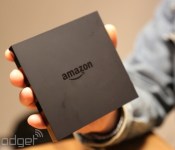
The hidden value of Amazon’s Fire TV

After a week with the Fire TV, I was confident that it was just another streamer, and our review reflects that. Amazon put a few nice tweaks on the existing set-top formula with an easy setup and voice search, but my TV stand is crowded with game consoles, dongles and other boxes that bring their own strengths. A month later, I’ve found that my initial experience didn’t tell the entire story — unlike other platforms that are locked down tight, letting the Fire TV languish as a Netflix/Amazon/Hulu box isn’t showing what it can really do.
Thanks to its (relatively) open setup and compatibility with Android apps, the Fire TV can easily extend itself beyond the usual set-top box restrictions. Whether or not Amazon approves an app, it still might run on the Fire TV — you’ll just have to install it yourself from another computer or mobile device on the same network via a technique known as sideloading. Standard Google TV boxes and even products like the OUYA have similar options, but so far haven’t shown the right balance of performance, price and control to stoke my initial interest. Older Apple TV devices can have their software cracked open too, but not the latest models, and the list of Chromecast-ready apps is still short.

Just like it did with the Fire tablets, Amazon left the Fire TV open to installs outside of its own Appstore. Unlocking the Fire TV’s potential is as simple as marking a checkbox, but actually introducing new software is a bit more complicated. The easiest walk-through I’ve found is available here on the XBMC wiki. Even if you don’t want to use XBMC right away, the steps are the same for any apps that you’ll install on the Fire TV.
Amazon also provides its own instructions, which are intended for developers to test out the apps they’re building. That means setting up a software-development environment or diving in from the command line is usually necessary. For an easier way, it’s possible to send apps over from a different Android device or download an easy-to-use program on your PC. Android apps are delivered in files known as APKs, and without direct access to Google Play, you’ve got to use one of these other options to install them. To find the files you need, Googling (name of app) + “APK” will usually work, but it’s probably a good idea to keep a virus scanner handy.
This process wasn’t tough, and if you’ve ever fiddled with an Android phone, you’ve probably done most of the work before. Once the apps are installed, they’re available under the settings menu — until/unless the Fire TV is rooted, anything you install yourself won’t be joining the other apps on the front page. My biggest problem? Finding apps that actually worked well. My first go-round with XBMC was anything but smooth, and common mobile apps like Spotify and Instagram would barely launch, pop up sideways or fail to respond to my inputs. Games are even worse, as the ones I tried didn’t work with the Fire TV’s controller at all.

Even apps that were functional (usually, services that are Google TV-ready) didn’t always perform well. However, things started to turn around with the new version of XBMC 13 “Gotham.” It’s built to run better on the cellphone/tablet-like ARM CPU that’s inside the Fire TV, making for an improved experience that lets its various add-ons for things like weather, video and music work even more smoothly.
XBMC support is key for those looking for a Plex alternative (already available in the official Appstore), and opens up extra features (AirPlay). The Fire TV has serious media chops, and we’re expecting to see it crib more features from the competition soon — through both these unofficial apps and standard ones. AllCast developer Koushik Dutta has already demonstrated video playback that pipes a second audio stream to users’ phones in a way that mimics the Roku 3′s headphone jack-in-the-remote trick.

So what can you actually use on the Fire TV? Verizon’s FiOS Mobile and Comcast’s Xfinity TV Go both work, as does HBO Go (which will arrive natively on the Fire TV soon). An XDA forum thread also points out some of the other apps that are known to work, including Nova Launcher and BBC’s iPlayer. Nova Launcher (and XBMC) can be used to launch any app you have installed, and makes getting to the sideloaded ones just as easy as any of the default options. A few popular games, like Jetpack Joyride, also work, and Firefox does too, if you want a web browser.
Unfortunately, the resolution of HBO Go’s streams left much to be desired. While my cable company (Comcast) blocks HBO Go on Roku’s hardware, the quality (on the Fire TV) was poor enough to make this usable only as a last-ditch option for Game of Thrones. Comcast’s Xfinity app pulled in HD streams of live TV and video on-demand without a problem, although the frame rate stuttered a little. The real bad news is that the Comcast, Verizon and HBO apps are all built to be controlled with a touchscreen, not on a TV. This is where the keyboard and mouse (to work as a pointer in place of a finger) came in handy. To use both at once, you’ll need a USB hub.
Hot-swapping a keyboard and mouse on the Fire TV’s single port is possible, but doing so can create problems, like causing HBO Go to reset. Some folks have also had success with keyboards that have a touchpad built in, like those from Microsoft and Logitech. If you want to dig deeper, some users have worked out ways to fix unruly games and apps that either don’t recognize the correct rotation for a TV or need extra help for controls.

There are a number of Android set-top boxes out there, and you can even load your own software on most, but the Fire TV combines that ability with top-of-the-line hardware and an easy-to-use UI. Right now, the main draw for loading your own software is its ability to run XBMC. I think it has enough horsepower to mimic any exclusive features of other boxes given the right software. With any luck, developers will take advantage soon, and maybe the competition from Google/Apple/Microsoft will follow Amazon’s lead and let users decide how we want to use our boxes.
More Information
XBMC Wiki entry for Fire TV
XDA-Developers
XBMC Forum
Filed under: Home Entertainment, HD, Amazon
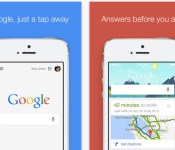
Google Search for iOS gets smarter with conversational voice search

Google’s just updated its search app on iOS, and in doing so it’s made the voice search feature much more useful. With Google Search version 4.0, using voice becomes conversational — you can ask follow-up questions in addition to simple queries like, “What’s the weather?” Once you know it will be sunny with a high of 95 tomorrow, you can ask Google “How about this weekend?” and get more info. As Google’s voice assistant competes with Apple’s Siri and Microsoft’s Cortana, more sophisticated, context-specific features like this are definitely important.
Better voice search is only part of the equation, though; the app update also brings more advanced Google Now integration, which means you’ll see articles from your favorite news sources, among other things. You’ll also get information related to your upcoming trip itineraries, such as a list of the best beaches in San Diego based on a recently emailed boarding pass. Oh, and the app update offers one special Easter egg for cricket fans: you’ll now see cards for the sport in Google Now. Download the latest version of Google Search via the source link below.
Via: 9to5Mac
Source: Google Search (iTunes)

New hints of Nexus 6, Nexus 8 emerge

New hints have shown up recently concerning the Nexus 6 and Nexus 8. Now remember these are just snippets of code from Chromium Code Reviews, but they could be leading up to some soon, say Google I/O?!?
The first snippet below shows the “Nexus 8″:

The second snippet below shows the “Nexus 6″:

Now take this with a grain of salt because nothing is for sure until we actually see a device in the wild. This could even be someone messing around trying to troll something up, but Google is expected to unveil the Nexus 8 this summer, alongside Android 4.5, and launch a new Nexus 6 smartphone in the fall.
Source: Florian Kiersch
The post New hints of Nexus 6, Nexus 8 emerge appeared first on AndroidGuys.
 AIVAnet