


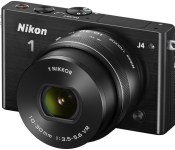
Nikon’s latest high-speed mirrorless cameras come to the US

After a (thankfully brief) wait, Nikon’s super-speedy J4 mirrorless camera is coming to the US — and it’s bringing along a low-cost counterpart, the S2. You should see the J4 arrive later this month for $650 with a standard 10-30mm zoom lens, or about $50 more than the outgoing J3. It’ll also be available in an $850 kit with a more flexible 10-100mm lens, and a $1,050 bundle is on tap if you want both the 10-30mm glass and a long-range 30-110mm telephoto lens. As you’d expect, the hardware hasn’t changed in the few weeks since Nikon first unveiled the J4. You’re still getting the new 18.4-megapixel sensor and Expeed 4A image processor that, combined, let you pump out photos at a steady 20 frames per second with advanced autofocusing (171 contrast detection points and 105 phase detection points). You’ll also enjoy relative luxuries such as a touchscreen and WiFi photo sharing.
Not surprisingly, the S2 makes quite a few sacrifices to cater to the budget-minded crowd. While it still includes the J4′s all-important 20 fps shooting rate, you’ll have to settle for a 14.2MP sensor with fewer autofocusing points (135 contrast, 73 phase); the touchscreen and built-in WiFi are gone, too. If you can live without those creature comforts, though, your wallet may thank you. The S2 ships in June for $450 with an 11-27.5mm lens, or $700 in a bundle that adds the 30-110mm telephoto.
Source: Nikon
Powramid brings a better designed surged protector with two integrate USB Ports [Review]
I am always on the look out for interesting and unique tech gadgets and gizmos that will make our lives easier in some fashion. At CES 2014 we met up with Accell purely by accident on our way somewhere else. What caught my eye wasn’t some crazy new phone or tablet that would launch eventually. No, what caught my eye was a circular based surge protector that formed a pyramid shape. The products name was Powramid and it looked unlike any other surge protector I had ever seen.
 What’s in the box:
- One Powramid
- Instruction/user/safety manual
The visual design of the Powramid is based off a traditional pyramid design. It offers up 6 plugs that circle around the unit at, i believe, is a 45 degree angle. Integrated in the base you will also find 2 USB 2.1 A out ports for charging anything that uses a USB cord.
 In the top center of the Powramid you see a blue button. This is the on/off button /safety switch. It is covered by a plastic dome that sits on top. It glows a very soft blue color when the device is turned on. Not bright enough to light up the room. heck, not even bright enough for me to even notice it is on. The whole unit is powered by a heavy duty 6-foot long power cable.
 The Powramid isn’t just all looks though, it has the tech to make it a great choice too. It offers 1080 joules of protection for your gadgets and is accompanied by X3 MOV technology. X3 MOV is Metal Oxide Varistor technology that detects surge conditions and reacts by directing the the excess power away from your devices and pushes it back through the grounding system. The MOV components are also housed inside a fireproof material that will contain any heat, thus further preventing the chance of a fire starting in the surge protector after a surge.
The actual numbers:
· JOULE RATING: 1080 Joules
· OUTLETS: 6 Grounded
· CORD LENGTH: 6ft. (1.8m) Grounded
· USB CHARGING: 2 Ports, 5V, 2.1A Shared
· RESETTABLE CIRCUIT: Yes
· ELECTRICAL RATING: 125V,15 Amps, 1800 Watts
· Max. Spike Amerage: 36,000A, Max. Spike Voltage: 6KV
· CLAMP RATING: H-N 400V, H-G 500V, N-G 500V
· NOISE REDUCTION: Up to 40dB from 150KHz to 100MHz
· RoHS Compliant
THe Powramid also comes with a 5-Year connected equipment $100,000 limited warranty too.
What I like about the Powramid
What isn’t there to like to about it? Having 6 power plugs that you can ACTUALLY use is pretty outstanding in my book. You all know what I mean, you have those printers or chargable devices that have a huge power block that takes plug planning and you usually lose the use of one or more outlets in the strip when it is plugged in. I didn’t have that issue with the Powramid. All the power plugs I have that are large didn’t hinder any other plug.
The inclusion of the 2 USB 2.1A out plugs is icing on the cake. That frees up potentially two outlets right there and at 2.1 amps, it has the power to charge up your tablets and other demanding devices.
The power/safety switch location along with the protective cover is a great little addition that serves as an ascetically pleasing topper to the pyramid design. It also helps to ensure that your foot, your cat, your dog or your kids don’t accidentally knock the power off also.
What I didn’t like about the Powramid
I can usually nit pick something out about a product. While I have a few future product design ideas that I think would go over really well, I can’t seem to fault this one at all, personally.
Other thoughts
I didn’t go out and attach a lightning rod to my house in an attempt to give the Powramid a joult, but I did have a chance to let it do its thing the other day. The power company needed to do some maintenance in the neighborhood on Monday morning and planned to turn off the power to our house for an hour. I figure that was the best chance to let it ‘protect’ my old PC. So I left it powered on and plugged into the Powramid. Nothing dramatic happened. Power went off, everything shut down, power came back on and the Powramid was off and I needed to hit the power switch to bring everything back up. Nothing fried, so that was a good enough sign for me. If we get any crazy lightning storms I’ll be sure to leave that old PC running and see what happens.
Accell offers a variety of version of the Powramid. This is the Power Center and USB charging station. It is available in black or white. The white version has a green power button in the top center, but is other wise identical. They also have the Power Center and Surge Protector that doesn’t offer up the USB ports. Plus a whole bunch of other cool and interesting little things.
Interestingly enough the black version is currently less expensive than the white version on Amazon right now. They both retail through Accell for $34.99, but you can get the black version for $22.75.


//<![CDATA[
ord = window.ord || Math.floor(Math.random()*1E16);
document.write('’);
//]]>
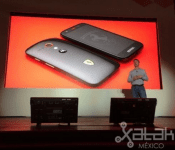
The Moto G Ferrari Edition comes with Kevlar, Android 4.4 and will cost you a pretty 4,999 Pesos
 In many markets around the world, the new Motorola Moto E and the Moto G LTE have just been announced, but in Mexico, they’ve gotten an additional little bonus from Motorola. There were rumours that there would also be a variant of the Moto G called the Moto G Ferrari Edition, which has been confirmed just today.
As you would expect, this is essentially a purely cosmetic variant with no changes to the Moto G hardware though it’s only going to be available with 16GB storage. Being a Ferrari branded phone, the Moto G Ferrari Edition will come adorned with Ferrari logos, a kevlar back cover, and a number of unspecified Ferrari accessories; probably let your imagination run wild on that one. The Moto G Ferrari Edition has been confirmed for sale in Mexico come sometime in June (same as the Moto G LTE) and will be going for 4,999 pesos (or about $390 USD); Motorola hasn’t specified whether this Moto G Ferrari Edition is going to be made available anywhere else in the world yet.
Would you be interested in the Moto G Ferrari Edition? Let us know what your thoughts are in the comments.
Source: Motorola, Xataka via Phone Arena
//<![CDATA[
ord = window.ord || Math.floor(Math.random()*1E16);
document.write('’);
//]]>
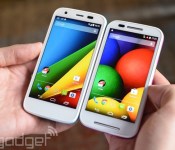
Motorola’s smartphones can now alert your close contacts in an emergency

You’ll usually want to call emergency services if you’re in truly dire straits, but the odds are that your friends and family also want to know if you need help. How do you reach them quickly? If you pick up the Moto E or Moto G LTE, you’ll have Motorola Alert at your disposal. The new app lets you trigger an emergency mode that sends regular alerts and location updates to important contacts. You can also tell people to meet up (at a shelter, for instance), and you can define your home or workplace to let people know that you’re in a familiar area. Alert won’t work on the Moto X or original Moto G until an update arrives in the near future, but you can still get a peek at it on Google Play if you’re curious.

Filed under: Cellphones, Mobile, Google, Lenovo
Via: Phone Arena, Mobile Syrup
Source: Google Play
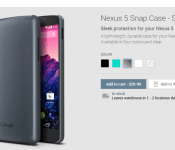
New Nexus 5 Snap Case hits the Play Store
A new line of cases has recently appeared on the Google Play Store for the coveted Nexus 5. The new Snap Case joins the previously launched Bumper and QuickCover cases. The Snap Cover is a pretty straight forward shell that snaps right around your device with very little of the case wrapping over you devices front screen. It is a very clean, and minimal, case for sure. No surprise, it has the appropriate cut outs for the device and offers up a small ‘Google” logo at the bottom on the rear of the case.
 The Snap case is now live for purchase and come sin under the price tags of the Bumper and the QuickCover at just $29.99. It comes in Black, Aqua, Silver (pictured above), white and clear.
It is always nice to see new goodies pop up in the Play Store, especially ones that are aimed at some of our favorite devices. Anyone out there pulling the trigrer on one of these? If so, which option are you choosing? Pop into the Play Store and take a look.
via: 9to5google
//<![CDATA[
ord = window.ord || Math.floor(Math.random()*1E16);
document.write('’);
//]]>
The Important Differences Between Real and Counterfeit iPad Chargers [iOS Blog]
One of the side effects of the tremendous popularity of iPhones and iPads has been the counterfeit Apple product market, which looks to lure in consumers who want to purchase items like chargers for less money than Apple’s official offerings.
However, those counterfeit chargers can be fairly dangerous, as highlighted by the tragic story of a Chinese woman who was electrocuted by a counterfeit charger while charging her iPhone last year. Following up his look at the difference between real and counterfeit iPhone chargers, Ken Shirriff has taken to his blog (via Daring Fireball) to explore the differences between the real and fake iPad chargers.
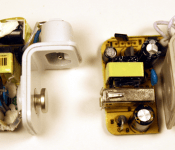
 Apple’s official iPad charger (left) vs counterfeit (right).
He compared the differences between Apple’s real $19 iPad charger and a $3 he found on eBay. While they look exactly the same on the outside, he found major differences on the inside. Apple’s charger is crammed full of bigger, higher quality components while the counterfeit has low-quality components and more space. Another difference was a safety measure:
One safety difference is obvious: the Apple charger has much more insulation. The upper (high-voltage) half is wrapped in yellow insulating tape. Some components are encased in shrink tubing, there are plastic insulators between some components, and some wires have extra insulation. The counterfeit charger only has minimal insulation.
Flipping the boards over reveals another obvious safety difference: Apple’s charger includes red insulating tape while the counterfeit does not. One not-so-obvious difference is the space between high and low voltage currents running through the boards. While Apple’s charger includes a safe 4mm separation between the two, the counterfeit only features a 0.6mm separation. Shirriff notes this means a simple drop of condensation could cause the charger to zap the user.
Another key difference is the power output. Apple’s charger outputs 10W at a steady rate while the counterfeit outputs 5.9W with frequent spikes, which means that Apple’s charger charges the iPad quicker with a higher quality of energy.
Shirriff goes into far greater detail with extensive images and graphs detailing the specific differences between Apple’s real iPad charger and the counterfeit. The full comparison is available on his blog. Users who believe they have a counterfeit charger may take part in Apple’s third-party charger takeback program and turn in their suspect chargers to receive an official charger for $10.
Engadget Daily: the Moto E, Xbox Live tears down app paywall, and more!

You might say the day is never really done in consumer technology news. Your workday, however, hopefully draws to a close at some point. This is the Daily Roundup on Engadget, a quick peek back at the top headlines for the past 24 hours — all handpicked by the editors here at the site. Click on through the break, and enjoy.

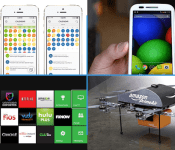
Netflix, Hulu, YouTube and other services will be open to all on Xbox One, Xbox 360
Today, Microsoft announced that Xbox One and Xbox 360 owners will no longer need a paid Xbox Live membership to access Netflix, Hulu and the like. So, say goodbye to that extra $5 per month it took to enjoy your existing subscriptions.

Motorola launches the $129 Moto E, a durable and affordable Android smartphone
If there’s one thing Motorola knows how to do, it’s how to get the best from mediocre components. The company’s new Moto E is durable, water-resistant and has only slightly weaker specs than the Moto G. And the best part is that it costs just $129.

Hollywood, Amazon and your local realtor are fighting to legalize drones
Commercialized drones? Well, it’s a complicated issue, mostly due to concerns of privacy and a sudden boom of low-flying objects. Despite the opposition, however, 68 groups are fighting to legalize the use of unmanned aircraft to shoot movies, dust crops and much, much more.

The Boyfriend Log merges data obsession with your love life
Does your love life often present more questions than answers? If so, The Boyfriend Log is here to help. By frequently measuring your happiness, the app aims to provide some clarity in a sometimes utterly emotional fog.
You also might like:
Filed under: Misc

Electronic artists turn 600 phones into a symphony of light and sound

Forget Prince’s “Purple Rules” demanding smartphone-free concerts, one group is actually encouraging fans to wave their handset in the air because it’s part of the show. Electronic group Booka Shade recently performed a concert where the audience’s phones played coordinated sound and lights via a custom app during songs, making them less of an annoyance and more an integral part of the performance.
“With so much opposition to using smartphones at gigs because of image and video rights infringement, we wanted to show how mobile technology can actually be used to make a performance even better,” says band member Walter Merziger. The band collaborated on the project with Vodafone and an organization called Makelight Interactive. To take part phones need to have Makelight’s app installed. They’re then synced up at the show using a tone that also pinpoints where each handset is in the room based on how it hears the sound. The creative agency has made several light shows using phones for bands in the past (as have others), but this is the first time they’ve incorporated music into the mix.
Adding tunes meant the agency had to address new details like when and where sounds would play to achieve the perfect mix. When it came time for the technical rehearsal, they also ran into a huge issue: phones aren’t loud enough on their own to make an impact at a live performance. The solution? The band handed out speaker accessories to make handsets 10 times as loud. The end result is a pretty epic show.
Filed under: Cellphones, Wireless, Mobile

This quadriplegic racer will drive a Corvette using only his head

When Indy Racing League driver Sam Schmidt crashed in 2000 and became a quadriplegic, many assumed that his driving days were over. However, technology is about to put him back on the track. Arrow Electronics has developed the Semi-Autonomous Motorcar (SAM) project, a modified 2014 Corvette Stingray that will let Schmidt drive using only head tilts. An array of infrared sensors will translate his head movements into steering commands, letting him race around with ease; the only control he’ll touch is a pressure sensor in his mouth for braking. GPS will also keep Schmidt out of harm’s way by creating virtual fences around the track walls that nudge the car back on course.
SAM isn’t ushering in a new era of hands-free racing, at least not yet. Schmidt won’t be competing against other vehicles, and he’ll have both a co-pilot and a pit crew that can take over in an emergency. You will get to see the technology in action very shortly, though: Schmidt will drive four laps with the Stingray at the Indy 500 on May 25th. It’s also just one piece of a larger plan. Arrow eventually hopes to roll its equipment into both regular cars as well as industrial and military vehicles, so it might not be long before many with limited use of their body can get on the road.
Filed under: Transportation
Source: Arrow
Apple Publishes Its ‘iOS Human Interface Guidelines’ on iBooks [iOS Blog]
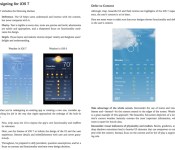
Apple has published its iOS Human Interface Guidelines to iBooks. The guidelines are Apple’s recommendations and suggestions to developers for designing cohesive and usable apps that follow similar user interface principles to other iOS applications.
The company has long offered user interface guidelines, dating back to the original Macintosh, but has recently only offered on the Developer Portal. By making them available to anyone via iBooks, the company appears to be looking to inform and inspire more designers.

An excerpt from the book:
Designing for iOS 7
iOS 7 embodies the following themes:
– Deference. The UI helps users understand and interact with the content, but never competes with it.
– Clarity. Text is legible at every size, icons are precise and lucid, adornments are subtle and appropriate, and a sharpened focus on functionality motivates the design.
– Depth. Visual layers and realistic motion impart vitality and heighten users’ delight and understanding.Whether you’re redesigning an existing app or creating a new one, consider approaching the job in the way that Apple approached the redesign of the built-in apps:
– First, strip away the UI to expose the app’s core functionality and reaffirm its relevance.
– Next, use the themes of iOS 7 to inform the design of the UI and the user experience. Restore details and embellishments with care and never gratuitously.
– Throughout, be prepared to defy precedent, question assumptions, and let a focus on content and functionality motivate every design decision.
The iOS Human Interface Guidelines are a free download from iBooks.
 AIVAnet