


Sony will give your PlayStation controller a free World Cup makeover

Major sporting events serve as the perfect time for brands to thrust their latest wares in fans’ faces. With only weeks until the start of the 2014 World Cup, Sony is maximising its marketing opportunities as one of only six official FIFA Partners by offering PS3 and PS4 owners the opportunity to give their DualShock controllers a World Cup makeover. Sony will set up Customisation Stations in three UK cities where teams of graffiti artists will adorn the controllers with owners’ favourite players, teams and squad numbers completely free of charge. To take advantage of the offer, make your way to the PlayStation Customisation Stations situated in the Bullring Shopping Centre in Birmingham on May 24th, Piccadilly Gardens in Manchester on May 31st or Westfield Stratford City in London on either the 7th or 8th June. All you’ll need is your PlayStation controller and an idea of what you want done with it.
Via: Pocket-lint

Future Army helmets make for cooler soldiers, terrified enemies

It’s hard to look at the US Army’s latest helmet and not think of Halo, but the design does have a purpose beyond gaming chic. Its latest “soldier of the future” concept would not only protect grunts in high heat and humidity, but also shield them from chemical and biological agents. While much bulkier tech already exists for that, such a model would use a fan embedded directly into the filtration system to suck air from the side of the mask and blast it across the nose. Tests done on an M50 gas mask modified with the tech proved it to be just as effective as with bigger units, but more comfortable for GI’s during intense drills. The design is just a render for now, but if the army is going to look to video games for design inspiration, we think they should go bigger.
Via: Pocket Lint
Source: US Army

Oculus Rift user transplants his whole body into VR using three Kinects

So, not every indie developer abandoned Oculus VR after the Facebook take-over. 3D video expert Oliver Kreylos is one of those who stuck around, and we’re mighty glad he did. Check out his three-way-Kinect-plus-Rift setup in the video below and you’ll be glad too — even if the second video, showing the wearer’s POV (and intended solely for other Rift owners) makes you wretch a couple of times. Video feeds from the three Kinects are merged to create a relatively solid 3D rendition of Kreylos as he moves about inside a VR environment. The merged feed is then sent to the Oculus so that he can look around at everything inside that environment, including his own body. Kreylos says that even though his limbs were a bit fuzzy during the experiment, due to the relatively low resolution of the cameras, the system’s low latency allowed his brain to believe that the body parts really belonged to him, to the point where it felt natural to try to reach out and touch non-existent objects. And bear in mind: All of this was achieved using first-gen Kinects, rather than the much more powerful version that is (usually) supplied with the Xbox One, so there’s already plenty of scope for improvement.
Filed under: Gaming, Wearables, Science
Via: Kotaku
Source: Doc-OK
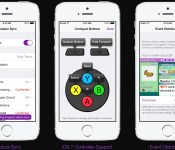
‘GBA4iOS’ Game Boy Emulator Shut Down After Nintendo Files DMCA Notice
GBA4iOS, the popular Game Boy emulator for iOS, has been removed by its creator Riley Testut on GitHub after Nintendo filed a Digital Millennium Copyright Act (DMCA) takedown request, reports The Next Web. First sharing the news through his Twitter, Testut stated that the emulator will continue to function normally on iOS devices, as in-app ROM downloads will be “temporarily suspended.”

GBA4iOS saw its last major update in February, which added iPad support, controller skins, iOS 7 controller support, Dropbox integration, and an in-app web browser that could used to download Game Boy games from any ROM website. The emulator was also notable for bypassing Apple’s App Store restrictions as it could be installed directly on an iOS device by visiting the project’s official website and tapping a download link.
Traditionally, Apple has taken a strict stance on emulators in the App Store, which has caused apps like GBA4iOS to seek alternative methods for user downloads. For instance, open emulators such as iMAME and iDOS have made their way onto the App Store only to be pulled a short time later likely because of potential legal issues.
Despite the removal of GBA4iOS, the ‘NDS4iOS‘ Nintendo DS emulator for iOS devices released last month remains available on its respective web page. However, it is unknown if Nintendo will file a similar takedown notice in efforts to prevent potential piracy.

Conquer the forces of evil: BogeyWogey Ghostbusters 3D [App of the Day]

Today’s app of the day is BogeyWogey Ghostbusters 3D. It is a very simple and funny 3rd person shooter that revolves around a blonde headed character setting out to defend his village from the “Ghostly” menace.
When you initially start the game you are prompted with a tutorial and some very retro Super Mario Bros. music in the background. The tutorial is a basic walkthrough of how to throw your magical fireballs and to maneuver around the game. Once your training is complete, you start at level 1 and as you progress through the levels, more Ghostly menaces and evil lanterns appear which can kill you faster.
You can earn more points by understanding the collision of different objects. For example, if there is a big ghost of top of 3 boxes and I hit the bottom box, hopefully the other boxes will fall onto the other ghost and kill them as well, earning more points! In-app purchases are available, but the game itself is free. 
The game was made with fun in mind and after you master the controls, you will be well on your way to destroying the Ghostly menace and taking back your village!
The post Conquer the forces of evil: BogeyWogey Ghostbusters 3D [App of the Day] appeared first on AndroidGuys.

Jawbone UP24 review

The Jawbone UP24 is one of the latest fitness trackers to hit the market along with Nike and Fitbit. I have previously reviewed the Fitbit Flex, which we really liked, but today’s focus is all about the UP24. The UP24 is the newest addition to Jawbone’s fitness line up. The device allows you to track workouts, food/drink, sleep, but one of the really cool features are the smart alarm and idle alert. Don’t worry we’ll get to these all very soon! Reigning in at $150 it is a little more than I would like to spend but lets dig into it and see what we got!
Compatibility
Lets go ahead and clear the air, because compatibility is the number one issue. The previous UP was compatible with iPhones and Android devices but did not offer any wireless sync options. However, the UP24 offers wireless sync, but only for Android or iPhone devices that support Bluetooth 4.0. Jawbone’s website offers a complete breakdown of what devices are compatible with the band, just to make sure.
What’s in the box
- UP24 Band
- USB charging cable
- Manuals
Durability
 The band feels great on my wrist and is very comfortable to wear day or night. The band is made of hypoallergenic TPU rubber and is very rugged feeling. No worries in this department.
As far as water goes, don’t submerge it! Jawbone says the band is “Splash-resistant”, which is a downfall for me because I am the kinda guy to just throw it on and forget about it. I’ve caught myself with it in the shower and immediately take it off, there was no damage to the band, but I hate having to remember to take it off and put it back on.
Functionality
I’ve really been impressed with the look of the UP24. The band goes on easily and fits comfortably, however it is crucial that you pick the correct size band for your wrist, Jawbone’s website offers an easy to use tool to make sure you get the best fit possible. While wearing the band I did find that it will snag and almost rip off if you’re not careful. This is one issue that I did not like, because I don’t want a band that has to be ultra tight, but I don’t want a band that is too loose and could possibly get ripped off my wrist. Again, make sure you get the correct size!
The band itself shows no data and has a silver square on one end of the band allowing you to activate the band or put it into sleep mode. That’s pretty much all there is too the band itself. It is very simple and sometimes simple is the best way to go. The battery life of the UP24 is roughly seven days and it can also be checked within the app as well.
The other side of the band sports a nice Jawbone logo in silver which also doubles as the charging port. Just pull off the Jawbone cap and it reveals a 3.5mm jack which plugs directly into the USB charging cable provided. It takes about an hour and a half to fully charge and holds a charge for about 7 days which coincides with what Jawbone’s website says as well.
Software
The app itself is quite nice but again lets talk compatibility. The UP24 requires Android 4.3, so keep this in mind especially if you are on a carrier who hasn’t pushed the latest update out for your device. I am using the HTC One (M8) which isn’t a problem, but make sure especially if you’re buying one as a gift.


The app is super easy to setup and get your UP24 synced and working correctly. It took me about 2 minutes to get it all setup. Once in the app the UP24 shows your total steps and sleep from the night before. You can then choose which one you would like to look at in more detail.
When looking at your steps it gives a complete breakdown of when you were active, calories burned, and how long you sat around watching House of Cards on Netflix (Guilty!). The colors and the look of the app are really nice and navigating is a breeze.
 Now, onto the sleep side, which is one of my favorite parts! I really like the ability to see how much sleep I was getting, and not getting! Right before you pass out for the night, remember to hold down the silver button on the end of the band until it enters sleep mode. Again, like checking out your steps, the sleep side is very easy to navigate because it’s all out in front of you.
Of all the features of the UP24, my favorite or two favorite are the Smart Alarm and Idle Alert. You can set an alarm for the morning and instead of some crazy sounds blaring, it will gently vibrate on your wrist. Now you’re probably saying, “Ok…Other fitness bands have that”, and yes you’re right. However, the one feature that sets it apart is that you can set a daily wake-up time within the app so that your band will wake you up at the best time based on your body’s natural sleep pattern. Kinda cool!
Alright, onto Idle Alert! This feature allows you to set an idle time, so if you’ve been sitting around for 45 minutes not doing anything, it will vibrate letting you know to get moving! Now I wouldn’t go tell your boss that you need to go for a power walk or anything because your wrist vibrated, but if you’ve been watching Netflix all afternoon, it might not be a bad idea!
Overall
I have really enjoyed the UP24. It feels good and I forget it is there most of the time. The app is wonderful, vibrant and easy to as well. However, the biggest downfall for me is the inability to get the band wet! Again, I hate taking it off and putting it back on to take a shower for the fear of ruining it.
The device is definitely work the look, it is alot cheaper than the Nike Fuelband, but it is pricier than the Fitbit Flex. However, this device provides you with true insight on your activity and it is a worthy contender for your money! Check out all the different colors at Jawbone’s website here!
The post Jawbone UP24 review appeared first on AndroidGuys.
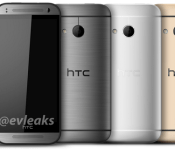
In true ‘Mini’ fashion, Sense 6 on the HTC One Mini 2 will be missing a few Features
 It’s now almost expected than ‘mini’ versions of flagship smartphones will always make some pretty big concessions when compared to their larger counterparts; bar the Sony Xperia Z1 Compact, ‘mini’ devices like the Samsung Galaxy S4 Mini and HTC One Mini have been disappointingly underpowered and ill-equipped while still keeping a premium price-tag. If the latest leak from evleaks is anything to go by, the HTC One Mini 2 isn’t going to be any different as evleaks suggests that Sense 6 on the HTC One Mini 2 will be missing quite a few features.
Evleaks says that the One Mini 2 (also referred to as the One M8 Mini), besides the obvious omission of the Duo Camera, will also be missing HTC Zoe, Fitbit, Motion Launch, and Pan 360 photos. That’s quite a few features to be omitted, if true, as many of those features were very heavy advertised as advantages of the HTC One M8. Hopefully, given that the One Mini 2 will be a fairly basic device without these features, perhaps HTC will price the device more appropriately than the original HTC One Mini, though we aren’t holding our breaths.
What do you think about the possibility of the HTC One Mini 2 missing all the features that made the HTC One M8 so attractive? Let us know your thoughts in the comments below.
Source: Twitter
//<![CDATA[
ord = window.ord || Math.floor(Math.random()*1E16);
document.write('’);
//]]>

Google Glass can be bought by anyone in US for $1500

It looks like Google’s recent one day only sale of Glass was a massive success for the company as they have now announced that Glass has moved into an open beta and can be brought by anyone on the US for $1500 without an invite.
The announcement that the Glass Explorer Edition is now up for sale was made in a post on Google+ with the decision to do so being made by the response they had to the one day sale a few weeks back. Google also states in the post “We’re still in the Explorer Program while we continue to improve our hardware and software”.
So while this is no commercial launch, Google are obviously wanting to get more people on board to accelerate development and improve the product ready for a wider consumer release later this year.
Glass will only be on sale in the US and while stock of the device lasts.
The post Google Glass can be bought by anyone in US for $1500 appeared first on AndroidGuys.
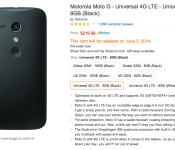
Motorola Moto G with “Universal 4G LTE” available for pre-order on Amazon

When the Moto G was first announced, it was widely received as a super affordable Android handset with decent specs. However, the biggest drawback was not having 4G LTE compatability.
After yesterday’s release of the Moto E, we have now seen the Moto G get a much needed update of LTE and microSD support. The device is currently available for pre-order on Amazon’s website for $219 and will ship out June 3rd. Below is a list of specs from Amazon’s website.
Specs:
- Android 4.4 (KitKat)
- Qualcomm MSM8926 quad-core A7 1.2GHz (Adreno 305 450MHz GPU)
- 4.5” 1280 X 720 HD, 329 ppi Display
- 2070 mAh Battery
- 1.3MP Front Camera & 5MP (4:3) / 3.8MP (16:9) Rear Camera
- 8GB standard, microSD card support up to 32GB Memory
-
Networks: LTE bands 2, 4, 5, 17; UMTS: 850/900/1700/1900/2100 GSM: 850/900/1800/1900
Source: Amazon
The post Motorola Moto G with “Universal 4G LTE” available for pre-order on Amazon appeared first on AndroidGuys.

Apple Looking to Restrict Vacation Time for Retail Employees in September Ahead of New Product Launches
Apple will look to restrict vacation days for its German retail employees this September ahead of a likely launch for the 4.7-inch iPhone 6 and other products, reports German site iFun.de (Google Translate). The move will likely also be enacted at the company’s other stores across the globe, and follows a similar move last year in which Apple restricted vacation time for AppleCare employees from September 15 to 28 for the launches of the iPhone 5s, iPhone 5c, and iOS 7 in that time period.
 The Apple Store Kurfürstendamm in Berlin, Germany
The majority of rumors throughout the past few months have indicated a September release for the 4.7-inch iPhone 6, with the larger 5.5-inch version of the device to launch towards the end of the year or in early 2015 due to production issues. However, this latest report contrasts a rumor from earlier this month that stated Apple will launch the 4.7-inch iPhone 6 in August and the larger 5.5-inch version in September, which would be a different strategy compared to past iPhone launches that have traditionally come in the fall for the past three years.
In addition to a larger display, Apple’s next-generation iPhone will feature a thinner profile, a faster A8 processor, and an upgraded rear-facing camera in the form of either optical or electronic image stabilization.
The report also gives an update on the progress of Apple’s upcoming retail store in Hanover, Germany, which is now on track to open sometime this fall. A previous report in March estimated that the store would open sometime in April, however multiple structural problems and mold have resulted in a delay for Apple’s move into the location. When the store eventually opens, the location will mark Apple’s 14th in the country, following stores in Düsseldorf, Berlin, and Frankfurt.
 AIVAnet