



Facebook says it only needs Moves’ data to help build the app

When Facebook initially addressed concerns about Moves’ new privacy policy, it raised more questions than it answered: just what does it mean when it says Moves will share data? Does that mean advertisers will see your fitness routine? Well, the company has since given us a clarification — and it looks like the sharing is more innocuous than it seemed at first blush. The new policy only exists so that Facebook staffers can “actually work on building the app.” The social network needs access so that it can bolster Moves’ small development team and maintain the software as necessary.
Meanwhile, the social network has also elaborated on the “commingling” it wants to avoid. Simply put, there are “no plans” to bring any data from Moves into your Facebook account. The company doesn’t want to identify people who use both services and open the door to a myriad of privacy issues. You shouldn’t see unusually well-targeted running shoe ads in your News Feed, then, but it would have been great to have this clarity from the get-go.
Filed under: Cellphones, Internet, Mobile, Facebook

An avalanche of new Snowden documents will go online next week

Way to bury the lede, Glenn Greenwald! Scroll to the bottom of this blistering response to recent remarks by just-retired NSA chief Keith Alexander, and you’ll find some very interesting news indeed. Greenwald, who recently won the Pulitzer Prize for his coverage of Edward Snowden’s NSA surveillance revelations, says he plans to publish previously unpublished NSA documents online next Tuesday, May 13th, with free access. The timing, it should be known, is not a coincidence: Greenwald’s book, No Place to Hide, comes out that day. In fact, the documents that will go online next week are ones he mentions in the book, but which weren’t previously reported in the media. So, if you were expecting the entire trove to go public (and even Snowden has advised against that), you might still be disappointed. But if you’ve been following this Edward Snowden-NSA-Big Brother saga closely and have an appetite for even more revelations, you’ll want to mark your calendars (and pre-order Greenwald’s book, if we’re correctly reading between the lines).
Image credit: U. Baumgarten via Getty Images
Source: The Intercept
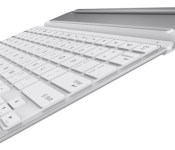
Belkin’s Ultra-Slim QODE Thin Type Keyboard Now Available for iPad Air [iOS Blog]
Belkin today announced the availability of the QODE Thin Type for iPad Air, adding an ultra-slim keyboard option to its popular QODE line of tablet keyboards. QODE Thin Type for iPad Air features an anodized aluminum design, 79 hours of battery life and iOS specific keys that pair nicely with the iPad. The keyboard’s main selling point is its 4mm thin profile that barely adds any heft to the already slender iPad Air.

An early review of the device from ZDNet’s James Kendrick is favorable, noting that the keyboard is “different in a good way” from competing iPad tablets from Logitech, Kensington and Annker.
The Belkin is a simple cover with a keyboard on one side. The metal cover is not flat like the competitors’ models. There is a hump toward the back of the cover that gives the Belkin three advantages over the competition. The hump houses a large battery that Belkin claims gives six months of use on a charge. This is double that of other iPad keyboards. Having this hump on the cover provides an ergonomic tilt to the keyboard, perfect for typing. Last but not least, the protrusion provides a secure grip for handling the tablet in the cover.
The QODE Thin Type keyboard for iPad Air is available now for $99.99 at Belkin.com and will land soon at select retailers worldwide.

Some iOS Users Reporting Apple ID Error Messages When Updating Apps
A number of mostly international iOS users on MacRumors forums, Apple’s support forums, and Twitter are reporting issues with failed app updates today. According to affected users, the process of updating apps in the iOS App Store produces a warning that “the update is not available for this Apple ID either because it was bought by a different user or the item was refunded or cancelled.”

Reader Vinamra on MacRumors forums:
“I go 4 app updates today and as soon as I clicked the update button, the App Store app popped up with the following message:
“Update Unavailable with this Apple ID – This update is not available for this Apple ID either because it was bought by a different user or the item was refunded or cancelled.”
I have always used a single Apple ID and this phone (5S) was bought new and have never had this problem in the past.”
Member Albertus8898 on Apple Support Forums:
i didnt change or log out from my apple id at my iphone 5. But when i wanted to update one of my apps it said “update is not available for this apple id either becuase of using different id or….” then i checked my apple id’s apps and most of my apps gone. what should i do to make them back to my apple id account? and i tried to delete those apps and redownload them but it gave the same message.
One user contacted an Apple Support representative, who confirmed there was a server issue on Apple’s side that was affecting app updates. Apple is working on the problem, but the company has not provided a timeline for the fix.
At this time, this issue that you’re experiencing with updating apps is being investigated. There are no possible fixes at this current time, as [it’s] an issue with our servers, but we are working on it and should have it functioning properly later today.
While such an error message may appear when users are managing multiple accounts or changing countries, the number of complaints surfacing today and reports from several users indicating that they are only using one account with no changes in country suggest that there is indeed a broader issue with Apple’s systems today.

Galaxy S5 Dx spied briefly on Samsung website

Another leak from @evleaks on Twitter has revealed what seems to be yet another device that Samsung have in the works dubbed the Galaxy S5 Dx.
The Galaxy S5 Dx will be available in more colours than the standard Galaxy S5 and will come with a model number of SM-G800, but any specs of the device are still undisclosed.
According to the leaked screenshot, the Galaxy S5 Dx looks pretty much ascetically like the released Galaxy S5, but available in a greater variety of colours. If that’s the extend to which the differences go then it will be interesting to see how Samsung market yet another variant of the same device along the Galaxy S5 and the Galaxy S5 Prime.
Samsung Galaxy S5 mini? [via tip] pic.twitter.com/tErdv1EdRA
— @evleaks (@evleaks) May 7, 2014
There is some speculation that the Galaxy S5 Dx is actually the real name for the heavily rumoured Galaxy S5 Mini which is set to feature a 4.5-inch Super AMOLED display with a 720p resolution, 1.5GB of RAM, and an 8-Megapixel rear camera.
That just leaves the question as to why they chose the name Galaxy S5 Dx? Perhaps it’s a codename? Let us know your thoughts in the comments below.
The post Galaxy S5 Dx spied briefly on Samsung website appeared first on AndroidGuys.

LG intros 5.5-inch Quad HD display ahead of G3

LG have just announced that their new 5.5-inch Quad HD (or QHD) display will be released for the first time on their upcoming flagship, the G3. If you remember, the LG G3 is set to be released on May 27th.
This new display has a 2560×1440 resolution, four times the image resolution of HD panels, and 1.8 times higher resolution than a Full HD panel. Adding a little bump up in design from last years G2, this display enables the phone to have a mere 1.15mm bezel.
This is looking up to be one of the best displays we see this year. If you didn’t catch it before, the G3 is rumored to have a Snapdragon 805, 3GB RAM, and a 13MP camera. Not only is the display looking great, but the whole phone seems better and better every day.
Seoul, Korea (May 8, 2014) – LG Display announced today that its 5.5-inch Quad HD (QHD) AH-IPS LCD panel for smartphones was certified as a QHD display after passing verified tests by NEMKO, the Norway-based international testing and certification organization for electrical products. The certification comes shortly before the new Quad HD LCD panel will be unveiled with theforthcoming LG’s flagship smartphone to be launched in the first half of the year.
The certified 5.5-inch QHD AH-IPS LCD panel has 2560 x 1440 pixels, four times the image resolution of HD panels and 1.8 times higher resolution than a Full HD panel. With 538 pixels per inch, this panel also meets the 100 percent RGB color reproduction standard.
This panel, which will go into mass production shortly, will offer superior performance to other existing smartphone panels. This is an ultra-slim panel with a mere 1.2 mm thickness and has a 1.15 mm bezel, which will be the narrowest available and 0.05 mm less than panels introduced last year.
In addition, the panel has achieved the same level of brightness as a Full HD panel. It is difficult to raise penetration ratio in higher resolution panels since they have more pixels. However, LG Display successfully achieved higher brightness by improving the penetration ratio through enhancing the pixel structure design and aperture ratio in the LTPS backplane.
The Quad HD display produces images in sharper color and contrast than regular displays because of the greater amount of pixels. This means that high resolution images and videos in the Blu-ray format can be viewed in a fully vivid and realistic manner. The display retains the readability of letters and images without distorting them when they are enlarged while surfing the internet or working on documents.
“This product fulfills the core qualities of smartphone displays, which are high resolution and slim design, and I believe the consumers can enjoy vivid images that are close to real life with this display,” said Byung-koo Kim, Vice President and Head of LG Display’s IT/Mobile Development Group. “LG Display will continue to maintain technology leadership in the super high-resolution smartphone display market above 500 ppi resolution, which will take off this year.”
According to DisplaySearch, the shipment of premium smartphone displays based on LTPS backplanes is expected to grow to 780 million units by this year and 940 million units by next year. These products are going to maintain sufficient competitive advantage in premium product categories where large size, high resolution and low power consumption are key factors.
The post LG intros 5.5-inch Quad HD display ahead of G3 appeared first on AndroidGuys.

Samsung, Nokia join 5G trials in Japan, but crazy speeds still far away

Source: NTT DoCoMo

Litely looks to improve mobile photo editing by focusing on simplicity

“The best photos don’t look edited; it’s all about the story and the moment,” photographer Cole Rise quips while walking me through his new mobile image editor. You may not recognize his name, but if you’ve used Instagram, you’ve seen some of his work. Rise created the Hudson, Sierra, Sutro and Rise filters for the popular social snapshooting app. But he’s quick to tell you that the features in Instagram and other mobile editing software help mask bad photos and are generally too heavy-handed to churn out truly compelling images. So with that in mind, and with a library of presets for Lightroom, Photoshop and Aperture already in his toolbox, he set out to make a non-destructive editor with a simple UI and subtle tools. Something to make film-like tweaks good photos rather than improve mediocre ones. He created Litely for iOS.
When you first fire up Litely, you’re greeted with a photo library to which you can add shots from your Photo Stream and other iCloud folders. Of course, you can take a new shot as well, and the app leverages the iPhone’s (or iPad’s, should you so choose) built-in camera chops to do so. Ever notice how photos look better in some apps as compared to others? Well, that’s largely a software issue and having spent some time at Apple, Rise is quite familiar with the camera on the 5s. That said, Litely doesn’t employ its own tweaks behind the scenes here, but rather it lets the native hardware do the heavy lifting. This means that you can snap a load of images with the phone’s camera and save the editing for later on it or an iPad, thanks to easy access to the cloud-stored files. Or you could drop a few JPGs from a DSLR and edit them slate-style whilst on the train.

Upon selecting a file, you’re launched into the main edit screen. The overall design of the app keeps its promise of simplicity, and that’s definitely evidenced here. While you can certainly swipe up and down on the list to toggle the presets, doing so on the image itself achieves the same result. Each of the options is applied at 50 percent by default (again, subtlety) and a slider appears above the list allowing for adjustment. “That’s important because subtlety means longevity. I wanted to create an app that enhances your photos today, but keeps them looking just as beautiful and timeless in 50 years’ time,” Rise notes. What’s more, if you swipe across the image with two fingers, you can gaze at a before/after split-screen preview.
“Subtlety means longevity.”
The presets are also colored-coded to give you an idea of the hues they employ and each has a regular, high-contrast and faded setting for further editing options. A single tap on the image serves up a zoomed-in view, which can be panned around using the gyroscope of an iOS device. Not only can you take a closer look, but also you can maneuver around the edges of the photo for a better view of all the edits. During my time with Litely, I found that I preferred my iPad mini over the iPhone 5s if I had some time to sit down to edit. The increased screen real estate was more comfortable and enhanced the use of the aforementioned movement. Of course, the smartphone was the choice if I needed to take a quick shot to edit before beaming out to Twitter.
Along the bottom of the UI are menu items for corrective adjustments, a crop tool and sharing options. Once inside that secondary editor, exposure, sharpen, vibrance and vignette tweaks are all there, with another intensity slider for each. During our chat, Rise dwelled upon that last feature for a few minutes. He says that while the vignette option in most apps just adds black to the outside of the image, Litely actually adjusts the exposure for the desired effect. “It’s technically right,” he adds.

Perhaps the most compelling feature is the way the software handles files. Litely is non-destructive, allowing you to step back from an edit and start fresh. It also makes adjustments to the full-resolution images and allows the exporting of those files without losing quality — a must for photographers needing to keep photos as large as possible for later use. When you’re all done, the app offers sharing to AirDrop, iMessage, Mail, Twitter, Facebook or just saving out that full-size file. If you’re looking to share images to Instagram or another social outlet, you’ll have to save ‘em and then open the desired shot in that app. While this is an inconvenience, Rise maintains that Litely isn’t meant to be social, but rather a tool focused on editing.
For those that aren’t after the more detailed tweaks that Adobe Lightroom for mobile offers, this could be an attractive option. That more pro-minded app requires a monthly subscription though, and is really more of a complement to the full-on desktop software. At launch, the free version of Litely for iPhone and iPad will house nine presets and users will have the option of making in-app purchases of a dozen at time for $1.99 per pack.
Filed under: Cellphones, Cameras, Tablets, Software, Mobile
Source: Litely (iTunes)

Uber introduces Uber Family in NYC, guarantees a child seat with your ride

As they so often are, the rumors were true: the smartphone-based taxi request app, Uber, is adding a new service today in New York City called “Uber Family.” The company’s calling it “uberFAMILY,” but we’re calling it Uber Family. Anyway, as the name implies, the new service takes what Uber already does and adds a guaranteed child seat. It also adds $10 to your ride: a small price to pay for the guarantee of a child seat, but it’s also a $10 charge to guarantee the safety of child riders. There’s no update to the existing app required; once you enter “FAMILY” in the promo code page, your next ride optionally becomes an Uber Family ride. Just like that!
As seen in the image above, on the left side, there’s an option for “Family” in the bottom row that’s selectable after inputting the promo code. Thats a pretty neat way to add functionality, if you as us. The offer is exclusive to New York City right now, and Uber’s offering a free upgrade this weekend to moms on the move (it is nearly Mother’s Day after all).
Filed under: Cellphones, Transportation, Internet
Source: Uber

Sony built the PlayStation 4’s controller with VR in mind

You may think that Sony built its Project Morpheus virtual reality headset to accommodate the PlayStation 4′s DualShock 4 controller, but it turns out that the opposite is true — the gamepad was designed for VR from the start. The company’s Jed Ashforth tells TechRadar that the Morpheus team insisted on building the always-on (and occasionally irksome) light bar into the DualShock for its purposes, and had to remain silent about its real objectives until the VR helmet’s unveiling this March. The move isn’t completely surprising given Sony’s tendency to use PlayStations as technology launching pads — see the PS3′s Blu-ray drive as an example. Still, it’s good to know that the controller was designed for much, much more than motion-based experiences like The Playroom.
Filed under: Gaming, Peripherals, Sony
Source: TechRadar
 AIVAnet
