



Apple’s WWDC 2014 to Focus on OS X 10.10 as Apple Pulls Resources from iOS 8 to Help
 According to 9to5Mac, Apple may use WWDC 2014 to focus on OS X 10.10, giving the desktop OS more attention than iOS 8 during the annual developer conference. Apple allegedly has been moving iOS user interface developers to the OS X teams in order to finish up the new design in time for early June conference.
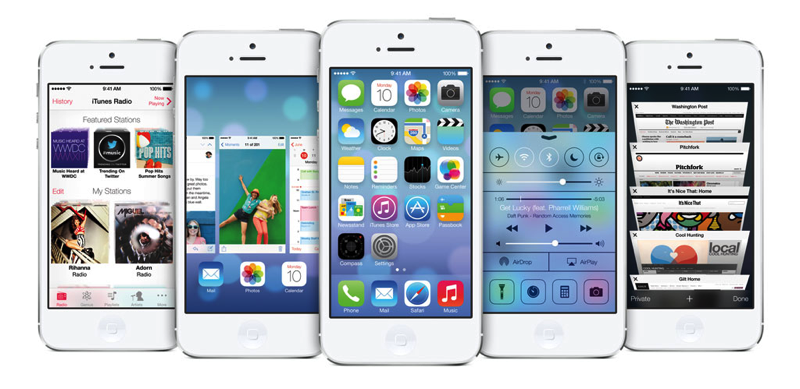
As has been previously reported, Apple is not merging the two operating systems, opting to keep iOS and OS X as separate entities, but the next version of OS X may share similar design elements with iOS 7.
The new look will have similar toggle designs to iOS 7, sharper window corners, more defined icons across the system, and more white space than the current version. However, OS X characteristics like the Finder, multi-window multitasking, and Mission Control will not disappear in favor of a more iOS-like experience.
Apple is targeting the desktop OS for release in the fall along with new hardware that will ship with this latest OS X version. Though the internal development codename of OS X 10.10 is “Syrah,” the shipping name is still unclear, with Apple apparently securing trademarks for popular California locations that would match the new theme started with “Mavericks.”
On the iOS 8 side of development, Apple is allegedly pushing some features of iOS 8 off to version 8.1 as the company focuses intently on its next version of OS X. Though Apple may present most of the new features of iOS 8 at WWDC next month, some notable additions such as transit functionality in Maps may not be available until later versions of iOS 8.
iCloud will reportedly see some significant changes in the coming year with improvements on the developer side that make it easier to implement support for the service. Siri may also see Shazam integration, allowing users to identify a song using the voice assistant. Lastly, iOS 8 is reportedly being optimized for Apple’s upcoming A8 processor and the rumored larger display of the iPhone 6.
The new iPhone’s larger display, as well as a “high-priority” iOS device that is not an iPhone, also lends itself to another core iOS 8 addition. The feature, dubbed by Apple employees as “multi-resolution support,” is designed to improve the performance of both App Store applications and the general iOS operating system across multiple new iOS device resolutions.
Apple TV is also now a priority for Apple, with the company rumored to be bringing in hardware and software engineering resources from within the company to work on the next generation device. Apple may be concurrently developing new hardware as well as a revamped iOS-based software system to power the device. Apple had hoped to introduce the hardware in early 2014, but the product’s debut has been pushed off. It is, however, unclear whether a new Apple TV will make its way into the WWDC keynote.
Samsung debuts LeBron app with ‘unprecedented access’ to athlete

Samsung on Thursday announced a brand new Android app designed specifically for Galaxy owners. Called ‘LeBron’, it gives users a look into the athlete’s life as he works his way through the NBA Playoffs. Details include photos and videos of workouts, his clothes and style, post-game commentary, and insight into what motivates him off the court. Also included in the app are lock screens and wallpapers.
Designed by Samsung in conjunction with the NBA the LeBron app is available on the Galaxy S5, Galaxy S4, Galaxy S III, Galaxy Note 3, and Galaxy Note II.
Samsung Gives Galaxy Owners Exclusive Access to LeBron James through New Mobile App
Galaxy owners get inside look into LeBron James’ life in the post-season
Dallas, TX – May 1, 2014 –Samsung Telecommunications America, LLC (Samsung Mobile) today announced “LeBron,” a mobile application that will give fans unprecedented access into the athlete’s life. Exclusively for Galaxy owners, the app provides a unique look into the life of LeBron James as he journeys through the NBA Playoffs.
The LeBron app will allow fans a glimpse inside LeBron’s world at a time when the Miami Heat player is in the midst of his busiest and most exciting time of year. The app will share never-been-seen content including photos and video both on the court and off the court along with game highlights and stats during the NBA Playoffs.
“We are creating content and services that enhance the consumers’ experience with our products,” said Todd Pendleton, chief marketing officer at Samsung Telecommunications America. “The LeBron app is the first of its kind that allows him to connect with his fans in a unique way, and gives our Galaxy owners an exclusive, insider’s view into his world.”
The exclusive content will focus on all areas of LeBron’s life, featuring four sections to browse:
- Athlete: Photos and videos of his workouts, daily life as an athlete including his routine for getting ready for games, post-game remarks and more.
- NBA Playoffs: LeBron’s season and career along with live scores from the Heat’s playoff games.
- Style: Photos and videos of his classic style, sneakers of the day, off-the-court looks, a radio that plays his favorite songs, and more.
- Journey: Insight into what fuels LeBron off the court including, his charitable work with his Foundation, as well as his home life with his wife and kids.
“Our partnership with Samsung continues to be totally innovative and exciting.” said Maverick Carter, LeBron James’ business manager and partner. “We collaborate on every project, concept, and campaign to come up with ideas that are totally authentic to LeBron and connect directly with his community. The NBA Playoffs are already so compelling and I think fans are going to love an opportunity to go even deeper.”
The app was built by Samsung in conjunction with the NBA and is available on the Galaxy S® 5, Galaxy S® 4, Galaxy S® III, Galaxy Note® 3, and Galaxy Note® II through the Google Play store.
“LeBron” also works in tandem with the NBA Game Time app allowing both apps to link together for current stats and game scores. Samsung also recently launched the Samsung Experience for select Galaxy* users available in the NBA Game Time app, featuring custom lock screens and wallpapers and special content for all NBA teams available first for Galaxy owners.
Through its partnership with the NBA, Samsung is continuing to develop unique mobile content and viewing experiences for fans. Screenshots and additional content is available on http://www.samsungmobileuspress.com.
*Samsung Experience in the NBA Game Time app is available on the Galaxy S 5, Galaxy S 4, Galaxy S III, Galaxy Note II, and Galaxy Note 3
Samsung, Galaxy, Galaxy S, and Galaxy Note are all registered trademarks of Samsung Electronics Co., Ltd.
About Samsung Telecommunications America
Samsung Telecommunications America, LLC, (Samsung Mobile) a Dallas-based subsidiary of Samsung Electronics Co., Ltd., researches, develops and markets wireless handsets, wireless infrastructure and other telecommunications products throughout North America. For more information, please visit http://www.samsung.com.
The post Samsung debuts LeBron app with ‘unprecedented access’ to athlete appeared first on AndroidGuys.

Snapchat brings Chat to its apps, video chat and instant messaging now available

Up until today, Snapchat was all about sharing disappearing photos, but now it’s so much more.
In the most recent update to its apps, which is are now available for download, it brings “Chat,” the ability to now interact with your friends and contacts through video chat and instant messaging.
After you update, all you have to do is swipe right on a friend’s name in your Snapchat inbox to start chatting.
Messages from both parties will disappear once both leave the screen, but either can take a screenshot to save anything they’d like to keep, just as before with photos. To video chat, all you have to do is go read a message from the text messaging screen and if that person is also there, just tap and hold the blue button to start a face-to-face chat.
There’s nothing like knowing you have the full attention of your friend while you’re chatting.
According to a blog post on its site, the company said that while building Snapchat, they learned a lot about what makes conversation special, that conversation feels better when it’s visual, but an important part was missing — presence.
If you’ve been in need of a way to use Snapchat as your sole instant messaging client or even just wanted to add another way to communicate to your repertoire, check it out now.
via Snapchat
The post Snapchat brings Chat to its apps, video chat and instant messaging now available appeared first on AndroidGuys.

T-Mobile boasts 2.4 million new subscribers in its best quarter ever

T-Mobile’s aggressive tactics and Un-carrier initiative is paying off…well, kinda. The second quarter figures are in for the fourth largest U.S. wireless provider and it shows T-Mobile as having gained nearly 2.5 million customers over the three-month period. It’s the best ever for Legere and Co. and would be welcome at any carrier. Growth comes from 1.8 million post-paid customers, 465,000 pre-paid subscribers; the same period last year saw them losing nearly 200,000 post-paid customers.
A year ago I promised that we would bring change to what I called this arrogant US wireless industry. We are delivering on that promise and our results reflect the growing customer revolution that we’ve ignited. – John Legere, CEO
It’s not all roses for T-Mobile just yet as they do report a loss of $151 million for the quarter, a near 180-degree turn from the $106 million profit earned in Q1 2013.
The post T-Mobile boasts 2.4 million new subscribers in its best quarter ever appeared first on AndroidGuys.

Rebranded Shoebox announced with new lock screen feature

There are already tons of photo to cloud backup solutions for you to choose from, but one of the most popular is getting rebranded. Shoebox (formerly MyShoebox) has a new name and some new features in the Android app.
Other than the simplified name, Shoebox is adding a nice rotating lock screen feature. Photos will stay set as your lock screen and will rotate every 24 hours. What’s more, you can now share galleries to Facebook, Instagram, Twitter, WhatsApp, and much more.
For all of your pretty pictures you just shared to your family on Facebook, you can now share on the big screen with Chromecast! Shoebox is joining the already huge list of applications with support for the Chromecast. That’s really nice to see.
Grab the update from Google Play in the link below.
Source: Shoebox
The post Rebranded Shoebox announced with new lock screen feature appeared first on AndroidGuys.

Amazon’s smartphone finally revealed in leaked render

Been wondering what Amazon’s smartphone might look like when it finally debuts later this year? Wonder no more. The gang over at BGR have received a press render of the device which reveals both the front and backside of the handset.
What do we know? It looks like a standard touch-only smartphone. Reportedly, the phone features a 4.7-inch 720p display, a quad-core Snapdragon processor, 2GB RAM, and an OS that closely resembles that of the Kindle Fire tablets. The device is alleged to be large but “reasonably comfortable” for single-hand usage. Amazon is said to have added gesture controls; six camera modules also provide for a 3D-like interface that tracks head.
Amazon will launch the smartphone in the third quarter, according to a number of reports. Last week gave way to rumors that Amazon could bring the phone to AT&T as part of an exclusive deal that centers around “Prime Data“.
What do you think of the look of the Amazon handset? Are you buying into the idea any more today?
The post Amazon’s smartphone finally revealed in leaked render appeared first on AndroidGuys.

Experimental UI equips you with a virtual tape measure and other skeuomorphs

While companies like Apple are moving away wholesale from faux real-world objects, one designer wants to take the concept to its extreme. Chris Harrison from CMU’s Future Interfaces Group thinks modern, “flat” software doesn’t profit from our dexterity with real-world tools like cameras, markers or erasers. To prove it, he created TouchTools, which lets you manipulate tools on the screen just as you would in real life. By touching the display with a grabbing motion, for example, a realistic-looking tape measure appears, and if you grab the “tape,” you can unsheathe it like the real McCoy. He claims that provides “fast and fluid mode switching” and doesn’t force designers to shoehorn awkward toolbars. So far, it’s only experimental, but the idea is to eventually make software more natural to use — 2D interfaces be damned.
Filed under: Science, Software
Source: Chris Harrison

Adidas teams with Spotify to soundtrack your run, hook you up with a new route

Spotify knows a thing of two about playlists we guess. As for Adidas? It’s responsible for more gallons of sweat than most. So, in something of an inspired combination, the two forces have linked-up to create a web-tool for runners. Hit up this link, and you’ll be prompted for your location, a hint of your musical taste, and just how physical you want to get. Feed that info into the machine, and you’ll be rewarded with a route to run in your locale (that matches your chosen distance) and a playlist based on your reference track AND desired level of physical pump. The heavy lifting for the route selection is actually powered by Runkeeper. Given there’s a music-and-mapping device with Adidas’ name on it, we can see potential for greater integration (offline music on the watch? A feature for loading the map? Too much to ask?). That’d definitely give not just us, but the competition, a run for its money.
Filed under: Internet
Source: Boost your run

Oral-B’s app-connected toothbrush now rescuing British teeth for £230

Oral-B’s electric toothbrushes spin, vibrate and get into places your standard scrubber can only imagine, but none are more extravagant than the new “Smart Series” launched today. The Bluetooth-endowed brushes — yes, they’re a thing now — pair with iOS devices (an Android app’s due in August) and tell you how terrible your oral hygiene is, with the hope of improving it. Basically, the app allows you to choose different brushing routines, with your iPhone showing a timer (as well as news and weather reports to distract you from the dull task at hand), telling you when to move on to different areas of your chops, and notifying you when you’re putting too much pressure on your teeth. Oral-B’s actually had toothbrushes with similar functionality for many years, but they’ve all required additional hardware that’s replaced by your phone in this new Smart Series. Kind of like a fitness tracker for brushing, the app will also store session data so you can build up a record of successful scrubs.

The idea is that you’ll take better care of your teeth when you’re more aware of your habits, and that dentists can recommend the right routine for you after reviewing the data stored on your phone, and looking at your teeth, of course. “Limited quantities” of the new range are available on Boots’ website from today, with Amazon receiving stock in June and other retailers in July. At £230 for the “Pro 6000″ model or £250 for the “Limited Edition Pro 6500,” you’ve gotta be pretty obsessed with your gnashers, or silly gadgetry, to actually consider buying one. You should probably also factor in the cost of phone insurance, too, if you’re going to start taking it on regular visits to the sink area.
Filed under: Cellphones, Household, Peripherals, Software
Source: Oral-B

Snapchat Updated with Text Messaging and Live Video Calls [iOS Blog]
Ephemeral photo sharing service Snapchat has released a significant update to its iOS app today, which brings integration of a new “Chat” text messaging feature and “Here” live video chat feature.
The app’s new Chat feature allows a user to swipe right on a friend’s name in the inbox to start text messaging, as messages in the chat screen disappear upon leaving the window. While in a conversation, users can also press and hold the blue photo button to pop in and out of live video chat, which uses a swipe up gesture to share video on the iPhone’s front facing camera and a swipe gesture down to share video on the rear facing camera.
Snapchat saw its last major update in October 2013, which brought a new “Snapchat Stories” news feed feature. The app has also been the subject of some controversy in the past few months, as a security breach last December compromised the user names and phone numbers of more than 4.6 million customers, while a vulnerability in February opened up the iPhone to denial-of-service attacks.
Snapchat is a free app for iOS devices and can be downloaded through the App Store. [Direct Link]
 AIVAnet