



Rovio’s next Angry Birds to be a turn-based RPG
Rovio, the brains behind Angry Birds, has begun to tease the next Angry Birds game. Rovio has dubbed the new title as Angry Birds Epic, which tells us the game tries to achieve an epic story-line. Differing from other titles in the franchise, this one will be a turn-based RPG game.
Angry Birds Epic will first touch down in Canadian and Australian markets and is expected to expand worldwide a couple weeks after.

The post Rovio’s next Angry Birds to be a turn-based RPG appeared first on AndroidGuys.

First Images of Official Family Guy iOS Game Surface [iOS Blog]
Fox and development house TinyCo have today unveiled the first images of the upcoming Family Guy iOS game, which is slated for release next month.
The game features an original story “influenced by the show’s 212-episode catalogue as well as current events.” It will be free-to-play, likely supported by in-app purchases or virtual currency.

As can be seen in the screenshots, the game features the same locations and characters that are in the hit television show, with Mort, Peter, Quagmire, and Chris outside The Drunken Clam in one shot and Peter and Joe outside the Quahog police station in another shot.

“We’re working closely with Fox Digital Entertainment and 20th Century Fox Television production to guarantee an authentic FAMILY GUY experience that makes you laugh your ass off,” said Andrew N. Green, head of business development and business operations at TinyCo.
While there is no official launch date in place for the Family Guy game, it is set to be released in April of 2014. More information can be found on the game’s Facebook page.
     |

[Giveaway] Win a Pair of Moverio BT-200 Smart Glasses Thanks to Prelaunch.com
We know you guys love giveaway’s as much as we love offering them to you. Today we have something ridiculously awesome for you to enter to win. No, it isn’t a phone, a tablet or case. No, today we have ONE pair of Epson’s new Moverio BT-200 Smart Glasses. Way cooler than a Moto X if you ask me.
 We got a chance to check out the first Moverio BT-100 at CES 2012. They were a bit big, a bit clunky, but they were pretty darn cool at the time even with Android 2.2. How could you not want to put a set on when you could watch the equivalent of a 320-foot screen from 20 meters away in 2D or 3D? Since the BT-100′s Epson has been hard at work to make the next version of the Moviero better than the last. This year they have the Moverio BT-200′s and boy have they made some significant changes to the design and the operation. Seriously, just look at the image above of the BT-200 vs the image below of the BT100.
 Drastic design improvements. They are certainly more stylish and look pretty awesome, but, what are they?
In simplest terms the BT-200 is a set of wearable smart glasses that does a whole lot more than let you see a notification from a friend on Google+. The glasses have 2 transparent screens placed in the glass. They run at a resolution of 960 x 540 in 16:9 with a 23 degree field of view. It has a built-in front facing camera, built-in motion sensor, Dolby Digital Plus sound, optional dark shade or prescription lens insert. They are also 60% lighter (88 grams vs 220 grams) than there predecessor. That just rounds out the primary features of the smart glasses themselves.
The glasses are are controlled via control unit that attaches to them. It offers approximately 6 hours of battery life, runs Android 4.0 and acts a track pad for navigation. The controller unit also has a Micro SD card slot for expandable storage and connects to Wi-Fi and Bluetooth.
 The controller also can wirelessly connect to a TV for mirroring what the glasses are producing. That allows others to in a room to see what you are seeing. it also works in reverse. You can actually mirror your Android device through your glasses.
They do a whole heck of a lot, like allow you to watch movies, play augmented reality games, overlay 3D objects in front of your field of view and more. We didn’t have a chance to swing by the Epson booth at CES 2014, but a number of others did, talk a watch of a booth walk through with Talk Android and see some of the developer partners, the UI, and applications.
The Moverio BT-200 aren’t aimed at being a Google glass competitor, they aren’t really something you will walk around the streets or drive a vehicle with. They are definitely aimed at business/enterprise use and while you are int he comfort of your home, on the plane or in a hotel.
I don’t know about you guys, but I wouldn’t mind having a set.
How to Win a Pair
Now that you know a little bit about the Moverio BT-200, you probably want to know how to enter to win a pair. We like to keep things simple, but we also want to make these beneficial for our partners who are kindly sponsoring the giveaway. Our partner for the Moverio BT-200 is prelaunch.com. The site is a newer site that has some pretty big things going on. Think kickstarter, but for companies who already have products that want to get pre-orders handled and offer special promotions or pricing. You can find upcoming devices and products from names you know, like Epson, BEM Wireless and Cogito. You also get access to exclusive offers, limited edition products and brand-sponsored contest. Lower prices via Prelaunch CrowdDiscount program and a few more great little perks for free.
1. Head over to Prelaunch.com and register for the site. It is free. (Not required, but appreciated and gets you a second entry)
2. Leave us a comment down below telling us why you need a pair of these in your life.
3. SHARE! Sharing is caring. It isn’t mandatory, but it would certainly be helpful. Use hashtag #BT200Prelaunch in your sharing to this giveaway and we will keep tabs on it during the contest period.
Time line and other details
The contest will run from today, March 13th through Friday March 21st at 5 p.m. PST. We will coordinate with Prelaunch to randomly select a winner out of the participants. The winner will be notified by AndroidSPIN on Monday March 24th to acquire shipping details. Prelaunch.com will be handling the shipping of the winner’s prize. Contest only open to the U.S. and Canada.
You can always skip the contest and just place a preorder now.
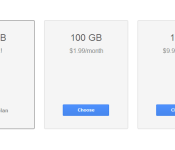
Price Drop hits Google Drive Storage, 100GB for $1.99 and 1TB For $10
Google just took a good thing and made it even better. Taking the prices for their online Google Drive storage and slashing them considerably. By default you already get 15Gb of free store from Google. That is a combined total across Drive, Gmail and Google+ Photos. If that wasn’t enough space, you had to pony up some cash for more storage. Now those prices just dropped to some extremely affordable options.
 before today 100 GB of additional storage would cost you $4.99 a month. That was a pretty acceptable price tag and one many opted for right off the bat who take a lot of photos on their devices. Now you can get the same 100 GB upgrade for just $1.99 a month. That isn’t the big one though. The big drop comes for the much larger 1TB (terrabyte) of storage. It previously set you back $49.99 a month and is now only $9.99 a month. That is a whole lot of storage for $10 a month.
If you already had one of the plans set up and scheduled for auto pay, don’t worry, Google will flop your price tag over automatically. For those of you that couldn’t justify the purchase pricing before today can head to your Google Storage Settings here, and sign up today.
You can still go larger than 1TB, as they have 10TB’s for $99.99, 20TB’s for $199.99 and 30TB’s for $299.99. Basically $10 per TB.
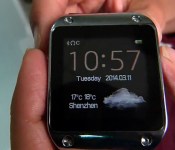
Someone (finally) made a Galaxy Gear clone

At first glance this beauty might look like the Galaxy Gear, but it’s actually the PW305. Apparently the guys at Podoor didn’t get the memo from CNN that people weren’t counterfeiting smartwatches, and made this stylish number. The company tells us that the watch is based on Linux and “performs stably and practically,” two features we’re definitely looking for in a wearable. Check out a demo video of the PW305 in all its KIRF glory after the break.
Filed under: Wearables, Mobile
Source: Podoor

Crowd-funded KickSat to carry over 100 tiny satellites into space this Sunday

It began with a Kickstarter project in 2011. This Sunday, KickSat creator Zac Manchester will see his poker chip-size satellites take flight when they launch from Cape Canaveral to an altitude of about 200 miles. More than 100 of the Sprite free-flying spacecraft will orbit the Earth as part of a technology demonstration. Each satellite includes a gyroscope, magnetometer, a Texas Instruments microcontroller, a radio, two antennas and solar cells for power. Once the Sprites are deployed from the KickSat cube sat on April 1st, the system will transmit telemetry packets that can be picked up by basic ham radio equipment back on Earth.
Eventually, individuals could purchase their own Sprite, with launch costs split between multiple owners. Since the tiny devices enter a low-altitude orbit, they’ll likely re-enter Earth’s atmosphere within a few days or weeks, eliminating the potential for space debris. The KickSat is expected to last a bit longer, burning up within a few months of launch. Check out a rendering of the deployment process in the video below.

Navigate the Colorado River from your sofa with Google Maps Street View

With spring quickly approaching (hopefully) and summer following shortly thereafter, outdoor adventures are just around the corner. In order to get mentally prepped for expedition season, Google Maps now affords users the opportunity to paddle down the Colorado River in Grand Canyon National Park thanks to Street View, without fear of being swept away by the currents. The added imagery also provides an up-close look at the Grand Canyon itself and popular spots like Deer Creek Falls, North Canyon and the Nankoweap Granaries. By adding the endangered river to Street view, the folks in Mountain View are hoping to raise awareness for the issues that plague the area. This is just the latest in Google’s Map-based tourism exploits that have recently included Monticello, Mount Fuji and even a submarine.
Filed under: Internet, Software, Google
Via: TechCrunch
Source: Google Maps
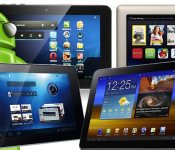
Top 7 Android Tablets In The Market Today That You Shouldn’t Miss

With so many android tablets out there, it is very easy to get dizzy and be overwhelmed with the different choices. To make things worse, if you are not tech-savvy yourself, there is a good chance that you will pick the wrong one and end up regretting your choice. For this reason, I want to help you to make the right decision by narrowing down your choice to seven. In this post, I want to share with you 7 of the top Android tablets across the globe. Of course, it is undeniable that these tablets might be a bit expensive, but hey, quality comes with a price. So if money is not an issue, check out our list and see which will best work for you!
Top 1: Google Nexus 7
On top of our list is Google’s very own Nexus 7. What else can we expect? Google owns the Android OS and so we surely would see how Google will turn its android tablet to be on top of the line. So what makes Nexus 7 2013 edition to be the king of all Android tablet? For one, it has the best screen resolution there is. Its battery life is impressive as well along with its other many features.
Top 2: Sony Xperia Tablet Z
Sony is truly an amazing brand when it comes to technological advancement and innovation. With its Xperia Tablet Z, there is no doubt that it deserves the number 2 spot in our list. I believe its waterproof casing and high durability makes it the best choice.
Top 3: Samsung Galaxy Tab 3
Run by Android 4.1 Jelly bean, Galaxy Tab 3 is by far the best series of the Samsung’s line of tab. It has a staggering 1.2GHz processor and 1GB RAM – enough to run a laptop or desktop. It has great hand grip, powerful features, and various multimedia capabilities.
Top 4: Amazon Kindle Fire
Amazon won’t be denied when it comes to the wholesale android tablets market. This tablet is perfect for watching movies because of its sophisticated Dolby audio and high screen resolution at 100% sRGB color accuracy. Personally, I believe Amazon’s Kindle Fire has the best screen resolution that even redefined the term HD.
Top 5: Asus Transformer Pad TF701T
Asus could have been a better tablet if only it’s not too bulky. Its outward design looks even more outdated. However, it is still one of the cheap Android tablets when it comes to performance. Asus Transformer Pad can be docked to a keyboard to make it look like a small netbook. Because of its fast performing processor, it can be the perfect tablet for gamers.
Top 6: Advent Vega Tegra Note 7
The best thing about Advent Vega Tegra Note 7 is its blazingly fast processor that can exponentially bring your gaming experience to a whole new level. It has good speakers too. So if you love to listen to music or watch movies with your cheap tablet, then this can be a good buy. You just have to settle with its average design and you will only rely with Wi-Fi for faster connectivity.
Top 7: Tesco Hudl
If you can’t afford an over $300 iPad, then you can get the best worth of your money with Tesco Hudl. Though it cannot be entirely considered as a wholesale android tablets, Tesco Hudl can help you gain the best features with the least price. It has a very sharp display and high memory expandability.
Conclusion
This is our top 7 list of the best of the best Android tablets available today. Because of the tough competition within this market, I am sure that every brand will do their best to wow their potential customers. To really identify the cheap android tablet for you, I would recommend that you determine your need, preference, and budget. Afterwards, explore the different options currently available to suit your criteria.

March Madness Live 2014: new apps, redesigned brackets and more social features

It’s about that time again. That time for NCAA Division I schools to battle it out on the court during the month of March, all in search of men’s basketball glory. Naturally, the NCAA, in partnership with CBS and Turner Sports, couldn’t have kicked things off without revamping its beloved March Madness Live, both on the desktop and mobile apps. For the most part, however, the streaming service remains largely unchanged — and we’d say that’s a good thing. That said, there are a few new things coming to March Madness Live this year, such as apps for Kindle Fire, Windows 8.1 and Windows Phone 8 (we’ll come back to the latter two in a bit).
Most notably, the bracket section has been redesigned across all platforms. This means you’ll now see the inclusion of team logos; and the ability to pinch to zoom within, which can either bring up info on specific games or show the entire tournament schedule, depending on your finger movement. A news section is also being added in 2014, with articles and videos emerging from the NCAA website. MML’s Senior Director Product and Operations, Hania Poole, told us how social networks were key factors to consider while everything was in development. As such, Social Arena is a huge part of the desktop and mobile experience; #MarchMadness will be used during streams to show what people are sharing on Facebook, Instagram, Twitter and Vine.
March Madness Live 2014 worked and looked great when we checked it out. Things like the freshly minted news section are a nice addition for hoops lovers to have, right alongside the live games, real-time stats, an improved Boss button and, of course, their brackets. Unfortunately, the Windows applications aren’t on par with those on iOS and Android, missing out on a number of tidbits — namely, bracket pinch-to-zoom and some social features. Video feed is present, though, so we have a hunch not too many folks will mind.
The tournament starts on the 18th of this month, and all live games will be accessible with a subscription to one of the many participating cable companies. Broadcasts by CBS, on the other hand, won’t require any sort of authentication, as has been the case in years past. You can get a better feel for March Madness Live 2014, which begins rolling out today, in the video below. And hey, let us known in the comments who you’re hoping is the last team standing come April 7th.
Daniel Orren contributed to this review.
Filed under: Home Entertainment, Internet, HD, Mobile
Source: NCAA
Apple Explores Adding a Lens Mounting System to the iPhone
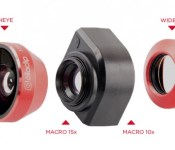
Apple’s granted patents and patent applications over the last couple of months have revealed a significant interest in camera lens systems that attach to the iPhone’s existing camera, enhancing its photo taking capabilities much like third-party lens attachment solutions from companies like Olloclip.
In a newly published patent application (via Patently Apple), Apple explores a bayonet lens attachment mechanism to fix a separate lens to an iPhone. Bayonet is a type of pin-based of lens mount that is designed to precisely align the mechanical and electrical features between a lens and a body in a traditional camera, preventing the components from rotating.
According to Apple, this attachment method is superior to other solutions such as a separate case that lenses can be mounted to or a magnetic attachment system that may not be strong enough to keep a lens attached while in motion. Apple describes both a case and a magnetic mount as “undesirable” and “unsightly.”
 Detachable lenses from third-party manufacturer Olloclip
The application explains in detail how a lens can be mounted to an iPhone or other device through a bayonet attachment, with the iPhone or other device possessing a cavity that the can attach to a lens and the bayonets being located around the aperture of the lens. It also describes quick release methods, should a device with a lens attached by dropped or otherwise damaged.
Attachment mechanisms are provided. The attachment mechanisms may be configured to couple accessory devices, such as lens devices to an electronic device. For example, a lens may be coupled to the exterior of an electronic device with first and second attachment mechanisms.
While there are a range of third-party add-on lenses for the iPhone and the iPad, none of the available solutions are able to use an attachment method as Apple describes due to the fact that such a system would have to be manufactured directly into the iPhone. Instead, they use magnets, cases, or other less than ideal attachment solutions that would be unable to compete with a native solution from Apple, should the company choose to pursue camera enhancements in the form of lens attachments.
 A drawing of Apple’s lens attachment method
Apple has also explored other attachment methods in recent years, including a magnetic lens attachment system that was detailed in a patent granted in January and a similar lens attachment system that worked with a removable back panel used to swap in different lenses, unveiled in 2012.
| |
 AIVAnet