


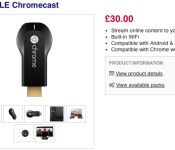
Big UK retailer lists Chromecast ahead of an official launch

Google’s Sundar Pichai said that Chromecast would be available in many more countries this month, and it now appears that this worldwide launch could be close at hand. Engadget reader Martin has noticed that big UK retail chain Currys is already listing the TV media stick, with nary an official announcement in sight. The company says it’s out of stock, but there’s a plausible £30 ($50) price tag in place. While the entry doesn’t give any clues as to when the Chromecast would reach the country, Google has less than two weeks to make good on its word — we’d reckon that the device arrives sooner rather than later.
[Thanks, Martin]
Filed under: Home Entertainment, Peripherals, HD, Google
Source: Currys
Dropbox will link business and personal accounts early next month

Good news for Dropbox users: soon, you’ll be able to switch between business and personal files without having to constantly sign in and out. The tool really only applies to those who use Dropbox for Business, as it will give them simultaneous access to corporate-controlled files and their own documents. Naturally, the ability to manage two accounts from one place will extend to your smartphone and tablet as well as the desktop.
The cloud-storage company first introduced the single-login feature in beta testing late last year, but it will officially launch on April 9th. According to The Verge, Dropbox will announce “new tools for administrators” on that date as well. Given Dropbox competitor Google Drive’s recently reduced storage rates, we wouldn’t be surprised if any pricing tweaks are announced, too. We’ll be on hand at the press event next month, so stay tuned.
Filed under: Internet
Source: The Verge
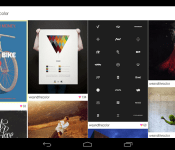
Dayframe Brings Chromecast Support for free, Prime on Sale for $0.99
Dayframe, from cloud.tv, went through some paces over the last few months. When Google pushed out the SDK for developers to launch Chromecast support into their apps, Dayframe was one of the first to go live with it. Not without some conflicts though. After having to pull it, offering the paid members the Prime access for free, bringing back Chromecast support and a few other hiccups, it finally made its way as a set feature option.When it did finally go live, it was only available to Prime (paid) members. Not anymore.
 Dayframe has pushed an update out for the app that hit late lastnight. it moved the app to version 2.3 and brings Chromecast support to everyone. That means anyone that installs this free app can have access to cast to their Chromecast devices. There will be a small logo on your screen though and a popup that will nudge you for Prime every so often.
The update also adds quite a bit of other things:
– users can now add multiple Facebook friends at a time– better support for wireless chargers (i.e. the Tylt)– now faster and easier to create playlists (as part of Prime)– slideshow got a lighter makeover– and of course: bug fixes


Next Version of iTunes Restores Local Contact and Calendar Syncing
 Apple today seeded a new version of 10.9.3 to employees (via 9to5Mac), but more importantly, the company also launched a new version of iTunes 11.1.6 beta which includes an important syncing feature that has been missing since the launch of Mavericks.
iTunes 11.1.6 “restores the ability to sync contacts and calendar information to your iPhone, iPad, or iPod touch from your Mac running OS X 10.9.3.”
Multiple users have been unhappy with their inability to sync contacts and calendar information to their iOS devices using their Macs. When iOS 7 and Mavericks were introduced, the ability was removed by Apple in favor of cloud syncing.
Apple’s Support Communities has a 212 page thread on the issue, and MacRumors has received multiple complaints since Mavericks was released.
     |

EA finally brings an offline mode to SimCity

SimCity has been surrounded by problems since its reboot last year, including having to deal with negative feedback due to the nature of its “always-on” gameplay. Now, EA’s hoping to turn some of these frowns into smiles, announcing that SimCity’s long-awaited offline mode will be available starting today. The update, after getting through its final test phase, began rolling out earlier this morning and should be at your mercy momentarily. As a result, EA says there’s going to be server down time “for a few hours,” so expect to put those city-building skills on hold for a little while. Don’t worry, it’ll be over before you know it. In the meantime, check out the video tutorial after the break.
Filed under: Gaming, Internet, HD
Via: Joystiq
Source: EA

Phosphor’s Touch Time is a smartwatch that doesn’t need a smartphone (hands-on)

When we talk about smartwatches, it’s normally devices that either work with your phone, or seek to replace them altogether. That’s not the approach taken by Phosphor, which recruited former Nike designer Stefan Andrén to craft a model that’s entirely self-contained. Of course, without a smartphone riding shotgun, the watch should have better battery life, but it also has to do the heavy lifting on its own. After raising more than $300,000 on Kickstarter, the Touch Time is clearly seeking to knock the Pebble from its perch, but will it succeed?
The biggest issue here is that the Touch Time abandons buttons in favor of gestures, and you’ll have to unlock the device with a long, bottom-to-top swipe before you begin using it. You can select from a number of pre-installed watch faces, or push across to a home screen where you can launch one of seven apps, including calculator, stopwatch and reminders. Unfortunately, this is where the dream begins to die, as the capacitive touchscreen isn’t big or sensitive enough to handle imperfect instructions. A casual swipe is frequently ignored, and it’s only long, precise movements that get you where you want to be. This, naturally, becomes a bit of a chore if you’re used to the instant gratification that comes from a smartphone touchscreen.

Then there’s the 1.3-inch 169 x 144 E Ink display itself, which only offers room for a 2 x 2 grid of icons. That’s fine when the apps are reasonably simple, but the calculator app pushes the operators to an entirely different screen, and switching between them frequently causes you to make unwanted key presses. Add in the lack of accuracy, and the process becomes even more frustrating as the unit beeps every time you make a gesture.
On the upside, Phosphor’s pedigree is in watchmaking, so the company has at least managed to get the basics right. The stainless steel case is stylish and the silicone strap is comfortable, albeit a tad too eager to pick up lint during wear. The device promises to last up to a year on a single watch battery, not to mention resist water down to depths of around 30 meters. Realistically, Phosphor has crafted something that’ll stand out in a crowded market, but not something that’ll tear you away from your Pebble. If that hasn’t deterred you, however, then you’ll be happy to know that the Touch Time is shipping from today, and will set you back $160.
Filed under: Wearables
Source: Phosphor
Firefox adds support for OS X Notification Center in latest release

Mozilla may have stopped working on the Windows 8 version of Firefox, but that doesn’t mean its standard desktop browser is getting the same treatment. Quite the contrary, actually. Today, Firefox 28 was released for Linux, Mac and Windows, with support for OS X Notification Center, volume controls for HMTL5 media playback and VP9 video decoding. There are also security fixes in tow, which, while not as exciting, are equally important. You can peek the full changelog here — in case you’re into that sort of thing.
Filed under: Internet
Source: Firefox

Moto 360 Announced by Motorola; It’s Time
 This morning we got to see what Google has been up to in regards to wearables with the announcement of the Android Wear platform. Int heir piece we saw a few videos, one for general use and one for developers. They also mentioned that they have been working with a number of manufacturers already. Now we are starting to get the flood of information about who is making what and a chance to see the individual manufacturers take. Not surprising, Motorola has one coming this summer dubbed the Moto 360.
As the name suggests, this one will have a round face and runs the new Android Wear OS/Software. The video provided by Motorola is pretty much useless in terms of what the specs are all about. It is round and will have a leather strap or metal strap option. You can also see the changes to the time aspect where Moto has created a more standard style analog watch face with multiple time locales. We snapped a few screenshots of the renders Moto has up on their landing page.

 Feel free to head over to moto360.motorola.com for an even closer look where you can see all angles of the renders with both strap options.
Source: Motorola
Via AndroidPolice
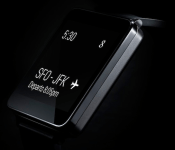
The G-Watch Announced by LG; Their First Android Wear-Powered Device
Hot on the heels, maybe even before, Motorola’s announcement of the Moto 360 is LG’s announcement for the G-Watch. Like the Moto 360, the G-Watch will be powered by Android Wear. LG goes to the more tradition smartwatch square/rectangular look vs the round approach Moto took.
 Engadget has it pegged for a Q2 launch, which is right around the corner. LG doesn’t appear to have a landing page up of any sorts though. The LG G-Watch will present a “ low barrier to entry for developers and offer the best Google experience for users.” Sounds like the G-Watch should come with a pretty competitive price point that might be a little more attractive for the masses. I have a feeling the Moto 360 is going to be more inline with the Samsung Gear pricing.
“The opportunity to work with Google on LG G Watch was the perfect chance for LG to really pull out all stops in both design and engineering,” said Dr. Jong-seok Park, president and CEO of LG Electronics Mobile Communications Company. “With the LG G Watch, LG is continuing the milestones we’ve set in wearables following in the footsteps of the world’s first 3G Touch Watch Phone in 2009 and the Prada Link in 2008. We’re confident that a well-designed device has the potential to take the smart wearable market by storm.”
What do you guys think? We still need to see what HTC, Samsung, ASUS and Fossil have up their sleeves. I have a feeling that Android Wear is going to produce quite a variety of styles, designs and price points.
Source: Engadget
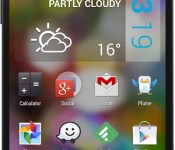
Beautiful Widgets Adds New Colored Widgets in Todays Update
LevelUp Studios has released an update to their Beautiful Widgets app today that brings it to v5.6. In the update you will find the usual bug fixes, but you will also find a new set of colored widgets to choose from along with a new color picker.


Beautiful Widgets has been around for a very long time and LevelUp has done a pretty good job at keeping updated with new features and ways to customize the look over the years. Many of you probably have the pro version of the since it has been on sale so many time. I know I still use it as my primary weather widget on all my devices.
Head to the Play Store and pick up the update, or go reinstall it if you forgot about it. The pro version will set you back $2.69 right now. You can always opt for the free version that also received the update today as well, you will just have a few in-app purchase option inside.
Beautiful Widgets Pro
Beautiful Widgets Free
 AIVAnet