


Why You Need Encryption

There is much emphasis that is placed on security, both for personal electronic data and for what is used for business purposes. As the world becomes more and more connected, the data that we use is shared more frequently and is also shared in different ways. Any time data transfers over a network, there is a risk of having it intercepted. There is also a risk of the data being compromised if it is not stored in a secure location. Encrypting your data can help to secure it. There are many companies that provide encryption software but finding the right one for your business needs is where it could get tricky.
A variety of encryption programs are available for personal and commercial use. They form an important part of the security of your data and work hand-in-hand with other security features, including antivirus software, anti-spyware and firewalls. Having everything in place before you connect to a network to transfer the data greatly reduces the risk that it will be compromised. Even if the information should happen to be intercepted while it is in transit, it is less likely to be used for nefarious reasons if it is encrypted.
Unfortunately, most people and businesses in the United States are not taking advantage of encryption software. Even the Office of the Director of National Intelligence, which oversees the National Security Agency, admits that Americans should be using encryption when they are using the Internet (Source: http://www.salon.com/2014/03/06/u_s_intelligence_officials_nevermind_us_maybe_you_need_encryption_partner/). That is an ironic statement, considering the fact that the agency has come under fire recently for accessing unencrypted traffic online and failed to tell the truth about it.
It is not only national agencies that are interested in your data, it is also individuals who would like to use the data for their own purposes. There are also times when it is necessary to encrypt data in transit because of regulatory agencies which monitor your business. As an example, businesses that handle sensitive medical information will need to ensure that it is secure in transit in order to remain compliant with HIPPA regulations. There are also regulatory agencies that monitor other businesses as well, including those that handle financial information.
Regardless of whether you are an individual or a large corporation, encrypting your data provides you with piece of mind. Although it is only part of an overall security program, it is a failsafe because it keeps the data from being accessed in the event of a security breach, because once your data is compromised, there’s no going back. A great encryption solution needs to be able to protect your data before the system even has a chance to start up! This is known as pre-boot authentication and is only available threw WinMagic. Another feature an encryption solution should have is the ability to authenticate thre a password, fingerprint sensor, smart card, or token (Source). These are just some of the different features an encryption solution should have and it’s important that you choose the right one for your business.

Hands-On with Republic Wireless and the Moto X; Surprisingly Great Setup
Republic Wireless might not be a name you have heard of, but it is a name you should pay close attention too. In the cell industry we all know the big name, Verizon, AT&T, T-Mobile and Sprint. Some have their own little pre-pad spin offs, like Sprint with Virgin Mobile and Boost Mobile. There are a number of others out there that will lease spectrum and devices from the big boys and let you stay off contract but have a chance at similar service. Republic Wireless is sort of like that, but with a twist.
 RW leases spectrum from Sprint. Meaning that everywhere Sprint is, you have service with Republic Wireless. However, not in the traditional sense. Instead of having your cell service and data service being two separate entities, RW piggy backs off Sprint’s 3G and 4G data connections to offer you calls, texts and web surfing over a data connection. Think, Voice over Internet Provider (VoIP), except on mobile it is called Mobile Virtual Network Operator (MVNO). RW expands beyond Sprint’s coverage though, it also run on Wi-Fi. Be it your home connection, your moms house or anywhere that you have access to Wi-Fi.
The three different connection types mentioned above, 3G, 4G and Wi-Fi are critical bits of information as they pertain to what sort of plan you will choose. Republic Wireless offers 4 plans based on your needs.
- The first is a $5 a month unlimited plan that will only connect and work over Wi-Fi. This would be a great way for people who spend much of their time at home, or might otherwise be immobile, who want a phone like the Moto X, but don’t need the high-cost plans associated to the larger carriers. It would also be a pretty slick community house phone.
- The second plan option is just $10 a month. This one retains the unlimited aspects on Wi-Fi, but also adds in unlimited text and calling on Sprint’s network. You will not have access to browse the web when not connected to Wi-Fi. Again, an extremely affordable solution for home bodies or even that unruly teenager.
- The third plan will set you back $25 a month. Like the previous plans you get your unlimited while on Wi-Fi, however, you also now have access to unlimited web via a 3G connection. You are limited to Sprint’s 3G speed, which usually ranges between 1.0 to 1.4 Mbps download with around 0.4 to 0.70Mbps upload. That is to be expected.
- The fourth plan is the big guns plan. Priced at $40 a month you get all you unlimited Wi-Fi but now have access to Sprint’s 4G network for your data. Typical speeds around 11 Mbps download and 4Mbps upload. You are at the mercy of what Sprint offers you in your local area for connection and speed.
Excluding the first, $5 a month plan, every other plan will offer up a hand off between Wi-Fi and Cellular data when you are coming and going. The switch is pretty quick, but there were sometimes that it took a few seconds before the conversation was picked back up. Not unusual and it is also worth noting that over the last month or so of using it I never experienced an all out dropped call during handover.
In my area, and the areas I travel the most, Sprint has pretty good coverage. There were times where I had service with my T-Mobile Xperia Z and not the Moto X and times where it was reversed. Again, not all that surprising. Republic does have a coverage check set up to see what you should be getting in the areas you will be using your device. You can toggle between 3G and 4G to see if the extra per month would even matter. I drove out to the fringes of the map in my area and still had good signal. Results are different for everyone of course, along with varying weather conditions and terrain.
The entire service is handled through a built-in app. In the app you can change your plan, change your phone number and adjust various settings like the sensitivity for when it hands off the connection to or from a Wi-Fi connection.


Where does Republic Wireless Shine?
Republic Wireless has a number of great things going for them. The monthly plans are one of the biggest. You never sign a contract and RW lets you change your plan twice a month. This is a big deal as most carriers will charge you extra to change your plan in the middle of the month, or only let you change at the beginning of your next cycle. If you happen to be home 90% of the time, like I am, I can easily see myself sporting the $10 a month plan with just calls and text when I am out and about. Most locations I go to when I am not at home have Wi-Fi anyways, but if I took a vacation or trip I could quickly open the app and toss on the 3G or 4G plan and be fine while I am gone.
When RW first started doing their thing it was with a Motorola Defy XT. While I am sure they had people sign up, it definitely wasn’t the device to really draw a crowd. The company really started to catch attention when they launched the Moto X, which is only $299 outright. They are further gaining attention with the more recent announcement that they are bringing the Moto G in April for $149. That gives the high-end users a choice and the mid-range users a choice. Covering both primary spectrum’s.
Where Republic Wireless Might Struggle
The Moto X’s big selling point is the Moto Maker. Unfortunately Republic Wireless isn’t mixed into Moto Maker. You only have white or black to choose from. I don’t think is is a HUGE issue, but a potential issue for many that would rather get a custom Moto X and spend a little more with a carrier, or other pre-paid provider, to have it.
The MVNO piggy backing on Sprint means no SIM cards. Which also means you can’t use any device you want. Even if there were SIM cards and you brought over your device, you wouldn’t be able o use it anyways because the Republic Wireless app is integrated into the software for service. Meaning, If you don’t buy their phone, you can’t connect to their service.
The integrated app that essentially is what brings you service is also something that could cause some headaches when it comes to software updates. We all know too well that carrier ‘bloatware’ is usually one of the leading causes for delayed software updates on our devices. Often times we see international devices without carrier bloat getting updates weeks, even months, before the carrier branded versions. Where they have a leg up is the fact that the Moto X is the only device they have right now. I am banking on them to be putting all their man power into making Android 4.4 available for it sooner rather than later. If Republic keeps their focus with the customer, like they have already done, and keep it going with timely software updates, then this will be a mute point. I was assured there is an update to Android 4.4 in the works, but a release time frame was unavailable.
Overall
Republic Wireless has a real shot at capturing and sustaining a good market share as is even if your only options are the Moto X and Moto G (in April). At $25 a month per line with 3G, you can have unlimited everything and that savings alone is enough for people to make the switch with confidence. I never experienced any issues with the service, and with the only alteration to it being the Republic Wireless software that is needed to make the connections, it is a small sacrifice for all that you get. Toss in the 50GB of Google Drive storage and the extremely high rated customer service and you have a real winner on your hands.
If you haven’t checked them out yet, head over to Republic Wireless’s main site and have a loo around. While you are at it, head over to the Republic Wireless G+ page and get in on the chance at a Moto G.

//<![CDATA[
ord = window.ord || Math.floor(Math.random()*1E16);
document.write('’);
//]]>
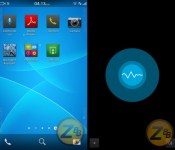
Leaks show BlackBerry working on a rival to Siri, Google Now (video)

Looks like Microsoft isn’t the only latecomer scrambling to add a voice-guided assistant to its mobile platform. A leaked test-build of the new BlackBerry firmware (version 10.3.0.140, if you’re curious) is rocking an app called “Intelligent Assistant,” but as both N4BB and a ZonaBlackBerry forum poster have noticed, it doesn’t quite work yet. The application sports a somewhat familiar circular icon for the primary UI, but, at the moment, it’s hard to tell how deep the implementation runs and what its capabilities are. Should this feature actually make it into a future update, it could be the struggling Canadian company’s answer to Android’s Google Now and iOS’ Siri. Let’s just hope the beleaguered outfit can come up with a catchier name if and when that happens. Check out the sources and video below for a look at the rest of what the flatter BB 10.3 might offer.
Filed under: Cellphones, Mobile, Blackberry
Source: ZonaBlackBerry (Spanish), N4BB

Ray-Ban and Oakley are working with Google Glass

Google only recently announced versions of its Glass headset attached to conventional specs and sunglasses (shown above), but a new partnership with Luxottica — the company behind brands including Oakley and Ray-Ban — will give it a significant boost. Described as a strategic partnership to “design, develop and distribute” Glass eyewear, the promise headsets that “that straddle the line between high-fashion, lifestyle and innovative technology.” Oakley has shown off its own heads-up display equipped goggles already, and one wonders if the two projects will merge or continue separate development. Andrea Guerra, CEO of Luxottica Group, says his company is proud to “set the pace in the eyewear industry once again,” but offers few details on how or when that will happen, with more info to be released later.
The Google Glass G+ post is a bit more revealing, highlighting Luxottica’s more than 5,000 retail locations and distribution channels that will come in handy later. Of course, those big name brands will also help Glass expand beyond the 40 or so variations offered currently in its Titanium Collection (seen in the gallery below) and make the product something people don’t want to snatch off of your face. Google’s “Captain of Moonshots” Astro Teller sees the deal as a way to push “smart eyewear” forward — although wearers may want to wait for the law to catch up.
Filed under: Wearables, Google
Source: Luxottica, Google Glass (G+)
Daily Roundup: NSA spies on Huawei, Google Now for Chrome and more!

You might say the day is never really done in consumer technology news. Your workday, however, hopefully draws to a close at some point. This is the Daily Roundup on Engadget, a quick peek back at the top headlines for the past 24 hours — all handpicked by the editors here at the site. Click on through the break, and enjoy.

NSA spied on Huawei founder’s emails to implicate him as a Communist Party insider
The New York Times managed to get a glimpse of documents suggesting that the NSA was hacking into the email account of Huawei founder, Ren Zhengfei. Apparently the government has been creating “back doors” in the company’s systems since 2009.

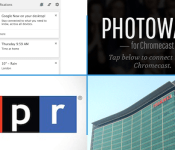
Google’s Photowall for Chromecast lets you doodle on photos, beam them to your TV
Google’s new app, called Photowall, lets Chromecast owners beam images and doodles straight to their TV. The iOS and Android apps are available now, so download away. And don’t worry WP8 users, there’s a web app too.

Google Now officially lands in Chrome
The power of Now has finally landed in Google’s Chrome. Basically, it works the same way that it does on your smartphone, though cards pop up from your OSes notification area.

iTunes Radio now streams the news, thanks to NPR
Earlier today, NPR announced that it joined iTunes Radio as the music streaming service’s first news channel. It may be the exclusive station for iDevice users at the moment, but we expect that won’t last for long.
You also might like:
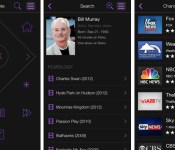
Roku’s revamped mobile apps bring content search and a fresh look

Roku’s mobile software just got a long overdue coat of fresh paint. The remote control apps for both Android and iOS now have a minimalist (and very purple) interface, as well as search that lets you track down content based on actors, directors and similar minutiae. It’s now easier to control most any Roku device on the network, too. You don’t have to use an account for most functions, and a single sign-in will automatically log in to every device linked to your credentials. There’s still no iPad-optimized app — really, Roku? — but what’s here is definitely worth grabbing from the App Store or Google Play.
Filed under: Cellphones, Home Entertainment, Software, HD, Mobile
Source: App Store, Google Play
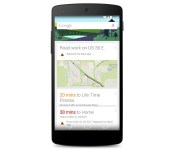
Google Search on Android now warns you when traffic grinds to a halt

Your Android phone can now warn you when traffic is likely to crawl to a standstill on the drive home. Google has updated the platform’s search app to send Google Now notifications if road work, accidents and other incidents might create major delays. The alert system won’t be as slick as having your very own traffic drone, but it should help you find an alternate route before you’re caught up in gridlock.
Filed under: Cellphones, GPS, Mobile, Google
Source: Google (Google+), Google Play

Apple Sends Email to iTunes Users Offering Refunds for Unauthorized In-App Purchases
 As a part of its consent decree with the U.S. Federal Trade Commission over in-app purchases in the App Store, Apple today sent out a mass email to some iTunes users, offering them a chance to obtain a refund by filling out a form through a special link.
Specifically, the email appears to be targeted toward users who have made recent in-app purchases, with Apple stating that unauthorized purchases “made by a minor” are eligible for a refund, with all requests required to be submitted by April 15.
Dear iTunes account owner,
Apple is committed to providing parents and kids with a great experience on the App Store. We review all app content before allowing it on our store, provide a wide range of age-appropriate content, and include parental controls in iOS to make it easy for parents to restrict or disable access to content.
We’ve heard from some customers that it was too easy for their kids to make in-app purchases. As a result, we’ve improved controls for parents so they can better manage their children’s purchases, or restrict them entirely. Additionally, we are offering refunds in certain cases.
Please follow the steps to submit a refund request:
Find your in-app purchase records. Check your email for iTunes receipts or use a computer to sign in to your iTunes account and view your Purchase History.
Use this link to submit your refund quest to Apple.
Provide the requested information and enter “Refund for in-App Purchases made by a minor” in the Details section.
Apple will review your request and contact you via email about your refund status. All refund requests must be submitted no later than April 15, 2015.
According to its agreement signed with the FTC in January, Apple will be required to provide full refunds to parents whose children purchased unauthorized in-app items, totaling $32 million in refunds. Apple also added a pop-up warning message in iOS 7.1 detailing a 15-minute window which allows users to make in-app purchases for 15 minutes without reentering a password.
     |
You can now download the Samsung Galaxy S5 firmware
With the launch of the Samsung Galaxy S5 only a few weeks away, you can now download an official firmware for the device.
The firmware is actually from the Chinese SM-G9009D Android 4.4.2 KitKat model and the build date shows March 12th, so it’s a recent build.
Having early access to the Samsung Galaxy S5 firmware means that developers can get to grips with the code for the new features found on the device and also begin porting apps to the older devices.
The Samsung Galaxy S5 firmware can be downloaded from here.
The post You can now download the Samsung Galaxy S5 firmware appeared first on AndroidGuys.
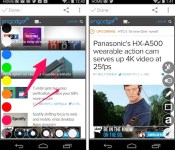
Skitch for Android gets new, finger-friendly toolbars to make mobile annotation easier

Are you a digital doodler? Odds are, then, that you’re familiar with Skitch, an annotation app from the folks at Evernote that lets users mark up PDFs, screenshots and pictures on phones and tablets. Today, the Android version of Skitch got a bit better with a revamped set of toolbars that make it easier to indulge your doodling ways. The new layout provides access to two menus at the bottom of your screen: an icon in the bottom left corner lets you choose the color and size of your scribbles, while the icon in the lower right is tapped for access to cropping, text and other tools. Tapping either expands the options along the edges of the screen, and they disappear once you’ve made a selection. It’s a pretty slick implementation, if we do say so ourselves, but you don’t have to take our word for it, first hand knowledge is just a download away.
Source: Evernote blog
 AIVAnet