


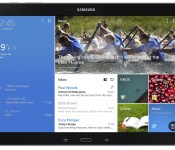
Verizon Samsung Galaxy Note Pro LTE review

Samsung has really outdone themselves in sticking to their Galaxy line’s mantra “The Next Big Thing”
With a gorgeous 12.2 inch display this device will confuse most lay-people who witness you using it in public because, ”I didn’t know they made iPads that big!”
Using the device at first is complete joy, I found myself grinning from ear to ear just in awe of the size of the thing. Aside from its weight, web browsing and reading are great. I really like the soft-touch, leather textured rubber of the back panel. On a device so big and unprecedented in the Android world, I didn’t find the TouchWiz UI to be overbearing or annoying at all, but mostly because when dealing with a totally new form-factor, it’s easy to keep an open mind.
My only real complaint about Samsung’s design choices here are the fixed capacitive buttons and home key. Although it’s nice to have the extra screen real-estate from the lack of navigation bar, the fixed buttons get in the way when holding the device in portrait mode. It feels a bit like being treated like an iOS user “You’re going to use this the way we want you to use it, and any other way is wrong.” They could redeem themselves in the next model if they added invisible navigation buttons to all four sides of the bezel and only allowing which ever side of the bezel is currently at that the bottom light up or respond to touch.
After a week or so of use, the device had lost most it’s grandeur. I all but stopped using it for pleasure and only picked it up when I had to work the go. It is the best Android-powered solution for mobile work productivity. It seems that a screen this size is the first place multi-window and split screen apps have really found a home. I am able to have Gmail and Hangouts open sharing half of the screen and Chrome working on the other half, with the small movable Swype keyboard, working was a dream, and each app had plenty of real-estate to be able appreciate all of it’s features and see all text.
I didn’t find myself reaching for the S-Pen often because Swyping is much faster for input, and for some reason the links in Chrome would tend to get confused when the S-Pen was out and stop responding to finger touches, so I was never able to get a proper taste for it.
Overall the Note Pro is great for productivity, but that’s about all. It’s fun to see apps on the bigger screen, but since displays this size aren’t common, developers haven’t yet started catering to this size. Most of the time, you’re just going to be looking at a magnified version of what you’re used to seeing on your 10.1 inch tablet.
Hardware
If you’re familiar with the 2014 Note 10.1, the hardware looks exactly the same, but larger. The top center, directly above the Samsung logo you’ll find the IR blaster, to the left are the volume rocker and power key. On the right hand side of the device the S-Pen can be removed from the top corner above the the right speaker. Then the USB 3.0 slot in the center, above a MicroSD slot and SIM slot. The bottom side is smooth and clean. The left holds only the 3.5 mm headphone jack directly opposite the S-Pen above the left speaker.
The front of the device is a black slate with the capacitive multi-tasking button to the left of the hard home key and balanced by the capacitive back button. Even thought they’re backwards, at least Samsung has taken a step in the right direction replacing the menu button with the multi-tasking key.
Software
As I said, TouchWiz doesn’t feel overbearing on this device, but mostly because you can’t be sure what to expect from such a device, so Samsung had free reign to set the bar wherever they wanted. Their stock keyboard feels great, and with the screen-size, you’ll feel like you’re actually typing on a full-sized keyboard for the first time on an Android tablet.
They didn’t try hard enough to jack up the resolution, so a icons, apps, fonts and settings all tend to feel large and toy-like. the worst offender is the notification shade in portrait mode, it takes up the entire screen like a phone.
Verizon LTE
If you read my review of the Verizon LG G Pad 8.3 LTE, you’ll recognize this, but as they are both Verizon devices, I can’t rightly publish the review without touching on the data connection!
Let’s talk about having 4G LTE on your tablet. I admit, up until I reviewed this unit, I was one of those people who preached against tablets with dedicated data lines. “Just use your phone as a hotspot!” I would say. But I have to say, having that data connection all the time has won me over. How best to do this? Numbered list!
Reasons to have a dedicated Verizon data line on your tablet
- No hotspot set-up
- Lower drain on your phone’s data plan (might even be able to save money by switching plans)
- Lower drain on your phone’s battery
- If you don’t have a Verizon phone, your tablet will get data when your phone might not.
- Verizon’s LTE speeds have improved a lot (33 Mbps down 3 Mbps up)
Basically, if you’re a tablet user, and you constantly find yourself switching on your phones hotspot, but don’t use the hotspot for much else, this could be a great alternative for you.
The Note Pro is huge, but so is the price. At $750 with a 2-year activation and $850 outright, I can’t say I would recommend this device to anyone who didn’t know for a FACT it was worth the money for them, or have a very good reason why this is the tablet they need.
The post Verizon Samsung Galaxy Note Pro LTE review appeared first on AndroidGuys.
Study finds LG the fastest growing Android brand in United States

A recent report from Kantar Worldpanel ComTech finds that LG is the fastest growing Android handset brand in the United States. The data, which was collected in a three month period ending in February 2014, shows LG has topped 8 percent market share in the United States, putting it in third place. What’s the reason for the recent growth? Probably something to do with the Nexus 4, Nexus 5, and the G2. After a string of low-tier and mid-range devices in the first few years, LG has quietly become a serious contender in the Android space.

Meanwhile, across the pond, Motorola is doing extremely well with the Moto G. Having grown from nearly zero market share to six percent, British buyers are snatching up the affordable Moto G.
The Moto G in Great Britain has attracted a very specific consumer profile. Almost half of owners are aged between 16 and 24, 83% are male and generally they come from lower income groups with 40% earning under £20,000.
The post Study finds LG the fastest growing Android brand in United States appeared first on AndroidGuys.
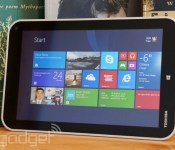
Toshiba Encore review: an 8-inch Windows tablet that struggles to stand out

Toshiba is no stranger to Windows tablets, but what we’ve seen to date has typically been targeted at businesses or has otherwise been… limited. In that sense, the Encore is something special. It’s not just the company’s first 8-inch Windows tablet — it’s the first aimed at a truly broad audience. That said, it faces stiff odds. Acer, Dell, Lenovo and others have comparable slates on the market, in many cases with similar features. Toshiba would have to do something truly out of the ordinary to stand out. And frankly, it doesn’t. While the Encore is a worthy device, you’ll have to be particularly enamored with its design to ignore its rivals. Read on to see what we mean.
Hardware
With certain exceptions, the design language of Toshiba’s mobile devices has typically been plain — a textbook example of form chasing function. That’s undoubtedly true for the Encore. Its “sunray silver” plastic back is reminiscent of the company’s lower-end Satellite laptops, and it neither feels nor looks premium — even Acer’s Iconia W4 seems upscale by comparison. The Encore makes up for this in sheer practicality. It’s comfortable to hold, and the textured back adds just enough grip that you won’t get nervous using it one-handed. The surface does a good job hiding fingerprint smudges, too. The Encore is also one of the heavier 8-inch Windows tablets we’ve seen at 0.97 pounds, although it’s not much thicker than Dell’s Venue 8 Pro, at 0.42 inches. Indeed, we had no objections to the added weight during prolonged browsing or gaming sessions.
The rest of the Encore’s design mostly checks the right boxes, delivering extras that you don’t always see on its peers. At the top, you’ll see micro-HDMI video output (not present on Lenovo’s Miix 2 or the Venue 8 Pro) alongside the usual headphone jack, a micro-USB port and one of two microphones. Meanwhile, there’s a microSD card slot on the left for extra storage, stereo speakers on the bottom, a 2-megapixel camera in the front-right corner and a sharper-than-average 8-megapixel shooter at the back. You’ll get either 32GB or 64GB of flash storage inside, much like other tablets in this class.

Toshiba could stand to improve the hardware keys. The power button and volume rocker at the upper right are easy to reach in most orientations, and they’re particularly well-suited to a portrait view. However, they’re almost flush with the body; it’s difficult to identify them purely by feel. There were a few times where we accidentally cranked the volume instead of putting the tablet to sleep. And the capacitive Start button can be frustrating — it occasionally ignores input, forcing you to either poke the key multiple times or use the on-screen task switcher. The button isn’t a dealbreaker, but we’d rather have the more conventional (and more reliable) buttons from Acer and Dell.
Display and sound

Stop us if you’ve heard this one before: The Encore has an IPS-based, 1,280 x 800 LCD screen that offers rich colors at virtually any viewing angle. Yes, Toshiba is closely following the template for screens in 8-inch Windows 8.1 tablets. And that’s mostly a good thing. It’s a delight to browse photos and videos on this device. There are a few differences that separate the Encore’s visuals from the rest of the pack, however, and they’re not all for the better. This is one of the brighter displays we’ve seen in the category, and it’s easily visible in most lighting conditions. There isn’t support for active styluses like on the Venue or ASUS’ VivoTab Note 8, though, and Acer’s optically bonded display is better at cutting out unwanted glare.
We also can’t help but wish Toshiba had sprung for a higher-resolution panel, if only because we’ve seen the difference it makes elsewhere. The 1080p screen in Lenovo’s ThinkPad 8 is noticeably sharper, let alone the greater-than-HD displays in mobile OS tablets like Apple’s iPad mini with Retina display or Samsung’s Galaxy Tab Pro 8.4. It’s not terribly likely that you’ll consider these $400-plus models if you’re looking at the much cheaper Encore, but it would be nice to see that higher-end technology filter down to lower-cost equipment.
You probably won’t be yearning for better audio quality, though. The speakers can’t replace a good set of headphones, but they’re loud enough to be heard clearly in a moderately noisy environment. Still, they’re unmistakably louder than Acer’s reedy-sounding equivalents. We didn’t detect much strain at full volume, either. We haven’t had the chance to directly compare the Encore’s output with that from the Venue 8 Pro, but having two speakers versus Dell’s one can only help with audio clarity.
Software

We’ve said it before, but it bears repeating: Windows 8.1 is virtually tailor-made for small tablets like the Encore. It lets you shrink Live Tiles to save you from scrolling, provides more thumb-friendly keyboard shortcuts and gives you quick access to the camera from the lock screen. While we can’t say that everyone will like Windows’ heavily gesture-driven interface, we felt at home before long. This is certainly the platform of choice if you want to run two apps at once, such as a chat client and a browser. You can do that with a few Android tablets, but it’s a bit more elegant here — many Windows 8 apps are designed to run side by side with others.
You’ll also have a solid (albeit not outstanding) selection of programs to choose from. Many media apps come in touch-native Windows versions, including those from the big TV networks and music-streaming services like Pandora. Some of the most tablet-savvy apps have only shown up relatively recently, such as Flipboard’s curated reading app and Nokia’s Here Maps. You won’t find some mobile titles (notably Instagram and Vine), and developers like Apple, Mozilla and Valve aren’t porting existing software to the modern Windows environment. Still, we haven’t been hurting for app choices in a while.
Having Windows 8.1 also grants access to the classic Windows desktop, which is useful if you absolutely, positively have to run a legacy app on your tablet. It’s not a panacea, mind you. As we’ve stressed before, the older interface just isn’t intended for an 8-inch screen. Many buttons and scroll bars are too tiny, and you can’t assume that your favorite release has been optimized for touch. We’d rather have the option than make do without it (as with Windows RT), but it’s best reserved for those moments when you have both a keyboard and mouse close at hand.

Toshiba has largely resisted the urge to load the Encore with extra software. There are just a handful of modern Windows apps beyond what Microsoft normally supplies, most of which are big-name titles. Amazon’s Kindle and shopping apps are here, as are BookPlace, eBay, iHeartRadio, Netflix, Symantec’s Norton security suite, Toshiba Central (for support), Toshiba TruCapture (for recording whiteboard notes), Xbox 360 SmartGlass and Zinio. The highlight on the traditional desktop is clearly the full copy of Microsoft Office Home & Student, although you will have to activate it. Besides that, you’ll only get a smattering of Toshiba support apps. It’s a very reasonable mix, although we quickly grew tired of the Norton bundle’s out-of-the-box tendency to nag about protection.
Performance and battery life
| Tablet | PCMark7 | 3DMark06 | 3DMark11 | ATTO (top disk speeds) |
|---|---|---|---|---|
| Toshiba Encore (1.33GHz Intel Atom Z3740, Intel HD graphics) | 2,479 | 2,068 | E339 / P210 | 177 MB/s (reads); 74 MB/s (writes) |
| Acer Iconia W4 (1.33GHz Intel Atom Z3740, Intel HD graphics) | 2,538 | 2,089 | E340 / P211 | 174 MB/s (reads); 70 MB/s (writes) |
| ASUS Transformer Book T100 (1.33GHz Intel Atom Z3740, Intel HD graphics) | 2,461 | 2,113 |
E338 / P209 |
123 MB/s (reads); 58 MB/s (writes) |
| Dell Venue 8 Pro (1.33GHz Intel Atom Z3740D, Intel HD graphics) | 2,343 | 1,986 |
E299 / P164 |
86 MB/s (reads); 45 MB/s (writes) |
The Encore doesn’t deviate from the script when it comes to hardware. Much like other budget Windows tablets, you’ll find both a quad-core, 1.33GHz Atom Z3740 processor and 2GB of RAM under the hood. That doesn’t sound like much, but don’t let the modest numbers fool you — the Atom chip’s Bay Trail architecture gives Toshiba’s slab plenty of power for the interface and lightweight apps. There isn’t any noticeable dip in performance when running two apps at once, for that matter.
Intensive tasks like desktop-oriented 3D games are generally off-limits. We could play Half-Life 2 well at low-to-medium detail, but BioShock Infinite just wasn’t an option. The Encore is far more adept with mobile-oriented titles like Halo: Spartan Assault, which are silky-smooth. Whatever you’re doing, you won’t scorch your lap; the Encore got warm when we pushed it hard, but nothing more.

Not surprisingly, there’s no clear performance edge over other recent entry-level Windows tablets. The Encore was largely neck and neck with its competitors in processor-focused tests, including the 416ms score we saw in the SunSpider browsing benchmark. The flash-based storage is about as speedy as it is on the Iconia W4, but we did observe a slightly pokier nine-second boot time. We won’t grouse too much about the similarity in results, since you’re still getting a pleasantly hitch-free tablet experience.
The middle-of-the-road battery life may be a tougher sell. We got eight hours and 45 minutes of runtime from the Encore while looping a video at half brightness (lower than on Acer’s tablet, to get comparable illumination), with WiFi retrieving email and social network updates. That’s better than the Miix 2 and Venue 8 Pro, but a full hour behind what Acer can manage. It’s also well below Toshiba’s official 14-hour estimate, which is based on a mixture of browsing, video and standby time. The company’s figure is realistic; we managed two days of real-world use before having to recharge. Even so, it’s proof that you need to read the fine print for official claims like these. The Encore’s battery is good, not great, under a heavy load.
| Tablet | Battery Life |
|---|---|
| Toshiba Encore | 8:45 |
| Microsoft Surface 2 | 14:22 |
| Apple iPad Air (LTE) | 13:45 |
| Nokia Lumia 2520 | 13:28 (tablet only) / 16:19 (with dock) |
| Apple iPad mini | 12:43 (WiFi) |
| Apple iPad mini with Retina display | 11:55 (LTE) |
| Apple iPad (late 2012) | 11:08 (WiFi) |
| ASUS Transformer Book T100 | 10:40 |
| Apple iPad 2 | 10:26 |
| Samsung Galaxy Note Pro 12.2 | 10:04 |
| Apple iPad (2012) | 9:52 (HSPA) / 9:37 (LTE) |
| Acer Iconia W4 | 9:50 |
| Nexus 7 (2012) | 9:49 |
| Microsoft Surface RT | 9:36 |
| Apple iPad | 9:33 |
| ASUS Transformer Prime Infinity TF700 | 9:25 |
| Acer Iconia W3 | 9:21 |
| Samsung Galaxy Tab 2 10.1 | 8:56 |
| Sony Xperia Tablet Z | 8:40 |
| Toshiba Excite Write | 8:13 |
| Galaxy Tab 2 7.0 | 7:38 |
| HP Slate 7 | 7:36 |
| Nexus 10 | 7:26 |
| Dell Venue 8 Pro | 7:19 |
| Samsung Galaxy Note 8.0 | 7:18 |
| Nexus 7 (2013) | 7:15 |
| Samsung Galaxy Tab Pro 8.4 | 7:13 |
| Samsung Galaxy Tab 3 10.1 | 6:55 |
| HP SlateBook x2 | 6:34 (tablet only) / 8:49 (keyboard dock) |
We’d add that the 8-megapixel rear camera isn’t the upgrade it appears to be over the 5MP units in the Iconia W4 and Venue 8 Pro. If anything, it’s a step backward. The Encore’s sensor produces more noise in low light than Acer’s, and blown-out scene highlights (such as bright windows) are more conspicuous. The rear camera probably won’t be a make-or-break factor in your purchase unless you’re one of the precious few people who buys a tablet with photography in mind. Even so, we’d prefer that Toshiba had focused on image quality over resolution.
Configuration options

As of this writing, you only have two choices among Encore tablets. A 32GB model will set you back $300 if you buy from Toshiba, while its 64GB sibling costs $350. If you’re a savvy shopper, you can pick up the 32GB variant for less; it currently goes for about $280 at Amazon. At any rate, we’d strongly suggest that you get the 64GB edition if you can –we were down to less than 4GB of space (out of 23GB available) on our 32GB test unit within a matter of days, and that’s without a significant media collection.
Moreover, there aren’t any major first-party accessories to speak of; we could only track down a basic snap-on case. Unlike Acer, Dell or Lenovo, there are no docks or keyboard cases to turn the Encore into a miniature workhorse. Third-party peripherals thankfully exist to pick up some of the slack, but this does mean you’ll have to search around if you’re bent on getting a keyboard or protector.
The competition

If you look at specifications alone, Toshiba’s slate does little to distinguish itself. It has the same processor, the same storage and the same underlying technology as much of its competition. It even starts at a similar official price these days (Toshiba originally charged $330).
Look closer and it gets more complicated. The Encore fares best against the Miix 2 and Venue 8 Pro, with the healthy battery life and micro-HDMI video that its rivals lack. Dell and Lenovo mostly rely on sales pricing to lure you away; it’s common to find either of their tablets selling for less than $250, making them great bargains when every dollar counts. The Venue and VivoTab Note 8 both have pen support in their favor, although ASUS’ $330 asking price hurts the VivoTab’s chances.
As you may have gathered by now, it’s Acer that gives Toshiba the real thrashing. The Iconia W4 has tangibly longer battery life, and it’s easier to find at low prices (it’s $250 at Amazon as we write this). While the Encore does have a brighter display and an easier-to-hold design, the Iconia counters these with reduced glare, better mechanical controls and a higher-quality rear camera. If the tablet industry narrowed down to just these two devices, Acer would emerge as the winner more often than not.
Don’t be quick to balk at paying $400 for a ThinkPad 8, either. It’s one of the few Windows tablets this size with a 1080p screen, and it has options for both 4G and 128GB of storage. That said, it doesn’t claim a decisive victory over the Encore. We’re in the midst of reviewing Lenovo’s tablet, and we’ve found that it has both a mediocre six-hour battery life and a scratch-prone chassis. All told, you may prefer Toshiba’s machine simply because it can take some abuse.
Wrap-up

You might think we’re down on the Encore based on the complaints littered throughout the review, but that’s not true. We genuinely enjoyed our time with it, and it’s safe to recommend if you can snag one at bargain-basement pricing. The battery life and performance are up to snuff, and there are no cavernous holes in the feature set — so long as you weren’t expecting an imaging powerhouse, anyway.
For us, the real problem is that there are few reasons to pick the Encore over something else. It’s not the best at anything, unless you’re in love with its silvery shell. If you want extended battery life, you should turn to Acer; if cost matters the most, go with Dell or Lenovo; if you like to jot down handwritten notes, choose ASUS or Dell. Toshiba has done a fine job with its first foray into 8-inch Windows tablets, but not the exceptional job it needed to rise above a sea of competitors.
Daniel Orren and Edgar Alvarez contributed to this review.

Xbox gets a new leader at Microsoft: Phil Spencer

When longtime Xbox lead Marc Whitten left for Sonos recently, Microsoft was left without an exec to lead up one of its most powerful divisions. Today, Phil Spencer is stepping in to fill that spot — not exactly a surprise given Spencer’s past role leading up the Xbox software side (specifically games). Beyond just Microsoft Studios and Xbox, Spencer says he’s, “leading the Xbox, Xbox Live, and creative teams including Xbox Music, Xbox Video and Microsoft Studios.” It also stands to reason that we’ll see a lot more of Spencer during Microsoft’s annual E3 briefing and in press interviews; what we’re trying to say is “expect to hear from him a lot more going forward.”
Not sure who Phil Spencer is? Rest assured, we’ve got more on his background below.
Phil Spencer is a longtime vet at Microsoft, with previous work going back as far as the Encarta Encyclopedia CD-ROMs. He’s been with the Xbox division in various capacities for over a decade; Spencer originally worked with the EMEA region, and eventually rose to corporate VP at Microsoft Studios. Along with Marc Whitten, Yusuf Mehdi and Phil Harrison, Spencer led the charge on launching Microsoft’s latest game console, the Xbox One. Spencer and his European counterpart, Phil Harrison, have headed up the games side of the Xbox One’s launch, though after today’s news it looks like Spencer will have a much broader spectrum of oversight.
Filed under: Gaming, Software, HD, Microsoft
Source: Microsoft (1), Microsoft (2)
Vudu’s 1080p movies and TV shows are now streaming on Chromecast

After a short test period, Walmart’s movie streaming service Vudu has launched Chromecast support across its website and mobile apps, adding to the long list of devices it’s already available on. A far cry from Vudu’s $399 set-top box that launched in 2007, owners of Google’s $35 HDMI dongle can now stream their entire collection of movies and TV shows in 1080p with just a press of the Cast button. That includes Ultraviolet digital copies, and while the code redemption process has been a source of frustration for many, Chromecast support means easy and cheap access without needing to log in, activate another device or set up an account again. In updated apps on Android or iOS the feature should already be live, and on Vudu.com if you have the Google Cast browser extension installed.

Filed under: HD, Mobile, Google
Source: iTunes, Google Play
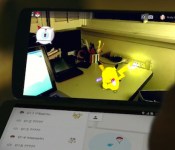
Google wants you to become a Pokémon master on April Fools

Google’s known for its weird and wonderful April fools jokes, but this year’s edition might be the best we’ve seen to date. Because it’s already April 1st in Australia and Japan, Google has introduced its “latest” build of Google Maps, laying down a “Pokémon Challenge” that requires you, a budding Pokémon Master, to discover and capture all of manner of creatures to fill up your Pokédex, simply by navigating around your local area. To start playing, make sure you have the latest version of Google Maps for iPhone or Android, hit the search bar and select “Press start.” You’ll have to be quick though, you’ve got until 2am on April 2nd to catch ‘em all.
Filed under: Cellphones, Internet, Software, Mobile, Google
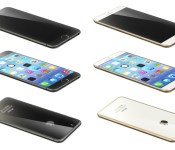
Renderings Based on Leaked Schematics Show Sapphire Glass-Backed iPhone 6 ‘Air’
Last week, Japanese magazine MacFan published alleged schematics for a 4.7-inch and 5.7-inch iPhone 6. French Apple website Nowhereelse.fr, along with graphic designer Martin Hajek, took these schematics one step further and created 3D “iPhone Air” renderings using these blueprints as a guide (Via TechCrunch).

These renderings show an ultrathin iPhone 6 that shaves at least 0.5 mm off the width of the current iPhone 5S, which measures 7.6 mm thick. The concept phone features curved edges and rounded buttons that are similar to early iPhone models. Other notable design elements include an edge-to-edge display, matte metal sides and a sapphire glass backing.
The validity of the source drawings are unknown, so these renderings may or may not be representative of the next generation phone Apple is creating. Other iPhone 6 renderings based on earlier rumors imagine the smartphone with an iPod nano-inspired design or a bezel-less, tapered form factor.
Apple is expected to unveil the next-generation iPhone sometime this Fall and may incorporate a larger display possibly made of sapphire, an improved processor and camera upgrades.
     |

T-Mobile ends employer discount for rate plans

Effective April 1, T-Mobile will end the monthly discount for customers who previously enjoyed a company discount. Some subscribers would save a small percentage on their monthly bill provided they set this up with T-Mobile and their employer. In its place, says the carrier, will be a $25 credit toward the purchase of a new device or upgrade. An announcement from the carrier late last week says this is to make things less confusing across the board.
The post T-Mobile ends employer discount for rate plans appeared first on AndroidGuys.

Measure distances and areas easily with Maps Measure [App of the Day]

Google Maps is good at a lot of things, but measuring individual distances isn’t one of them. Actually, if you want to measure a certain area or distance, it’s almost like pulling teeth.
Maps Measure aims to help with that.
This is a very simple app. Place a series of checkpoints on the map where you’d like to measure, and Maps Measure will give you the information you need at the top of your screen. You can measure the distance from place to place or measure the area of your path. It also provides map or satellite views, which are both very helpful.

And that’s all there is to it. It’s an easy way of making up for one of biggest Google Maps flaws.
I’ve used this app every day since I’ve found it. In my particular case, I run outside. I don’t have a gym membership and I’m always looking for new running paths around the neighborhood. This app has completely eliminated the chore of finding a new path.
Download Maps Measure for free from Google Play today!
The post Measure distances and areas easily with Maps Measure [App of the Day] appeared first on AndroidGuys.
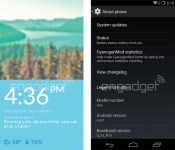
First screen grabs of Cyanogenmod 11S leak for OnePlus One

The leaks and teases for the upcoming OnePlus One smartphone continue today with a couple of screen grabs from the OS. Reported to be running Android 4.4.2-based Cyanogenmod 11S, the handset looks unlike the other versions of the custom OS experience. Perhaps that the rationale behind the little “S” at the end of the build.
What do we know from these very basic photos? Not much, unfortunately. The image to the left is said to be the lock screen and shows the time, weather, battery status, and notifications. As for the one on the right? It does tell us, however, that the device will employ software buttons and not hardware.
There’s but a few weeks to go before the OnePlus One makes its official debut so look for the leaks to continue. As a refresher, the device is expected to carry a sub-$400 sticker, feature a 5.5-inch 1080p display, and Qualcomm Snapdragon 801 processor. In other words, it could be a game changer.
The post First screen grabs of Cyanogenmod 11S leak for OnePlus One appeared first on AndroidGuys.
 AIVAnet