



Snowden says encryption and oversight are key to protecting the public from surveillance

Speaking to a packed exhibit hall through a Google Hangout, which was passed through seven proxies, Edward Snowden said the keys to protecting the public from government surveillance is encryption and civilian oversight. The world’s most famous whistleblower has said it before, but reiterated it for the SXSW crowd, that end-to-end encryption would go a long way towards protecting user data from both spying and attackers. Many current communications systems, like the aforementioned Hangout, encrypt data at either end, but companies often decrypt your information in between because it needs to harvest data in order to serve up ads. If communications are encrypted the entire time, mass surveillance of the sort that the NSA has engaged in becomes extremely difficult and prohibitively expensive. Of course, if you’re a target of the NSA, encryption won’t be able to protect you. However, breaking through those protections would require a much more targeted attack, rather than a broad collection of data.
Of course, encryption tools also need to be easier to use. Popular tools like PGP (pretty good privacy) and Tor are incredibly difficult to install and use for the less technically inclined. The ACLU’s Ben Wizner, who was moderating the conversation, said that when Tor is the best choice for the “average user” to protect themselves “we’ve failed.”
The second essential ingredient is public oversight of our spy agencies and government. He singled out Michael Hayden and Keith Alexander as having weakened America’s cyber defenses during their tenure at the NSA by shifting the agency’s priority to “offensive” operations. The focus on data collection meant has meant leaving open backdoors and spreading vulnerabilities. Networks and services have been designed with surveillance in mind under their watch, which makes these platforms vulnerable to hackers and criminals, as well as governments.
You can watch the entire conversation below.
Filed under: Internet

Vimeo On Demand celebrates first birthday, gives filmmakers money, viewers a fresh interface

Web video’s growing up before our eyes, folks. A year ago, Vimeo On Demand made its debut to help content makers get paid by content consumers (that’s you) directly, and, presumably, to help folks think of Vimeo as a purveyor of online video that’s more Netflix and less YouTube. In celebration of its first 12 months of existence, Vimeo’s making some improvements to the on demand portal’s interface and announcing plans to help fund digital filmmakers.
First off, joining the standard comedy, documentary, animation, etc. content categories, the site now has curated collections of videos that share common themes to help users discover new videos. And, there’s a new UI, inspired by brick-and-mortar stores with “well-designed shelves,” that really just makes Vimeo On Demand look more like Netflix on the web — users get rows of content categories that each scroll horizontally to show more videos within them. Vimeo’s also rolling out a My Library feature for users that keeps track of all the videos you watch, rent and buy in one place, too.
As for the folks actually making all those videos on demand? Vimeo needs them shooting quality movies, which is why its new Audience Development Program was created to distribute $10 million to digital auteurs with “distribution-ready titles.” In plain english, that means you must’ve raised more than $10,000 for your project on Kickstarter, Indiegogo or Seed & Spark, or have premiered it at a select list of film festivals in 2014 — they aren’t giving the cash away to just anybody, folks. Additionally, should your film qualify, you can look forward to marketing and promotional support from Vimeo, too. Think your next project could benefit from Vimeo’s generosity? You can apply right here.
Source: Vimeo staff blog

Akai’s Rhythm Wolf has analog drum machine and bass synth chops for $200

If you’re a fan of drum machines and synthesizers, 2014 is off to a great start, and now Akai has added a device of its own to the fray. The pro audio outfit has announced the Rhythm Wolf, an analog drum machine and bass synth module designed with classic sound machines in mind. There’s a built-in 32-step sequencer and six MPC pads to wrangle “highly tweakable” drum sounds and the bass synthesizer’s selectable oscillator and classic filter design. A “Howl” knob (because, of course) adds a custom distortion circuit and the gate trigger allows use with other gear. As you might expect, USB MIDI and MIDI input/output are built in and there are separate audio outputs for the drum machine and bass synth modules. Ready to commit? You’ll need to part with $200 when the Rhythm Wolf arrives this summer.
Filed under: Misc
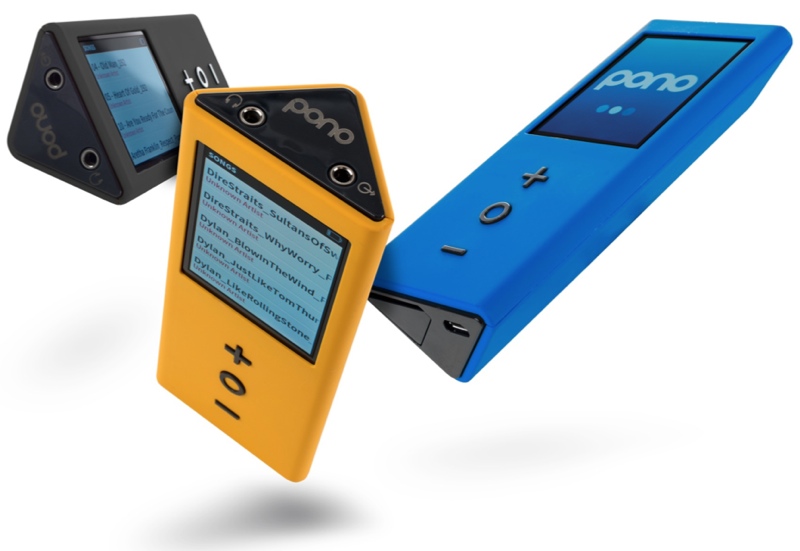
Neil Young to Debut ‘PonoPlayer’ High-Definition iPod Competitor This Week
Musician Neil Young, who has also dabbled in songwriting and directing, has been working on a competitor to Apple’s iPod for several years now, which is now close to seeing a release date.
The PonoPlayer is a $399 digital music player that is designed to offer high quality sound, beating out Apple’s iPod. The sound is described as “master-quality digital music at the highest audio fidelity possible,” which allows listeners to feel the true emotion and detail of the music, “the way the artist recorded it.”
Young initially unveiled plans for the higher-quality digital music in 2012, after he revealed in an interview with AllThingsD that he had discussed high definition music formats with former Apple CEO Steve Jobs ahead of his death. Young has been in favor of higher definition music formats for several years, but such formants require larger files, which may have held Apple back from jumping on board.
When asked if Young had approached Apple about the idea, Young said that he had, in fact, met with Jobs and was “working on it,” but that “not much” ended up happening to the pursuit.
Of note, Young made mention that Jobs was a vinyl fan, despite having helmed the company that would spearhead the way people listened to and purchased digital music.
Apple offers iTunes music in an AAC format at a quality of 256 kbps and while the company does support a lossless audio format, the files take up more space than AAC files and are not sold on the iTunes Store.
Young’s PonoPlayer works in conjunction with the yet-to-be-released PonoMusic service, which pledges to “significantly improve the way you get to hear and feel your favorite music.” The PonoPlayer itself will ship with 128GB of memory, storing from 100 to 500 high resolution albums.
As for Apple’s line of iPods, several of the devices, including the nano, the shuffle, and the classic, have gone more than three years without an update. Apple did introduce a minor color change for some of the devices, but it appears the company may be planning to phase out several models. The exception may be the iPod Touch, which was updated with a new design in 2012.
During a recent conference call, Tim Cook called the iPod a declining category for the company, which has been overtaken by more popular offerings such as the iPhone and the iPad. “All of us have known for some time that the iPod is a declining business,” he said.
The $399 PonoPlayer will be introduced to the public via a Kickstarter project that is set to go live later this week.
     |

Apple Releases iOS 7.1 With CarPlay, Touch ID Improvements, Visual Tweaks
Following a lengthy beta testing period, Apple today released iOS 7.1 to the public, marking the first major update to iOS 7 since its September release. The update includes much-needed improvements to the Touch ID fingerprint recognition system built-in to the iPhone 5s, an update for a home screen crashing issue, and it brings CarPlay support, which was first unveiled by Apple last week.
Apple has launched a new website page that shows off some of the additions to iOS 7.1.
The update also includes multiple visual tweaks, such as revamped shift and caps locks keys on the keyboard, refined icons for the Phone, FaceTime, and Messages apps, and a redesign for several aspects of the Phone dialer and shutdown screen.

Accessibility has been improved with a new “Button Shapes” option that indicates where tappable areas are located, a “Darken Colors” option, and an enhancement to Contrast allowing users to reduce iOS 7’s white point.
A multitude of minor improvements to enhance the performance of the operating system have also been bundled into the update, such as new bounce animations in Control Center, more prominent buttons in the Music app, and a new event list view within the Calendar app. Full release notes are as follows:
CarPlay
– iOS experience designed for the car
– Simply connect your iPhone to a CarPlay enabled vehicle
– Supports Phone, Music, Maps, Messages, and 3rd-party audio apps
– Control with Siri and the car’s touchscreen, knobs, and buttonsSiri
– Manually control when Siri listens by holding down the home button while you speak and releasing it when you’re done as an alternative to letting Siri automatically notice when you stop talking
– New, more natural sounding male and female voices for Mandarin Chinese, UK English, Australian English, and JapaneseiTunes Radio
– Search field above Featured Stations to easily create stations based on your favorite artist or song
– Buy albums with the tap of a button from Now Playing
– Subscribe to iTunes Match on your iPhone, iPad, or iPod touch to enjoy iTunes Radio ad-freeCalendar
– Option to display events in month view
– Country specific holidays automatically added for many countriesAccessibility
– Bold font option now includes the keyboard, calculator, and many icon glyphs
– Reduce Motion option now includes Weather, Messages, and multitasking UI animations
– New options to display button shapes, darken app colors, and reduce white pointOther
– New Camera setting to automatically enable HDR for iPhone 5s
– iCloud Keychain support in additional countries
– FaceTime call notifications are automatically cleared when you answer a call on another device
– Fixes a bug that could occasionally cause a home screen crash
– Improves Touch ID fingerprint recognition
– Improved performance for iPhone 4
– Fixes display of Mail unread badge for numbers greater than 10,000
– Continued user interface refinements
The update officially disables the evasi0n iOS 7 jailbreak, patching key kernel exploits.
iOS 7.1 was first seeded to developers back in mid-November, following the launch of iOS 7.0.4. iOS 7.1 saw five developer betas, with the last beta coming on February 4.
iOS 7.1 can be downloaded via the software update tool in the settings menu on iOS devices. Users on devices upgrading from iOS 7.0.6 are seeing file sizes of approximately 268 MB, while those upgrading from a beta are seeing larger downloads of 1.3-1.4 GB.
Apple has also launched a new update for the Apple TV.
| |

Apple TV 6.1 Software Update Makes Hiding Channels Easier [iOS Blog]
Alongside the launch of iOS 7.1, Apple today updated its Apple TV software to version 6.1, adding a much-requested feature that allows users to hide unwanted channel icons from the main screen without needing to access the Parental Controls menu. The hiding feature joins an already existing rearranging feature, letting users further customize their Apple TV home screens as the number of channels has grown significantly in recent months.

Arranging or hiding icons can be initiated by selecting an item in the main menu and then pressing and holding on the Select button of the remote control until the icon jiggles, much as how icon rearranging functions within iOS. Icons can be moved using directional buttons, with Play/Pause available for more options.

The Apple TV software was last updated to version 6.0.1 in October, following the release of the 6.0 software in September, which brought several new features including iTunes Radio and AirPlay from iCloud. Earlier this week, the Apple TV gained a new iTunes Festival channel ahead of SXSW.
Users can download the Apple TV 6.1 software through the Apple TV’s over-the-air update mechanism found in Settings –> General –-> Software Update.
| |

ZTE Boost Max review
The Boost Max aims to give users a premium phablet experience with a small price tag.
Do you remember when smartphones were upwards of $500? Some still are, like the Samsung Galaxy S4, Note 3, and the HTC One. Recently in the United States, prices of handsets have gone significantly down, allowing more and more users to purchase their phones outside of a 2-year agreement.
In turn, the phones that have a cheap off-contract price are selling like hot cakes, and more and more manufacturers are trying to join the US market. ZTE certainly doesn’t have much presence in the United States, but they’ve made a recent effort to change that with the ZTE Boost Max.
It can be found for $299 on the Sprint MVNO Boost Mobile, weighing in as one of the more expensive “premium” phones that the prepaid carrier offers.
Recently, the bar has been set pretty high for budget smartphones. The Moto G, Moto X, and Nexus 5 are prime examples of premium handsets for a very cheap price tag. Can the Boost Max rival the price of the Moto G, while offering a great phablet experience like the Galaxy Note 3? Find out in our review below.
Specs
When you first read the list of the specifications, you might not be interested, at all. But remember: this phone is relatively inexpensive, and ZTE obviously has to make money on it, so try giving them the benefit of the doubt.
With it’s 5.7-inch, 720×1280 IPS LCD display, the Boost Max houses a 1.2GHz dual core Snapdragon 400 processor, 8GB of on-board storage, and 1GB of RAM. It has an 8MP rear-facing camera, a 1MP front-facing camera, and a non-removable 3200mAh battery. It also has Bluetooth 4.0 LE, WiFi 802.11 b/g/n, and 4G LTE.
Hardware

If you’re looking for the most positive part of the phone, look here. The look and feel of this phone is well-built and beautiful. With the brushed metallic back and the matte-finished top and bottom portions, it is a really good-looking device. But don’t read too far into the metallic back of the phone – it’s only plastic. It’s easy to see why ZTE made that material decision, given the $299 price point.
The button layout on the Boost Max is a little different from what most people are used to. The power button sits on the right edge, along with a physical camera button. The left side holds a microSD card slot and the volume rockers. You’ll also find a micro USB port on the lower-left side – this makes it a bit awkward to hold while charging. This is definitely a two-handed device, so you’ll find yourself bumping into the charging cable more than you might like.

It also has capacitive navigation buttons – back, home, and… a menu button – one design aspect that we wish would just go away.
The top matted portion covering the camera snaps off to reveal a SIM card slot, while the rear portion holds a single speaker. It’s decently loud, but very tinny. When playing media without headphones, there are a few fixes for poor audio quality, due to ZTE’s custom software. (We’ll revisit this in the software section).
The display on the Boost Max could be better, but arguably not, solely because of the price tag. It has a 5.7-inch, 720×1280 IPS LCD display. Viewing angles are fine, and we weren’t able to see any pixelation anywhere on the screen. We did, however, find one major flaw – whites aren’t white – they’re very visibly off-white. Tainting almost every screen we viewed, this is the major downfall to what is otherwise a beautiful display.
Software

Probably the most unappealing part of the software is that it ships with Android 4.1.2 Jelly Bean. This is a very old build to be shipping on a smartphone that was released in January 2014. Though Boost informed users that they intend to push Android 4.4 KitKat sometime in 2014, that is a very vague description. This is one of the sacrifices we wish didn’t make it to the Boost Max.
The phone offers a near-stock Android experience, while only throwing in a few minor design changes. The homescreens and app drawer don’t stray away from the “stock” look. The only changes they made in the user interface are the lock screen, notification tray, and the quick settings. There are, of course, a huge amount of custom apps. Most of them are from Boost and can be uninstalled very easily.

ZTE also opted to throw in some surprisingly useful features. The main feature being a multi-window clone called Smart Viewer. Hold down the back button to pull up a list of apps, and drag them to one half of the screen. Smart View lets you mute one window at a time, which we found to be very useful. On the Samsung’s Multi-Window feature, only a handful of apps are compatible for some reason. On Smart Viewer, any installed app can be used.
We did experience a good amount of lag in odd places. This mainly happened while accessing Chrome, Google Search, YouTube, or Smart Viewer. Sometimes, the webpage we were trying to load would take more than a minute to fully show. The amount of lag we came across hinders the otherwise positive experience with the software.
Now, to talk about audio quality. The speaker, though very loud, has some EQ issues. It’s a bit like listening to music in a tin can, but Boost hopes to change that with their Dolby Digital Plus EQ app. We actually found this to be very useful, though a bit cumbersome. If you use it frequently, it’s easy to get the best sound possible out of the given hardware. However, if you frequently switch between podcasts and music, revisiting the app over and over to change sound modes gets old very fast.
The overall software experience was just… okay. You can tell ZTE tried, but due to the processor and other hardware slumps, it fell a bit short.
Battery Life
The battery life on this phone is tremendous. With it’s huge 3200mAh battery, we failed to drain it in an entire day. Stand by time was great, only draining 1% overnight, while connected to the Boost network. Watching hour-long HD videos on YouTube and streaming music from Spotify barely brought the battery down to 70% in a few hours. If you’re a normal-heavy multimedia consumer, you should have no qualms with the battery.
The only factor that remotely drained the battery was the the Boost network. Even though we had some trouble in this area, you should have no problem making it through much more than a day of use.
Camera

The Boost Max’s 8MP rear-facing camera is good at times, and horrible at others. There aren’t many things to nit-pick about it, considering the price. Shutter speed is normal, and focusing didn’t cause us any problems. They’re not perfect, but they’ll do.
We did have a lot of trouble with color. Colors are washed out and dull, no matter the lighting conditions. Also, the hardware shutter key isn’t a two-step button, so you’ll find yourself with a lot of blurry photos if you try to focus beforehand. We found ourselves better off just using the on-screen shutter key.
If you hope to get a decent camera on a budget phone, you could certainly do worse. But that doesn’t mean it’s particularly good, either.
Availability
If you’d like unlimited everything (minutes/messaging/data) on Boost Mobile, plans begin at $55. If you pay your bill on-time, your plan shrinks by $5 every month, until it’s as low as $35. This is definitely a good incentive to move over to Boost, but is the Boost Max good enough to keep people on the network?
Conclusion

The Boost Max tries to offer as much as it’s competitors, but ultimately falls short in some important areas. Most of our experiences can be summed up with a, “This feature is nice, but…”.
ZTE’s Smart Viewer is a great addition, adding functionality and innovation to the size of the device. But it’s buggy and slow, and that made us not want to use it. The look and feel of the device is beautiful. It has a nice weight to it, and it offers a loud speaker and a hardware camera button. But the speaker is tinny, and the camera button makes it difficult to keep your focus.
All things considered, if you’re on Boost Mobile, and absolutely have to stick with it, you could do worse than the Boost Max. It’s the best option for someone who wants a phablet experience, but doesn’t want to break the bank. If you’re in the market to purchase a new phone off-contract and you don’t mind the screen size, buy a Moto G. It has better software, hardware, and is two-thirds the price.
If the Boost Max was $200, I would recommend it immediately. It’s a bit slow, but offers a beautiful look and feel, while giving you the experience you’re looking for. But for $300, I have a difficult time recommending this one.
The post ZTE Boost Max review appeared first on AndroidGuys.
CHIL Notchbook Review and Giveaway!
The CHIL Notchbook is a quality case worth updwards of $50 but costing only half of that. The leather feels great and really has a “premium” design about it. You’ll find that it’s light, padded, and protective – three things we look for in a tablet case.
The cutout for your hand seems a bit gimmicky at first, but the more I’ve used it, the more useful it becomes. The case feels high quality and looks professional. It has a built in magnet for auto sleep/wake when the case is opened of closed.
The main complaint I have is that the frame around the screen cuts it a bit close. Performing actions from the top, sides or bottom (such as pulling down a notification shade) requires slightly more effort than without the case and the magnet that keeps the notch flap in place. Keep in mind that I’m reviewing the 2012 Nexus 7 variant of the case, so this issue may not exist for other models depending upon how each device is made. For this case in particular, when the magnet moves on or off of the back of the device it likes to trip the magnetic sensor in the tablet and shut your screen off. As you can imagine, this can be pretty frustrating when you’re trying to read.
The only other quibble is more due to the construction of the tablet, but the volume and power buttons aren’t as available as I’d like them to be. Every time I attempted to change the volume or take a screenshot I found myself fumbling around and guessing at which button I needed.
If you watch a lot of Netflix or YouTube on your device, the stand mode is really great; both simple and sturdy.
All-in-all, at the price point, I’d recommend this case to most people depending on your needs.
Win a Chil Notchbook!
Thanks to the fine people at CHIL, we also have a Notchbook case for the 2013 Nexus 7 to give away!
How to Enter: In the comments below, please tell us why you love your Android device so much.
When does this mighty fine Giveaway end? Well, you must enter this giveaway contest by Wednesday, March 12 (11:59PM PST)
Winners will be picked at random and announced in an update to this post.
What if this giveaway is over and I’m still interested in a CHIL Case? You can find out more information about purchasing a CHIL Notchbook Case for your tablet by visiting CHIL’s website. Enter “AndroidGuys” in the promo code for 15% off your purchase, which lasts until April 15.
The post CHIL Notchbook Review and Giveaway! appeared first on AndroidGuys.

Watch Edward Snowden’s SXSW virtual conversation at 12PM ET

At SXSW today, NSA whistleblower Edward Snowden will make his “first appearance front of a live audience” since he unveiled the under belly of the government surveillance program. Snowden will speak with the ACLU’s Ben Wizner and Christopher Soghoian, but as the name suggests, this is a virtual conversation and he will not be appearing in person for the festivities in Austin. The ACLU is liveblogging the entire affair here at 12PM ET and a livestream will be posted over at The Texas Tribune. If you miss out on the live coverage, the ACLU will post a video of the interview afterwords.
Update: We’ve embedded the livestream after the break.
Filed under: Internet
Source: ACLU

Bitcoin exchange Mt. Gox files for bankruptcy in the US

Just days after it sought protection in Japan, once popular Bitcoin exchange Mt. Gox has been forced to file for bankruptcy in the US in the hope of climbing out of the huge hole it’s found itself in. Still reeling from the loss of 850,000 Bitcoins (currently worth around $549 million) and debts of more than $63.6 million, the company has filed papers that will temporarily suspend US legal action against it, allowing it to work out how “weaknesses in the system” allowed the digital currency to go missing in the first place. It’s not quite the news customers were hoping for, but it’s a logical move by Mt. Gox as it will better protect investors located outside of Japan and could also open avenues for it to take on financial aid. While it continues to piece together exactly what happened, some are taking matters into their own hands. Over the weekend, hackers reportedly gained access to Mt. Gox CEO Mark Karpeles’ personal blog as well as his Tumblr and Reddit accounts, accusing the company of fraud and alleging it kept some of the Bitcoins that had been reported stolen.
[Image credit: anatacoins, Flickr]
Via: ZDNet
Source: Marketwatch
 AIVAnet