


LaCie’s ‘Little Big Disk Thunderbolt 2’ Now Available for $1299 [Mac Blog]
First introduced at CES in January, LaCie’s 1TB Little Big Disk Thunderbolt 2 drive is now available for purchase for $1,299. The Little Big Disk is one of the first external hard drives to support Intel’s Thunderbolt 2 specification, delivering transfer speeds of up to 1375 MB/s.
Little Big Disk offers two 500 GB PCIe solid state drives from Samsung in a Raid-0 configuration and is able to support mobile streaming and editing of both 4K and 3D video. It features an aluminum enclosure with a Mac Pro-style black finish along with an optimized interior design that improves cooling efficiency and reduces noise.
To achieve the full potential of Thunderbolt 2 speeds, LaCie engineered the Little Big Disk with some of the best–performing solid state drives on the market – a pair of 500 GB PCIe Gen 2 SSDs. It’s possible to push the boundaries of the technology even further by daisy chaining two LaCie Little Big Disks to achieve speeds faster than the maximum Thunderbolt 2 transfer rate. By connecting them in parallel to Apple’s powerful new Mac Pro, they can deliver speeds up to 2,600 MB/s.
Thanks to its Thunderbolt 2 ports, the Little Big Disk can be daisy chained with up to five other Little Big Disks along with a 4K display, all connected to a computer with a single cable.
The Little Big Disk is available in a 1TB SSD capacity from the LaCie online store for $1299.
     |
Listen to All of Siri’s Voices From Around the World [iOS Blog]
 Around the world, Apple’s voice-based assistant Siri has 32 voices for various languages, which have been compiled by Tes Mat, developer of the app Vocab Ninja.
Mat has created a website that offers a sample of the voice assistant saying “Luke, I am your father,” in all of Siri’s languages, ranging from Arabic to Turkish.
Each voice clip is available in both standard and enhanced quality, a higher quality version of the voice assistant that has been available since iOS 7. Though some languages, such as US English have multiple Siri voices available, the website appears to list only one voice per language.
The site has been updated for iOS 7.1, adding the newly introduced enhanced voices for Siri in Mandarin Chinese, UK English, Australian English, and Japanese. iOS 7.1 also brought new functionality for Siri, allowing users to manually control when Siri is listening to speech by holding down the home button on an iOS device.
The different voices and languages of Siri can be accessed by visiting the Vocab Ninja website.
| |

HP Spectre 13 Ultrabook review: a good deal, but with trade-offs

It’s already March, dear readers, which means with the exception of this post right here, you’re not going to find many laptop reviews on this site. Why? Because Intel’s just three months away from launching its next-generation chips and besides, we’ve reviewed most of the current-gen models anyway. But not HP’s. We haven’t reviewed a Hewlett-Packard Ultrabook in more than a year. So here we are, picking up where we left off. The company’s newest flagship, the Spectre 13, has a metal-clad body, much like the older models we’ve tested, except it steps up to an optional 2,560 x 1,440 display and an extra-wide touchpad designed to make all those Windows 8 gestures easier to pull off. It also starts at $1,000, making it a good deal cheaper than most of the other models we’ll be name-checking throughout the review. So does that make it a good deal?
Look and feel
When the Spectre 13 Ultrabook first launched late last year, a company rep told me that the laptop takes design cues from other luxury items — namely, expensive cars. As much as that sounds like marketing hooey, it turned out to be a pretty smart strategy on HP’s part: The brown lid, metal keyboard and champagne-colored chassis make the machine look… expensive. To be fair, the build quality helps too — the palm rest doesn’t flex or bend when you hold it in one hand and, thanks to a strong hinge, the screen doesn’t wobble when you touch it. I also appreciate how clean the bottom side looks, right down to the metallic accents surrounding the rubber feet. (Of course, a clean underside means the parts aren’t user-replaceable, but that’s par for the course for Ultrabooks.) Really, my only complaint is that the brushed-metal lid picks up scratches too easily, but then again, the same thing can be said of the MacBook Air.

Actually, I do have a second complaint: At 3.34 pounds, the Spectre 13 is actually on the heavy side for an Ultrabook. Case in point: The Lenovo Yoga 2 Pro and Samsung ATIV Book 9 Plus both come in at 3.06 pounds, while some models, like the Acer Aspire S7 and Sony VAIO Pro 13, come in well under the three-pound mark. All that said, it won’t break your back to put it in a bag — I even got away with using a leather tote. Also, for what it’s worth, the cut of the laptop at least makes it comfortable to hold; the wide, blunt edges leave lots of room for your fingers, and the chamfered hinge is also easy to grip. Speaking of those wide edges, the Spectre 13, as hefty as it is, does make room for a good selection of ports. These include two USB 3.0 connections, a full-sized HDMI socket, Mini DisplayPort and an SD card reader, along with the requisite headphone jack and power connector.

Though the Spectre 13 is available with a 2,560 x 1,440 display, we tested it out with the standard 1,920 x 1,080 option. Even with the lower (but not “low”) resolution, it’s still a lovely screen. The viewing angles are wide enough that I was able to watch many a Netflix movie from all sorts of angles — head-on, from off to the side, lying on the couch, dim light, fluorescent light. The Spectre 13′s display thrives in most any environment, and the colors are nice and punchy too (but don’t worry, not too punchy).
Keyboard and trackpad

The kindest thing I can say about the Spectre 13′s keyboard is that I ultimately got used to it. Well, mostly anyway. Even now, after weeks of use, I still frequently have to go back and correct a typo, because my key presses didn’t register the first time around. It’s a shame because the buttons are well-spaced and easy to find without taking my eyes off the screen. And yet, between the shallow pitch and lack of bounce, it’s quite possible you’ll find someting something you wrote has a letter or two missing.
If you’re like me, you’ll adjust your typing style over time without even really thinking about it, but even then, you’ll make some annoying mistakes. For most people, the layout here will be fine, especially since Ultrabooks by definition tend to have flat, space-saving keyboards. But if typing is of the utmost importance, you can still do better (might I suggest the new ThinkPad X1 Carbon?).

Unfortunately, I can’t be nearly as charitable about the touchpad. Which is ironic in a way, because the trackpad, with its so-called touch zones, was actually designed to reduce erroneous clicks. Here’s my problem: The main surface has way too much resistance, so that if I want to do something like scroll or pinch to zoom, I have to go out of my way to apply pressure with my fingers. I’d rather I didn’t have to think about it at all. What’s worse is that even when I do think about it, the touchpad doesn’t always respond the way I want it to; oftentimes, I either used the touchscreen to scroll through web pages, or (carefully) dragged my cursor to the arrows along the side of the screen. Not an ideal situation.
And what of those clearly marked touch zones? They do a good job of separating the “Windows 8 gesture” areas from the “regular touchpad areas,” so that you know exactly where to swipe if you want to expose the Charms bar or cycle through open apps. The thing is, most other touchpads do this just fine, even without an obvious line separating the main touch surface from the edges. Rather than solve a problem that doesn’t exist, we’d rather HP issue a driver update to ensure the touchpad works properly.
Performance
| PCMark7 | 3DMark06 | 3DMark11 | ATTO (top disk speeds) | |
|---|---|---|---|---|
| HP Spectre 13 Ultrabook (1.6GHz Core i5-4200U, Intel HD 4400) | 4,786 | 6,005 |
E1,837 / P962 / X293 |
527 MB/s (reads); 327 MB/s (writes) |
| Lenovo IdeaPad Yoga 2 Pro (1.6GHz Core i5-4200U, Intel HD 4400) | 4,676 | 5,688 |
E1,713 / P914 / X281 |
546 MB/s (reads); 139 MB/s (writes) |
| Samsung ATIV Book 9 Lite (1.4GHz “quad-core” processor, AMD Radeon HD 8250) | 2,060 | 2,814 |
E749 / P530 |
550 MB/s (reads); 139 MB/s (writes) |
| Samsung ATIV Book 9 Plus (1.6GHz Core i5-4200U, Intel HD 4400) | 4,973 | 5,611 |
E1,675 / P867 / X277 |
547 MB/s (reads); 508 MB/s (writes) |
| Acer Aspire S7-392 (1.6GHz Intel Core i5-4200U, Intel HD 4400) | 5,108 | 5,158 |
E1,724 / P952 / X298 |
975 MB/s (reads); 1.1 GB/s (writes) |
| Sony VAIO Pro 13 (1.6GHz Intel Core i5-4200U, Intel HD 4400) | 4,502 | 4,413 |
E1,177 / P636 / X203 |
1.04 GB/s (reads); 479 MB/s (writes) |
| Sony VAIO Duo 13 (1.6GHz Core i5-4200U, Intel HD 4400) | 4,440 | 6,047 |
E1,853 / P975 / X297 |
546 MB/s (reads); 139 MB/s (writes) |
| Sony VAIO Pro 11 (1.8GHz Core i7-4500U, Intel HD 4400) | 4,634 | N/A |
E1,067 / P600 / X183 |
558 MB/s (reads); 255 MB/s (writes) |
After using the Spectre 13 for weeks, I can assure you that the Spectre 13′s performance never calls attention to itself. And that’s a good thing. Throughout, as I was writing stories, streaming Netflix and Pandora, juggling browser tabs and talking in HipChat, I had no problem opening apps and switching from one program to another. The fast 10-second startup time is also easy to get used to, perhaps because almost every Ultrabook these days can cold-boot in a similar time. If anything, the biggest thing holding me back from getting work done was that flaky trackpad, but I, of course, won’t lay that at Intel’s feet.
As it turns out, too, that brisk performance wasn’t just a figment of my imagination: The Spectre 13 bests most of its Ultrabook peers, even those that have the same dual-core Core i5-4200U processor. In particular, you’ve gotta hand it to the Liteon solid-state drive, which achieves not just category-standard read speeds of 527 MB/s, but also write speeds as high as 327 MB/s. Big improvement over the SSDs in most of the other Ultrabooks we’ve tested.
|
Battery life |
|
|---|---|
| HP Spectre 13 Ultrabook | 8:30 |
| MacBook Air (13-inch, 2013) | 12:51 |
| MacBook Pro with Retina display (13-inch, 2013) | 11:18 |
| Sony VAIO Duo 13 | 9:40 |
| Samsung ATIV Book 9 Plus | 8:44 |
| Sony VAIO Pro 13 | 8:24 |
| Lenovo IdeaPad U430 Touch | 7:53 |
| Acer Aspire S7-392 | 7:33 |
| Acer Iconia W700 | 7:13 |
| Sony VAIO Pro 11 | 6:41 |
| Lenovo IdeaPad Yoga 2 Pro | 6:32 |
| Microsoft Surface Pro 2 | 6:27 |
| Lenovo IdeaPad Yoga 13 | 5:32 |
| Samsung ATIV Book 9 Lite | 4:33 |
To say the Spectre 13 has “middling” battery life would be like saying a fourth-place Olympic skier is “slow.” The truth is, with eight and half hours of continuous video playback, according to our tests, it does rank somewhere in the middle as far as new Ultrabooks go. Sure, it’s no MacBook Air, which lasts nearly 13 hours on a charge. Then again, we’ve tested a handful of other models capable of eight to 8.5 hours, so at the very least, the Spectre 13 finds itself in good company.
Besides, doesn’t eight and a half hours count as “all-day battery life” for lots of people? We think it does, especially if you expect to be near an outlet for at least part of that time. And if eight hours isn’t enough, the sad truth is that most Haswell-based Ultrabooks won’t last longer than that anyway. And most “regular” notebooks won’t last longer than an Ultrabook, at least not without the help of a secondary battery. So even if you do need more runtime, this is very nearly the best you can do.
Software
Though HP didn’t pre-load the Spectre 13 with much extra software, what’s there calls a little too much attention to itself. I’m mainly referring to McAfee LiveSafe, which constantly greets you with pop-ups when you boot up and go to the desktop for the first time. The good news? HP at least threw in a year of McAfee service, as opposed to just 30 days, so you can at least get some use out of the app for a good while after you purchase the laptop. In addition, HP also included Adobe Lightroom 5 (nice!), Box, HP Connected Music and HP Support Assistant.
Configuration options
The Spectre 13 starts at $1,000 with a dual-core Core i5-4200U processor, 4GB of RAM, a 128GB SSD, 1,920 x 1,080 display and 802.11n WiFi. Basically, then, for a thousand bucks you’re getting specs that a year ago would cost you as much as $1,400. What’s more, even the base model includes a two-year warranty — about twice the coverage you’d get on most any other consumer PC.
Of course, no one’s stopping you from spending $1,400 if you do indeed want cutting-edge components. This year, that means a dual-core Core i7-4500U processor, 8GB of RAM, 256GB of storage, a 2,560 x 1,440 screen and a faster 802.11ac wireless radio. With all the trimmings, you’re looking at a price of $1,435, not including extras like Microsoft Office.
The competition

We’ve already name-checked most of the Spectre 13′s main rivals, but it’s worth circling back to talk about what makes each of them a potentially good (or not-so-good) buy. Perhaps its most direct competitors are the Lenovo Yoga 2 Pro ($899-plus) and Samsung ATIV Book 9 Plus ($1,400 and up), both of which weigh about a quarter of a pound less and come standard with 3,200 x 1,800 screens — likely the same one, actually. If anything, the Yoga 2 Pro will win you over with its convertible design, which lets you use it as a notebook, tablet and in “Stand” or “Tent” mode, with the keyboard tucked out of the way. Our big caveat there is that the battery only lasts 6.5 hours, making it one of the shortest-running Ultrabooks we’ve tested lately. The ATIV Book 9 Plus, meanwhile, delivers almost identical battery life to the Spectre 13, but again, weighs a lot less. Point, Samsung.
Meanwhile, you might also want to check out the 2.34-pound Sony VAIO Pro 13 ($1,250-plus), the lightest laptop in its class. Despite its pin-thin frame, it manages to match the Spectre 13 in battery life. Similarly, the 2.87-pound Acer Aspire S7 ($1,350-plus) ekes out some respectable runtime, even if it’s not quite as long as the Spectre 13′s. Word to the wise, though: We’re betting that if you get the Acer Aspire S7 with a 2,560 x 1,440 display instead of the 1080p panel we tested, the battery life will probably dip.
Finally, we have two oldies. One is the Dell XPS 12 ($1,000-plus), which came out in 2012, but has since been refreshed with Haswell processors, NFC and a bigger battery. In short, we like it a lot. Finally, there’s the Toshiba Kirabook. Though it was one of the first Ultrabooks to rock a 2,560 x 1,440 display, we ultimately panned it because it launched at $1,600 with already-old processors. Now that it’s been refreshed with Haswell processors, you can surely expect longer battery life. But man, that $1,500 starting price still stings.
Wrap-up

It’s easy for us to give the Spectre 13 a good review, but that’s partly because the price is so reasonable. Were this priced in line with its peers, we’d have a harder time forgiving its flaky trackpad, sticky keyboard and relatively heavy weight. As it stands, though, it offers an attractive design, fast performance, a bright display and a generous two-year warranty, all for a relatively low $1,000. For the money, you can get used to the keyboard, and the slightly heavy design won’t kill you, either (though we still think there should be a bigger battery inside). Assuming HP can come through with a much-needed touchpad update, the Spectre 13 is a solid, if imperfect, choice.
Edgar Alvarez and Daniel Orren contributed to this review.
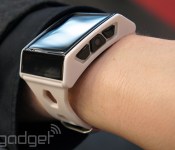
When you cram an entire smartphone into a watch, you get the Exetech XS-3

Most smartwatches act as a secondary display for your phone, but there’s a select few, like the Neptune Pine, that just want to replace it altogether. It’s in this latter category that you’ll find the chunky Exetech XS-3: a watch that stands almost two centimeters tall from your wrist. Wrapped in plastic and attached to a heavy-duty rubber strap, the hardware looks tougher than it really is. There’s no back cover other than the battery itself, which is exposed to the elements and leaves us concerned as to how sweat-resistant (let alone rain-resistant) this device will be. In any case, it’s with the internals and software that things start to get interesting, because the XS-3 comes pretty close to replicating every major function of a smartphone.
The XS-3 runs Android 4.0 on a dual-core MediaTek processor with 2GB of on-board storage, while a 3G radio lets you emulate Penny / Dick Tracy / John Sheridan (delete as appropriate). The 420mAh may be vulnerable, but it’s at least user replaceable, and beneath it you’ll find micro-SIM and microSD slots. On standby, the XS-3 will last around 18 hours, but that falls to 6-7 hours if you use it a lot throughout the day, and to just 2.5 hours if you put it to work as a GPS tracker.
Since the device is able to access Google Play, users are able to get some benefit from Google’s apps, although we doubt that too many of them will run as efficiently as you’re used to, given that the real estate is a 1.54-inch 240 x 240 capacitive LCD touchscreen.
There are two navigation buttons on each side of the bezel, and in the center on the right hand side is a dainty 2-megapixel camera for taking cheeky snaps of your friends or, you know, corporate documents you’re planning to steal. The left middle button swings away to reveal the microUSB port, which you’ll use to charge the unit, as well as connecting headphones (via an adapter). The XS-3 is currently available in black, with a white version appearing on the Italian company’s website in the very near future, priced at €350 ($485).
Sharif Sakr contributed to this report.
Filed under: Wearables, Mobile
Source: Exetech

Move over Chrome, Google Docs has add-ons now too

Power users have been tricking out Google’s Chrome browser with extensions for years, and now they can do the same with… Google Docs? Today the search giant launched an add-on store for its word processing and spreadsheet web apps so that productivity buffs can get more work done with less hassle. So far the store comes stocked with about 60 tools, ranging from the seemingly arcane (Supermetrics somehow turns Docs into a web analytics tool) to the incredibly useful (EasyBib takes the sting out of crafting those awful works cited pages). If you’re feeling particularly creative, you can start crafting a Google Docs add-on of your own too — just make sure you’ve got a nifty use-case in mind or Google will shoot it down. Neat as it is, though, the move is no surprise. Microsoft rejiggered its own web-based Office suite just last month, and courting developers could help the folks in Mountain View keep their edge in a battle that’s only going to heat up.
);
Via: TechCrunch
Source: Google

Chrome developers can now charge for themes and extensions

Google made a few changes to the Chrome Web Store today to benefit developers and make it easier for them to publish to the platform. The biggest change has to do with what’s actually sold in the store. Now, instead of just paying for apps, you might also pay for extensions or themes. If commitment isn’t your thing, subscriptions or free trials will be offered for some extensions, and the test-drive option is also available for packaged apps (read: Chrome apps that can run offline). All this is good news for developers, who starting May 1st will no longer be able to publish extensions outside of the Chrome Web Store for Windows users. It could also be great news for users. Now that developers have the opportunity to make a little cash for their work, hopefully we’ll see some even better themes and extensions headed to the store in the future.
Source: Google Developers

Android users in Canada get first dibs on Wind-Up Knight 2
 The original Wind-Up Knight by Robot Invader was a wildly successful game that everyone seemed to love immensely. The team behind the game have been hard at work to bring the sequel to light in Wind-Up Knight 2. They took everything wonderful from the first game and only made things better, so it would seem from the Play Store listing and Mobile Syrup. You still run, slash, jump, block and roll through various levels but they have upped the graphics of the title along with lots of other side things to accomplish.
Wind-Up Knight 2 pulls in Side Quests to gain replay value for levels you have already completed. For instance, playing a level and not killing anything, or finding all the hidden diamonds. There is also a Tournament Mode where you can challenge your friends on Google Play Games for top spot. Check points have also been added to help get you through those longer levels. Take a quick watch of the teaser trailer released yesterday for Wind-Up Knight 2.
It will feature in-app purchasing, but since I am in the U.S. I do not know to what extent. It would seem that the main purchasing aspect will be for gold coins that you can use to buy tickets to play Tournament Mode, purchase power-ups and various other things for your knight. Mobile Syrup says the games mechanics are set up so you can play through without needing to spend real money unless you can’t sit and grind through to earn gold coins on your own. However, there is a flat fee of $4.99 to unlock all levels of the game that is handled through an IAP as well.
Anyone in Canada want to check it out? If so, hit the snazzy banner button below and give it a whirl.

Source: Mobile Syrup

Flappy Bird Creator Reveals Why He Pulled the App, ‘Considering’ Returning Flappy Bird to App Store
When Flappy Bird creator Dong Nguyen removed his ultra popular app from the App Store back in February, he gave little explanation for the surprising decision, aside from a short message stating he could no longer take the attention.
In a new interview with Rolling Stone, Nguyen explains why he pulled the app, pointing to extensive press coverage and unwanted attention in his home town of Hanoi. While Nguyen enjoyed his early success, he was swarmed by the media after news of his monetary success was revealed. At the height of its popularity, Flappy Bird was generating upwards of $50,000 per day.

As news hit of how much money Nguyen was making, his face appeared in the Vietnamese papers and on TV, which was how his mom and dad first learned their son had made the game. The local paparazzi soon besieged his parents’ house, and he couldn’t go out unnoticed. While this might seem a small price to pay for such fame and fortune, for Nguyen the attention felt suffocating.
Even more troubling were the messages he began receiving from parents and Flappy Bird players who had become addicted to the game. One woman told him he was “distracting the children of the world,” and Nguyen worried the game was too addictive.
Another [message] laments that “13 kids at my school broke their phones because of your game, and they still play it cause it’s addicting like crack.” Nguyen tells me of e-mails from workers who had lost their jobs, a mother who had stopped talking to her kids. “At first I thought they were just joking,” he says, “but I realize they really hurt themselves.”
According to Nguyen, who had trouble in school because of his own addiction to Counter-Strike, those messages were a major reason why he opted to put an end to Flappy Bird. When asked by the interviewer why he ultimately pulled the app, he said “I’m master of my own fate. Independent thinker.”
With Flappy Bird’s removal from the App Store, hundreds of clones have popped up. While Apple initially attempted to stem the flood of Flappy Bird-style games, the game’s success has continued to tempt developers into creating clones. At the end of February, one-third of new games released over a 24-hour period ended up being games that were heavily inspired by Flappy Bird and Nguyen’s success. “People can clone the app because of its simplicity,” Nguyen said, “but they will never make another Flappy Bird.”
 Flappy Bird clones
Nguyen told Rolling Stone that removing Flappy Bird from the App Store has been a “relief,” but he is also contemplating returning the app to the App Store.
“I’m considering it,” Nguyen says. He’s not working on a new version, but if he ever releases one it will come with a “warning,” he says: “Please take a break.”
Though Flappy Bird is no longer available for download, it continues to make money for Nguyen, “generating tens of thousands of dollars.” The app’s success has led Nguyen to quit his job, and he’s considering purchasing both a Mini Cooper and an apartment as he continues to develop new games.
Rolling Stone‘s full interview with Nguyen, which is well worth reading, also includes tidbits on the development of Flappy Bird, details on Nguyen’s childhood, his game creating experience, and info on his future plans.
| |

iOS 8 – Healthbook, Improvements to Maps, Siri Enhancements, and More
The next iteration of Apple’s iOS software for mobile devices is likely coming this fall. Apple generally pre-announces details during the summer, but a handful of rumors have already given us some information about what to expect.
iOS 8 is said to be heavily focused on health, and may integrate with the iWatch, Apple’s much-rumored smart watch currently in development. The operating system will reportedly include a “Healthbook” app that pulls fitness-related information from both the M7 motion co-processor included in the iPhone 5s and sensors to be included with the iWatch.
Because iOS 7 included a complete visual overhaul of the operating system, iOS 8 is not expected to feature many design changes. Instead, Apple will likely focus on polishing existing features, possibly improving Maps and Siri, along with bolstering the functionality of Touch ID through a new mobile payments system.
| |

iOS 8 – Healthbook, Improvements to Maps, Siri Enhancements, and More
The next iteration of Apple’s iOS software for mobile devices is likely coming this fall. Apple generally pre-announces details during the summer, but a handful of rumors have already given us some information about what to expect.
iOS 8 is said to be heavily focused on health, and may integrate with the iWatch, Apple’s much-rumored smart watch currently in development. The operating system will reportedly include a “Healthbook” app that pulls fitness-related information from both the M7 motion co-processor included in the iPhone 5s and sensors to be included with the iWatch.
Because iOS 7 included a complete visual overhaul of the operating system, iOS 8 is not expected to feature many design changes. Instead, Apple will likely focus on polishing existing features, possibly improving Maps and Siri, along with bolstering the functionality of Touch ID through a new mobile payments system.
Read full roundup for more details…
| |
 AIVAnet