


Smarty Ring V2 promises scrolling display
Following the outstanding success of their first Indiegogo campaign, Smarty Ring has launched a second campaign which brags “upgrading to scrolling display.”
The rest of the Indiegogo page is pretty similar to that of the first campaign. There are a couple of contribution options. The $60 option being reserved for those who have already ordered the Smarty Ring v1.0 who would like to upgrade to the v2.0 with scrolling display. The other options are:
- $175 – Smarty Ring v1.0
- $275 – Smarty Ring v2.0
- $300 – Smarty Ring v1.0 couple
- $475 for the Smarty Ring v2.0 couple.
There’s only 7 days left in the current campaign, how high to you think we can push this one?
The post Smarty Ring V2 promises scrolling display appeared first on AndroidGuys.

Skrillex debuts noisy new album as a mobile game easter egg

When is a game not really a game? When it’s a Trojan horse for new music from Skrillex. Play the seemingly humdrum shooter Alien Ride on Android or iOS and you’ll find that it’s actually a preview for the dubstep(-ish) artist’s first full album, Recess — you can listen to the whole LP ahead of its March 18th debut. You’ll still have to rely on other music services to get your wubwubwubs a more traditional way, but the app easily beats other run-of-the-mill attempts at building up hype. Just be prepared to endure an audio assault alongside the alien kind — we doubt that the game will sway your opinion of Skrillex if you weren’t already a fan.
Filed under: Cellphones, Gaming, Mobile
Source: App Store, Google Play, Skrillex

Snoop Dogg gives us a tour of his SXSW ‘man cave’

What better way to wrap up SXSW 2014 than with a picnic with Snoop Dogg? We stepped inside Snoop’s own mini-apartment, which he designed in partnership with Airbnb, to talk about his favorite gadgets. He’s apparently a huge fan of the Avegant Glyph virtual-reality headset, though his temporary pad also includes essentials like a Samsung flat-screen and an Xbox One. One other must-have, which you won’t see in our video tour: Snoop’s special breakfast sandwich, with Texas toast, eggs, bacon, sausage, cheese and grape jelly. (It’s surprisingly good!)
Zach Honig contributed to this report.
Filed under: Misc

Flappy Bird creator ‘considering’ bringing the game back

Admit it, you played Flappy Bird. And for a brief period of time, you may have even liked the incredibly addictive game. After millions of people downloaded the viral hit, however, creator Dong Nguyen decided enough was enough — it was time to pull the plug, making it unavailable in the iOS and Android app markets. But never say never again: Nguyen revealed in an interview with Rolling Stone that there is still at least a sliver of a chance that the extremely simple game will return in a blaze of avian glory. “I’m considering it,” said Nguyen when asked if it would ever be offered again, so take that with a grain of salt; we’ll believe it when we see it. In the meantime, we bet Android users can still download an APK somewhere, and iPhone fans can always check eBay to see if somebody’s selling their phone with the game on it. As for why Nguyen pulled the app, he mentioned that the game’s massive success was crushing and weighing him down, and it threatened his simple life: “I’m a master of my own fate,” he said, “[an] independent thinker.”
Filed under: Cellphones, Tablets, Wireless, Mobile, Apple, Google
Source: Rolling Stone

Blizzard’s Free to Play ‘Hearthstone: Heroes of Warcraft’ Launches on Mac [Mac Blog]
Blizzard Entertainment’s digital card game Hearthstone: Heroes of Warcraft has publicly launched on the Mac after a brief public beta period. The free-to-play collectible card game is set in the Warcraft universe, allowing players to compete with Magic-style decks in one-on-one fights via Battle.Net — Blizzard’s online gaming platform — or against the computer.
Though it’s only launching on Mac and PC today, Blizzard has promised iPhone and iPad versions of the game as well.
The Hearthstone beta is complete and we wanted to take a moment to thank all of our participants for their incredibly valuable feedback and support. If you haven’t had the chance to jump into the game, now is the perfect time to check out the fast-paced strategy card game that’s fun for everyone. If you’re new to Hearthstone, getting started is simple: Just visit playhearthstone.com and click on the “Play Free Now” button. Once your download is finished, fire it up and click on the Hearthstone icon. Install Hearthstone, then hit the “Play” button and you’ll be on your way.
As soon as you jump in you’ll challenge iconic Warcraft characters, including the ferocious Hogger, the mischievous Millhouse Manastorm, and the wise Lorewalker Cho. As you progress through these introductory missions, you’ll hone your card-slinging skills in preparation for a climactic battle against Illidan Stormrage! You are not prepared . . . for this much fun!
System requirements are fairly generous, requiring an Intel Core 2 Duo processor, although Blizzard recommends an Intel Core i3 or better, along with an NVIDIA GeForce GT 650M or ATI Radeon HD 5670 or better graphics card.
Hearthstone: Heroes of Warcraft is a free download from Blizzard’s website.
     |
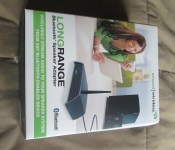
[Review] Amped Wireless Long Range Bluetooth Speaker Adapter
In the wonderful world of technology there often hundreds or products and hundreds or ways to do something. For instance, you can use Plex with a Google TV set top box to stream your videos from your PC to the living room. You can use a micro HDMI cable to connect directly to your TV. You can use a Chromecast to play your music and watch Netflix and so much more. For many people there are different needs. While all the options above are great, they all also rely heavily on you having access to a Wi-Fi and a TV that has a HDMI input. What if your use and situation is different. That is where alternate options, such as the Amped Wireless Long Range Bluetooth Receiver (BTSA1) can be a great solution.

What’s in the box
- Amped Wireless Bluetooth Receiver
- Screw on antenna
- Power cord
- Audio Cable (3.5mm to RCA)
- 2 months free unlimited Rhapsody access

 The BTSA1 long range Bluetooth speaker adapter is a small compact receiver that allows you to connect any Bluetooth enable device to any speaker system in your home or else where.
On the front you have a one touch connect button to quickly put the device into pairing mode. A flashing blue light will let you know that it is available to pair with your device.
 On the rear is where all the connections are found. On the left you have the power port for the included power supply. Then you have your typical red and white RCA audio jack outs. Next to those you have a 3.5mm line out jack and to the far right is where you attach the high gain antennae.


Depending on your need you can use the included cable to go from the 3.5mm jack to an RCA input on your home stereo system or you can reverse that and use the RCA outs and plug it into anything that accepts a 3.5mm headphone in jack.
The box is quite small measuring in at 4 x 2.75 x 1 inches (101.6 x 69.85 x 25.4 mm). Or, just a bit longer than a Bic lighter and about the same width with the antennae attached.


The Set Up
Connecting it from the 3.5mm output jack to my old school Yamaha head unit didn’t take any special work. I plugged the two RCA cables into one of the inputs and flipped the switch over. Plugged the device into an available power outlet for power and then grabbed my phone to turn Bluetooth on. Amped Wireless advertises this as a “Plug N’ Play” device, so keeping it as simple as possible is important. Once everything was connected I opened the Bluetooth menu on my device, hit the ‘connect’ button on the front of the unit and searched for available device. It only took a few seconds for it to locate the receiver and connect to it.
How does the BTSA1 perform
It is a very simple and straight forward little device. Anything you push through Bluetooth, such as Music, Movie audio, Video games, plays straight through to what ever you have it connected to. It relies on a power source to an outlet so there is no fear of a battery dying, other than you smartphone or tablets battery.
The major selling point is the long range claim. Typical Bluetooth range offers 30 feet or so. Sometimes you find yourself getting a little more distance in different environments and with different devices. I hooked the BTSA1 up behind my TV and turned on some tunes from Google Music. Then I went out the front door, down the steps and out to the street. I lost signal to the receiver just past the side walk, which is about 100 feet from the living room. The front door was closed and the street is down a pretty steep hill.

 Needless to say I was pretty impressed it went that far since they claim up to 2X more range than standard Bluetooth. I do see reviews on Amazon stating 40 to 50 feet being their best and upper level streaming skipped or stuttered.
I was able to go to the street with both my Sony Xperia Z and the Moto X without issues. I had my wife on the phone with me while I walked out so that I could hear the music and so she could tell me when it stopped. I am sure it will vary by user, by device, by placement of the BTSA1, various interference factors and too many others to even think about. I seem to have pretty good luck and must have low interference in my home.
Sound Quality
The sound quality is a tricky subject. If you are a bookshelf stereo that has a blown speaker this won’t make it sound any better. The BTSA1 does use Bluetooth 3.0 with aptX support, so if you have a decent set-up or a high-end system you will find a clear stream at 192kb, and be able to hear the quality degrade if you are streaming lower end bit rates. There was no popping or audio issues while I used it other than when I reached the end of its receiving reach. Then it would cut in and out a little as it was picking up and dropping the connection.
What I like about the BTSA1
Set up is pretty simple and really is just plug n’ play. I have used other devices that stated that and turned into quite a headache trying to get them into pairing mode or to connect. It has both RCA and a 3.5mm out port allowing you to connect it to various stereo systems. It is small and would easily travel in a bag or purse. The range was equally impressive with zero issues staying connected anywhere in side my town house.
What I didn’t like about the BTSA1
I do my best to find something that could have been done differently or that isn’t quite right in my book. There are two thing that I didn’t like about the BTSA1.
First is the proprietary power plug. The BTSA1 has a power rating of 5v 1A, so it could have easily used a micro USB input for power, much like the Chromecast. It would alleviate the possibility of losing the power supply and ultimately make it more travel friendly.

Second, there is no mounting solution on the bottom. Might seem a bit trivial, but getting it elevated would create a better dome of signal. I would have like to see your typical thumb tack hanging holes on the bottom.
Overall thoughts
I can see a good market for the BTSA1. All the super techy people out there have probably already moved on from this review because they see no point in the unit especially if they have a Chromecast, smart TV or Google set top box. While I can agree that using a Chromecast through your TV with the audio out to your home stereo receiver is pretty awesome, there are a few things to consider for the rest of the general population.
One of these would be great for the garage where you might not have a HDMI connected TV but do have your work bench and a set of speakers. It would be great for the shop, the office, a warehouse or any other less typical location that has power and some sound equipment. I personally know a few auto repair shops and framing companies that use their device connected to stereo systems with audio cables for music during their day. A BTSA1 would let them keep their phones in their pockets instead of half way across the shop. Not to mention how great it would be if you want to DJ your backyard house party from your phone or tablet.
Price always play a factor into anyone’s decision in buying anything. While the BTSA1 isn’t outlandishly expensive, it isn’t less than a Chromecast though. The Amped Wireless Long Range Bluetooth Speaker Adapter will set you back $69.99 on Amazon and their website. For the price it is worth looking into, especially if you have been searching for a solid Bluetooth connection solution for streaming audio to your stereo.
// <![CDATA[
amzn_assoc_ad_type = "product_link"; amzn_assoc_tracking_id = "wwwandcom-20"; amzn_assoc_marketplace = "amazon"; amzn_assoc_region = "US"; amzn_assoc_placement = "B00FXPL272"; amzn_assoc_asins = "B00FXPL272"; amzn_assoc_show_border = true; amzn_assoc_link_opens_in_new_window = true;
// ]]>
// <![CDATA[
// ]]>


Nexus 5 ‘Always-On’ compatible with Ok Google command
The Moto X has a great feature which allows Google Now to be triggered with a simple ‘Ok Google’ voice command, which is made possible due the device always listening for that particular phrase to be announced.
Other devices such as the Galaxy S5 can be trigged using the ‘Ok Galaxy’ voice command, but only when S Voice is actually open. It seems, however, that this background listening is not constrained to just the Moto X and is infact embedded already in the Nexus 5. A recent video shows a concept which unlocks this native compataiblty in the Nexus 5, allowing Google Now to be triggered with the simple phrase hands-free.
The concept is part of the custom OmniROM and it seems to work pretty well. Hopefully the developer can build the feature into a finalised package for deployment to the general public in order to bring true hands-free operation to the Nexus 5.
Update – It seems that the video has already been taken offline.
The post Nexus 5 ‘Always-On’ compatible with Ok Google command appeared first on AndroidGuys.

WhatsApp updated with new privacy settings and features
If there’s a messaging application we all really love and use, then I think it would be none other than WhatsApp. It was recently acquired by Facebook for a huge amount, and now the app just received its first update after the deal. First spotted by Android Police, the app now have following new features:
- New privacy settings for last seen, profile photo and status
- Add Camera shortcut for quicker picture sending
- Add ability to pay for a friend’s WhatsApp service
- Add large video thumbnails in chat
- Add option to show unread messages on home screen widget (Android 3.0+)
- Add option to share/save profile photo/group icon
- Increase message history user can send
- Fix sending flag emoji on Sony phones
- Fix voice note recording volume on Samsung Note 3 and Sony phones
- Enabled Hindi (Android 4.1+)
 The app will be upgraded to version 2.11.186 after installing the update. The most notable feature here is that WhatsApp will now allow you to pay for your friend’s subscriptions as well. The app is free to download and use for the first 12 months, and then $0.99 in-app payment required each year after that. So if you want to, you can pay for your friends, family members, or anyone else if you want to.
What are your thoughts about the new features?
The post WhatsApp updated with new privacy settings and features appeared first on AndroidGuys.
Use Bitcoins for in-app purchases with InAppCoins for Android
BitCoin has grown exponetially in its popularity and use as a virtual currency, and now a new app is launching called InAppCoins that easily integrates Bitcoin payments into mobile apps and games on Android.
In-app purchases form the freemium model for many apps, so InAppCoins has launched an SDK and web dashboard for developers who want to accept BitCoins as payments for their in-app purchases.
If you’re a developer and are interested in signing up for accepting BitCoins for your in-app purchases then you can try it out here.
The post Use Bitcoins for in-app purchases with InAppCoins for Android appeared first on AndroidGuys.
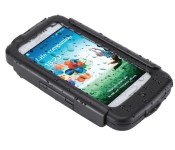
BikeConsole Power Plus for Galaxy S4 review
Don’t look now, but we’re just about out of the winter and finally into warmer weather. With the friendlier temperatures comes our favorite outdoor activities, such as biking.
I love nothing more than to toss my handset into a bag and put in some miles on the mountain bike. Very few things beat pairing some Bluetooth headphones with my smartphone and killing a few hours. The problem I run into, however, is that it’s fairly easy to deplete the battery if I’m out for more than a few hours. Between music, GPS tracking, and the occasional message, I often finish the ride with less than desirable remaining battery life.
 I found a solution that I like quite well in the BikeConsole Power Plus. Available for multiple device types, I spent time playing with the Galaxy S4 version.
In essence, this is an extended battery pack, protective carry case, and bike mount kit. Not only does it allow you to see your device, it’s also charging it while you’re out and about. And, thanks to its kickstand and cutout for headphones, it’s a handy device off of the bike as well. Bonus points are awarded for the exposed camera port which lets me pull of the Galaxy S4 and snap some photos. Just know this isn’t some sleek designer case that’s going to look sexy in public.
One of the other details I like most about the Power Plus is that it is waterproof. While the battery pack itself cannot be submerged, the case is able to take a rainstorm without breaking a sweat.
The clip-on battery pack is rated at 2800mAh which means it essentially doubles your handset’s juice. No more worry about wrapping up a ride with like 30% of your battery to get you through the rest of the day.
The whole unit comes together quite easily and feels very snug when in place. Thanks to its double locking mechanism, the phone never feels like it’s going to fall off the handlebars. I’ve really come to like the Power Plus in that it brings my phone out in front of me again. Rather than keeping it in a backpack or bag, I can see the phone and interact with it much quicker.
I shot a short video outlining the process of installation but found that the official clip told the story better.
You can purchase the BikeConsole Power Plus for your Samsung Galaxy S4 for $89.99. That price is a little steeper than I’d like, and would recommend something closer to $75 for the bundle. I’ve checked Amazon and found it listing for as low as $49.99 through various retailers. If you can get one of these for that price then I say hop all over it.
// <![CDATA[
amzn_assoc_ad_type = "product_link"; amzn_assoc_tracking_id = "agref_apps-20"; amzn_assoc_marketplace = "amazon"; amzn_assoc_region = "US"; amzn_assoc_placement = "B00E9QQRF8"; amzn_assoc_asins = "B00E9QQRF8"; amzn_assoc_show_border = true; amzn_assoc_link_opens_in_new_window = true;
// ]]>
// <![CDATA[
// ]]>
The post BikeConsole Power Plus for Galaxy S4 review appeared first on AndroidGuys.
 AIVAnet