



New Plants and Zombies added in Plants vs Zombies 2 Far Future Update
 A new update has been released for Plants vs Zombies 2. The new update brings in some FAR FUTURE levels to the mix. A total of 24 to be exact. It also mixes in 10 new zombies, such as the jetpack zombie, and 8 new plants, like the laser-bean, to re-kill them with.
The new update also adds in new Power Up tiles and increase Plant Food across the board. EA has also brought back the Zen Garden that many loved from the past too. The Zen Garden allows you to tend to your plants and earn rewards.
The new levels, plants and zombies are all available in the update of the free-to-play game. You can head to the Play Store and grab it now, or if you forgot all about PvZ2, you can hit the link below to go download the game now.

//<![CDATA[
ord = window.ord || Math.floor(Math.random()*1E16);
document.write('’);
//]]>

Lenovo ThinkPad X1 Carbon review (2014): new, but not necessarily improved

Don’t call it a business laptop. I mean, you could, but you’d be missing the point: Though the original Lenovo ThinkPad X1 Carbon was technically aimed at corporate users, it was good enough for us to recommend even to regular consumers. That was a year and a half ago, though: In the intervening months, the machine has gone without an update, save for the addition of an optional touchscreen. Finally, though, Lenovo went and refreshed it, bringing it into the modern age with fresh processors, a thinner and lighter design and an ultra-high-res 2,560 x 1,440 screen option. In addition to tweaking the original, though, Lenovo also overhauled the keyboard, adding an “adaptive panel” whose shortcuts change depending on what app you’re using (yes, that means the traditional Fn buttons are out). That potentially controversial change aside, this clearly has the makings of another winner… right?
Look and feel
With the exception of that adaptive keyboard panel, which I’ll get to in a moment, Lenovo didn’t reinvent the wheel with the new X1 Carbon. It just made that wheel even thinner and lighter than it was before. Once again, the X1 claims to be the lightest 14-inch Ultrabook on the market, with a weight of 3.15 pounds and measuring 0.72 inch thick (if for some reason you configure the machine without a touchscreen, it’ll come out to 2.8 pounds and 0.69 inch thick). That’s a marginal improvement over last year’s model, which came in at 3.25 pounds and 0.81 inch thick (make that 2.99 pounds/0.74 inch for the non-touch version). Numbers aside, then, this is more of a revision than a full-on makeover. Nonetheless, it’s still kinda neat that the new touchscreen model is now thinner than the original non-touch one.
One thing that hasn’t changed: the build quality. As ever, the notebook was built to meet the military’s MIL-STD-810G standards for toughness, with an unwavering hinge that can extend 180 degrees without breaking. Even that new adaptive keyboard is coated in Gorilla Glass, to help ward off unsightly scratches. Once again, the lid here is fashioned out of carbon fiber, though the chassis is now made from magnesium alloy. That change aside, this otherwise looks like a ThinkPad, and to a Lenovo die-hard, it’s a beautiful thing indeed. ThinkPad loyalists will love it for its clean lines, cushy keyboard and signature red TrackPoint, even if the shape is, as ever, a little boxy. Even if you’re a fresh convert to the brand, though, the craftsmanship is something to be admired. As plain as that monotone black casing might look, it’s still doing a good job of masking fingerprints, even now that I’ve been using it for several weeks. And scratches? Haven’t picked up a single one yet.

Pick up the laptop, and you’ll find all the ports on the right and left sides, with nothing around back except for a sealed SIM card tray. Over on the right, there’s a Gigabit Ethernet port (adapter required), along with a USB 3.0 port. On the left, there’s Lenovo’s unique OneLink power connector, a full-sized HDMI socket, a Mini DisplayPort, a headphone jack and a second USB 3.0 socket (last time, only one of the USB connections was 3.0). Weirdly, though, Lenovo chose to nix the SD card slot that came in the last-gen model. A shame — we thought we were past the point where Ultrabook makers pretended they couldn’t fit a memory card reader on their super-skinny machines.
As before, the X1 Carbon comes standard with a 14-inch, 1,600 x 900 panel, but whereas that used to be the only resolution option, you can now opt for a higher-res 2,560 x 1,440 panel instead. Either way, the screen has a low-glare (not-quite-matte) finish that barely reflects any light, at least not in your typical fluorescent office. Colors are good, and the viewing angles are wide — you’ll have no problem reading the screen from off to the side or with the lid dipped forward. If anything, the only flaw has to do with the fact that not enough apps are optimized for that 2,560 x 1,440 resolution — Google Chrome looks awful, for example — but then again, we’ve said the same thing about every other notebook with a higher-than-full-HD display, including the Retina display MacBook Pro.
Keyboard and trackpad

You have to hand it to Lenovo: It takes cojones chutzpah to mess around with the ThinkPad keyboard. You know, the very thing that has kept loyal fans coming back generation after generation. And yet, Lenovo has revised the keyboard a couple times now, first moving to an island-style layout, and now doing away with the physical Function buttons. What used to be a six-row keyboard is now a five-row setup, with an adaptive panel taking the place of the Fn keys.
By default, the panel shows multimedia controls — things like volume up and down, brightness and Windows 8-specific functions like search and pulling up the app menu. There are also shortcuts for Dragon Assistant (more on that later), the Windows Snipping tool and a programmable “cloud” hotkey that takes you to OneDrive or Lenovo Reach, by default.
If you go into the keyboard settings — also accessible from that default panel screen — you can select a different cloud application, as well as change the order of the various adaptive keyboard “modes.” Further, you can make it so that the “default” screen isn’t actually the default at all — if you’d rather see web browser buttons, video-conferencing tools or the traditional Fn buttons, you absolutely can. By default, the keyboard is set up so that the controls change depending on what program you’re using — a useful feature, we’d say. However, if you live and die by Fn shortcuts, you might wanna make sure they’re always visible. It’s your best bet now that the physical keys are no more. Even then, you can press a button at any time to cycle through the different modes.
All told, the adaptive panel feels like a good idea — and a well-executed one, at that. Still, the move from a six-row keyboard to a five-row one meant Lenovo had to shuffle around some key buttons, or even remove them altogether. And you know what they say about change, right? It’s damn confusing. It’s less obvious, for instance, how to take a screenshot with no PrtSc button. There’s also no Caps Lock button this time around; you’ll need to hit Shift twice instead (aren’t you glad you have us to explain these things?).
Worse, Lenovo shrunk the Backspace key and switched places with the Delete key, so that the Delete key is now in the upper-right corner, where the Backspace button usually is. So, depending on the size of your hands, you might find yourself missing the Backspace key, striking the Delete key instead. All in all, it’s still a fine keyboard, with springy buttons, ample travel and a sturdy underlying panel. We just can’t promise all of you will get used to that shrunken Backspace key.

Wrapping up, this isn’t the first time we’ve seen a ThinkPad touchpad with zero buttons — but it’s a first for the X1 Carbon, anyway. As always, the trackpad has integrated right and left buttons, but now there are also built-in touch zones to go with the TrackPoint. So, if you’ve got your finger on the red stick and want to click right or left, or do a quick-scroll down the page, you’ll need to feel around and make sure your finger hits the appropriate strike zone.
Truly, it’s not that hard, but I can see where it’d be an adjustment for folks upgrading from, say, an old T-series model. For one thing, the right and left TrackPoint buttons are both underlined in red, so you can’t miss them. Secondly, the scroll zone is marked by a row of raised dots, so it’s easy to find by sight and by feel. Most importantly, perhaps, Lenovo has done some fine-tuning so that there’s no longer a “dead zone” between touch areas. That said — and I know I’ve hinted at this already — this will be an easier transition for folks who are fairly new to the ThinkPad line.
Performance
| PCMark7 | 3DMark06 | 3DMark11 | ATTO (top disk speeds) | |
|---|---|---|---|---|
| Lenovo ThinkPad X1 Carbon (2014, 1.6GHz Core i5-4200U, Intel HD 4400) | 4,773 | 5,881 |
E1,727 / P930 / X284 |
555 MB/s (reads); 137 MB/s (writes) |
| HP Spectre 13 Ultrabook (1.6GHz Core i5-4200U, Intel HD 4400) | 4,786 | 6,005 |
E1,837 / P962 / X293 |
527 MB/s (reads); 327 MB/s (writes) |
| Lenovo IdeaPad Yoga 2 Pro (1.6GHz Core i5-4200U, Intel HD 4400) | 4,676 | 5,688 |
E1,713 / P914 / X281 |
546 MB/s (reads); 139 MB/s (writes) |
| Samsung ATIV Book 9 Lite (1.4GHz “quad-core” processor, AMD Radeon HD 8250) | 2,060 | 2,814 |
E749 / P530 |
550 MB/s (reads); 139 MB/s (writes) |
| Samsung ATIV Book 9 Plus (1.6GHz Core i5-4200U, Intel HD 4400) | 4,973 | 5,611 |
E1,675 / P867 / X277 |
547 MB/s (reads); 508 MB/s (writes) |
| Acer Aspire S7-392 (1.6GHz Intel Core i5-4200U, Intel HD 4400) | 5,108 | 5,158 |
E1,724 / P952 / X298 |
975 MB/s (reads); 1.1 GB/s (writes) |
| Sony VAIO Pro 13 (1.6GHz Intel Core i5-4200U, Intel HD 4400) | 4,502 | 4,413 |
E1,177 / P636 / X203 |
1.04 GB/s (reads); 479 MB/s (writes) |
| Sony VAIO Duo 13 (1.6GHz Core i5-4200U, Intel HD 4400) | 4,440 | 6,047 |
E1,853 / P975 / X297 |
546 MB/s (reads); 139 MB/s (writes) |
| Sony VAIO Pro 11 (1.8GHz Core i7-4500U, Intel HD 4400) | 4,634 | N/A |
E1,067 / P600 / X183 |
558 MB/s (reads); 255 MB/s (writes) |
The better laptop components get, the tougher it is to evaluate performance. I mean, is there really such a thing as “bad” performance these days, when even the most sluggish of Ultrabooks can cold-boot in 10 seconds or less? Maybe not, but there’s still an argument to be made that some models offer more speed for the money. As far as the new X1 Carbon goes, you’re looking at about the same benchmark results as other laptops with Intel’s dual-core Core i5-4200U processor. The weird thing is, even with 8GB of RAM, it merely matches some competitors that use half the memory. In fact, it actually trails those machines in some cases. Take the HP Spectre 13, for instance; it bests the X1 nearly every time, and costs about $300 less (and that’s even with the high-res screen option).
In absolute terms, though, the X1 is a good performer. Boot-up takes nine seconds, and the Samsung-made SSD reaches top write speeds of 555 megabytes per second, which is on the higher end of normal for machines that don’t have a faster PCI Express drive. (Read speeds top out around 137 MB/s, which is less impressive; the Spectre 13 makes it all the way up to 327 MB/s.) Meanwhile, our own Terrence O’Brien, who owns the 8GB configuration, says Photoshop runs well for him, even when he’s applying effects to large images. He’s also had no problem juggling Photoshop with other apps like HipChat and Chrome, complete with 17 open tabs. Through it all, he had no problem streaming a Mets game, sharing tabs in Chromecast or watching Aereo casted to his TV. The only sign that 8GB and a Haswell processor might not be enough: Adobe Premiere is still a bit slow to load, he says.
|
Battery life |
|
|---|---|
| Lenovo ThinkPad X1 Carbon (2014) | 6:18 |
| MacBook Air (13-inch, 2013) | 12:51 |
| MacBook Pro with Retina display (13-inch, 2013) | 11:18 |
| Sony VAIO Duo 13 | 9:40 |
| Samsung ATIV Book 9 Plus | 8:44 |
| HP Spectre 13 | 8:30 |
| Sony VAIO Pro 13 | 8:24 |
| Lenovo IdeaPad U430 Touch | 7:53 |
| Acer Aspire S7-392 | 7:33 |
| Acer Iconia W700 | 7:13 |
| Sony VAIO Pro 11 | 6:41 |
| Lenovo IdeaPad Yoga 2 Pro | 6:32 |
| Microsoft Surface Pro 2 | 6:27 |
| Lenovo IdeaPad Yoga 13 | 5:32 |
| Lenovo ThinkPad X1 Carbon (2013) | 5:07 |
| Lenovo ThinkPad X1 Carbon Touch (2013) | 5:00 |
| Samsung ATIV Book 9 Lite | 4:33 |
Typically, when Lenovo reps say a laptop lasts X number of hours, we’re inclined to believe them. After all, Lenovo’s product managers have been known to use Engadget’s own video looping test in their labs, so it’s not unusual for them to come up with a number that’s similar to ours. In the case of the new X1 Carbon, though, the real-world battery life falls far short of Lenovo’s claims. In particular, the company is promising up to 8.6 hours of runtime, but we managed just six hours and 18 minutes — the worst showing for any Haswell Ultrabook we’ve tested.
Granted, the last-gen X1 Carbon got around five hours, which means this year’s model delivers more than a 20 percent improvement — not an insignificant difference. Also, the X1 Carbon uses a quick-charging technology that allows it to rebound to 80 percent capacity in under an hour. Still, all that said, a six-hour runtime is pretty disappointing when other skinny machines can last seven, eight, nine (even 13) hours on a charge.
Software and warranty

We normally give the software section in laptop reviews fairly short shrift, reporting back on all the bundled apps and how annoying some of them are. In this case, though, we’ll go into a little more detail, as the X1 Carbon comes with an app we haven’t used yet: Nuance’s Dragon Assistant, the latest version of which was unveiled just a couple months ago. In brief, it’s a desktop app that you can use to dictate emails and documents, search the web, control playlists, turn the computer on and off, adjust system settings and post to social media sites like Twitter and Facebook. In particular, version 3.0 is more conversational than previous iterations, so that if you ask, say, “Who wrote Her?” you can follow up with phrases like “What else did he write?” (And by “he,” of course, I mean Spike Jonze, but I trust Dragon is smart enough to tell you that.)
For now, at least, the only supported language is English, though you have some choices when it comes to calibrating your voice: You can tell the app you don’t have a strong accent, or that you speak with a Chinese or Indian accent (everybody else can select the “other accents” option). You can personalize the experience even further by specifying your gender, but you don’t have to. In my tests, the program pronounced my name correctly on the first try (plenty of people call me “Dawn” or “Donna”), and it fared just fine with my male colleagues too. I also aced the initial sound test: The program measures your levels in the setup process, but I found even without any fine-tuning, I had no problem getting into the optimal volume range.

With the exception of Norton Internet Security, which goes a little overboard with the subscription-renewal pop-ups, the software load here is fairly minimal. In addition to that security trial, you get “Metro” versions of Skitch Touch, Evernote Touch, AccuWeather.com, Amazon’s Kindle reader, Hightail (formerly YouSendIt), Zinio’s magazine store and the music-streaming service rara.com. Meanwhile, Lenovo threw in some apps of its own, including Lenovo Settings and Lenovo Support (they are what they sound like) and Reach, which is a cloud service.
As for warranty service, the ThinkPad X1 Carbon starts with one year of coverage, though you can extend it to up to four if you like. Starting with that optional second year of service, you can also add accidental damage protection as well as on-site service (by default, you have to send it in to a depot).
Configuration options
The new ThinkPad X1 Carbon starts at $1,259 with a Core i5 processor, 4GB of RAM, a 128GB SSD and a 1080p display. If you want that super-sharp 2,560 x 1,440 panel, the starting price is $1,359. It’s important to note, too, that the $1,259 model actually comes with a non-touch panel. If you do want a touchscreen — and don’t we all at this point? — you’ll have to pay an extra $150. Ouch.
Aside from the higher-res display option, you can also opt for a slightly faster Core i5 processor than the one that comes standard (that’ll cost you an extra $100). There’s also a Core i7 CPU available for an extra $270. Additionally, you can go up to 8GB of RAM ($130) or get up to 512GB of storage (premium SSD options start at $100, but go up to $450 in the case of the 512GB drive).
The competition
If it sounds like I’m holding the X1 Carbon to a high standard (and I am), it’s because it has tons of competition. Even if you decided you didn’t want a convertible machine like the Dell XPS 12 ($1,000 and up) or Lenovo’s own Yoga 2 Pro ($999-plus), you’d have a tough choice among just the traditional clamshell-style Ultrabooks. At the moment, our favorites include the Samsung ATIV Book 9 Plus ($1,400 and up) and Acer Aspire S7-392 ($1,350-plus), both of which can be had with super-high-res displays, similar to the X1 Carbon’s. Also, the HP Spectre 13 is a pretty good deal considering the relatively low thousand-dollar starting price. Generally speaking, the X1 Carbon has a better keyboard and trackpad than most, with a more durable (it not necessarily prettier) design. On the other hand, the performance and display are merely on par with the competition, whereas the battery life is worst-in-class.
Wrap-up

On paper, the new X1 Carbon is an improvement over the original (which we liked!) in nearly every respect: It’s thinner and lighter, and has a sharper screen, fresh processors and longer battery life. The problem is, the X1 Carbon, like many things in life, isn’t just the sum of its parts — it’s actually slightly less than that. The adaptive keyboard panel, though useful, comes at the expense of an unfamiliar layout, and for some, those context-aware function keys won’t even be worth it. With this redesign, the X1 Carbon has also lost its SD reader — not a dealbreaker, per se, but an annoyance for many. Worse, though the battery life is indeed longer than it used to be, it trails the competition by a wide margin, making it the shortest-lasting laptop in its class. Finally, this thing is expensive: even with a starting price of $1,259, the touchscreen still costs $150 extra.
If you’re a ThinkPad die-hard, you might still consider the X1 Carbon for its durable build and (mostly) satisfying keyboard. But for everybody else — folks who are indifferent to the Lenovo brand –it’s tough to get excited about this when there are so many other well-rounded options to choose from.
Terrence O’Brien, Edgar Alvarez and Daniel Orren contributed to this review.

San Francisco Giants (and most of MLB) adopt Apple’s iBeacon for an enhanced ballpark experience

“It’s kind of a no-brainer.” That’s what the San Francisco Giants’ Chief Information Officer, Bill Schlough, said when asked why the team is implementing Apple’s iBeacon technology this season.
For the uninitiated, iBeacon is a small Apple device that communicates with iPhones through Bluetooth to expand the location services in iOS. In practice, it’s a marketing tool that lets apps know when you approach or leave the presence of an iBeacon. This is the first season that pro baseball is implementing the technology with 20 of the 30 Major League Baseball teams participating, though retailers have been using it since last year.
For the Giants, the technology is another way to better engage with fans. “Mobile and digital experiences are paramount to our fan experience,” according to Schlough, “and they have played a role in the fact that we’ve had 246 straight sellouts.” (Winning two World Series in the past five years probably doesn’t hurt ticket sales, either.)
The Giants have long been one of the most technologically progressive organizations in baseball. Fans first enjoyed in-stadium cell coverage in the early 2000s, and in 2004 the club became the first in professional sports to turn its stadium into a WiFi hotspot. Currently, there are 1,289 WiFi antennas blanketing AT&T Park with connectivity good enough to stream video to thousands of fans. Plus, during the offseason, when the Giants installed the iBeacons (it only took a day to do it), Schlough’s team put in an entirely new LTE backhaul system to deliver more mobile bandwidth to ticket holders.
All told, 19 iBeacons are located at all of the fan entry and exit points of the ballpark, per MLB policy. That number will vary at other stadiums — the Dodgers, for example, are reported to have 65 installed, presumably due to the presence of more ways to get inside Dodger Stadium. They’ll be used to check fans in (think Foursquare) upon entry, assuming they have an iOS 7 device running the MLB At the Ballpark app and have Bluetooth turned on when they walk through the gate. The app’s available to both iOS and Android devices — and provides maps, concession info, video clips and the ability to upgrade your seat — but only folks with Apple devices benefit from the bespoke iBeacon experience.

Once checked in, teams can push tailor-made notifications and relevant offers through the app. Fans need not fear that they’ll be bombarded with junk, though, as MLB is soft-launching the technology as a pilot on Opening Day, and there are restrictions on its use… at first, at least. “We don’t want to turn this into some sort of SPAM engine,” says Schlough. So, the club’mms exploring new and creative ways to use the devices to improve, not take away from the gameday experience. Of course, users can always opt-out of the program altogether, too.
Generally speaking, iBeacon strategy is controlled by MLB: the league tells teams where to place the hardware and what sorts of stuff can be sent to folks who check in using the technology. For now, that means fans get a welcome message when they check in, and maybe an offer to upgrade their seat or get a discount on concessions. Schlough wouldn’t tell us exactly what kind of offers the Giants will be making, but he did say that he’s particularly excited about geo-targeting. “It opens up a world of possibilities,” he says, indicating that iBeacons could enable the club to send notifications about activities happening nearby (not everyone sits and watches the game from their seat) or target offers for specific parts of the park.
The expectation is that MLB will let clubs “get more creative” once iBeacon has proven stable and useful for fans. Naturally, the Giants don’t know when that’ll be, but the team will have things ready to go whenever the league office gives the go-ahead. Until then, Schlough’s biding his time and figuring out how to best use iBeacon to service one of the most tech-savvy fan bases in the bigs.
[Lead image credit: Jeff Chiu,AP]
Filed under: Cellphones, Software, Apple

Nokia Lumia 630 spotted in the wild running Windows Phone 8.1

If you’ve wanted to know what Nokia’s entry-level Lumia 630 looks like in real life, today is your lucky day. Both a Coolxap video (below) and a handful of photos from @Umit have shown off the smartphone in all its Windows Phone 8.1-based glory, including the on-screen navigation, Action Center and the updated camera interface. Previous rumors have suggested that the 630 will be relatively powerful for a low-end device with a 4.5-inch (albeit 800 x 480) display, a quad-core Snapdragon 400 processor and 1GB of RAM. Don’t get too attached to the way the phone looks in these images, though. The 630 in the still pictures is likely using a protective case or prototype shell, and we wouldn’t count on the video reflecting the final design, either. With that said, the new media may represent our best clue yet as to what Nokia might reveal at its event next week.
Filed under: Cellphones, Mobile, Nokia
Source: Youku, Coolxap (translated), Nowhereelse.fr (translated)

Visiting the concept restaurant of the future: iBeacons, motion detection and smartglass service (video)

An invitation to see a “future restaurant” covered in highfalutin tech concepts was shaping up to be a highlight of our week. According to Recruit Advanced Technology Lab’s teaser, it was going to encompass smartglasses, augmented reality, gesture interfaces, customer face identification, avatars, seamless wireless payments and more, all hosted at Eggcellent, a Tokyo restaurant that… specializes in egg cuisine.
The demonstrations might not have reached the polished levels of the dreamy intro video, but the concept restaurant at least attempted to keep all of its demos grounded in reality. iBeacons through Bluetooth for food orders and payments, iPads that interacted with a conveyor-belt order projection, Wii Remotes that transform normal TVs into interactive ones and a Kinect sensor to upgrade Japan’s maid café waitresses into goddesses — well, at least that’s one idea.
The first demo involved Apple’s iBeacon tech, increasing the precision of location detection from store-to-store level to individual tables. Each table was kitted out with a Bluetooth-enabled beacon, disguised in (egg-themed) porcelain, and bringing an iDevice in close booted up the menu app. From there, you can peruse the menu, see what friends have liked in the past (in this concept, the app would also be personalized from your social networks and phone book) and place your order. The app, through iBeacon, would also allow payments as soon as you’re finished — just tap to the bill and slide to pay.

As ordering is digital, the restaurant can keep a running total of dishes ordered and project this on a nearby wall. A pachinko-esque screen (also beamed from a projector) keeps tabs on what’s been ordered and whose dish is coming next. But there could be a problem: If everyone’s ordering eggs Benedict (why wouldn’t you be ordering eggs Benedict?), how can you tell whose is whose? Well, that’s where the next demo comes in, with several iPads on hand for customizing your order. Once you’ve chosen what you like, you add stamps, a signature or a message, and then flick it off-screen and up to the projector. It then digitally shuffles down, and onto a conveyor belt behind the orders already taken.
Fun, but well, a little too safe, a little boring. No fear, here’s the smartglasses part. Recruit ATL decided to go with a pair of Vuzix frames, and a system that’ll be familiar to anyone that’s used an augmented reality app through their smartphone camera. Once the glasses picked up the chef symbol, the food menu appears on the wearable; while hovering over the “call” button patches a call through to a member of the serving staff, who reply not in person, but through a video call on their tablet. The demo hits the same bumps in the road that we’ve seen on many real-use AR apps. If it’s too dark, or you’re looking at the wrong angle, the camera and software simply won’t register the marker. The system might work fine in bright daytime cafes, but could become unusable in late-night bars. The face recognition posited in the teaser video unfortunately didn’t surface, either.
To flag down a waitress or waiter at Hypothetical Bar 2022, you pray to the (projected) heavens.
In a room isolated from the rest of the restaurant, there’s a blue sky projected onto the ceiling. This is the next concept, and the technology used is all pretty familiar. A projector, microphone and Kinect sensor do the impressive part, while a PC joins them all together. Rather than raise a hand (or your voice) in an effort to flag down a waitress or waiter at the Hypothetical Bar in 2022, your group prays to the (projected) heavens. Like this:

The Kinect sensor picks this up, and the clouds gather, revealing the “goddess” who’ll take your order. While explaining how it worked, a spokesman said that this was really only a starting point, and that it could work for many more gestures, depending on the direction developers are looking to go — not to mention the fact that the Kinect is now a middleweight movement sensor these days. Even at this stage, the idea could certainly work in Akihabara’s maid café scene.

Next, we thought we were seated at yet another AIO touch PC, another giant one, but dressed like a table. We move the candle, and the touchscreen picks that up and uses it like a cursor. Not this time, as this tech was far more charming… and low-fi. This screen was just a common TV set, laid flat. A PC was connected to it through HDMI, but all the input came from a Wii Remote, suspended a meter above the table. Through infrared, the Wii Remote (chosen because it’s cheap) can detect that movement and scales it to the TV’s 2D surface. Rest the candle on the menu circle, and said menu appears. Moving the candle then navigates through the choices and because it’s not touchscreen, it otherwise behaves like a table — there’s nothing else that’s likely to be picked up by the IR sensor, unless you’re smoking in a restaurant, you monster.

The team expects the event to open up more conversations — more ideas — about what augmented reality, motion capture and the rest can offer in the future.
Recruit Advanced Technology Lab itself pulled together these concepts into a slightly more joined-up video [below], but it remains exactly that: a concept. According to Recruit, the event was all about grasping beyond the existing tech field. The team expects the event to open up more conversations — more ideas — about what augmented reality, motion capture and the rest can offer in the future. What problems can it solve? What can this tech add?
Also, these working concepts are made from pretty cheap, preexisting tech, so what might developers and makers be capable of with pricier parts? Some of the ideas here are disarmingly superfluous, perhaps unnecessary, but there’s definitely going to be more tablet-based food menus and augmented reality in the next few years — whether you ordered it or not.
Filed under: Cellphones, Wearables, Science, Alt

Apple’s Arizona Sapphire Plant May See Expansion to Bolster Yields
As construction on Apple and GT Advanced’s sapphire manufacturing plant in Mesa, Arizona, progresses, the two companies are already looking at expanding their available space.
According to AppleInsider, several companies in the area are currently bidding on a potential expansion, which would possibly allow GT Advanced to put out even greater quantities of sapphire for use in Apple’s products. While it remains unclear just how Apple will use the sapphire, there have been several strong hints and equipment orders pointing towards sapphire displays for the upcoming iPhone 6.
 Aerial view of Apple’s existing facility (via AppleInsider)
Announced in November, the Mesa, Arizona facility currently under construction will house approximately 700 employees with enough sapphire-making equipment to supply screens for Apple’s entire line of iPhones – capacity is at 100 to 200 million sapphire displays per year, according to an analyst estimate. If the proposed expansion is also used for sapphire manufacturing, GT Advanced’s output capabilities could increase even further.
Public records from the U.S. International Trade Administration suggest that there are several vacant parcels of land adjacent to the area where Apple is already building.
Although the exact purpose of the second unit is unknown, the build would likely be similar to Cascade’s building as project planners are said to be fielding bids from existing construction companies and material suppliers. Firms actively working on the project include Rosendin Electric, Wesco Distribution and Graybar Electric, among others.
While documents filed with the Foreign-Trade Zone Board in January suggested Apple was aiming to open the plant in February, construction is ongoing. The site does appear to be functioning in a partial capacity, however, powered by an array of temporary generators, possibly already producing sapphire for future products.
     |

Apple Seeds OS X Mavericks 10.9.3 Build 13D28 to Developers [Mac Blog]
Apple today seeded build 13D28 of OS X 10.9.3 to developers, a little over one week after releasing the third OS X 10.9.3 beta, build 13D21 and three weeks after the first 10.9.3 beta. The beta is available through the Software Update mechanism in the Mac App Store as well as through the Mac Dev Center.

Apple is currently asking developers to focus on Graphics Drivers and Audio. As was discovered with the first beta, 10.9.3 adds new support for 4K displays, offering “Retina” resolutions that improve readability along with support for 60Hz output from the Retina MacBook Pro.
| |
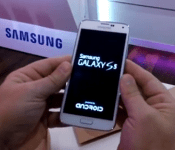
‘Powered by Android’ on Bootup Now Required by Google
We all know the Android OS pretty well by now. We are all also very familiar with the various skins that OEM’s place over it like Sense and TouchWiz. Google is apparently making a slight change to what OEM’s must do in order to use the Android OS in their devices. A new ground rule will require any device that is certified for Google, which means they have Play Store access and Google apps pre-installed at start-up, to display ‘Powered by Android’ on the boot-up screen. As depicted in the first boot up of the new Samsung Galaxy S5.
 The new implementation won’t just be required for new devices going forward though. Previous devices that receive updates will also be getting a ‘Powered by Android’ logo added too. The logo has a detailed size, spacing and placement rule set making it easy to implement and hard to deviate from. The logo must be a minimum of 20dp and with a 10db clear space boarder where nothing else can be placed. It can be larger, but not smaller. At least that is what I am understanding from the documentation provided by Android Police. While Google has yet to confirm this, a source for AP has confirmed it and with it appear on the boot up screens for the Galaxy S5 and for the HTC One M8, we are likely to agree that it is something that we will see on all new devices.
Does this mean much to you guys? Probably not. In my eyes I see it as a good way for Google to keep Android in front of the consumers. While many people don’t turn their devices off and on often, nor do many people not know they bought and Android device, it certainly won’t hurt with keeping the branding easily in view. With so many new devices and new customers making the switches to an Android device, there is still quite a lot of confusion out there. To this day I still hear people refer to their device as “the new droid” when asked what device they have. Certainly that was due to the heavy influence and marketing of Motorola and Verizon for the Droid line of devices.
Source: Android Police & Geek.com
//<![CDATA[
ord = window.ord || Math.floor(Math.random()*1E16);
document.write('’);
//]]>
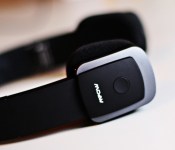
Mpow Bluetooth 4.0 Foldable Headphones review
Looking for a great pair of wireless headphones to use with your Android? Look no further!
The Mpow Bluetooth 4.0 Foldable Headphones are a great addition to your phone accessory collection. They’re completely Bluetooth enabled, so you don’t need to worry about another thing getting tangled in your backpack. They’re foldable, durable, and offer clear music quality… What more could you want?
We’ve used these for 2 weeks, and think they’re really great. Check out our review, and see if they’re right for you and your Android!
Build Quality

The build quality/design portion is where the headphones shine. They’re made of a matted soft-touch plastic that gives it a premium feel. The inside of the headphones are a bit more rubbery to ensure they won’t slip off while you’re using them. The hinges extend out about 1-inch, so if you have a big head, these will do just fine. And they fold up nicely, so I wouldn’t be worried about throwing them in my backpack for the day.
Quite possibly the only aspect of the build we’d change is the earpieces. They’re made from a spongey material that just doesn’t seem to high-quality. The positive in having sponge earpieces is that they won’t stick to your ears like leather ones, but we’d still like to see a bit better quality go into the earpieces.
On one side sits a button that looks identical to the iPhone’s home button, with rewind/forward and -/+ buttons below it. These are used to turn on and off and control the headphones, which definitely comes in handy. Below the buttons sits an LED light used to show if they’re connected or not.
The headphones have a 300mAh Li-Ion battery inside, which doesn’t seem like a whole lot a first, but actually does reall well. Mpow quotes the headphones at 15 hours of music/talk time, while we could manage to get about 11. Still, that’s 11 hours of usage, and that’s pretty impressive considering the size of these things. And the battery only takes about three hours to charge. That’s definitely not bad considering you get almost a full days use out of a single charge.
Overall, they’re sleek, durable, and comfortable, and aside from the earpieces, we wouldn’t change anything about these.
Performance

The quality of the sound turned out to be pretty great. Bass and treble seemed to shine through, and we didn’t need to worry about EQing the music to accommodate for the headphones. Call quality was okay, and it sounded like we were talking on a speakerphone the entire time. It definitely isn’t something we’d like to do for an extended period of time, but it’s convenient when a call interrupts your music. And once again, back to the earpieces. Having the headphones at full volume generated a lot of noise if you aren’t the one using them, so if you’re the private type, you may want to try something else.
The controls were pretty easy to master. You have a multi-function button that pretty much does everything – answer calls, hang up, and turn on and off the headphones. There is a rewind/volume down key and a forward/volume up key that work just the way they’re supposed to.
The only difficult part of using these keys is switching devices. For example: if you’d like to switch from a phone to a computer, you can’t just turn Bluetooth off on the phone, and automatically connect to the computer. At least in my experiences, I needed to unpair the headphones in Bluetooth settings on my phone, then proceed to connect to the computer. It’s a bit of a hassle to do this every time you switch devices.
Conclusion
Overall, I really like these headphones. I had a few gripes, but nothing that would get me to not buy these. Battery life, build quality, and performance are all great. And, don’t forget, completely wireless. To be honest, if the headphones weren’t Bluetooth capable, I’d might tell you to pass. But for wireless, great quality headphones, you could do a heck of a lot worse than these. If you’d like your own pair, pick them up on Amazon for $37.99.
Do it. You won’t be sorry.
The post Mpow Bluetooth 4.0 Foldable Headphones review appeared first on AndroidGuys.
Swiss Watchmakers Rebuff Apple’s Partnership and Hiring Advances
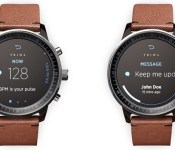
Apple allegedly is trying to tap Swiss watchmakers for their technical and metallurgy expertise as the company works to brings its rumored iWatch to the market, reports the Financial Times. Though Apple is reaching out to several companies, most are not willing to work with the Cupertino company.
Swatch chief executive officer Nick Hayek confirmed the watchmaker has talked to several companies about their wearable products, but he is not interested in forging a partnership with any group.
We have been in discussions – not ever initiated by us – with practically all players in smart wearables up until today,” Swatch chief executive Nick Hayek told the Financial Times. “However, we see no reason why we should enter into any partnership agreement.”
Hayek says his reluctance to work with Apple and similar companies comes from his desire to protect Swatch’s advancements in ergonomic design, longevity and battery life, but he also has been critical of the iWatch, proclaiming publicly the smartwatch won’t be “the next revolution” for Apple.

Jean-Claude Biver, president of Watches and Jewelry at LVMH, claims Apple unsuccessfully tried to poach employees from his Hublot brand as well as from other manufacturers who make precision parts for these luxury watches.
“Apple has contacted some of my employees – I saw the emails personally,” Mr Biver told a Swiss publication, claiming that all those who had been contacted refused the iPhone maker’s advances.
Apple allegedly may launch the iWatch later this year as it prepares to expand its lineup of mobile devices to the wrist. The iWatch possibly may have a fitness focus with biosensors that enable users to track vital health statistics like heart rate, blood pressure and more. It is believed the band could share this data with Apple’s Healthbook app, a health and fitness title expected to debut alongside iOS 8.
| |
 AIVAnet