


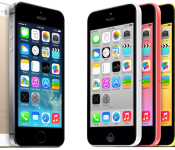
Apple Quietly Sells Its 500 Millionth iPhone
As documented in its quarterly earnings reports over the years, Apple reported total sales of 472 million iPhones between the device’s 2007 launch and the end of 2013. With analyst estimates of over 38 million units for the current quarter ending in just a few days, the company has undoubtedly already sold its 500 millionth iPhone, a milestone that passed without mention from the Cupertino company, notes Forbes.
The consensus would have placed the milestone sale around March 8 given that entering the quarter Apple had sold 472 million iPhones. So even if it proves a bit high as it did last quarter, we’ve crossed the point where it’s safe to assume that Apple has sold 500 million smartphones in less than 7 years. And the most recent 100 million took somewhere between 2-6 weeks less than the previous 100 million did.
Apple is known for celebrating notable milestones, changing its homepage for the 30th anniversary of the Mac and setting up countdowns on its website for App Store milestones. The company reached the 50 billion app download milestone in May 2013 and awarded a $10,000 iTunes Store gift card to the person who downloaded the 50 billionth app.

Even though Apple didn’t announce the 500 million iPhone milestone, it is not without significance. Quarterly iPhone sales continue to rise consistently on a year-over-year basis, with the company selling a record 51 million iPhones in fiscal Q1 2014, up from 47.8 million in the same time period in the prior year.
These next few quarters may see a slump in iPhone sales as Apple gears up for a possible fall launch of the iPhone 6. Apple’s upcoming iPhone 6 is widely rumored to include a larger display, which could encourage a significant number of users to upgrade in 2014 and cause another spike in sales later this year.
     |

OnePlus to finally unveil its CyanogenMod-powered smartphone next month
 Today in New York City, HTC is finally “officially” unwrapping its “All New One” for the world to see, but that isn’t stopping newcomer OnePlus from trying to steal some of the Taiwanese company’s thunder by announcing its own upcoming smartphone unveiling.
With all leaks and teases aside, the OnePlus One will be officially unveiled April 23.
“Thanks for everyone’s patience and support over the last few months. We promise the wait will be worth it.”
The device has been a marketing marvel for OnePlus, the new company of ex-OPPO exec Pete Lau, with it announcing device features along the way. Features are said to include a Qualcomm Snapdragon 801 processor (upgraded from a 2.3GHz quad-core Qualcomm Snapdragon 800 processor, due to community response), 3,100 mAh battery, 5.5-inch 1080p JDI display, 6 piece 13 MP f/2.0 Sony Exmor IMX214 and swappable back covers in a variety of materials. All this will be powered by a specially designed version of CyanogenMod “with exciting new elements and features.” The device is also said to be coming in at under $400 off-contract.
We’ve written how this device may be a game-changer in the smartphone industry, focusing on the user experience, but it remains to seen if all these rumors are true and if the new company will be able to deliver what they’ve been promising.
Stay tuned April 23 for the official unveiling.
Source: OnePlus
The post OnePlus to finally unveil its CyanogenMod-powered smartphone next month appeared first on AndroidGuys.
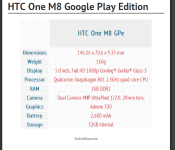
HTC One (M8) Google Play Edition officially announced
Alongside the new HTC One (M8), as we suspected HTC have introduced a Google Play Edition of the device running the latest version of unskinned unbranded Android 4.4.2 KitKat operating system.
The new HTC One GPe will feature the same internals as the standard HTC One (M8) including the same Duo UltraPixel camera technology.

The Google Play Edition of the HTC One (M8) will be available to pre-order today in silver and is priced at $699, before being released for sale in the coming week.
Are you picking up a GPe HTC One (M8)?
The post HTC One (M8) Google Play Edition officially announced appeared first on AndroidGuys.
Live from the HTC One event in New York City!

The time has finally come to see what the hullabaloo is all about — this year’s version of the HTC One is going to be announced here very soon, and we’ll be bringing all of the big news to you live from New York City! Stay tuned as we get this liveblog rolling just before 11AM ET.


Filed under: Cellphones, Wireless, Mobile, HTC
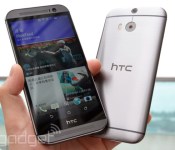
HTC announces the new One with depth-sensing camera and larger screen

The “all new” HTC One has been one of the worst kept secrets of 2014, but today it’s a secret no more. The Taiwanese manufacturer has taken the wraps off its latest flagship and fans of last years model (count us among them) won’t be disappointed. The phone boasts the same aluminum unibody construction as last year’s model, but with more pronounced curves and even more metal this time around. A full 90 percent of the body is made of aluminum, quite a bit more than the 70 percent on last year’s. That means it’s about half and ounce heavier, but it seems like a small trade off given the incredible design and spacious 5-inch screen. That panel is still a 1080p S-LCD3 one, which means you can count on the same bright colors and deep blacks. Plus the whole front is protected by a sheet of Gorilla Glass 3. Oh, and before we go any further — the pair of capacitive buttons have been replaced with the standard trio of Android soft keys! (Phewww…)

Under the hood you’re looking at a 2.3GHz Snapdragon 801 and 2GB of RAM. Basically this phone will laugh in the face of almost any task you throw at it. Edit photos, put together video montages, play taxing 3D games — this thing should churn through it all with ease. As far as storage goes you’ve got two options, either 16GB or 32GB. But if you feel that’s not enough, there’s a microSD slot for adding up to 128GB more. Plus, Google is throwing in 50GB of storage on Drive for two years, replacing Dropbox. Unless you’re truly abusive to your gadgets there’s no way you should run out of room to store stuff. A sizable 2,600 mAh battery keeps the whole thing chugging along for an estimate 20 hours of talk time or, with the new Extreme power saving mode enabled, 40 days of standby. Regardless, it’s a nice but smallish boost from 2,300 mAh one found in last years model. And, of course, the expected set of radios and sensors are on board, including Bluetooth 4.0, dual-band 802.11ac WiFi, AWS compatible LTE, NFC, an accelerometer, gyroscope and barometer.

Of course, the two big unique features from last year’s model make a return here: the front-facing stereo speakers with BoomSound and the UltraPixel camera around back. But both have been given significant upgrades for 2014. The speakers are connected to a new dedicated amplifier and a more powerful DSP chip. They’re also seated deeper in the phone’s chassis which should lead to richer, louder audio with better defined low-ends. The UltraPixel shooter around back is, for all intents and purposes, the same exact camera as last year. The sensor is the same four megapixel backside-illuminated one with giant 2µm pixels, but there’s a new imaging processor attached and HTC has ditched the optical image stabilization tech. But, it’s also added a second camera to the back in what it’s calling a Duo Camera array. Truth be told, the second “camera” isn’t actually a camera in the traditional sense, it’s a depth sensor. It allows the One to perform all sorts of neat tricks especially in post processing, such as blurring backgrounds or changing the focus point like a Lytro.

No new flagship phone would be complete without a significant software update, and HTC isn’t going to let you down. At its core the One is running Android KitKat 4.4, which means it’s got all of the latest enhancements straight from Google. On top of that, however, it’s running Sense 6.0 which includes BlinkFeed and a heavy focus on themes. Several of its primary UI elements have been given subtle redesigns that bring a more modern and open look. Perhaps most exciting though, Blinkfeed has been opened up to developers who will be able to push information to your feed. For example Foursqaure will be able to publish lunch recommendations or Fitbit can send you activity tracking data. Interestingly the company has also broken several of its proprietary apps free of its firmware, such as Zoe which will find itself on the Play store soon. That will make it much easier to push updates to users, which means features will be available much quicker.
Most of the tweaks are relatively small, but Motion Launch is a pretty significant new feature. When the phone senses movement it “listens” for prompts to launch particular apps or actions. For example swiping right on the screen will take you straight to BlinkFeed, holding the volume rocker while turning the phone into landscape mode launches the camera and you can answer a call simply by putting the phone to your ear — all without unlocking it first.. The Dot View case, seen above, extends those features, by allowing you to tap the case twice to receive notifications without turning on the phone’s display.
The all new HTC One will be available in three colors gunmetal gray, glacial silver and amber gold starting today, March 25th.
Richard Lai and Brad Molen contributed to this report.
Filed under: Cellphones, Mobile
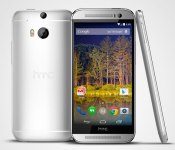
The new HTC One is available in Google Play and Developer editions

Do you lust after the machined aluminum body of the new HTC One but hate locked bootloaders? Would you rather vanilla Android instead of Sense? Well, good news it’ll be available in both a Developer and Google Play edition. The Developer version is the same device you’re able to get form your carrier, more or less, except that it’ll be SIM unlocked and you’ll be free to flash whatever software or ROM you want. The Play Edition obviously forgoes all that Sense business, and instead will ship with a relatively unmolested copy of Android 4.4.2. We say relatively because it will be able to take advantage of the One’s Duo Camera, which requires tapping into HTC’s APIs. Both will be available for preorder today, March 25th, with the Developer Edition selling for $650 direct from HTC’s site, while Google will be hawking the Play Edition for $699.
Filed under: Cellphones, Mobile, HTC, Google
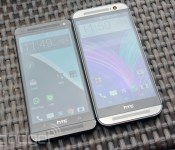
The new HTC One vs. the 2013 model: what’s changed?
If you’re still attached to last year’s HTC One, you may be wondering just how the new model compares. What’s new? Well, we’ve compiled spec sheets on both the 2013 and 2014 models just past the break for an easy side-by-side comparison. There’s plenty to consider including increases in battery size, screen real estate, external storage and, of course, that newfangled Duo Camera. Take a peek after the jump for the full rundown.
| HTC One (2014) | HTC One (2013) | |
|---|---|---|
| Starting price | $199-$249 (on-contract) $649 (Google Play edition) |
Free (on-contract) $599 (Google Play edition) |
| Known Dimensions | 5.76 x 2.78 x 0.37 inches (146.36 x 70.6 x 9.35mm) | 5.41 x 2.69 x 0.37 inches (137.4 x 68.2 x 9.3mm) |
| Weight | 5.64 oz. (160g) | 5.04 oz. (143g) |
| Screen size | 5.0 inches | 4.7 inches |
| Screen resolution | 1,920 x 1,080 pixels (441ppi) | 1,920 x 1,080 pixels (468ppi) |
| Screen type | S-LCD3 | S-LCD3 |
| Battery | 2,600mAh (non-removable) | 2,300mAh (non-removable) |
| Internal storage | 16GB/32GB | 32GB/64GB |
| External storage | microSD (up to 128GB) | None |
| Rear camera | 4MP, UltraPixel sensor, Duo Camera, dual LED Smart Flash, BSI sensor | 4MP, LED flash, UltraPixel, OIS |
| Front-facing cam | 5MP | 2.1MP |
| Video capture | 1080p | 1080p |
| NFC | Yes | Yes |
| Bluetooth | v4.0 | v4.0 |
| SoC | 2.3GHz Qualcomm Snapdragon 801 (2.5GHz variant in Asia) |
1.7GHz Qualcomm Snapdragon 600 |
| GPU | Adreno 330 | Adreno 320 |
| RAM | 2GB | 2GB |
| WiFi | 802.11a/ac/b/g/n, dual-band | 802.11a/ac/b/g/n, dual-band |
| Operating system | Android 4.4 | Android 4.4 |
| Standout features | UltraPixel sensor, Duo Camera, HTC Sense 6, Zoe, BoomSound, BlinkFeed, Extreme Power Saving Mode | UltraPixel camera, HTC Sense 5 (at launch), Zoe, BoomSound, BlinkFeed |
Filed under: Cellphones, Mobile, HTC
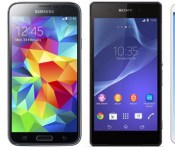
The new HTC One vs. the competition: the battle of Android flagships rages on

We all knew it was coming, and after a lengthy list of leaks, the new HTC One is finally official. This time of year is known for its gaggle of new handsets, so we’ve lined up the latest offerings so you can see for yourself how they stack up. Flagships from Samsung, Sony and LG are all here to see which mobile device will nab an edge on paper. Want to compare these to your current daily driver? Mosey on over to our comparison tool to do just that. Otherwise, head past the break for our neatly compiled list of specs and form your own analysis of the lot.
| HTC One (2014) | Samsung Galaxy S5 | Sony Xperia Z2 | LG G Pro 2 | |
|---|---|---|---|---|
| Starting price | $199-$249 (on-contract) | N/A | N/A | N/A |
| Known Dimensions | 5.76 x 2.78 x 0.37 inches (146.36 x 70.6 x 9.35mm) | 5.59 x 2.85 x 0.32 inches (142 x 72.5 x 8.1mm) | 5.78 x 2.89 x 0.32 inches (146.8 x 73.3 x 8.2mm) | 6.22 x 3.22 x 0.33 inches (157.9 x 81.9 x 8.3mm) |
| Weight | 5.64 oz. (160g) | 5.11 oz (145 g) | 5.57 oz. (158g) | 6.07 oz. (172g) |
| Screen size | 5.0 inches | 5.1 inches | 5.2 inches | 5.9 inches |
| Screen resolution | 1,920 x 1,080 pixels (441ppi) | 1,920 x 1,080 (432ppi) | 1,920 x 1,080 pixels (424ppi) | 1,920 x 1,080 pixels (377ppi) |
| Screen type | S-LCD3 | Super AMOLED Full HD | Triluminos Full HD (IPS) | Full HD IPS |
| Battery | 2,600mAh (non-removable) | 2,800mAh (user removable) | 3,200mAh | 3,200mAh (user removable) |
| Internal storage | 16GB/32GB | 16GB/32GB | 16GB | 16GB/32GB |
| External storage | microSD (up to 128GB) | microSD (up to 128GB) | microSD (up to 64GB) | microSD |
| Rear camera | 4MP, UltraPixel sensor, Duo Camera, dual LED Smart Flash, BSI sensor | 16MP, LED flash | 20.7MP, LED flash | 13MP, LED flash, OIS+ |
| Front-facing cam | 5MP | 2MP | 2.2MP | 2.1MP |
| Video capture | 1080p | 4K | 4K | 4K |
| NFC | Yes | Yes | Yes | Yes |
| Bluetooth | v4.0 | v4.0 |
v4.0 |
v4.0 |
| SoC | 2.3GHz Qualcomm Snapdragon 801 (2.5GHz variant in Asia) |
2.5GHz Qualcomm Snapdragon 801 | 2.3GHz Qualcomm Snapdragon 801 | 2.26 GHz Qualcomm Snapdragon 800 |
| GPU | Adreno 330 | Adreno 330 | Adreno 330 | Unspecified |
| RAM | 2GB | 2GB | 3GB | 3GB |
| WiFi | 802.11a/ac/b/g/n, dual-band | 802.11a/ac/b/g/n, dual-band | 802.11a/ac/b/g/n, dual-band | 802.11a/ac/b/g/n, dual-band |
| Operating system | Android 4.4 | Android 4.4 | Android 4.4 | Android 4.4 |
| Standout features | UltraPixel sensor, Duo Camera, HTC Sense 6, Zoe, BoomSound, BlinkFeed, Extreme Power Saving Mode | Fingerprint scanner, heart rate sensor, Ultra Power Saving Mode, IP67 certified, 4K video | IP58 certified, BRAVIA screen tech, Exmor RS camera, 4K video | KnockCode, Backside buttons, Mini view, Multi Window |
Filed under: Cellphones, Mobile, HTC

HTC opens up BlinkFeed, allows apps like Foursquare and Fitbit to push data to your homescreen

Love it or hate it, Sense is growing up. BlinkFeed, the beating tiled heart of the HTC experience is now being opened up to developers through an SDK. That means that third parties will be able to push information to the stream of data that makes up your feed. For example, Fitbit will be able to keep you abreast of how many steps you’ve taken without you having to go into the app. Oh, and the Fitbit app does harvest movement data from the phone’s internal sensors, just like it does on the iPhone 5S, so you don’t really need that separate band. HTC announced one other launch partner for the BlinkFeed SDK — Foursquare. The location-based social network will pop up suggestions for lunch spots while you’re out and about. Of course, the company will have to convince other big names to hop on the bandwagon if BlinkFeed is going to really take off.
Filed under: Cellphones, Mobile, HTC
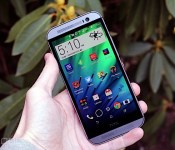
HTC One review (2014): a great phone, but no longer a game-changer

The HTC One was one of our favorite smartphones of 2013. It featured a gorgeous industrial design, a fantastic display, great camera and top-of-the-line performance. HTC poured its heart into it, as evidenced by nearly every aspect of the device. The phone exceeded nearly all of our expectations, but that also left a big problem: We now expect history to repeat itself. After all, if the original One was such a great device, its successor should, in theory, be even better, right?
Of course it should be. But does this year’s version of the One have what it takes? On paper, the answer is yes: It has a larger screen, offers two curious-looking rear camera sensors, boasts an improved version of HTC’s Sense UI and features a chassis with even more metal. It appears, then, that there’s a lot to love here, but it’s difficult to take our breath away twice in a row. Here’s what impressed — and what didn’t.
Hardware
We can’t remember the last time HTC made an unattractive flagship smartphone. In the last two years, the company has cranked out beautifully crafted unibody devices like the One X, One S and Windows Phone 8X. However, its crowning achievement was last year’s HTC One, also known as the M7. The phone’s fantastic industrial design and anodized aluminum shell are just two reasons it remains one of our favorites to this day. Of course, our high opinion of the M7 doesn’t just mean we’re excited to play with its successor; we’re also holding it under a lot more scrutiny.
There’s no mistaking the fact that the new One (aka the M8) inherited a lot of traits from its predecessor, including BoomSound speaker grilles, a curved back and horizontal stripes. After all, if it ain’t broke, why fix it? And believe it or not, the phone is made from even more metal than last year’s model: roughly 90 percent of the chassis is made from aluminum, compared to 70 percent for the M7. That means the phone no longer sports polycarbonate accents on the top, bottom and sides; instead, metal wraps all the way around until it reaches the display. Throw in some rounded corners and a brushed-metal finish on the back, and you’ve got yourself a beaut. Still, beauty is also in the eye of the beholder: A few Engadget editors prefer the new M8, while others would rather hang onto last year’s M7. Our unit came in gray, but you’ll also be able to buy the phone in silver and gold.
The brushed finish we just mentioned presented a huge challenge to HTC’s design team. According to lead designer Scott Croyle, his team had to invent a new production method just to make it work. It was challenging to figure out how to apply the finish on such a curvaceous phone without it coming out looking clumpy and inconsistent. Croyle didn’t get into specific details on how his team overcame the problem, but the end result is obvious: a body that looks even sleeker and more premium than the M7.

All told, it’s incredibly polished — almost too polished. As beautiful as the new One is, it’s as slick as a bar of soap. Not only is the new finish slippery, but the One also has fewer places to get a firm grip since it evolved from a 4.7-inch screen with blunt sides to a 5-inch screen and sides with sharp curves. I can’t find a place to rest my fingers without feeling like they’re going to slip off, so keep in mind that you’ll need to be careful with the phone if you buy it. It’s comfortable enough to hold — so long as can get a good enough grip on it.
One other thing to consider here is that while the One’s all-metal exterior looks great and is quite durable, it’s still susceptible to small scratches, if not more so than the previous model. Even if your phone has only fallen victim to wear and tear, it likely won’t look as brand-new as the day you bought it. In fact, in the brief time I’ve been using the One, I’ve already noticed a couple of dings around the edge of the device.
In comparison to the (now) old One, this new model is just as thick (9.3mm) but is taller, wider and heavier. None of these should come as a surprise: The 2014 One uses a larger screen and is weighed down by the increased use of metal; of course it’s going to be bigger and heavier. That said, the phone isn’t uncomfortably heavy and isn’t an awkward fit in my hand, either.

HTC made a few changes to the layout of the buttons as well. The power button now sits on the top right. Since I regularly hold the phone in my left hand, this setup is much less awkward than it was on the M7, which put the same button on the top left. Granted, the M8 has new motion gestures that almost make the power button unnecessary, but we’ll dive into that later. We praised this button on last year’s flagship because HTC managed to integrate the IR blaster into it, but the company didn’t feel it was necessary this time around. Instead, the IR is housed underneath a piece of smooth-looking plastic that looks like it belongs on KITT.
But enough about the top of the phone; there are plenty of other sides to get to. The volume rocker still sits on the right, but it’s not completely flush with the chassis anymore. On the original One, we often grew frustrated at how difficult it was to know if we’d actually pressed the volume buttons, so we’re happy to see that it now pokes out a little bit. Even better, it has a new neighbor: a memory card slot! Indeed, the microSD spot can take cards up to 128GB, which will come in handy since you can only get up to 32GB of internal storage on the new One. Turning to the bottom of the phone, you’ll find the micro-USB QuickCharge 2.0 port and 3.5mm headphone jack, while the left side houses a slot for the nano-SIM card. Sadly, the charger that comes included in the box only supports QuickCharge 1.0, which means you’ll need to pay for an optional accessory just to take advantage of the faster charge time.
If you’re annoyed to hear that HTC’s reduced the size of the SIM card, you’re not alone. However, company reps gave us two reasons for the change. First, every millimeter of space underneath the hood matters. Second, by switching to a smaller size HTC was able to make room for a second nano-SIM without making sweeping changes to its internal design. Many manufacturers have to redesign their phones entirely, just to find a way to stick a dual-SIM setup inside. HTC’s essentially eliminated this problem by planning ahead and building the dual option into the phone from the very start. (This doesn’t mean every variant will contain dual-SIM capability — it just means that it’s accessible in the phone’s design.)
If you used the original One, the back of the new model will look quite familiar — arched back, flash, camera, logo, horizontal stripes, another camera. Wait, what? Yep, there are indeed two “cameras” on the back, as well as two LED flashes, but we’ll go into more detail in a later section. Turning the phone over to the front, you’ll see a much-improved 5MP front-facing camera near the top, as well as virtual navigation buttons and a logo below. There’s also BoomSound, which earned our praise last year. This time HTC promises richer and louder sound by using a new amp, throwing in a new DSP and deepening the chambers housing the speakers.
If you liked the 1080p Super LCD3 display on the original One, be prepared for essentially the same experience. The M8 retains its predecessor’s resolution and display tech, but steps up to a slightly larger 5-inch screen. Display snobs will note that this results in lower pixel density, but unless you’re looking at the two displays side by side, you’re probably not going to notice. As on last year’s model, the panel looks sharp, bright and vibrant; viewing angles are wide and the display is easy to see in direct sunlight as long as you push the brightness up to 75 percent or higher.
The screen itself is protected by a slab of Gorilla Glass 3, which is, of course, designed to be scratch-resistant. Since the glass is raised a bit above the rest of the phone’s body, should we be concerned about possible chips? Croyle tells us that the answer is no: The company applied a special protective coating to prevent additional scratches and impacts that may normally weaken the glass.
| HTC One (2014) | HTC One (2013) | |
|---|---|---|
| Dimensions | 146.4 x 70.6 x 9.35mm (5.76 x 2.78 x 0.37 inch) | 137.4 x 68.2 x 9.3mm (5.41 x 2.69 x 0.37 inch) |
| Weight | 5.64 oz. (160g) | 5.04 oz. (143g) |
| Screen size | 5.0 inches | 4.7 inches |
| Screen resolution | 1,920 x 1,080 (441 ppi) | 1,920 x 1,080 (468 ppi) |
| Screen type | S-LCD3 | S-LCD3 |
| Battery | 2,600mAh (non-removable) | 2,300mAh (non-removable) |
| Internal storage | 16GB (32GB version coming) | 32/64GB |
| External storage | MicroSD (up to 128GB) | None |
| Rear camera | 4MP UltraPixel, f/2.0, 2.0µm pixel size, 1/3″ sensor size, 28mm lens | 4MP UltraPixel, f/2.0, BSI, 1/3″ sensor size, 2µm pixel size, OIS |
| Front-facing cam | 5MP, f/2.0, BSI, wide-angle lens | 2.1MP |
| Video capture | 1080p | 1080p, 30 fps |
| NFC | Yes | Yes |
| Radios |
GSM/EDGE (850/900/1800/1900) (All); CDMA (800/1900) (Verizon, Sprint). HSPA+ EMEA: (850/900/1900/2100) with HSPA+ up to 42 Mbps LTE EMEA: (800/900/1800/2600) |
Depends on the market |
| Bluetooth | v4.0 with AptX | v4.0 with AptX |
| SoC | 2.3GHz quad-core Qualcomm Snapdragon 801 (Asia variant uses 2.5GHz); Adreno 330 GPU | 1.7GHz quad-core Qualcomm Snapdragon 600 (APQ8064T) |
| RAM | 2GB | 2GB |
| SIM slot | Nano-SIM | Micro-SIM |
| Connectivity | MHL, DLNA, IR, HDMI, GPS/GLONASS | MHL, DLNA, IR |
| WiFi | Dual-band, 802.11a/ac/b/g/n | Dual-band, 802.11a/ac/b/g/n, WiFi Direct |
| Operating system | Android 4.4.2, Sense 6.0 | Android 4.1.2, Sense 5.0 (at launch) |
Under the hood, the M8 comes loaded with a 2.3GHz quad-core Snapdragon 801 chipset (it’s 2.5GHz in certain regions), 2GB of DDR2 RAM, a 2,600mAh battery, dual-band 802.11a/ac/b/g/n WiFi and Bluetooth 4.0 with aptX. Data connectivity depends on which of the six variants you get: You can choose among versions for each of the four major US carriers, one for Asia and another for all of Europe/Middle East/Africa. (Both of our review units were the latter.) All six will feature the same quad-band GSM/EDGE (850/900/1800/1900), but it gets tricky from there — we’ll lay them all out in the table below, so check it out if you demand a special set of frequencies or support on a specific carrier.
Finally, one of the more curious hardware additions are the low-powered, always listening “Smart Sensors.” Accelerometers are nothing new, but HTC’s can be used by apps all day long without significant drain on the the battery (as they don’t fire up the processor etc). As HTC’s opened up the API for these — dubbed HTC’s Smart Sensor Hub — app developers will be able to hook into this information directly. In fact, HTC worked directly with Fitbit to create a custom version of its app that comes pre-loaded on the phone. With the M8, you don’t need a Fitbit wristband to track your steps: the phone will do that for you, and update the Fitbit app directly.
We’ve tested it against an actual Fitbit band, and it works pretty well. The amount of steps it tracked seemed within the same ballpark as the standalone device, and of course there was no need to wear a tracker, or sync over Bluetooth. It might not replace these devices entirely, however, as there are times when you might not want to lug your phone about — say, at the gym, or when going out for a run (it’s a fairly large phone, after all). Still, it’s a promising introduction to what these new sensors are capable of, and we look forward to more motion-sensitive apps in the future.
SENSE UI 6.0

Let’s get one thing out of the way before we begin this section: Yes, HTC is calling version 6.0 of its new UI its “Sixth Sense.” However, the company’s latest Android skin, which is integrated with KitKat (Android 4.4.2), does not actually see dead people — not to our knowledge, at least. Obligatory groans aside, let’s explore the new firmware preloaded on the M8, which will later come to the M7 and other 2013 HTC devices.
As with most KitKat launchers, the M8 home screen feels more expansive because the status bar on top and virtual navigation bar on bottom are both transparent. You now have three soft keys representing buttons for back, home and recent apps; we weren’t big fans of the two-button setup on the original One, so this is a happy change. HTC put more emphasis on themes and colors this time as well. Most Sense apps and features comply with specific shades depending on which color theme you choose (by default, BlinkFeed is green, for instance), but you can change to other themes if you like.

BlinkFeed still sits to the left, and you can add panels to the right (you’re allowed up to five now, even if BlinkFeed is active). The app menu is in its usual place, though HTC removed the Sense clock from the top and made it easier to push apps from here to the home screen — pressing and holding an app lets you place it directly onto your home panel of choice. Unfortunately, this means you can’t have folders in the app menu, but undesired icons can be hidden easily. Additionally, you can still change the grid size from 4 x 5 to 3 x 4 if you desire.
Most of Sense has been tweaked in one way or another, but all of the basic mechanics are the same as the last version. This means that anyone who has used Sense 5 will experience little to no learning curve, and yet they won’t feel like it’s the same old skin. HTC uses a lighter, larger and more modern-looking font on the majority of its UI, which does a great job of making use of the new One’s extra screen space.
On Sense 6, HTC is following Google’s lead by making several of its proprietary apps available on the Play Store. The gallery, Zoe app and Sense TV are the first ones that receive this treatment. This is a smart move on HTC’s part: Now, the company can push out updates to individual Sense services anytime it wants, rather than having to bundle new features and bug fixes into a firmware update that can take weeks to roll out (even longer if you live in the US). If this strategy is a success, we’ll likely see HTC do the same thing with even more apps in the future.
There’s a new gesture feature called Motion Launch, with which we have something of a love/hate relationship. It takes Nokia’s and LG’s double-tap-to-unlock and expands upon the concept with swipe gestures. You can still double-tap to wake up the lock screen, but you can also swipe your finger in different directions to bypass the lock screen entirely and take you directly into specific functions (provided you don’t have any security locks in place). Swipe up to go into the home screen; swipe right to access BlinkFeed; swipe left to launch the widget panel; and swipe down to activate voice dial for faster calling. If you want to take a picture, hold the volume rocker and lift the phone up in landscape mode.
In theory, the only way you can trigger Motion Launch gestures is when the phone senses movement — it can tell that you’re picking up your phone and assumes that you’re wanting to turn the phone on. In practice, however, the gestures were too sensitive; I could wake up the phone when the One was sitting on my desk, resting in my pocket and when my thumb was firmly planted motionless on the screen. I’d also really like to customize the gestures to take me directly into apps that I use frequently, like email. Let’s give HTC credit where it’s due, though: This new functionality is pretty clever, and it’ll likely get even smarter with future software updates.
The reason we’re hopeful that HTC will improve its proprietary features is because it’s already done a pretty good job fine-tuning BlinkFeed. (Considering our distaste for it when we first reviewed the M7, that’s saying a lot.) Ever since BlinkFeed’s debut in the original One, HTC has continued to make it more customizable. For instance, if you’re interested in any given subject you can do a search for that topic and create a whole feed around it. On top of that, the company now boasts over 1,000 content partners, so there’s no shortage of reading material here. Also, HTC tells us it will soon be releasing a developer kit for BlinkFeed, which means developers will be able to add their own feeds and content.

Sense 6 also features a Do Not Disturb mode, and it does exactly what every other DND mode does: It silences your phone so your sleep isn’t interrupted by the latest eBay newsletter hitting your inbox. However, HTC’s option adds multiple presets, so you can change the hours based on which day it is; this is ideal for anyone who needs to be on call on specific days.
HTC is continuing its tradition of offering cloud storage space, but it’s dropped Dropbox in favor of Google Drive. Once you agree to the terms and conditions, you’ll get 50GB of space for free for two years. This deal with Google is part of a program called the HTC Advantage, which the company introduced last month; on top of the extra storage, HTC has also committed to updating the M8 firmware (along with the rest of the One family) for two years. If you live in the US, you can also take advantage of HTC’s cracked-screen-replacement option, which allows you to swap out a shattered screen for free within the first six months after you buy the phone.
CAMERA

When last year’s One came out, we boldly proclaimed it our new go-to camera. Of course, the smartphone industry hasn’t stood still over the past year; during this time, we’ve seen spectacular imaging come from the Nokia Lumia 1020 (not to mention the 1520 and Icon), as well as the Sony Xperia Z1. And soon, in the coming weeks, we’ll also be able to take fantastic photographs with the Samsung Galaxy S5 and Oppo Find 7. Has HTC, king of the UltraPixel, done anything new on the M8? (Spoiler: The answer is yes, but we’re still unsure if it’s enough to best the competition.)
First off, HTC is sticking to its UltraPixel philosophy. In a nutshell, the idea is to take a physically large sensor and combine it with big pixels that are capable of gathering more light than standard-sized ones. Many smartphone cameras feature 1.1µm pixels, while the One proudly boasts a one-third-inch BSI sensor with 2µm pixels capable of absorbing 330 percent more photons. It also uses ImageChip 2 and a 28mm f/2.0 AF lens that helps grab even more light. HTC believes you don’t need a high-resolution sensor to take great pictures, and as long as you don’t need to zoom in on anything, the quality should remain near the top of its class.

Having used the original One’s 4MP camera for the past year, we’re still happy with its overall performance. However, we were hopeful that HTC would bump up the One’s resolution to something higher (8MP would’ve been a logical jump), but unfortunately the company didn’t increase it at all, opting instead to emphasize the new depth sensor and software optimizations. Even worse, it’s also done away with optical image stabilization (OIS). When we asked HTC about why the feature’s gone, we were told it was left out due to improvements to the module — faster autofocus was used as an example — as well as overall feature cost and the extra space needed for the mechanical component. The company feels that it’s less necessary to have this feature on today’s advanced hardware. Furthermore, reps explained to us that OIS is also incompatible with its Duo Camera tech (which we’ll discuss soon), which uses “smart stabilization” features like anti-shake.
Even if you don’t agree that faster autofocus is a valid reason for dismissing OIS, autofocus is still a nice feature to boast. The AF speed is now set at three-tenths of a second, matching what Samsung claims on the Galaxy S5. We’ll be intrigued to test the two devices side by side, but so far, we don’t see a noticeable improvement in focus time over the original One. The M8 also features a dual-LED flash, which is designed to get rid of glare and make nighttime photos look more natural. This has been done in quite a few smartphones already, such as the iPhone 5s, but HTC’s option is actually much brighter and produces more natural skin tones.
Although the rear camera’s resolution remains the same, HTC upgraded the front-facing unit to 5MP with an f/2.0 wide-angle lens, BSI sensor, HDR capability and 1080p video capture. The company recognizes that selfies are a critically important element of the smartphone camera experience now — heck, it even added a “selfie mode” that features the front-facing camera — and this will give HTC a solid advantage over Samsung’s 2MP offering on the Galaxy S5.

Along with Sense 6 comes a new user interface on the camera app. This version is streamlined with fewer options on top: videos, selfies, 360-degree pano shots (like Photo Sphere), dual-camera captures and Zoes are now all confined to separate modes that can be accessed on the lower-right corner. Each corner of the viewfinder has an icon (flash, settings, modes and gallery shortcut), and the only other UI element is the shutter button halfway down the right side. When you choose settings, you’re presented with a bar of options along the bottom of the viewfinder. This includes ISO (up to 1600 on the M8), exposure, white balance, filters, random settings and scenes; the latter option lets you choose between no fewer than 11 scenes, including HDR, Night mode, manual, macro, sweep panorama and anti-shake, among others.
Manual mode reminds us of Nokia’s fantastic camera app — it brings up a whole new set of options along the bottom, and each one reveals a slider that lets you adjust white balance (you can customize temperature in Kelvins), exposure, ISO, shutter speed and focus. You can see the results in real time, so you don’t have to worry about what the image is going to look like after you take the shot. But that’s not all: You can save your manual settings, add it to your list of modes and go back to it any time. If there’s a limit to the number of saved settings you can have, we didn’t reach it — we added seven more modes (there are six modes per page) before we stopped. It’s one of our favorite features on the camera. And that’s saying a lot for a phone that sports an extra lens on the back.
Duo Camera

With that, we’ll segue into HTC’s crowning photography achievement here: Duo Camera. This is the first time we’ve played with a phone that has two “cameras” on the back yet isn’t stereoscopic 3D. We used quotation marks around the term because the one on top isn’t technically a camera at all — it’s a depth sensor that, when used in tandem with the main camera lens, is able to calculate the distance of subjects in your image.
So what’s so great about that? There are several cool tricks that take advantage of the Duo Camera’s depth information, particularly when it comes to post-production effects. Arguably they do nothing to enhance the actual quality of your photos (in terms of overall detail), but you can sure make them look fancy and add some professional flair to each one. We’ll give you a few examples.

The first one is UFocus. Devices made by Nokia and LG (and soon to be Samsung) have a way to let you change the point of focus after the pic is taken, Lytro-style. With it, you can change depth of field and add bokeh, but there’s a catch: You have to be in a separate mode just to make it do what you want. This is typically because the camera needs to take several pictures over the course of five seconds to achieve the desired effect. When your child is having a cute moment, you rarely have time to figure out the best mode to use for the best picture; you have a split second to pull your camera out, point it and snap the shot before it’s too late. HTC’s Duo Camera, however, eliminates the need for these separate modes because it takes just one image and uses the image’s depth information to determine which part of the photo to keep in focus.
This feature makes it easy to “bokeh” the background of the image and blur out photo-bombers that sneak up behind your friends (friends don’t let friends get photobombed). Granted, it only lets you choose from two or three different places on the picture, blurring everything else out in the process, but this action saves you from wasting precious seconds to get into the correct mode — and you don’t have to regret your choice afterward, since you can keep the original photo while editing it as much as you want.

Essentially, the depth info can figure out which objects are in the foreground and which ones are in the background. It also desaturates the image and separates colors. This process makes it so you can add effects to the background while leaving your intended subject intact. Instantly, you could make the Eiffel Tower look like a “Take On Me” music video; the Statue of Liberty could turn into a cartoon; and you could apply motion blur to the Space Needle behind you and your significant other.
The Duo Camera also makes it possible to copy elements of one photo — say, your best friend Bob at last night’s party — and paste it into a completely different image (how did Bob magically show up at that wedding reception wearing a party hat?). You can also give photos a 3D-like parallax effect by tilting the phone from side to side.
Interestingly, HTC tells us that the Google Play edition of the M8 will utilize the same sets of API codes for the Duo Camera as the Sense version. The company hasn’t gone into more detail on how this will be implemented yet — we don’t know if Google plans to add this to the stock camera UI on the phone or if it’s just opening the phone up to third-party developers. (As an aside, we’re told that HTC plans to eventually release a developer kit for the Duo Camera, but it’s not saying when.)
HTC hasn’t forgotten about Zoe, even if the option has completely disappeared from the viewfinder. As a refresher, Zoe cranks out a burst of photos and a few seconds of videos, and mashes it together into a moving picture not unlike the newspaper from Harry Potter. It now functions as its own separate mode, as we mentioned earlier, which makes us wonder if too many users accidentally turned Zoe on in previous versions of Sense, an action that can potentially suck up storage space and battery life. Regardless, Zoe mode has a simple shutter button that can do one of three things: You can press it for a regular pic, hold it down for up to five seconds to get a Zoe or hold it even longer to produce a full video. This can be handy if you’re in Zoe mode and need to snap a quick shot right away, though we’re concerned that you might just want to record a Zoe, but accidentally hold the button for six seconds and record a regular video instead.
Highlights haven’t gone anywhere, and they’re now more collaborative. With Sense 6, you can now import pics shared from other people and put them together for a special reel. This actually makes a lot more sense, especially when you’re putting together a monster ballad montage of last December’s work party; if a co-worker snapped a funny moment that you didn’t see, you can now combine shots that were missing from your collection.
Camera performance
It’s not our go-to device whenever we need a professional-quality picture, but the new HTC One is great when you want to take a quick photo and add some schnazzy effects after the picture is taken. The natural flash works great, but the beauty of the UltraPixel tech is that you don’t need flash to take a good image in little to no light. The M8 is just as good as the Lumia 1020 in low light, but there’s some give and take involved. On the plus side, it seems to be a little less noisy in low-light scenarios than the Nokia Lumia 1020; the bad news is that HTC appears to reduce noise by blurring some of the fine details. It’s not immediately noticeable, but take a close look at the grain of the wood in the images above and you’ll see what we mean.
Photos taken during the day turned out nearly identical to the original One. That’s not a bad thing since we still love using that phone to take pictures, but it’s disappointing that there wasn’t much of an improvement in actual image quality. It seems that most of HTC’s resources were spent on getting the Duo Camera ready for action. Ultimately, the One still takes great shots for viewing and sharing on your phone or other mobile device, but they aren’t the kind of photos you’ll be framing on your wall. You’ll also need to get used to an aspect ratio of 16:9 if you want to take advantage of Duo Camera features or even the full 4MP image.
Performance and battery life

Premium smartphones typically come out with the most powerful chipsets currently available, and in the past year we’ve seen the One step up from a 1.7GHz quad-core Snapdragon 600 to a 2.3GHz quad-core Snapdragon 801 (that’ll be a 2.5GHz clock speed in Asia). There’s not much improvement on the 801 that we didn’t already enjoy on the 800, but still, this is the best in the industry at the moment until the Snapdragon 805 shows up later this year. Here’s some food for thought, however: Most of the aforementioned software and imaging features would’ve been much more taxing (if not impossible) if weaker processors were involved. So even though you may not notice much of a difference in quickness unless you’re looking at them closely side by side, keep in mind that there’s plenty more to a faster chipset than you might initially expect. This powerhouse of a phone also comes with 2GB of RAM and an Adreno 330 GPU clocked at 578MHz, both of which help ease the burden on the main processor.
A good personal benchmark for any given chipset’s power is how little we actually notice it — it just works. In other words, it’s so smooth and snappy that we don’t have to pay attention to what’s going on behind the scenes. That’s the case with the Snapdragon 801 running the show; we had to try hard to catch any failures, and even then we couldn’t find anything sluggish enough to nitpick about here. We tried our darndest to make it crash by loading it with countless processor-intensive tasks and graphics-heavy games, but it stood its ground like a stubborn cow. If that analogy doesn’t do anything for you, we’ve also added our standard benchmarks to the table below.
| HTC One (2014) | HTC One (2013, AT&T) | Samsung Galaxy Note 3 | |
|---|---|---|---|
| Quadrant 2.0 | 25,548 | 12,104 | 23,278 |
| Vellamo 2.0 | 1,804 | 1,435 | 2,501 |
| 3DMark IS Unlimited | 20,612 | 10,698 | 18,828 |
| SunSpider 1.0.2 (ms) | 782 | 1,238 | 537 |
| GFXBench 3.0 Manhattan Offscreen (fps) | 11.2 | 5.0 | 9.3 |
| CF-Bench | 40,223 | 26,854 | 33,785 |
| SunSpider: Lower scores are better, results compiled on Chrome. HTC Ones benchmarked on Android 4.4.2 | |||
Speaking of not noticing the chipset, there was one other aspect of the new One that we much prefer over its predecessor: It doesn’t overheat. Even under intense loads, we were unable to heat up the M8 to uncomfortable levels, whereas it was a standard way of living with the M7 regardless of what we were doing on it.
As much as we like power, we love battery life even more. The M8 comes with a 2,600mAh battery inside, which is 300mAh larger than last year’s version. Before reviewing the phone, we predicted that we’d see roughly the same life on this model as we did the M7, primarily because of the larger display and more powerful processor with a higher clock speed. The most important battery test we conduct on any smartphone is the real-life usage test — ya know, actually using the phone as our daily driver. We tested the One for a week, and at the end of most days of moderate use we had around 30 percent left when it was time to go to bed.

On days with heavier use, the tank was much closer to empty, but we rarely had to run for the nearest outlet. In comparison, this is a vast improvement over the original One, which seldom got us through an entire day; it’s still not quite as good as the Sony Xperia Z1, but in that case the smaller size is a major boon. This improvement was echoed in our standard video rundown test, in which our unit yielded nearly 11.5 hours while looping a high-def video eternally. Considering the M7 only made it 6.5 hours on the same test, we’d call that good news indeed.
Our European review units fared well in overall call quality, and BoomSound helped make the speakerphone easy to use for conference calls. Speaking of which, we could tell that BoomSound was louder than it was on the M7, and music sounds clearer. The only issue we had in performance was with the GPS; the blue dot froze on too many occasions, and although it typically caught up with us after 20 to 30 seconds, we sometimes had to exit out of Maps and restart the app to force it to find our new location.
The competition
By the time you read this review, the new HTC One will already be available in select parts of the globe. As expected, the launch window of each market will vary, but it’ll be immediately available in the UK and the US after the phone’s launch. In the US, always one of the more complicated markets to keep track of, you can pick up a retail unit from Verizon before it’s available on any other carrier. You can order it through AT&T, T-Mobile and Sprint online today, too, but you’ll have to wait until April 11th if you’re the type of person who prefers to waltz into a brick-and-mortar venue to get a new handset. The phone will sell for $650 off-contract, whereas the on-contract price ranges from $200 to $250, depending on the carrier. If you’re looking to tinker with your device or just prefer the stock Google experience, HTC’s got you covered from day one: The Google Play edition will be available in the Play Store today for $700, and the Developer edition will be sold on HTC’s website for $650.
This doesn’t give HTC much time to sell the M8 before its arch-nemesis, the Samsung Galaxy S5, arrives on the scene April 11th. The two devices will be direct competitors, which means the underdog One will have to find a way to stick out. We’ll publish a chart shortly that compares the two devices, so you can see for yourself which one has the right feature set for you (if either one fulfills your needs, that is).
Wrap-up

The new HTC One is a great smartphone that does a lot of fantastic things. We can tell that the company listened to feedback, focused on areas that needed improvement and added some innovative new features that are actually useful along the way. The new design looks fresh and inviting; the Duo Camera’s new abilities are fun and useful (a rare combination, it seems); the performance is fantastic; battery life has improved significantly; the new version of HTC Sense is even better than the last (but please, HTC, don’t make “Sixth Sense” a thing, okay?); and the company continues to improve features like BoomSound and BlinkFeed. Naturally, these factors are convincing enough for us to give high marks on the new One.
The biggest problem with the M8 is that it doesn’t raise the bar much higher than it already is — and that’s going to make it difficult to stand apart from competing devices like the Galaxy S5. Yes, Samsung’s upcoming flagship is an iterative improvement as well, but for better or worse, the company will still sell millions of units while HTC’s success remains uncertain. Duo Camera is a clever new touch, but we also needed to see improvements to HTC’s UltraPixel tech; hardware that’s just as easy to hold as it is to admire; and other new features that show us the company is changing the game once again. Keeping that momentum going is the biggest challenge a smartphone maker can face, but we fear it’s the only way HTC can keep its head above the crowd.
Edgar Alvarez and Daniel Orren produced the video review; Sharif Sakr and James Trew contributed to the review.
Filed under: Cellphones, Mobile, HTC
 AIVAnet