



China Mobile Adds One Million iPhone Users in First Month of Availability
China Mobile Chief Executive Li Yue confirmed on Thursday that the carrier added one million new iPhone customers in the four weeks following the iPhone’s launch in mid-January, reports the Wall Street Journal. China Mobile released these subscriber figures as part of its earnings statement, which also included the carrier’s first annual profit decline in 14 years.

To offset growing competition from rival carriers China Unicom and China Telecom, China Mobile is trying to attract new customers with the combination of its new 4G network and flagship phones like the iPhone 5s and the iPhone 5c.
“We added 1.34 million new 4G users in February and most of them are iPhone users. We are happy with the progress as we are still building our 4G network and the coverage is only available in some major cities,” China Mobile Chairman Xi Gouhua told The Wall Street Journal.
China is the world’s largest mobile phone market by subscribers, with over 1.24 billion mobile subscribers as of January 2014, and China Mobile is the country’s largest wireless carrier. Analysts predict the addition of the iPhone to China Mobile’s smartphone lineup could boost iPhone sales by 15 to 30 million units in 2014. Apple sold 51 million iPhones globally in Q1 2014 and has sold 472.3 million smartphones in total as of January 2014.
     |
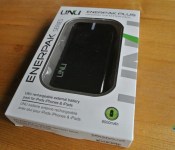
uNu Enerpak Plus Universal Battery Pack Review: 8K battery power in a pocket-sized Package
 The market for portable battery packs is literally flooded with a sea of options these days and it’s almost impossible to differentiate between them, lest you possess some loyalty (or prejudice) for a particular brand. Other times, it’s just a case of working out what’s good value and what’s going to do the job it says its going to do. That’s the market that the uNu Enerpak Plus Universal Battery Pack is aiming to fulfil, and it’s trying to do this by stuffing 8,000mAh into a pocket-sized package; let’s see what it can do.
What’s in the box
 The uNu Plus comes with the bare essentials: the battery pack and a micro-USB cable to be used for charging your devices; naturally the cable can also be used to charge the battery pack with a computer or USB AC adapter. To be honest, for a battery pack that costs MSRP 79.95 USD, I expected a little more to be included in the box, like a carry bag or additional cables, but it is what it is; at least it isn’t missing anything. In the end, the primary cost adding feature is the battery capacity (8,000mAh).
The overview
 Overall, the uNu Plus is a nice looking battery pack. The smooth, black exterior and the general design of the device make for a very sleek looking battery pack. While the smooth plastic does tend to attract lingering fingerprints, the device overall maintains a very streamlined appearance, and is easily cleaned of any grime.
 Being of a smaller size than your average battery pack (4X2.5X.08 inches) and with rounded edges, the uNu Plus is very comfortable to hold in one hand. Similarly, being only 6.8 ounces (or about 200 grams) it’s not heavy at all and makes for a really nice bag, or pocket, carried battery pack. This is perfect since it packs more than enough power for your night out, or even for short trips over several days.
 Features of the uNu Plus include an input micro-USB port for charging the battery pack as well as two USB outputs, one labeled for smartphones and one for tablets. According to the spec sheet, the smartphone port is only able to output 5V/1A whereas the other port gets 5V/2.1A which is required to charge tablets (and some phablets); we’ll get onto the uNu Plus’ charging performance a bit later. The uNu Plus also features a LED flashlight, which can be switched on and off by pressing the button (located on the side) twice, while pressing that same button once shows the current charge available to the battery pack on the indicator LED.
 I’m not a huge fan of the way the indicator LED is designed, though, as guessing how much charge is left on the device at a glance is quite difficult; the blue LEDs seem to bleed colour throughout the LED indicator which can sometimes give misleading reading. Furthermore, when the battery pack is being used to charge another device, the LED will turn off completely, and you must press the side button to get an update of the device’s charge status. I understand that this methodology likely saves more battery than showing the charge status all the time, however it is a bit of a chore when checking whether the battery pack is actually charging requires you to actively find this information.
The performance
 To test the uNu Plus’ charging performance, I used the Battery Monitor Widget app (available here for free) as a measuring tool and checked how long the uNu Plus took to fully recharge my Samsung Galaxy Note 2 from 23%. From the 2.1A port, which is required for the Note 2, it took just over 2 hours to fully recharge my Note 2. This isn’t exactly a perfect estimation of the uNu Plus’ abilities as the charging appears to slow as you approach full charge.
 If however, we consider just the periods of peak charge rate i.e. 50% to 70%, which took roughly 32 mins, this equates to about 1% every 1.6 minutes. When compared to the 1% every 1.55 minutes the Ventev battery pack is capable of (which is also capable of a 2.1A output; see that review here), the uNu Plus doesn’t come off too badly in its performance and performs pretty much how we’d expect it to. With 8,000mAh, it should be able to charge most smartphones 2-3 times before needing to recharge the unit itself, which in my experience, can take about 6+ hours, which is slow, but unsurprising given the input is limited to 1A.
The verdict
 Rating: 3.5/5
Overall, the uNu Enerpak Plus Universal Battery Pack is a solid, likeable entry in the portable battery scene. I like the way it looks and I like that it has solid, consistent charging performance. It does have its pitfalls, but in a portable battery market that is increasingly being flooded with cheap imitations and being able to consistently deliver at least 2.1A to charge higher powered devices becomes more important, the uNu Plus assures you of what you’re getting.
The uNu Enerpak Plus Universal Battery Pack is available for $79.95 USD from uNu’s website which you can visit here.
Gallery of Photos


Samsung Gear 2 and Gear Fit pricing revealed
Samsung has releasing the pricing of their smartwatch Gear 2 and fitness tracker Gear Fit in Taiwan, and incidentally revealed an indication of pricing worldwide.
The Gear 2 smartwatch will cost NT$8,990 or $294 while the Gear Fit will cost NT$5,990 that works out at around $200.
With the Android Wear announcement and a whole host of smartwatches entering the market over the next year, Samsung needs to get these to market and at the right price.
The post Samsung Gear 2 and Gear Fit pricing revealed appeared first on AndroidGuys.

Twitter testing ways to hide @replies and hashtags

Twitter occassionally tests new ways to streamline its service; some features make the cut, while others are destined never to see a public release. Buzzfeed reports that in its latest experiment, the company has begun changing how it delivers the humble @reply, in some cases hiding usernames from users’ timelines completely. The change, which is currently limited to beta versions of the official app, drops physical mentions in favor of grouped conversations, relying on that little blue/grey line to make engagement more intuitive. Like it did with native retweets, Twitter is looking into whether it can cut manual operators like hashtags and introduce more visual cues, which help new users understand how the service works (and it really needs new users). The latest experiment is likely to confuse existing tweeters, however, so Twitter will have its work cut out if it wants to please everyone.

[Image credit: ari, Flickr]
Filed under: Internet, Software
Via: The Next Web
Source: Buzzfeed

Intel flaunts 8-core Extreme Edition Haswell with support for DDR4 memory

Since Intel’s next Haswell chips are aimed squarely at enthusiasts, what better place to unveil them than at the Game Developer’s Conference? The 4th-gen Core-i7 Extreme Edition CPU, codenamed “Devil’s Canyon,” will feature eight unlocked cores and 16 threads, trumping the last model’s six cores. It’ll also support the latest DDR4 memory standard, which brings much higher transfer speeds and lower power drain than DDR3. Along with a better thermal interface, all that will enable “significant” overclocking and performance enhancements, according to Intel. It also announced a Pentium Anniversary Edition with unlockable cores and revealed the “Black Brook” reference all-in-one — designed to show off tech like its RealSense 3-D camera (see the video after the break). Finally, Intel revealed that its 5th-gen Broadwell 14-nanometer processors will be available unlocked and with IRIS graphics. Given that those chips are expected soon and the Extreme Edition Core CPU will arrive in mid-2014, it might be prudent to put off that upgrade.
Filed under: Desktops, Peripherals, Intel
Source: Intel

IBM sends Watson on a genetic quest to find the best cancer treatments

Sure, IBM’s Watson crunches data for mobile apps and powers food trucks, but its owners are constantly looking for important studies that can put its cognitive computing expertise to the test. With the recent announcement of a clinical trial studying ways to deliver personalized care to brain cancer patients, the Jeopardy-conquering supercomputer appears to have found that next major challenge. In collaboration with New York Genome Center, Watson will be tasked with trawling archives of medical literature and clinical data, using its patten recognition skills to identify the best brain cancer treatments based on a patient’s genetic make-up. Teams of scientists had manually undertook the process before, but it’s exactly the kind of problem Watson was designed to help solve. IBM says it will begin a trial later this year and hopes to open its findings to doctors across the world.
Filed under: Internet, Software, Alt
Source: Financial Times
Safeguarding yourself against malicious calls
Anyone who has been on the receiving end of malicious calls will know that they can be terrifying. While most people have experienced unsolicited calls of one kind or another at some point in their lives, threatening calls affect only a small minority, with the victims of such harassment often reluctant to report the incidents for fear of reprisal.
Receiving a threatening call is different to receiving an unwanted call from a marketing agency trying to promote a service, or an unsolicited call from a firm which handles personal claims injury. The latter calls are undoubtedly nuisances but rarely do they cause the receiver any real anxiety.
Malicious calls, on the other hand, almost always cause the receiver distress, which is why it is important for victims of such abuse to take action. Whether you receive a threat to your family or harassment pertaining to your personal appearance, reporting such incidents is the first step towards identifying the caller and having them charged with a criminal offence.
What to do about malicious calls
Making abusive calls to strangers or people you know is a criminal offence in the UK. Receivers of malicious calls should in the first instance contact their telephone service provider to report the calls. However, if the threats are serious and immediate, contacting 999 or your local police station at 101 may be more appropriate.
In many cases, the person making the complaint will not know the identity of the malicious caller. This is not a problem since the telephone provider or police handling the complaint can advise the victim of such harassment about ways in which the identity of the unwanted caller can be determined. Once the identity of the caller has been established, criminal charges can be pressed.
Protecting yourself from further telephone threats
Some telephone providers offer features which can help prevent victims of threatening calls from receiving any further calls of abuse. One such feature is anonymous call rejection, which blocks calls from unknown callers. This service can, however, unintentionally block important calls, meaning the phone owner ends up missing calls from people or services they would like to hear from.
Callblocking using a call blocker like those available at http://www.callblocker.co.uk/ is an effective way to screen and reject unsolicited calls. The callblocker can block specific telephone numbers, including international numbers and numbers preceded by a specific area code, as well as calls where the number has been withheld and those followed by an automated message. Typically, callblockers send the caller to a pre-recorded message that requires them to press a number or give their name to continue.
Alternatively, a subscription service which identifies malicious callers for a fee can be used. This service, offered by telephone companies, allows the receiver of threatening calls to call a number immediately after receiving a malicious call. The telephone company then records important meta-data such as start and end times, which is then made available for police use in tracing the caller.
Image attributed to: FreeDigitalPhotos.net/ hin255
Source: http://www.police.uk/contact
‘Ok Google, Take a Picture’ Goes Live on Google Search App
If you’ve ever wanted to take a picture hands-free by simply prompting Google of your intentions, then Google’s latest enhancement to their Android Search App and Google Now will allow you to do just that.
When you want to capture that perfect moment, all you have to do now is hit the microphone icon or say “OK Google”, then “take a photo” or “take a video” and Google will launch the camera app in the specified mode.
Whilst this is pretty useful, it will be more noticeable for those devices with “Ok Google” for true hands-free operation. For those devices where you still have to manually open Google Now in order to hit the microphone button, it’s still a button press which could equally be the camera.
The post ‘Ok Google, Take a Picture’ Goes Live on Google Search App appeared first on AndroidGuys.

China’s Alibaba bets $215 million on chat app Tango

Facebook has made it a pretty darn good time to be a messaging app maker — just ask Tango. It’s received $280 million in funding including $215 million from Chinese e-commerce behemoth Alibaba, which is looking to bolster its forces against competitor Tencent. That gives it a minority interest in the video chat app, which has 70 million active users and 200 million in total. Tango has also stretched out recently with a social platform SDK for other apps that makes it easier for users to invite friends, for instance. According to Bloomberg, Alibaba could go public as soon as next month and its investment means Tango could be worth as much as $2 billion. We’ll write a witty conclusion in a second, but first we’re going to go learn some coding.
Update: Alibaba led a $280 million investment round, but only bet $215 million of its own cash. The post has been updated to reflect that.
Filed under: Software
Source: Tango

Facebook adds profile photos to experimental Android notification bar

Facebook makes it a habit to test new features before release, and one of them is a permanent notification bar that popped up for some Android users last year. Now, that feature’s back, and it even comes with an upgrade: it shows your profile picture right next to Facebook’s familiar icons. Just like the first time around, the bar stays in Android’s notification tray whether or not you have a new message or friend request. The only difference this time is that your face will stare right back at you every time you access the tray. As is usually the case with Facebook’s experimental releases, only a small pool of users has access to the tool right now. If you happen to be one of them and hate having to look at yourself all the time, don’t worry: simply click the “i” icon to disable the bar via the Settings page.
Filed under: Cellphones, Tablets, Mobile, Facebook
Source: The Next Web
 AIVAnet