



Samsung’s new Ultra HD TVs arrive soon with (or without) curves for $2,500 and up

We got our first peek at Samsung’s latest high-end HDTVs — including the new curved shape that it says creates a larger viewing “sweet spot” — at CES back in January, and now they’re just about ready to come home. Of course the new shape isn’t all there is to offer, and while Samsung isn’t joining LG in pushing any new OLED TVs, it is expanding its lineup of Ultra HD screens and bringing more 4K content to watch thanks to a new deal with Fox. There’s also upgraded Smart Hub software with multitasking to pull in streaming video and live TV all at once, new quad-core CPUs to boot it all up in just 1.8 seconds, and a simpler pebble shaped remote for control. That massive 105-inch Ultra HD TV we were drooling over is still penciled in to launch during the second half of this year, but if you’re looking for a more modest upgrade, then we have new details on price and release for most of the other models (LCD only, no word on plasma).

All of Samsung’s new top of the line 9000 series TVs are both Ultra HD and curved, and start shipping this month. Unlike some of the curved TVs we’ve seen before these can be wall mounted, and of course come with a ton of buzzwordy tech to improve picture quality. The 55- and 65-inch versions will hit first with $4,000 and $5,000 sticker prices, respectively, followed by a 78-inch version later this year for $8,000. There will be a step down 8700 series arriving later in the spring with the same shape but missing a few features (price is TBD), but if you want a high-res display and an old-school flat HDTV experience, the 8550 series is the one. 55- and 65-inch versions launch this month for $3,000 and $4,000, but it will be a couple of months before the 50- ($2,500), 60- ($3,500) and 75-inch ($6,000) options join them.
Still impressed by 1080p? Samsung has HDTVs without the U ready and waiting, with a new H8000 series (curved) and H7150 series (flat). A 48-inch curved 1080p HDTV will ship in May for $2,000, while 55- ($2,500) and 65-inch ($3,400) versions are coming too.The H7150 brings the HD that you’re used to in a shape that’s familiar, along with all the multitasking and picture quality features Samsung can muster. 55-, 65- and 75-inch versions will all arrive this spring for between $1,900 and $4,000.

Of course, if you opt for one of the Ultra HD TVs, you’ll probably be looking for stuff to watch. Samsung will stream or download 4K video in apps from Netflix, Amazon, M-GO, Comcast and DirecTV, but for the highest quality you’ll probably need its UHD video pack. Basically a 1TB storage device stuffed with movies, it’s $300 and includes Night at the Museum, The Counselor, X-Men Origins: Wolverine, G.I. Joe: Retaliation and World War Z, plus three documentaries. Samsung plans at least one more pack for release this year, and says it’s working with Fox to pioneer a “sustainable UHD content distribution ecosystem.” We talked to Fox’s Mike Dunn during CES about an extension to the Blu-ray format that could handle higher res video and other features, but so far there’s nothing new to report there. Samsung also has a new BD-H6500 Ultra HD upconverting Blu-ray player for $180 along with a few sound bars and sound stands — we’ll get our second chance at a first impression today, so check back for a few hands-on pics.
Filed under: Displays, Home Entertainment, HD, Samsung

OUYA removes free-to-try requirement, lets devs choose whether to include demo content

OUYA will soon let developers choose whether or not to include free content. Since the platform’s launch, customers have been able to try out any game before making a purchase, but some devs have been pushing back, requesting that OUYA allow them to make that call on their own. While free content certainly has its advantages, game makers have outlined several reasons why a free-to-try model may not be practical. Creating demo content costs money, of course, and in some cases, it’s difficult to fit a selection of free gameplay within an existing storyline. It’s not entirely clear when the policy change will take effect, so if you’ve been taking advantage of OUYA demo content, enjoy it while it lasts.
Filed under: Gaming
Source: OUYA
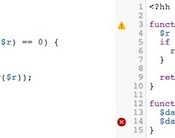
Facebook wants to help you write code faster with its ‘Hack’ programming language

Mark Zuckerberg and Facebook often try to assist and provide tools for coders, both current and future ones. With that in mind, the social network today announced Hack, an open-source language for programmers. This new language has been used internally at Facebook for the past year and offers a lot of potential for developers, enabling them to program faster and be able to catch errors more easily, among other things. Hack, which was developed for the HHVM platform, is designed to be extremely friendly with PHP; as Facebook puts it, its new programming language “offers the best of both dynamically typed and statistically typed languages, and that it will be valuable to projects of all sizes.” Essentially, this means you theoretically could have access to websites that are faster and more reliable. Interested in learning more? Head over to Facebook’s Engineering blog, where you’ll find all the nitty-gritty details you’re looking for.
Filed under: Internet, Facebook
Via: GigaOM
Source: Facebook

Future DualShock 4 update for PlayStation 4 will add option to dim light bar (updated!)

It may seem like minor news, especially considering the hoopla over Sony’s Virtual Reality this week at GDC, but the PlayStation 4′s DualShock 4 controller is about to get a firmware fix. In an interview with Geoff Keighley of Spike TV, Shuhei Yoshida, Sony PlayStation’s head of Worldwide Studios, confirmed that a future firmware update (we’re not sure if it’s console- or controller-specific like on Xbox One) will give gamers the option to turn off dim the controller’s light bar. If you own a PS4, then you know just how preciously short-lived the DualShock 4′s battery life can be. The ability to muffle that glaring light should help extend the DS4′s longevity, but only slightly. Still, it’s a major boon for the community, and those of us that like our controllers to be less of a night light and more of a gamepad.
Update: Yoshida clarified on Twitter that the firmware update will only dim the DualShock 4′s light bar, not disable it entirely.
@geoffkeighley no, I said dim the LED, not turn off
– Shuhei Yoshida (@yosp) March 20, 2014
Source: Geoff Keighley (Twitter)
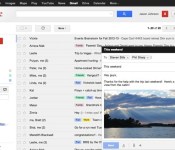
Google makes Gmail more secure in light of NSA snooping

Your Gmail inbox may well be full of chain letters and kitten photos, but Google just announced two security changes that’ll help keep prying eyes away from all your important messages. From now on, Google will always use a secure HTTPS connection when you’re checking or firing off emails. You may remember that Google made such secure browser connections the default back in early 2010, but you always had the option to disable HTTPS if you really believed in the security of your network. The second (and arguably juicier) change is that your messages will be encrypted as they get routed through the company’s many data centers. Google isn’t exactly being coy about why, either. It said in a blog post that internally encrypting those messages became a priority “after last summer’s revelations”… a not-so-subtle way of saying it doesn’t want organizations like the NSA poking around where users don’t want them.
Via: The Next Web
Source: Google
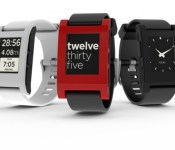
Pebble Smartwatch Sales Climb to 400,000 Units, Revenue to Double in 2014 [iOS Blog]
Pebble launched its smartwatch Kickstarter campaign in 2012 and started shipping the device early last year. Since January 2013, the company has sold over 400,000 smartwatch units, earning Pebble an estimated $60 million in revenue, reports Fortune, which spoke to Pebble CEO Eric Migicovsky.

Pebble as a company has grown significantly in the intervening years, becoming profitable in early 2013 and almost doubling its workforce from 45 up to 70 this year. Revenue also is expected to double year over year in 2014.
“When we started working on wearables six years ago, there were few players in the space and a lot of skeptics,” says Pebble CEO Eric Migicovsky of Google’s news. “It’s exciting to see this market grow so quickly — enabling more interesting use cases and keeping all of us laser-focused on creating the very best user experiences we can.”
As the company matures, Pebble’s ecosystem is experiencing its own expansion. The company recently rolled out an Appstore for its smartwatch and has over 1,000 apps in its library, with 12,000 registered developers ready to add more titles in the future.
As for Pebble’s next steps, Migicovsky is not concerned about Google’s recent Android Wear announcement and the unveiling of Motorola’s Android-based Moto 360 smartwatch.
For now, Migicovsky is more worried about making his products better than Google shaking up the market. He’s exploring technologies that could help boost Pebble’s week-long battery life further and keeping tabs on newer screen displays, particularly ones made from flexible materials.
Besides adding an Appstore, Pebble also recently started selling a new version of the smartwatch. The $249 Pebble Steel features a stainless steel body with a leather or steel band and a face covered with durable and scratch resistant Gorilla Glass material.
Apple also is expected to enter the wearables market in 2014 with its iWatch product. Recent rumors suggest the device will focus on fitness with support for heart rate measurement, step count and more. The device may pair with Apple’s Healthbook app, a Passbook-inspired wellness app that could debut alongside iOS 8. The iWatch may also include Siri and mapping functionality. 
     |
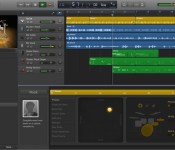
GarageBand for Mac Updated with MP3 Export, New Drummers, and More [Mac Blog]
Apple today updated GarageBand for Mac to version 10.0.2, bringing several improvements including the ability to export tracks in MP3 format and three new Drummer options in the $4.99 content pack.

What’s New in Version 10.0.2
– Improves stability and addresses a number of minor issues
– Adds the option to export songs as an MP3
– Contains multiple enhancements to Accessibility
– Includes 3 new Drummers and drum kits from the rock, songwriter, and R&B genres**Part of the one-time in-app purchase that includes the complete set of GarageBand sounds, loops, and drummers, as well as access to the GarageBand Lesson Store.
GarageBand 10 was introduced alongside OS X Mavericks last October and was part of a significant shift in Apple’s business model that saw all iLife and iWork apps for iOS and Mac devices become free for customers purchasing new devices. While the basic GarageBand app for Mac is a free download [Mac App Store], additional content such as virtual drummers, lessons, sounds, and loops are part of a $4.99 in-app purchase package due to licensing costs associated with the content.
| |

AT&T Starting Gear Fit, Gear 2, Gear 2 Neo and Galaxy S5 Pre-orders Tomorrow
It is almost time for all the carriers to officially launch the Samsung Galaxy S5. The first word we have heard so far comes in from AT&T. The Samsung Galaxy S5 will start the pre-order process March 21st, that is tomorrow, and will set you back a typical $199.99 on contract, $25 a month with AT&T Next 18 or $32.50 month AT&T Next 12. If you prefer to drain your bank account, you can also opt to buy the device at full price, which will be $649.99. Pre-orders are said to start shipping in “early April”.
 Along with the Galaxy S5 AT&T is also getting the Gear 2, Gear 2 Neo and Gear Fit ready for customers. Pre-orders will start for all three of those device tomorrow too. Contrary to the pricing details from an earlier post, the Galaxy Gear 2 will be $299, only a $4 difference. The Galaxy Gear 2 Neo and Galaxy Fit will be $199 . We expected the Gear 2 Neo to be closer to $250, but we will take the price cut.
If you plan to buy both a Galaxy S5 and either a Gear 2 or Gear 2 Neo, AT&T has a special little promo that they will be running to help you out a little. If you pick up one of the mentioned watches and the S5, you will save another $50. The Gear Fit doesn’t appear to part of the promo though. The $50 off promo will be good from March 21st through June 5th, or while supplies last.
Press Release [Galaxy S5] [Galaxy Gears]
AT&T Galaxy Gear Page
P.S. That Photoshop job is pretty bad.
AT&T outlines Samsung Galaxy S5 pre-order details
AT&T on Thursday announced the pre-orders for the Samsung Galaxy S5 will commence on Friday, March 21. Pricing is listed at $199 with a two-year service agreement; the smartphone will be sold in Charcoal Black and Shimmery White.
Customers who purchase the Galaxy S5 on a Next plan can spread payments out at $25 per month and the full retail price is $649.99
Those interested in picking up one of the new wearable devices can save $50 if they purchase with the Galaxy S5. Bought separately, the Gear 2 will retail $299 while the Gear 2 Neo and Gear Fit will be $199.
The post AT&T outlines Samsung Galaxy S5 pre-order details appeared first on AndroidGuys.
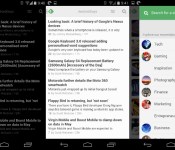
Our favorite news readers for Android
After Google Reader died, the poor souls who used RSS feeds for their main source of news were forced to move on. RSS isn’t dead quite yet, and there are tons of really nice apps for Android out there. Here’s a list, in no particular order, of some of the readers we use on our phones.
Feedly

Let’s start this list out with our collective favorite. Feedly was there when Google Reader wasn’t, plain and simple. It offered a painless way to import our Google Reader feeds without skipping a beat. The app has been updated like crazy, and it’s now more beautiful than ever. Theme options, view options, and a solid app – what more could you want?
Press

Press has been around for quite awhile, offering a beautiful look at your news sources. Import your Feedly, Feedbin, Feed Wrangler, and Fever feeds to Press and have at it. It offers Immersive Mode, a light and dark theme, and one heck of a widget. It’s $2.99, and for a great app like this, it’s well worth the money.

This is probably one of the most popular news apps out there. Flip through pages of articles and browse through content at the speed of light, all while looking at that nice flipping animation. You can sign in with you Facebook or Google+ username, or just jump in and start customizing your feed. For those of you who need more than just headlines, this app is for you.
Pulse

Or LinkedIn Pulse, rather. Probably the best things that Pulse has going for it is its layout. Very creative, very functional. It also has a nice widget that acts just like your feed.
gReader

gReader has been around for quite a long time. Nobody knew if it would make the jump after Google Reader was shut down, but lo and behold, it’s still here! you can sign in with Feedly Cloud, The Old Reader, or choose neither, and start customizing. The app is free, but you’ll need to shell out $4.69 if you want to get rid of ads and add some better widgets.
News+

News+ was created to be almost a gReader clone with more feed options. At the time of it’s creation, gReader only supported Google Reader feeds. That has since changed, but News+ is still around, bringing you the news that you want, but only if you have the right extensions. The interface is very similar to gReader, so you aren’t losing much if you decide to switch over. If you’d like to customize your feed a bit more than usual, you’ll need to pay a fee to add more than one feed.
Google Play Newsstand

This one replaced Google Currents, Google’s news aggregator that killed battery life. Think of Play Newsstand as an ”all in one” reader. You can read your news feeds, browse magazines, and even use Bookmarks, a built-in read it later service.
Amber RSS Reader

Amber RSS Reader isn’t terribly popular, but we still love it. This one lets you log in with Feedly, Feedbin, FeedHQ, and BazQux Reader to get your news. it will cost you $1.99 from the Play Store, but it’s definitely worth it. For those who are looking for something beautiful and simple, take a look at this one.
Flyne

If you missed our App of the Day coverage on this one, you should check it out. Built by the same developer as the Falcon Pro Twitter client, Flyne aims to offer your news when you need it in a beautiful package. Use the free Popular Feeds, or download the Twitter and Feedly extensions for $1.99 and $.99, respectively. Try out the Popular Feeds section for free, and you’ll be hooked.
Digg Reader

This last one is for people who don’t need pretty visuals and over-the-top widgets. Digg Reader is simple, clean, and functional. It also has Instapaper/Pocket support along with the ability to thumbs-up or thumbs-down certain posts. And… it’s FREE!
That’s all, folks! Hopefully you found a new app that you’d like to try. Any other suggestions? Let us know!
The post Our favorite news readers for Android appeared first on AndroidGuys.
 AIVAnet