



Join the Engadget HD Podcast live on Ustream at 8:45PM ET

It’s Tuesday, which means it’s time for the Engadget HD Podcast and we hope you’ll join us for the live recording at 8:45PM. We start this week’s show with the latest rumors about an Amazon set-top box, or something like that. We of course cover the latest Chromecast developments, like just about every week, and there’s always plenty of streaming news and a few other home theater related items. If you’ll be joining us, take a peek at the topics after the break and then get ready to participate in the live chat.
Rumors of an Amazon music service, TV set-top box swirl yet again
Amazon’s streaming device is reportedly a dongle with gaming support
Plex adds free Chromecast support for all, media shuffling and camera uploads to iOS
Chromecast Android app prepped for upcoming international rollout
Big UK retailer lists Chromecast ahead of an official launch
Google settles its seven-year YouTube copyright battle with Viacom
PlayStation 4 tops US console sales in February, but Xbox One narrows the gap
Microsoft to take Xbox One to 26 new countries in September
ACC Sports channel arrives on Apple TV with on-demand analysis and highlights
Torrent front end Popcorn Time made streaming movies free and easy, so of course it’s gone
Veronica Mars Ultraviolet digital copies frustrate many backers, Warner Bros. offers refunds
Dish’s Super Joey DVR extender arrives, lets you record eight shows at once
Netflix’s three new originals include ‘Shrek’ and ‘Madagascar’ spin-offs
March Madness Live 2014: new apps, redesigned brackets and more social features
Must See HDTV for the week of March 17th: March Madness, American Hustle, Infamous
Filed under: Home Entertainment, HD
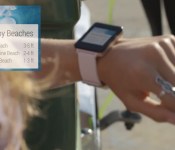
Android Wear: Zen and the art of smartwatch design

Are you ready for a smartwatch that knows where you are, what information is important to you and, above all, wants you to forget that you’re even wearing it? That seems to be the basic idea behind Google’s Android Wear platform, which promises to deliver contextual, relevant information to you whenever you need it, while fading into the background when you don’t.
With today’s announcement of the Android Wear platform for wearables, much of the discussion has revolved around how Google is following the Android smartphone playbook and focusing on creating an ecosystem that can accommodate multiple manufacturers, with a range of products with different price points and feature sets. And Google has lined up an impressive list of partners, including smartphone makers HTC, LG and Motorola; chipmaker and smartwatch-wannabe Qualcomm; and watchmaker Fossil. Even Samsung, which just last month held a splashy launch for its latest round of Gear smartwatches, is in on the game.
… Google doesn’t see wearable devices as full-fledged computers or smartphone replacements.
Those partnerships instantly make Android Wear a major platform in this nascent category. However, what’s most interesting about Google’s approach isn’t the business model, which isn’t that different from Microsoft’s SPOT platform of a decade ago. What matters most about Android Wear is Google’s approach to the category. Unlike, say, Samsung, which initially marketed Galaxy Gear as the real-life successor to Dick Tracy’s wrist communicator, Google doesn’t see wearable devices as full-fledged computers or smartphone replacements. They’re designed to help you get snippets of crucial information — like the weather, your flight status or whether there’s a jellyfish warning in effect for your beach — when you need them most, and then allow you to get on with the rest of your life.
The philosophy is consistent with Google’s approach to its first wearable, Glass. The media may obsess about how Glass can be used to pirate movies and play games. But the device, first and foremost, is designed to make it easier to focus on the here and now, while still being able to check to see if your boss sent you that important email you were waiting for. As Glass Senior Developer Advocate Timothy Jordan said at Engadget Expand last year, the best apps for Glass “help technology get out of the user’s way, but [are] there whenever they want [them].”
The philosophy is consistent with Google’s approach to its first wearable, Glass.
The first Android Wear watches extend that idea further, bringing Glass’ location awareness and voice control to a more socially acceptable design. Nobody is likely to ask if you’re recording them, and cops probably won’t pull you over, just for wearing a Moto 360. In today’s Android Wear announcement, Google SVP Sundar Pichai called watches “the most familiar wearable,” and said that devices based on the company’s new platform “understand the context of the world around you, and you can interact with them simply and efficiently, with just a glance or a spoken word.”

Google isn’t the first to treat the smartwatch as a simple way to access actionable information without interrupting the flow of your life. Pebble, for one, takes a similar approach. CEO Eric Migicovsky says developers are encouraged to look for a “subsegment” of their smartphone apps that can work effectively on a small screen. Unlike Pebble, however, Google’s ambitions are to give you access to just about all of the information you can get on your smartphone — but to allow you to do so unobtrusively and with minimal effort. Android Wear apps, according to Google, should “provide the maximum payload of information with a minimum of fuss, optimized to provide tiny snippets of relevant information throughout the day.” User input, according to Google, should take place only “when absolutely necessary.”
In 1991, computer scientist Mark Weiser declared that “the most profound technologies are those that disappear. They weave themselves into the fabric of everyday life until they are indistinguishable from it.” Weiser envisioned a future dominated by “ubiquitous computing,” with invisible technology that is always there. Android Wear, with its Zen-like approach to “allowing you to be connected to the virtual world and present in the real world,” and with a developers’ guide that lists being “unobtrusive” as a key design principle, seems to be an attempt to deliver on Weiser’s promise. The question is, in a world where it’s become socially acceptable to pull out a smartphone in the middle of a meeting, and where the most exciting developments on the gaming front all involve immersive virtual reality environments, is there still a market for technology that just gets out of your way?
Skype version 4.7 for Android brings significant battery savings
“Imagine being able to leave Skype running on your phone all day without having to worry about your battery life.”
That’s how Skype are promoting their latest version of the popular app, promising to rid the battery woes that has plagued the app for sometime.
Version 4.7 of Skype sees improvements that aggressively tackle the issue of battery usage, to a point where Skype claim leaving the application running in the background all day will go unnoticed by users when it comes to battery used.
To achieve such drastic improvements, Skype have had to make some fundamental under-the-hood changes including turning off instant notification of messages in group chats. They advise:
- In the near future, you will be able to receive group chat messages instantly without additional battery impact.
- If you can’t wait for that to happen, we’ve added a new setting to let you keep group chat notifications. Go to Settings > Notifications > check the “Sync group messages in the background” box.
In addition, version 4.7 of Skype includes a workaround for a KitKat bug which caused a ‘runaway’ process when the camera was synced in the background (fantastic news), as well as a fix for audio and video calling on tablets that do not have Bluetooth.
The update is live in the Google Play Store right now.
The post Skype version 4.7 for Android brings significant battery savings appeared first on AndroidGuys.
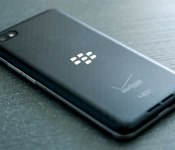
Verizon’s BlackBerry 10 phones are finally getting their 10.2.1 updates

A few lucky Verizon BlackBerry buffs got the long-awaited 10.2.1 update back in January, and now Big Red is starting to push that new build to all its Z10, Q10 and Z30 owners. The new version number doesn’t sound all that impressive, but the changelog is heftier than the label lets on: there’s loads of UI tweaks to dig into, to say nothing of an offline reading mode, better support for group messaging and FM radio functionality… if you’ve got a Q10 or Z30. BlackBerry also made it easier to install Android APKs, if you’re into that sort of cross-platform witchcraft. Verizon is the second major US carrier to make this update available (T-Mobile took the gold this time), but there’s still no word on when AT&T and Sprint will get their respective acts together.
Filed under: Mobile
Source: @VZWNews

Unity 5 game engine brings advanced lighting, physics and audio effects to mobile, PC and now the web

At the Game Developers Conference, or for those in the know: GDC, we got a taste of the new Unity 5 game engine. For most of you, a new engine doesn’t mean much, but in the hands of the right people, it can mean more beautiful and realistic games. Unity, which powers any number popular titles, especially on the mobile front, is getting a host of new features for version five. Most notably is a new physics-based shader system and integration of Geomerics Enlighten illumination tools — that means more realistic lighting and shadows as well as console-caliber visual effects. The engine’s audio pipeline has also been rebuilt from the ground up for better performance and more flexibility when it comes to mixing sound and adding effects. But perhaps the biggest addition is early access to WebGL support, which means you’ll be able to build titles that work on iOS, Android, Blackberry, Windows Phone, OS X, Windows, Linux, PlayStation, Xbox, WiiU and any modern web browser. As an example, Unity will be demoing Dead Trigger 2 running on WebGL at their booth at GDC.
Filed under: Gaming
Google Voice expected to merge into Hangouts this summer
Following trend with Google moving towards one single app that incorporates the functionality of all their social and communication services, it seems Google Voice is to be absorbed into the Hangouts app this summer.
Once the transfer of Google Voice into Hangouts is complete, you’ll be able to make VoIP calls directly from your Google phone number in the mobile app, just like on the web.
Google has already made its Hangout app take over the function of system-wide SMS handling, and come this summer it seems it’ll be able to handle all VoIP communication too.
The post Google Voice expected to merge into Hangouts this summer appeared first on AndroidGuys.
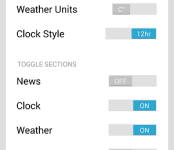
MyCastScreen Fixes Toggles, Adds Custom Background Support and More
It seems like days ago we showed you guys a new app by musicalbigfoot called MyCastScreen. It just was launched and caught on rather quickly as a good start to a home screen, of sorts, replacement for you Chromecast device. It is just an app that casts various bits of information in a card style UI to your TV, not an actually home replacement.
Today the dev has released an update for the app, yes already, that adds quite a bit of functionality to it. The first thing that was fixed, was the ability to actually turn off various cards like the traffic, weather, news and clock. Also in this update you can change the clock to a 24 hour format and the temperature read out to Celsius.

 Last, but not least, you can now plug in a Custom Background URL for setting your own backgrounds.
 Bad photo, I know, but the Moto 360 looks pretty awesome on a 39″ HD T.V. How about this one;
 Check out the app via the Play Store button below. It certainly seems the dev is going to be working forward with it and making it better as time progresses. It never hurts to show support to help encourage active development and updates.

 AIVAnet