


Review: Supertooth Freedom Bluetooth Headphones With NFC

When you think of quality headphones names like Beats, Turtle Beach and Sennheiser probably come to mind straight away. While the aforementioned are indeed some great headphones there is a world of headphones beyond the big name brands. Supertooth is one of those brands, and they’re looking to give the big names a run for their money by offering similar quality at a much more affordable and reasonable price.
Sound
Let’s get the biggest part of the review out of the way right now. I’ve been fortunate enough to use the big name headphones and I know what good quality audio should sound like. I already own a pair of Turtle Beach i60′s, which I absolutely love. I’ve used friends Beats headphones and Sennheiser I’ve used when I played in my old band. The Supertooth Freedom’s sound quality is nothing to scoff at. It produces great all around sound giving you a full and immersive experience. I couldn’t even take these to full volume for fear I’d damage my hearing. There was absolutely no cracking or degradation of the sound over Bluetooth or wired. The Freedom’s bass reproduction is superb but if you’re looking for the Beats bass sound, you’ll not find it here. Beats are manufactured with a total bass experience in mind. The Freedom is looking to give a balance and try to level everything out. That’s not to say you can’t listen to bass heavy music with these, you can, just don’t expect them to be geared toward a bass experience. The Freedom’s also support phone calls, you can switch to a phone call via the ear piece button and quickly switch back to music when you’re done.


| Technical specifications | |||||||
|
Battery, Bluetooth Range, NFC, Build Quality and Design
The battery on the Freedom’s is amazing. I went easily two days without charging them once. And that’s with about 3-5 hours of listening to music each of those days. The battery is really a high point in this entire review, Bluetooth accessories can be a pain when you’re having to recharge the damn thing all the time. The Bluetooth range on these headphones is second to none. I was able to walk away from my phone close to 50 feet before I started experiencing signal loss. I tested the Bluetooth range in a metal warehouse with racks and lots of equipment. Your results may vary depending on where you’re at and what’s in the path of the Bluetooth signal. The Freedom’s also come with NFC pairing capabilities, which I did not test as I did not have an NFC capable device on hand. But this is a great feature for Android users, not so useful for iPhone users. The build quality is actually very good as well. It’s mostly all plastic with the exception of the inner rails, which look aluminum. The only real complaint I can find with the build quality is that fingerprints tend to love the glossy plastic, be prepared (if you’re a neat freak) to wipe your phones down daily. The overall design is spectacular. You can tell they are shooting for the Beats crowd with the clean curves and simple lines. I’d rate the design right up their with the competition.


WrapUp
The Supertooth Freedom’s are really an awesome set of headphones for the asking price of $149. They really stand their own against Beats or any other big name headset maker. There were very little complaints that I had with the Freedom headphones, mostly trivial things like fingerprints on the plastic. I was also slightly annoyed with the dust covers for the AUX in and microUSB. But most dust covers are kind of annoying anyway. I highly recommend these headphones if you’re seeking a pair of Bluetooth headphones with quality sound and NFC. I didn’t mention this earlier but the Freedom’s do not have noise canceling technology but really that’s a minor drawback. The Supertooth Freedom’s have a nice minimal clean design that competes with the likes of Beats and others. The sound is extraordinary for the price tag. NFC is a win for those with Android devices. Overall I give the Supertooth Freedom’s 4 out of 5 stars. For the price here folks, you just can’t lose. These are well worth the $149. Hit the link below to get a pair of your own Supertooth Freedom’s!

Microsoft Releases OneNote as a Free Mac App Store Download
In line with a report from last week, Microsoft today launched OneNote for the Mac, making several significant changes to the service for both mobile and desktop users. The biggest change is in pricing with OneNote now free across all supported platforms for personal use. The free Mac app also includes 7GB of free OneDrive storage space, which can be expanded by subscribing to Office 365.
The Mac version is very similar to the Windows version with only a few subtle visual differences. Both versions share the same notebook metaphor, ribbon interface and freeform note-taking features.

Along with a Mac version, Microsoft also is releasing a OneNote clipper browser plug-in for Internet Explorer, Chrome, Firefox and Mac Safari that allows users to save clippings from webpages. This feature is being extended to third-party apps via a new cloud API that provides developers with the ability to integrate OneNote clipping into their apps.
Other new tools in OneNote include Office Lens, which allows users to take a picture of a document and immediately import it into their OneNote QuickNotes with text recognition. Microsoft also enabled a OneNote email service that provides users with the ability to create new QuickNotes using a unique onenote.com email account.
Microsoft OneNote for the Mac [Direct Link] is available for free from the Mac App Store. While the consumer version is free, Microsoft is still offering a paid business version with premium features like Outlook integration and SharePoint support. New partner apps with support for OneNote include Feedly, IFTTT, News360 and Weave. 
     |
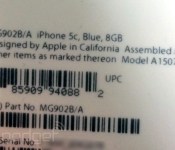
8 GB iPhone 5c Packaging Label Shown in New Photo [iOS Blog]
Following reports this morning claiming that Apple is introducing an 8 GB iPhone 5c tomorrow, Engadget has received a photo of what is said to be the label from the device’s packaging.

The label is from a blue 8 GB iPhone 5c and carries a new part number of MG902 to go along with with the existing A1507 model number that is used on iPhone 5c devices sold in Europe and the Middle East for compatibility with cellular networks in those countries.
| |

Hope for Optical Image Stabilization in iPhone 6 Revived with Supplier Rumors
Late last week, shares of InvenSense rose on rumors that the company had won a contract to supply sensors for Apple’s upcoming iPhone 6. InvenSense supplies sensors such as accelerometers and gyroscopes to major phone manufacturers, but the company has yet to publicly land a deal with Apple. The validity of the rumor seems up for debate, however, as a Needham & Company analyst soon released a note saying that he “did not get the impression” from InvenSense’s CEO and CFO that such an agreement was in place. Of course, that information would be under a strict non-disclosure agreement with Apple, severely limiting what InvenSense executives could tell the analyst.
Regardless, The Motley Fool speculates on what InvenSense could bring to Apple. While InvenSense could offer drop-in replacements for the current gyroscope and accelerometer sensors in the iPhone, the company also provides Optical Image Stabilization (OIS) technology for mobile phones:
There’s one additional socket that InvenSense could win on the iPhone — an OIS gyroscope. The burgeoning technology is used to improve smartphone camera’s by stabilizing the image using a gyroscope. Samsung neglected to use the technology in the Galaxy S5, but Apple may decide to integrate it into the iPhone 6. If it does, InvenSense is a clear choice.
 Image from Electronics 360
Optical Image Stabilization remains relatively new in the smartphone market, and uses a motion-tracking system to compensate for device shakiness, allowing for sharper photos and video. This video demonstrates the product:
Apple presently offers software-based image stabilization in its iPhone 5s, but has definitely been researching optical image stabilization for the iPhone. Earlier this year, an Apple patent application detailing an OIS system was published. The employee who authored that patent was hired by Apple in 2012 from a company working on the same optical image stabilization technology.
Whether or not Apple is actually planning on incorporating Optical Image Stabilization technology in the next iPhone or not, it’s clear the company’s engineers are working on it. Historically, Apple has made steady improvements to the iPhone camera with each subsequent generation, and the last several generations have focused on image quality improvements rather than simply increasing megapixel counts.
| |
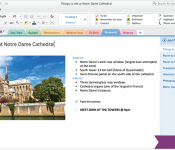
Microsoft’s OneNote goes completely free, launches for Macs

Honestly, we’re a little surprised that it took this long for OneNote to land on OS X — Microsoft’s powerful tool for taking and organizing notes has been around for a decade now. Oddly it came to iOS and Android before finally finding a home in the Mac version of the Office suite of products. With its launch on Apple desktops, OneNote is also going completely gratis. The new Mac version is available for free in the App Store and the Windows edition is becoming a free download as well. The Metro-fied version designed for Windows 8 has been free for sometime now, but the full desktop version of OneNote 2013 was a paid part of the Office productivity suite. Premium features, like SharePoint support and Outlook integration still require you to cough up some cash, however.
In addition to ditching the price tag, Microsoft is adding a bunch of new features to OneNote. Most notably is the launch of an API that allows developers to integrate their own creations with the service. As a demonstration of its most basic functionality, Redmond launched a collection of web clipper extensions for IE, Chrome, Firefox and Safari. Of course, capturing web pages is just the tip of the iceberg. Feedly, IFTTT, Genius Scan and a host of others have added the ability to save to OneNote from their own apps and we’re sure plenty more will join the fray soon.
Lastly, today also marks the launch of Office Lens, a Windows Phone app that turns your smartphone camera into a scanner. Evernote and Google Drive (previously Google Docs) have offered the ability to snap photos of documents or handwritten missives for a while now. Lens finally brings OCR (optical character recognition) to Microsoft’s apps, bringing it closer to complete feature parity with its competitors. You can go download OneNote and its various companion apps now.
Filed under: Software, Apple, Microsoft
Source: Office Blogs
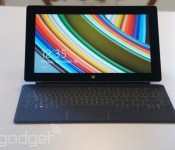
Microsoft intros an LTE version of the Surface 2, arrives tomorrow for $679

As hard as it is to believe, Microsoft has until now never put out a 3G/4G Surface tablet. But we knew one would come eventually: the company said it was working on an LTE-enabled Surface 2 and indeed, the thing recently surfaced (har) in FCC documents. Now it’s finally here: Microsoft just announced that the LTE Surface 2 will go on sale tomorrow, and will be compatible on AT&T’s 4G network here in the US. (Fun fact: its official name is literally “Surface 2 (AT&T 4G LTE)”.) All told, it’ll sell for $679 with 64GB of built-in storage. That’s a $130 premium over the 64GB WiFi-only model which, if you’re paying attention, is the same premium you’d pay for a cellular iPad over a WiFi one (it’s worth noting, however, that the 4G Surface 2 is considerably less expensive).
Happily, the Surface 2 comes free of any contractual agreements. The big catch, of course, is that you’ll need an AT&T micro-SIM: the tablet supports LTE bands 4, 7 and 17, along with 3G UTMS (bands 1, 2 and 5) and regular old GSM (800/900/1800/1900MHz). In theory, that also means you should be able to get away with using a T-Mobile SIM, since T-Mobile also uses LTE 4 and 1900MHz 3G. T-Mo isn’t officially supported, though, so don’t expect anything in the way of possible bug fixes or performance enhancements. Either way, what’s nice is that even with the LTE, the tablet promises the same battery life (up to 10 hours) and basically weighs the same as it did before.
In any case, you can find the Surface 2 with LTE tomorrow at Microsoft Stores, MicrosoftStore.com and Best Buy (but not AT&T stores, oddly). Oh, and all those promotions Microsoft was offering back when the Surface 2 first launched? They still apply five months later on this LTE version. That means you can expect 200GB of free OneDrive storage for two years and a year of unlimited Skype WiFi calling and landline calls.
Filed under: Tablets, Microsoft, AT&T
Source: Microsoft

The other thing Holland has legalized: carrier-free SIM cards

When it comes to tolerating things that other countries deem illegal, Holland’s got previous experience, but this time the nation has approved something that doesn’t just benefit glaucoma sufferers. The country has ratified the use of blank SIM cards that aren’t tied to a carrier, and can instead be tweaked use whatever network is best for you. The idea is that since you’re not tied to an operator, you can switch between providers when your needs change — allowing you to swerve roaming charges when you’re out and about. The move also boosts “internet of things” makers, who can connect devices to cellular networks without signing a long, expensive deal. Of course, the longer-term implication is that smartphone companies like Apple and Samsung could bulk-buy voice and data services and cut out the middle man — a prospect that would even send John Legere into a cold sweat.
[Thanks, Omar]
Filed under: Cellphones, Mobile
Via: iPhoneclub (Translated), GigaOM
Source: Overheid.nl

Scrabble-playing robot learns how to sass its rivals

– Transcript of staff appraisal for Robot PX31i
Hey PX31i, thanks for coming in, please take a seat!
So, I wanted to talk to you about your personal development today. No, don’t look down, because you’re great at moving heavy objects and scaring the visitors, but we’re all worried about your work / life balance. Like, at the after-office party, you just sit in a corner, eyeing up the leftover filing and wishing you didn’t have to talk to Dave.
We think you, you know, could be a little more personable. Like Victor, have you seen Victor? He’s a research project to get computers to be more chatty. Victor’s amazing, he’s even got his own Twitter account. People think they’re playing Scrabble with him but actually he’s just showing off his impressive range of smack talk. Maybe you could watch the Wall Street Journal video tonight and come back tomorrow with a little more personality? Either that or maybe wear a fruity hat or something. Okay, that’s all for now!
– Transcript ends.
Filed under: Robots
Source: The Wall Street Journal
Blu Life Pure mini first impressions and review
I must admit, I wasn’t sure what to expect when I first received my unit. But at the sub $300 price point, I was not expecting anywhere near the level of quality with which I was greeted. Not only is the presentation everything you’ve come to expect from traditional manufacturers, but after pulling all of the pieces from the box, I found the absolute classiest move by any device manufacturer I’ve seen to date. Included with the device were a fitted screen protector and a simple translucent case for the device. Gone are the days of leaving the factory screen protector on the device while you wait for your aftermarket protectors to arrive in the mail, nay, they’ve literally included everything you need to get your started.
Hardware
The Life Pure mini looks like the big brother of the iPhone 5C, but don’t let that thought deter you. It’s extremely sturdy, has a good weight (~150 g), and a minimalistic nearly badge-less design – save for the lone “BLU” symbol above the iPod-esque “16GB” toward the bottom of the device’s rear. The only other accents on the back are the half-inch speaker grate on bottom right and the 8 MP camera with LED flash, top left.
The charging port is located on the bottom, but it’s upside down and positioned almost entirely to the left side, so you can forget about using most universal USB media docks. Volume rocker is exactly where Nexus and Galaxy users would expect, thumb-height on the left side, but the power/sleep button resides at the top on the right, balancing the 3.5 mm headphone jack to its left rather than opposite the volume rocker, which instead you’ll find the ejectable SIM tray.
After using the Galaxy S 4 and Nexus 5 as my main devices for so long, the form-factor of a device with a 4.5 inch display is a much welcome change. It just fits perfectly in the hand, even comfortably using it one-handed vegging out on the couch and not straining fingers to keep hold when reaching a far corner of the display. Music sounds fine on the speaker, you couldn’t expect more from a device in this price range, it’s loud enough even to hear in a moving vehicle without sounding distorted, although some notifications do tend to sound distorted and odd.
Software
The software developers are obviously paying attention to custom ROMs as a lot of features you’ve come to expect from aftermarket firmware are packed in.
Swiping left on the notification shade flips to quick settings toggles, of which there is no shortage. Now, I must say, they’ve obviously been taking cues from Apple in a couple areas; the above mentions design, but more importantly, the stock launcher on the Life Pure mini, isn’t anything you’ve come to expect out of Android.
There’s no app drawer, so if you’re like me and you have over 100 apps, things can get pretty messy. You do, however, have the ability to create folders, which hold up to 12 apps each, and if can get past it’s shortcomings the themes and tweaks are pretty beautiful. The grid on each screen is 4 across 3 deep, above which you have a weather “widget” pulling down on which reveals a clock and the lock screen.
The horizontal recent applications option is only accessible by pushing the home key from the stock home screen. Long pressing the home button activates Google Now. However if you’re running a third party launcher, for some reason long pressing the home key summons the stock Android multitasking screen.
Now, this is Android 4.2.1, which seems to cause some compatibility issues with certain market apps, although side-loading has yet to fail. Although it’s a relatively recent, if not short-lived Android release, there are shades of older Android version baked in.
First, the included stock Android keyboard (AOSP) seems to have been taken from either 4.0 or 4.1 as it does not have Swype style gesture typing capabilities. The expandable notifications seem to be completely broken. There’s no discernible rhyme or reason to when they are expanded or are not, and no way to manually expand or compress.
The gesture control for the gallery app is very interesting and has quite a bit of potential. To activate it from the gallery, hover your open hand about a foot from the screen until a hand icon appears on the screen, then you can leaf left and right through the photos by moving your hand in either direction. As you can see from the screenshot in the slideshow below, 1 GB of RAM may not be enough for a power user.
While uploading a photo to ArtsCow to create a custom Android mousepad, I received the “Unable to complete previous operation due to low memory” notification. it was easily rectified by closing the other running apps, but it’s definitely something to keep in mind.
Everyday Use
All above observations were made in the first 2 days of use. After observing the way that the phone works out of the box, I decided to change gears and install my favorite third-party launcher, and most of my complaints disappeared. For instance, the horizontal, iPhone-esque multi-tasking application is no longer accessible from a third party launcher, and long-pressing the home key no longer activates Google Now, it seems just activating a new launcher as default brings back the stock Android app switcher, and like most, it is activated by long-pressing the home key. No idea why this is disabled while the stock launcher is default, but it’s not truly an issue as long as there is a way to bring it back. After downloading the new launcher I even seem to be getting a bit better battery life.
It’s going to be rough to go back to the form factor of the Nexus 5 after this. If you’re not the type of user who believes bigger screens are better no matter what the cost, then you will love the size of this device. The Life Pure mini will be a wonderful first Android phone after a transition from iPhone. It’s got plenty of power, and the battery life will be a refreshing change, not to mention to $249 price-tag.
This is one of the best devices for the money I’ve seen and I’ve already recommended it to several people. Check out their Amazon store and buy your own, looks like they’re on sale for $219.99 at the moment!
The post Blu Life Pure mini first impressions and review appeared first on AndroidGuys.
Get This Look: ‘Remix’ Zooper Widget
We’re huge fans of changing the home screen around a bit and creating a new user experience for our Android. So much so that we present our ongoing series of Get This Look posts. In a nutshell we show you a new layout, app, widget, or icon set for your Android handset and tell you which apps you’ll need to mimic the feel.
Some of these are a little easier to create than others and many of them can be tweaked to no end. The following details are but the ingredients to which you can create your own delicious Android dish; your results will vary. Which is awesome! If nothing else, this is a great way to discover new apps, widgets, icons, and more!
Remix by ToxicThunder
Why we love this look:
if you’re after a complete redesign of your Android device then Remix is what you’re looking for. This Zooper widget completely changes the look of your homescreen into something that doesn’t look like Android at all. With quick access to important media such as your music and gallery, and with notifications and custom shortcuts organised in a visually appealing way, Remix is sure to have your friends asking ‘where did you get this look?’. What you’ll need:
The post Get This Look: ‘Remix’ Zooper Widget appeared first on AndroidGuys.
 AIVAnet