



Apple’s ‘iPad Pro’ Plans Reportedly on Hold
Apple has “shelved” its plans to produce a larger-sized tablet, according to a report from Digitimes. Nicknamed the “iPad Pro”, the 12.9-inch tablet was rumored to be under development with a launch date possible early next year.
Apple’s alleged move comes as these larger tablets face hurdles because the form factors are not compatible with the existing ecosystems, forcing manufacturers to scale back on their plans, claims Digitimes.
However, most of the large-size tablet projects face difficulties because of lack of support from related platform developers and ecosystems. Apple has also been said to shelved its large-size tablet project.
 Mockup of a 12.9-inch iPad next to a 13-inch MacBook Air
It is unclear whether Apple having “shelved” the iPad Pro is a permanent move or if the company is simply taking a wait-and-see attitude with the project for the time being.
Rumors of the iPad Pro first surfaced last May with a claimed early 2014 launch timeframe, but while a number of other sources have weighed in with their own claims about the device including word that production on the device’s display had already begun, targets for the device’s launch have slipped over time. Most recently, KGI Securities analyst Ming-Chi Kuo, who has frequently offered accurate information on Apple’s product plans, suggested last month that while the iPad Pro remained under development, its launch would likely not come this year.
As rumors of a larger iPad gained steam throughout the latter half of 2013, Samsung moved to introduce its own product with the launch of a 12.2-inch tablet early this year.
Digitimes has a mixed track record with its reporting, frequently obtaining accurate information from within Apple’s supply chain, but on occasion seeming to misinterpret that information.
     |

Sprint’s latest prepaid plan offers 2.5GB of LTE data for $60

Sprint has slapped a fresh coat of paint on its prepaid mobile by rebranding Sprint As You Go to Sprint Prepaid and launching all-new plans. The carrier has more attractive pricing too, though there’s a caveat. The Smart Plus LTE data plan is $10 less at $60, but the previously unlimited data is now throttled after 2.5GB like plans on Sprint’s Virgin and Boost Mobile brands. If you don’t need network data, the basic Smart Plan is $45 for unlimited calls and texts (plus WiFi data), a $5 drop over last year. You’ll also be able to pick any device you want, as long as it’s an LTE Samsung Galaxy S3, LTE Galaxy S4 mini, 3G Moto G or pre-owned Apple iPhone 4s. With T-Mobile having just doubled down on data, we’re not sure how tempting that sounds — but if Softbank gets its merger, it may soon not matter.
Filed under: Cellphones, Mobile, Sprint
Source: Sprint
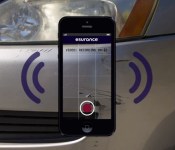
Esurance video appraisal lets a rep use your smartphone’s camera to assess damage remotely

This is one cool tool we hope to never use. Esurance’s new video appraisal feature for the insurer’s Android and iOS apps helps speed up the post-accident process significantly. Typically, you’re required to get a vehicle inspection after an accident before the insurance company can send out an estimate for repairs. With the refreshed app, however, an appraiser can use your smartphone’s camera to assess the damage while also communicating with customers and the repair shop. You’ll still need to set up an appointment (through the Esurance app), but since the agent won’t need to travel, you’ll be on your way much more quickly. Video appraisal requires a smartphone running Android 4.0+ or iOS 7, a front and rear camera with autofocus and a WiFi or LTE connection. Tablet compatibility is in the works. It’s available today in the latest version of the Esurance app.

The Engadget Podcast is live at 12PM ET!

Get your Three Amigos jokes ready, folks, because the gang’s all here. We’ve got Joseph Volpe and Terrence O’Brien back from the Wild Wild South by Southwest to talk about … whatever it is that happens at South by Southwest. Riding on wrecking balls, or something? We’ll find out! Oh, and Titanfall came out this week, so Ben’s gonna talk about Titanfall. Did we mention Titanfall? All that and more, at noon on The Engadget Podcast!
Filed under: Podcasts
AT&T completes Cricket buyout; plans to fold Aio brand
AT&T, having completed its acquisition of Cricket Wireless, has announced plans for both its Cricket and Aio brands. AT&T expects to integrate Cricket’s network and operation into the larger arm and ultimately migrate the prepaid customers over. Expected to take a few weeks to complete, subscribers will then be able to select new plans and devices. As for those on the Aio network, AT&T plans to fold that particular branding.
In the coming weeks, Cricket will be combined with AT&T’s existing operations to create the new Cricket, with a national presence featuring thousands of stores in states across the country. The new Cricket is taking the very best from each brand and focusing on providing customers with simple, affordable no-annual-contract wireless that’s easy every step of the way.
Existing Aio customers are directed to check out this page; Cricket subscribers can learn more here.
The post AT&T completes Cricket buyout; plans to fold Aio brand appeared first on AndroidGuys.
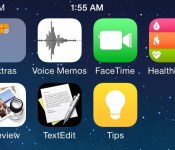
iOS 8 May Streamline Notification Center, Remove Game Center App, and More
Besides adding new Healthbook, TextEdit and Preview apps, Apple may also change existing pre-bundled applications in iOS 8, claims 9to5Mac. Apps slated for improvement include Notification Center, Voice Memos, Messages, Game Center and CarPlay.

Apple may be simplifying existing apps like Notification Center, doing away with the “All” and “Missed” views and combing them into one “Notifications” view. The new Notification Center will contain “Today” and “Notifications” views, making it easier for users to keep track of items that are immediately important. Voice Memos also will see a redesign with controls that distinguish between recording and playback functions.
Messaging may be tweaked with an optional auto-delete function that will remove older messages after a certain amount of time. This new feature would be useful for iOS owners who have older devices with less storage space and prefer not to use that valuable space to store old messages.
Apple also may remove Game Center as a standalone app from both iOS and OS X, opting instead to embed the functionality into games that support the social gaming service. The company also is considering improving inter-app communication by creating a new API that allows apps to share data.
For example, a future photo editing application could have the ability to push the edited content for upload via the Instagram or Facebook apps. The debut of the API has been in development for the past couple of years, and it had been removed from the launch version of iOS 7 last year for unspecified reasons. With that in mind, it is plausible that Apple could, again, choose to hold back the functionality.
As hinted by Volvo, CarPlay may be updated to support WiFi connections instead of relying on the lightning cable to link an iOS device to the car’s in-dash system.
From these early iOS 8 rumors, Apple appears to focusing on the overall experience by improving key apps like Maps, Siri and Notification Center and speeding up performance of the OS. The company is expected to unveil iOS 8 at WWDC later this year, with a release possible this fall.
| |

French billionaire to bring 3,000 all-electric hire cars to London

Electric cars have yet to wow British drivers, but that doesn’t mean the government is ready to give up on putting more greener vehicles on UK streets. With help from a French billionaire, the city is set to become home to more than 3,000 electric hire cars and 6,000 charging points in the next two years, quadrupling the number of available outlets that are available today. It’s all part of a £100 million investment by businessman Vincent Bollore, whose company won the rights to assist London mayor Boris Johnson in getting 100,000 electric vehicles on the road and putting every resident within one mile of a charge point. While the charging network will be run for Transport for London, the car-sharing scheme is commercial. Bollore reckons around 100 “Bluecars” will be available by the end of the year, which can be rented using a smartphone app for £10 per hour (nearly twice as much as some petrol car services like ZipCar). While it’s certainly no Tesla Supercharger network, we can expect EVs to suddenly become a lot more visible on the street’s of Britain’s capital city.
[Image credit: criminalintent, Flickr]
Filed under: Transportation
Source: Sky News
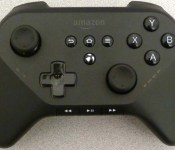
Reported Amazon game controller appears in pictures

Amazon is probably making a game console, and today we’ve got a better idea of what that console’s controller looks like thanks to Dave Zatz and the Brazilian FCC. The standards are all there: two offset, concave analog sticks, four buttons (A/B/X/Y) on the right front, a d-pad in the lower left, and triggers/shoulder buttons around back/up top. What’s weird about this particular controller, however, are the other buttons. A slew of media controls sit at the bottom (play, fast-forward, rewind), and in the middle there are four buttons: Home, Back, Menu … wait a minute! These are Android buttons! Either Amazon’s building a controller for Android or the console it’s making is Android-based (we’re guessing the latter). Head below for more!
So, what’s the mysterious fourth button? Your guess is as good as ours, but it sure is shiny (the white spots in the images appear to be the reflection of the lights overhead). It could be a tiny trackball, but that’s a tremendously bad idea and we think Amazon’s smarter than that. Perhaps a power button for the console? Or maybe a share button, a la Sony’s DualShock 4? Again, we can’t be sure just yet. Feel free to venture your best guesses in the comments below (like we have to ask).
(Update: As several folks pointed out, the button looks an awful lot like the Amazon Game Circle logo, the digital service Amazon already has for games that add leaderboards and achievements, among other things.)
Further, there are six LED lights on the controller’s front. While we expect the set of four on the right to be used for indicating which player is holding that particular unit, it’s unclear what the other two (on the left) are being used for. Also, it takes two AA batteries.
It also looks like Amazon is employing Apple product assembly partner Foxconn to put the controller together, as Foxconn has factories in Brazil where this controller was put through government regulation. In case you have any doubt this is tied to Amazon (beyond the … Amazon logo on the controller itself), the regulatory filing was tied to “Amazon Fulfillment Services Inc.”
Filed under: Gaming, Handhelds, Peripherals, HD, Amazon
Via: Dave Zatz
Source: Anatel (PDF)
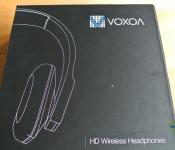
VOXOA HD Wireless Stereo Headphones Review: a pair of headphones that offer much more than meets the Eye
 It’s incredibly difficult these days to enter the consumer audio market; big name brands like Sennheiser, Beats by Dr Dre and Bose tend to flood any conversation regarding the best headphones available on the market, whether deservedly or otherwise. As a consumer community then, we have become very brand-centric, often shunning smaller or lesser known brands in favour of the bigger names. Which is a shame, because I think I’ve found my favourite wireless Bluetooth headphones so far and they’re from a brand you’ve probably never heard of. That brand is VOXOA, and those headphones are the VOXOA HD Wireless Stereo Headphones; let’s get on and see what’s what.
What’s in the box
 In the box, you’ll get everything you’ll need to get started with your VOXOA headphones and includes a velvet-like drawstring bag for transporting your headphones; as I’ve always said, I’m a big sucker for headphones that come with a carry bag. The full contents of the box includes:
- VOXOA HD Wireless Stereo Headphones
- Carry bag
- Micro-USB charging cable
- 1m audio cable
It’s the bare essentials of what you’ll need for your headphones. The only downside I can see out of all the contents of the box is the 1m audio cable; 1m is a bit too short, particularly for those who want to hook the headphones up to their desktop computer or stereo system.

The headphones
 The VOXOA HD Wireless Stereo Headphones are not a visually conspicuous pair of headphones, at least, not at first. While its black (also available in white), sleek profile is definitely reserved and unsuspecting, on closer inspection, the VOXOA headphones have a lot in the way of subtle visual allure like the fact that the sides of the earcups each have a patch of brushed metal. They’re probably not going to be turning any heads, but they look great to just admire. Despite being made mostly from plastic, the VOXOA headphones manage to feel solidly constructed, and its thick headband and hinges further add to this feeling.
 As a set of on-ear, Bluetooth headphones, some controls are required on the headphones themselves, but thankfully they’re all in relatively inconspicuous locations. All located on the right side, you will find a multifunction button for answering calls and turning the headphones on and off, volume up and down buttons, a play/pause button as well as track skip forward/back buttons. Rather than opt for large buttons, VOXOA has elected to put very small buttons that are the same colour as the headphone to blend in with the overall decor, and it works quite nicely.
 On the underside of the right side, there are still yet more hidden goodies including the micro-USB charging port as well as the 3.5mm audio input and a microphone tucked in for good measure. Probably the best thing about this layout is that despite the amount of functionality and number of buttons available on one side of the headphones, the blending buttons and button placement works with the overall simplistic look of the headphones. You can use the VOXOA headphones using either a Bluetooth connection or with the physical audio cable, but more on that later.
 As I mentioned earlier, the VOXOA headphones do come with a drawstring carry bag which is made from a velvet-like, thick material. Naturally, the VOXOA headphones are also collapsible, allowing it to be folded into a nice compact package should you need to put them away during travel and has more than enough space to store everything that was provided to you in the box.
 While it might look very simple, the VOXOA headphones actually has at least one trick up its sleeve. As the little on the headband might suggest, the VOXOA headphones can be easily paired with NFC-enabled devices; simply turn on Bluetooth and NFC, place the headphones against your device, and voila, one paired audio device. NFC is probably a little under-utilized in the audio product space so it’s nice to see this feature included in such a subtle way.
 It’s impossible to tell from the photos, but the VOXOA headphones are actually quite weighty. Compared to the MEElectronics Atlas headphones we reviewed last week, these VOXOA headphones might even be considered heavy and despite the fact that it feels like a good weight, that weight does have some ramifications which we’ll take a look at later in the review.
The audio
 There is a DJ audio equipment manufacturer who goes by the name VOXOA Pro, and while I’m not sure if the VOXOA that makes these HD Stereo Headphones is related, the audio quality of their headphones sure makes a good case for them.
 The sound in general from the VOXOA headphones is very clear and full. The treble and bass ranges are very well represented, though I would say that the treble range is definitely more heavily emphasized; I had a ball listening to classical music on them as all the little nuances and sharpness of orchestral pieces came through. That’s not to say that they aren’t good with other genres of music; I had an equally good time listening to pop, rock, and dance music, however they definitely don’t have the meatiest bass on the market.
 Overall, I would say that for on-ear headphones, I prefer the sound from the MEElectronics Atlas headphones as they manage to give their audio a lot of depth, much like the sound you would expect from over-the-ear headphones; the VOXOA headphones, by contrast, sound slightly muffled, however I am most definitely nitpicking at this point as the sound experience was great regardless. Call quality with the VOXOA headphones is as good as you can expect, with mic performance good and audio quality average, though I wouldn’t expect terribly clear audio if using them in a crowded area; there’s no noise cancelling and the mic is free to the world’s sounds.
The comfort
 For me, the highlight of the VOXOA headphones is its comfort. Those of you familiar with my headphone reviews will know I’m not entirely at ease with on-ear headphones simply because more often than not they are difficult to wear comfortably. Not so with the VOXOA headphones which is probably the most comfortable on-ear headphones I have ever worn. The earcups are made from memory foam on the inside with a sheet of perforated leather covering them. In this configuration, the leather sheet acts as a secondary cushion, allowing your ear to rest inside the rectangular ear cup however it wants. There is also more than ample extension on the headphone arms which should please people with taller heads.
 The headband is also made from leather and memory foam, and despite the headphones’ overall extra weight doesn’t actually affect the comfort. However, I will mention at this point the downside of having that extra weight which is that when you tilt your head forward or back, the headband will succumb to gravity fairly quickly, sliding off your head. This also makes the headphones less applicable for exercise purposes as they will definitely fall off your head during movement.

The practicality
 The VOXOA headphones are a supremely portable set of headphones, and the addition of a carry bag is a huge plus for carting it around. The fact that they are solidly constructed and collapsible also gives you confidence that nothing is likely going to break if you throw it into your bag with everything else.
 One thing that peeves me not only about the VOXOA headphones, but wireless Bluetooth headphones in general is that the audio cable jack is on the right earcup, not the left. As usual, this is necessitated by the fact all the controls are on the right side and not having separate chips in each earcup is a time saver, but it somehow still feels unusual (and occasionally inconvenient) to have the cable coming out of the right side. Having said that though, with the use of the physical audio cable, the VOXOA headphones can be used as a standard mobile headset without even powering the headphones on, which is a huge plus for those big on travelling.
The verdict
Rating: 5/5
 The VOXOA HD Wireless Stereo Headphones are definitely one of the top Bluetooth headphones I have ever had the honour of using; for all its minor flaws, it feels fantastic to wear, looks sleek and stylish, and sounds fantastic. It’s definitely part of my daily arsenal of audio products and holds the honour of first on-ear headphones that I have no complaints wearing, plus they’re a mobile headset to boot. With a MSRP of $149.95, they are right in the ballpark for most Bluetooth headphones and definitely worth it. If you’re looking for a new pair of wireless headphones, stop looking for the big brands and take a look at the VOXOA HD Wireless Stereo Headphones.
To make this review even sweeter, the VOXOA headphones are currently on sale on Amazon. They are $50, which brings them down to $99.95, which is a fantastic price considering everything it can do; Amazon links are below. For more about VOXOA, you can visit their website here.
Gallery of Photos


Get This Look: ‘Spectrum Clocks’ Zooper Widget
We’re huge fans of changing the home screen around a bit and creating a new user experience for our Android. So much so that we present our ongoing series of Get This Look posts. In a nutshell we show you a new layout, app, widget, or icon set for your Android handset and tell you which apps you’ll need to mimic the feel.
Some of these are a little easier to create than others and many of them can be tweaked to no end. The following details are but the ingredients to which you can create your own delicious Android dish; your results will vary. Which is awesome! If nothing else, this is a great way to discover new apps, widgets, icons, and more!
Spectrum Clocks by GFXDevs
Why we love this look:
Everyone loves a fancy looking clock widget, and this Zooper widget is the perfect addition to your homescreen. The array of layouts included in Spectrum Clocks look fantastic with clocks ranging from simple faces, to those including information such as battery status and weather. Spectrum Clocks is a widget for the person who likes their homescreen to look a little different and the bundled layouts will certainly compliement your device. What you’ll need:
The post Get This Look: ‘Spectrum Clocks’ Zooper Widget appeared first on AndroidGuys.
 AIVAnet