


Xiaomi’s next-gen budget phone shows up with octa-core chip, larger screen

Xiaomi’s sub-$130 budget line, the Redmi (previously known as Hongmi aka “Red Rice“), has been credited for accelerating the company’s expansion into Taiwan, Hong Kong and Singapore, with nearby countries like Malaysia, Indonesia, and Thailand soon to be added to the list. While this is a recent development, the company’s already prepping a follow-up model, according to four new listings on China’s TENAA certification database. As you can see, this upcoming device is marked with red Android buttons on the front, which gives away its Redmi identity. It’ll feature a 5.5-inch, 720p IPS display (a bump from the current 4.7-inch version), as well as Android 4.2.2, 1GB of RAM and an octa-core processor (our guess is MediaTek, again) coming in two versions: 1.4GHz and 1.7GHz.
As far as 3G radios are concerned, China Mobile users can pick the TD-SCDMA model, whereas folks elsewhere have the WCDMA option — we suspect the CDMA2000 version for China Telecom will arrive later. Other goodies include a more powerful 13-megapixel main camera, a beefed-up 5-megapixel front imager (though the TENAA listing also threw in an 8-megapixel mention) and the same old microSD expansion (up to 32GB).
Alas, there’s no LTE to be found here, which may give opportunity to local competitors like Huawei, Coolpad and Hisense, who are either expecting or already offering LTE phones in the sub-$130 segment in China. On the other hand, the current speculation is that Xiaomi will unveil this new Redmi at its “MiFan Festival” — a celebration for the company’s anniversary — in early April, so there’s still a small chance of seeing an LTE version pop up between now and then.
Filed under: Cellphones, Mobile
Via: Zealer (Sina Weibo)
Source: TENAA

Minimal Icon Pack by BladeXDesigns Review: minimal tries something New
 There are plenty of minimal icon packs already on the Play Store, whether by name or general theme, but BladeXDesigns has decided to produce his own take on the popular idea anyway, and we’re glad he has. The Minimal Icon Pack by BladeXDesigns (better known as Inder Deep on Google+) is a fresh take on the theme that involves some striking colours and unique icon arrangements. Let’s take a closer look:
As you can see, a very different approach to a minimalistic icon pack, but nevertheless interesting. As I mentioned, the icon pack does have over 1050 icons in its library and continuously growing, and is compatible with all the standard custom launchers. Add to that the massive on- and off-line wallpaper database (that’s 90 online and 11 off-line, not including inevitable future updates) and you have a very special icon pack.
If you’re interested in picking up the Minimal Icon Pack by BladeXDesigns, it’s only $1.50 on the Play Store now (links below), and be sure to follow Inder Deep on Google+ to get his updates on his existing packs as well as his new ideas.
Icons: Minimal Icon Pack
Price: $1.50
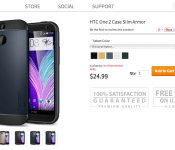
Spigen Lists Beautiful New Cases for the All New HTC One

It always happens: anytime a new phone is about to be unveiled, a company that makes specialty cases for that phone, lists them early. Spigen is no stranger to this, and they have posted new cases for the All New HTC One. Oh do they look glorious.
Spigen are naming these new cases “Slim Armor”, and I must say they are pleasing to my eyes. These new cases are going for $25, and they will be in stock come mid-April. So if you are thinking about getting yourself the All New HTC One, I suggest grabbing one of these bad boys to protect it. Head over to Spigen right now if you want to grab yourself one. Let us know if you do.

Watch the new, customizable Windows Phone 8.1 camera app in action (video)

Microsoft didn’t just equip Windows Phone 8.1 with a redesigned notification center and a Siri nemesis called Cortana, it also revamped its stock camera app. While many of the current app’s features remain intact, a video leaked by Unleash The Phones shows that the right side of the interface now features shortcut buttons for single photo, video and burst photo modes. The left side, however, is completely customizable, and a user can easily fill it with up to five shortcuts to settings (flash, lens picker, resolution, ISO among others) of their choice. Curious WP users who want to know how the updated app compares to Nokia’s camera software can watch the video after the jump. Of course, they might only have to wait a bit more to know everything about the OS… and to finally find out if they can install it on their WP8 devices.
)
Filed under: Cellphones, Mobile, Microsoft
Source: Unleash The Phones

Samsung Posts New Video Talking About ISOCELL CMOS Image Sensors

Ever wanted to know what ISOCELL CMOS Image Sensors are? Samsung to the rescue. The company that strives for the very best in camera quality, posted a new video today talking about the ISOCELL CMOS Image Sensor technology.
Samsung fit this new camera sensor into the Galaxy S5 naturally, and it will help in those low-light moments when you desperately need to snap those crazy moments or selfies in a dimly lit place. But don’t let me spoil the video for you, check it out below, and let us know if you plan on getting yourself a Galaxy S5.
)
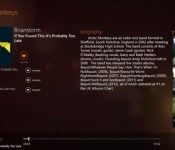
VLC’s media player hits Windows 8 in beta form

Let’s say you bought a new laptop and wanted to check out a few videos that you legally downloaded without leaving Windows 8′s touch-focused UI — until now, your options have been pretty limited. If you’re feeling a little adventurous though, the beta version of VLC’s media player that Microsoft News spotted on Redmond’s app store should do the trick. It’s an experimental port of the Windows RT app, however, and as such the application has a few hurdles to clear before it’s ready for prime time. General sluggishness compared to the desktop version and some audio bugs, for instance, are a few issues that may crop up. Developer VideoLAN says that this version isn’t nearly as stable as it should be (it is a beta, after all), but that hasn’t stopped you from downloading its apps before, has it?
VLC for Windows 8 first beta: http://t.co/CxDfE2gfNi
– VideoLAN (@videolan) March 12, 2014
Filed under: Home Entertainment, HD, Microsoft
Via: Microsoft News
Source: Windows Store, Kickstarter
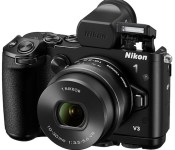
Nikon 1 V3 camera unveiled: $1,200, 120fps slow motion, 20fps continuous shooting

Tonight Nikon is unveiling the latest edition of its 1 series of mirrorless cameras, the Nikon 1 V3. Compact yet powerful, it follows up on the V2 by packing an 18.4MP sensor, built-in WiFi, 1080/60p video capability and a new image processing chip. Standout features for pros and amateurs alike include the V1′s ability to shoot stills continuously at up to 20fps with autofocus — the fastest we’ve seen from an interchangeable lens cameras — 720p slow motion video recording at up to 120fps and 171 “densely packed” focus points that Nikon claims give it better ability to track moving objects than DSLRs.
It also adds a touch-panel tilting 3-inch LCD and arrives alongside two new 1 NIKKOR lenses — a 10-30mm f/3.5-5.6 PD-Zoom and 70-300mm f/4.5-5.6 are available for $300 and $1,000, respectively. Last year the falling prices of DSLRs reportedly had Nikon reconsidering their ILC lineup, but judging from the V1 the company is plowing full steam ahead. A full kit with camera, 10-30mm lens, viewfinder and grip will go on sale in April for $1,200 — check Nikon’s website for more details on specs and features or look after the break for a brief demo video.
Developing…
Source: Nikon

1Password for Mac Gets Updated with 30 New Features, 1Password Mini Item Editing [Mac Blog]
 AgileBits today has updated its popular password manager app, 1Password for Mac, to version 4.2, bringing 30 new features, including significant improvements for 1Password Mini, the app’s menu bar extension (via Cult of Mac).
1Password mini– You can now edit items directly within 1Password mini!
– Edit generated passwords in 1Password mini, too
– Greatly improved URL matching makes logging in to sites with sub domains easy
– Configure URL matching for sub domains in 1Password > Preferences > Browser
– Improved support for multiple Chrome profiles
– By popular request, 1Password mini now shows Secure Notes!
– 1Password mini now supports fuzzy search. For example: “oogle” will now return items named “Google”
Other improvements include refinements to the app’s AutoSave functionality, as the app now searches all vaults before asking to save or update Logins and will prompt users to save Logins in their primary vaults by default. Additionally, item editing has been streamlined, allowing users to edit when 1Password locks or quits in the middle of a change as well as the ability to switch vaults while editing.
The update is currently available for download on AgileBit’s website, and will be available in the Mac App Store once the update is approved.
1Password for Mac is available in the Mac App Store for $50. [Direct Link]
     |

Starbucks app to let you pre-order your coffee later this year

It sucks when you go to Starbucks for a pick-me-up and some guy’s holding up the line with an overly complicated request. Thankfully, the Seattle company’s testing a mobile ordering service in an effort to speed things up. To be clear, when it debuts later this year, you still won’t be able to get coffee delivered, but Bloomberg reports that the service will at least let you order through the Starbucks app before you get to the store. That’s all we know about the upcoming feature, though, as the coffee empire’s keeping mum about its finer details. We still don’t know if the service will take custom requests, but if it does, we hope you tip generously for that fancy $50 Mocha frapp.
Source: Bloomberg

NSA Director nominee wants every branch of the military to have a dedicated cyber attack force

It seems like President Obama was pretty serious about that cyber attack list he drew up last year — his nominee candidate for NSA Director, Admiral Michael Rogers, just told the Senate that the military is building several new cyber combat units. Rogers, who is slated to both take over at the NSA and head the United States Cyber Command, spent several hours answering to the Senate Armed Services Committee this week, explaining his views on national security and his desire to be “as transparent as possible with the broader nation about what we’re doing, and why.” This included a detailed account of the need to create dedicated cyber attack divisions to supplement traditional ground, naval and air forces, which he says will help act as a deterrent to countries that see the United States as an easy target. “Clearly, Cyber will be an element of almost any crisis we’re going to see in the future,” he told the Senate. “It increasingly is becoming a norm.”
Filed under: Misc
Source: New York Times
 AIVAnet