


Apple’s iPod Nano Pedometer Patent Application Sparks iWatch Speculation
Apple has been rumored for some time to be working on an “iWatch” featuring biometric sensors and integration with other iOS devices, and a recently published patent application (via AppleInsider) addressing pedometer functions is being presented as evidence that the company is indeed working on a wrist-worn fitness device.
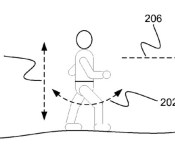
In some implementations, optimizations for detecting steps when a pedometer is worn at a user’s wrist are described. In some implementations, a threshold crossing step detection method can be enhanced for wrist locations by counting the number of positive peaks between comparison threshold crossings, adjusting a minimum peak-to-peak threshold for qualifying threshold crossings, and inferring a second step based on the amount of time between threshold crossings. In some implementations, the pedometer can automatically determine that the pedometer is being worn on a user’s wrist.

The problem with this interpretation is that Apple already offers a product with a built-in pedometer and which is frequently worn on the wrist or arm: the iPod nano with Nike+ integration. Also supporting the idea that this research was pursued with the iPod in mind is the fact that the sole inventor listed on the patent, Yash Modi, is open about his work on iPod pedometer functionality during his time at the company. Modi left Apple in March 2012 to join Nest.

While such pedometer functionality is likely to make its way into the iWatch given rumors of emphasis on biometric sensors for the device, Apple’s patent application is by no means a smoking gun given that the technology has been in use for a number of years already. The built-in pedometer debuted in the fifth-generation iPod nano introduced in September 2009.
Still, Apple’s “Wrist Pedometer Step Detection” patent offers an interesting glimpse at how Apple has worked to optimize algorithms for detecting steps when a device is worn on the wrist. Unlike standard pedometers that are worn on the waist and provide consistent step data, the wrist adds complexity to step measurement because its motion is not always tied to actual forward movement. Algorithms analyzing wrist movement data must isolate actual steps from the background movement when users are typing, driving or performing other common tasks.
Apple’s filtering method of step analysis accurately measures this movement and has the added benefit of being able to analyze movement from a device that is worn anywhere on the body. The software powering the device also can determine when a device is worn on the wrist or another body part and will adjust its analysis based on the device’s location.
Apple is expected to unveil its iWatch wearable later this year with health and productivity features that connect the device to a user’s iPhone or iPad via Siri and iOS 8′s Healthbook app.
     |

Sprint + T-Mobile: What everyone else is saying about a possible acquisition

Softbank CEO Masayoshi Son has been on a mission to purchase T-Mobile and merge it with the Now Network. His campaign began in secret, first involving several visits to regulators in Washington DC. In the past week, however, he’s become much more vocal. Son appeared on The Charlie Rose Show and CNBC on Monday, claiming a post-merger Sprint will be good for the wireless industry. The next day he argued that broadband in the US is one of the slowest and most expensive in the world, and the answer is to encourage mobile broadband deployment.
Son’s solution to the speed problem is to eventually deploy mobile broadband as fast as 200Mbps, but would a T-Mobile acquisition bring down the cost to consumers? The CEO certainly thinks so: he says the merger will launch a price war and enhance wireless competition unlike anything this country has ever seen. He’s going up against federal regulators, two of the largest carriers in the country, and history: just over two years ago, AT&T’s attempt to purchase T-Mobile fell flat when the FCC and Department of Justice determined that competition would take a nose dive. So we know Sprint’s position on the matter, but what does the rest of the industry think about it?
T-Mobile
When asked on Tuesday about industry consolidation (streamlining from four national networks to three) at a Deutsche Bank investor conference, T-Mobile CFO Braxton Carter said: “It is not a question of if, it is a question of when.” Carter didn’t specify which companies would be involved in this inevitable process, but he went on to mention that “to take a third-scale national player that has the scale benefits with the right business model could be very competitively enhancing in the US.” If Sprint were to acquire T-Mobile, its subscriber count would climb to an estimated 100 million, which puts it just shy of AT&T and Verizon. A Sprint of this size, Carter argues, would be strong enough to make it much more competitive than it can be with only 53 million subscribers.
“The government can’t have their cake and eat it too.”
Carter believes that a merger between the third and fourth-largest wireless carriers in the country wouldn’t be as damaging to competition as US spectrum auctions, which are typically dominated by the two largest operators, AT&T and Verizon. “The government can’t have their cake and eat it too. If they think there really needs to be four players in this market on a nationwide basis, they are going to have to put some structural protections to ensure an adequate distribution of spectrum,” Carter said. If the big players are snatching up the best spectrum, he argues, it makes it much more difficult for the smaller players to legitimately compete.
In the meantime T-Mobile isn’t worried about its own future, even if Sprint isn’t involved in it. While Deutsche Telekom CEO Tim Hoettges mentioned last week that his company would approach future consolidation with “an open mind,” he also said that “at the moment we have no difficulties to run T-Mobile US on a stand-alone basis.”
AT&T
At the Deutsche Bank conference this morning, AT&T CFO John Stephens said that he’d be surprised if such a merger were to be approved. He has plenty of reason to be skeptical: his own company attempted to do the same thing over two years ago and was met with rejection from government regulators, a roadblock which ultimately cost his company four billion dollars.
“It would be surprising if [the FCC and DOJ] changed or reversed that opinion.”
Since a merger between Sprint and T-Mobile isn’t official yet, Stephens didn’t give any specific views on it. That didn’t stop him from pontificating about industry consolidation, which he said was something AT&T favored for several years due to the need for more spectrum, more resources to upgrade networks and higher demands for data consumption. “”It would be interesting to see if the government varies from [their previous position]… I don’t think they will,” Stephens said. “It would be surprising if they changed or reversed that opinion.”
Verizon
Although Verizon doesn’t have much to say about Sprint’s proposal, the company’s CFO, Fran Shammo, briefly touched on the subject recently at the same Deutsche Bank conference. When asked about the potential merger, Shammo reiterated the words of his company’s CEO Lowell McAdam by stating: “We are really happy with four competitors … Obviously spectrum would become a big play if there was a consolidation in the industry.”
“We are really happy with four competitors.”
Interestingly, Shammo’s point about spectrum plays well into Son’s and Carter’s arguments: a post-merger Sprint would be large enough to compete against AT&T and Verizon in the war for spectrum. In other words, it would finally have the resources and strength to buy up more airwave real estate — a luxury that has worked against Sprint and T-Mobile.
The Government
To nobody’s surprise, regulators are skeptical about the merger. After Son met with government officials, Reuters reported that FCC Chair Tom Wheeler was dubious of the potential deal, but would keep an open mind. Justice Department reps expressed similar mistrust, according to the WSJ, indicating that such a deal would face difficulties going through the regulatory process. The heart of the argument is that government officials believe a four-carrier system is essential for maintaining a competitive market.
Of course, this doesn’t guarantee Son’s mission will be fruitless, but it shows exactly what he has to overcome in order to find success. Not only does he have to prove that his proposal won’t harm the US wireless industry, he has to affirm that this transition will actually leave the industry in much better shape than it was before.
In an ironic twist, the company Sprint wants to acquire is also the company currently proving that a four-carrier system can indeed initiate price wars and strengthen competition. Thanks to its UnCarrier strategy, T-Mobile has made the process of persuasion much more difficult for Masayoshi Son.
[Image credit: AP]
Filed under: Cellphones, Wireless, Mobile, Verizon, Sprint, AT&T, T-Mobile
Garmin Vivofit review: a truly fitness-focused activity tracker

Keep moving. That’s the message you’ll get from anyone offering up fitness advice these days. It’s snappy, simple and probably quite valid. The problem is that it can be hard to quantify how much activity is merely part of our basic existential requirements before we get to the part that counts as extra, life-enhancing exercise. As always, technology to the rescue. On this occasion, it’s an activity tracker from a company with heritage in this space: Garmin. The product? The Vivofit fitness tracker.
There’s been a deluge of similar products lately, each bringing their own take. This is clearly a hot market right now, and the race is on to crack it. Can Garmin use its wealth of experience in wrist-worn fitness devices to set the standard? Priced at $130 or $170 with a heart rate monitor, it’s up against the likes of Fitbit and Nike’s FuelBand. Does it keep up with the competition? Or is it left huffing and puffing a few paces behind? We let it judge monitor our movements and coax us off the sofa to find out. Warning: This review may (definitely does) contain mental images of desk-dancing that some readers may find distressing.
Hardware
The Vivofit is comprised of two parts: the strap and the actual tracker. The strap is a cheap-feeling, plastic affair — similar to the sort of watch you might buy at a novelty store. It’s clearly durable, and will withstand all the stress and tension that exercise might demand. But, it’s also a little bit uncomfortable to wear, and not the most imaginative of designs. The plastic reminds us of the kind used on cheap ’80s sports watches, and can cause mild itchiness if moisture is captured underneath (say, after a shower). The strap fastens via a basic notch-and-clasp mechanism, and overall looks quite masculine — at least on the black model, anyway.
The good news? Given that the strap is separate from the brains of the operation — the tracker part — you’ll theoretically be able to replace it with something more comfortable. Garmin is at least offering a choice of different hues at launch, if you want something other than black. Also, unlike other bands, the strap is flexible, so it won’t hang loose on your wrist, or interfere with typing. The Vivofit comes bundled with two straps, but these are just for different size options (one large, one small), not style choice.
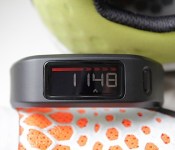
The main event, of course, is the tracker. Unsheathed, the curved unit is about two inches long, by half an inch wide, and dominated along the topside by the screen, which measures 1 x 0.39 inch. That display is an always-on, two-color (gold and red) LCD that, again, resembles a basic digital watch face. While it’s permanently on (there’s no button to wake it), there’s also no backlight. In fact, there’s no illumination option at all.

The unit has four small screws around the edges, and they’re not just there to hold things together. The Vivofit has no physical ports — no USB; no nothing. Instead, it uses removable batteries (2 x CR1632) for power, and wireless radios (ANT+ and Bluetooth 4.0) for connectivity. This means no charging. Ever. Garmin claims you should be able to get a year’s worth of use before you need to change the batteries (something we won’t be able to confirm for a while), so you’ve plenty of time to buy the required mini screwdriver for when that moment eventually comes.
Another good thing about this screwed-down configuration is that the Vivofit is waterproof to 50 meters — good news for swimmers. If you’ve gotten this far and are wondering why we haven’t mentioned GPS (it is a Garmin, after all), that’s because the Vivofit doesn’t have it. It might seem like a weird omission, but it’s likely to help battery life (and also keep the price down).
Right now, at least there’s a thin line between fitness trackers and full-on sports watches. Some companies are starting to blur that distinction with products that incorporate both, but for now, the Vivofit is aimed mostly at the lifestyle fitness market, rather than someone with more demanding training requirements. As we mentioned in the intro, there are two skus as of this writing — the standalone Vivofit, or a bundle that includes a heart rate monitor strap. It’s the latter offering that we’re discussing today, but since the Vivofit works with any ANT+ strap, you’re good to go if you already own one. Finally, it’s worth noting that both models come with an ANT+ USB adaptor for connecting/syncing the Vivofit to your computer.
Software

Garmin’s online exercise-logging platform — Connect — has been around some time now. But it’s just undergone a drastic redesign, and Vivofit users get first dibs on experiencing the new layout. There’s also a matching Connect mobile app for iOS and Android that translates the new design neatly over to your phone. Both are comparable in functionality, with no significant differences (other than screen layout for the most part) so we’ll refer to them interchangeably from here on out.
Setting up the Vivofit through Connect is easy. You’ll need an account if you don’t have one already, where you’ll be required to answer the typical questions about age, weight, height, et cetera. You’ll then, of course, be asked to pair your device. You can pair via Bluetooth with your phone, or with the supplied ANT+ USB dongle and your PC. The same goes for syncing, which is just a matter of pressing and holding the button on the Vivofit until the word “sync” appears (more on this later). If you’re within range of your PC or phone, the Vivofit will go right ahead and upload your latest activity. The dashboard presents the most recent info from each main category, which includes Steps, Sleep, Connections (friends) and Activities. There’s also the option to add more cards to the dashboard showing off your badges (achievements) and reports.

While you can theoretically use the Vivofit standalone, and never once log in to Connect (if you’re just happy to aim for your step-target on a day-to-day basis), the usefulness of the wristband is undoubtedly augmented thanks to the platform. Being able to store your data in one place and easily visualize it is an essential feature for any fitness log, but an added bonus here is that you can also import activities from other devices, like a GPS watch. Yours truly, for example, has been using Garmin Connect to log runs with a Forerunner watch. Now, not only are my mapped runs there, but my general daily activities and sleep data are too, all in one place — no more hopping from platform to platform. The ability to bring data in from third-party devices means you aren’t even beholden to using a Garmin watch — though you’ll probably need to use the Vivofit for logging your steps and sleep at this time, as activity tracking isn’t quite as ubiquitous yet (the ability to export this data from native apps is rare, even though Garmin lets you export Vivofit activities as GPX or TCX files).
Of course, there are a ton of reports you can dive into with Connect, too. This might not be so pertinent to general activity loggers, but if you’re a card-carrying self-quantifier, then you’ll love being able to know that your average heart rate over the last year (when logging, not in general!) was 141, like mine, and other such self-centered trivia.
In use

If you just wear the Vivofit and do nothing else, at best you have a watch (it tells the time wonderfully) that lets you know how much or how little you’ve moved that day. Effectively, you’ve bought awareness. The Vivofit actually has much more to offer, though, and can be a powerful little tool if you actively make use of it. This is generally true of most other fitness trackers, of course, but the Vivofit has a few additional characteristics that make it stand out.
The unit has seven screens of information you can cycle through, and then leave on the display at any time. You can also choose to remove some of them via Connect (if you don’t care to know the date, for instance). Repeatedly pushing the button will loop you through them in this order: steps (daily total), goal (steps remaining), distance covered (in miles or kilometers), calories burned, time, date and heart rate. The first two are effectively the opposite of each other; the steps counter starts at zero and works up, while your daily goal starts high and counts down. When and if you achieve your goal, this number starts counting back up again to show how many extra steps you achieved. Both of these screens are handy for keeping tabs on how you’re doing at different parts of the day — or you may just be more motivated by increasing your steps, or crushing your target, for example.
Just as useful, perhaps, but for different reasons, are the distance-covered and calories-burned metrics. The former is just that — the total amount of miles (or kilometers) you’ve plodded through that day. As this is total daily movement, and not just your exercise sessions, it can be quite revealing to see how much this can vary from day to day. Likewise, the calories-burned screen shows the total number you’ve burned throughout the day. Not just from your walking/exercise, but the total number of calories required for you to be on planet Earth that day, whatever you were doing. This is worked out based on your physical details (e.g., height, age, gender), along with the movement data, making it one of the more accurate numbers for representing your daily metabolic burn. Of course, we’re all different, and there are other factors (that metabolism-jacking double espresso you nuked after lunch), but all told, it’s a useful number to know, and it’s right there on your wrist.

We said you actually needed to use the Vivofit, and so far we’ve merely acquainted you with the information it offers. To add a bit more activity to your daily routine, the obvious thing to do is start smashing through those footsteps, and heading toward your daily goal. Easy enough in theory, with a stroll at lunch, the walk back from the bus stop and so on. The Vivofit has another trick too, though, which is reminding you that you’ve been on your “mattress” (read: sedentary) for too long. Other trackers do this too — Jawbone’s Up will vibrate, and the FuelBand lets you “win” the hour — but we particularly like Garmin’s approach. Instead of just giving you a nudge, then forgetting about it, the Vivofit displays an ominous red bar on the screen, which stays there until you’ve moved enough to clear it. This happens after around an hour of inactivity, and extra sections are added to the bar for each of the following 15 minutes that you remain motionless, for a total of two hours.
Call us optimists, but we enjoyed the challenge of working off this “Move bar” (this is where the desk-dancing comes in) every time we saw it; the fact that it remains on display until you do makes this a more practical and less invasive way to do it (a vibration on your wrist as you type an email can be annoying). With the Move bar visible, then, you can be mindful that you ought to get up, but won’t be annoyed by it should you be in a situation where desk-dancing (or, you know, walking, whatever) isn’t an option. With the Jawbone Up, we ultimately turned this feature off, as the vibrating alert usually happened when we were predisposed. Worse, we would then forget to make up the activity once we were at a dance-friendly location (this should be all locations, we know).

So we’ve gotten up and out of our chairs. That’s a good start, but the second way to actually benefit from the Vivofit is to use the calorie guidance. The number provides you with a solid target to aim for with your daily food intake. In theory (and mostly theory), you could plan your meals to come in 500 calories below this number, and lose a pound of fat a week (going by the 3,500 calories in a pound of fat “wisdom”). Alternatively, you can use this as another number to actively increment, via steps or activity, to hit a chosen goal. So, if you noticed there were 600 calories in that “low fat” snack, time to get running and count them off one by one from the wrist. Of course, it’s a little oversimplified to put it like that, but you get the idea. In short, what we enjoyed most about the Vivofit was the instant access to this information (and the Move bar) without the need for updating an app, or even touching a button in some cases (depending on which screen you leave the Vivofit showing). You may have your own goals: better/more sleep, general motivation, wellness and so on, but the value in this is so much clearer when you decide to use the data, or follow its advice (mostly: move!).
Another strong point with the Vivofit is the accuracy of the distance tracking. We took it out for a couple of long walks, which we measured with different GPS watches (one Garmin, one Adidas) and on every occasion the Vivofit was surprisingly close to the mark. Between 0.1 and 0.05 mile or so off. That’s not bad, and given that this works indoors, and all day, that means your activity data should be consistent and pretty reliable. Garmin works this out based on your personal details, and projected stride length. It also detects when you’re running, and factors in the difference that will make on stride length, too. While the Vivofit will log your distance all day long, you can also easily log something as an “activity too” (e.g., a training session) if you have a heart rate monitor. When you put the strap on and navigate to the “heart” screen, the Vivofit will listen out for the HRM signal, and once it gets it, the unit will not only display it (with BPM and heart rate intensity “zone”), it’ll also mark this as the start of a training activity. This worked great in our tests, and makes for a seamless experience. The next time you sync, you’ll see your activity logged on Connect with all the related statistics — pace, calories burned, average heart rate, et cetera.

The last, and potentially most helpful, feature is how the Vivofit automatically adapts to your training goals. Most activity trackers start out with a fixed goal — usually around 10,000 steps — or let you set your own manually, and there it ends. If you meet your goal, great; if not, oh well. The Vivofit starts you off with a modest 5,000-step goal, and adjusts every day from there depending on whether you achieve it or not. I fell short on my first day (go easy on me; I set it up in the afternoon), and the next day’s goal was about 4,800 steps. I crushed this, of course, and was given the challenge of around 5,200 steps the following day. The amount added/subtracted from your goal isn’t fixed either. After a particularly active day, the goal goes up by more than after one where you only just met your target. Obviously you could keep going up and up and up (or down and down), but the idea that you can constantly be challenged to eke out a few more steps adds an extra dimension to an otherwise simple training premise.

If there are any wrinkles in the experience, they boil down to rudimentary technical issues. While it’s nice to have a choice of sync options, we found both ANT+ and Bluetooth a bit unreliable. Sometimes we’d have to close the app and reopen it for the update to go through, or restart the Garmin ANT agent software on our desktop. It’d always sync, but sometimes it needed a little encouraging. The second functional negative is the lack of a backlight on the screen. For the most part, this isn’t an issue, but it can be at times — namely, when you’re going to bed. To activate sleep mode, you have to press and hold the button for around five seconds. This is the same process as accessing sync mode and pair mode, with just the duration of the press determining which option you choose. Sleep mode is the second in this list, so when you press the button, you have to wait for sync to come, then go, before releasing the button. If you’re in the dark, there’s no way of telling when this happens (other than counting the seconds, and hoping for the best). At a more basic level, the same issue makes the Vivofit less useful as a watch at night!
It’s probably also worth mentioning a few things the Vivofit doesn’t do. Most surprising — given the emphasis on activity and training — is the lack of a stopwatch, or a manual way to kick off activities without a heart rate strap. Being able to time a running interval or trigger a lap point seems like something that might slot in quite naturally with how the Vivofit is currently set up. There are also no other smartwatch-style features. To be fair, Garmin never claimed there would be, but given the always-on screen, wrist placement and Bluetooth 4.0 connectivity to your phone, some might argue there was a chance to fold in some notifications, app-to-Vivofit alerts or even smart motivation alerts. Ultimately, Garmin has clearly decided to focus on the core functionality of fitness tracking, and not weigh it down with superfluous features, but the always-on screen is ripe for exploiting, we think.
The competition

The Vivofit isn’t short of competition. We’ve already mentioned Nike’s FuelBand ($149), Jawbone’s Up24 ($150) and Fitbit (which makes more than one worthy competitor). All three of those have their own plus points. Jawbone’s software is comprehensive and easy to use. Nike’s FuelBand has the brand cachet and great social features (though it’s also iOS only), and the Fitbit Force is as complete as any other tracker we’ve seen. That was, until it got recalled after irritating some users’ skin. Something of a shame, as pound for pound (or dollar for dollar), this was likely one of the Vivofit nearest rivals.
There are a host of others to consider, too. The oft-overlooked Polar Loop ($110) came out before, and costs less than the Vivofit and has a very similar feature set (the two brands are old foes in the sports watch world, after all). Or, if you want something with a gentler aesthetic, there’s also the Misfit Shine ($120). Don’t be fooled by its simple design — it’s as versatile, if not more so than its rivals, as it’s not restricted to being worn on the wrist. We must note, though, that the accompanying Android app isn’t as comprehensive as the iOS version. All told, there’s plenty to consider, as we said, and even more in the pipeline.
Wrap-up

More Info
There are a lot of good things going on here. For once, we have an activity tracker that permanently shows your steps/time/goal, with little to no user interaction required. We like the implementation of the Move bar, and how the daily goal adapts to the individual user. Likewise, the accuracy of the distance tracking and the ability to log training sessions (with added heart rate data) make this a great choice for moderate trainers, gym bunnies (finally a way to log those treadmill sessions effortlessly) and those who wish to keep general tabs on their daily activity levels. And, of course, let’s not forget the epic battery life and waterproofing, a combo that means you can put this on and almost never have to think about it again.
Except that you will. We’re less sold on the strap, which is serviceable, but not as sleek or comfortable as we’d like. Also, the lack of a backlight (or low-light visibility) is a minor annoyance. Lastly, the $130 price might not make it the most expensive tracker on the market, but from a company like Garmin, we’d like to have seen a few more detailed features such as elevation/stair tracking, food logging, a stopwatch/timer or even just some extended watch features (e.g., an alarm, timer.). If you’re looking for a reliable, durable activity tracker that has a decent online platform, the Vivofit is all of those things. If you can live with its minor flaws, and don’t mind the aesthetic, it’s a worthy addition to your fitness arsenal.
Daniel Orren and Edgar Alvarez contributed to this review.
Filed under: Wearables

T-Mobile celebrates 1 year of LTE with new ad campaign aimed at Verizon
T-Mobile on Thursday is celebrating its first year anniversary of LTE deployment with a new ad campaign. According to the Uncarrier, T-Mobile’s network now covers 96 percent of the United States. In just one year, the wireless provider has grown its 4G LTE footprint to blanket 210 million people across 273 metro areas. To help spread the news, T-Mobile is rolling out a new ad campaign, this one taking aim at Verizon.
“Right now, T-Mobile covers 96 percent of Americans, and over the past year, we’ve completely shattered records with the fastest 4G LTE deployment the U.S. wireless industry has ever seen.” said John Legere, president and CEO of T-Mobile. “Our competitors want you to believe our network doesn’t measure up. But that just isn’t true. And American consumers are going to see right through the spin and half-truths when given the facts.”
Looking ahead, T-Mobile has committed upgrading its 2G/EDGE coverage with 4G LTE. The goal is to nail down half of it in 2014 with its completion wrapping up by the middle of next year.
T-Mobile Celebrates 1st Anniversary of LTE Rollout
By Launching Major Network Upgrade Program
T-Mobile introduces new network marketing campaign to showcase 96% U.S. voice and data coverage
Delivers America’s fastest growing LTE network in less than a year from launch
BELLEVUE, Wash. – March 13, 2014 – Over the past year, T-Mobile US, Inc. (NYSE: TMUS) has abolished a litany of consumer pain points through a series of revolutionary new programs and services – and Americans have responded by making T-Mobile the fastest growing wireless company in the U.S. Today, the Un-carrier announced it is continuing its relentless pace of industry innovation by launching a major new program to expand what has already become the fastest LTE deployment the U.S. has ever seen.
Less than one year since launch, T-Mobile’s 4G LTE network already reaches 210 million people in 273 metro areas nationwide. Building on the unprecedented pace of its LTE rollout, T-Mobile is now kicking off a major new program to upgrade its 2G/EDGE network with 4G LTE. The company plans to complete 50 percent of the work this year alone, and expects the program to be substantially complete by the middle of next year. The upgrade will provide customers who currently experience 2G/EDGE coverage new access to 4G LTE, and many already covered by 4G LTE will enjoy access to 4G LTE in even more places. In addition, T-Mobile plans to begin deploying 4G LTE this year in the new 700 MHz A-Block spectrum the company is in the process of acquiring.
“Right now, T-Mobile covers 96 percent of Americans, and over the past year, we’ve completely shattered records with the fastest 4G LTE deployment the U.S. wireless industry has ever seen.” said John Legere, president and CEO of T-Mobile. “Our competitors want you to believe our network doesn’t measure up. But that just isn’t true. And American consumers are going to see right through the spin and half-truths when given the facts.”
In a span of just six months, T-Mobile deployed its 4G LTE network coast to coast and at a pace unprecedented in the U.S. wireless industry – going from zero to nationwide coverage between March and September 2013. Already, T-Mobile has built America’s fastest nationwide 4G LTE network – based on millions of speed tests by real customers using Ookla’s Speedtest.net app on their own devices. More than 6.5 million customer tests have been conducted in 2014 alone.
“Through this major new network upgrade program, and other initiatives already underway, we’re driving hard toward our multi-billion dollar strategy to further improve what is already an amazing network experience for our customers,” said Neville Ray, Chief Technology Officer for T-Mobile. “Our 4G LTE is going to reach 230 million people across the U.S. by mid-year. By year’s end, we’re going to be delivering wicked-fast 4G LTE to more than 250 million people. That’s how the Un-carrier rolls out 4G LTE.”
In addition to these network updates, T-Mobile announced it is pushing back against misleading competitive claims through a new primetime television ad that began airing in primetime last night – and the company has demanded Verizon cease and desist with its well-known map ads.
“Verizon’s ink blots massively understate our coverage and don’t begin to represent the actual customer experience on T-Mobile’s network,” said Legere. “So we’re setting the record straight – both by demanding an end to the misinformation, and by going straight to the people with the truth.”
T-Mobile has taken legal action demanding that Verizon cease and desist the carrier’s network map advertising, arguing that Verizon has cherry-picked a single network technology to depict in its ads rather than accurately reflecting the many technologies widely in use today. T-Mobile reaches over 230 million people nationwide with 4G HSPA+, which provides 4G coverage in many locations where LTE has not yet been rolled out. This is in addition to T-Mobile’s nationwide 4G LTE coverage.
The Un-carrier’s new network television spot is now available for viewing on YouTube.
About T-Mobile US, Inc.:
As America’s Un-carrier, T-Mobile US, Inc. (NYSE: “TMUS”) is redefining the way consumers and businesses buy wireless services through leading product and service innovation. The company’s advanced nationwide 4G and expanding 4G LTE network delivers outstanding wireless experiences for customers who are unwilling to compromise on quality and value. Based in Bellevue, Wash., T-Mobile US provides services through its subsidiaries and operates its flagship brands, T-Mobile and MetroPCS. It currently serves approximately 46.7 million wireless subscribers and provides products and services through 70,000 points of distribution. For more information, please visit http://www.t-mobile.com.
The post T-Mobile celebrates 1 year of LTE with new ad campaign aimed at Verizon appeared first on AndroidGuys.
Samsung Galaxy S5 TouchWiz Apps available to download
If you cant wait to get your hands on the Samsung Galaxy S5, which is due out in about a month, then as a consolation the TouchWiz Apps included with the Galaxy S5 have been leaked and are available to be sideloaded on a Samsung device. The new Apps include S Note, WatchON, S Health, S Translator, Calculator, and Gear Manager.
You’ll need a Samsung device running Android 4.4.2 and some of the new leaked APK’s will require the old version to be uninstalled, which you’ll need to be rooted in order to do.
You can download apk from here:
- S Note
- Samsung Watch ON
- S5 Calculator
- Gear Fit Manager
- Galaxy Gear Manager
- S Health (NOT Working)
- S Translator
The new updated TouchWiz was heavily focused on during the Galaxy S5 launch as being redesigned with new flatter looking icons and UI in order to bring it more inline with the look and feel and Android. With these leaked Apps you’ll be able to see for yourself what the new TouchWiz looks like on your older Galaxy device.
The post Samsung Galaxy S5 TouchWiz Apps available to download appeared first on AndroidGuys.

Editorial: The future of smartphones is now
Up until recently, it’s seemed like the smartphone industry has been focusing on cramming the highest resolution screen and fastest processor into the largest phone possible before people complained it was the size of a tablet. Many of these smartphones may have been beautiful machinery, but many lacked the latest updates, the highest quality build materials and even reasonable battery life.
This is where the newly Google-owned Motorola came in last year with the Moto X, saying that it was going to take a new approach, with a device that had specs that could satisfy not only the casual user, but more, had a high build quality, a reasonable price, especially for an unlocked smartphone and was extensively tested and optimized, giving an amazing user experience, great battery life as well as fast updates to the latest version of Android.
Now, this brings me to the one company that I believe is taking this “Googerola” approach even further and that’s the newly-founded OnePlus, the startup of ex-OPPO exec Pete Lau.
It may be true that OnePlus has been bashing its competitors through marketing a bit while it has not even shown off its device yet, but with its approach to the upcoming smartphone and being open with the Android community all along the way through its forums and even a Reddit AMA (Ask Me Anything), the new company is surely one to watch.

While I’ve been excited about the OnePlus One from the beginning since I’m a huge fan and supporter of CyanogenMod, what prompted me to write this and what validated my excitement was a recent post from Lau.
When OnePlus announced the processor being used in its device, it wasn’t the newest on the market and they spent countless hours testing numerous CPUs. Lau said that his company chose a 2.3GHz quad-core Qualcomm Snapdragon 800 processor because while it’s not the latest, it provided the best speed, battery consumption and heat management.
“Yes, and the higher number may have given us a slight marketing advantage while not providing any noticeable change in performance,” Lau said. “But ‘Never Settle’ doesn’t mean we tip the scale to one extreme, and let our users suffer the imbalance.”
This is exactly what Motorola was trying to also achieve last year when many said they wouldn’t buy the Moto X with its “outdated” processor and 720p screen, but it then ended up being one of the most popular and successful Android phones of 2013, that also was optimized to compete with the best of them.

To me, it seems like Motorola started something — companies focusing on the overall experience for the smartphone user rather than just trying to win the specs race. The OnePlus One will be a very fast and powerful smartphone, don’t get me wrong, but the company is focusing on releasing an optimized phone that also runs one of the best builds of Android, CyanogenMod, that was created to give Android users what they always wanted, whether the latest updates since it didn’t come from their carrier, useful tweaks or even a built-in theme engine.
Before I move on to my last point, I just need to touch on some of the specs and features of this unannounced beast, since we may have not had the chance to touch on them recently here at AndroidGuys. OnePlus also announced that the One will have a 5.5-inch display, but a body that’s the same size as a phone with a 5-inch display, it’s said to feature touch-less controls like the Moto X and will be sold at under $400 for an unlocked LTE smartphone, something pretty much only accomplished previously by Google’s Nexus program.
Finally, I’d like to finish by saying while, all these features are great, the best thing about the OnePlus Plus One is that it seems to be focusing on the customer, whether through its features, price or engagement, being open nearly every step of the way and trying to get feedback from those who will be using and developing for the phone. Much of the OnePlus One remains to be seen, but from the way things have been going, it seems like the company may also be trying to offer its customers some customization, which Motorola did with its Moto Maker. I’m not sure what extent they will take this to, but a leak from the Evleaks may give a hint of something we’ve never had the choice of before with the same smartphone, the choice of either capacitive or on-screen navigation buttons. As someone who has been with Android from nearly the beginning and evolved from capacitive to on-screen nav, it’s a very important feature to many and I imagine this could only be part of the ability to customize this device.

In closing, it seems like Motorola may have started it, but companies, especially the new OnePlus, are realizing that specs may be important to some degree, but they aren’t the only thing that matters and people want a device that is nearly perfect all around that they can customize to their liking. It may be a while until we see the high level of customization and unlimited upgrade-ability of Project Ara, but the OnePlus One is due in Q2 and the Moto X successor is coming late summer, so it’s going to be an interesting year. The future of smartphones is now and it’s going to be awesome.
The post Editorial: The future of smartphones is now appeared first on AndroidGuys.

Apple Working to Boost iCloud Integration with Preview and TextEdit Document Viewer Apps for iOS 8
 Apple may be expanding iCloud in iOS 8 by releasing iOS versions of Preview and TextEdit that use iCloud for document retrieval and storage. It also is developing tools that will make it easier for developers to create iCloud-based applications. These improvements are expected to arrive later this year, reports 9to5Mac.
Apple is developing versions of the Mac operating system’s Preview and TextEdit applications that are optimized for the iPhone, iPad, and iPod touch. The applications are said to not be designed to actually edit PDFs, images, or text documents. Instead, the apps are built to serve as tools to view Preview and TextEdit files stored in iCloud by OS X. Apple added iCloud synchronization for Preview and TextEdit with OS X Mountain Lion, but has not yet released iOS counterparts to actually view the synchronized content.
These new Preview and TextEdit apps will be document viewers only and won’t include editing functionality. iPhone and iPad owners will be encouraged to use iWork applications to edit common document types and iBooks to manipulate PDFs.
These changes reflect a new development strategy championed by Apple Senior VP of Software Engineering Craig Federighi. Instead of two separate teams with one focusing on iOS and the other dedicated to OS X, Federighi has merged the teams so the same group of developers work on both the iOS and OS X versions.
Apple also is exploring ways to make iCloud app development easier for developers. Details are sparse, but Apple may provide new iCloud storage tools that allow developers to use iCloud as a file system for sharing data across iOS and OS X platforms.
| |

Microsoft said to be waiving Windows Phone fees for some manufacturers

Rumors have been popping up lately that Microsoft’s Windows Phone OS may become free to some companies to help them compete with Android devices. Now two unnamed Indian manufacturers, part of a group of new Windows Phone partners, have said that they are, in fact, getting WP8 at no charge. One told the Times of India that it’s “not paying Microsoft a license fee” through a unique, specific agreement. Redmond wouldn’t confirm that, however, saying only that “we have extensive programs to help our partners build great devices.” Indian OEM Karbonn notably just launched a dual-boot Android/WP8 phone, though it hasn’t admitted to receiving any largess. Either way, it would mark the first time Microsoft hasn’t taken a fee for its mobile OS, even from Nokia. Until it clarifies things, though, it’s best to take all this with a grain of salt — even though it would give a more viable non-Android option to Microsoft in the developing world.
Filed under: Cellphones, Mobile, Microsoft
Via: WM Power User
Source: Times of India
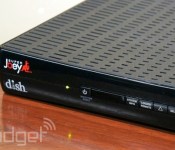
Dish’s Super Joey DVR extender arrives, lets you record eight shows at once

Dish subscribers who fret over choosing shows to record can relax a little today. The satellite provider has just released its promised Super Joey, which both extends the Hopper DVR to other rooms and adds two tuners to the Hopper’s already plentiful six. As the math suggests, the device combo lets you record a full eight shows at the same time — four of your own choosing, plus four from the biggest US networks (ABC, CBS, Fox and NBC). Dish hasn’t said how much it will cost to bring a Super Joey into your home as of this writing, although we’d expect it to carry a premium over a run-of-the-mill Joey.
Filed under: Home Entertainment, HD
Source: Dish

Bright House set to match Google’s Fiber speeds in Tampa community

Despite some recent PR setbacks, Google has become the people’s champion in cities with its gigabit fiber network — thanks in part to the low reputation (and speeds) of regular providers. However, one cable outfit, Bright House Networks, is at least seeing the commercial value in such installations. It’s joining forces with a real estate company to build a gigabit fiber-to-the-home network for a 6,000-unit development in Tampa, Florida. The first houses will be occupied this summer, with completion slated for 2017. Bright House said the move is not a response to Google’s recent announcement that it’ll expand Fiber to 34 more cities, but meant rather as a “differentiator” for the community. With its average internet speed around a fortieth of that figure, we imagine the rest of the company’s 2.4 million subscribers will keenly notice the difference.
Filed under: Internet
Source: WSJ
 AIVAnet