



Rovio teases upcoming Angry Birds game involving suits of armour, coming to Australia, Canada and NZ Soon
 We’ve been long overdue for an Angry Birds related release from Rovio this year, but it looks like they are about the rectify that. In a teaser trailer released this morning, Rovio has teased a new Angry Birds game that looks like it will feature some kind of a medieval theme, but apart from that, it’s quite difficult to speculate on anything else in particular. Check out the trailer for yourself:
Refering to it as “the most epic soft launch ever”, Rovio is saying that the launch for this new game will only be a soft launch in Australia, Canada and New Zealand (except New Zealand gets no mention in the video itself, sorry). If you’re wondering why these countries in particular, Rovio and even EA seem to like doing their soft launches in these countries first for whatever reason, though it probably has something to do with smartphone saturation and population. Whatever it is, we’ll be letting you know as soon as we get hands-on with the game and give you a sneak peek.
What do you think this new Angry Birds game is going to be about? Do you think Rovio should be continuing the Angry Birds franchise? Let us know what you think in the comments.
Source: YouTube via IntoMobile
Use the SanDisk Connect with AllCast for Chromecast Support
I like to use technology to my advantage when ever possible. I am sure many of you thought that the SanDisk 64GB Connect Wireless Flash Drive was pretty darn cool. It really it is. Being able to transfer files, movies, images and photos back and forth between your devices and the flash drive without any physical connection is pretty great. The ability to stream movies from the drive to your phone or tablet is also pretty cool. That doesn’t mean you can’t do more though.
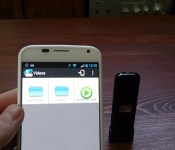
While the SanDisk app by its self doesn’t offer Chromecast support as a playback option, you can still cast the content from the flash drive to Chromecast easily. The thought dawned on me this morning when I remembered that when you launch a video for play back you are prompted to pick your player. Many of us have multiple apps that can play back videos. So I installed AllCast to the Moto X and I could cast from the SanDisk 64GB Connect Wireless Flash Drive to the Chromecast.
 To make it happen though you do need to set up the flash drive on your preferred internet connection so that the internet passes through to your phone or tablet. If you don’t it will never connect because the app flips to the drive for the connection and disables your Wi-Fi connection. Once connected, you open the SanDisk Connect app, select the movie you want and then open it with Chromecast.

 I shouldn’t be surprised that it worked, but it is not something that an average consumer might have thought to try. It certainly does open up more uses for the drive for many people. I did run into issues with various file formats of course. A .m4v caused Play Services to force close and an avi just sat there and did nothing, but the traditional mp4 video file played just fine all the way through.
Head over and read the full review of the SanDisk 64GB Connect Wireless Flash Drive and pick up one. Alternatively, grab AllCast from the Play Store too.
Pebble 2.0 with Appstore is now finally live on Android
 The Pebble 2.0 with Appstore app is finally live on Android today, bringing with it the promised appstore with all Pebble Watch compatible apps, a watchface store where all submitted watchfaces can be browsed, as well as new functions to help Pebble smartwatch owners manage their apps and watchfaces. It’s a pretty extensive revamp, completely redesigning the user interface as well as streamlining the whole Pebble pairing process which I think had previously been a bit messy and ugly.


I’m particularly impressed at how easy it is now to install apps and watchfaces; it’s pretty much an all-in-one solution now, making it a breeze for even casual users to install anything and everything. From the Play Store, the official list of changes to the app include:
New Features in 2.0.12 (requires Android 4.0 or newer):
- Pebble watchapp directory: browse, find and install the latest watchapps for Pebble.
- List of prior notifications now stored on your Pebble.
- Watchapp locker: keep track of your favorite apps and manage the apps on your Pebble.
- Completely revamped and improved user interface design.
The new Pebble 2.0 app can be had on the Play Store now if you haven’t already got it (links below), and the update should be available if you already have it installed. Let us know how you find the new Pebble 2.0 in the comments.
Source: Droid-Life via engadget
Application: Pebble
Price: Free
Pre-orders begin for the Asus Chromebox at $179
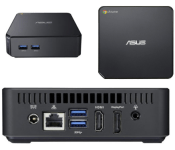
The beginning of February Asus announced their upcoming Chromebox which was promised to be the ‘Smallest-Ever’ measuring in at 4.88 x 4.88 x 1.65 inches. Inside you will find a 1.4 GHZ Celeron 2955U processor, 2GB DDR3 RAM and 16GB internal storage. All running the Chrome OS.
 Beyond the internal hardware specs, the Asus Chromebox also brings 4 USB 3.0 ports, HDMI, Display, Ethernet port and sd card reader. You get all of that for plus 100GB of Google Drive cloud storage for 2 years for just $179. Asus also let the source know that they did end up putting a fan inside. While they promise it will only fire up briefly at start up and kick on only when needed, they weren’t able to make it fanless as they intended.
We are certain the developers out there will have a field day with this little box. We have seen them bring Ubuntu, Debian and other things to the Chromebooks, we can only imagine what tinkering they will do with this.
You can pre-order through the usual locations like Amazon, TigerDirect or Newegg. All three retailers offer the same price tag. Shipments are planned for March 14th. We like Amazon best, so you can find the link to the Amazon store for the Asus Chromebox below.
// <![CDATA[
amzn_assoc_ad_type = "product_link"; amzn_assoc_tracking_id = "wwwandcom-20"; amzn_assoc_marketplace = "amazon"; amzn_assoc_region = "US"; amzn_assoc_placement = "B00IT1WJZQ"; amzn_assoc_asins = "B00IT1WJZQ"; amzn_assoc_show_border = true; amzn_assoc_link_opens_in_new_window = true;
// ]]>
// <![CDATA[
// ]]>
Via Liliputing
ASUS’ pint-sized Chromebox ships on March 14th for $179

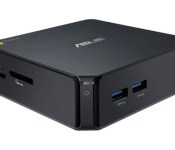
If the simplicity of ASUS’ Chromebox is enticing, you’ll be glad to hear that you can pick up the miniscule computer very soon. The $179 Chrome OS desktop is now available for pre-order at stores like Amazon, Newegg and TigerDirect, with the first wave of orders due to ship on March 14th. A base system starts out modestly with a 1.4GHz Celeron and 2GB of RAM, although you can splurge for a Core i3 model (the Core i7 variant isn’t coming stateside). Just don’t expect a completely silent machine — AnandTech understands that none of the Chromeboxes are fanless, contrary to some expectations. As long that isn’t a dealbreaker, though, you can snag ASUS’ cheap PC at one of the source links.
Via: AnandTech
Source: Amazon, Newegg, TigerDirect

We carved a custom bottle opener with the free Easel web app

Inventables’ Shapeoko 2 desktop computer controlled (CNC) milling machine just got a whole lot more attractive. The company’s new Easel tool is a free design and fabrication web app designed for the $650 open-source kit, which launched last October. The new duo will enable you to design objects in 2D with a real-time 3D preview, then “print” your creation using a USB-equipped CNC milling machine (such as the Shapeoko) with wood, plastic or soft metal. Best of all, Inventables has whipped up an interface so straightforward even an Engadget editor could figure it out. Creating designs, such as the bottle opener we tossed together is a simple drag and drop affair, and requires no prior experience. While you should be able to design basic objects in less than five minutes, assembling a Shapeoko can take considerably more time. Fortunately, Zach Kaplan happened to have one ready to go, so we caught up with the Inventables CEO to try out the new cloud-based design tool here at SXSW.

We’re live from SXSW Interactive 2014!

We’re live on the ground at South By Southwest (#SXSW for short), the annual event that brings together everyone and anyone who’s invested in the interactive arts. Those artists include the minds behind emerging startups (like Twitter was here in 2007), as well as established innovators like Mark Cuban and even Grumpy Cat.
We’re already off to a great start: we’ve seen a man get stunned by the Chaotic Unmanned Personal Intercept Drone and had a chance to punch virtual sharks with the Oculus Rift and Leap Motion. But, there’s more to come over the next few days, including riding MarioKart in real life, separate virtual conversations with Edward Snowden and Julian Assange, Shaq and much more.
Here’s how to keep up with us at SXSW, after the break.
Event Hub
You’ll find our familiar collection of posts coming out of the events we cover right here.
!function(d,s,id)var js,fjs=d.getElementsByTagName(s)[0];if(!d.getElementById(id))js=d.createElement(s);js.id=id;js.src=”//platform.twitter.com/widgets.js”;fjs.parentNode.insertBefore(js,fjs);(document,”script”,”twitter-wjs”);
You can follow us and our team on the ground at these handles below:
Follow Engadget @engadget
Follow Zach Honig – Deputy Managing Editor @ZachHonig
Follow Terrence O’Brien – Deputy Managing Editor @terrenceobrien
Follow Joseph Volpe – Senior Editor @jrvolpe
Follow Sarah Silbert – Senior Editor @sarahsilbert
Follow John Colucci – Social Media Manager @johncolucci
More Social Media
We’ll update our Facebook and Google+ pages with the latest news on Engadget. When we’re out and about in Austin, we’ll post pictures and videos to Instagram, as well as shorter videos to Vine.
[Thanks, SXSW for the headline picture, with this author and his selfie with now Senator Cory Booker.]

T-Mobile’s tweaked Simple Choice plans come with more data, unlimited international texting

T-Mobile’s customer-friendly “Uncarrier” schtick seems to be changing people’s minds about the country’s 4th largest wireless provider, and it’s not done fiddling with that formula just yet. The folks in magenta just announced a slew of tweaks to its Simple Choice plans that make them worth yet another look.
Here’s the long and short of it: if you’ve got T-Mobile’s $50 Simple Choice plan, your LTE data and tethering buckets will double in size from 500MB to 1GB (at no extra cost, mind you) starting on March 23. If you’re more of a power user, you can shell out an additional $10 per month per line to bring those buckets up to 3GB a pop, and a new $30/month option grants you unlimited LTE data speeds and 5GB of tethering. This does come at a price though: the $20/month tier that gave you unlimited LTE data and 2.5GB of tethering has been rejiggered to provide 5GB of each. Sure, 5GB is a lot of data, but it doesn’t hold a candle to what you used to get. Thankfully, if you’ve already got that plan, it’s yours keep.

But really, it’s T-Mobile’s aggressive (and surprising) stance on international data and messaging that really helped to turn some heads. As you might expect, the carrier’s global data roaming footprint has just grown (if only by a bit): you’ll be able to check emails and fire off messages with impunity in Afghanistan, Guam, Honduras, Macao, Uganda, the Canary Islands and San Marino. The biggest get here though is the inclusion of unlimited international messaging for–you guessed it–a whopping $0 extra per month. It’s probably not going to spell the end for hugely-popular messaging apps like Whatsapp, but smoothing out wrinkles of international texting couldn’t hurt T-Mobile’s reputation. As usual, you don’t have to do anything to claim these goodies — they’ll just show up on your bill, waiting oh-so-eagerly for you to use them.
Filed under: Mobile

SlatePro TechDesk Features Built-In Docks for iOS Devices, Air Vents for Macs [iOS Blog]
The SlatePro TechDesk is a new Kickstarter project featuring a desk that has been designed with built-in docks and cutouts to accommodate several different Apple devices. It comes with multiple display docks that are able to hold an iPad, iPhone, or other mobile device, and air vents in the middle of the desk offer continual cooling for MacBooks.

Designed to fit any size computer or laptop, from a MacBook to an iMac, the desk also comes equipped with a heavy duty mousepad, a filing rack, a pen dock, and a recessed cup holder. There are also built-in cutouts for cords to keep everything organized.
The SlatePro’s surface is cut from pure, premium bamboo and protected by a sheet of clear acrylic. It’s super strong, very light weight, and it will support your computer with ease. The desk’s steel legs are completely hand-crafted. They create the perfect height and are made by some of the best metal workers in the USA.
Nathan Mummert, the SlatePro’s creator, was also behind the Slate Mobile AirDesk, a successful Kickstarter project that featured a portable lap desk.
Some early pricing tiers of the SlatePro have already sold out, but interested backers are still able to pre-order a desk for $448 on Kickstarter. The first desks are expected to ship in May of 2014, while orders made now will ship in June or July.
     |

Engadget Podcast 387 – 3.7.14

Ben Gilbert is joined by Engadget editor and former Best Buy celeb Chris Velazco, along with our social media guru John Colucci who’s managed to drag himself away from Grumpy Cat and 3D-printed Oreos long enough to share his thoughts on SXSW. While Ben flexes his verbal Shaq Fu to keep the podcast on track, the real Shaquille is actually scheduled to host a panel on wearables at the Austin event this week. There’s a good deal of strange news to talk about, but none quite as odd as Dorian Nakamoto’s #bitcoinchase on Thursday. Of course there’s a method to all this madness and it can be found at the streaming links below, steganographically embedded into this week’s episode of the Engadget Podcast. Enjoy!
Hosts: Ben Gilbert
Guests: Chris Velazco, John Colucci
Producer: Jon Turi
Hear the podcast:
07:19 – Bitcoin’s elusive founder reportedly discovered living in California
18:50 – PlayStation US head Jack Tretton parts ways with Sony
26:28 – Hands-on with Apple’s CarPlay: when Siri met Ferrari
Subscribe to the podcast:
[iTunes] Subscribe to the Podcast directly in iTunes (enhanced AAC).
[RSS MP3] Add the Engadget Podcast feed (in MP3) to your RSS aggregator and have the show delivered automatically.
[RSS AAC] Add the Engadget Podcast feed (in enhanced AAC) to your RSS aggregator.
Download the podcast:
Contact the podcast:
Connect with the hosts on Twitter: @realbengilbert, @chrisvelazco, @johncolucci
Email us: podcast [at] engadget [dot] com
Filed under: Podcasts
 AIVAnet