


Developers Now Able to Provide Promo Codes for In-App Purchases
Apple appears to be allowing developers to create promo codes for in-app purchases, a useful feature that makes it far easier to test and promote freemium games and apps with content that can only be purchased within an app once it has been downloaded.
Promo codes for apps have long been available, but were previously limited to initial app downloads and were not available for in-app purchases. This change will make it easier for developers to give early app testers, reviewers, and other users access to the full content available within freemium apps.
While it is unclear if the feature is currently available to all developers, Jeff Scott of 148apps.com shared a screenshot on Twitter of an in-app purchase promo code for Real Racing 3, from major developer EA. EA is using the promotion to give customers 10 free gold within the app, which has an in-app value of $1.99. The gold can be obtained by visiting this link on an iOS device.

Entering the promo code provides users with gold in the app, and if the app is not installed, it will automatically download before redeeming the in-app purchase code.

Apple has not yet updated its developer site to reflect the availability of in-app promo codes and its rules still state “Promo codes don’t work for In-App purchase products, including Newsstand issues.”

Buyer’s Guide: Discounts on iMac, MacBook Air, and Apple Accessories [Mac Blog]
There’s a great deal on the entry-level 27-inch 3.2GHz iMac with 8GB of memory and a 1TB hard drive this week. It’s available for $1,659.99 from Best Buy, Amazon, and B&H Photo, which marks a discount of $139 and one of the lowest prices we’ve seen.

The best deal for many users will likely be from B&H Photo, as the site does not charge sales tax outside of the state of New York. Best Buy and Amazon, on the other hand, will charge sales tax, making B&H the lowest available price.
Lower prices are also available on some of Apple’s other iMacs, but the deals aren’t quite as nice. The entry-level 21.5-inch version can be purchased for $1,179 from Adorama or B&H Photo, a savings of $120, while the higher-end 21.5 inch model is available at $1,399 from Best Buy or B&H Photo, a savings of $100. The high-end 27-inch model is also available for $122 off from Adorama, at $1,878.
There are still deals to be had on Apple’s 2013 MacBook Airs, which are nearly as good as the 2014 models. The entry-level 11-inch model can be purchased for $787 from Amazon, $112 less than the comparable 2014 model. The high-end 11-inch version is available for $939 from Amazon and $949 from B&H Photo, a savings of $150+.

As for the entry-level 13-inch 2013 MacBook Air, the best deals this week come from B&H Photo and Amazon, both of which are offering it for $899. The higher-end 13-inch model is available for $1,044.99 from Amazon and B&H Photo, $155 off the comparable 2014 model.
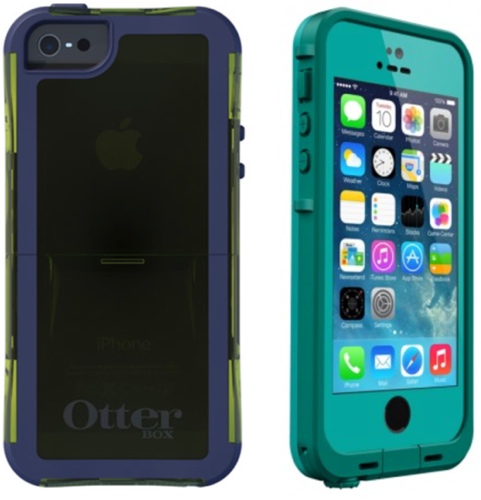
Several Apple accessories are available at a discount this week, including Apple’s EarPods, which can be purchased for $15.95 (down from $29.99) from A4C. Lifeproof is offering 25 percent off of all its Fre and Nuud cases for the iPhone 5, 5s, and 5c with the promo code EVENT25 and Otterbox cases for the iPhone 5 and 5s are available for $18 from LivingSocial, a discount of $32.
MacRumors is an affiliate partner with some of these vendors.

Podcasts for iOS is now properly outfitted for Siri and CarPlay

Folks that spin favorites through Podcasts on iOS to endure the workday can nab an update that should boost listening sessions. Version 2.1 of the standalone app boasts improved browsing by episode, complete with Unplayed and Feed (available for download or stream) tabs for easy access. You can also save favorites for offline enjoyment and tweak the settings to automatically delete selections once you’ve listened. Siri integration finally makes its debut as well, allowing voice-activated commands like “play podcasts” or specific stations with “play Stuff You Should Know” for the virtual assistant. There’s also CarPlay support added in to prep for its arrival in autos in the months to come. If you haven’t been alerted to the new version just yet, hit the source link that follows to snatch it up.
Via: MacRumors
Source: iTunes

Podcasts for iOS Updated With Siri Integration, CarPlay Support and Improved Browsing [iOS Blog]
 Apple today updated its Podcasts app for iOS to version 2.1, adding several improvements to the app, which currently has just a two star rating in the App Store. The update includes a new “Unplayed” tab displaying episodes that haven’t been listened to, and episodes that are available to stream or download can be accessed from the “Feed” tab.
It’s now possible to save favorite episodes to listen to offline and users can also automatically delete episodes after they’ve been played. Siri integration has been included and Siri is able to play podcast episodes with a “play podcasts” command. Users can also ask Siri to play specific podcasts or stations.
Along with these enhancements, the Podcasts app now supports CarPlay and link sharing via AirDrop. Apple has also released iTunes 11.2 with several desktop podcast improvements.
This update includes several improvements that make playing your favorite podcasts even easier:
Improved Episode Browsing
– Quickly find episodes you haven’t listened to in the new Unplayed tab
– Browse episodes that are available to download or stream in the Feed tab
– Save your favorite episodes to keep them offline
– Episodes can now be automatically deleted after you play them
– Tap on links that appear in podcast and episode descriptions to open them in SafariAsk Siri
– You can now ask Siri to play podcast episodes by simply saying “play podcasts”
– To play specific podcasts or stations, just ask Siri to play them by name, like “play TEDTalks”
– Please note that Siri may not be available in all languages or in all areas.Additional Improvements
– Podcasts now supports CarPlay
– Start playing a station right from the stations list — just tap the Play button next to the station name
– Share links to your favorite podcasts using AirDropThis update also resolves playback issues after syncing with iTunes and improves stability while downloading podcasts.
Podcasts can be downloaded from the App Store for free. [Direct Link]
iTunes Connect for iOS Updated With iOS 7 Redesign [iOS Blog]
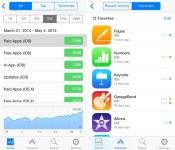
Following the release of OS X 10.9.3, an update to iTunes, and a revamped Podcasts app, Apple has also debuted a new version of the iTunes Connect app for developers, which includes an iOS 7-style overhaul.
Designed to allow developers to access sales data on their iOS devices, iTunes Connect has been completely redesigned in the first update that it has received since October of 2012.

Along with a new look, the iTunes Connect app now allows developers to access music, movies, and TV shows they have released on the App Store, in addition to apps and e-books.
iTunes Connect has been completely redesigned to make it even easier to manage your products. In addition, you can now use the iTunes Connect app to access the music, movies, and TV shows you have made available on the iTunes Store.
iTunes Connect can be downloaded from the App Store for free. [Direct Link]

Bentley Ad Shot Using iPhone 5s, Assembled on iPad Air [iOS Blog]
Bentley’s newest ad, Intelligent Details, was filmed entirely with Apple’s mobile devices. Photographers used the iPhone 5s to shoot video and then put it together using an iPad Air, according to details provided on the making of the ad at the end of the spot (via The Loop).
Shot in New York, a quick behind the scenes look at the black and white film on the $300,000 Bentley Mulsanne reveals that it was filmed with an iPhone 5s, using specialized lenses, mounts, and cases to produce high-quality video on par with far more expensive camera equipment.
The short video was then assembled using an iPad Air and the iMovie app with an attached custom keyboard case. Much of the editing was done on the go in the back of a Bentley, showing the mobile capabilities of Apple’s devices.
Bentley’s ad is the newest spot to be filmed using Apple tools, but it’s far from the first. Back in 2013, Burberry announced a partnership with Apple that saw it shooting an entire Spring/Summer 2014 runway show using nothing but the iPhone 5s ahead of the phone’s launch.
Searching for Sugar Man, a documentary that won an Academy Award back in February of 2013, was also partially shot using an iPhone.

‘iWatch in 60 Days or Bust’ Analyst Claims Apple Developing a 3D Printer
Global Equities Research analyst Trip Chowdhry has made a number of outlandish predictions when it comes to Apple, and his latest claim is that Apple is preparing to enter the 3D printer market. Chowdhry shared his thoughts with Benzinga, outlining his belief that Google is pursuing a 3D printer project based on its expectations that Apple will be making a similar move.
 Retro Apple Logo in 3D by arguncencen on Shapeways
Chowdhry provides little to no details on Apple’s 3D printing plans, citing only the company’s experience in hardware and its intellectual property covering the technology as substantiation for his prediction.
“It’s either Apple or Microsoft [that inspired Google],” Chowdhry told Benzinga. “But developers feel that Apple is probably the focus for Google because Google considers Apple to be its prime competitor, not Microsoft. And Google really sees Apple to be a strong competitor, not Microsoft, because Microsoft has a lot of issues to worry about.” […]
“Apple does have intellectual property [in that space],” said Chowdhry. “And they often have more expertise in hardware development than, say, Microsoft has.”
Chowdhry also points to Apple’s acquisition of PrimeSense last year, with that firm’s 3D sensors made famous for their role in the original Microsoft Kinect perhaps playing a role in Apple’s 3D printing ambitions.
As for timing, Chowdhry doesn’t specify anything for Apple but speculates that Google could announce its 3D printing intentions this June or October with product launches coming a full 12-18 months later.
As if the unsubstantiated claims and seemingly nonsensical predictions weren’t enough to essentially dismiss the report as fanciful thinking, Chowdhry has a history of making grandiose claims. Freshest in many people’s memories is his claim earlier this year that Apple had 60 days to introduce the iWatch or the company “will disappear” as it proves itself unable to innovate in the post-Jobs era. Chowdhry’s deadline comes next Monday, with no sign of an imminent iWatch announcement.

Apple Releases OS X 10.9.3 With Enhanced Support for 4K Displays, Syncing Improvements
Apple today released OS X 10.9.3, after two months of developer testing. The last 10.9.3 developer beta, build 13D61, was released just over a week ago.
The update, which is recommended for all Mavericks users, improves 4K display support on the late 2013 Mac Pro and 15-inch MacBook Pro with Retina display. According to the release notes, it also re-adds the ability to sync contacts and calendars between Macs and iOS devices using a USB connection and it improves the reliability of VPN connections using IPSec.
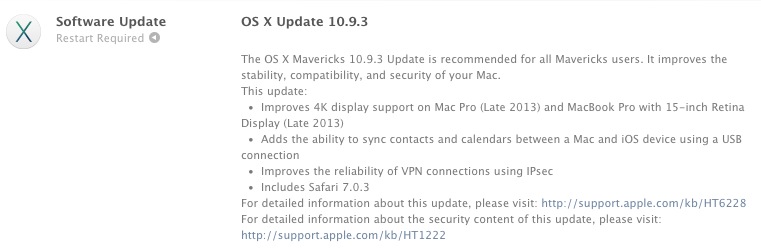
The OS X Mavericks 10.9.3 Update is recommended for all Mavericks users. It improves the stability, compatibility, and security of your Mac.
This update:– Improves 4K display support on Mac Pro (Late 2013) and MacBook Pro with 15-inch Retina Display (Late 2013)
– Adds the ability to sync contacts and calendars between a Mac and iOS device using a USB connection
– Improves the reliability of VPN connections using IPsec
– Includes Safari 7.0.3For detailed information about this update, please visit: http://support.apple.com/kb/HT6228
For detailed information about the security content of this update, please visit: http://support.apple.com/kb/HT1222
First outlined after the initial 10.9.3 beta, the improved 4K support enables HiDPI Retina scaling on 4K displays for the 2013 Mac Pro and Retina MacBook Pro with DisplayPort 1.2, which improves the size and readability of text and other on-screen elements. 10.9.3 also includes 60Hz 4K output for the 2013 Retina Macbook Pros and the higher refresh rates will improve response times for smoother game playing, video editing, and more.
OS X 10.9.3 can be downloaded through the software update function in the Mac App Store.

iTunes 11.2 Released With Podcast Improvements, Bug Fixes [Mac Blog]
 Apple today released iTunes 11.2 with several improvements to Podcast browsing, giving users a way to find new episodes with an “Unplayed” tab and the ability to save favorite episodes to a computer. Episodes can also now be deleted after they’re played, and episodes that are available to download or stream can be found in the “Feed” tab.
There’s also a fix for an issue that caused iTunes to become unresponsive when updating Genius, and there are also improvements for overall performance and stability. Apple also recommends users download Podcasts for iOS 2.1 or later to sync podcast episodes.
This update includes the following improvements:
Improved Podcast Browsing
-Quickly find episodes you haven’t listened to in the new Unplayed tab
-Browse episodes that are available to download or stream in the Feed tab
-Save your favorite episodes to keep them on your computer
-Episodes can now be automatically deleted after you play themThis update also resolves an issue where iTunes may become unresponsive when updating Genius and improves overall performance and stability. Podcasts for iOS 2.1 or later is recommended when syncing podcast episodes.
For information on the security content of this update, please visit: http://support.apple.com/kb/HT1222
iTunes 11.2 can be downloaded from the software update tool of the Mac App Store.

Swarm inherits Foursquare’s social roots, tells you where your friends are

In an effort to focus more on local search and finding you the best restaurants in your area, Foursquare recently announced that it would be splinter off the social aspect of its app — the part where you check in and find out where your friends are partying — to an entirely separate one called Swarm. Today, that app is officially live in both the Apple App Store and Google Play. I had a chance to try it out for a few days, and while it looks very different from its progenitor with its bee-inspired design and bright-orange hue, many of the social features remain the same. All your Foursquare contacts are ported over, and you can check in to a location just as you would before. Similarly, you can view a list of your friends’ recent check-ins, and you’re able to heart or leave a comment on them as per usual.
But in addition to that familiar functionality, Swarm’s also introduced a whole new set of features that might not have fit so well with the original Foursquare app. For one thing, Swarm now has an ambient proximity feature called Neighborhood Sharing, which when toggled, passively shares your location in terms of what neighborhood you’re in — check-in not required. This lets your nearby friends know that you’re in the neighborhood without telling them your specific location. For example, instead of saying you’re at a certain cafe, you’ll just be listed as being in a particular area, like the Mission District in San Francisco, or Soho in New York. According to Foursquare, your friends will never know your exact spot with Neighborhood Sharing, at least until you actually check in. Still, if you feel uncomfortable with that, you can always switch the toggle off.

In conjunction with the new Sharing feature, Swarm’s main welcome screen provides a social heat map of sorts that lets you know which of your friends are closest to you. They’re divided into six distances — Right here (500 feet), A short walk away (1.0 mile), Nearby (5.0 miles), In the area, (20 miles) and Far far away. If you see someone is close enough to arrange a rendezvous, simply tap on their avatar and you’ll be able to call, text or send them a message on Facebook Messenger (as long as they’ve got all that information set up on their accounts).
Perhaps my favorite feature of the new Swarm app, though, is the ability to set up plans. Instead of just randomly posting a status update on Facebook or Twitter that you’d like to have drinks after work, you can send a quick open-ended invite to Swarm’s “Nearby plans” page in the hopes that friends in the vicinity will see it and respond. You can then make arrangements of where to meet ahead of time, which is far easier than broadcasting your locale and simply hoping your friends show up. Of course, nothing’s stopping you from posting random missives on the Nearby Plans page, so you could also use it to sell extra concert tickets or complain about the weather. It seems pretty similar to Dodgeball‘s pre-Foursquare shout feature, just a lot more localized.

Swarm also added a fun little component that seemingly every other social app has: stickers. You can either add a mood sticker that indicates your, well, mood, or a category sticker that matches the place you’re at — so you would add a beer sticker if you’re at a bar, a coffee one if you’re in a cafe, etc. Swarm doesn’t offer reward Badges — that particular feature remains with the main Foursquare app — but you’ll get more stickers if you check in to more places. Also, like we said a few days ago, the concept of mayorships has changed. Instead of just having one mayor, a particular place can have multiple mayors because you’re only competing with your friends to hold the title at any given location. Last but not least, Swarm finally introduces extensive search of your entire check-in history so you can reminisce on where you’ve been.
As I’ve only had the app for a few days, there’s likely more about it that I haven’t yet discovered. But at first glance, it feels as if Foursquare old-timers will feel right at home with Swarm’s social elements, and though I have my reservations about ambient location-sharing, that seems potentially useful, too. The question now is whether that’s enough for folks to switch over — after all, an app that tells you where your friends are is only useful if your friends actually use it. To check it out for yourself, either hit the source link below or head over to the appropriate app store to download it.
Source: Foursquare

