


DT Live: Superstar influencer Quinn Slocum talks building brands and living well
For many young professionals today, influencers are the new rock stars; it’s the career everyone wants, but few are quite sure how to attain. It’s no surprise influencers are so popular. In the age of social media, where everyone feels the need to share pieces of their daily lives, influencers get more than just the occasional like and a fleeting sense of acceptance in a cold world. They also get paid.
Becoming a social media influencer isn’t easy. You probably won’t find a degree program for it. The best way to study may be to learn from the influencers themselves. On DT Daily, we talked to Instagram superstar Quinn Slocum, who talked about how to build an Instagram following (something we’ve written about before), his tips for young entrepreneurs, and the importance of giving back to the community.
Slocum’s most famous Instagram page is @bestcelebrations, which showcases heartwarming videos of people celebrating, whether in sports or just life. He got his start when he was just an 8th grader.
“I was a kid who just loved lacrosse. I made sports edits on Vine… and I was making these edits, and I found someone through Instagram who was like ‘Hey, I need edits done for my sports page. Can you do them?’ And I said ‘Heck yeah.’”
From there, Slocum started a variety of social media pages, the first of which was dedicated to pictures of famous athletes’ houses. Building the brand wasn’t easy; sometimes the houses in the pictures didn’t actually belong to the athletes in question.
“I think people called me out every time like ‘That’s not his house!’” Slocum says. “So I didn’t know… there was like a 50 percent chance it was. So I could be posting some random rich guy’s house. That was the fun of it.”
“I felt a little embarrassed,” he continues, “but it was also kind of funny at the same time, because while there was the 3 percent that were like ‘That’s not his house!’, I still fooled 90 percent of people into thinking it was. So it’s a win-win, you know?”
Always eager to give back to the world, Slocum has some advice for aspiring influencers: Don’t get too focused on the numbers.
“It’s awesome growing an Instagram and stuff, right?” he asks. “But you want to make sure that at the same time you’re inspiring people and doing your part in making an influence in the world. One of the people I really look up to, Jay Shetty — I met him back in January — he’s really all about that. Everything he does is in order to give back. And that’s just kind of how I want to live my life and make a difference.
“I could be happy living in a van.” Slocum explains. “I would be happy as long as I’m traveling and doing my thing, rock climbing, taking photos. I would be so happy.”
Money and fame are nice, but to one of Instagram’s great success stories, they are no substitute for a life well lived.
Editors’ Recommendations
- For Monaris, it’s a photography career launched on an iPhone and Instagram
- Capcom will catapult Mega Man to the big screen with a live-action movie
- Cars that talk to each other are coming soon, and could save thousands of lives
- These 10 amazing bus conversions put a new spin on mobile living
- Philo: Everything to know about the live TV streaming service
Facebook is putting focus back on simplicity with Messenger 4
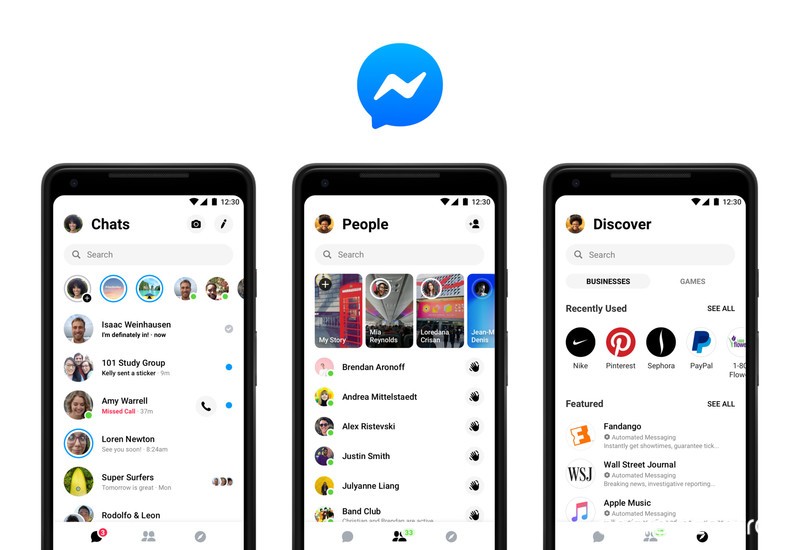
Facebook and its various services like Instagram and Messenger are widely known to be overly crowded with unnecessary features and menus, but that may be changing soon with the rollout of Facebook Messenger 4. The company said that it ran a study on Messenger and found that 71% of participants considered simplicity a top priority.
What a wild concept that people just want to use Messenger to message their friends and family without rummaging through a clunky UI.
Rolling out globally over the next few weeks, Messenger 4 trims down from nine tabs to a much more reasonable three — Chats, People, and Discover. There’s still a camera at the top of the app for sharing photos and videos to your messaging groups or your Facebook Story, and you’ll still be able to play Instant Games through the Discover tab.
On top of simplification, there are also a few neat new features, including color gradients in conversations that make each message a different color gradually leading from, say, blue to red. Messenger 4 is also introducing Dark Mode, which should be good news to AMOLED users.
After years of clumsy and overcluttered designs, it’s great to see Facebook making an effort to change for the better. Messenger 4 is being rolled out in phases, but again, you can expect to see the update some time in the coming weeks.
Do you need the first big DLC for Spider-Man?

Best answer: It’s an incomplete package considering The Heist’s story picks up in two more upcoming content drops, but it’s easily worth your time and money if you’re a Spider-Man fan.
PlayStation: Spider-Man: The Heist ($10)
What’s so good about The Heist?

Insomniac was praised for how the studio deftly took established, beloved characters—both major and lesser known—and molded together a game that in all aspects made it seem like Insomniac had been developing Spider-Man for decades. It’s quite easy to upset comic fans if you mishandle popular characters like those that belong to Marvel, but Insomniac rose to the challenge. The Heist continues this pedigree with the introduction of Black Cat/Felicia Hardy. It’s worth it alone to watch the interactions between Black Cat and Spider-Man because of their shared history and how that plays into their complicated relationship.
It’s worth it alone to watch the interactions between Black Cat and Spider-Man.
The Heist’s main campaign contains several missions alongside various district activities. While the gameplay doesn’t take a drastic departure from the formula found within the base game, it was already so good to begin with that more content is still welcome regardless. Where these missions shine is the narrative.
With Fisk put away after the events of the base game, a power vacuum was created that saw nearly every big crime family in the city fighting for the top spot. As it turns out, the five most powerful crime families pooled together their assets which could only be accessed by five separate USB drives, and Black Cat is out to steal them. Her motives turn from shady to understandable and back to shady again near the end, but it’s a wild ride along the way that leaves you clamoring for more.

The Heist includes three new suits; the Resilient suit, Spider-UK suit, and the Scarlet Spider II suit. Though they don’t have any new associated suit powers, the ones already in the base game more than make up for that since they can be assigned to any suit. These are just a nice added touch for those of us who want more out of our Spider-Man wardrobe.
What’s bad about it?

Considering the story picks up in two upcoming content packages, we don’t get the full picture of what’s going on. The ending certainly teases bad things ahead with a stunning revelation and its cliffhanger, but sometimes when we buy a DLC pack we want to play through a self-contained story start to finish without worrying about what comes next.
Not only is the story left incomplete, but just this one pack costs $10 alone, and took me around 3 hours to complete 100%. Should you decide to purchase The City That Never Sleeps, you’re probably looking at around 10 hours or so of content if the pattern holds true. The good news is, shelling out for the entire package gives you a slight discount than if you would have bought each pack individually.
As for gameplay, don’t pick this up expecting anything too different. Though some of the activity names have changed—Taskmaster Challenges are now Screwball Challenges—what you are doing is basically the same. Beating up a group of enemies under a time limit, earning points by quickly defusing bombs, that sort of stuff. All in all, it feels very much like an extension of the main game, for better or worse.
Considering the entire game takes place in New York City, you’re also not getting a whole new playground to explore. There are certainly a couple of new interior spaces we get to see, but much of the action is retreading old ground. The good news: it’s hard to grow tired of fighting crime because Insomniac’s combat system is outstanding.
Should you buy The Heist?
The Heist is only chapter one of a three-part DLC saga dubbed The City That Never Sleeps, but it’s a strong opening nonetheless. It perfectly introduces Black Cat into the mix while simultaneously setting up a new threat for Spider-Man to face down the line. Fans of our web-slinging hero should definitely pick this one up, if only for the interactions between Felicia and Peter.
For more details on Spider-Man, check out our review and everything you need to know.
Our pick
Spider-Man: The Heist DLC

$10 at PlayStation
A wonderful reimagining.
The Heist is a tad short, but it excels at bringing to life our favorite super heroes and villains with much appreciated nuance. Insomniac proves once again that the Spider-Man name is in good hands, though we’ll have to wait and see how the story ends.
Our pick
Spider-Man: The City That Never Sleeps

$25 at PlayStation
The complete package.
The City That Never Sleeps is shaping up to be a fantastic addition to Peter’s story, and it’s probably best to get the entire bundle instead of purchasing separately.
Red Dead Redemption 2 companion app launches this week

Red Dead Redemption 2 is receiving an official mobile companion app upon release.
Rockstar Games’ upcoming western, Red Dead Redemption 2, is just around the corner for Xbox One and PlayStation 4. While a few days out, there’s still a lot to learn about the highly-anticipated title upon its slated October 26 debut. Parallel to the full game launch, an official companion app has now been announced for iOS and Android devices.
The Red Dead Redemption 2 companion app promises to relay “real-time interactive information” when playing the console game. The app is capable of displaying the world map, with options to zoom, set waypoints of mark areas of interest. You’ll also hook into the protagonist’s in-game journal, serve up Rockstar Social Club statistics, and access a full game guide provided by Piggyback.
Using the app can also enhance your on-screen experience, with an option to shift heads-up-display (HUD) elements to your smartphone. This mode doubles-down on immersion, without comprising on gameplay indicators.
The Red Dead Redemption 2 companion app is currently on track for October 26, 2018, alongside the Xbox One and PlayStation 4 release.
See at Amazon
Apple Highlights iPhone XR Reviews
Reviews for the iPhone XR went live this morning ahead of Friday’s launch, and in a press release in the Apple Newsroom, Apple has highlighted reviews from several members of the media who were able to spend some time with the new iPhones.
Apple shared key passages from sites that include Digital Trends, Daring Fireball, Tom’s Guide, Mashable, Engadget, The Verge, TechCrunch, CNN, Best Products, Techradar, and more.
Mashable, for example, called the iPhone XR the “Goldilocks of iPhones” with its large screen size, affordable price tag, “fantastic” cameras, and future-proof power in the form of the A12 Bionic chip.
Daring Fireball said that the iPhone XR is the best Apple’s ever made “dollar for dollar,” while TechCrunch compared the device to “a piece of nicely crafted jewelry” with a “depth and sparkle” unmatched by other iPhones.
CNN praised the impressive Portrait Mode shots the camera is able to capture, The Verge lauded the work Apple did to make the rounded corners of the LCD match the corners of the device, and Digital Trends called the iPhone XR “the iPhone to buy.”

Apple focused on sharing positive elements of the iPhone XR reviews, but for the most part, reviews were positive due to the iPhone XR ‘s affordable price tag and high-end components.
The biggest difference between the XR and the XS is the LCD display over the OLED display, and reviewers thought the iPhone XR ‘s display was one of the best LCD displays and while not as good as the OLED, it’s not noticeable as long as you’re not holding the two devices next to one another.
Apple’s full list of review selections can be seen in the article shared via the Apple Newsroom, while additional reviews can be found in our own review roundup.
The first iPhone XR pre-orders will arrive starting on Friday, October 26, the launch date for Apple’s newest flagship device.
Related Roundup: iPhone XRBuyer’s Guide: iPhone XR (Buy Now)
Discuss this article in our forums
KeepCalling review: the simple way to make international calls on the cheap

Calling friends and family abroad can cost a fortune, but if you know the right way to call, you can pick up the phone for next to nothing.
For example, you can install an app for international calling like KeepCalling. It’s free to download on your Android smartphone and offers affordable prices for calls made via Wi-Fi or data.
KeepCalling features a clean and simple-to-use interface that will get you on the line with your friends in a few short minutes.
Simply log-in with your, email address, Google account or Facebook to get started. Next, you’ll have to purchase some credit. The standard options include $5, $10, $20 and $50. However, you can also manually enter the amount you want to pay to start from $2.

You can pay either by credit card or PayPal which is quite convenient. KeepCalling also offers the option to purchase a Monthly Plan with unlimited minutes which varies depending on the country you’re calling. For example, for Canadians, the plan will take them back with $4.99.
International calls don’t have to be expensive
Before you buy calling credit you can check to see the calling rates for the country you are planning to call to, so you get an idea of how much to get. For example, for the Czech Republic, calling on mobile is 3.3 cents/min, while SMS is 7 cents.
Once you’ve purchased the credit you can start calling. Just make sure you use the country’s specific international code when you call.
In our experience, using the app was a pretty straight forward affair. We could hear the other party quite smooth, although we did experience some echo. The calls went through uninterrupted, but we were connected to a stable Wi-Fi.

By default, you get a random caller ID, but you can set it to your mobile phone number from the app by accessing the Set my CallerID option from Settings.
Want more credit? You can earn free credit if you refer some of your friends. For each referral who places an order with KeepCalling, you’ll receive $5.
The app also lets you import all your contacts and also has a Speed Dial feature to which you can add up to 99 numbers you call the most.
So if international calls are draining your budget, then you should definitely try and give KeepCalling a shot. If you’re not sure the app is for you just yet, simply try testing it out. It won’t cost you more than $2.
Download KeepCalling from the Play Store
Happy 17th Birthday to Apple’s Original iPod
17 years ago today, then Apple CEO Steve Jobs stood on stage at the Apple Town Hall in Cupertino, California and showed off the very first iPod, a palm-sized device that held an entire music library and helped bring Apple back to profitability.
As Jobs introduced the first iPod, he called it a quantum leap forward in technology and outlined its three major breakthrough features: ultra-portability, Apple’s legendary ease of use, and auto-sync with iTunes.
iPod is an MP3 music player, has CD quality music, and it plays all of the popular formats of open music. The biggest thing about iPod is that it holds a thousand songs. Now this is a quantum leap because for most people, it’s their entire music library. This is huge.
How many times have you gone on the road with a CD player and said ‘Oh God, I didn’t bring the CD I wanted to listen to.’ To have your whole music library with you at all times is a quantum leap in listening to music. The coolest thing about iPod is that your whole music library fits right in your pocket. Never before possible.
The first-generation iPod was advertised as the device that put “1,000 songs in your pocket,” with the music stored on its 5GB 1.8-inch hard drive. Priced starting at $399, the first iPod lasted for 10 hours before needing to be recharged.
The commercial that was shown during the keynote event where Jobs introduced the iPod
Apple’s original iPod featured a black and white LCD and Apple’s first click wheel, a simple, intuitive mechanical scrolling interface designed to let users quickly scroll through long lists of music.
The click wheel, which became an iconic feature of Apple’s iPod lineup, included easy access buttons for playing, pausing, rewinding, and fast forwarding through music content.
 A later version of the iPod classic
Following the launch of the first iPod, new versions followed on a yearly basis.
Other notable updates included the iPod Photo in 2004, which had the first color display; the smaller iPod mini, which also came in 2004; the smaller and more portable iPod nano, introduced in 2005; the tiny iPod shuffle, even smaller than the nano, which came in 2005; the third-generation iPod nano “fatty” with a wider, squatter body, introduced in 2007; and the first iPod touch, also released in 2007.

Today, the iPod has been largely replaced with the iPhone, which was first introduced in 2007. Today’s iPhone XS, XS Max, and XR feature music storage and Apple Music, along with messaging and calling capabilities, a full App Store, and so much more.
 The iPhone XR comes in multiple colors, much like Apple’s iPods did
Apple retired the iPod nano and the iPod shuffle in July of 2017, and has slimmed down the iPod lineup to a single iPod — the iPod touch. Apple has not updated the iPod touch since 2015, and it’s likely that at some point, the entire iPod lineup may be put to rest for good.

It’s not clear when that might happen, and for now, the iPod touch remains available for sale. It can be purchased from Apple for $199 for 32GB of storage or $299 for 128GB of storage.
Unfortunately, there have been no rumors of an update, so Apple’s future plans for the iPod remain up in the air.
Related Roundup: iPod touchBuyer’s Guide: iPod Touch (Caution)
Discuss this article in our forums
How to connect an Xbox One controller to a PC
Microsoft’s consoles have always shipped to consumers with the highest quality gaming controllers and the Xbox One is no different. Less of a complete overhaul of the Xbox 360 gamepad and more of a refinement, the Xbox One’s controller is perfect for any and all games.
So, what if you game on a PC and crave something other than a mouse and keyboard? Or want to try SteamOS? We’ve got some good news — the Xbox One controller supports Windows PC and setting it up only takes a few minutes. Microsoft’s official drivers allow any Xbox One controller to work with PC games that have controller support.
How to connect an Xbox One controller to PC

To help you play all of your favorite PC games with your favorite Xbox One controller, we’ve put together this simple step-by-step walkthrough. Before we begin, you should know that there are three ways to do this: USB, wireless, or Bluetooth. You should also make sure your controller is updated with the latest Firmware.
You might also like How to connect a PS4 controller to a PC and How to connect Nintendo Switch controllers to a PC
Connect your Xbox One controller using USB
Step 1: Use a micro USB cable to connect your Xbox One controller to your PC. If you have a wireless controller, simply use your charging cable. If you have a wired controller, well, you can just plug it in like you would with your console.
Operating system specific limitations
Windows 10: You can have eight controllers connected at once. With chat headsets connected, that number decreases to four and with stereo headsets, it drops to two.
Windows 7/8: You can only connect four controllers at once. No headset support.
Connect your Xbox One Controller Wirelessly
- Step 1: Purchase the Xbox Wireless Adapter ($25).
- Step 2: Connect Xbox Wireless Adapter to an open USB port on your PC. Complete the setup process for the adapter as outlined here.
- Step 3: Press the Guide button (Xbox logo) on your controller to turn it on.
- Step 4: Press the sync button on top of the controller until the Xbox logo begins flashing (it’s the small button just right of LB).
- Step 5: Press the small sync button on the adapter. Once the Xbox logo on the controller stops flashing and turns solid, you’re good to go.
Connect your Xbox One Controller using Bluetooth
Some Xbox One controllers support Bluetooth for wireless connection. To tell if your controller does, look at the plastic around the Xbox logo. Is it part of the face of the controller? If so, it has Bluetooth. But if the plastic surrounding the logo matches and leads into the triggers/bumpers, it doesn’t support Bluetooth. Bluetooth compatible Xbox One controllers came bundled with the Xbox One S and have been sold ever since. So if you purchased a new controller after August 2016, there’s a good chance it has Bluetooth. Look at the images below as an example.
Previous
Next
1 of 2

Bluetooth compatible

Not bluetooth compatible
- Step 1: Navigate to Settings on your PC and click Devices.
- Step 2: Click the Bluetooth settings option to make sure your Bluetooth is turned on. Stay in this menu.
- Step 3: Press the Guide button and then the sync button on your controller. The logo should start blinking.
- Step 4: On your PC, choose “Add Bluetooth or other device,” and click Bluetooth. This tells your PC to look for your controller.
- Step 5: Once it shows up, choose Xbox Wireless Controller to finish the pairing process.
Editors’ Recommendations
- How to connect a Nintendo Switch controller to your PC
- How to connect your PlayStation 4 controller to a PC
- How to connect a PS3 controller to your PC
- The best gaming headsets of 2018
- How to transfer files from Android to your PC
Facebook’s reported Rift 2 cancellation caused a rift with Oculus executive
Bill Roberson/Digital Trends
It appears that the abrupt departure of Oculus co-founder and former CEO Brendan Iribe from Facebook may have been caused by the company’s decision to cancel the second-generation Rift virtual reality headset. Iribe announced his departure from Facebook at the beginning of the week, noting that he is now moving on “after six incredible years.” Now more details are surfacing on what precipitated the rift between Facebook and Iribe.
While Iribe praised the Oculus team, which was acquired by Facebook in March 2014, he noted that there is still more work to be done. “Every part of VR and AR needs to improve, especially the hardware and core technology, and Oculus has the best team in the world to do that,” the executive said in a blog post announcing his departure from the social networking giant. “Although we’re still far from delivering the magical smart glasses we all dream about, now they are nearly within our reach.”
Iribe’s statement led to speculation that the departure may have been less than amicable than what we were led to believe and TechCrunch reported that the executive left Facebook because he shared “fundamentally different views on the future of Oculus that grew deeper over time” than the rest of the executive team. “Iribe wasn’t interested in a ‘race to the bottom’ in terms of performance,’” the report stated.
That difference may have culminated recently at Facebook’s recent VR-focused developer conference, called Oculus Connect 5. At the event, Oculus showed off its new vision for stand-alone virtual reality experiences in the form of the $399 Oculus Quest, which will begin shipping next week. Unlike the Rift, the Quest doesn’t require wires or a connection to a high-end PC with discrete graphics. Instead, the Quest is powered by smartphone-based components, like a Qualcomm Snapdragon processor, to deliver on Facebook’s vision of VR for the masses.
If the TechCrunch report is accurate, than Iribe may have been pushing for Facebook to prioritize work on the Oculus Rift 2, rather than stand-alone experiences like the Oculus Go and Quest headsets. Because the Rift connects to a higher-end gaming PC with discrete graphics, it represents a more powerful experience. Even with Facebook hyping the power of the Quest, in our hands-on review of the headset at Connect 5, we found that performance is somewhat compromised because it comes with a weaker Snapdragon processor. Still, Quest did deliver an immersive VR experience and walked a fine line between performance and portability.
Though Facebook did not confirm the publication’s hypothesis, it said that it is working on a future version of Rift. “While we can’t comment on our product roadmap specifics, we do have future plans, and can confirm that we are planning for a future version of Rift.” the company said in a statement. Facebook did not deny that the Rift 2 has been canceled and it’s unclear what a Rift successor would look like.
Editors’ Recommendations
- Oculus Rift review
- Oculus Quest and Oculus Rift 2: Everything you need to know
- Oculus Quest vs. Oculus Rift
- Oculus Rift vs. HTC Vive
- The Oculus Quest’s competitor isn’t Rift or Vive. It’s the Nintendo Switch
Meet the $1.5m Xprize winner that makes artificial clouds in shipping containers
Could the solution to a lack of clean drinking water in parts of the world be an artificial cloud inside a shipping container? It sounds crazy, but it’s the revolutionary concept which just won the $1.5 million Water Abundance XPrize, a contest designed to reward the creators of a sustainable and scalable approach to collecting water from the air at low cost.
The winning technology, called WeDew (a name derived from the more unwieldy “Wood-to-Energy Deployed Water”), combines a device called Skywater, which creates artificial clouds, with a sustainable method of generating power through burning wood chips or other biomass. It can reportedly create enough water — around 2,000 liters per day — to support 100 people.
“[Our technology relies on] the Atmospheric Water Generator technology of the Skywater Machine, which uses a patented method of condensing the moisture in the air, when warm and cold air meet, similar to the way clouds are formed in nature,” David Hertz, team lead for the winning Skysource/Skywater Alliance team, told Digital Trends. “We powered the system using 100 percent renewable energy in the form of [a] biomass gasification system from All Power Labs, and captured the waste heat and the moisture contained in plant matter to create an augmented environment which made an ideal mic climate for maximum water production.”
The team hopes that the WeDew system can be used as a distributed point-of-use water and energy solution in disaster relief zones, as well as in parts of the world where clean water is never in regular supply.
“Using an intermodal shipping container allows for easy transport and mobility,” Hertz continued. “This self-contained unit can provide rural electrification, potable water, and even refrigeration. What’s more, the byproduct [known as] bio-char is a way to sequester carbon from the atmosphere, and put it in the ground for beneficial soil enhancement.”
The team is using its generous prize money to develop and deploy units of the technology all over the planet, working with nonprofit organizations to do so.
“The XPrize is akin to winning a Nobel prize, but for technology,” Hertz said. “It is a huge honor and a privilege to have been awarded the Grand Prize of the Water Abundance XPrize. It is tremendously rewarding to have your concept and engineering validated by experts globally — and to have been successful from over 98 teams from 27 countries addressing this important issue is humbling.”
Editors’ Recommendations
- New technique combines organic and synthetic tech to harness the sun’s energy
- A nanofiber cloth could pull fresh drinking water straight from the air
- A new way to ‘freeze’ water could help transform organ preservation
- Engineered sand could remove nasty toxins to produce drinkable water
- Award-winning robot travels through water pipes to detect leaks
 AIVAnet