


Call of Duty Black Ops 4: Everything you need to know
Boots are back on the ground.

It wouldn’t be a year in gaming without the annual Call of Duty release blessing the fall launch schedule. The last title we got was a non-Black Ops game, which means we’re due for another from the talented team over at Treyarch.
Call of Duty: Black Ops 4 is poised to build on the previous game by implementing changes inspired by fan feedback and introducing some interesting new game modes that’ll change your expectation of what a Call of Duty experience is supposed to be. Here’s everything you need to know.
What is Call of Duty: Black Ops 4?
This is the latest game in the Call of Duty series, and, specifically, the fifth such game made by Treyarch, the studio which got its start with Call of Duty: World at War and exclusively made Black Ops games ever since.
Black Ops games have never followed traditional Call of Duty standards in terms of story. They’re set in a dystopian-like universe that explores alternate realities. One of the games even straddled the line of supernatural, with Black Ops 3’s events all taking place inside someone’s head.
While the original Black Ops game was set in a period during the Cold War, subsequent titles have gone for a more futuristic setting so as to introduce interesting new gameplay mechanics.
Is there a story mode?
Earlier Black Ops games featured original stories, but Call of Duty: Black Ops 4 will not. In fact, this will be the first ever Call of Duty game that doesn’t have a single-player campaign.
It was originally rumored that Treyarch had started on a campaign for the game, but scrapped it during development as it wouldn’t be finished in time. We later learned that this wasn’t the case, and it was instead a conscious decision by the team to focus their time on multiplayer as a majority of players don’t finish the single-player campaigns in Call of Duty games.
If you love a good single-player campaign and nothing more, it’s wise to skip this one. But Treyarch has mentioned that this isn’t necessarily the start of a trend and that single-player campaigns can and will return to future Call of Duty titles.
Gameplay

With multiplayer being the sole way to play Call of Duty: Black Ops 4, Treyarch wants to ensure they make the deepest shooter possible, and also looked to address some of the more unpopular things they tried in Black Ops 3. Jetpacks and wall-running have been completely removed from the game.
The fan cry for “boots on the ground” has been quite loud, which is why many were ecstatic for Call of Duty: World War 2’s launch. Treyarch’s removal of the feature is a testament to their ability to listen to feedback and not only understand what their fans want, but take action on it.
A lot of the good stuff is returning, though, including the game’s use of Specialist characters. These characters are unique and feature special traits, abilities, and finishing moves. We’re getting four new characters with this launch for a grand total of 10:
- Torque: This is the builder of your team. You can make barricades to control firing lanes in the game, as well as more advanced deployment of barbed wire. Torque’s barricades have heat and distortion fields built-in, so anyone looking to challenge the area you’re denying will have a tough time.
- Ajax: When you need someone to push into an enemy zone, Ajax is the pick. He has a shield, and the shield has a hole in it, so whoever uses him can still be a deadly force. Ajax also has a flashbang that can be cooked, and the longer you cook it, the more flashes it will set off.
- Recon: A new fog of war mechanic means enemies won’t always show up on your radar whenever they shoot, so Recon’s goal is to reveal them.
- Crash: Medic fans will love Crash. He can not only heal allies, but he can also buff them in certain ways. And if you’re wondering why he has to heal anyone, it’s because Black Ops 4 will not have regenerative health.
All of these specialists share much of the same weapon and equipment pool, but there will be some mods and attachments specific to each character. And not all attachments will be made equally, with tier 2 versions of mods offering greater benefits than their standard ones.

Speaking of which, gunplay is getting a big upgrade in Black Ops 4. Treyarch has implemented predictive recoil patterns for each gun, which means you’ll have a rough idea of how your gun will react whenever you shoot it. The recoil mechanic in previous games was based on RNG, something Treyarch felt was important to eliminate as they wanted all of the game systems in Black Ops 4 to be learnable.
Scorestreaks are back. This staple Call of Duty feature nets you game-changing perks and bonuses as you rack up kills. Treyarch hasn’t yet revealed any new scorestreaks or changes to existing ones.
Players will do battle on a number of maps, five of which are fan favorites from previous Black Ops games that have been remade. Those include Jungle, Slums, Summit, Firing Range, and, of course, Nuketown. The former four will be available at launch, though Nuketown will arrive a bit later.
When you want to take a break from multiplayer, you can play Solo Missions, a collection of missions that’ll let you test your skill with any of the specialists. These missions will contain light backstories for each specialist if you’re interested in learning more about them.
It’s clear Treyarch wants more for Call of Duty than its roots as a simple twitch shooter. The continued focus on unique character abilities and an upgraded ballistics system puts it in league with the likes of Rainbow Six: Siege, and should help position it well to become a fun game to follow and play for eSports.
Zombies
What’s a Black Ops game without a zombie mode? Zombies in Black Ops 4 will have the most launch content we’ve seen yet. This coop mode lets you and up to three other friends take on a horde of zombie enemies across several big maps, with each wave being interspersed with time-sensitive objectives.
Black Ops 4 will feature three such maps at launch, two of which are entirely new and one that has been remade from a previous game. The new maps – Voyage of Despair and IX – have a short storyline of their own to follow, and will feature all-new original characters Scarlett, Shaw, Diego, and Bruno.

The remake is Blood of the Dead, which is based on the Mob of the Dead map from Black Ops 2. Its story will feature the original Primis gang, including Nikolai, Takeo, Richtofen, and Dempsey. A fourth map made for the Primis characters named Classified is also on the way, but will only be available for Black Ops Pass owners and anyone buying the Special Edition versions of the game.
You’ll get more customization than ever before, as players can now customize their starting loadouts before each game. And the game at large can be played to your exact liking with over 100 variable “mutations” that can be applied. These mutations can alter things like zombie speed, health, damage, and overall difficulty.
And to give players a reason to keep coming back, Treyarch will run events called Callings. These limited time events may offer rewards or introduce new gameplay twists to help keep things fresh.
Blackout Mode
Peg Call of Duty as another game jumping on the Battle Royale bandwagon. Black Ops 4 will have its own royale mode called Blackout, and it’ll feature the single largest map we’ve ever seen in a Call of Duty game. It’s said the original test map for Blackout mode was 144 square miles wide. We don’t know how much it’s been shrunken or enlarged since then, but it sounds massive either way. The map will have iconic locations from previous Black Ops games, and it can be traversed by land, sea, or air.
Treyarch doesn’t seem to be touting any crazy twists on the genre. The teaser trailer for the mode suggests players will parachute down into the play area to find their starting loot before the game eventually shepherds players into tighter areas. Their whole selling point, then, is that this is a Battle Royale game with the tried and true gunplay, smooth controls, and fast-paced action that Call of Duty is known for. They’re also taking care to ensure each game feels different through the mode’s core mechanics, something they hope will keep players hungry for more.
In the mode, you’ll be able to play as series favorites Alex Mason, Raul Menendez, and all of the original Primis crew, among other characters. Treyarch didn’t have much to say regarding how, exactly, the mode will operate, but we do know the company is looking to incorporate bullet drop, a first for a Call of Duty game.
Black Ops Pass
Treyarch is trying a different monetization model with Black Ops 4. Instead of offering up new maps in flat-rate map packs, you will now have to buy a Black Ops Pass. The pass will offer up access to new content as soon as it becomes available.
Pricing information for the Black Ops Pass hasn’t yet been revealed, but we do know that the pass will eventually offer up 12 additional multiplayer maps, four exclusive characters to use in Blackout mode, and four Zombies maps throughout 2019, as well as the Classified Zombies map at launch.
Activision has also confirmed that you will need to buy special editions of the game starting at $100 if you want the Black Ops Pass at launch. They have plans to make the pass available separately, but not until a later date.
Beta
Yes, there’s a private beta, and you’ll be able to play it by doing one simple thing: pre-order the game. Treyarch hasn’t ruled out other ways to access the beta, but this is your safest best to try it out early if you don’t mind committing your money to a pre-order.
A beta launch date has yet to be set, but previous rumors suggest we’ll see it at some point in August. An open beta is also still a possibility leading up to the game’s launch.
Pre-order deals
There are lots of good things to be had for pre-ordering Call of Duty: Black Ops 4. All standard edition pre-orders will be in line for a Black Ops 3 map pack that will feature Jungle Summit, Slums, and Firing Range. You’ll also get access to the private beta in August.
See at Amazon

Get the Digital Deluxe Edition for $100 and you’ll get 2,400 Call of Duty Points and the Black Ops Pass to go along with it.
See at Amazon
The Digital Deluxe Enhanced Edition is the same as the Digital Deluxe Edition, but comes with 8,500 Call of Duty Points. It’ll run you $130.
See at Amazon

Finally, there’s a $120 Call of Duty: Black Ops 4 Pro Edition that adds in a steelbook, a pop socket, 10 specialist patches, three Zombies-inspired collectible art cards, 1,100 Call of Duty Points, and a Call of Duty Endowment (C.O.D.E.) calling card. This version of the game is available exclusively at GameStop.
See at GameStop
When can you play it?
The boots hit the ground for Call of Duty: Black Ops 4 on October 12th for PlayStation 4, Xbox One, and PC. Let us know if you’ll be joining in on the fun.
PlayStation 4

- PS4 vs. PS4 Slim vs. PS4 Pro: Which should you buy?
- PlayStation VR Review
- Playing PS4 games through your phone is awesome
Amazon
Find My Device: Everything you need to know
Find My Device lets you remotely track, lock, and erase the data on a lost or stolen phone.
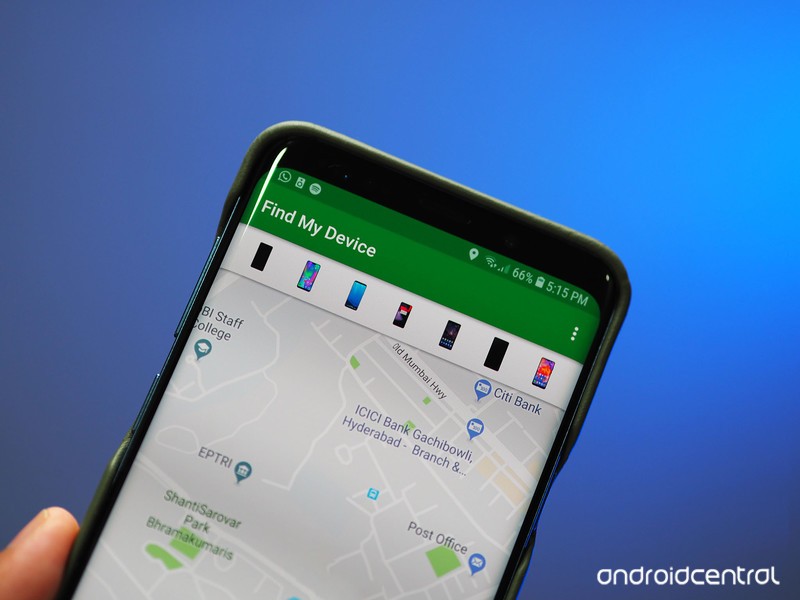
Find My Device easily lets you remotely track, lock, and erase the data on a lost or stolen phone. You can also see the battery life remaining on your phone and the Wi-Fi network it is connected to. It’s the easiest way to track a lost Android phone, though there are other ways, too.
With the rebranding, Find My Device is now a part of Google Play Protect, a suite of services designed to protect your phone from malicious content. Google is leveraging its machine learning expertise to scan and verify the apps installed on your phone, and while the Verify Apps feature has existed since the Jelly Bean era, Google is making the process much more visible to users.
Here’s what you need to know about Find My Device, and how you can set it up on your phone.
- Will my phone work with Find My Device?
- How to install Find My Device
- How to sign in to Find My Device
- How to see if your phone is discoverable with Find My Device
- How to locate over the internet
- How to ring your phone with Find My Device
- How to lock your phone with Find My Device
- How to erase your lost phone’s data remotely
Will my phone work with Find My Device?
Before we show you how to get started installing and setting up Find My Device, it’s important to know whether your phone will work with it. If you’re running a device running Android 4.0 Ice Cream Sandwich or later, you’ll be able to install Find My Device. That means roughly over 99% of active Android devices — or 2 billion devices worldwide — are eligible to install Find My Device.
How to install Find My Device
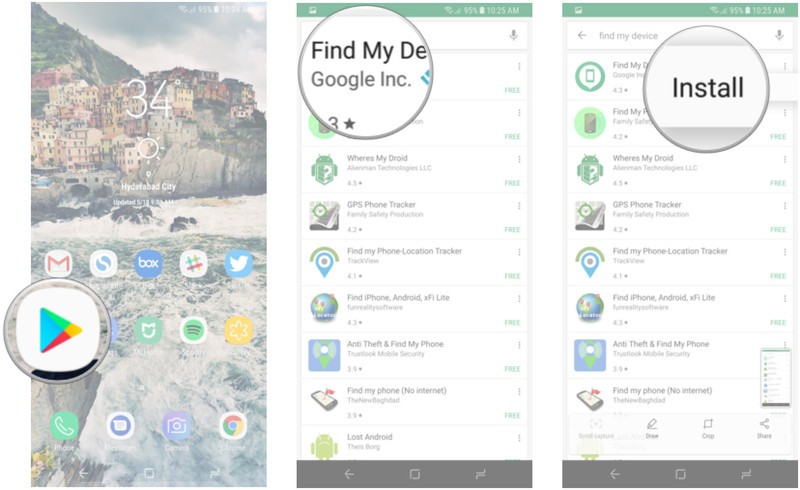
This is the easy part. Just head to the Play Store and search for Find My Device to download the app. We’ll break it down for you:
Open Play Store from your home screen or app drawer.
Search for Find My Device.
Tap the three dots next to the first search result and select Install.
How to sign in to Find My Device
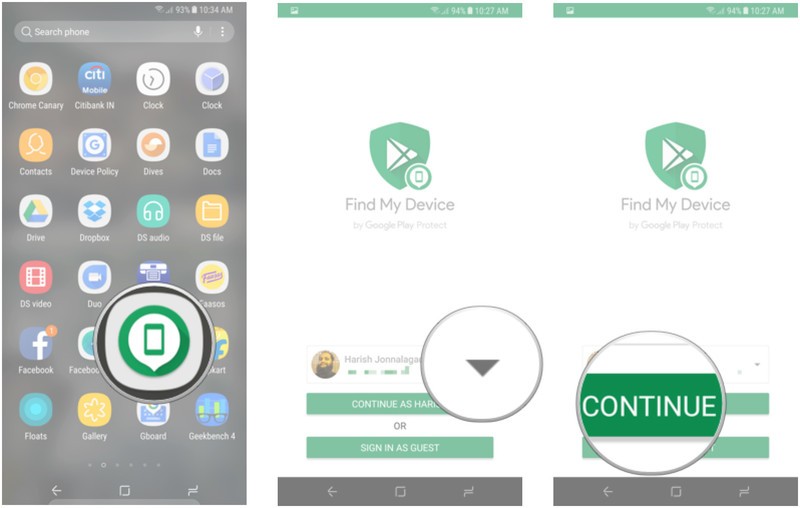
After installation, you’ll need to sign in to Find My Device from your Google account. If you’re signed into more than one account on your phone, you get a drop-down menu from which you can select the account you want to associate with the phone.
Open Find Device from your home screen or app drawer.
Select the Google account you want to use the service with.
Hit the Continue as button.
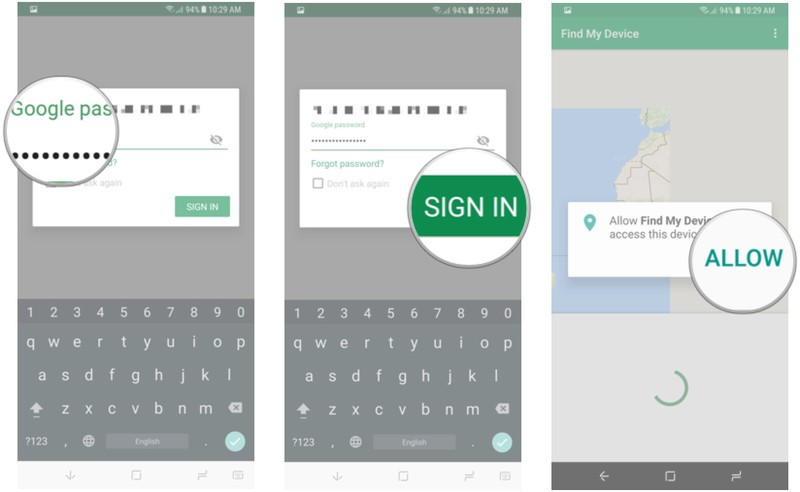
Enter your Google account password.
Tap Sign in.
Give location access to the service.
How to see if your phone is discoverable with Find My Device
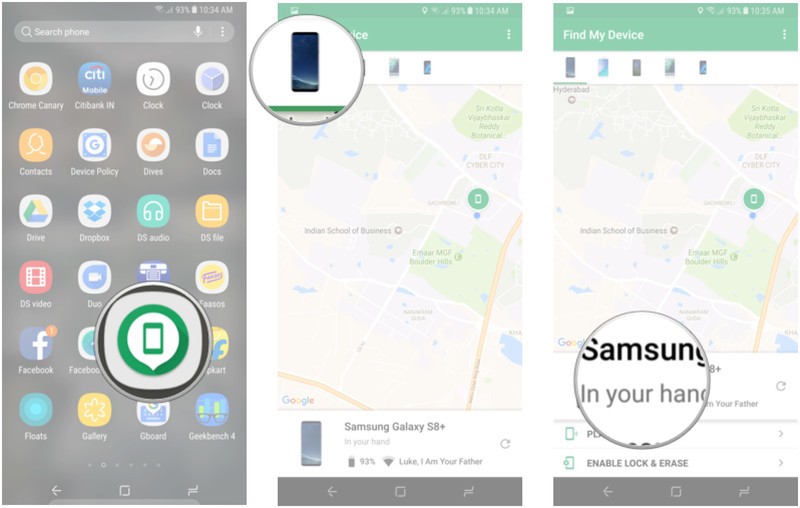
Once you’re signed in to Find My Device, you’ll see a map with your current location as well as the make and model of your phone, and two options — Play Sound, and Enable Lock & Erase. Hitting the latter option will allow you to start using the Lock and Erase functions.
If you’ve signed into more than one phone, you can select a particular device by browsing the list at the top of the screen.
Open Find My Device from your home screen or app drawer.
Select your phone from the list of devices at the top of the screen.
See if your phone is discoverable.
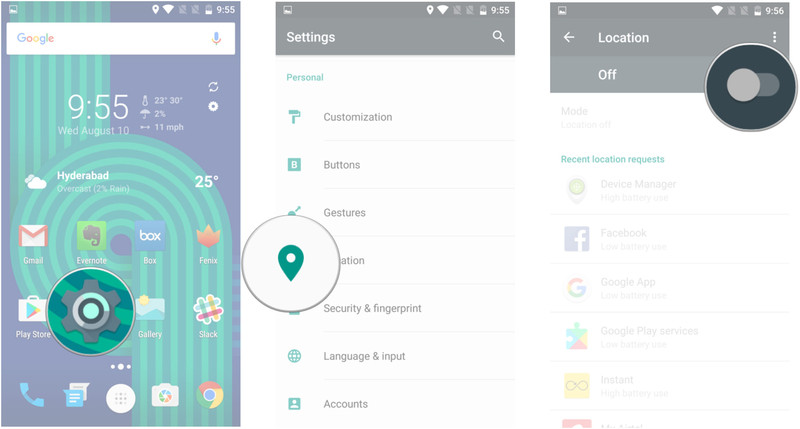
If you’re not able to find your phone or if it says that the device is unavailable, it is likely that the location services are disabled. Find My Device relies on GPS to track your phone, so now would be a good time to enable location services.
Open Settings from your home screen or app drawer.
Tap Location.
Toggle Enable location services.
How to locate your phone over the internet
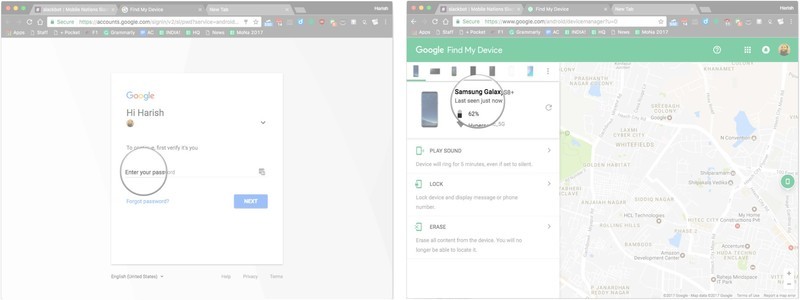
If you’ve lost your phone, you can remotely locate it through the Find My Device website. You’ll need to sign in to the Google account that was used to set up Find My Device. It takes a few seconds, but the service should be able to track your phone. Alternatively, you can also do a Google search for “find my phone” to locate your handset.
Head to the Find My Device website.
Sign in to your Google account.
Check if your device is visible.
How to ring your phone with Find My Device
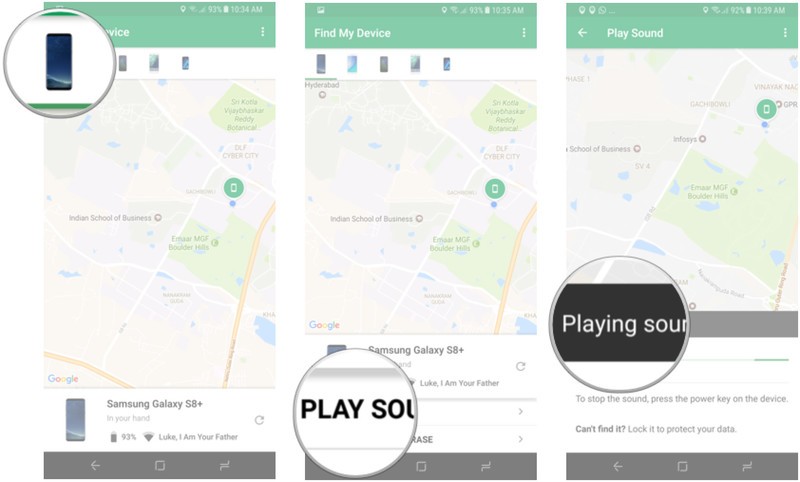
The best part about Find My Device is that it is easily accessible. If you need to locate your phone, just head to the website or log in to the service from another phone. Once you sign in to Find My Device and locate your device, you can use the Play Sound option, which plays a loud tone on your phone continuously at full volume for five minutes even if you turned the ringer off. Once you find your phone, you can hit the power button to stop the ringing.
Locate your phone on Find My Device.
Tap Play Sound.
Your device will start ringing. You can hit the power button to stop the sound.
How to lock your phone with Find My Device
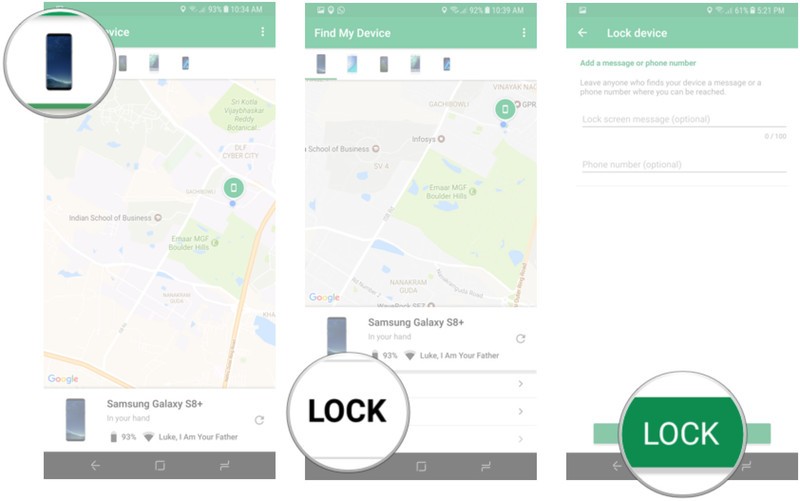
There’s also a Lock option that lets you set a new password to unlock the phone. You can also display a message over the lock screen and add a button to call back your number so that anyone that comes across your phone can easily get in touch with you.
Locate your phone on Find My Device.
Tap Lock.
Enter a message and phone number to display on the lock screen and tap Lock.
How to erase your lost phone’s data remotely
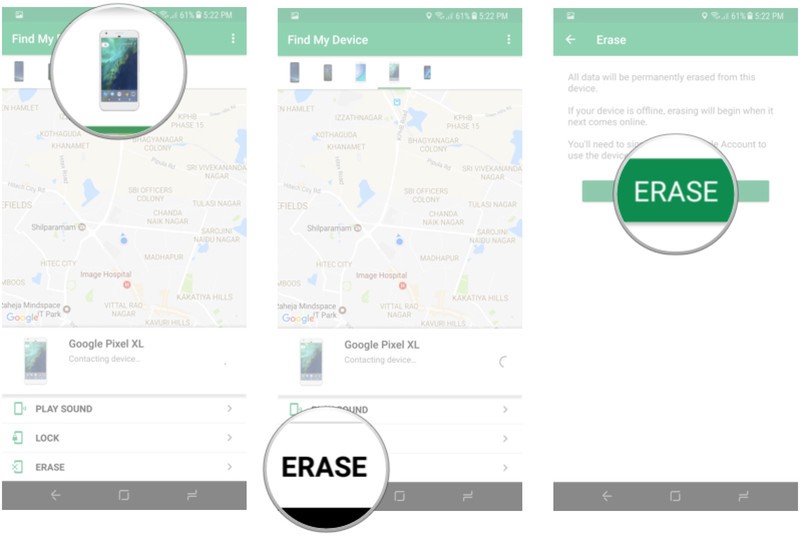
If you’re certain that you’re not going to see your phone again, there is the nuclear option of erasing the data remotely. Selecting the Erase option deletes all the data on your phone. The service also deletes data from a connected SD card, but there is a chance that it may not be able to, based on the manufacturer and Android platform version. Even if your phone is switched off when you send the Erase command, the factory reset process will be initiated as soon as it goes online.
Locate your phone on Find My Device.
Tap Erase.
Confirm deletion of data by hitting the Erase button.
Are you prepared if your phone goes missing?
How has your experience been with Find My Device? Have you successfully used it to recover a lost phone? Let us know in the comments.
Updated July 2018: This article was updated with the latest information pertinent to Find My Device.
‘When In Rome’ is a board game you play with Alexa, when she wants to cooperate
There are tons of games you can play with your Amazon Alexa devices, some better than others. While a few require special buzzer-in buttons, When in Rome is the first to require a $30 board game. It’s a travel-centric trivia game that takes about 40 minutes and two teams to play. But it’s also completely dependent on Alexa. If you don’t have a speaker (or screen, or microwave) with Amazon’s assistant, all you’ll have is a board game and some plastic pieces.
One of the best things about this game is that it encourages you not to read the rules. There’s a little booklet that comes with it, but it’s fairly straightforward and you have Alexa to guide you through. You set up the board, enable the skill in your Alexa app, and you’re ready to go. Alexa will ask you to split into teams and then help you choose who starts.
“Alexa is very robotic,” a friend commented about the speaker’s monotone delivery.
Teams move from city to city — as long as there’s a connecting flight, denoted by dashed lines on the board — answering multiple-choice questions from locals. There are both three-point easy questions and five-point difficult questions from categories such as arts and culture, sports and games, myths and legends, and food and drink. If you answer correctly, you get the points and the local becomes your friend. You can then use the city as a sort of connecting flight in subsequent turns, and the local will refuse to let the other team answer a question for points. At various points in the game, Alexa will tell you there’s a seven-point souvenir in a certain city, so you’ll want to make it there faster than your opponents. If you have a friend in Montreal, you can make it from New York to London in a single turn.
Our game was almost over before it really began. Alexa prompted us to say, “Alexa, we’re ready,” once we were sorted into teams. “Alexa, ready,” someone said. Oh, fiddlesticks. “I’m ready when you are!” came the reply. After much overlapping speech of trying to get Alexa to snap out of it (“I was born ready, or at least very well-prepared. Let’s do it!” the assistant said at one point), we finally got the speaker back on track by asking to play When in Rome again.
There were a few other moments where saying the wake-word literally took us out of the game. “Alexa is very robotic,” a friend commented about the speaker’s monotone delivery. The speaker perked up and paused our game. Alexa’s tone is especially noticeable when it butts up against the lively chatter of Laura from Sydney, Australia or Hin from Hong Kong (who are, apparently, “genuine, local people.”) Plus, the game gets in its own way when a character says “Alexa,” causing the flow of words to stop and Alexa to respond, “Sorry, I didn’t get that.” When we asked for the score, Alexa told us France had beaten Belgium — she was referring to the World Cup and not whether the red or blue team was winning.
In some ways, it’s a game that would be enhanced by having a screen.
It could be a bit difficult to tell the easy from the hard questions. Sometimes both had throw-away answers; Montreal’s baseball team was clearly not the Flappy Chickens and Rio de Janeiro’s residents likely go by a term other than “gorgeous.”
In some ways, it’s a game that would be enhanced by having a screen. It took a bit of Googling — after the game was over, we weren’t cheating — to find out how to spell nyama choma, Nairobi’s famous dish. Also, we’re convinced the game has the answers to one of its questions about a neighborhood in Cairo mislabeled. The blue team guessed “B,” but Alexa said that was wrong. The local, Mohammad, went on to explain why “B” was actually correct. It wasn’t a question of Alexa mishearing, though that happened once, too. Alexa’s mistake ended up costing the blue team the game, though in reality they won.
Are these minor quibbles? It depends on how much patience you have. Alexa doesn’t always like to be interrupted but tends to repeat some instructions over and over. The questions themselves can be a bit information-dense and filled with unfamiliar words, so you might ask your speaker to repeat it. (This might be especially true if it’s the Fourth of July and some players have been drinking.)
Alexa-centric quirks aside (is it Lie-ma or Lee-ma? For Alexa, it’s both), When in Rome is a fun trivia game. We played two games and didn’t have any repeat questions, and presumably its makers, Voice Originals, could add more to the Alexa skill in the future. Having locals ask the questions and add in some of their own stories may inspire some wanderlust. You may just be able to tote along some fun facts on your next trip, provided it’s to one of the 18 cities on the board.
Editors’ Recommendations
- Alexa helps players travel the globe in the new board game, ‘When in Rome’
- When is the best time to post on Instagram?
- Epic Games reveals when ‘Fortnite’ will finally come to Android
- RocketBody tracks your metabolism to tell you when to eat and work out
- Curious what you’re missing when you blink? This new wearable records it
The best Windows apps
Are you looking for the best apps for your Windows computer or mobile device? We’ve rounded up the latest-and-greatest apps currently available for Windows machines, along with a few reasons as to why you should download them. So save some time, speed up your computer, protect your passwords, manage your media, and carry out a range of other actions with these lauded pieces of software.
Interface
Windows Central
If you are relatively new to Windows 10, or want to know everything that the operating system is capable of, Windows Central should be one of your first stops. The app provides ad-free viewing for all of Microsoft’s Windows 10 posts, reviews, and news, so you can easily keep up on the latest changes. It also gives you access to Windows forums, the latest recommended apps, YouTube videos from the Windows channel, and the ability to comment or ask questions. It’s a great way to make sure you don’t miss anything in the Windows world, especially if you enable article notifications.
Download now from:
Windows Store
This app is designed for those who need a Windows computer, but enjoy Google’s design and prefer to search with Google whenever possible. If your search habits have you using Google’s search engine more often than Edge or Bing, then you may want to download this app, just to have it handy. Or if you prefer working with the Chrome browser directly, you can download Chrome here to install it on Windows.
Download now from:
Windows Store
Productivity
Dropbox
Not everyone needs or uses OneDrive, especially given the oft-associated fees. If your business or school prefers Dropbox as the cloud storage solution of choice, well, there’s an app for that. This slick piece of software allows you to view your pictures or videos using a grid, or as a list when dealing with documents (it even works with Xbox controllers). If this is your first time signing up with the service, you also get 2GB of free storage.
Feel free to replace Dropbox with the cloud storage option of your choice, too. If you need Google Drive or Box, opt for one of these apps instead.
Download now from:
Windows Store
Wunderlist
If you don’t already have an app for planning, making lists, and collaborating, then Wunderlist is an excellent place to start. It allows you to set up all sorts of reminders and plans, and allows you to work with others, quickly add new details, and carry out a slew of other actions. Plus, the app is now compatible with Windows 10, which means you can create smart reminders and use Cortana to instantly add events to Wunderlist.
Download now from:
Windows Store
Duolingo
Trying to brush up on your language skills? Need a little bit of help for a language class? Planning on a trip to a foreign country? This free app may be exactly what you need to prepare. It’s a language teaching platform with tons of gamification, along with plenty of rewards and achievements for a variety of quizzes. The app’s ultra-casual nature means you can use it for minutes at a time and still learn something, so why not give it a try?
Download now from:
Windows Store
Skype for Windows
Skype remains one of the most popular chat clients for long-distance communication, and it’s another example of an app that integrates very well with Windows 10. Chances are good that, if you’re already using a video chat service at home or work, you know exactly what to download. But if you haven’t done much video chatting in the past and want to explore this type of communication with friends and family, Skype is a great place to start and you should give this app a chance. The official Windows app also allows you to share pictures, opt in for translation, and share your screen for troubleshooting purposes.
Download now from:
Skype
Microsoft Sticky Notes
Theis app lets you create digital sticky notes as reminders, then place them on your desktop screen. Of course, the latest version also comes with a few new tools as well, including the ability to pin your stickies to your Start screen, create notes with the Surfac ePen, and connect notes to sites or documents for additional information.
Download now from:
Windows Store
Creation
Open Live Writer
Prefer a more desktop-oriented program for sculpting your latest blog entry or web page? Open Live Writer is designed to do just that. Inside you can create text, photo, or video posts, then publish them to your site whenever you want. The app also works with WordPress, TypePad, Blogger, and other common service providers. It even has a simple interface for tagging and scheduling, so you may end up saving some additional time in the long run!
Download now from:
Windows Store
Fused
Want more interesting effects for your photos than the usual apps offer? Before you upload to Instagram, take a look at Fused, which is designed to blend photos into a background and foreground to create different effects. Going into all the ways this can be used would take a long time, but, suffice to say, it can make your photos look awesome with the right work. If you like to create your own backgrounds, or just get a thrill out of posting impressive photos, check out what Fused has to offer.
Download now from:
Windows Store
Fresh Paint
Fresh Paint was popular on Windows 8, but it’s even better on Windows 10. The painting application lets you choose from a variety of palettes and activity packs to color in designs or work from the ground up, or you can upload your own art and apply filters or paint in the style of your choice. The software can’t exactly take the place of something like Photoshop — nor should it — but it’s a fun and very useful program in its own right.
Download now from:
Windows Store
Adobe Photoshop Express
While you may have to pay for access to Adobe’s full suite, there is a free version of Photoshop available for Windows 10. The apt-titled Express gives you limited access to Photoshop’s photo-editing tools, however, allowing for plenty of customized work. It’s a very useful tool if you’re familiar with Photoshop and want to work on some images, but don’t need or want access to the application’s full feature set. That said, keep in mind that you’ll need an Adobe ID login to make this app work.
Download now from:
Windows Store
Entertainment
VLC for Windows Store
For many users, VLC is an old standby that handles nearly any popular video format you can throw at it. This app, in particular, is an updated version made for Windows 10. The media players supports TagLib and other video customization options, and it can play pretty much any video file ripped from a common source, including discs and network streaming protocols. If you use a lot of media on your computer, it’s a great addition to your asenal.
Download now from:
Windows Store
Plex
If you’re not a fan of iTunes or other pre-packaged music management software, then you may want to try out Plex. The software functions as a media management program, one that uses server access to collate and control your songs, movies, and photos across your devices. The only problem is that the free app is basically a trial version that only shows you what Plex can do. If you really want the software, you’ll need to pay a subscription fee ($5 a month). Still, it’s a great way to test Plex and find out if you like it.
Download now from:
Windows Store
Netflix
If your computer functions more as an entertainment box than one made for productivity, we suggest downloading the Netflix app so that you can quickly access it directly from your desktop. And now that Netflix syncs across devices — if you start watching something on your computer, for example, you can finish on your Xbox One — these apps are even more versatile. Of course, if you aren’t a Netflix fan, then there are official apps for Hulu and other services as well.
Download now from:
Windows Store
Pandora
Everyone has their favorite music service, so feel free to substitute whatever app you prefer in here. That said, Pandora has really stepped up with a strong app for both desktop and mobile devices, one that makes it easy to stream your favorite tunes. The app also boasts compatibility with the Xbox One, and is generally more Windows-friendly than Spotify and Audiocloud.
Download now from:
Windows Store
Xbox
Have an Xbox One? Download this app. Since Microsoft is working on converging as much Xbox and Windows gameplay as possible, this app comes with some unique features, like the ability to stream games or movies from an Xbox One to your PC. The app also comes with social and sharing features, meaning you can quickly share game clips or join clubs.
Download now from:
Windows Store
Social media
You probably don’t need a reminder to download social apps like Facebook, but we still like to mention Instagram’s Windows app, which provides a lot more functionality than a web page. The app provides features like the Explore tab, the update bar at the top of your feed, private messaging through Instagram Direct, and other various tools. The app has seen increased integration with Windows desktops, and with the advent of IGTV, your desktop computer is a better place for the app than ever.
Download now from:
Windows Store
WhatsApp Desktop
If you or your friends use WhatsApp, you deserve this clean desktop version that makes it easy to carry on multiple, detailed chats at the same time. The app also offers complete syncing so you can pick up conversations on any other device as needed, without worrying that the conversation isn’t updating properly.
Download now from:
Windows Store
News and feeds
Flipboard is a news aggregator that’s designed for tile-based exploration and reading, making it a perfect fit for Windows 10. You can use it to build a personalized magazine either from particular sources or general topics, which allows for the perfect mix of specificity. After you create your magazine, you just check back in to view the latest news. This saves you time and lets you curate your news sources down to as much detail as you want.
Download now from:
Windows Store
Newspapers
The Newspapers app has a more traditional focus on, well, newspapers. You can set the app to collect the latest newspapers from cities, states, and countries of your choice. The app only covers news content that’s free (no subscription material), but it’s a great way to keep track of what’s happening in a region from highly dependable sources.
Download now from:
Windows Store
Wikipedia
This is an app designed for the mobile iteration of Windows 10, and it’s one of the best Wikipedia apps ever made. If you end up frequently searching Wikipedia for information — or distractions — you need this app on your device. You can search in different languages, share articles, save articles for offline viewing, and quickly change accent colors, font sizes, and other facets of the app. You can also save your place in an article so you can resume reading after switching to one of the other excellent apps on our list. Oh, and if you’re not interested in the mobile version, we’ve got you covered.
Download now from:
Windows Store
The Weather Channel
A weather widget is a nice feature on any computer, and the Weather Channel app is designed to fit right into Windows 10. Once installed, you can use to keep track of weather alerts, pollen counts, forecasts, and all the other handy things that you’ve come to expect from a good weather app. The downside is that to unlock the most useful alerts, you have to create a Weather Channel account, which make take some time.
Download now from:
Windows Store
Security
Dashlane
Dashlane remains one of the most popular password managers thanks to its simple setup process and easy-to-use design. While the app is a little invasive — it really wants to know all your passwords, after all — it’s also one of the best ways to collect and protect passwords from a variety of sources. It’s also optimized for Windows 10.
Download now from:
Dashlane
Revo Uninstaller Freeware
This Revo bundle gives you several tools to help clean out any unnecessary file and app remnants from your computer. If you handle a ton of apps and frequently move from one app to another, a tool like this can be invaluable for cleaning up the leftovers and making sure your computer stays speedy.
Download now from:
VS Revo Group
Editors’ Recommendations
- Limited-time offer: Score the HP Windows Mixed Reality headset bundle for $199
- Get smart: The best educational apps for iPhone and Android
- The best money-transfer apps for Android and iOS
- The best drone apps
- The best Android apps (July 2018)
Chinese law enforcement break up billion-dollar cypto gambling ring
On Thursday, Chinese authorities reported that they had shut down an online gambling ring worth more than $1.5 billion. The dark web gambling ring, which made its fortunes by facilitating bets on the World Cup, only accepted payments in cryptocurrencies such as Bitcoin or Etherum. The South China Morning Post reports that this was the first major Chinese gambling ring to make use of digital currencies.
Law enforcement from the Guangdong province said that during its eight months of operation, the site drew approximately 330,000 users from multiple different countries. The police also report that the site employed more than 8,000 operators who would earn commission for recruiting new members into what is being described as a pyramid scheme. Chinese authorities said that the syndicate’s ringleaders took advantage of China’s lax rules governing cryptocurrencies to make “huge profits.”
While the aforementioned incident is China’s largest example of World Cup gambling, it is far from the only one. Chinese law enforcement have embarked on a campaign meant to root out the various gambling rings that have risen during the World Cup. Law enforcement from the Guangdong province reported that they have arrested 540 suspects and frozen 260 million yuan in cases related to illegal gambling on the World Cup. However, they say that the recently busted crypto ring is the largest of such operations to date.
In addition to cracking down on illegal activities fostered by cryptocurrencies, China is also taking a stricter stance toward digital currencies in general. In September of last year, the government shut down Chinese cryptocurrency exchanges and banned initial coin offerings. The government cited concerns that cryptocurrencies were unregulated and could be a destabilizing influence on the Chinese economy. Those efforts appear to have been somewhat successful as the Chinese central bank has reported that trading between yuan and Bitcoin now accounts for less than one percent of the world’s Bitcoin trades.
Despite the currency’s reputation for illegal dealings, Bitcoin and other cryptocurrencies have plenty of legitimate uses rather traders do it as a simple hobby or as a means of buying a brand new Lamborghini. Bitcoin has had a bit of a troubled year so far, but the technology behind it will likely remain even if the currency itself eventually dies out.
Editors’ Recommendations
- This website lets you earn cryptocurrency by picking World Cup winners
- ‘FIFA 18’ adds Russia World Cup content to game in free update
- Win an iPhone X and rep your soccer team with Speck Presidio World Grip cases
- What is a blockchain? Here’s everything you need to know
- The best apps for the 2018 World Cup
Apple fixes MacBook Pro keyboard issue – sorta, but calls it a feature not a fix
The 2018 Apple MacBook Pro boasts a quieter keyboard than earlier models – but what’s touted as a new feature actually may be a fix for an old problem. It that’s the case, Apple’s not telling.
Reporting on a dramatic discovery found in the middle of its 2018 MacBook Pro teardown, IFixIt called out the noise-reduction tech: “Apple has cocooned their butterfly switches in a thin, silicone barrier….. the advertised boost in quietude is a side-effect of this rubbery membrane. The quiet angle is, quite literally, a cover-up.”
The MacBook Pro’s nagging problem since 2016 has been keyboard failure due to dust and crumbs getting under the butterfly key switches. Apple began using butterfly switches instead of scissors-style key switches in the 2016 model year to reduce the laptop’s thickness.
Additional articles about the MacBook Pro keyboard issue
Failure rate of MacBook Pro ‘butterfly’ keyboards is double that of older models
Apple files patent for a crumb-resistant MacBook keyboard
MacBook Pro owners file class action lawsuit over keyboard issues
MacBook DIY keyboard repairs don’t void your chance of a free replacement
Apple’s sticky key problem isn’t going away on the 2018 MacBook Pro
Keyboard failure and reliability issues have plagued the flagship laptop since 2016. The saga has included doubled failure rates, denials, lawsuits, and dramatically upgraded factory repair and replacement policies for keyboards taken down by dust and crumbs.
The story took a different turn earlier this year when Apple appeared to be working on a solution to a problem no one complained about, or at least not as much as keyboard death-by-dust-and-crumbs.
In March Apple filed a patent application for a keyboard that company engineers wrote was designed to block “Liquid ingress around the keys into the keyboard…”
Liquid spills were not a significantly greater problem with the butterfly switch keyboards, however. Pointedly, the boosted repair policy that covers dust and crumb-damaged keyboards does not extend to keyboards damaged by liquid.
The Verge asked about the new keyboard during the press rollout event for the 2018 MacBook Pro. Apple representatives insisted the change wasn’t designed to solve reliability issues, but only to reduce keyboard noise. According to The Verge, when they asked how the keyboard design was changed to make it less noisy, the Apple reps would not answer.
Editors’ Recommendations
- Can we get an apology? Two big MacBook fails that Apple should fix at WWDC
- iPhone X problems, and how to fix them
- Common OnePlus 6 problems, and how to fix them
- The most common Nintendo Switch problems, and how to fix them
- The most common iOS 11 problems, and how to fix them
Go deal-hunting in the Amazon Warehouse with an extra 20% off for a limited time
Find a discount on just about anything.
Ahead of Prime Day next week, Amazon is offering an extra 20% discount on over 200,000 products available on Amazon Warehouse exclusively for Prime members. Those who are in-the-know have been checking out Amazon Warehouse to snag deals for a while now, and today’s offer brings the already discounted items there further down to can’t-miss prices. If you’re not a Prime member yet, you can start a free 30-day trial to take advantage of this offer. The 20% discount will be added during checkout automatically.
 Amazon Warehouse is where many of your Amazon returns have likely ended up. The selection comprises returned, warehouse-damaged, used, and refurbished goods. Just about anything Amazon sells has a chance of having a warehouse deal, which you’d normally check by clicking on ‘Available from these sellers’ on the product page and looking for any listings which feature Amazon Warehouse as the seller. You can find everything from TVs to unlocked smartphones and deals on brands like Apple, Samsung, and Sony.
You don’t have to be worried about receiving damaged goods either. Amazon Warehouse shows condition grade levels from Like New to Good so you can get a better feel of what condition the item you’ll receive is in. At times, some ‘Like New’ items actually seem to be new and unused even, and the store does a good job of grading items fairly so you won’t be surprised. In the case an item doesn’t meet your expectations, you can always return it within 30 days just like any other Amazon.com purchase.
If you really cannot wait for Prime Day, then this Warehouse sale is a perfect one for you to look through. Along with the already discounted products, Prime members can score an extra 20% off TVs, kitchen appliances, home improvement, baby products and much more.
Past the Warehouse, there’s a selection of other early Prime Day deals that you have just a few days left to check out and redeem if you’re interested. Prime Day starts July 16 and marks the end for many of these offers.
See at Amazon
Beard trimmers, turntables, Bluetooth speakers, and more are all discounted today
Whether you’re looking for new tech gear or household items, we’ve got you covered.
We found plenty of great deals today that include big discounts on the UE Roll 2, an Audio-Technica turntable, Amazon Warehouse items, and more! Time’s running out to take advantage of these prices, so hurry!
View the rest of the deals
If you want to know about the deals as soon as they are happening, you’ll want to follow Thrifter on Twitter, and sign up for the newsletter, because missing out on a great deal stinks!
From Apple’s charging mat to Google’s modular phone, these gadgets went MIA
There have been loads of tech products announced over the years, generating various levels of excitement. A few succeed, most fail, and some never even make it across the starting line. We’ve crafted a list of exciting tech products that caught the public imagination with a flurry of press releases, prototypes, or teaser reveals — only to evaporate in the heat of their own hype.
Apple’s AirPower wireless charger
AFP Contributor/Getty Images
In September last year, Apple unveiled the iPhone X, iPhone 8, and iPhone 8 Plus making a big deal out of their ability to charge wirelessly. We also caught a brief glimpse of a new Apple wireless charging mat called AirPower, which was touted for an early 2018 release. The mat was shown charging an iPhone X, an Apple Watch, and a set of AirPods simultaneously, but it seems Apple may have bitten off more than it can chew.
Here we are more than halfway through 2018 and the AirPower mat is nowhere to be seen. WWDC 2018 came and went and Apple has remained silent on the subject. But we’re not ready to count this one out just yet. There’s still a chance it will reappear alongside this year’s iPhones in September, but if that event comes and goes without any AirPower news, the charging mat could slip into the realm of the quietly forgotten like the rest of our list.
Sega VR headset
Back in 1991, when Sega was on top of the world riding the wave of the Genesis’ (Mega Drive) success, it rashly announced a virtual reality headset. The product wasn’t shown off until a couple of years later when it was revealed that Sega VR would sell for $200, work with the Genesis, and come with four games on release. It was pushed back and then canceled after prototypes induced motion sickness and severe headaches in testers.
Despite Sega VR being dead and buried, Nintendo pushed forward with the Virtual Boy, which was released in 1995 and flopped spectacularly, burying the idea of virtual reality for almost 20 years until its recent resurrection. The best VR headset today (the HTC Vive) boasts twin OLED displays with a resolution of 2,160 x 1,200 pixels. Sega VR had color LCDs with a 320 x 200-pixel resolution.
Google’s Project Ara smartphone
The idea of a modular smartphone generated a lot of excitement when Motorola announced it back in 2013. Why upgrade your phone every year to get a better camera or a bigger battery when you can just buy an individual component upgrade and slot it into your existing phone? Google had just acquired the phonemaker back then and looked ready to throw its weight behind the project, which was first shown off at Google I/O in 2014.
Although slotting together your dream phone like a collection of Lego bricks appealed to some people, it proved difficult to realize. Different concepts and hints at the involvement of big manufacturers came to nothing and Google shelved the project in 2016. A watered-down version of the idea eventually appeared in the shape of Moto Mods. Ethical smartphone maker Fairphone has also pursued the idea with its modular Fairphone 2, and LG made an attempt with the LG G5, but we’ve yet to see a big modular smartphone success.
Phantom game console
The video game industry is good at generating enormous levels of hype and excitement and then delivering massive disappointment, but few have scaled the heights of the Phantom game console. Infinium Labs announced the Phantom in 2003, promising a console that would outperform the PlayStation 2 and Xbox. The marketing babble was suspiciously devoid of details, but the central idea hinged around a good-looking console with PC innards capable of offering games on-demand, downloadable from the internet for subscribers.
It was originally supposed to be released in 2003 for $400 with a $10 per month subscription for games, but it was pushed back again and again until the company removed any mention of it from its website in 2006. Valve eventually realized something close to the idea with Steam Machines, announced in 2013 and released in 2015, but even with the might of Steam behind it the platform floundered and has now all but disappeared.
Saygus V2 smartphone
Simon Hill/Digital Trends
This Android superphone was set to deliver a laundry list of features for Android fans seeking something a bit more powerful than the average release. We actually managed to get a hands-on with the Saygus V squared back at MWC in 2015. It was set to have a 21-megapixel camera, a fingerprint sensor, two MicroSD card slots, a 5-inch display, a 3,100mAh battery, and to be IPx7 water resistant, all of which sounded more impressive a few years ago.
We were suspicious about some of the features that didn’t work in the prototype we tried, but like many people who put more than $500 down to pre-order, we believed it was a real phone close to being released. The release date was pushed back further and further, and Saygus couldn’t deliver, even though it continued to take people’s money. Somehow the company still exists, but a two-year delay for a phone makes it hopelessly out-of-date even if it does belatedly arrive. We aren’t holding our breath, and anyone who pre-ordered should ask for their money back while they still can.
Microsoft Courier tablet
With a string of prototypes and a team of more than 130 people working on it, Microsoft’s ill-fated Courier tablet could have been an iPad competitor of sorts. First reported on back in 2008, the Courier was a folio-style tablet with two 7-inch touchscreens and stylus support. It was designed to be for productivity first and foremost, it ran Windows — so it supported Microsoft’s full suite of Office software — and it was going to be capable of syncing with web services. It also had a camera built-in and support for wireless charging.
After some internal disagreement at Microsoft, the Courier was canned in 2010 and Ballmer led the company towards the touch-friendly Windows 8 platform, almost completely missing the tablet boat. Microsoft eventually tackled the tablet market directly with the Surface line in 2012. The company has continued to iterate, most recently with the $400 Surface Go.
Dishonorable mentions
There are simply too many broken tech dreams to list them all here, but here’s a quick mention of some other hotly anticipated products that never made it.
Nokia Moonraker – This wonderfully-named smartwatch was going to launch alongside the Lumia 930 in 2014, but it got pushed aside in favor of the Microsoft Band when Nokia was acquired.
Microsoft Surface Mini – Gearing up to launch in 2014 alongside the Surface Pro 3, the Mini was set to have an 8-inch display, a Snapdragon 800, and 32GB of storage, but it was canceled just a few weeks before the launch event.
Mattel Aristotle – A $300 voice-controlled hub designed for babies and toddlers, the Mattel Aristotle was set to launch in 2017 but it was canned after an outcry from privacy advocates and child-development experts.
Palm Foleo – Announced in 2007, the Foleo was designed to be a companion for smartphones offering a full keyboard and larger 10-inch screen, while connecting to the internet through your phone. It was canceled three months after being announced.
DigiScents iSmell – This bizarre 2001 product answered a question no one posed: What does the internet smell like? It connected to your computer via USB and could be triggered to create different odors by files embedded in websites, emails, or programs. The inventors miraculously raised $20 million and produced a working prototype before realizing there was zero demand.
Editors’ Recommendations
- Here’s everything we know about Apple’s AirPower wireless charging mat
- FLI Charge’s conductive wireless charging could revolutionize classroom tech
- If you blinked, you may have missed this year’s biggest phone innovation
- Everything we know about Microsoft’s ‘Andromeda’ Surface phone device
- Awesome Tech You Can’t Buy Yet: Self-healing tents, jellyfish lamps, solar ovens
Amazon Echo vs. Dot vs. Tap vs. Spot vs. Show: Which should you buy?
Which Amazon Echo is best for you? I have no idea. But here’s how I’d approach each one.

I own too many Amazon Echo speakers. From the original Echo to the Echo Dot and the newfangled Echo Show with its screen and camera. Plus the Amazon Tap, and Echo Look, which you can’t even buy without an invitation. (And you probably shouldn’t but it, for reasons I’ll get into in a second.)
This isn’t a cookie-cutter list of all the Echo speakers and why you should buy them. Hell, a couple I think you probably should stay away from. This is a list of how I see things after having used them all for months and months. Hit the links below to jump on down to the Echo that tickles your fancy.
- Echo Dot
- Echo Dot Kids Edition
- Echo
- Echo Plus
- Echo Spot
- Echo Tap
- Echo Show
- Echo Look
Echo Dot: The best Amazon Echo for starting out
Start simple. If you’re just not sure about this whole Alexa thing and really don’t know how much you’ll get out of an Amazon Echo, it’s best to not spend a lot of money. Start with an Echo Dot.
The Echo Dot costs $49 retail, but it’s not uncommon to see it on sale for as low as $30. And at that price it’s kind of a no-brainer. Buy one and give it a go.
Another pro tip here is to buy more than one at a time. Amazon typically has deals if you buy multiple Echoes Dot at one time — $20 is the usual savings. So if you’re like me and you know you’ll want to stash a few of these around the house, save yourself a few bucks and take advantage.
See at Amazon
The redesigned Amazon Echo: A great mid-range option
Amazon has completely redesigned the basic Echo for 2017. It’s shorter than the original and more squat in stature. And you can get one clad in fabric for $99. That’s not a bad buy, and it’s what I’d recommend for someone who wants to get something better than the Dot, but still not spend more than a hundred bucks. The sound quality is decent for that price. Can you get something better? Yeah. But not for less money.
If you want to spend a little more, though, $119 will get you a new Echo with a wood veneer, or in matte plastic. I’ve found the fabric to be plenty good, though.
See at Amazon
Amazon Echo Dot Kids Edition: You know, for kids
Amazon has a new Echo Dot that is made especially for kids. Or, really, it’s a perfectly ordinary Echo Dot that comes with a nice little case (because kids apparently will be prone to breaking these sorts of things that aren’t really meant to be moved in the first place) — and a free year’s access to Amazon Freetime Unlimited.
That’s the part that actually justifies the $80 price tag. (That’s $30 more than the Echo Dot at retail, and $40 more when it’s on sale.) Amazon Freetime Unlimited gives you (and your kid) access to a whole bunch of kid-friendly content, including books, music, games and more. Plus parents get access to the Amazon Parent Dashboard, which lets you set how long the kid can use any of this newfangled tech. It’ll also block non-kid-friendly content, shut off the Echo Dot at bedtime, and teach your kids to remember to say please and thank-you to not-quite-sentient tech. (We have a feeling that’ll be more important than we realize at some point.)
See at Amazon
Amazon Echo Plus: The best-sounding Echo yet

Amazon decided to keep the tried and true Echo design, but give it better internals. That gives us the $149 Echo Plus. It sounds a little better than the previous-generation Echo, and definitely better than the current 2017 model. It comes in the same matte plastic, but now you can get silver in addition to black and white.
Also new for the Echo Plus is the ability to serve as a smart home hub — if the devices you’re looking to support use Zigbee to connect. (You’re forgiven if you don’t know what Zigbee is — it’s not something an end user should ever have to worry about.) It likely won’t solve all your smart home problems, but it’s a nice little addition nonetheless.
See at Amazon
Amazon Echo Spot: An expensive, but cool, bedside Echo
If you take the Echo Show and shrink it down, this is what you’d get. It’s a $130 Echo clock with a decent (but not overly great) speaker and a 2.5-inch display. You’ll get the time, of course, along with weather information and the same semi-useful headlines as on the Echo Show. Plus it’ll make phone calls and video chat with other Spots or Shows. (Yes, that means there’s a camera pointed into your bedroom.)
This is a great-looking device, but it’s not inexpensive, and it’s only $10 less than the much larger Echo Show, which will be better for the video it can still display.
See at Amazon
Amazon Tap: Smaller, portable, expensive

For whatever reason, this isn’t an “Echo” device. It’s “Alexa-enabled.” OK. (Maybe it’s because the “Alexa” hotword isn’t enabled by default, and instead you’re supposed to push the microphone button.) But no matter. For all intents and purposes it’s an Echo, and it’s meant to be portable.
The Tap has a charging base that allows you to just pick up the speaker and take it wherever you want. And it sounds decent. Not great, but good. Good enough for $129 retail, though? Eh, now Amazon is starting to ask a lot — particularly when you can get a portable battery base for the original Echo for just $50 and get a much better speaker for your troubles. Or you could stick an Echo Dot in this little cordless speaker and get a decent experience — again, for just $50.
On the other hand, the Amazon Prime Day price drops to $89, which is far more palatable.
Personally, I don’t really see the necessity of a portable Alexa speaker — especially since the speaker itself is going to need to be connected to the Internet at all times for the Alexa stuff to work. And hotspotting to your phone just isn’t something I want to bother with.
Your money probably is better off with any other Echo — or just a traditional Bluetooth speaker.
See at Amazon
Echo Show: Will it ever get better?
I was an early fan of the Echo Show — the potential for an Alexa-enabled device with a large touchscreen is enormous. Unfortunately, it’s yet to pan out in the first few months. The headlines you get are pure fluff, with very little actual news, if ever — and Amazon says it’s done this on purpose.
Then Google decided to not let YouTube videos play on the Echo Show — likely because Amazon’s implementation was doing so without advertising. That killed one of the few reasons I’d actually recommend the Echo Show.
And then there’s the fact that very few Alexa Skills actually take advantage of the display in the first place. It’s a novelty at this point, not a necessity — even though making video calls on the Echo Show is still a great experience.
All that said — the Echo Show normally is $229. If you can pick it up on sale — especially at the low Amazon Prime Day price of $129, do it.
See at Amazon
Echo Look: How much do you care about what you wear?
There’s a pretty good chance you shouldn’t buy the Echo Look. Unless you really care about fashion — to the point that you want to take a picture of what you’re wearing and send it to Amazon for cataloging and analysis — then you’ll just want to ignore this. For that’s what Echo Look is good at. It’s got a camera and its own app for taking your picture from head to toe, and it does a nice job of highlighting you while downplaying everything else.
From there it lets you flip back through what you’ve worn day after day, and you can have it compare two outfits and decide which it thinks looks better on you. (To varying degrees of success, I found.)
You very much will get out of Echo Look what you put into it. I don’t care so much about what I’m wearing, so this wasn’t really $200 well spent for me. Your wardrobe mileage may vary.
And in case you missed it, the Echo Look has graduated from invite status and is now available for anyone to purchase.
See at Amazon
Updated July 2018: Updated pricing and availability.
Amazon Echo
- Tap, Echo or Dot: The ultimate Alexa question
- All about Alexa Skills
- Amazon Echo review
- Echo Dot review
- Echo Spot review
- Top Echo Tips & Tricks
- Amazon Echo vs. Google Home
- Get the latest Alexa news
See at Amazon
 AIVAnet