


Most Secure Android Phone in 2018
- Best overall
- Best for typing
- Best for simplicity
Best overall
Google Pixel 2

See at Google
See at Verizon
The Google Pixel 2 is the most secure Android phone you can buy, and one of the most secure phones of any available today.
Without disabling any security protections, the Pixel 2 and Pixel 2 XL are updated to keep you protected against known public security exploits and remote installations are monitored by Google’s scanning software which blocks potential malicious content. While security and privacy are two very different things, when you decide you want private things to stay private you need to make sure your phone is secure to keep them that way.
Bottom line: The open-source nature of Android and the dedicated Android security team work in tandem to make the Pixel 2 and Pixel 2 XL the best phones when it comes to security and privacy.
One more thing: The Pixel 2 and Pixel 2 XL also show us that a secure phone that’s great to use is a reality.
Why the Google Pixel 2 is the best
A phone you want to use can also keep your data safe — and it comes in two sizes to fit everyone.
Every device that can connect to the internet has exploits available that break the default security configuration. If your phone isn’t getting timely updates to combat them, you’re simply not secure. We keep a vast amount of private — and priceless — data on our phones, and we all should care about keeping it safe from outside attacks. After you read all the agreements and decide what you’re willing to give away, you should expect the remainder to stay private.
Pixel 2 phones are updated directly from Google with the latest version of Android. Outside of any new features that may come with, the device security model has been updated and strengthened by a dedicated team who regularly audits and enhances the code used to build Android. On top of this, Google releases updates to the security model at the beginning of every month for the people who build Android phones to apply to its software. These are important. More important than any other update.
Equally important, but often overlooked, is transparency. You shouldn’t have to trust a company when it says something is secure or updated, and the Android code for both the platform version and all updates is available for anyone to take a look at. Plenty of people do, and despite any opinions to the contrary, Android, as written, has proven to be a very secure platform. A phone like a Pixel 2 is the embodiment of this.
Most important of all is that both Pixel phones are not only secure but are also phones that you’ll want to use. No compromise is needed and the 5-inch Pixel 2 and 6-inch Pixel 2 XL both share the same fast processor and other internal components. A great — and secure — experience is available for fans of both sizes.
Best for typing
BlackBerry KEY2

See at Amazon
BlackBerry is legendary when it comes to mobile device management and security, and follows that trend when using Android to power its phones. With the KEY2, you also get the keyboard experience that only BlackBerry can offer. The KEY2 is a great way to enjoy Android for people who still want a physical keyboard on their phone, and peace of mind that knowing a company is concerned about security.
Bottom line: BlackBerry continues its reputation for excellent mobile security and having a great keyboard with the KEY2.
One more thing: The KEY2 is also the first BlackBerry with dual-cameras so photos for business or pleasure will look better than ever.
Best for simplicity
BlackBerry Motion

See at Bell
See at SaskTel
See at TELUS
See at Koodo
The BlackBerry Motion resembles the KEYone at first glance, if you were to remove the keyboard.
This 5.5-inch phone has the bells and whistles — IP67 water resistance, a fast fingerprint scanner, a great camera, etc. — that you expect and BlackBerry’s reputation of security in a more traditional smartphone package. The Snapdragon 625 with 4GB of RAM means it can handle both work and play, and Android 7.1 with BlackBerry’s enhancements will keep you secure while doing any of it
Bottom line:The BlackBerry Motion brings the security you want in a modern and familiar package.
One more thing: The Motion’s 4,000 mAh battery will keep you up and running all day plus!
Conclusion
Media outlets like to give Android a bad reputation when it comes to security, and it’s difficult to blame them. Old, outdated software from manufacturers with no real concern for your security or privacy are the norm when it comes to phones running Android. But it doesn’t have to be this way.
The Google Pixel 2 delivers a great smartphone experience that ticks all the boxes for reviewers and users alike, and with no modifications, your personal data is very safe. A team of security professionals and engineers are dedicated to keeping it that way. Any of the phones on our list will do a great job when it comes to security, but the overall experience makes the Google Pixel 2 the best.
Best overall
Google Pixel 2
See at Google
See at Verizon
The Google Pixel 2 is the most secure Android phone you can buy, and one of the most secure phones of any available today.
Without disabling any security protections, the Pixel 2 and Pixel 2 XL are updated to keep you protected against known public security exploits and remote installations are monitored by Google’s scanning software which blocks potential malicious content. While security and privacy are two very different things, when you decide you want private things to stay private you need to make sure your phone is secure to keep them that way.
Bottom line: The open-source nature of Android and the dedicated Android security team work in tandem to make the Pixel 2 and Pixel 2 XL the best phones when it comes to security and privacy.
One more thing: The Pixel 2 and Pixel 2 XL also show us that a secure phone that’s great to use is a reality.
Update July 2018: The Google Pixel 2 is still our top pick, with the BlackBerry KEY2 and BB Motion rounding out the list.
Armani’s new Wear OS watch has GPS, NFC, and costs $295+
Qualcomm’s Wear 2100 processor strikes again.
We’re expecting big things to happen with Wear OS later this fall, but until then, we’re left with fashion brands continuing to keep the platform alive. Most recently, Armani announced its latest entry in its Emporio Armani Connected series.

Armani’s kicked out a number of Wear OS watches over time, and its latest entry looks a lot like other options in its portfolio.
There’s a 1.19-inch AMOLED display on the front, metal construction, a heart-rate sensor, GPS, and NFC to support mobile payments with Google Pay.
Interestingly enough, Armani says that its watch will come equipped with Mobvoi’s Tic Health app and Mobvoi Assistant in China.
Other highlights include water resistance up to 5 ATM, Google Assistant, and the incredibly outdated Snapdragon Wear 2100 processor that was first introduced back in 2016.
If you’re interested, pre-orders are going live today at Armani’s site with prices ranging from $295 up to $395 depending on the model you choose.
See at Armani
Android Wear
- Everything you need to know about Android Wear 2.0
- LG Watch Sport review
- LG Watch Style review
- These watches will get Android Wear 2.0
- Discuss Android Wear in the forums!
This $24 SanDisk 128GB microSD card was made for your new Amazon hardware
This versatile memory card is ready to save.

The SanDisk 128GB microSD card for Fire tablets/TV is down to $23.88 on Amazon. That’s one of the lowest prices we’ve ever seen and a huge drop from its $40 street price. The 64GB version is also on sale for $13.99 from a street price around $22.
While these SD cards were made exclusively to appeal to people using Amazon hardware like the Fire tablets or Fire TV, they are Class 10 cards and should work with anything. Obviously it’s a bonus that they’ve been specifically tested to work with Amazon hardware, especially if you’re looking at buying some on sale today.
See at Amazon
PSA: Gestures aren’t turned on in Android P by default
Google’s not forcing you to swipe quite yet.
Android P is almost here, and one of its biggest features is the new navigation gestures. The new gestures are a welcome touch, but if you can’t live without your Home, Back, and Recents buttons, you’ve got nothing to fear.
When you update your phone to Android P, the gestures are turned off by default. If you want to enable them, you’ve got to go to Settings -> System -> Gestures -> Swipe up on Home button.
We can’t say for certain if Android P’s gestures will still be turned off by default with newer phones like the Pixel 3, but even if they aren’t, you’ll still be able to toggle them off if you really can’t stand them.
The gestures are at least worth checking out so you can get a feel for Google’s vision of Android in 2018, and while they still aren’t perfect, we’re excited to see how they improve down the road.
Do you plan on using Android P’s gestures?
Android P’s gestures are a jagged pill you should learn to swallow
Android P
- Android P: Everything you need to know
- Android P Beta hands-on: The best and worst features
- All the big Android announcements from Google I/O 2018
- Will my phone get Android P?
- How to manually update your Pixel to Android P
- Join the Discussion
Get your next three months of Audible for just $5 each with this early Prime Day deal
You’ll want to hear this.
Amazon is offering Prime members an exclusive discount on their next three months of Audible. New subscribers (as well as those who re-activate) can save 66%, dropping the cost to just $4.95 per month. Normally, this subscription costs $14.95 a month, and that’s what Amazon will bill after the first three months are over, so if you don’t want to continue your subscription you’ll want to be sure to cancel it before that time comes.
In order to take advantage of this promotion, you do need to be a Prime member. If you aren’t currently a member, you can get a free 30-day trial to be able to take advantage of this and other early Prime Day deals right now, and have all the other benefits like free 2-day shipping and more on the big day.
You’ll be billed monthly for the service, so if you decide during the first month that it isn’t for you, you can cancel your subscription immediately after only having paid $5. You’ll get one credit each month, which is each good for any audiobook on Audible regardless of its price. You’ll also get access to podcasts and other audio programs ad-free.
Additional audiobooks beyond the credits you receive are discounted by as much as 30%. If you want, you can swap books out for no extra charge, and if you cancel your subscription, you get to keep any books you’ve already collected forever.
Audible makes listening easy, as you can download the app on a range of devices, from Amazon Kindles to smartphones and more, and even your Sonos speakers.
Other early Prime Day deals are available right now too, like the Echo Show on sale for $130. For more info on the special event, check out our Prime Day hub and sign up for our Prime Day newsletter to stay on top of all the latest news, leaks, and deals.
See at Amazon
How to clear search and location history in Google Maps on the web

It takes some time, but you can completely control the location history Google collects from your devices.
We’ve already covered how to remove individual locations and history items from Google Maps on Android, but when you need to access and manage all of your location history, you need to hop onto the computer. As the old saying goes, “knowledge is power” — and we’re going to give you all of the tools necessary to know what information Google knows about your location, and how to clean it up or stop further reporting.
Accessing and managing your Google location history
First thing’s first, you’ll need to make sure you’re signed into your Google account and go to the Google Location History dashboard on the web. On this page, you’ll see every bit of history Google has logged for where your Google-connected devices have been located, so long as you have opted in to location reporting on the device.
You can go day-by-day through the history using the calendar on the left side of the screen, with the map on the right populating the information collected on that day. Red dots are places that your devices have been, and Google does its best job at coordinating timestamps to show where you moved throughout that day. If you have more than one Android device turned on with location reporting, your map will be far less useful for determining where you went — Maps thinks you constantly bounce back and forth between the location of the two devices.
If you don’t want Google to remember data from a specific day or set of days, use the drop-down menu under the calendar to select a time period — 1, 2, 3, 5, 7, 14 or 30 days — and then click the Delete history from this time period link below it. A pop-up window will ask you to confirm, and explain that it may take up to 24 hours for the data to be deleted completely from the dashboard.
If for some reason you wish to delete all location data Google has from your devices — which may not be a bad idea from time-to-time if you want to keep things fresh — you can simply click the Delete all history link on the left. Again you’ll be asked to confirm, and it may take up to 24 hours for everything to be cleared out. But once you do it, Google will no longer have any of that data.
Double check your phone’s location history settings
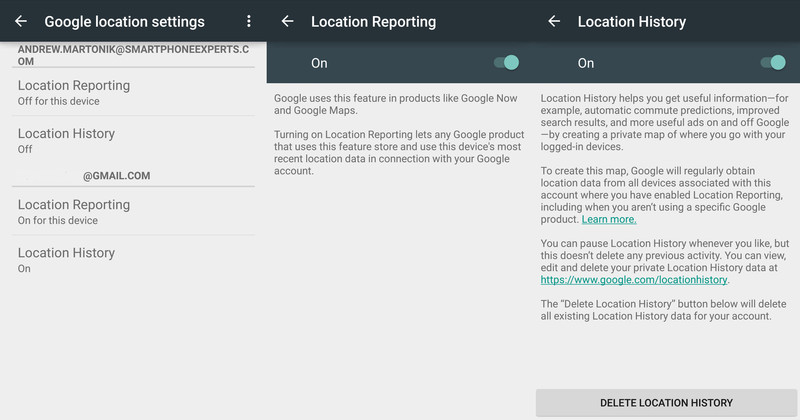
If looking at your location history is a bit of a shocking experience as to how much location data is being stored from your devices, you may want to consider looking at the location history settings on your devices. Though the interface may look slightly different depending on your phone, everyone can access the location history settings by going into their app drawer and opening the Google Settings app (it’s a grey icon shaped like a gear). You can then tap Location, which will launch you into your phone’s location settings screen.
Once there, look for an entry called Google Location Reporting and tap it. You’ll then see all of your active Google Accounts on the device listed, and two entries under each: Location Reporting and Location History. You can turn either one or both off, but it’s important to first understand what each one does.
Location Reporting is the service that lets Google know where your phone is right now, which will let Google apps like Google Now and Google Maps know roughly where your phone is so it can offer up location-based information. This feature is what helps you quickly get located on a map without first locking on GPS, or gives location-based information when you walk by certain stores or areas. If you were to turn off this setting your phone wouldn’t give its current location to Google apps, but it will still keep that location history when you view it from the Google Location History Dashboard.
Location History is the setting that lets Google create a long-term log of places where your phone has been. When you have Location History turned on Google will aggregate location data of your device(s) and use it for things like commute time predictions in Google Now and better search results in Google apps. Location history is kept private and you can access it any time you wish, as we’ve shown above. You can turn off this Location History setting at any time without deleting your history, but if you wish to delete all location history you can do so from this setting or from the web, as we’ve shown.
Take the time, take control of your location history
Now that you have the tools and know-how, we encourage you to spend a little time checking your device’s settings and seeing what location information Google has collected from those devices. It isn’t always approachable or simple, but now that you know the right places to go you have the power to manage it yourself!
A Kindle Paperwhite for $79 is a killer deal

A Paperwhite is the best invention since Gutenberg’s press.
I love to read. I try to read at least two books each week and don’t limit myself to any specific genre — I just like to lose myself in a good book or two. And I’ve found the best way to read if you love reading as much as I do is with a Kindle Paperwhite.
See at Amazon
I’ve been unfaithful to my Paperwhite in the past, thinking I had little desire to keep yet another device charged and up to date and that my phone was a good enough experience that I’d not miss it. And I was wrong. A Paperwhite, with its spectacular e-ink screen, not only feels like a real book but looks even better. E-ink is probably not the right type of display for a phone (sorry Yota) or a smartwatch (sorry Pebble) but when it comes to looking at page after page of words and enjoying it, the contrast and unique screen lighting of a Kindle Paperwhite really is the best thing to happen for book lovers since Gutenberg. You’ll know this is true once you take a Paperwhite outside.

Amazon’s Kindle experience and ecosystem are also pretty good. Once you forget about DRM and how Amazon will do whatever it can to lock you into their store (every online bookstore seems to want this) you’ll realize that any book you would want to read is probably available at the touch of a button. If it’s not, you can also easily import your favorite DRM-free books into your library just by placing them on an SD card. And if you’re a voracious reader, Amazon’s KindleUnlimited service lets you read (or listen to if you’re into Audiobooks)your choice of millions of titles any time you like for $10 per month.
Get the black version if you’ll be reading outside — your eyes will thank me.
As I mentioned, I strayed and thought I no longer wanted to continue my affair with my old Paperwhite. Too many things to keep charged is a real thing, and I foolishly decided to drop a device that only needed charging every week or so and put the Paperwhite on the shelf with the rest of my unloved tech. It didn’t stay there long: kids and spouses tend to make quick work of grabbing something good that never should have been abandoned. I’ve been meaning to grab a new Paperwhite when I caught one on sale and Prime Day made it easy.
You can get a Kindle Paperwhite with Amazon’s “Special Offers” — ads on your lock screen and a banner on the home page — for just $79.99 today. That’s saving you $40. If you like to read, you won’t get something this nice at this price until next year.
See at Amazon
Samsung Expected to Match 2018 iPhone Sizes With Galaxy S10 Lineup
Apple is widely rumored to introduce a trio of new iPhones in September, including a second-generation 5.8-inch iPhone X, a larger 6.46-inch version dubbed iPhone X Plus, and a 6.1-inch model with only some iPhone X features.
Galaxy S9
Perhaps inspired by those plans, respected analyst Ming-Chi Kuo claims that Samsung will follow suit with its Galaxy S10 lineup next year, including 5.8-inch, 6.1-inch, and 6.4-inch models. Kuo outlined his predictions in his latest research note with TF International Securities, seen by Business Insider.
Kuo notes that the 6.1-inch and 6.4-inch models will be equipped with an ultrasonic fingerprint scanner built into the display, a feature that Apple decided against on the iPhone X. The technology will also be built into the Galaxy Note 10 later in 2019, according to his research note.
Kuo’s prediction will surely reignite a long-standing debate about Samsung copying Apple, just weeks after the two companies settled a seven-year-long lawsuit in which Samsung was found guilty of copying the iPhone’s design.
Korean website The Bell previously reported that one of the Galaxy S10 models will be a lower-cost option, in line with the rumored 6.1-inch iPhone, which is expected to have some iPhone X features like Face ID, and an edge-to-edge display with a notch, but lack others, like an OLED display.
The lower-cost Galaxy S10 will also have tradeoffs, such as a fingerprint scanner built into the edge of the device, according to Kuo.
The Bell also said the Galaxy S10+ will feature five camera lenses: three on the back, and two on the front. The rear system is said to include the same 12-megapixel wide-angle lens and 12-megapixel telephoto lens as the Galaxy S9+, plus an all-new 16-megapixel 120º ultra-wide-angle lens.
Apple is also rumored to introduce at least one new iPhone with a triple-lens rear camera in 2019, but likely not until September, which would likely be after the first triple-lens Galaxy S10 is released, so it’s not always Samsung following second. Huawei was first to release a triple-lens smartphone regardless.
Samsung is also said to be considering adding 3D facial recognition to the Galaxy S9 lineup, in line with Face ID on the iPhone X. Galaxy S8 and Galaxy S9 models already feature facial recognition, but it is 2D, and tests proved that the systems could be spoofed with a photo of a face.
One feature that Samsung has yet to copy, unlike several other Android smartphone makers, is the iPhone X’s notch. Galaxy S9 models still have slim, uniform bezels along the top and bottom of the display, although Samsung has patented a notched smartphone design, and could use it eventually.
As usual, Samsung will likely unveil its Galaxy S10 lineup at Mobile World Congress in February 2019, with availability in March.
Related Roundup: 2018 iPhonesTags: Samsung, Ming-Chi Kuo, Galaxy S10, TF International Securities
Discuss this article in our forums
Amazon Prime Day Live Blog: The Best Deals Worth Checking Out
Today kicks off Amazon’s annual Prime Day shopping event, offering customers with an Amazon Prime subscription the chance to save money on nearly countless items across the retailer’s storefront.
Since we routinely share great deals on Apple products and accessories being sold on Amazon, we’ve launched a live blog today that will track notable Prime Day discounts from Apple accessory makers like Anker and EasyAcc, as well as other interesting sales as they go live. Prime Day will officially begin this afternoon at 3 p.m. ET and continue for 36 hours afterwards.
Note: MacRumors is an affiliate partner with Amazon. When you click a link and make a purchase, we may receive a small payment, which helps us keep the site running.
Before that time, Amazon has debuted early access Prime Day discounts on its own range of Alexa and Echo devices, with up to 50 percent off of products like the Echo Look, Fire TV Stick, Fire HD 10 tablet, and more, which are expected to last throughout Prime Day.
In contrast to deals that last for a majority of the event, there will also be limited-time lightning deals that appear at different times throughout the day and night, and only last for an hour or so.
In this live blog, we’ll be tracking lightning deals, longer-lasting discounts, and competitor sales as products get marked down throughout Prime Day, so be sure to bookmark this page and check back for new bargains as Amazon’s mid-year shopping event continues into Wednesday morning.
Live Updates – No need to refresh 
Loading live updates…
Tags: Amazon, Amazon Prime, Prime Day
Discuss this article in our forums
Apple Highlights Upcoming 2018 Emoji in Celebration of World Emoji Day
World Emoji Day kicks off on July 17, and in celebration of the event, Apple today shared details on new emoji that are coming to iOS devices “later this year” as part of the Unicode 11 emoji release.
Apple plans to introduce 70 new emoji characters later this year, with new options for red hair, gray hair, curly hair, and no hair, along with smiley faces that include cold face, party face, pleading face, and face with hearts.

Super heroes, an eye-shaped nazar amulet, and an infinity symbol will be added, along with new animals such as kangaroo, peacock, parrot, and lobster. New food items include mango, lettuce, cupcake, and moon cake.

A full list of the emoji included in Unicode 11 are listed on the Emojipedia site, and Emojipedia was also able to interview Alan Dye, Apple’s VP of User Interface Design to get some insight into how Apple designs new emoji.
According to Dye, when designing new emoji characters, Apple aims for a design that’s “the most iconic” and “the most timeless representation” of the item in question. There’s no specific formula, though, behind the look of each individual emoji.
“Without a doubt, we want it to always feel like an Apple emoji and that’s what we’re going for, but we really make that decision on a case by case basis,” Dye said.
Apple often discusses adding more diverse options, such as emojis for black families, but it’s a challenge to come up with an appropriate interface. “I think that you need a UI that can accommodate the variations,” Dye told Emojipedia.
All of the new emoji Apple shared today will be available across iOS, macOS, and watchOS, joining the hundreds of emoji options that are already available. Apple has not said when the new emoji will be released, but they could come out either alongside the release of iOS 12 this September or in an iOS 12 update later this year.
Related Roundup: iOS 12Tag: emoji
Discuss this article in our forums
 AIVAnet