


Android P: Everything you need to know about Android 9
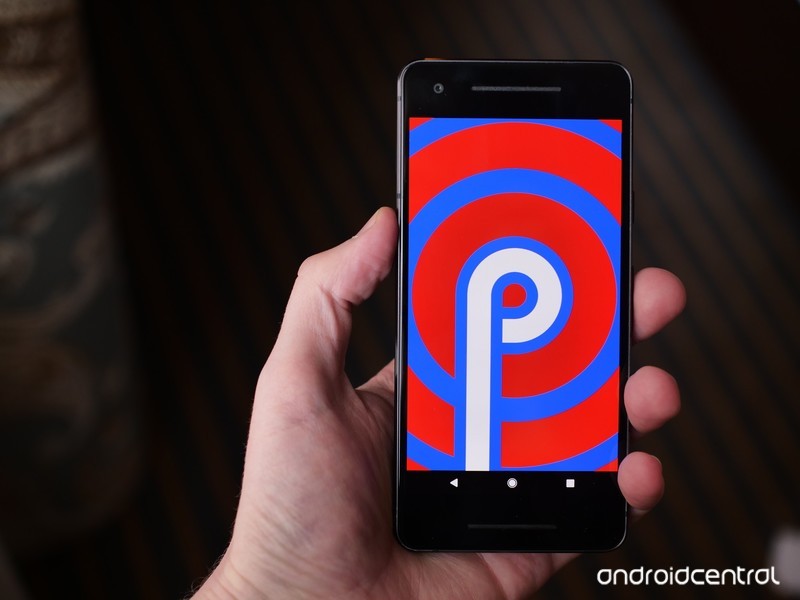
From new gestures to extending battery life, here’s everything you need to know about Android P!
Following last year’s Oreo release, 2018 is the year of Android P. We’re still some time away before Google rolls out the new software to all users, but even in its current form, P is showing a lot of promise.
Things are bound to change leading up to Android P’s official launch, but for the time being, here’s everything you need to know about this year’s big update.
The latest Android P news
July 20, 2018 — Android P engineers discuss dark mode, gestures, and more in Reddit AMA
Leading up to the official launch of Android P in about a month or so, the development team behind the new update recently got together for an AMA on Reddit to answer technical questions about P.
The dev team covered a ton of stuff, but there are a few highlights worth pointing out here. First off, when it comes to Android P’s gesture navigation, they had this to say:
We evaluated many, (MANY!) options for navigation as part of this overall change to the system spaces (worth noting that our main impetus was about making All Apps/Overview more accessible from wherever you are in the system, similar to the notification shade). HOME and BACK are so central to Android navigation (both the system and the apps) – that ensuring the dependability of them via buttons with enough space led us to the current design. All that said – we really value both the aesthetic and functional appeal of a smaller nav bar / more gross-gesture navigation and are continuing to explore opportunities to bring that in.
A system-wide dark mode has also been on the minds of many, and to not much surprise, it was said that Google doesn’t “have anything to announce about a unified dark mode.”
The team also explained how maintaining Project Treble is actually more difficult than past efforts, said a fix is coming for Android’s awful sharing menu, and more.
Read through the full AMA here
All the big details
Android P is officially Android 9
As spotted in the third developer preview, Android P is Android 9. This signifies that Android P is a big upgrade from 8.0 Oreo, and based on what we’re about to dive into, we’ve got no problem agreeing with that.
It completely changes Android’s navigation system
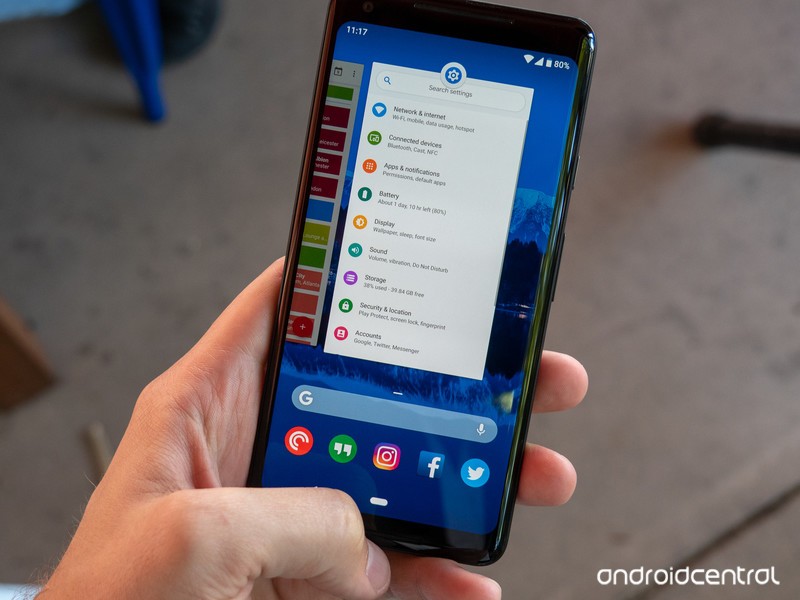
Back in 2011 with Android 3.0 Honeycomb, Google introduced Android’s iconic three button navigation system we’ve come to know and love – Back, Home, and Recents. Seven years later with Android P, these are being eliminated in favor of a gesture-based system.
Android P is the first time Google’s heavily relying on gestures for navigating the UI, and in their current form, they work as follows:
- Tap the Home button/pill to go home
- Swipe up to access the recent apps page
- Swipe up twice or do a long swipe for the app drawer
- The Back button only appears in certain apps/menus when it’s needed
This combination of taps and swipes is a bit confusing right now, but we’re expecting Google to roll-out a more refined version of this in later Developer Previews or in the final build. You can still use the traditional three buttons in Developer Preview 2 and 3 if the gestures aren’t your thing, but it’s rather obvious that this is the future Google wants for Android.
Android P’s gestures are a jagged pill you should learn to swallow
The user interface is more rounded and colorful
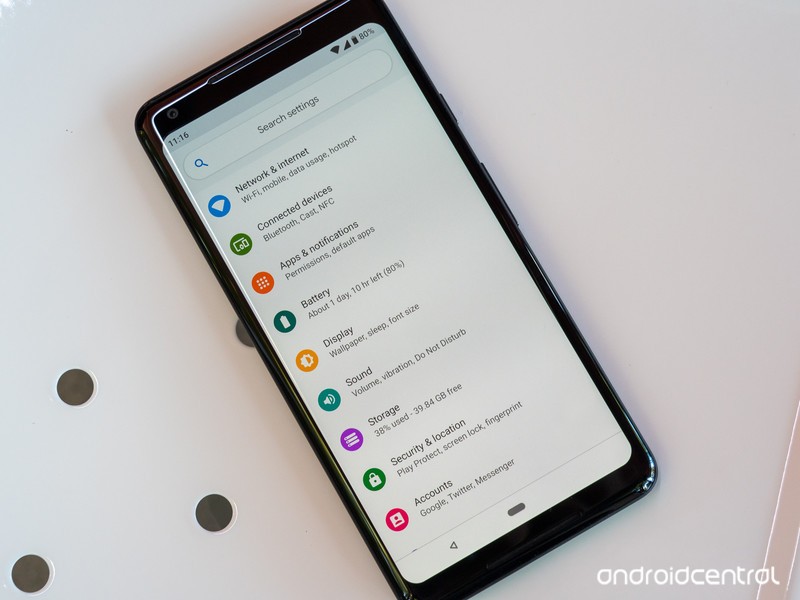
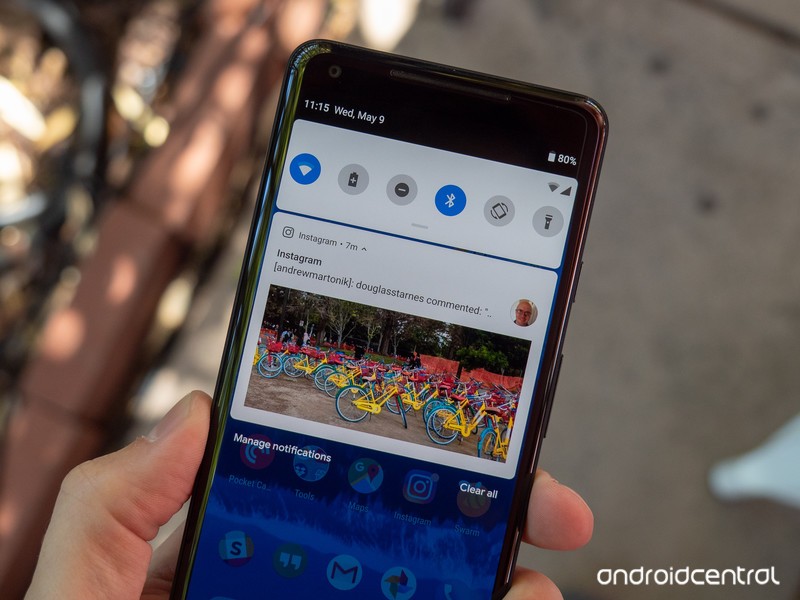
Android P isn’t as drastic of a visual change like we saw with the jump from KitKat to Lolipop, but compared to Oreo, there are some elements that are noticeably different.
At first glance, things like the colorful icons in Settings, circular Quick Settings icons, and rounded corners for just about every menu jump out like a sore thumb. These elements do take some getting used to, but I ultimately came around to liking them quite a bit.
Something else you’ll notice with Android P is just how alive it feels. Between the new gestures and updated animations, Android moves in a way that I’ve never seen before. Oreo was smooth and buttery, but Android P flies underneath your fingertips in a way that can only be experienced in-person.
There are tools for helping you use your phone less
Google talked a lot about helping people with their “digital wellbeing” at this year’s I/O conference, and a lot of those efforts are baked right into Android P.
Although not live in Developer Preview 2 or 3, later versions of Android P will introduce a new system called Android Dashboard. Android Dashboard will offer a quick glimpse into how you’re using your phone, including stats on which apps you’re using the most, how many times you’ve turned on the screen, how many notifications you’ve received, and how much time you’ve spent on each app.
You’ll also find a feature called App Timers that’ll restrict you from using a certain app after you’ve spent x amount of time on it, as well as tools for easily turning on Do Not Disturb and switching your screen to a monochrome color palette to help you wind down for bed.
Google’s ‘digital wellbeing’ initiative feels incomplete and insincere
Google’s trying to squeeze as much juice as possible out of your battery
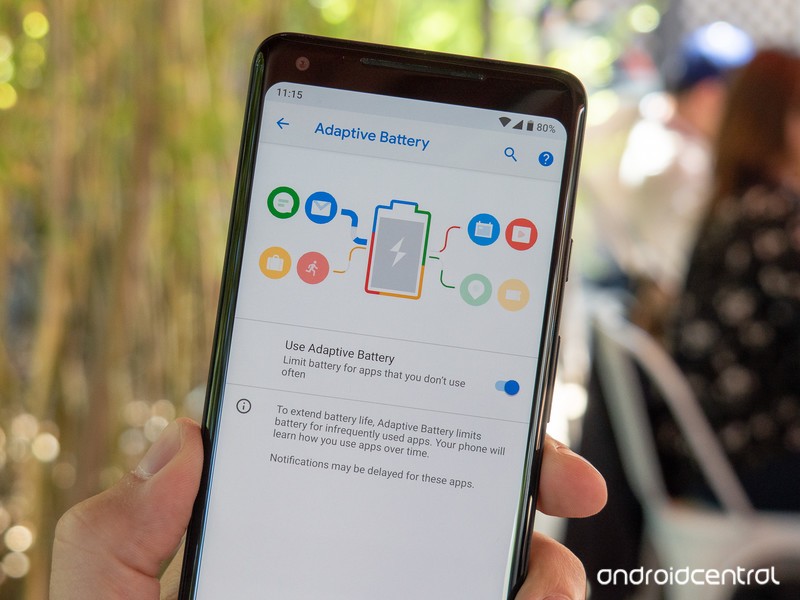
It seems like Google’s always trying to find ways to maximize your phone’s battery life as much as possible, and with Android P, those efforts are present in a new Adaptive Battery mode.
Similar to how Adaptive Brightness automatically adjusts your display’s brightness level based on your environment and usage, Adaptive Battery will examine how you use your phone and limit CPU usage to apps you infrequently use.
Google notes that Adaptive Battery can lower CPU usage by as much as 30%, and thanks to the use of Machine Learning, it’ll only get better the more you use your phone.
App shortcuts are everywhere
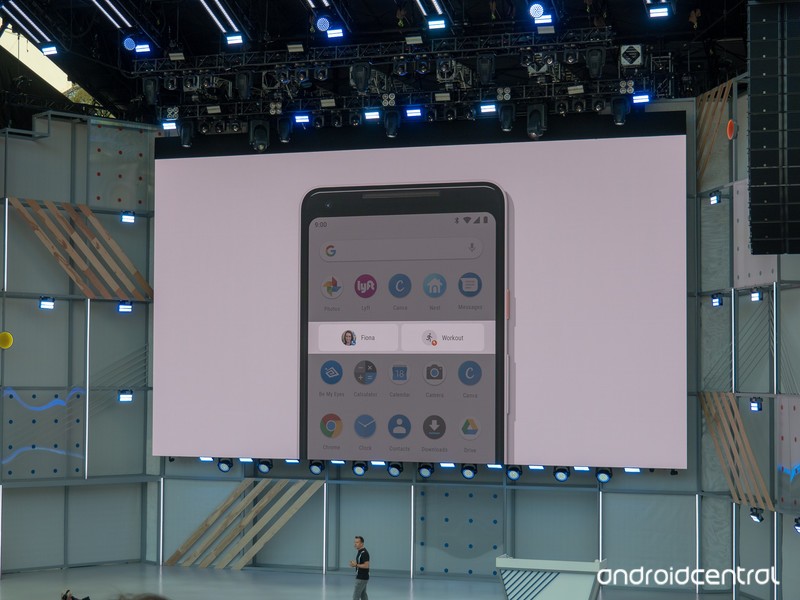
With Android Nougat, Google introduced us to App Shortcuts for the first time. Holding down on an app icon to quickly access certain elements of it can be genuinely useful at times, and with Android P, Google’s taking these to the next level with App Actions and Slices.
App Actions will try to determine what you’ll do next with your phone and give you recommend shortcuts for doing so within the app drawer, Assistant, and more. For example, if you watch Good Mythical Morning each day with breakfast, you might see an App Shortcut in your app drawer for searching Rhett and Link on YouTube during the morning.
On the other hand, Slices will allow you to perform more complex actions from the Assistant or Google Search. In the example Google gave at I/O, searching “I want to book a ride” will give you a special link to call a ride home via Lyft (assuming you’ve got the app installed).
157 new emoji

In Developer Preview 3, Google added a ton of new emojis to keep your conversations bright and colorful — 157 of them, to be exact.
Although we won’t run through the entire list, some of the highlights include red hair, superhero, face with three hearts, bagel with cream cheese, mooncake, lobster, and llama.
There are also improvements to existing emoji, including two new gender-neutral family and couple designs and updated looks for the bacon, salad, turtle, and cricket emojis.
A new standard for biometric authentication
Fingerprint sensors and face unlock systems make it easier than ever to access private information on our phones, and in Android P Developer Preview 3, Google added a brand-new standard for this called “BiometricPrompt API.”
Thanks to the new API, developers no longer have to create their own dialog for using biometric systems with their apps. This isn’t something you’ll notice in day-to-day use, but it’s an important background change we’re more than happy to see.
All the little things
In addition to the big changes found in Android P, there are a ton of smaller elements also scattered throughout the update. Some of my favorites include:
- Built-in screenshot editor
- Zoom pop-up when highlighting text
- Changing the volume now defaults to your media volume
- Volume controls appear on the right of your screen instead of the top
- Do Not Disturb is more customizable and easier to understand
You can sign up for the beta now
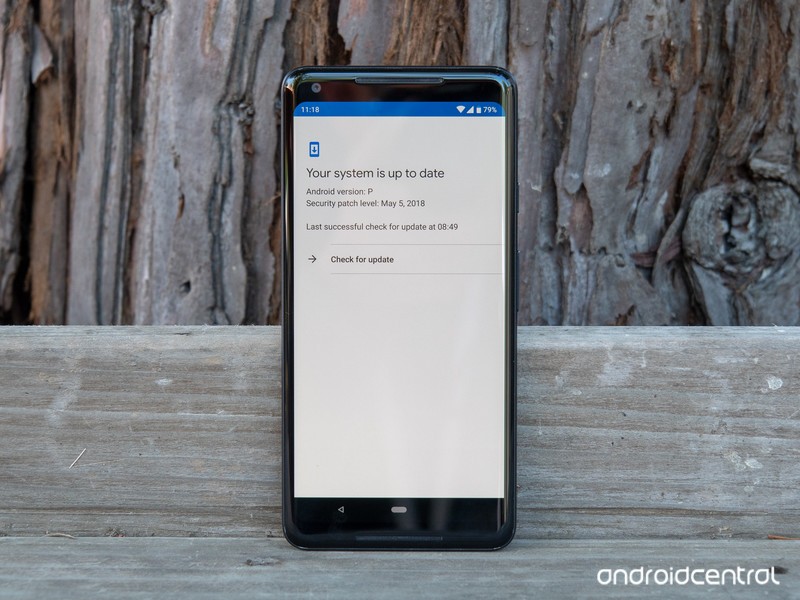
Similar to last year’s Oreo beta, anyone with a Pixel phone can opt-in to the Android P beta right now to get an OTA update to download and play with the new software.
However, Google’s Pixel phones aren’t the only ones that get to have fun with this early access. Google’s opening up its Android Beta Program to third-party OEMs for the first time ever thanks to Project Treble, including Nokia, OnePlus, Sony, Essential, Xiaomi, Vivo, and Oppo.
How to get Android P on your Pixel right now (or roll back to Oreo)
The official build should be released in August
If you’d rather not mess with the beta and just wait for the final version to drop, we’re not too terribly far out from it.

Google notes that the final release for Android P will be published in Q3, and based on the above timeline and Oreo’s release schedule, we should see Android P get a proper launch at some point in August.
Updated June 6, 2018: Added new features included with Android P Developer Preview 3.
Android P
- Android P: Everything you need to know
- Android P Beta hands-on: The best and worst features
- All the big Android announcements from Google I/O 2018
- Will my phone get Android P?
- How to manually update your Pixel to Android P
- Join the Discussion
Pre-order the ‘Amazing Red’ PlayStation 4 Pro in time for the new Marvel’s Spider-Man
That color really is amazing.
Sony just announced in conjunction with the release of the upcoming video game Marvel’s Spider-Man, fans can also pre-order a limited edition PlayStation 4 Pro 1TB Spider-Man-themed gaming console. If you’re already sold and don’t need to read more, which I kinda am, then you can go ahead and pre-order it for $399.99 directly from Best Buy, GameStop, and soon Amazon.

Back in April they released a limited edition God of War bundle, and it was awesome. Sony really knows how to appeal to gamers, though, because I think they’ve upped the ante a bit with the Spider-Man look. The paint job is a beautifully vibrant red that matches the new Spider-Man suit. Sony calls it “Amazing Red” and it shows. The top of the PlayStation has Spider-Man’s spider logo emblazoned on it. The controller uses a mixture of that same red color along with white buttons to pair nicely with the console.
The console doesn’t release until the game does, Sept. 7. This console is going to be really hard to find if you wait too long, though. Just look at the God of War bundle I mentioned above, which was just released a couple months ago and is already discontinued and selling for around $700. Not only will this bundle come with the game, you’ll also get some extra in-game content including the Spidey Suit Pack, five Skill Points to spend, a Spider-Drone Gadget, a custom theme for your PlayStation 4, and a Spider-Man PSN Avatar. Get that early edge fighting criminals throughout New York City.
The best things to come out of the early 2000s Sam Raimi Spider-Man movies were the video games. Spider-Man 2, despite weird balloon-catching side missions, was the first time I got to truly swing around New York City as the web-crawler, and I loved it. This game seems to promise that same sort of accessibility to the city. This is also the first Spider-Man game (and first licensed game) from Insomniac, who have the sort of gaming repetroire that should make you drool with excellent examples like Resistance, Sunset Overdrive, Ratchet & Clank, and more. This is going to be Sony’s next big game, so I hope you’re getting excited for it.
The ongoing San Diego Comic-Con revealed some of the story with a new trailer, if you are interested in seeing more about the game. Otherwise, you can pre-order your new bundle from Best Buy, GameStop, and Amazon (eventually).
Microsoft, Google and more team up to help you transfer data between services

Tech giants are teaming up to make it easier to port your data between services.
Microsoft, Google, Twitter, and Facebook have partnered to form the Data Transfer Project (DTP), a new initiative whose goal it is to make transferring your data between services much easier. Initially founded in 2017, DTP’s aim is to create an open-source platform that apps and services can adopt, ultimately stoking competition by giving consumers the ability to easily try out new services while keeping data they’ve built up on another (via The Verge).
“Data Transfer Project (DTP) extends data portability beyond downloading a copy of your data from your service provider, to providing consumers the ability to directly transfer data in and out of any participating provider,” the project’s website states.
DTP takes advantage of the existing APIs and authorization mechanisms for each service, transferring the data supplied into a common format, then moving it into the new service’s API. This can be used for everything from contact information and email to media like photos and music.

DTP is currently in “very active development,” but it’s not hard to see how useful an open standard for portable data could be for consumers. As an example, porting playlists between music services, which is currently a major barrier for many, could be automated through DTP. Similarly, giving another email app a try could be made much easier by automating the transfer of your contact data.
Of course, all of this depends on major services eventually adopting DTP. However, given the open nature of the project, it’s easy to envision more companies hopping on board.
Dying Light 2 for PlayStation 4: Everything you need to know
Parkour + Zombies = a very exciting zombie survival game.

The original Dying Light was the sort of success story that makes you smile. It left the starting gate to lukewarm reactions, but it eventually drummed up a head of steam and went on to be played by millions of gamers worldwide.
While the core of the game was always solid fun, a wealth of updates and expansions since launch have given players an insane amount of content to enjoy in this sandbox. Now it’s time to take everything they’ve learned and put out a sequel that just might be able to compete for Game of the Year honors once it launches. Here’s everything you need to know about Dying Light 2.
What is Dying Light 2?
At E3 2018, Techland announced the sequel to one of 2015’s most surprising new IPs. Dying Light 2 follows up with a zombie survival horror game that has grown into one of the most polished, fun-filled, and feature complete games in this genre.
As with the original game, Dying Light 2 is expected to offer a first-person open-world experience that emphasizes melee combat and the swift yet fluid art of parkour movement.
What’s the story so far?
Techland hasn’t given many details about the story of Dying Light 2 just yet. The original game had you playing as Kyle Crane, an American agent sent on a mission to infiltrate a human settlement to find a high-value target known as Rais.
Rais is a political figure on the run, and he’s doing that running because he’s in possession of a document that could paint Kyle Crane’s agency in a negative light. Be it for concerns of national security or a crooked official looking to cover their tracks, Kyle’s goal is to either capture that man or destroy that file.

When Kyle hits the ground, however, he finds that it’s easier said than done. He was dropped right in the middle of a zombie outbreak, and sure enough, he’s been bitten. One of the locals helps save his life by giving him an antidote and bringing him into the survival community to recover.
While on the task, Kyle finds that there are genuinely good people in the camp who need his help. His federal duties suddenly seem to play second fiddle to helping people who truly need it.
Fast forward to Dying Light 2, which takes place 15 years after humanity has been nearly completely overrun by the viral threat. There is only one known human settlement remaining, and they’ve holed up in a place called The City.

The City — the map of which is supposedly four times bigger than all the maps in the original Dying Light combined — is said to have a much different feeling compared to the game world of the original. Previously, night and day were equally tough to deal with, with night having fewer hordes overall, but more singularly vicious enemies.
In Dying Light 2, the hordes are mostly retired to shelter during the daytime, while they’ll litter the streets at night. That doesn’t mean your daily tasks will be free of stress when the sun is up. Zombies can still come to attack you if you alert them to your presence, and there’s now a lot more hostility coming from local gangs and other less pleasant survival groups in the area.
We also know that this story will have a lot more critical choices to make. For instance, one of the early gameplay demos shows a situation where you have to choose to either help a peacekeeping survival group or turn your back on them for your own benefit. Saving them gives the local innocents access to free water and makes the area safer, but helping the bandit gives you a regular source of income from selling the water while paving the way for more dangerous gangs and zombies. These sorts of choices and the impacts they can have on the game world will be numerous.

Techland secured the help of Chris Avellone, a game designer known for his work with games where choices can affect the outcome of the game world, characters, and story. He has worked on the likes of Planescape, Star Wars: Knights of the Old Republic 2, and some of the Fallout games, so he’s sure to bring the expertise needed to deliver a game with non-linear storytelling.
Parkour and zombie-punching goodness
Expect Dying Light 2 to build on the exciting foundations established in the first game. Your legs and hands are still your most valuable tools, with parkour being a big part of the experience. You’ll run, jump, and swing your way from one corner of the world to the other.
Techland mentioned they doubled up on the number of animations that go into this system, which should make for more varied moves you can pull off. We’re also set for an even heavier emphasis on the melee-focused combat present in this series, which means you’ll also be looking forward to more crazy weapons to craft.

You’re going to need all that extra stuff for Dying Light 2’s more savvy zombie hordes. The AI is smarter, the zombies are faster, and the rooftop is no longer a guaranteed haven for the main character. And yes, the night is still scary and full of things that seem to lust for your blood more than others’. The enemies become bigger and more numerous, and some will have access to moves you’ve never even seen before.
As with the original, you’ll be able to experience all of this in a 4-player co-op session. Your friends can join you to help fight against the plague, but when they go back to their game their story and city will remain the way they left it. The only thing they’re taking back is character development, so any experience you earn, skills you learn, and items you find in a friend’s game can be used to help make you stronger to take on the challenges your own game presents.
Where to pre-order
There are no current pre-order bonuses for Dying Light 2, though Amazon’s pre-order listing for the game is already up. You can pre-order for as low as $47.99 if you’re an Amazon Prime member, and you’ll also be guaranteed to get it on its release date.
See at Amazon
When can you play it?
Dying Light 2 is in the works for PlayStation 4, Xbox One, and PC. There’s no hard release date just yet, but we know it will be made available at some point in 2019.
PlayStation 4

- PS4 vs. PS4 Slim vs. PS4 Pro: Which should you buy?
- PlayStation VR Review
- Playing PS4 games through your phone is awesome
Amazon
Amazon Fire TV Cube Video Review
You’ve read the review — now watch the video!
If there’s one thing we learned during Amazon Prime Day 2018, it’s that folks care a lot about Amazon Fire TV. And, specifically, the Amazon Fire TV Cube.
You’ve already read our full Fire TV Cube review at CordCutters.com, right? Good. (And if not, what are you waiting for?) Now it’s time for some video.
The short version? The Amazon Fire TV Cube is a great little way to combine all the power of a Fire TV 4K with the brains (and a bit of braun) of an Amazon Echo Dot — all in a package that’s still pretty easy on the wallet. Check it out!
Subscribe to Modern Dad on YouTubeCheck out CordCutters.com
Introducing CordCutters.com
- The hardware you need
- All about streaming services
- What channels are on which service
- FREE over-the-air TV
- How to watch sports
- Join the discussion
Get the latest deals
Destroy six pieces of paper at the same time with this $24 AmazonBasics paper shredder
Shhhhrrrreeeeeddddd it up.

Right now Prime members can pick up the AmazonBasics 6-sheet paper and credit card shredder for $23.74, which is just over $6 less than it normally sells for. If you aren’t already a Prime member, you can sign up for a free 30-day trial in order to take advantage of this discount and all the other Prime benefits. The shredder can crosscut up to six sheets at the same time, and credit cards one at a time.
It has a two-minute continuous run time with a 30-minute cooldown period. There’s an auto start and manual reverse feature to make it work best for you. The feed is 8.7 inches wide, and it sits on a 3.8-gallon bin to hold all of your shredded documents. It’s time to stop throwing away your banking statements and bills and start shredding them at home. It’s backed by a one-year warranty, so be sure to grab one now.
See at Amazon
How to tell when your phone’s battery has gone bad

Unlike diamonds, batteries aren’t forever. Here’s how to tell if yours is ready for a ride to the recycling center.
You’ll find plenty of online discussions, whether in forums or articles on websites like this one, about phone batteries. Almost all of them are about charging and stretching out the time between charging. That’s important information to know but there is also another problem you might face, especially if you keep the same phone for a couple of years: batteries don’t last forever.
Phone batteries are complicated

We’ve all either had to get a new battery for our car or know someone who has. Batteries are chemical power plants and once they have reached to point where they can no longer build a charge through their chemical reaction, they turn into a container for semi-toxic and expensive materials that don’t do anything. When that happens you need to provide a new battery if you want to continue to use the things that it powers. And be sure to recycle your old one properly, please.
You used to be able to change the battery yourself in a phone, but those days are never coming back.
Phones aren’t like cars, where changing the battery is as easy as disconnecting the old and connecting a new one. They used to be, but thinner phones and higher battery capacity demands meant that they are now small foil bags sealed up inside your phone. They are designed to last a specific number of charge cycles, and a charge cycle is taking the battery from its lowest point to its highest. It’s worth noting that this doesn’t mean zero to 100, even though the phone will report it that way. Batteries are designed to be used at 80% of the listed capacity (but still safe up to 125%) and never brought down to a zero-charge state. The circuitry inside your phone takes care of that and makes it simple for us by reporting the scale to 0-100.
The number of charging cycles that a battery is rated for is an approximation; they reported number is based on an average. There are ways to “game” the system when it comes to charging cycles, and you’ve probably seen advice that says to charge your phone a certain way to extend the usable life of the cell. These do work, but you won’t be able to get too much extra life from your phone’s original battery so it may not be worth it. You have to decide if micromanaging the way you charge your phone is worth another two or three months of life.
I just charge my phone whenever it needs it because life is too short. Hashtag YOLO.
Signs your battery is ready to move on

A battery doesn’t just suddenly die under normal circumstances; it gives some warning signs that it’s getting close. Sometimes batteries can just short or have another type of fault that kills them, but those instances aren’t very common. A lot of time and energy went into designing a safe and long-lasting battery for a phone.
You might notice when your battery is going downhill because it rapidly discharges while you’re using it. If you used to go half the day and your battery was still at 60%, for example, and it now hits 30% during the same time, it’s a sign that the battery is starting to sour. Other things like bad apps or a bad update can do this, too, so it can be tricky to diagnose.
Your phone’s battery will most likely die a slow, noticeable death.
You’ll also notice that it won’t charge completely. No matter how long you leave it plugged in it never says it is fully charged because it’s not. It can’t hold enough electrical energy to register as full by the electronics in your phone because the materials inside have degraded enough to affect performance.
One of the first warning signs is your phone losing charge right away. If you take your phone off the charger when it says the battery is at 100% and it immediately drops to 90% or 80%, the battery is getting a bit old. It’s normal for some phones to lose a few percentage points of battery charge right away (at least according to the battery gauge) but a drop of 10% or more is a sign of a problem.
If your phone is bulging or swelled up, stop using it right now.
If you notice your phone bulging in the middle or getting very hot on or off the charger, that’s a sign of a bad battery too, but you also need to stop using it right away and take it somewhere that a tech can look at it. We’ve all heard stories of phones bursting from a bad battery, and the whole Note 7 thing is still fresh in our minds. Phone batteries are safe when used as intended. Because of things like Samsung’s excellent response to Note 7s catching fire and bursting, they are safer now than ever before. But accidents and malfunctions happen. Don’t ignore any signs of excessive heat or swelling because nobody likes it when their pants (or anything else) catch fire.
You probably won’t see any of these signs for at least 18 months after you bought your phone if you bought it new. Battery life may be listed in charge cycles, but the goal is to make them last two years since that’s the standard length of a carrier contract. But if you really like your phone or really like not spending money on a new one, you will see your battery die eventually.
What can you do about it?

You used to be able to go online or take a trip to the carrier store and buy a new battery for your phone. Those days are gone and I doubt they will ever come back. But the battery in your phone probably can be changed by someone who knows what they are doing.
Changing the battery in a sealed phone isn’t hard for people who know what they are doing. Most of the time.
Most of us aren’t that person. Changing a phone battery isn’t hard on most models, but the way you open the two halves of a phone can be a little tricky. There may be hidden screws, plastic clips that are designed to never be unclipped, and there will be adhesive. Lots of sticky adhesive. I can change the battery on some phones here at my desk with a handful of simple tools; the Nexus 4 and iPhone 4 only take a few minutes to open and change things. Other phones I could never open without breaking the screen. I know because I’ve done it. Unless you’re still using a Nexus 4 or iPhone 4, forget changing the battery yourself.
Luckily, a person who can change a phone battery isn’t hard to find. If your phone is still covered under a warranty, you should talk to the people you bought it from first. Always. If you don’t, you’re probably going to lose that warranty, so do it.
If your phone no longer has a warranty, ask a friend if they have a “phone person” they trust. If not, it’s fairly safe to take a chance with someone who has a legitimate business repairing phones. Think about it. The little kiosk in the mall where someone will swap your battery in two hours while you shop wouldn’t be there if they weren’t able to do it successfully. Changing a battery is a mechanical thing — the phone comes apart a certain way, only a specific battery fits for a replacement, and the parts go back together the same way they came apart — only in reverse. For a “phone person,” it’s a simple job and the hardest part is making sure they don’t scratch the screen, and remembering to wipe the fingerprints off of everything when they are finished.
If your friends don’t have a “phone person” look on Google.
There are also plenty of national companies that specialize in phone repair. You’ll find them listed online or even in the Yellow Pages if you ever see an old actual phone book. You can look at review sites like Google Maps for an overview of customer experiences, and because these franchises all operate under a specific set of policies you can look them up to see what to expect. I’ve used this sort of service in an emergency, and a Puls agent in New Orleans was able to replace both the battery and the charging port on an iPhone 5s in just a couple of hours. I was hesitant, but it was either have the repair done that way or see my wife without her phone during a trip to Costa Rica. You would have done the same. It was good as new when finished, and it still works.
Your carrier may also have a phone repair center, even one on site in some locations. It’s worth talking to them about it.
The “unfixables”
Some phones, like the original HTC One M7 or the Nexus 6P, are built in a way that you probably won’t find someone willing to open them to change the battery. Don’t get mad at the person you’re asking to do the repairs, because some things aren’t meant to be opened. The original iPhone was notorious for being nigh impossible to change the battery unless someone was a professional with experience. A business that specializes in quick phone repairs on site can decide it’s not worth the risk of damaging the phone by trying it.
You can see a list of popular phones and their “repairability” scores at iFixit. The easiest phones to open are at the top and the hardest are at the bottom. If your phone is near the bottom of the list you’ll probably have to let a professional have the phone for a day or two and a service that fixes things while you wait isn’t going to be an option. They need to give you back your phone looking as good as it did when you gave it to them. That’s hard to do with some phones.
Buying a new phone isn’t the worst thing in the world. You might have to do it.
Finally, maybe it’s time to buy a new phone. Or a new-to-you phone, even. We have you covered with our comprehensive Smartphone Buyer’s Guide. You’ll find a phone that’s the best at almost any crieteria you have set, and you might even see something that you never thought of. A phone is more than a novelty in today’s society and is an important tool. It’s worth doing the research to find the one that fits you best.
Best Android Phone With a Headphone Jack in 2018
- Best overall
- Best for sound quality
- Best for business
- Best for less
Best overall
Samsung Galaxy S9 / S9+
See at Amazon
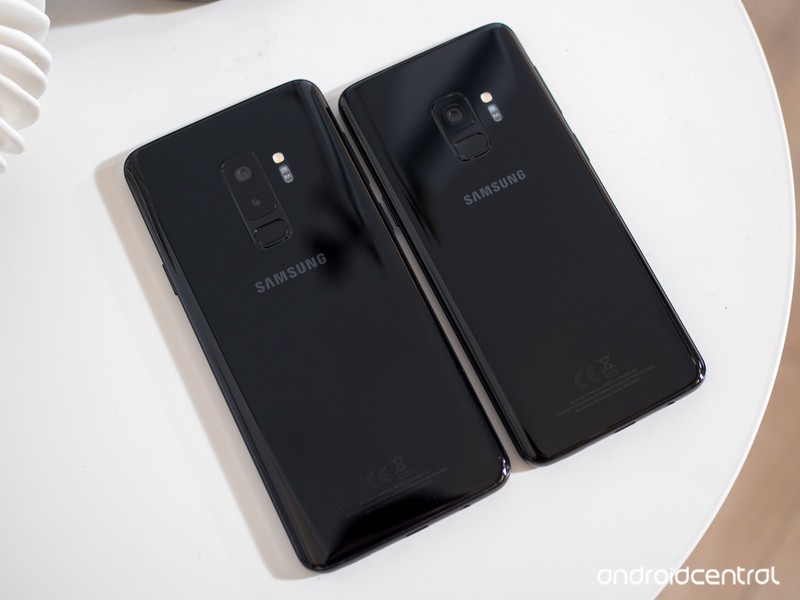
The Galaxy S9 and S9+ aren’t much different from their predecessors, but seeing as those were Samsung’s best-ever-selling phones that’s not a bad thing. These phones are all about giving you the most features in the most beautiful package. You get top-end specs across the board, plus all of the hardware features you expect: waterproofing, wireless charging, an SD card slot, a headphone jack and more.
The camera is all-new this year, with a sensor that does fantastic processing to remove noise and sharpen fine detail. It’s aided by a dual-aperture lens to get the best combination of light and detail in different shots, and in the case of the Galaxy S9+ is paired with a secondary telephoto lens for zoom and portrait mode shooting.
You don’t get the clean and simple software experience of the Pixel 2, which may take some extra customization and tweaking on your part, but the Galaxy S9 is far less polarizing overall — just about anyone looking for a high-end phone will love using the Galaxy S9 or S9+.
Bottom line: The Galaxy S9 and S9+ don’t require much thought — they can do everything, and look great doing it, with few real downsides.
One more thing: Consider paying the extra $120 for the Galaxy S9+, where you get more RAM, a bigger screen and longer battery life. It’s worth it for most people.
Best for sound quality
LG G7
See at B&H Photo
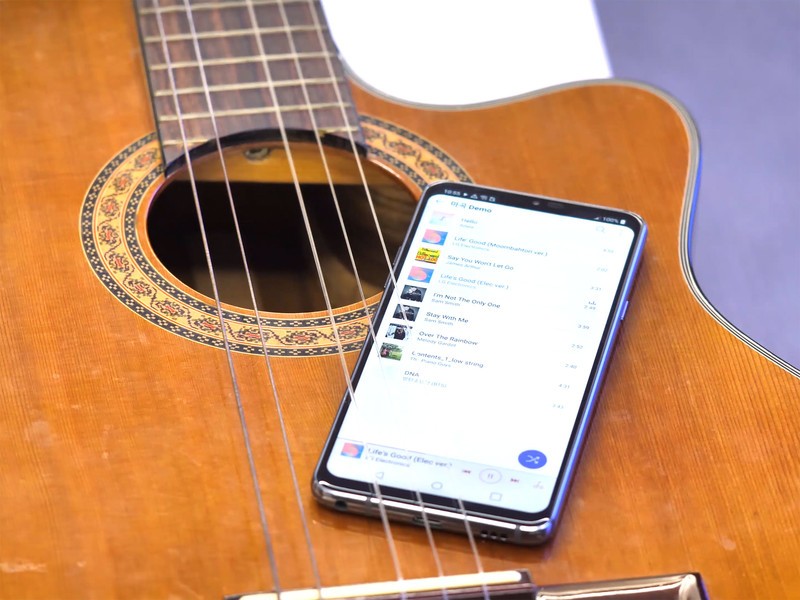
LG’s latest phone, the G7, has a headphone jack, a powerful amplifier, and a Quad DAC, to push some of the best audio we’ve ever heard in a phone. While it’s not as good overall as the Galaxy S9 and S9+, on audio quality alone the G7 has no peer (except other LG V-series phones).
With a 6.1-inch display, a super-fast Snapdragon 845 processor, 4GB of RAM, and a dual camera setup that will impress even the most vociferous critics, the LG G7 is, overall, an outstanding phone. But if you just want the best sound quality coming out of a phone headphone jack, the LG G7 is the phone for you.
Bottom line: LG does all of the basics amazingly well, and accents it with a nice body and super-capable pair of cameras.
One more thing: The G7 can even power high-impedance headphones from the headphone jack.
Best for business
BlackBerry KEY2

See at Amazon
Business folks don’t need to worry about Bluetooth — they just want to plug and play. The KEY2 continues BlackBerry Mobile’s tradition of offering incredible sounding phone calls through a precisely-tuned headpiece and, of course, a headphone jack. There’s even a pretty great pair of earbuds in the box — with a microphone and in-line remote — if you don’t have your own pair.
Bottom line: Along with the keyboard, the KEY2 keeps it fittingly retro with a great-sounding headphone jack.
One more thing: You can use the phone’s keyboard shortcuts to quickly launch your favorite music app.
Best for less
Moto X4
See at Amazon
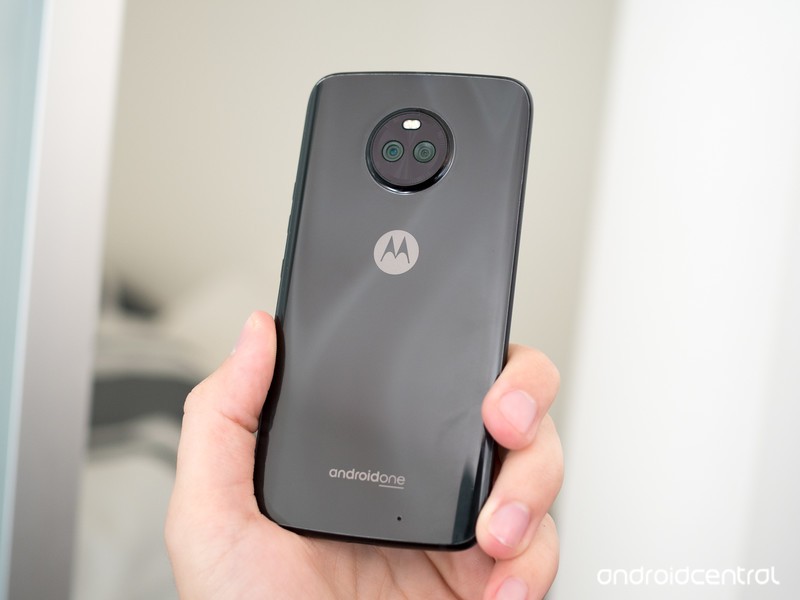
The Moto X4 is all about providing a high-end feel without the coinciding price. It originally retailed at $399, but can often be had for well under $300 now just a handful of months after launch. At that price, it’s a fantastic phone — it has a beautiful metal-and-glass build, dual rear cameras, solid battery life and really good specs for the money. The software experience is typical clean Motorola, and runs buttery smooth thanks to some wonderful optimizations.
Unlike many of Motorola’s more expensive phones, the Moto X4 has also retained a headphone jack. And even with that, it’s still IP68 water and dust resistant.
Bottom line: The Moto X4 is a fantastic deal at under $300, providing a flagship-like experience in many respects for far less than half the price.
One more thing: You can get the Moto X4 from Amazon or Motorola directly, but also on Project Fi as an “Android One” version with a longer update runway.
Conclusion
When it comes to keeping the headphone jack around, Samsung still takes the cake with the Galaxy S9 and S9+ — they’re great phones overall that happen to also still hold onto this important port. The LG G7 is also a good phone that keeps the jack, and has best-in-class audio quality. On the cheaper side, the Moto X4 has a ton going for it and retains the headphone jack and IP68 water resistance at a sub-$300 price.
Best overall
Samsung Galaxy S9 / S9+
See at Amazon
The Galaxy S9 and S9+ aren’t much different from their predecessors, but seeing as those were Samsung’s best-ever-selling phones that’s not a bad thing. These phones are all about giving you the most features in the most beautiful package. You get top-end specs across the board, plus all of the hardware features you expect: waterproofing, wireless charging, an SD card slot, a headphone jack and more.
The camera is all-new this year, with a sensor that does fantastic processing to remove noise and sharpen fine detail. It’s aided by a dual-aperture lens to get the best combination of light and detail in different shots, and in the case of the Galaxy S9+ is paired with a secondary telephoto lens for zoom and portrait mode shooting.
You don’t get the clean and simple software experience of the Pixel 2, which may take some extra customization and tweaking on your part, but the Galaxy S9 is far less polarizing overall — just about anyone looking for a high-end phone will love using the Galaxy S9 or S9+.
Bottom line: The Galaxy S9 and S9+ don’t require much thought — they can do everything, and look great doing it, with few real downsides.
One more thing: Consider paying the extra $120 for the Galaxy S9+, where you get more RAM, a bigger screen and longer battery life. It’s worth it for most people.
Update July 2018: We’ve replaced the LG V30 with its newer, better counterpart, the LG G7. The rest of the list remains unchanged.
Disconnect VPN will keep your browsing private for life for just $40!
It’s probably trite and a bit cliché at this point, but we increasingly live our lives online. Our bank information, personal information, likes, dislikes, and more are all over the internet — often whether we like it or not. That’s all data, and nowadays, data is a commodity. Your information is being bought and sold. Sometimes it’s simply to show you catered ads; other times it’s for the stuff that after-school specials used to warn you about.
Block online trackers for life for $40 Learn more
What can you do to combat all of this online tracking? Do you turn to VPNs? Sure, but they don’t necessarily block tracking in every sense. Did you know that there are services and apps that actually block online trackers in order to keep your data safe?

Disconnect is one of the best tracker blockers around. It blocks tracking requests from connecting to any of your devices, thereby keeping your data safe. It even masks your location so that you can access websites as though you’re in another country (like a VPN). Apps like these have subscription rates, and some charge an arm and a leg. If you were to go directly to Disconnect for a lifetime subscription, you’d pay $500. Through Android Central Digital Offers, you’ll pay only $40, a savings of more than 90%.
Disconnect is available for iOS, Android, PC, and Mac, so you can cover all of your devices and keep your browsing habits private. If you often deal with sensitive information or would rather just keep your internet habits completely your own, you’ll need a quality tracker block, and Disconnect is one of the best around. Check it out at Android Central Digital Offers and save 90%.
Block online trackers for life for $40 Learn more
This $250 Asus Chromebook Flip can be used in tablet, stand, or laptop mode
Download apps directly from Google Play and more.

The Asus Chromebook Flip C101PA-DB02 is down to $249.99 at Amazon for a limited time. When not on sale, it can generally be found selling for up to $300.
The C101PA features a 360-degree hinge and a 10.1-inch touchscreen which allows you to use the device in tablet, stand, or laptop mode. It weighs just two pounds and is only .6 inches thick with a battery which can last for up to nine hours on a single charge. It features a Rockchip RK3399 Quad-Core 2.0 Ghz processor with 16GB of storage and 4GB RAM.
You’ll also want to note this Chromebook runs the Chrome OS operating system (not Windows or Mac), and can download apps directly from the Google Play Store to use on the device. You’ll also receive 100GB of Google Drive space with its purchase.
See at Amazon
 AIVAnet