


Can a gadget save you from the distraction of gadgets? We tried Foci
Most people I know are, to some degree, addicted to their cellphone. We’ve all felt it. How an illuminated screen demands every ounce of your attention. How an unexpected text message evokes a physiological response like an amphetamine. And then there’s that seemingly insatiable impulse to check the time, check the weather, then check the time again. It’s gotten to the point that much, if not most, of the time I spend on my phone is in a state of distraction, not productivity. I’d bet you’re in the same boat.
Call it what you will — addiction, obsession, or some strange form of cyborg dependency — but, whatever it is, our relationship with technology is fraught and unwell.
Whatever it is, our relationship with technology is fraught and unwell.
One of the most obvious issues is our inability to focus for more than a few minutes on end. It’s like we live our lives in little vignettes, punctuated by moments when we check the phone. If an alien civilization started observing humans just a decade ago, they’d probably assume cellphones were a power source we use to recharge.
So I was intrigued when I recently got an email about Foci, a wearable device designed to boost focus. I’ve tried more organic routes — dabbling (albeit superficially) in yoga, meditation, and mindfulness techniques — but my efforts were in vain against the omnipresent tug of my iPhone and the many senseless wonders of the World Wide Web. I asked them to send me a product for review and hoped I’d find a newfound, distraction-free mentality.
A wearable for the age of mass distraction
Foci is a biometric wearable that looks a lot like a bluetooth earpiece. The only difference — and this is important — is that you wear it on your waist instead of your face. The device uses tiny sensors to track your breathing patterns (which research and thousands of years of practice have linked to the mind) and runs them through a machine learning algorithm, which the creators say helps the device identify your cognitive state and keep your mind on track if it begins to wander. When you veer towards distraction, a few soft vibrations bring it to your attention.
(Note: Before you put your money into a crowd-funding campaign, we suggest you read our guide to not getting burned. Even inventors with the best intentions have been known to fail investors.)
Complementing the wearable is an app that uses a fluid orb to depict your mental state. It floats and bobs around the screen, changing color from grey to yellow, purple, blue, and red to show if you’re distracted, focused, fatigued, calm, or stressed. The fluctuations in your mental state are recorded, minute-by-minute, which the extra studious user can review and, ideally, learn from. Finally, an artificial intelligence “mind coach” gives personalized insight into your progress and focusing habits.
More than just a monitor, Foci’s creators say it has to potential to improve four types of focus: stimulus suppression (tuning out visual and auditory distractions), self-regulation (controlling procrastination and goals), fatigue tolerance (sustaining prolonged attention), and finding an effortless type of deep focus known as “flow.” These improvements don’t just happen spontaneously. Like any other behavioral change, they require practice, effort, and, well, focus.
More than just a monitor, Foci’s creators say it has to potential to improve four types of focus.
The end goal is not only to overcome trivial distractions but to achieve what psychologist Mihaly Csikszentmihalyi described as “when you’re completely involved in an activity with intense focus and creative engagement.” He’s termed that mental state, flow.
With Foci, you get into the flow when you achieve consecutive states of focus, i.e. when you don’t sporadically truncate your work to check your phone, use the bathroom, make a sandwich, pressure-clean the driveway, or feed leftover breadcrumbs to the scurry of squirrels outside.
Getting in the zone
Throughout my week with Foci, the app said I reached a state of flow twice. However, neither of those times was I in what I would call a deep state of focus. In fact, the app would sometimes say I was distracted when I felt like I was on a roll with my research or writing — errors that could be due to this being an alpha model of the device. It also took about five days for the Foci algorithm to “learn” my breathing patterns but, once it did, its interpretations of my mental state were more accurate. Foci’s creators say they hope to decrease the learning period to just a few days when the product is released to its backers.
Every now and then I’d end up checking emails or scrolling through Twitter, and the device would give me a little nudge to set me back on track. These nudges were helpful. But occasionally, when I was really deep into my work, the device vibrated and took me out of my creative flow. This happened less often the longer I used Foci (and the more time the algorithm had to learn my breathing patterns) but just one would be enough to make me abandon the tool all together.
There’s cause for pause here. If technology is the reason why so many of us have stunted focus in the first place, how wise are we to ask for help from to yet another A.I.-powered device? I think the key with Foci, as with any self-help tool, is to not just relying on the device to keep you on track, but to use the app to spot your own bad habits and form newer, better ones.
If technology is the reason why so many of us have stunted focus in the first place, how wise are we to ask for help from to yet another A.I.-powered device?
Foci has a slew of supporters already. Over 2,000 backers pledged more than $155,000 to fund Foci in a recent Kickstarter campaign. An Indiegogo campaign has been even more successful. Once launched in October, the device will retail at $109.
So, would we recommend one?
If you struggle with distraction, have tried simpler techniques (like disconnecting from your phone or the internet when you really need to focus), and have $100 burning a hole in your pocket — then yes. Foci will help. Even the alpha version of the product brought attention to my tendencies to kill time on impertinent things. But if you haven’t put in the effort to fix your focus in other ways, try those first before adding another gadget to your belt.
As touchstones for our personal and professional lives, tech tools have also become the source of our distraction. We’re so accustomed to being always on that it’s tough to ever turn off. Tech giants like Apple have caught wind, including new features in their products that monitor and moderate our digital time stamp, but it’s a shame it’s even come to that. We should really get a grip on our own distractions. After all, attention is currency of the Information Age. We’ll be paupers without it.
Editors’ Recommendations
- Stock your travel bag with these gadgets for gaming on the go
- Six wine gadgets that wine drinkers will love
- Shoot smarter in the woods with the best photography gadgets for camping
- From solar stoves to skewers, 12 grill gadgets that’ll crown you king of summer
- Cool camping gadgets for every outdoor adventure
How to back up and restore your WhatsApp messages with Google Drive

Wanna hold on to all of your WhatsApp messages? Save ’em! Switching phones? Take ’em with you!
Maybe you like to use WhatsApp for work because it’s free and easy to use. Maybe it’s just a convenient way to keep in touch with friends. Either way, you probably have some pretty important messages and media in there, and it’d be a shame if it all suddenly disappeared. That’s why it’s a great idea to back up your messages, photos, and videos.
- Backing up between Android and iPhone
- How to backup your WhatsApp chats to Google Drive
- How to restore WhatsApp chats from a Google Drive backup
- How to move your WhatsApp messages to a new phone using Google Drive
Backing up between Android and iPhone
If you’re planning on switching from Android to iPhone and want to take your WhatsApp messages with you, you’re out of luck. When you back up WhatsApp on your Android phone, you back up to Google Drive. The Android WhatsApp app uses Google Drive to back up and restore. The iOS app uses iCloud to do both of those.
Even if you have the iOS Google Drive app, you still won’t be able to restore your Android WhatsApp files. The iOS WhatsApp will only communicate with iCloud.
How to backup your WhatsApp chats to Google Drive
Luckily, WhatsApp automatically backs up and saves your messages to your phone’s memory on a daily basis. However, depending on your settings, you can also backup your chats to Google Drive. This way, just in case you have to delete WhatsApp from your phone, your messages will be safe. Just be sure to back things up before you uninstall the app.
Google Drive is a great way to backup all your WhatsApp messages. You can switch from Android phone to Android phone and you’ll be able to have your messages and media follow you wherever you go. It’s also a bit of extra insurance in case WhatsApp decides to one day crash beyond repair and you end up having to uninstall and reinstall it. Here’s how to backup with Google Drive:
Launch WhatsApp from your Home screen or from the app drawer.
Tap the menu icon on the top right of the screen. It’s the three vertical dots.
Tap Settings.
Tap Chats.

Tap Chat backup.
Tap Google Drive settings to choose the frequency with which you’d like to backup your chats.
Tap Account.
Tap the account you would like associated with the backup.
- Tap an account in the list
- Tap Add account to add an account not found on the list or to create a new one.
Tap Allow.

Tap Back up over.
- Tap the circle next to “Wi-Fi” to backup over Wi-Fi only.
- Tap the circle next to Wi-Fi or cellular to backup via Wi-Fi or wireless data, keeping in mind that you could accrue data charges.
Tap the box next to “Include videos” to backup video messages.
Tap Back Up to manually back your phone up now.
Now that everything’s backed up, you’ll be able to restore your chats every time you reinstall WhatsApp, no matter the device. Note that whenever you back up to Google Drive, WhatsApp also backs up to your phone’s internal memory as well, which means it’ll take up some space. If you have a preinstalled file managing app, or one like ES File Explorer, you’ll be able to go in and make room if you need to.
It may be prudent to plug your phone in when backing up, as the first backup could take a while, depending on the sizes of your chats. The nice thing is that every backup you perform after the first one will be incremental, which means it will add to the current backup, instead of erasing everything and starting again or adding an entire backup over the old one, taking
How to restore WhatsApp chats from a Google Drive backup
Everything’s backed up. Great! You’ve changed phones or have had to reinstall WhatsApp. Not so great. Now how do you get all your chats back? Here’s how!
Launch WhatsApp from your Home screen or from the app drawer.
Verify your phone number when prompted.
Tap Restore.
Tap Next when the restoration is complete.

Set up your profile just like you did the first time.
Tap Next at the top right of the screen.
Tap Continue.

Now you can access your WhatsApp chats on any Android phone that has WhatsApp installed. All you have to do is sign in.
How to move your WhatsApp messages to a new phone using Google Drive
You’re wading through the jungle in Borneo. Of course, you’re using WhatsApp to keep in touch with family and friends back home because hey, it’s free. Suddenly, an orangutan swoops in, grabs your phone, and crushes it into dust between its able hands.
No worries! You’ve already followed the steps above and are properly backing up your WhatsApp chats to Google Drive, so all you have to do is grab a new phone and move all your chats over. Confused? Don’t be! Here’s how:
Add the same Google account to your new phone that you used to perform the backup on your old phone.
Install WhatsApp on your new device as you did on the previous one.
Launch WhatsApp from your Home screen or from the app drawer.
Tap Agree and continue.
Verify your phone number, just like you did the first time you set up WhatsApp.

Tap Restore to restore your WhatsApp chats from your Google Drive backup.
Tap Next.

And away you go! Your WhatsApp on your new phone is just like it was on your old phone. Thanks, Google Drive!
Note: This process isn’t entirely foolproof and may not work every time. You may have to uninstall WhatsApp and reinstall it a couple times for the restore to take effect. If there are messages you really want to save, you may want to copy them to a computer or some other device to make sure you have them forever. Also beware that continually reinstalling WhatsApp may result in a temporary ban, since your phone number has been recognized. In short, WhatsApp can be just a little fickle.
If you’d rather not bother with Google Drive, you can always save your chats to an SD card and transfer them that way. This is a rather complicated process, since you can’t just simply move WhatsApp from your phone’s internal memory to an external SD card; you can only move its data. So, when we say it’s a complicated process, we mean it’s more like a migraine, and we don’t recommend it if you can avoid it. However, if you must, check out WhatsApp’s “Restoring or transferring a backup” instructions.
Updated July 2018: Added a section regarding backing up and restoring between iOS and Android and updated screenshots.
Prototype ‘smart bandage’ can detect infections and auto-apply antibiotics
Previous
Next
1 of 4


Here at Digital Trends we have covered a surprising number of fascinating high-tech wound dressings, such as one made of spider silk and a futuristic Star Trek-style patch, which uses cold plasma as part of the healing process. Adding to this growing subgenre of stories is a new smart bandage developed by researchers at the University of Nebraska-Lincoln. Not only is it capable of checking whether a wound is infected, but it can also proactively treat it with medication if it deems this to be the case.
“We have developed an automated and smart bandage that can measure the level of pH, and use that for identifying potential infection in chronic wounds and deliver antibiotics if infection is detected,” Ali Tamayol, an assistant professor in the department of mechanical & materials engineering, told Digital Trends. “This platform reduces the number of hospital visits by patients, and facilitates quick treatment of infection in wounds to reduce the life threatening complications associated with that.”
The smart wound dressing contains both pH and temperature sensors. Between them, these two sensors can tell when a wound turns more alkaline, thereby signalling the presence of bacteria, as well as the presence of inflamation. The sensors are located in a hydrogel sheet, which carries capsules containing medicine, including antibiotics. If an infection is detected, the bandage can automatically release the drugs. In tests, it was able to wipe out more than 90 percent of bacteria, and bring pH levels back within normal range.
“The treatment of chronic diabetic wounds is an immediate application,” Tamayol explained. “However, this approach can be extended to other chronic diseases in which drugs should be delivered to control the level of biomarkers. For example, a similar platform can be used for controlling the level of glucose in patients suffering from diabetes.”
The next stage in the development process will involve improving the drug delivery platform, along with testing the bandage on small animal models. Should this be a success, hopefully it won’t be long before clinical trials on humans might be carried out, prior to this becoming a standardized tool available to physicians. “There are many people suffering from chronic wounds, and my hope is to find a solution to help them out,” Tamayol said.
A paper describing the work was recently published in the journal Small.
Editors’ Recommendations
- Futuristic bandage can monitor wounds and deliver drug treatment
- Move over, antibiotics! Cold plasma could be the next great way to treat wounds
- Glowing contact lenses could be the key to stopping diabetic blindness
- Spider silk could be used to create artificial skin to help heal wounds
- Smart dresser could help people with dementia achieve more independence
Have an old 3G phone? You won’t be able to get it activated by Verizon anymore
Digital Trends / Robert Nazarian
If your phone isn’t 4G LTE-compatible, don’t look to Verizon for help. The mobile service provider will stop activating phones that don’t have this relatively modern technology available. As initially reported by Droid Life, a few 3G phone owners who went to Verizon in hopes of activating their mobile devices were turned away. Verizon has since confirmed that this is its new policy.
“For several years, we’ve been publicly saying that our 3G CDMA network will remain available through the end of 2019. Virtually all traffic on our network is on our 4G LTE network,” Verizon told Engadget. “To facilitate a smooth transition to 4G LTE-capable products and services, we are no longer allowing devices that are not 4G LTE-capable to be activated on our network.”
Rumors around this change have been circulating for quite a few months, with talk that Verizon would likely stop activating 3G phones by June or July 2018. That has since come to fruition, and Verizon is still set to discontinue its entire 3G CDMA network by the end of next year. Indeed, Verizon has long since stopped selling 3G devices, and recently began offering LTE-only flip phones for customers who wanted to spend less time staring at an addicting smartphone screen but still wanted to be part of the most modern cell phone technology.
Droid Life also reports that there are rumors circulating around Verizon’s alleged decision to prevent older LTE devices from being activated. The policies their sources have seen purport that CDMA devices and devices without HD Voice or VoLTE will not be activated. While Verizon has not commented directly on this change, the company did later amend its initial statement to say, “To facilitate a smooth transition to 4G LTE capable products and services, we are no longer allowing devices that are not 4G LTE capable with VoLTE to be activated on our network.” That means that some phones without VoLTE capabilities could soon find themselves unsupported, too.
In any case, it seems that this change hasn’t been broadly implemented yet, so if you’re still hanging on to a dinosaur of a cell phone, you’ve got a bit of time left.
Editors’ Recommendations
- The best MP3 player you can buy (and 3 alternatives)
- How to choose a smartphone
- How to unlock a phone on every carrier
- Save up to $900 with the best smartphone deals for July 2018
- How to track a phone
DARPA’s latest endeavor is a tiny robotics challenge called the SHRIMP Olympics
DARPA
With an invention history that can claim a pioneering role in the development of the internet, Siri, GPS and other world-changing inventions, the U.S. government agency known as DARPA (Defense Advanced Research Projects Agency) has always thought big. Until now, at least. With its new SHRIMP program, DARPA is suddenly thinking very small indeed — and that’s really exciting.
The SHRIMP program — short for SHort-Range Independent Microrobotic Platforms — is an effort to develop new insect-scale robots for operating in environments where much larger robots may be less effective. In the tradition of its DARPA Grand Challenges, the organization is seeking proposals for suitable robots, in this case ones that weigh less than a gram and are smaller than one cubic centimeter. The selected micro-bots will then compete against one another in a “series of Olympic-themed competitions,” including categories like rock piling, steeplechase, vertical ascent, shot put, weightlifting and more.
“Overall, this program is seeking innovations in actuator materials, actuator mechanisms, and compact power systems to enable untethered mm-to-cm scale robotics,” Dr. Ronald Polcawich, the DARPA program manager who is leading SHRIMP, told Digital Trends. “The competition at the end of Phase 3 of the program, which is slated for the 2021 time frame, serves as a way of evaluating the technologies to be developed within the program.”
The hope is to develop tools which can be used in fields like emergency search and rescue, disaster relief, and hazardous environment inspection. The foundational research could also be used for things like steerable optics and prosthetics. With these kinds of serious goals in mind, DARPA is investing some serious cash in this initiative. In total, it’s spending $32 million in funding, which will be spread across the various projects falling under the SHRIMP banner.
“The DoD (Department of Defense) has interests in robotics of all scales,” Polcawich continued. “The development of small-scale robots requires addressing several unique challenges, especially in the area of extreme size and weight constraints that can be less of a priority for robots of other scales. In particular, SHRIMP is focused on innovations in both actuator materials and compact power systems, which have been highlighted as limiting the current performance in existing research activities in mm-to-cm scale robots.”
Facebook suspends data firm claiming access to 1 trillion conversations
Facebook may have another Cambridge Analytica on its hands, and the company is taking an unusually proactive step to contain what could potentially be another large privacy scandal. On Friday, July 20, the social network said it is suspending Boston-based Crimson Hexagon, a data analytics firm that claims to have more than 1 trillion consumer conversations aggregated from social media, forums, blogs, reviews, and other online sources. Crimson Hexagon counts government agencies from the United States, Turkey, and Russia among its clients with the purpose of helping organizations monitor public sentiment.
While Facebook found no wrongdoing by Crimson Hexagon, the company’s access to data from Facebook and Facebook-owned Instagram was temporarily shut down pending further investigation. “Facebook Inc. said Friday it was suspending an analytics firm while it investigates whether that firm’s government contracts violate the social-media giant’s policies on how its public data is collected and shared,” The Wall Street Journal reported. Unlike the now-defunct political consulting firm Cambridge Analytica, which collected private profile data from more than 87 million Facebook users, Crimson Hexagon claims it merely pulls readily available information from public profiles. Even though Facebook has found no evidence of improper data collection, the company is investigating Crimson Hexagon’s policies on how data is collected, stored, and shared.
“We don’t allow developers to build surveillance tools using information from Facebook or Instagram,” Facebook said in a statement. “We take these allegations seriously, and we have suspended these apps while we investigate.”
For its part, Crimson Hexagon chief technology officer Chris Bingham said that it is fully cooperating with the investigation. In a blog post, Bingham said that Crimson Hexagon “routinely vets all potential government customers that inquire about the platform and will decline potential customers with use cases that would violate policies of our data partners, like Twitter. Each government customer must contractually commit, in writing, to the detailed use cases that they will be pursuing on the platform.” Moreover, Bingham claims that no private data is collected as part of the company’s practice and that the collected data could only be used for specifically approved purposes. The company denies that it is helping with any government surveillance program.
This is not the first time that Facebook has been embroiled in controversy surrounding surveillance. In 2016, Facebook, along with Instagram and Twitter, shared public data with a startup that helped law enforcement monitor and track protesters in Ferguson, Missouri, and Baltimore, The Washington Post reported. After those incidents, Facebook revised its policy to prohibit partners from using data on its network for surveillance purposes. And following the Cambridge Analytica scandal, Facebook has been under investigation in the U.S., U.K., and European Union, forcing the company to take a more consumer-friendly approach to privacy.
In addition to its government clients, other customers of Crimson Hexagon’s data analytics include Paramount Pictures, Adidas, General Motors, Twitter, and General Mills. The company was founded by Harvard University professor Gary King.
Editors’ Recommendations
- Despite promising to stop sharing your data, Facebook continues to do so
- Another Facebook privacy scandal — 3 million users’ data exposed by quiz
- Facebook bans 200 apps following audit as Cambridge Analytica scandal grows
- You’ll never read Facebook’s new data policy, so we did it for you
- Apple quietly bans developers from selling your contacts’ data
This solar panel rolls up like a scroll when it isn’t charging your gadgets
Previous
Next
1 of 4
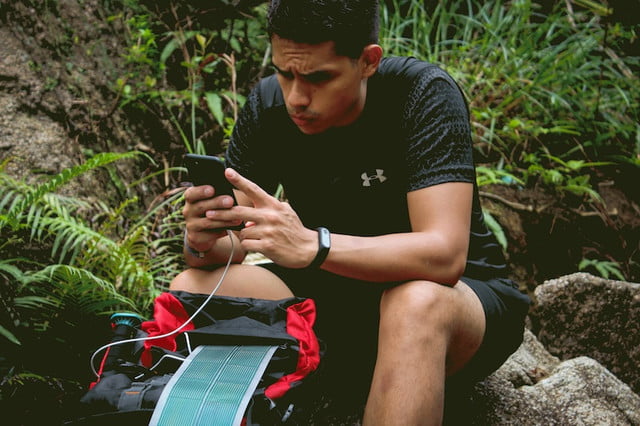


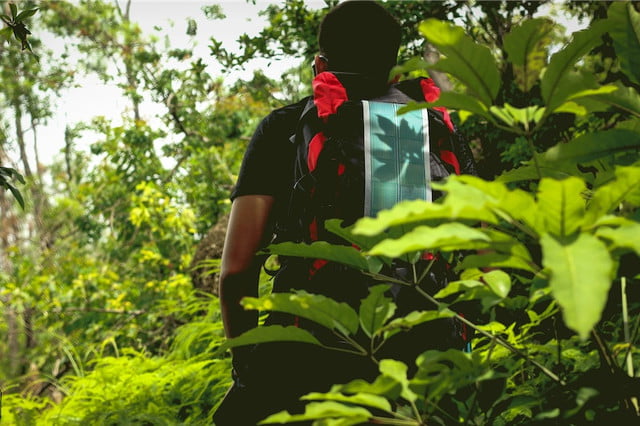
Small, portable solar panels have been a popular option for those wanting to keep their gadgets charged while traveling or backpacking. The problem with most of the solar-charging solutions that are currently available is that they tend to be big, bulky, and difficult to carry in a backpack. They’re often not all that efficient, offering theoretical charging times that are rarely achieved in the real world. But a new solar charging solution promises better results by using a clever design that allows it to take up less room in your pack while still offering plenty of juice to keep your gadgets functioning on the trail.
The Soul Solar Scroll launched on Kickstarter earlier this week and has already garnered nearly half the funding required to get it into production — and one look at its technical specifications and design makes it easy to understand why. The Solar Scroll is built to function as a lightweight, easy-to-carry charging solution for keeping mobile devices powered while on the go. It comes armed with a 5,400 mAh battery and a quick-charging USB port. Those features alone are enough to recharge a smartphone one or two times or a set of wireless headphones as many as 10 times.
But there are a lot of mobile charging solutions on the market today, some of which even come with built-in solar panels. What separates the Solar Scroll from the competition is that its solar panel is made of a very thin, flexible, and lightweight photovoltaic material that can be spread out to collect energy from the sun. When not in use, the solar panel can be rolled up – like a scroll – into the device’s housing, making it easy to carry with you wherever you go. Soul claims that the Solar Scroll is capable of producing as much as 5 watts of energy, which is enough to recharge its internal battery pack in as little as 5 or 6 hours using the sun alone. It can also be charged in just 2 to 3 hours if plugged into a wall outlet.
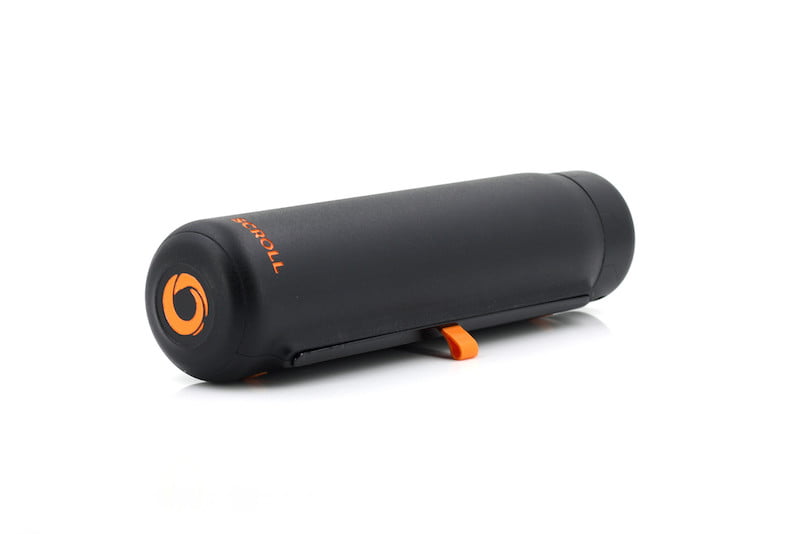
In its most compact state, the Solar Scroll is just 7.5 inches thick and 1.5 inches in diameter. It also weighs just 10.5 ounces, making it an ideal option for frequent travelers, hikers, or backpackers who need to keep their mobile devices charged while on the go. The battery is also reportedly good for more than a thousand cycles, which means you won’t have to replace it anytime soon.
The designers of the Solar Scroll are hoping to raise $30,000 to turn their innovative idea into an actual product. If successful, they hope to start shipping the charger in November of this year for $150. Early bird supporters can reserve one now for as little as $99 however, although it is important to realize the risks associated with backing any crowdfunding campaign.
Find out more on the Soul Solar Scroll website or Kickstarter page.
Editors’ Recommendations
- The best solar chargers for your phone, tablet, and other battery-powered gear
- The best portable power stations
- Omnicharge makes compact battery packs to power all of your outdoor adventures
- Awesome Tech You Can’t Buy Yet: Laptop screen extenders and self-healing tents
- The best portable chargers
Asus ZenBook S vs. Dell XPS 13
Mark Coppock/Digital Trends
After years of Windows manufacturers striving to create viable notebook challengers to the extremely thin and light Apple MacBook, they’ve finally succeeded. Today, you can find some excellent Windows 10 notebooks that are both small and superior, offering great performance, build quality, and battery life without compromise.
The Dell XPS 13 is one of the best examples, and it’s been our favorite 13-inch notebook for some time now. Asus just recently introduced its newest competitor, the ZenBook S, which hopes to leverage some innovative technology to take on the class leader. Can the ZenBook S dethrone the XPS 13?
Design
Mark Coppock/Digital Trends
Dell’s XPS 13 received a significant update in early 2018, shaving off some millimeters from both the bezels and the chassis. The result? It’s now pretty much the smallest 13.3-inch notebook around, and thanks to some new materials — like Gore insulation — it still manages to perform without melting down.
It’s also a great looking design, with a new white and rose gold color scheme that adds some style to an otherwise conservative look. The new version uses a woven texture material in the palmrests and keyboard deck that offers a luxuriant feel.
The Asus ZenBook S is the company’s newest thin and light notebook, and it’s a chip off the same block in its aesthetics. It sports that usual ZenBook concentric swirls and dark blue color scheme — Burgundy Red is also an option — in an all-aluminum build that Asus subjected to MIL-STD-810G testing for durability. It shows, with a chassis that’s nearly impervious to bends and twists.
Asus also took a different tack than Dell to keep heat away from your skin. Where the XPS 13 uses the aforementioned Gore insulation, the ZenBook S simply props the keyboard up at a 5.5 degree angle with its ErgoLift hinge, and it works as intended.
Both notebooks offer relatively shallow keyboards that still manage to provide snappy, precise typing experiences, along with Microsoft Precision touchpads that work as well as any you’ll find on a Windows notebook. And both machines use accurate fingerprint readers for Windows 10 Hello support, although the XPS 13 can also log you in via facial recognition.
Overall, we found the ZenBook S to have a slightly favorable build, keyboard, and overall aesthetic.
Performance
Bill Roberson/Digital Trends
Both the XPS 13 and the ZenBook S can be equipped with fast and efficient 8th-generation Intel Core CPUs. Unsurprisingly, they both provided acceptable performance. We tested both with the Core i7-8550U, and the XPS 13 managed to keep its processor running at full speed for longer than the Asus in our video encoding test thanks to its better thermals. Because of their fast PCIe solid-state drives (SSDs), though, these two tiny notebooks were both storage speedsters that can feed the system with data at a fast clip.
We tested the ZenBook S with its 4K UHD display (3,840 x 2,160 or 331 PPI), and we found it offers average color gamut for premium notebooks today — which is to say, good but not great. Dell equipped with XPS 13 with a 4K UHD option that offers a wider color gamut than the ZenBook S but slightly less contrast. Both are excellent displays, perfect for Netflix-watching and for displaying sharp text and graphics.
You can configure either notebook with a Full HD display (1,920 x 1,080 or 167 PPI) as well, although Asus offers this display only with a lesser Core i5-8250U CPU. Meanwhile, Dell drops the touch display on the lower resolution panel.
Portability
Mark Coppock/Digital Trends
The Dell XPS 13 is a thin notebook at 0.45 inches — and thanks to its ultra-thin bezels, it’s also diminutive in its other dimensions. In fact, it’s the smallest 13.3-inch notebook on the market if you consider its depth and width. It’s a dense little notebook, though, coming in at 2.68 pounds — that’s not exactly heavy, but it’s not as light as some other thin-and-light machines.
For example, the ZenBook S comes in at 2.2 pounds, which is considerably lighter. However, its bezels are a bit bigger in all dimensions — although it keeps the webcam above the display, unlike the XPS 13 with its up-the-nose videoconferencing — and it’s not as thin at 0.51 inches. It’s quibbling at this point, but all of that makes the Asus just slightly less tiny.
Where the XPS 13 wins out, though, is in battery life. In all of our tests, including an aggressive web benchmark, web browsing, and looping a local video, the Dell lasted considerably longer than the Asus. That’s thanks to a slightly larger battery but also some efficiency magic on Dell’s part.
You won’t mind slipping either of these thin and light notebooks in your backpack, but you’ll be less tempted to carry your power adapter along if you’re toting the XPS 13 around with you.
Dell’s XPS 13 retains its top spot
Bill Roberson/Digital Trends
Dell has priced the XPS 13 at an extra premium, coming in at $2,100 for a Core i7-855oU, 16GB of RAM, a 512GB SSD, and a 4K display. You can go as low as $1,000 for a Core i5-8250U, 4GB of RAM, a 128GB SSD, and a Full HD non-touch display, with several options that let you mix and match processors, RAM, storage, and displays.
Asus is more limited in its configurations. You can choose our review setup, a Core i7-8550U, 16GB of RAM, a 512GB SSD, and a 4K display for $1,500. Or you can select a Core i5-8250U, 8GB of RAM, a 256GB SSD, and a Full HD display for $1,200. We do wish that Asus would offer more options, such as its faster configuration with a more battery-friendly display.
In the end, we liked both of the notebooks quite a lot, and we consider them among the best little notebooks money can buy. The Dell XPS 13 wins out, though, for providing better performance and better battery life in such a tiny chassis.
Editors’ Recommendations
- Razer Blade Stealth vs. Dell XPS 13
- Dell XPS 13 vs. MacBook Pro 13
- Dell XPS 13 9370 review
- The best Dell laptops
- Razer Blade Stealth (2018) review
How to back up and restore your WhatsApp messages with Google Drive

Wanna hold on to all of your WhatsApp messages? Save ’em! Switching phones? Take ’em with you!
Maybe you like to use WhatsApp for work because it’s free and easy to use. Maybe it’s just a convenient way to keep in touch with friends. Either way, you probably have some pretty important messages and media in there, and it’d be a shame if it all suddenly disappeared. That’s why it’s a great idea to back up your messages, photos, and videos.
- Backing up between Android and iPhone
- How to backup your WhatsApp chats to Google Drive
- How to restore WhatsApp chats from a Google Drive backup
- How to move your WhatsApp messages to a new phone using Google Drive
Backing up between Android and iPhone
If you’re planning on switching from Android to iPhone and want to take your WhatsApp messages with you, you’re out of luck. When you back up WhatsApp on your Android phone, you back up to Google Drive. The Android WhatsApp app uses Google Drive to back up and restore. The iOS app uses iCloud to do both of those.
Even if you have the iOS Google Drive app, you still won’t be able to restore your Android WhatsApp files. The iOS WhatsApp will only communicate with iCloud.
How to backup your WhatsApp chats to Google Drive
Luckily, WhatsApp automatically backs up and saves your messages to your phone’s memory on a daily basis. However, depending on your settings, you can also backup your chats to Google Drive. This way, just in case you have to delete WhatsApp from your phone, your messages will be safe. Just be sure to back things up before you uninstall the app.
Google Drive is a great way to backup all your WhatsApp messages. You can switch from Android phone to Android phone and you’ll be able to have your messages and media follow you wherever you go. It’s also a bit of extra insurance in case WhatsApp decides to one day crash beyond repair and you end up having to uninstall and reinstall it. Here’s how to backup with Google Drive:
Launch WhatsApp from your Home screen or from the app drawer.
Tap the menu icon on the top right of the screen. It’s the three vertical dots.
Tap Settings.
Tap Chats.

Tap Chat backup.
Tap Google Drive settings to choose the frequency with which you’d like to backup your chats.
Tap Account.
Tap the account you would like associated with the backup.
- Tap an account in the list
- Tap Add account to add an account not found on the list or to create a new one.
Tap Allow.

Tap Back up over.
- Tap the circle next to “Wi-Fi” to backup over Wi-Fi only.
- Tap the circle next to Wi-Fi or cellular to backup via Wi-Fi or wireless data, keeping in mind that you could accrue data charges.
Tap the box next to “Include videos” to backup video messages.
Tap Back Up to manually back your phone up now.
Now that everything’s backed up, you’ll be able to restore your chats every time you reinstall WhatsApp, no matter the device. Note that whenever you back up to Google Drive, WhatsApp also backs up to your phone’s internal memory as well, which means it’ll take up some space. If you have a preinstalled file managing app, or one like ES File Explorer, you’ll be able to go in and make room if you need to.
It may be prudent to plug your phone in when backing up, as the first backup could take a while, depending on the sizes of your chats. The nice thing is that every backup you perform after the first one will be incremental, which means it will add to the current backup, instead of erasing everything and starting again or adding an entire backup over the old one, taking
How to restore WhatsApp chats from a Google Drive backup
Everything’s backed up. Great! You’ve changed phones or have had to reinstall WhatsApp. Not so great. Now how do you get all your chats back? Here’s how!
Launch WhatsApp from your Home screen or from the app drawer.
Verify your phone number when prompted.
Tap Restore.
Tap Next when the restoration is complete.

Set up your profile just like you did the first time.
Tap Next at the top right of the screen.
Tap Continue.

Now you can access your WhatsApp chats on any Android phone that has WhatsApp installed. All you have to do is sign in.
How to move your WhatsApp messages to a new phone using Google Drive
You’re wading through the jungle in Borneo. Of course, you’re using WhatsApp to keep in touch with family and friends back home because hey, it’s free. Suddenly, an orangutan swoops in, grabs your phone, and crushes it into dust between its able hands.
No worries! You’ve already followed the steps above and are properly backing up your WhatsApp chats to Google Drive, so all you have to do is grab a new phone and move all your chats over. Confused? Don’t be! Here’s how:
Add the same Google account to your new phone that you used to perform the backup on your old phone.
Install WhatsApp on your new device as you did on the previous one.
Launch WhatsApp from your Home screen or from the app drawer.
Tap Agree and continue.
Verify your phone number, just like you did the first time you set up WhatsApp.

Tap Restore to restore your WhatsApp chats from your Google Drive backup.
Tap Next.

And away you go! Your WhatsApp on your new phone is just like it was on your old phone. Thanks, Google Drive!
Note: This process isn’t entirely foolproof and may not work every time. You may have to uninstall WhatsApp and reinstall it a couple times for the restore to take effect. If there are messages you really want to save, you may want to copy them to a computer or some other device to make sure you have them forever. Also beware that continually reinstalling WhatsApp may result in a temporary ban, since your phone number has been recognized. In short, WhatsApp can be just a little fickle.
If you’d rather not bother with Google Drive, you can always save your chats to an SD card and transfer them that way. This is a rather complicated process, since you can’t just simply move WhatsApp from your phone’s internal memory to an external SD card; you can only move its data. So, when we say it’s a complicated process, we mean it’s more like a migraine, and we don’t recommend it if you can avoid it. However, if you must, check out WhatsApp’s “Restoring or transferring a backup” instructions.
Updated July 2018: Added a section regarding backing up and restoring between iOS and Android and updated screenshots.
Micro-aggressions and Veiled Threats [#acpodcast]

Daniel Bader, Jerry Hildenbrand, and Russell Holly are joined by Marton Barcza of TechAltar to talk about Google’s Fuchsia OS and its potential for replacing Android. They also have an in-depth discussion about the EU’s Antitrust case against Google and the $5 billion fine levied against them. The ruling may be just, but it could be argued that the outcomes will negatively affect consumers.
Listen now
- Subscribe in iTunes: Audio
- Subscribe in RSS: Audio
- Download directly: Audio
Show Notes and Links:
- @TechAltar on Twitter
- TechAltar YouTube channel
- Google’s Fuchsia OS may replace Android in 5 years
- Or not
- Google Assistant just got proactive — and a lot more useful
- Google defends Android following $5 billion fine from European Commission
- The EU Antitrust case against Android sucks for everyone, especially you
Sponsors:
- Thrifter.com: All the best deals from Amazon, Best Buy, and more, fussily curated and constantly updated.
 AIVAnet