


Best Gaming Controllers for Amazon Fire TV

Gaming on your Amazon Fire TV? You have more controller options than you might think.
Looking to invite friends over for a multiplayer session on your Amazon Fire TV but not sure what controllers are compatible with it? Whether you have a first-generation Fire TV, a 4K Fire TV dongle, or the new Fire TV Cube there are a variety of Bluetooth game controllers available.
We’ve broken out a list the best controller options for the Amazon Fire TV — and chances are you may already own one that’s perfectly compatible.
- Amazon Fire TV Gaming Controller
- SteelSeries Stratus XL
- Mad Catz Micro C.T.R.L.R. Mobile Gamepad
- Xbox 360 Wired Controller
- DualShock 4 Bluetooth Controller (for PS4)
- Matricom G-Pad BX Wireless Gamepad
- Logitech Gamepad F310
Amazon Fire TV Gaming Controller

An obvious but necessary inclusion on this list, if you enjoy the gaming controller that came with your Amazon Fire TV Gaming Edition, you can buy extra controllers from — where else — Amazon.
The Amazon Fire TV controller connects via Bluetooth and has a number of features specifically designed to get the most out of your Amazon Fire TV box. For starters, it includes a built-in microphone, which gives you full access to Alexa features and allows you to search for games, movies, music, and more information, using only your voice.
The controllers also feature a headphone jack, so you can fully immerse yourself in a movie or game without bothering the people around you. This will also be your best option if you have a second generation Fire TV, as support for third-party game controllers with the newer Amazon box is spotty at best compared to its predecessor.
The Amazon Fire TV controller takes two AA batteries, so you should stock up on those if you plan on becoming a heavy gamer. Get yours for just $49.99 from Amazon (where else?).
See at Amazon
SteelSeries Stratus XL

The SteelSeries Stratus XL is a great controller that works for gaming on your Windows PC, Android phone, and Amazon Fire TV. SteelSeries has basically taken the best features from the DualShock and Xbox 360 controllers and combined them to create the Stratus XL.
It connects via Bluetooth and plays for up to 40 hours on two AA batteries. It’s perfectly weighted and has been designed to fit comfortably in your hands for marathon gaming sessions.
Best of all you can get this great controller for just $40. This is a great controller for any Android gamers so you won’t want to miss out on a good deal.
See at Amazon
Xbox 360 Wired Controller

The wired version of the Xbox 360 controller works nearly flawlessly with the first generation of Amazon Fire TV. Simply plug in the controller to the USB port on the back of your Amazon Fire TV and you’re good to go. With the second generation, you may need to go into settings and ensure that USB debugging is turned off before the system will find the controller.
Looking to attach more than one USB controller? It’s as simple as first plugging in a USB hub then plugging in up to four controllers. If you’ve got a couple plugged in, you’ll even notice the player indicator lights will light up properly — a small but reassuring feature.
There’s a whole bunch of third-party controllers that work with the Amazon Fire, including the wireless versions of the Xbox 360 controllers, but the reason why we’re not recommending the wireless variant is that you’ll also need to own Microsoft’s Xbox 360 Wireless Receiver for Windows.
If you happen to already have a few of the wireless Xbox 360 controllers around, the dongle receiver may be the better option. If you don’t, the wired variety is your best bet, as you won’t have to worry about batteries or connectivity issues. At this point, they must be considered collector’s item because Amazon is selling them for $65.
See on Amazon
DualShock 4 Bluetooth Controller (for PS4)

The DualShock controller has been an industry standard and trailblazer since first being introduced for the original PlayStation back in 1998. While the technology inside the controller has improved, the overall design has remained largely unchanged and it’s clear to see why — it’s incredibly comfortable to hold.
Sony’s DualShock 4 Bluetooth Controller is a great option that’s compatible with your Amazon Fire TV. It’s quick to pair — simply go into the Amazon Fire TV’s Bluetooth controller settings, then hold down the Share and PS button on the DualShock controller to start the pairing.
The DualShock 4 controller is a surprisingly versatile controller; beyond using it with your PS4 and Amazon Fire TV, it’s also compatible with Windows for PC gaming. Get yours for $57 on Amazon.
See at Amazon
Matricom G-Pad BX Wireless Gamepad

There’s a number of features that make the Matricom G-Pad a compelling third-party Bluetooth controller to buy for your Amazon Fire. For starters, it’s powered by a rechargeable lithium-ion battery which means you won’t need to stock up on AA batteries, and if you’re running low you can plug the mini-USB cable to your Amazon Fire and play wired.
Since it’s Bluetooth, it’ll work just fine with your Samsung Gear VR, other Android devices and, of course, Matricom’s own G-Box Android TV box. It features dual modes for control, so you can switch over to mouse emulation whenever you may need it. Best of all, it’s the cheapest controller on the list offering at just $17.50, yet is quite comfortable and lightweight for a budget price. Given its near-universal compatibility and simple-yet-conventional design, Matricom’s G-Pad Wireless gamepad is worth your attention.
See at Amazon
Logitech Gamepad F310

If you’re looking for a cheaper USB controller option, the Gamepad F310 from Logitech is a good choice.
It features the same analog stick layout as the DualShock and a cord that should be long enough to reach from the Amazon Fire TV to the couch. This one is also plug-and-play, meaning you shouldn’t have to worry about setting things up.
And since this is a cheaper option, starting at around $25, you could stock up on a couple of them, along with a decent USB hub and always be prepared for some multiplayer action.
See at Amazon
What’s your preferred controller?
Do you have a favorite Amazon Fire TV gaming controller that didn’t make our list? Tell us about it in the comments!
Update July 2018: Updated pricing information and reordered our list. These are still the best options for the Amazon Fire TV.
Amazon Fire TV
- What’s new on Amazon Prime Video
- Read our full review!
- Get the latest news
- Join the discussion
Buy at Amazon
Here’s what we’re reading, watching, playing, and listening to this week

How we’re spending our leisure time.
Everyone has a bit of quiet downtime once in a while. Whether you’re sitting quietly at home or trying to relax on a plane or just giving your busy mind and hands a break, it’s important to relax.
A good way to do that is to read a book, listen to some music or watch a movie or show. See what’s caught our attention for the week of July 21st.
Ara Wagoner

I’m a sucker for an enchanting fantasy anime, and Kakuriyo has me hooked as we head into the second half of the season. The full title is Kakuriyo -Bed and Breakfast for Spirits- and it weaves a bewitching story around a young woman who gets swept up in the affairs of a hidden realm of spirits and monsters because of her dead grandfather’s debts. It’s a story of patience, perseverance, the magic of good food! The music, art style, and the character dynamics make it easy to get swept away, which has led me to binge the first 13 episodes more than once the last week.
Kakuriyo is available both dubbed on Funimation and subbed on Crunchyroll.
Daniel Bader

I’m having a kid in a couple months — seven weeks, actually — so I’ve been reading about, and listening to, how they work. You know, babies.
One book my wife had recommended to her was Brain Rules for Babies: How to Raise a Smart and Happy Child from Zero to Five, which has proven a fascinating study into how our brains develop from conception to the early years of childhood. While I knew that babies were pretty helpless straight out of the womb, I didn’t realize it was because they come into this world before what scientists consider to be their “infant maturity.” That’s not to say they should be ready to walk and talk right away, but scientists believe that, once born, babies go through a “fourth trimester” that represents a further period of intense neural growth and brain development. It’s a fascinating look at how we, as adults, get to where we are, and how the early months and years of our lives have tremendous impact on the people we eventually become. Anecdotally I knew this, but it’s really interesting to see all the science behind it.
Tom Westrick

The second expansion for Far Cry 5 — Lost on Mars — was released this week, and it’s some good old-fashioned sci-fi fun. You get a jetpack to blast around the Martian terrain, you blast alien Xenomorphs arachnids in the face, and you collect body parts to put your best friend back together. Okay, that last bit may not be standard, but it’s still a fun goal to make the player explore the map. Far Cry 5 got stale for me after completing the story (which was too short in my opinion), and the Lost on Mars expansion is a great way to extend that.
Elsewhere, a good friend of mine, Jake Schlegel played at an album release party for his very first album. I love seeing friends of mine succeed, especially when it’s as tricky as being an independent musician. If you’re into folk, blues or country, give his album a preview.
Mick Symons
I finally finished playing through Batman: Arkham Knight this past week after it sat on my shelf for two years. Unpopular opinion, judging by reviews: I didn’t really like it. Without giving too much away (although, if you don’t know by now, then what are you waiting for?), there’s just way too much Batmobile stuff. For one, the Batmobile is ridiculously hard to control when you’re just driving. I get it; it’s realistic that an overpowered tank of a car would be difficult to steer down narrow streets at full tilt, but still — there’s also a dude running around in a bat outfit chasing a dude in a gas mask and needle claws; let’s suspend disbelief for everything that matters, shall we?
I also, maybe for the first time ever, found Kevin Conroy’s voice acting wooden. All of his dialogue was delivered very matter-of-factly, and oh man — don’t even get me started on all the dialogue. Every 5 seconds Batman is telling you exactly what you need to do to get past a certain obstacle or not get killed. There was way too much hand-holding throughout the entire game. All that said, the story was quite good, and there are a couple of great twists that I genuinely didn’t see coming (even though I was spoiled for the Arkham Knight reveal because I was late to the party).
Essa Kidwell
This week I’m diving right back into my Fallout 4 addiction. Right now I’m mostly playing it on my PlayStation 4 but, with the new Fallout 4-76 mod, I’ve reinstalled it to my computer as well. With over 300+ hours logged on my Steam, and God knows how many logged on my PS4, it might be a good time to I admit I have a problem. Maybe tomorrow. I can stop anytime I want to!
As the time passes I am getting more and more excited for Fallout 76 to release. I am absolutely vibrating with excitement to grab a team of friends and wreak havoc on these wastelands. Goodbye Commonwealth, hello mountain Momma West Virginia! I want to get my hands on that new Pip-Boy! Plus, I’m only mildly ashamed to admit I’m looking forward to a Fallout game with a massive amount of green foliage and not just the trash rubbish of the wastes.
(P.S. Dear Bethesda, please finally tell us who sang that cover of Country Roads for your teaser-trailer. Thanks.)
Quentyn Kennemer

So I never made it to The Defenders, because just as Luke Cage was ending, Power started back up. This season is drumming up toward an exciting conclusion that should finally reveal the true intentions of all the main characters involved. (And it also means a whole extra season of laughing at 50 Cent’s character and the ways in which he manipulates people.) Beyond that, my colleagues have rightfully shamed me for having yet to see a single Star Wars film, so after some cool suggestions on which order to watch them in (and after finishing the Darth Bane trilogy novels) I’ll be looking to get myself more cultured.
On the gaming side of things, I’m still running around the digital version of Bolivia in Ghost Recon: Wildlands trying to take down a fictional drug kingpin. You know, it’s not quite as exciting as you might think — most of it is just getting untrustworthy underlings to squeal on their boss. Regardless, I still can’t get enough of the want-to-be-tactical-but-it’s-also-fun-to-blow-things-up gameplay that this title has to offer.
Your turn
What are YOU reading, watching, or listening to this week? Let us know in the comments!
Update, July 21st, 2018: This is a bi-weekly series where we tell you what we’re into, so check back every other weekend!
Shark vacuums, DNA test kits, Hue Lights, and more are all discounted today
Whether you’re looking for new tech gear or household items, we’ve got you covered.
We found plenty of great deals today that include big discounts on Shark’s popular multi-floor vacuum, Philips Hue Starter Kits, DNA testing kits and more! Time’s running out to take advantage of these prices, so hurry!
View the rest of the deals
If you want to know about the deals as soon as they are happening, you’ll want to follow Thrifter on Twitter, and sign up for the newsletter, because missing out on a great deal stinks!
Revisit the good old days with the NES Classic Mini, now in stock at Amazon
You should hurry up.

Ah, Nintendo, breaker of hearts and crusher of dreams. How can one company be so good at releasing such limited quantities of the coolest items ever?!
The Nintendo NES Classic Mini has been hard to nab from the get-go. When it was first released, people waited in line for hours in the hopes of snatching one up — myself included. This little gadget hit the reseller market fast after stock was depleted, selling for up to $1,000. Seriously. It was once thought to be gone forever, and it left thousands of fans upset, knowing that they may never have the chance to revisit their childhood favorites on an actual Nintendo machine. (Yes, you can emulate retro games. No, it isn’t the same. Don’t @ me.)
Thankfully, you don’t have to wait for six hours in the freezing Wisconsin snow to get yours like I did. You don’t even have to leave your house. Amazon has the Nintendo NES Classic Mini console in stock for the MSRP of $59.99. No markups, no hassle, and no blood, sweat, or tears. Except for maybe tears of joy.
This thing is awesome. It has the look and feel of the original console, although it is slightly smaller and sleeker. It includes an old-school controller and it’s packed with 30 games, including Super Marios Bros., Donkey Kong, The Legend of Zelda, Mega Man, and more. It’s worth noting that the controller cord is pretty short, but extenders are available for cheap or you could even pre-order a wireless controller. If you were inclined to do some web searching, you may also find that rumor has it you can hack the console to include hundreds of other games, although you run the risk of bricking your machine, among other things, and an editor such as myself couldn’t possibly suggest that you do such a thing.
This is the first major restock of this console since it was released. If you’re interested, trust me: there are thousands of other interested people, too. Hop to it and beat them to the punch before it sells out again.
See at Amazon
Apple Hosting Live HomePod Question-and-Answer Event on July 25
Have a question about the HomePod?
Apple announced that it will be hosting a HomePod live event in its Support Communities on Wednesday, July 25, providing customers with an opportunity to ask Apple support representatives questions about the Siri-enabled speaker.
Specialists will be on hand between 11 a.m. and 3 p.m. Pacific Time, answering questions about a variety of topics in real time:
Discover how to make HomePod your own: use AirPlay 2, create a stereo pair, personalize your setup and settings, ask Siri, and more. During this live event, Apple HomePod Specialists will be available to help you get the most from your HomePod.
To participate in the event when it goes live, head to the HomePod Community on the Apple Support Communities, sign in to or create an Apple ID account, click Post > Discussion in the upper-right corner, and submit a question.
Specialists already monitor the Apple Support Communities, and occasionally answer questions, but this event should lead to faster answers.
It’ll be interesting to see how this goes.
Related Roundup: HomePodTag: Apple Support CommunitiesBuyer’s Guide: HomePod (Buy Now)
Discuss this article in our forums
The Walking Dead: Our World for Android — News, Tips & Tricks, and Everything else!

Blast zombies and rescue survivors in The Walking Dead: Our World!
It seems we can’t go a full month without another augmented reality mobile game launch. The latest franchise to try its hand at the AR craze is The Walking Dead: Our World, a game developed by Next Games based around the popular post-apocalyptic zombie drama on AMC.
An augmented reality game for fans of zombies survival


For the hardcore fans of The Walking Dead franchise, this game is pretty cool and delivers a ton of zombie survival awesomeness. Using Google Maps, the game has you set up sheltered havens for survivors around your city, which has been overrun by hordes of zombies.
This is a game you can technically play from your sofa seat (or at least regularly check into the app during your day) but there are loot crates and events scattered everywhere if you’re willing to go out exploring your city. You’ll find Encounters with walkers which require you to shoot down a horde of zombies for a reward, and Infestations which are rarer and offer a three-part challenge for a bigger reward.
Along the way, you will collect weapons and hero cards featuring characters from the TV series who will help you out in your battles. Those cards are also key to collecting XP and leveling up, and you’ll need to reach level 6 to unlock the Raiders, which add an additional event that has you battling against armed opponents.
You’ll also need to build an maintain shelters, which require survivors to level them up and reset the defenses. By rescuing survivors, you also unlock new Hero cards.
Where is the AR camera mode?
Currently, the ability to battle in AR or use the Photo Booth to take photos of your heroes or weapons in the real world is currently only available for iPhones with ARKit.
There’s no date set on when Android will get the full AR features, but support documents state that the developers will be using Google’s ARCore, which is only available on a limited number of supported devices.
Tips for starting out

- You can change your weapons and heroes in the pre-mission screen: This is a sort of weird game quirk that isn’t explained anywhere and can be quite frustrating to figure out on your own. As you play and collect new weapon and hero cards, you might think you can go into your card collection and set a new weapon or hero for your missions. This is not the case. The only place you can swap out weapons or heroes is on the briefing screen before you jump into the mission. Tap the weapon or hero card to swap in the one you want. This is done, in part, because you’ll want to see the zombie types you’re facing so you can choose weapons and heroes that give you an advantage against the zombie horde.
- Joining a group is very advantageous: It’s a good idea to join a group early on. You can create a group with some friends but you’re best off trying to find a big group that’s nearly full and join them to Get in on the weekly challenges. You’ll get a bunch of coins if you complete tiers, which will help you level up. As such, you don’t need to be playing with local players necessarily but I did find that the game recommended local groups. Playing with local players might be important to keep your structures up and running, as you need to constantly rescue survivors to level them up and reset the defense timer to 10 days.

- The XP leveling system is designed to be a major grind or pay-to-win: The XP system for leveling up in TWD: Our World is pretty confusing, to say the least. You only gain XP by upgrading cards or completing some challenges and gain no experience from the direct action of shooting down zombies in Encounters or Infestations. From those interactions you collect cards or rescue survivors which eventually lets you upgrade cards, and you’ll need a steady supply of coins to upgrade cards. Once you inevitably run out of coins, you’re stuck with either going for a walk and finding zombie events to raid and collect coins, spend some in-game gold to buy some coins, or spend your own cash and just spend your way to the top. The journey may be worth it for some, but it’s
Will it work on my phone?
The Walking Dead: Our World for Android requires a device with “more than 2GB” of RAM and running on Android 5.0 or later. Not all phones will support the AR functionality and there have been some reports of the app crashing on phones that should certainly support it — I had it crash a couple times on a Galaxy S8.
Other than those first few hiccups during setup, I’ve had no issues running the game since.
Ready for a zombie walk?
Are you excited about this new take on AR mobile gaming? Let us know in the comments!
Download: The Walking Dead: Our World (Free w/IAPs)
Wolfenstein Youngblood for PlayStation 4: Everything you need to know
The Nazis may have left America, but this fight isn’t over.

Bethesda Softworks did the world a favor and introduced a new Wolfenstein game. Wolfenstein Youngblood, as it’s called, is still set in the time of Nazi Germany. And yes, the game largely still celebrates killing those Nazis.
But how will you do it? What’s the story going to be? What crazy new ways can you dispatch of the murderous, hateful souls? Here’s everything you need to know.
What is Wolfenstein Youngblood?
Wolfenstein: Youngblood is the sequel to Wolfenstein 2: The New Colossus, though we’re not yet sure whether to treat it as a direct sequel or a spinoff. (The game is currently boasting a $30 price tag at pre-sale outlets, so it sounds like it may not be the full-fledged Wolfenstein story we were given with the previous two games.)
It’s worth noting that while this is the third game in the modern-day Wolfenstein franchise, it’s the eighth mainline title for the series overall. It’s being made by MachineGames, who handled the first two titles in the contemporary reboot.
What we do know is that the game will feature a co-operative campaign that can be played with up to one other buddy. If you’re more of a loner, you can also go it alone.
Retake Paris from the Nazis

Youngblood is set 19 years after the events of Wolfenstein 2, in 1980. While the previous games had you playing as longtime series protagonist B.J. Blazkowicz, Wolfenstein Youngblood follows the path his daughters take to fight the Nazi regime that still has control in Paris.
The twins, Jess and Soph, actually have to go and rescue his father, who was captured in the events of the previous game. There aren’t many details regarding the story, but it sounds like there’ll be much of the same tropes that made the previous two games worth playing. That includes tight first-person shooter action with some fun weapons and tools to help you in your battles. Of course, now you’re doing it all with someone else at your side.
Fight back with sis at your side

The previous two Wolfenstein games were first-person shooters at the core, and you can expect more of the same for Youngblood. With the co-operative element in play, we’ll likely see in-game puzzles and battles that are made easier with the help of a second person. These moments aren’t likely to be entirely dependent on co-op elements – after all, they have to leave in the option to do it all solo – but expect MachineGames to at least scratch the surface.
Beyond that, we’re expecting typical shooter gameplay. We’ll see a mix of both melee and firearm combat. You’ll be able to fight with the weapons given or picked up from enemies, and they can all wield their own assortment of attachments.
Returning from previous games is the Da’at Yichud power suit. The suit was created by an ancient order who somehow harnessed powerful technology that’s no longer found in the present day. The wearers of the suit are granted immense strength and likely protection from some harsh biochemical agents that the enemy will try to use to knock you out. The announcement trailer for the game showed both Soph and Jess donning the suit, so it seems the player will spend significant amounts of time dishing out supercharged punishment.
Where to pre-order
Strangely enough, Wolfenstein Youngblood is up for pre-order at a reasonable $30. This isn’t a mistake, either, with Bethesda showing that price tag on their website. You can pre-order from Amazon right now to lock in the price, and those with Amazon Prime can get it for as low as $23.99.
See at Amazon
When can you play it?
Wolfenstein Youngblood launches in 2019. The game is being developed for the PlayStation 4, Xbox One, and PC.
PlayStation 4

- PS4 vs. PS4 Slim vs. PS4 Pro: Which should you buy?
- PlayStation VR Review
- Playing PS4 games through your phone is awesome
Amazon
Best Android Video Camera in 2018
- Best overall
- Best stabilization
- Best for manual controls
- Best for less
Best overall
Samsung Galaxy S9+

See at Amazon
The Galaxy S9+ takes fantastic photos, and the quality carries over to video as well. An f/1.5 lens lets in lots of light, keeping noise down even in dark scenes, and you can shoot at up to 4K resolution at 60 fps that’ll even look good on a large TV. The combination of OIS and EIS provides very smooth video, particularly when shooting in 1080p.
The GS9+ also has the extra trick of offering 960 fps super slow-mo, with an easy-to-use interface, in addition to “standard” 240 fps slow-mo that’s still slower than many phones. You can also use the secondary camera to provide an optical 2X zoom, which is incredibly important for video that very quickly gets pixelated when zooming.
Bottom line: The Galaxy S9+ video camera is capable in both basic and advanced situations, with extra software and hardware features to help you get just the shot you want.
One more thing: The smaller (and cheaper) Galaxy S9 has all of the same video capabilities, aside from the secondary telephoto lens.
Why the Galaxy S9+ is the best video camera
Much like its photo prowess, the Galaxy S9+ has a ton to offer to those who capture videos. The basic point-and-shoot nature of the camera interface lends itself well to casual shooters, and the standard video captured both looks great and is stable even if you move around a bit. The f/1.5 lens lets it take better-looking video in low-light situations than most other cameras.
Samsung’s flagship offers a ton to video shooters.
But the Galaxy S9+ really comes alive when you start to look into all of its advanced features and capabilities. You can shoot in up to 4K resolution at 60 frames per second, which puts it in an exclusive group, but you can also scale it back and shoot 1080p with extra features. No matter what you can zoom using the secondary camera lens to geta 2X “telephoto” look without losing resolution.
Samsung also offers industry-leading slow motion options. If there’s a lot of light to work with the 960 frame per second slow-mo is amazing to see, and the software makes it very easy to capture. There’s also still-impressive 240 fps recording at 1080p resolution, which is still slower than many phones.
Samsung’s flagship offers a ton to video shooters, and you also get an overall great phone outside of the camera.
Best stabilization
Google Pixel 2 XL

See at Verizon
See at Google Store
Like its predecessors, the Google Pixel 2 and 2 XL have absolutely fantastic video stabilization that’s just unrivaled in smartphones. The new phones add OIS to the already fantastic EIS to create buttery smooth video whether you’re riding along in a car or train, or just walking down the street with the phone in your hand.
Google uses some pretty advanced software to process the video and smooth it out, and it does so without much of the jarring “jelly” effect that you sometimes see when adding stabilization after the fact in video editors. The camera app doesn’t offer other advanced features, but it absolutely nails the stabilization.
Bottom line: If all you want to do is shoot stable video on the move and don’t need any other advanced features, the Pixel 2 XL is the one to get.
One more thing: For the exact same video experience in a smaller size (and lower price), you can get the standard Pixel 2.
Best manual controls
LG G7 ThinQ

See at B&H Photo
What, no LG V30? The G7 ThinQ, despite not being part of the video-focused “V” lineup, does everything its older counterpart does with better hardware and an improved secondary sensor. By “everything” we mean literally everything: LG has brought over the same powerful, easy-to-use, and fun manual controls from the V30 to the G7 ThinQ.
Moreover, the G7 is just a great phone overall, with a beautiful 6.1-inch display, an awesome design, and wide availability in the U.S. and Canada.
Bottom line: The LG G7 shoots awesome, stabilized 4K video from its main sensor and then lets you get wild and creative with awesome manual controls and a fun wide-angle lens.
Best for less
OnePlus 6

See at OnePlus
The OnePlus 6 does an admirable job in the video department, especially considering its more reasonable price than the other members of this group. The f/1.7 lens and solid sensor offer good video quality, and the OIS is aided by really good EIS for smooth shooting in shaky conditions.
You can also shoot up to 4K resolution at 60 fps, or choose between 240 or 120 fps slow-motion video. The rest of the features are pretty basic, though, so don’t expect a bunch of advanced features.
Bottom line: You get all of the basic features and pretty good quality for a couple hundred dollars less than the competitors.
One more thing: If you’re going to shoot lots of 4K video, consider getting the 128GB or 256GB internal storage model for $50 or $100 more, respectively.
Conclusion
The Galaxy S9+ is the best Android phone for shooting video, bringing tons of advanced features but also simplicity when you need it. The Pixel 2 XL’s video stabilization is the best in the business, and is worth considering if that’s important to you. The LG G7 has all the manual controls you could ever want, and the OnePlus 6 offers really good all-around video capabilities at a lower price than the competition.
Best overall
Samsung Galaxy S9+
See at Amazon
The Galaxy S9+ takes fantastic photos, and the quality carries over to video as well. An f/1.5 lens lets in lots of light, keeping noise down even in dark scenes, and you can shoot at up to 4K resolution at 60 fps that’ll even look good on a large TV. The combination of OIS and EIS provides very smooth video, particularly when shooting in 1080p.
The GS9+ also has the extra trick of offering 960 fps super slow-mo, with an easy-to-use interface, in addition to “standard” 240 fps slow-mo that’s still slower than many phones. You can also use the secondary camera to provide an optical 2X zoom, which is incredibly important for video that very quickly gets pixelated when zooming.
Bottom line: The Galaxy S9+ video camera is capable in both basic and advanced situations, with extra software and hardware features to help you get just the shot you want.
One more thing: The smaller (and cheaper) Galaxy S9 has all of the same video capabilities, aside from the secondary telephoto lens.
Update July 2018: The LG V30 has dropped from the list due to its age, replaced by the Galaxy S9+ which has great quality, cool slow-motion capability and a telephoto lens, as well as the LG G7. The Pixel 2 XL remains as the best stabilized shooter, and the Note 8 leaves on account of the GS9+ being added. The OnePlus 6 hops on as a good budget option that still offers quality video capture.
How to delete games from your PlayStation 4
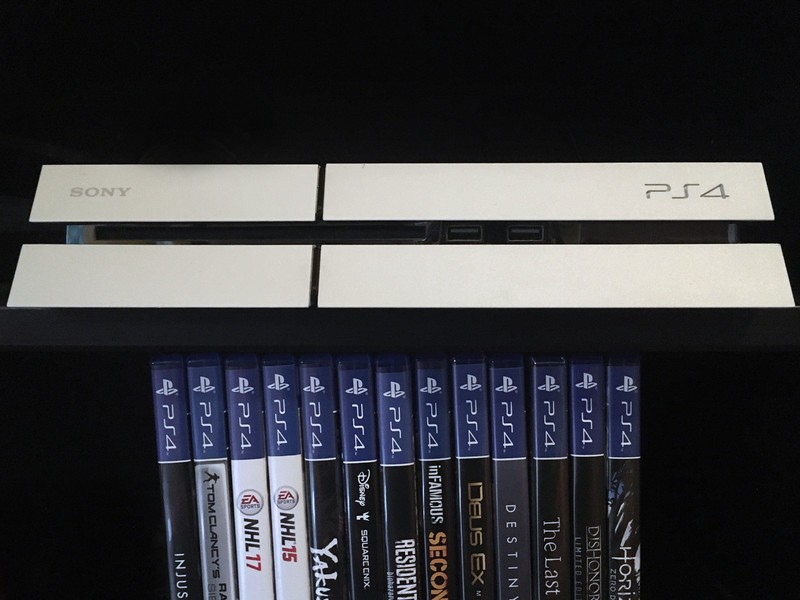
No game lives forever.
It happens to those with even the most spacious of hard drives. Sometimes you just run out of space and some of those old games have to go. Or maybe it’s as simple as a terrible game in your library and every time you look at it you are reminded of what a terrible waste of money it was.
No matter the reason, there are times where you need to delete some games from your PlayStation 4. There are two ways to do it and both of them are easy as pie. Let’s take a look.
Deleting games directly from your library
From the main page of your PS4, scroll all the way to the right and select Library.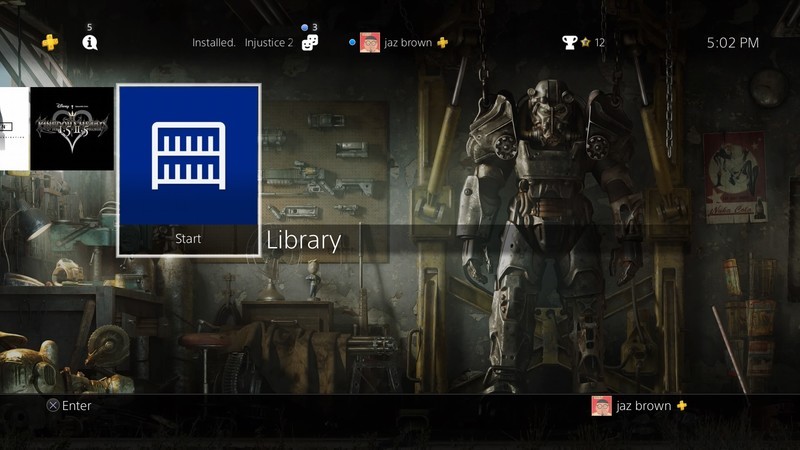
Once in your library, find the game targeted for elimination. 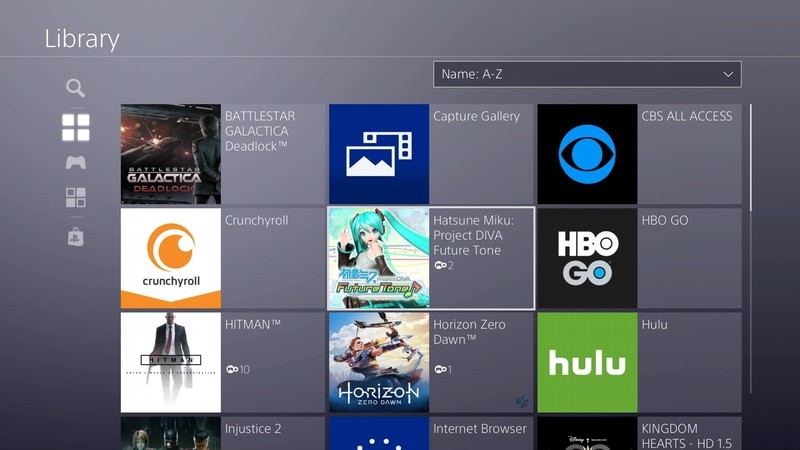
Push the Options button on your PS4 controller. 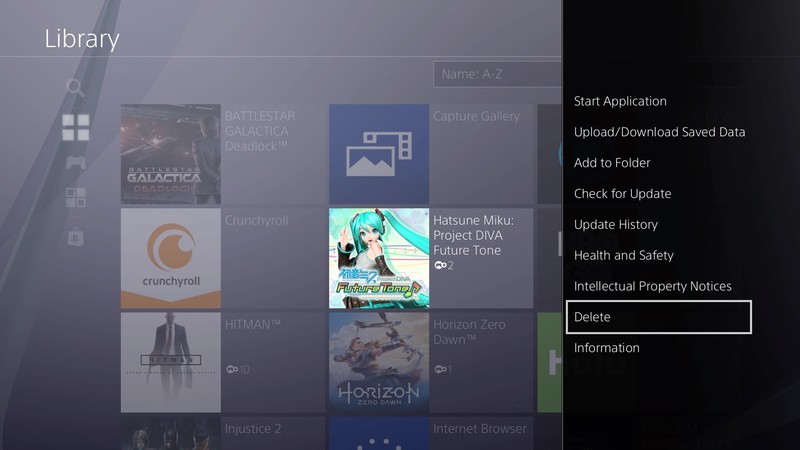
A menu will pop up on the right. Scroll all the way down to Delete and select it. 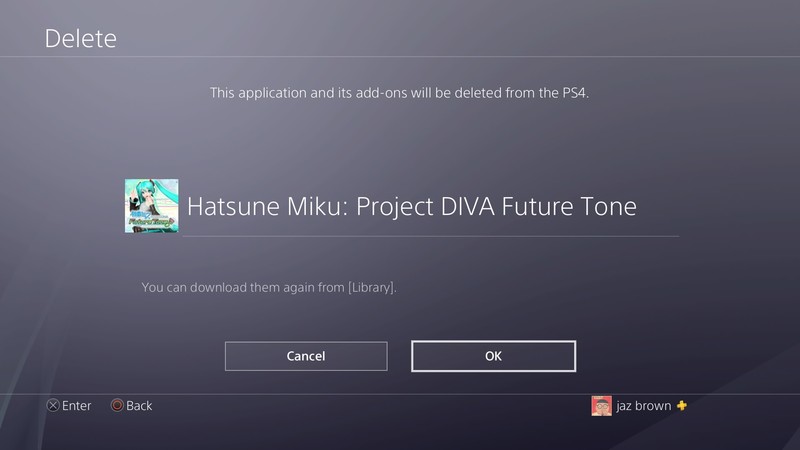
You will then be presented with a screen letting you know you’re about to delete the game. Select OK and POOF it’s gone.
Deleting games from the Storage Menu
From the main page of your PS4, go to Settings. 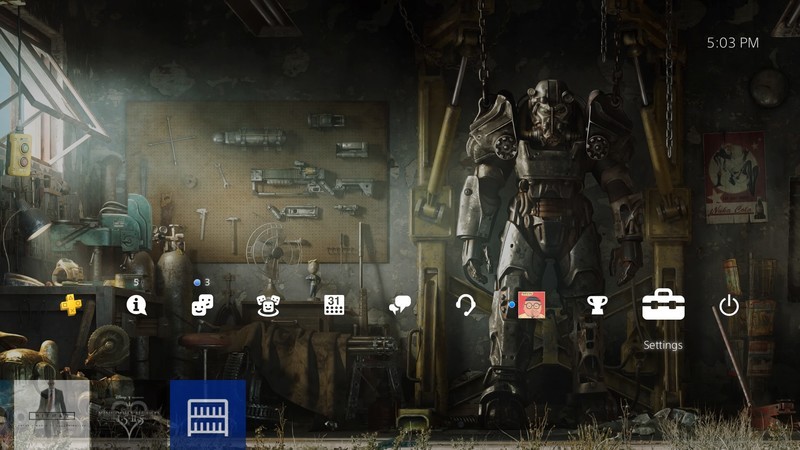
Within the Settings menu, scroll down to Storage. 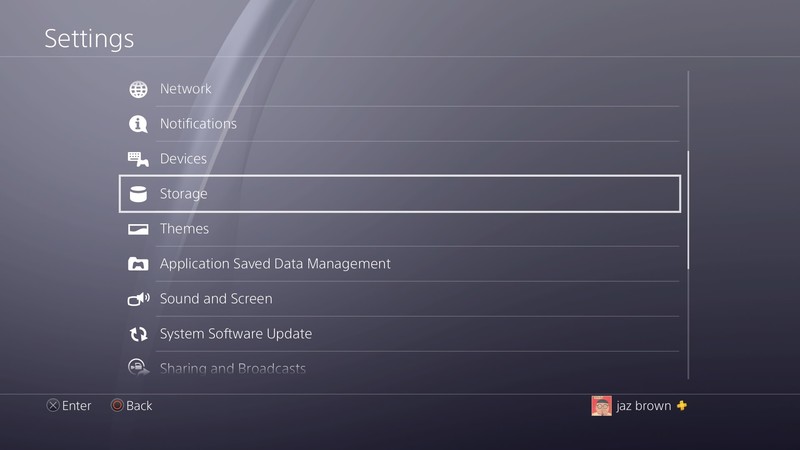
Choose the drive you would like to delete games from.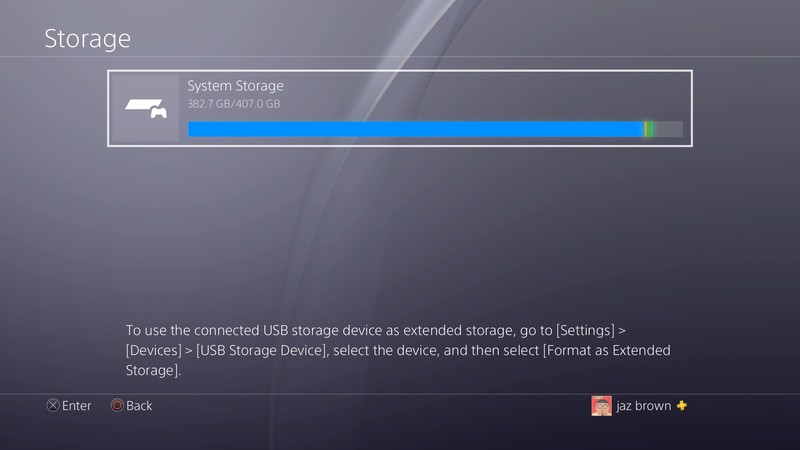
Select Applications.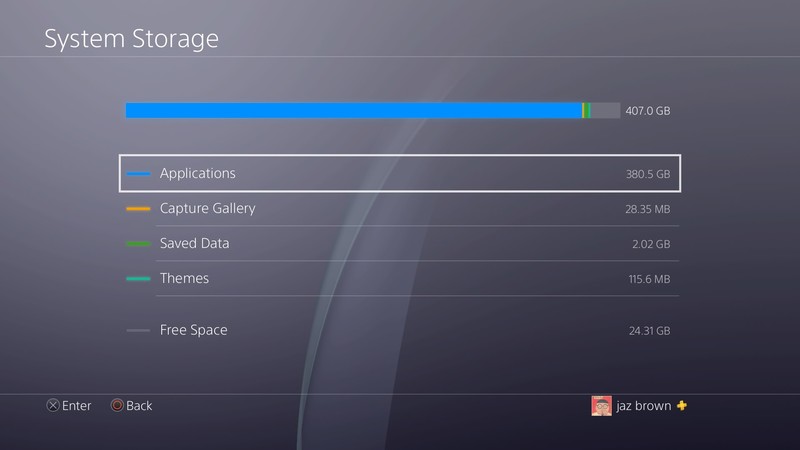
You will then be presented with a list of all games and applications on that drive. Scroll down to the one you would like to delete. 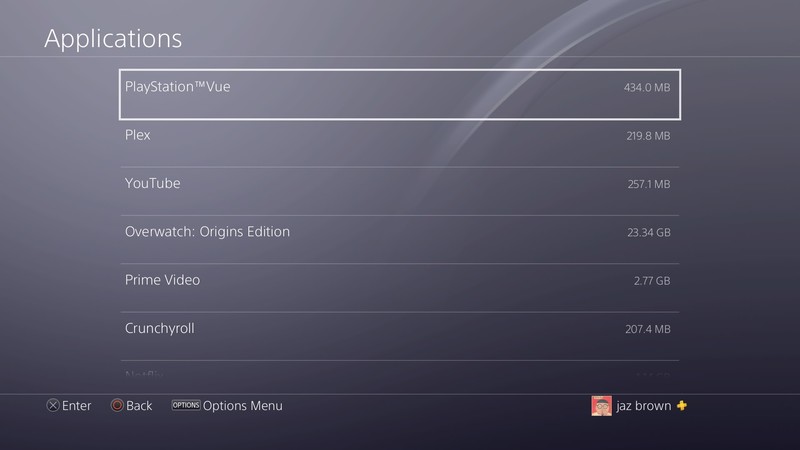
One your cursor is on the game you would like to delete, push the options button on your PS4 controller.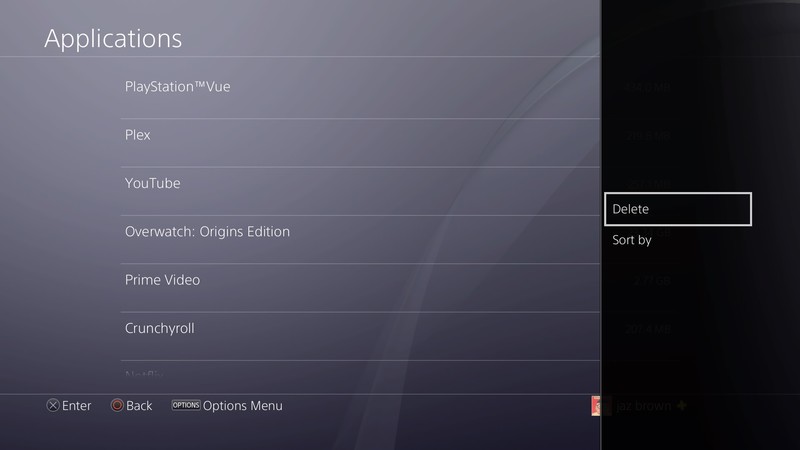
Select the Delete option and that game is whisked away to the nether realm.
One thing to note is that if you accidentally delete a game or you decide that you want it back later, you can always download it again from your Library page.
Once you have had a PS4 for a while it is almost inevitable that you will have to deal with data management in some way or another. Hopefully, this guide will help you keep a nice spacious harddrive with room for all the games you want.
What games are you deleting?
PlayStation 4
- PS4 vs. PS4 Slim vs. PS4 Pro: Which should you buy?
- PlayStation VR Review
- Playing PS4 games through your phone is awesome
Amazon
It’s time to bring back Google Glass
Google Glass was an experiment that came before Android was ready. It’s ready now, but are we? I think so.
In 2013, the world was not ready for Google Glass when the company let a few thousand developers (and bloggers) take a pair into the wild. Neither was the software that powered it. But five years is a lifetime when it comes to technology and I think both our readiness and Android’s capabilities have changed enough to bring the idea back.
Google has the money and ability to try some crazy ideas, like Google Glass in 2013.
It’s easy to call Google Glass yet another failed idea from Google, which loves to try outlandish ideas and is willing to see them fail. The reality is that Google wasn’t exactly sure how Glass could and would be useful, so it crowdsourced ideas from people who were willing to try them. Fast forward a few years and Google saw the potential of Glass in the enterprise. Lo and behold, Glass Enterprise Edition was born and collaboration and teleconferencing, from professionals like surgeons or security specialists, is better than ever. These are the kinds of projects a company with money to burn can do when executives and board members have a bit of dreamer in them.
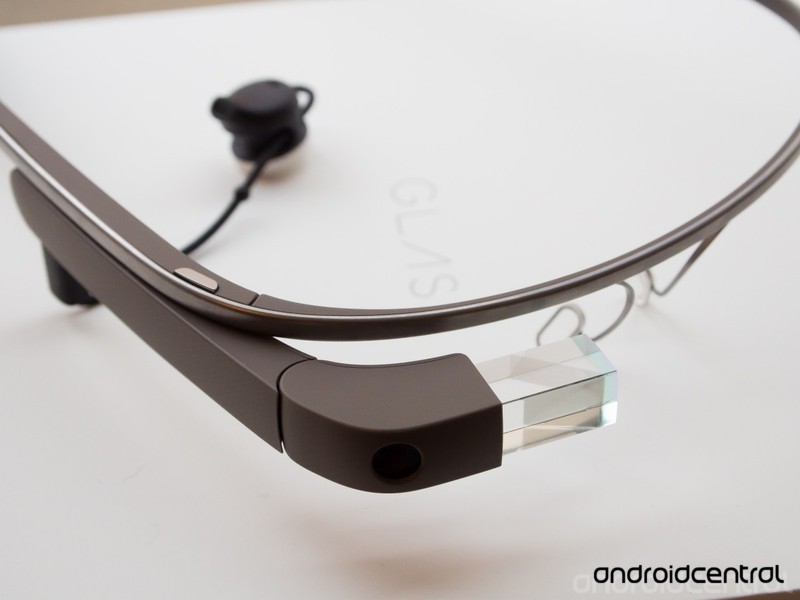
We — the collective we that includes you, me, and anyone else who pays attention — didn’t have enough of that dreamer in 2013 and didn’t see a need for a computer that you wear like a pair of glasses. We decided it needed to die, and there was (and remains) pervasive resistance to the idea that wearable cameras are a bad idea. Never mind that everyone using Glass also had a phone with a much better camera on them, or that the government and businesses across the country were recording our every move, a camera you can wear was outrageous. Selfies while wearing Glass in the shower didn’t help, either.
I always thought the camera you could see was better than the cameras you couldn’t if one were concerned about privacy.
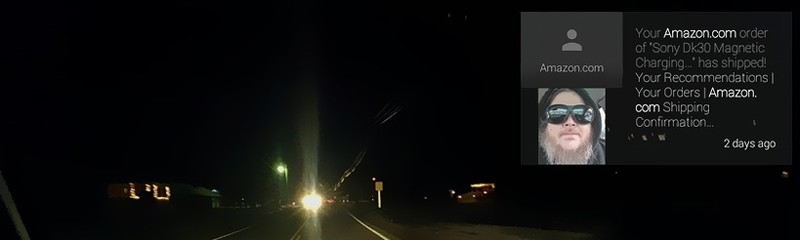
I’m not sure how much ill-informed consumer backlash had to do with the cancellation of a true consumer version of Glass. I do know that said consumer edition would have failed on its own, though. I know this because I used the product and it was clunky, distracting, and nowhere near fluid and friendly enough for anyone but the true tech hardcore to love. Android was nowhere near ready to be 100 percent hands-free, and the pseudo-Google Now interface that powered Glass was a typical version one product that nobody liked. I had this epiphany one evening while driving in winter weather, trying to not be blinded by oncoming headlights, and having Glass tell me about a package Amazon sent two days prior.
Android Oreo and Google Assistant changed all of that. Like it or not, you can do most anything you would want to do on a face-mounted computer by talking to Google Assistant. More importantly, Google’s AI could adapt both to a wearable and to your needs. Of course, more powerful and more miniaturized hardware wouldn’t hurt when it comes to making a user experience that flows without being distracting because it can know you’re going 30 miles per hour in a mix of rain and ice at 10 PM on a Sunday. Assistant isn’t perfect, but it’s smart enough to know not to bother me with all that going on.
Google Assistant is not perfect, but it’s smart enough to not try to kill us on an icy highway.
More importantly, Assistant’s ability to work with home automation products and be contextually aware can make Glass amazing. Front door locked and you have a bag or two of groceries in your hands? Look at the lock and blink to open the door. Glare from a window is at just the right angle to make you miserable? Glass could know this and lower the blinds. Glass could do these sort of things and more, so my novelty ideas are just the tip of an AI-powered automated future where everyone has a tiny computer strapped to their head.
Maybe my ideas of a utopian future aren’t the best example of how Glass could be a product we want in 2019. That’s why I don’t work at Google thinking up ways to change the world and stuff. The people who do work at Google to change the world can think of ways to integrate Glass into real life, though. If Snapchat was willing to try it, Google should do the same.
 AIVAnet