


Watch Airbus give its whale-shaped Beluga plane a cute makeover
Airbus
Airbus’s Beluga aircraft is named after the Arctic whale that it resembles, and just in case anyone was in any doubt about just how similar the two look, the plane maker recently gave its new BelugaXL aircraft the cutest makeover ever.
According to Airbus, 20,000 employees were allowed to vote on six different liveries, with 40 percent choosing the smiley whale face as their favorite.
The company recently tweeted a short video, complete with several time-lapse sequences, showing the new livery being applied to its very first BelugaXL aircraft.
The team had a whale of a time getting the new #BelugaXL ready for the big reveal! Say hello to the next generation of airlifters. pic.twitter.com/3quQU34h2M
— Airbus (@Airbus) July 3, 2018
The enormous and unusual-looking plane has been in service for the last 20 years, flying huge aircraft components such as fuselage sections, wings, and tails from European suppliers to Airbus’s assembly plants in Toulouse, France, and Hamburg, Germany.
Airbus decided to build the largest Beluga to date — the aptly named BelugaXL — to ramp-up capacity requirements for the company beyond 2019.
“The new oversize air transporters are based on the A330-200 Freighter, with a large re-use of existing components and equipment,” Airbus explains on its website, adding that the first of five BelugaXLs will undergo test flights this summer before entering into service in 2019.
The front of the 184-foot-long (56 meters) Beluga opens up, allowing cargo to be loaded into the cavernous “bubble” space. The plane’s cockpit is placed lower than usual in order to avoid the need to disconnect electrical, hydraulic, and flight control systems every time cargo is loaded and unloaded.
Compared to the current Beluga, the new XL version can take 6 tons of extra cargo, increasing the limit to 53 tons. It’s also 20 feet (6.1 meters) longer and 3 feet (1 meter) wider than its predecessor, allowing Airbus to make further efficiency improvements when it comes to moving large airplane parts.
The new design will, for example, be able to carry two Airbus A350 wings instead of just the one as with the current Beluga.
It’ll also be able to transport sections of the double-decker A380 — currently the world’s largest passenger plane — allowing the aircraft manufacturer to simplify some of its up-to-now highly complex logistical operations that involve driving the A380’s wings and fuselage through the narrow streets of French villages on their way to the Airbus assembly site in Toulouse.
Editors’ Recommendations
- Airbus’ odd-looking BelugaXL aircraft is one step closer to its maiden flight
- Sleep tight: Airbus wants to fill plane cargo holds with beds
- Norway tests its first all-electric plane, hopes for passenger flights by 2025
- Airbus’ latest A350 aircraft to break record for longest commercial flight
- Kitty Hawk’s personal flying vehicle takes to the skies
Who controls the tech inside us? Budding biohackers are shaping ‘cyborg law’
Karen Sandler Getty
Karen Sandler has a complicated relationship with her pacemaker. On the one hand, the device has the power to save her life. On the other, it sometimes suddenly and unnecessarily shocks her, mistaking a slight aberration in her heartbeat as a call for help.
Sandler was pregnant during two of those occasions, when the pacemaker detected her heart palpitations (which aren’t abnormal in expecting mothers) and delivered an unwarranted jolt. Worried that the device would misfire again, Sandler asked the manufacturer for access to its source code, hoping to reconfigure the implant to suit her condition. The manufacturer denied her request.
“As the law stands, cyborgization promises to make us both more vulnerable and more powerful.”
“The only way that we could solve that problem was to have my cardiologist prescribe me heart medication, which slowed down my heart rate so much that I had a hard time walking up a flight of stairs,” Sandler tells Digital Trends. “The sole point of that medication was to prevent me from getting unnecessary treatment from my device.”
Sandler now serves as the executive director of Software Freedom Conservancy, a not-for-profit organization that promotes free and open source software, supports open source projects, and encourages policies more pertinent to the way we engage with technology in the present day.
She’s one of a handful of modern-day cyborgs fighting for control of the tech that’s in their bodies. This might seems like an esoteric issue — a topic that impacts the fraction of the population fitted with a medical device, prosthesis, or experimental implant — but as the number of people who are tethered to a device of some kind increases, cyborg rights and cyborg laws are bound to affect us all.
Cyborg society
We live in a society of cyborgs. Look at any bus stop or coffee shop — it’s clear we’re deeply, viscerally, compellingly intertwined with the technology around us. From the cellphone that’s rarely out of reach, to the myriad data and metadata that weave together tapestries of our behavioral patterns and whereabouts, tech tools have become disembodied digital organs, like little minds in the palm of our hands.
blackzheep / 123RF
“As the law stands, our cyborgization — our reliance on a 24/7 technological interfaces, whether physically incorporated into our bodies or not — promises to make us both more vulnerable and more powerful,” says Jane Chong, a lawyer and co-author of a Brookings Institute report on cyborg law.
Cyborg right’s are not a new issue. For decades, people have equated the rights of cyborgs with the rights of humans in general.
“More vulnerable because we may be subject to new forms of compromise and exploitation, whether it’s our privacy that’s at stake or something else, like our right to make autonomous decisions regarding our health and health data. And more powerful because we may be able to put up new barriers when it comes to the government’s ability to access information that it could previously have obtained by way of, say, a search warrant based on probable cause.”
This newfound technological power and vulnerability may need a whole new set of laws and regulations, according to Chong, ones aimed at protecting individuals (their data and enhancements) in a society rife with surveillance and digitization.
A brief history of cyborg rights
Cyborg right’s are not a new issue. For decades, people have equated the rights of cyborgs with the rights of humans in general. In her 1984 essay, “A Cyborg Manifesto,” feminist and literary theorist Donna Haraway claimed with conviction that we “are all chimeras, theorized and fabricated hybrids of machine and organism; in short, we are cyborgs.”
The topic made national headlines in 2002, when Steve Mann, a Canadian engineering professor and longtime cyborg, who wears a web of wires and electronics to augment his senses, was accosted by airport security, strip-searched, and injured in the process. Beyond his physical and psychological distress, Mann calculated $56,800 in damages to his equipment. Ten years later, he was assaulted in a McDonalds in Paris, France because employees objected to his digital eye glasses.
Steve Mann, Sequential Wave Imprinting
And the first government-recognized cyborg was announced in 2013, when Neil Harbisson, a colorblind artist and co-founder of the Cyborg Foundation, whose cranial antenna implant lets him detect color, lobbied the United Kingdom to let him take his passport photo with his device attached.
But cyborg rights have only recently begun to be argued in America’s highest court.
In 2014, the United States Supreme Court ruled that police officers couldn’t search a cellphone that was seized during an arrest, because cellphones are such intimate parts of our being that it would undermine the Fourth Amendment. “Modern cellphones…are now such a pervasive and insistent part of daily life that the proverbial visitor from Mars might conclude they were an important feature of human anatomy,” wrote Chief Justice John Roberts.
“People today have very few rights to the proprietary information implanted in them.”
The Supreme Court followed up that landmark decision with another one this June, ruling that police need to obtain a warrant to access cellphone data from carriers. By adopting digital-age privacy rules, the justices made the legal case for how our devices are extensions of our mind beyond the body. After previously referring to the cellphone as “a feature of human anatomy,” Roberts wrote that the cellphone “faithfully follows its owner beyond public thoroughfares and into private residences, doctor’s offices, political headquarters, and other potentially revealing locales.”
The rights of individuals to argument their bodies with technology is also being argued abroad. In March, an Australian biohacker named Meow-Ludo Disco Gamma Meow-Meow was fined $220 for breaching the terms of use of a public transport company, Opal Card, after he implanted the chip from his metro card into his hand. He was required to pay an additional $1,000 in court costs on top of that. But after appealing his conviction, a district court judge overturned the conviction, citing Meow-Meow’s good character and the “highly unusual [case] involving a unique set of circumstances.”
Neil Harbisson (left), giving a talk at the Science Museum, London in 2015. Wikimedia
This case might no be as unusual as the Australian judge thinks. Biohackers around the world — not least among them, our own Emerging Tech editor — have embedded NFC chips and rice-sized RFID tags into the flesh of their hands, using the tiny implants to open apps, unlock doors, and store personal data.
Entire countries are even on board. Last year, Sweden began a trial using NFC implants for public transport. Around 1,500 test subjects had an NFC chip embedded under their skin, enabling them to check in at train stations simply by swiping their hand.
“Implants and other physical modifications are interesting because the body is in many respects a protected space under our laws,” Chong says. “We are going to see the emergence of a lot of gradations in that protection.”
Companies over consumers?
Historically, the company’s right to its proprietary information has trumped a consumer’s right to know the ins and outs of their device, according to Chris Hables Gray, a cyborg researcher at the University of California, Santa Cruz. Gray worries that new technologies that are more integrated with the human mind and body are still regulated as if they’re old technologies, with their clear distinction between what’s human and what’s machine.
“People today have very few rights to the proprietary information implanted in them,” Gray says. “It’s a real problem of capitalist priorities dominating over the rights of individuals to control their own destiny.”
Surveilluminescent wand: When moved through space in a long-exposure photograph, it makes the sightfield of a surveillance camera visible. Wikimedia
Karen Sandler replaced her pacemaker after giving birth, opting for a new manufacturer, but still faces certain vulnerabilities that she says could be mitigated with access to the source code.
“Almost every pacemaker on the market now broadcasts by default,” she explains. “They have a wireless interface that’s always open to connection, and currently there’s no encryption on most of these devices so they’re entirely exploitable.”
“The fundamental issue is we need a new baseline of guaranteed rights.”
Pacemakers contain personal information — including a person’s name, heart condition, and doctor. A bad actor who decided to hack into a broadcasting implant could both access this information and manipulate the device to make it malfunction.
“Right now we basically have the worst of both worlds,” Sandler says. “We have no real security on these devices, which means that anyone with over-the-counter equipment can take control and deliver even fatal shocks … And we have code that is not available for us to review. So we have no transparency and no security.”
What cyborg rights might look like
A few quick fixes would help address Sandler’s concerns. Among them, she says consumers should have the right to not broadcast data from their medical devices. Source code should also be made available for review by researchers, who could be given access to the code under a non-disclosure agreement, allowing them to test for vulnerabilities, share their findings with manufacturers, and only go public if the company fails to fix the product.
For Chris Hables Gray, a much more comprehensive reworking of the law is in order, which grants broader liberties and freedom to all individuals. He laid those ideas out in his Cyborg Bill of Rights.
“The fundamental issue is that we need a new baseline of guaranteed rights that aren’t covered, but that we wish might have been covered, by the constitution or other statements of rights,” Gray says.
Linda MacDonald Glenn, a lawyer and bioethicist at California State University, Monterey Bay, agrees. She points out that laws evolve to reflect changing norms and insists that in our hyperconnected times we’ll need a significant shift towards laws that accommodate people and technology as one.
Accountability and responsibility may be some of the biggest hurdles for cyborgs going forward.
“Traditionally under the law there’s been this dichotomy,” she says. “Either you’re a person or you’re property. Perhaps it is time for the law to take this from a different approach. That is, rather than looking at it as a dichotomy, we might want to look at it as more of a continuum,” in which devices begin to blend with the personhood of their owner.
However, Glenn admits there could is a “dark side” to the continuum idea, which could lead to classifications of things as “not quite human” or “less than human.”
Questions about accountability and responsibility may be some of the biggest hurdles to emerge when shifting certain rights from companies to consumers, according to Kevin Warwick, a professor of cybernetics often regarded as the world’s first cyborg. Although Warwick supports Sandler’s right to inspect (and perhaps even alter) her pacemaker’s software, he points out how that might complicate questions of accountability if the device were to malfunction.
Kevin Warwick, the world’s first cyborg and a former Professor of Cybernetics at the University of Reading, England. Kevin Warwick
“There are all sorts of legal issues there if she did have the and she decided to reprogram it so it worked in a different way,” Warwick says. “Who has the responsibility if she subsequently became ill or even died from it? Who bears the responsibility if she has taken over?”
These are the types of questions lawyers and lawmakers will argue over as we push further into the digital age. Their answers will shape the way we live as increasingly technological beings.
Editors’ Recommendations
- Meet the Australian ‘techno-artist’ growing a web-connected ear on his arm
- It took them 15 years to hack a master key for 40,000 hotels. But they did it
- MIT can charge implants with external wireless power from 125 feet away
- Technology makes our lives easier, but is it at the cost of our humanity?
- The new ‘Terminator’ movie: Everything we know so far
Jaybird Run Review: Truly wireless headphones done right

Ever since Apple released the AirPods, Android users have been hoping for a proper competitor. We have seen options from Bragi, Samsung, and others, but nothing really has stuck with us.
READ MORE: Zolo Liberty+ Headphones Review
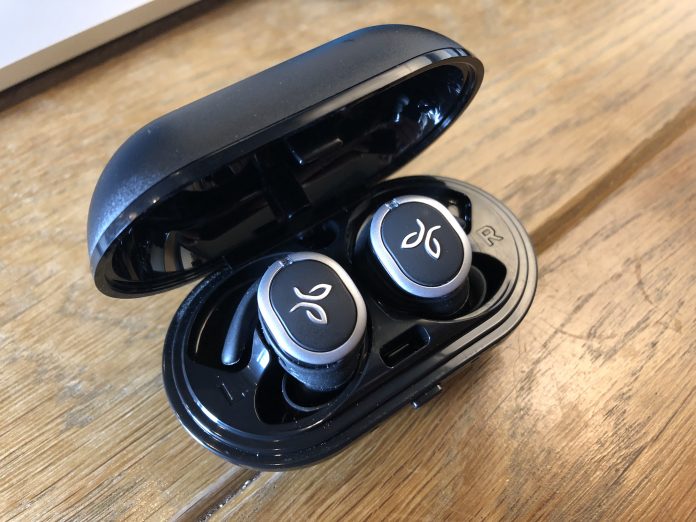
Then, Jaybird decided to jump on the hype train with the Jaybird Run. These headphones are completely wireless, come with a charging case, and come from a trusted brand.
In fact, Jaybird has been one of the de-facto choices for Bluetooth headphones if you want to move out of the budget market. But how well do the Jaybird Run really stand up?
Design
When you unpackage the Run for the first time, you will notice that these are a bit bulky. You can thank the included battery for that, but it won’t take away from how good these look.
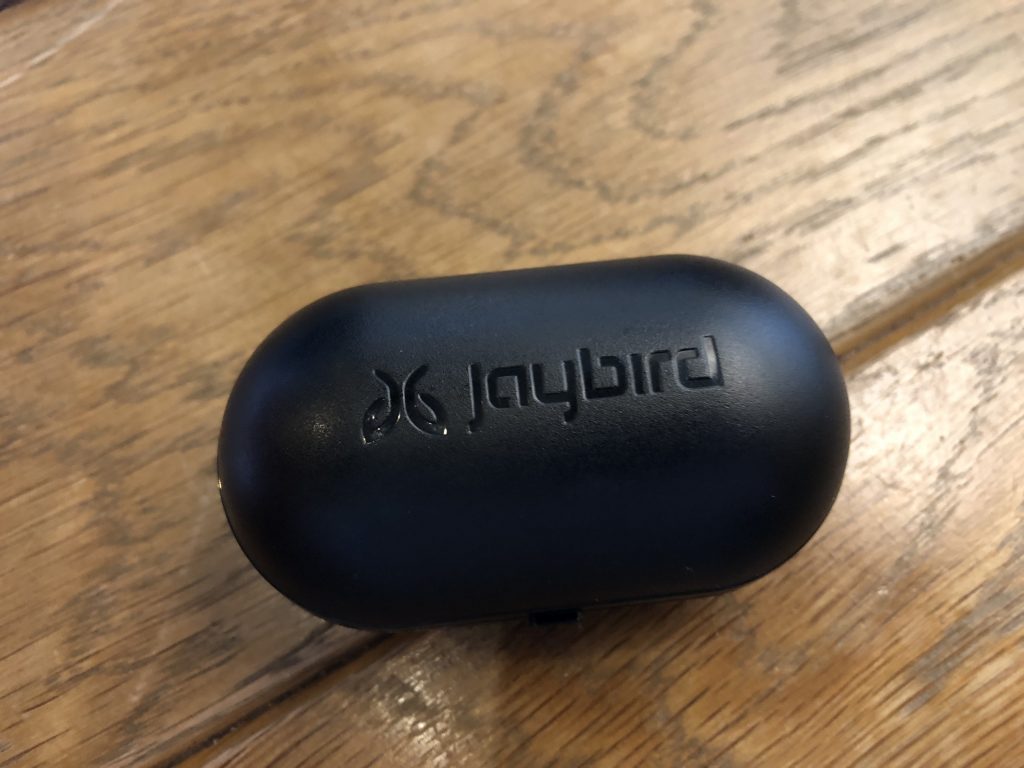
No, the Run won’t turn any heads and make you rush to your local Best Buy to pick up a set. But it’s a muted design that you would expect to see from Jaybird.
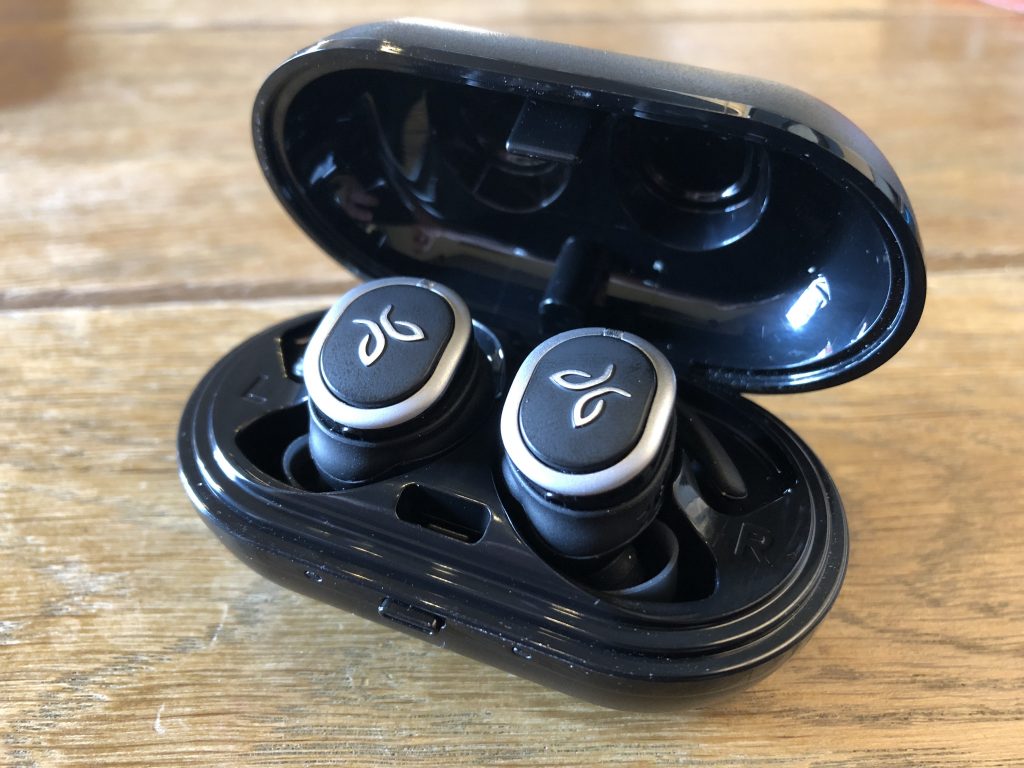
Inside the packaging, you receive the left and right earbuds, charging case/cable, along with a few different ear-tips. This is a much-welcome addition so that you can get the perfect fit. There are even “fins” that will fit into a groove and help provide a better fit in your ears.
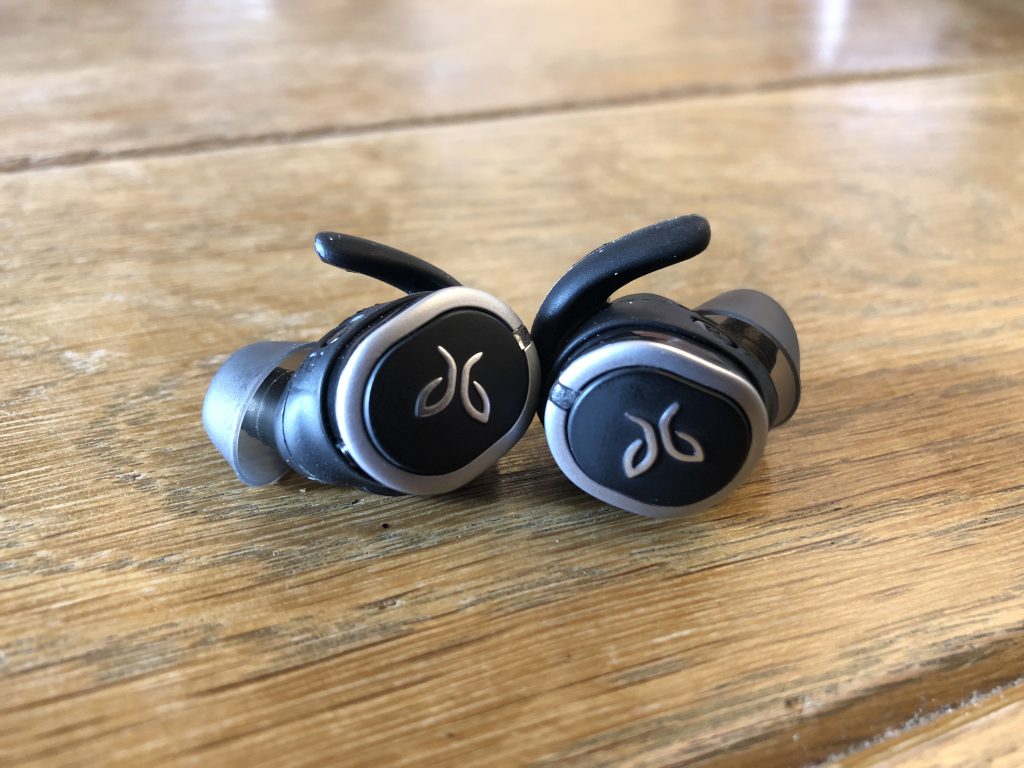
On the outside of each headphone, you will see the Jaybird logo with a small LED placed at the top. The LED allows you to gauge battery life, along with pairing status and more.
On the inside of each headphone, you’ll find the charging pins so that you can use the charging case on the go. You will also find some labeling to let you know which headphone goes where.
Usability
The pairing process for the Jaybird Run is pretty simple. Before getting started, you’ll want to download the free Jaybird MySound app from the Play Store.
This will assist in the pairing process, along with including some extra goodies. Once the Run are charged up and ready to go, you can take them out of the case and power them on with the button on the outside.
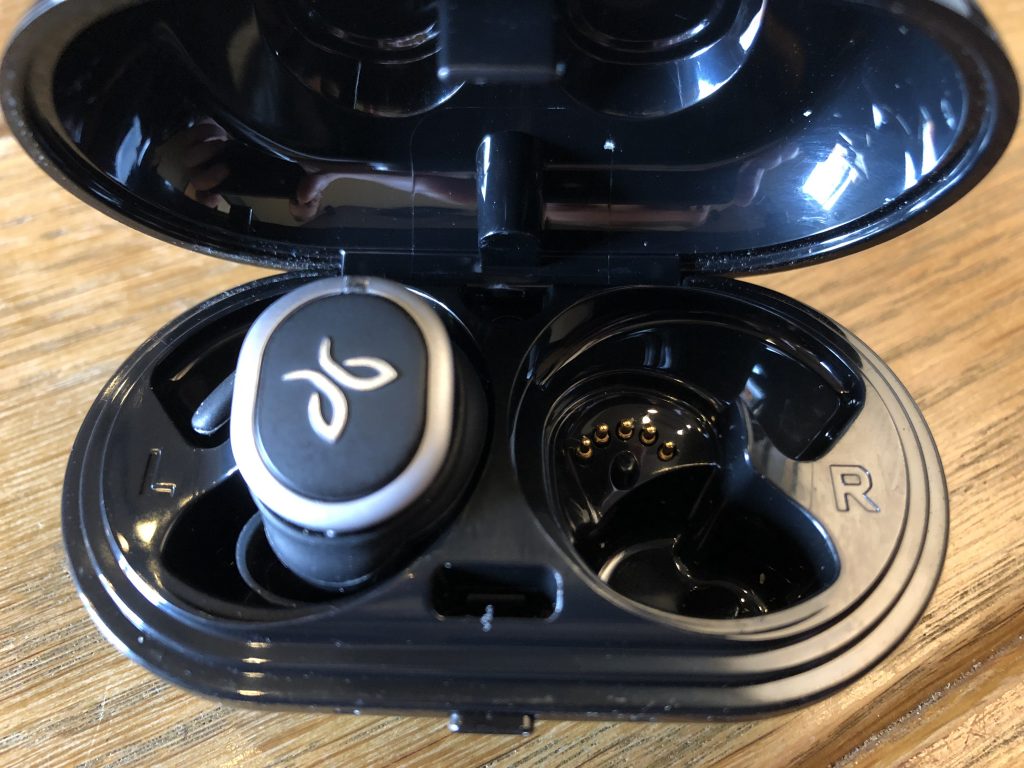
That’s right, the big Jaybird logo on the outside of each earbud is actually a button. A long press of the button turns it on, and will also put it into pairing mode for the first time.
After these have been connected to your smartphone of choice, you can get started. Which brings us to the MySound application.
From within the app, you create and customize different sound presets. This will be super helpful so that your music sounds as crisp and clear as you want it to.
Overall, the pairing process is extremely easy, even if you want to pair it with more devices. There are even community playlists and EQ presets for you to save and take advantage of.
For those who rely on Jaybird for workout headphones, have no fear. The Run is both sweat-proof and water resistant. These will keep going, regardless of whether you’re running in the rain or pumping some iron in the gym.
Battery life
When it comes to these truly wireless Bluetooth headphones, the biggest question is battery life. Jaybird claims that the Run will last for up to four hours before needing to be recharged.
In our testing, the Run came close to this on a regular basis. At times we would see shorter battery life, but that was largely due to the EQ being put to work for bass-heavy music.
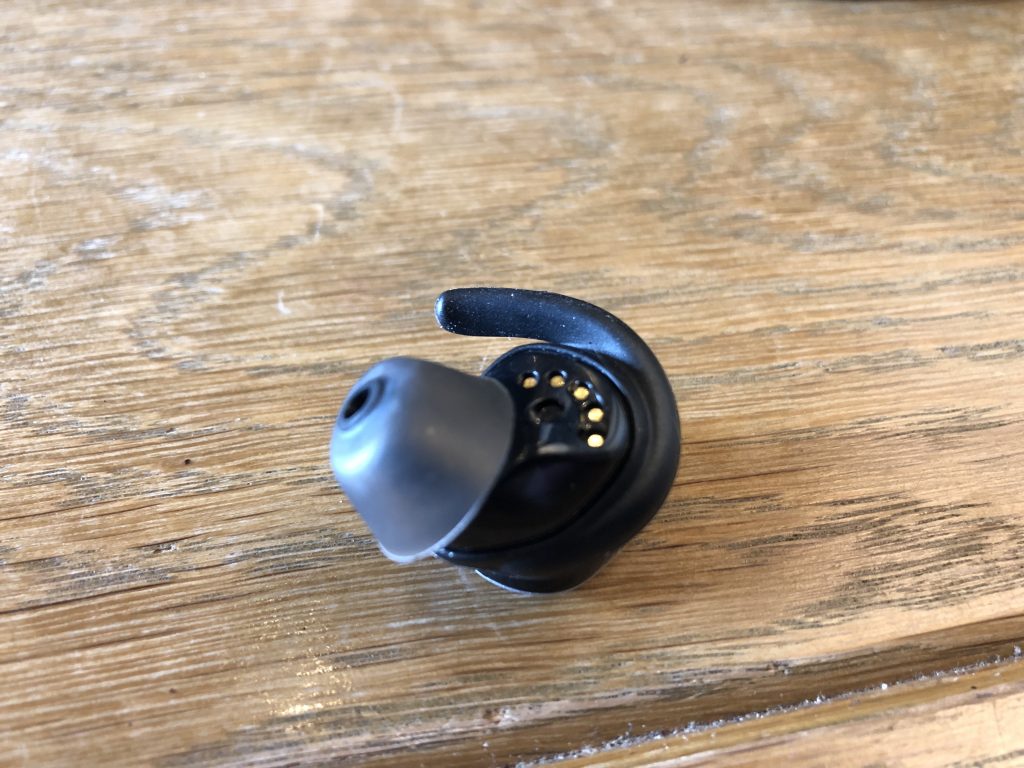
Listening to softer content such as podcasts and audiobooks gained us as much as an extra 45 minutes of usage. I look at this as a benefit due to the fact that the MySound allows for so much customization.
The included battery case will provide up to 8 extra hours of charge. Meaning that you can swing for two more playing sessions with the Run before having to completely charge everything.
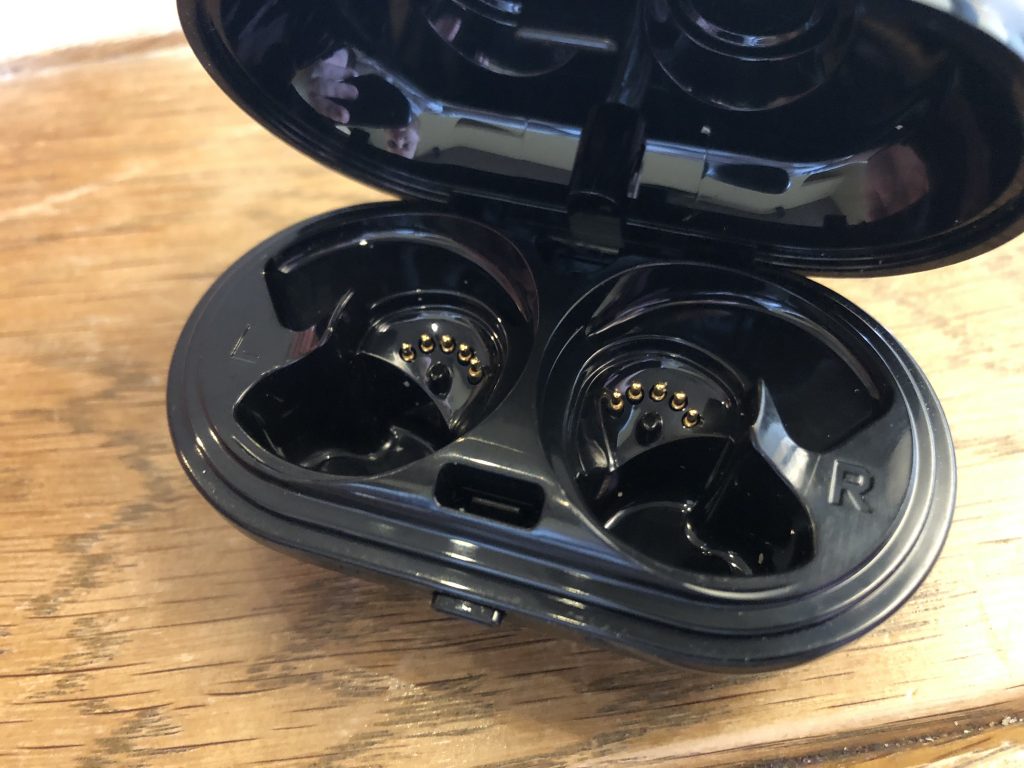
But what makes life even better for Run owners is the Fast charge capabilities. If you’re going out for a bit, you can throw the Run in the charging case for 5 minutes and get an extra hour of play time.
That’s pretty impressive and is something that more of these headphones manufacturer’s should do.
Sound
The next big question when it comes to these headphones is the sound. Did Jaybird sacrifice anything to join the truly wireless headphone push?
In my experiences with the Run, the short answer is no. Of course, these headphones aren’t studio quality, but they will definitely hype you up during a run or workout.
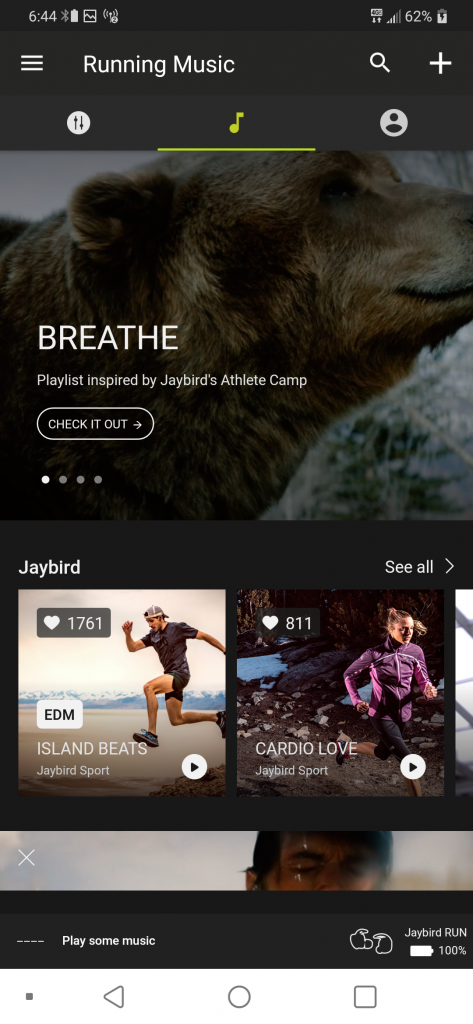
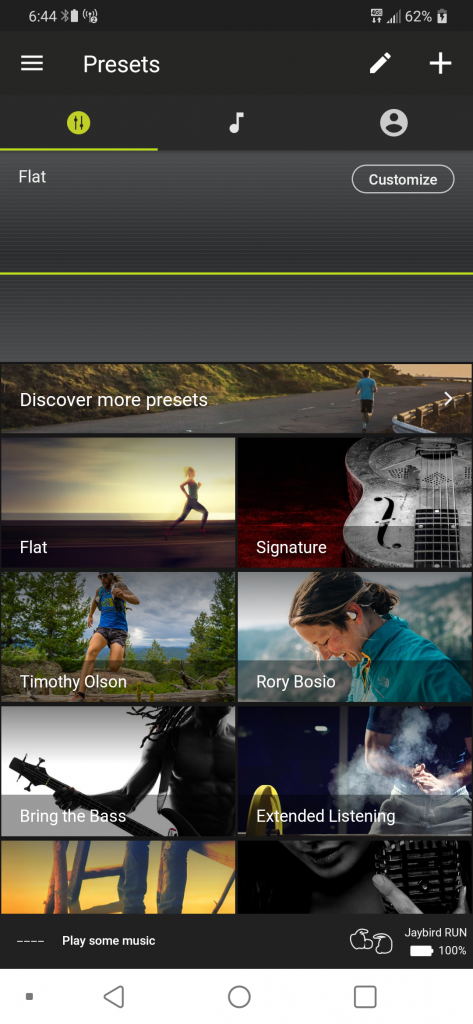
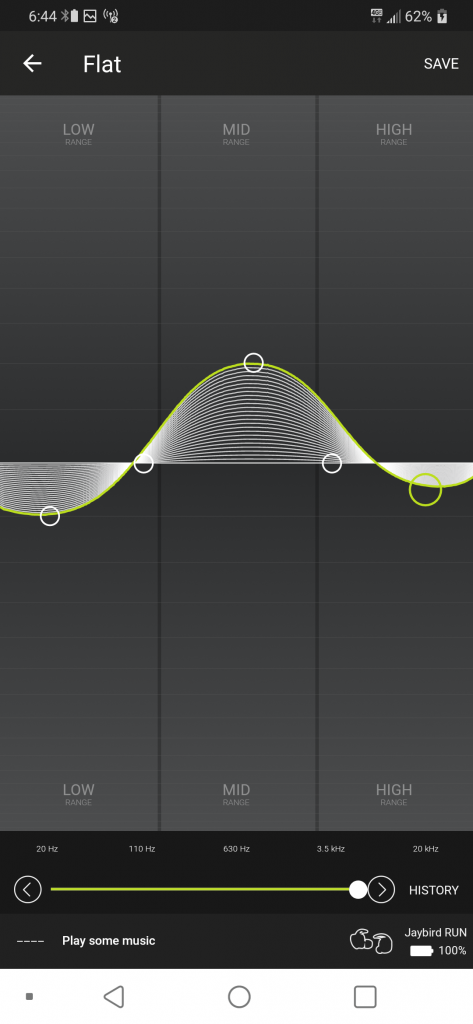
Listening to some Rap or Dubstep? Pump up the base a bit. Listening to a podcast? Use the proper preset or create one for your personalized listening experience.
We can’t say enough good things about being able to customize presets to your needs. You won’t have to worry about being “stuck” with bass that is too heavy or treble that is too high.
Jaybird really hit the nail on the head with the Run and these are some of the best sounding earbuds on the market.
Conclusion
Jaybird is killing the game, as it has been for quite some time. With the release of the Jaybird Run, the company is finally moving out of the wired era, and into the wireless age.
Despite being the company’s first such iteration, you can definitely tell that some cues have been taken from previous products. But in the end, what you get is a solid product from a company that you trust and love.
The biggest gripe is one that we haven’t mentioned. Price. The Jaybird Run are priced at $180, which is $30 more than the AirPods and Zolo Liberty+.
But what you get for that $180 is a high-quality product that will survive anything that you throw at it. If you want to pick up a set for yourself, hit the button below and let us know what you think.
Buy the Jaybird Run!
PG&E applies to build Tesla’s largest-yet battery farm for Silicon Valley
Tesla’s largest-ever Powerpack installation may be coming to north-central California. Pacific Gas and Electric Company (PG&E) applied to the California Public Utilities Commission (CPUC) for approval for a utility-owned 182.5 MW energy storage farm using Tesla Powerpacks at the company’s South Bay – Moss Landing Energy Storage site.
PG&E also sought approval for three third-party owned energy storage projects. One of the third-party projects will have a larger initial capacity than the Tesla project. The Tesla project, however, would have an expansion capacity of 1.1 GW.
The storage projects’ purpose is to help keep electrical power levels even for PG&E customers. The storage facilities would feed power to the grid when consumption exceeds normal levels and during blackouts or other service interruptions.
The three additional projects and their respective storage capacities are Dynegy Marketing and Trade, LLC, 300 MWh; Hummingbird Energy Storage LLC, 75 MW; and Micronoc Inc., 10 MW. All four projects would use lithium-ion battery storage technology and be located in the utility’s South Bay – Moss Landing area, which services from the South Bay area south to California’s central coast. The coverage area encompasses Silicon Valley.
Additional mega-energy farm utility projects
Recurrent Energy’s 350 MW solar power and battery farm
Chernobyl nuclear exclusion zone solar farm
Tesla giant Australia battery reduced service costs by 90 percent
Get in on the action with community solar marketplaces
The projects will have enough storage capacity to provide power to the region’s electrical grid for four hours. If the Tesla project expands to the max, its discharge duration will increase to six hours and provide six times as much energy as the initial installation.
Tesla’s 100 MW battery farm in South Australia, switched on December 1, 2018, has already proved its value. In the first four months of service, the costs for ancillary services to fill in for power interruptions in the region decreased by a full 90 percent, according to McKinsey and Co.
PG&E is looking for improved service and reduced costs from the proposed projects.
“Energy storage plays an increasingly important role in California’s clean energy future, and while it has been a part of PG&E’s power mix for decades – starting with the Helms Pumped Storage Plant in the 1980’s – recent decreases in battery prices are enabling energy storage to become a competitive alternative to traditional solutions. As a result, we believe that battery energy storage will be even more significant in enhancing overall grid reliability, integrating renewables, and helping customers save energy and money,” said Roy Kuga, vice president, Grid Integration and Innovation, PG&E.
Editors’ Recommendations
- Tesla’s giant Australian battery reduced service costs by 90 percent
- World’s largest battery on a desert solar farm would triple Tesla’s record
- California prepares to lead the nation in solar-equipped housing
- Powered by a laser, this insect-sized RoboFly can take off and land wirelessly
- The best solar chargers for your smartphone or tablet
How to fix the most common Windows 10 installation problems
Like any complex piece of software, Windows 10 and its installation process is vulnerable to mistakes, glitches, and hardware errors. That being the case, here are some of the most commonly-encountered problems that arise when installing or upgrading to the new version of Windows. If you’ve got Windows 10 installation problems, you’ve come to the right place.
Side note: If the latest version of Windows 10 is experiencing widespread problems, you may also want to wait. The April 2018 update alone had the potential to wipe all the data from your desktop or break Chrome. Not an ideal outcome! It’s a good idea to research the latest update first to see if there are any notable issues, a sign that you should perhaps hold off on the update anyway and check back later to see if a trouble-free version is available.
Run the Windows Update troubleshooter
Windows 10 includes a troubleshooter that can automatically detect and try to fix problems with updates and patches. If the problem isn’t clear and you aren’t sure what to do next, try running this troubleshooter. It doesn’t always find a solution, but it’s a good place to start.
Step 1: Head to your search box and type in “Troubleshoot.” Select the “Troubleshoot” option that awaits in System Settings.
Step 2: A new troubleshooting window will open. In the first section, called “Get up and running,” you should see an option for “Windows Update.” Select it.
Step 3: A new button should now appear that says “Run the troubleshooter.” Select it to automatically start the troubleshooter and see how it can help.
Step 4: A new troubleshooter window will now open as Windows 10 scans for any problems. If it finds any issues — and it will look for everything from missing updates to corrupted files — then it will notify you and ask if you want to “Apply this fix” or “Skip this fix.” Since you are trying to fix your update, it’s a good idea to always choose the “Apply” option here.
When finished, the troubleshooter with give you a list of any problems found and fixed, at which point you can select “Close” to end the process. If the troubleshooter did find and fix notable issues, you should now try your update process again.
Low disk space
Windows 10 requires quite a bit of free disk space on your hard or solid state drive in order to install. The 32-bit version of the OS — used mostly on tablets and less expensive laptops at this point — needs 16GB of free space, the 64-bit version needs 20GB. If you’re installing from a file stored on your computer itself with the Microsoft upgrade tool, you’ll need an additional two to 4GB just for the installation files.
If you have a full storage drive, or a small one to begin with, you’ll need to make some room. The quickest way to do this is to uninstall space-hogging programs. Robust 3D games and complex packages like Adobe Creative Suite take up gigabytes of space. Uninstall them and be sure to back up any save files or settings. Don’t worry, you can re-install them from the installation discs or with a download once Windows 10 is properly set up.
Should you still need more space, it’s recommended you remove files in the following order: video files, audio files, images of all kinds, then documents, and other files. An external USB hard drive is the quickest and easiest way to accomplish this — simply save any files you can’t delete to the external media, and they’ll be easy to restore once you’ve installed Windows 10. Afterward, empty the Recycle Bin to clear the deleted files, or run a program like CCleaner to clear out your browser caches, logs, and other things that take up storage space.
To check your progress, click the Start button, type “This PC,” and click the result. The drive labeled “Windows” is what Windows 10 will install to — make sure you’ve got at least 20GB free just to be safe.
ISO image issues
If you’ve used the Microsoft Media Creation tool to burn a disc or create a bootable USB drive to install Windows 10, it’s possible that the media itself is damaged or corrupt. This will result in a failed or damaged installation. Sadly, it’s extremely difficult or impossible to modify the files once they’re written to the disc or drive. You’ll need to run the tool again to install Windows 10, which may necessitate access to another laptop or installing your older version of Windows again.
If you continue to experience problems after creating multiple installation media and trying to install Windows 10 more than once, you may have a persistent hardware problem. The CD/DVD burner or the USB drive you’re using may be faulty. If possible, try using a different USB drive or an external disc burner.
Thankfully, you might be able to just install Windows 10 from an ISO image, which you can grab here, for free. Fire it up, follow the prompts, and it’ll tell you if you’ll be able to install your new operating system without the use of external media like flash drives and discs.
Error codes
Sometimes during the Windows installation process, the program will stop and display an error code. There are hundreds of possible error codes and at least as many potential problems. The best thing to do in this situation is to write down the code — you may not be able to copy it from the display screen — and search the internet for the core problem, and hopefully, a solution.
Here are some of the steps you can take if there’s no reliable information for your specific code:
- Unplug any unnecessary devices from your computer, like flash drives and dongles. Laptops should have nothing plugged in at all (except a power cord), and desktops should only have a monitor, mouse, and keyboard attached.
- For desktops, remove or disconnect any unnecessary internal hardware. If your PC includes an integrated graphics card or sound card on the motherboard, remove any standalone cards. Unplug any secondary storage drives (but not the primary OS drive), disc drives, card readers, and extra hardware such as a fan controller or USB extension connected to a PCI port.
- If you’re upgrading your PC and you’ve selected a standard upgrade that preserves your programs, remove unnecessary programs before beginning the installation process. Anti-virus programs and drivers for devices like game controllers seem to have the most trouble during the upgrade process.
- If your Windows install or upgrade doesn’t complete, or if you have issues with startup, you might want to disable hibernation, which you can do by typing “powercfg /h off” into a Command Prompt window.
- Alternately, simply install the operating system “cleanly,” preserving your personal files but not the programs. To do so, select “Custom: Install Windows” instead of “Upgrade” during the setup process. You can re-install your programs later.
Microsoft also offers a list of potential Windows 10 installation error codes, and what they mean.
Incompatible hardware
Windows 10 runs on a variety of hardware, including Atom-based tablets and other low-power systems, but it does have minimum requirements. If your computer has a processor with a speed of less than 1GHz — or RAM totaling less than 1GB for the 32-bit version or 2GB for the 64-bit version — the setup wizard will not allow you to complete the installation. Desktop users can often upgrade their RAM or processor, but laptop users who don’t meet the minimum requirements are probably out of luck.
For a look at how much RAM you really need, check out our guide to all things memory.
Editors’ Recommendations
- How to convert FLAC to MP3
- Windows update not working? Here’s how to fix it
- How to reset your iPhone
- Following battery backlash, Apple offers a $50 refund to some customers
- The most common Nintendo Switch problems, and how to fix them
Rugged portable SSDs, Black+Decker lawn tools, robot vacuums and more are all discounted today
Whether you’re looking for new tech gear or household items, we’ve got you covered.
We found plenty of great deals today that include big discounts on SanDisk’s rugged portable solid-state drives, Black+Decker lawn tools, robovacs, and more!! Time’s running out to take advantage of these prices, so hurry!
View the rest of the deals
If you want to know about the deals as soon as they are happening, you’ll want to follow Thrifter on Twitter, and sign up for the newsletter, because missing out on a great deal stinks!
Best Outdoor Speakers in 2018

Make your garden sing with some outdoor speakers.
Portable speakers are great additions to your Android stable. But maybe you want something you can leave outside, and not have to lug back and forth every time you want to remind the neighbors just how much you love Journey. Or maybe you want both. So wouldn’t it be nice to have more options for audio fixtures in your yard?
We’ve rounded up the best outdoor speakers for your backyard listening pleasure.
Bluetooth speakers:
- Acoustic Research Hatteras Northern Lights
- Acoustic Research Pasadena
Wired speakers:
- Bose Free Space 51
- Klipsch AWR-650-SM All Weather 2-way
- TIC GS-3
- Dayton Audio IO655
- Polk Audio Atrium 4
What to consider when buying outdoor speakers
The best outdoor speakers (or speakers of any kind, really) are wired. Wired audio gives you better sound and a tried and true connection – no worrying about how the layout of your home or backyard might affect the wireless signal. If you’re unsure about a wired setup, consider adding a Sonos Connect:Amp ($499). This handy little device acts as a receiver for your wired speakers, so you can wirelessly stream music from your phone or tablet without even needing a receiver.
If you do have a receiver, then consider the Sonos Connect ($349), which just plugs into your existing setup, allowing you to wirelessly stream music to your receiver.
If you do want to go wireless (as most of us do nowadays), then consider Bluetooth speakers, since they’ll offer you great sound and you can have your device near them to help eliminate interference and a choppy signal.
A third option is to get wireless speakers that operate using a wireless transmitter. The transmitter plugs into your receiver (usually in the house) and transmits your music outside. Though this type of speaker has gotten better over the years, it’s still pretty hit and miss when it comes to audio quality and signal consistency. If your receiver is turned up too loudly, your outdoor speakers will distort — even at low volumes. If you’re in a crowded part of town, you’ll get all kinds of interference.
This is why we’ve included some wired and some Bluetooth options in this roundup, so that you’re getting the best audio quality possible, especially if you’re planning on spending a ton on speakers.
Bluetooth outdoor speakers
Acoustic Research Hatteras Northern Lights

If you’re looking for some solid wireless outdoor speakers, then the Acoustic Research Hatteras speakers might have what you’re looking for.
Unlike many wireless outdoor speakers, the AR Hatteras speakers operate via Bluetooth. You can set them up on your deck or elsewhere in the backyard and enjoy music from your smartphone or tablet. The best part is you get to keep your device near without having to go inside to change anything with your stereo setup. You can also control playback right on the speaker itself.
The Hatteras is attractively designed as a high-tech lantern, which should nicely complement most backyard aesthetics. The cool factor is its “northern lights” 360-degree light, which changes colors and operates in six modes, which include various pulsating and flashing patterns, as well as solid colors.
The bass thumps, thanks to 40 watts of peak power, two tweeters, and two mid-ranges. You won’t get the true stereo sound that you would from a pair, but it’s still more than acceptable, especially for a speaker of this size.
If you want a great-looking outdoor Bluetooth speaker, then look no further. This is as good as it gets, if not a bit pricey, at around $200.
See at Acoustic Research
Acoustic Research Pasadena

Acoustic Research makes the list again with their more affordable, battery-powered Pasadena. These speakers start at around $65 each and sound great on their own — and even better when paired with a second one.
They offer Bluetooth connectivity and up to 8 hours of battery life — ideal for outdoor listening — plus it’s easy to store and charge them in the garage or house when not in use. There’s also an auxiliary jack on the back, just in case you’d prefer a wired connection or are dealing with a device that doesn’t have Bluetooth.
The best part is that you get three-way sound in a 9.5-inch-tall package. There’s a front-facing 2.5-inch tweeter, a front-facing 3.5-inch mid-range, and a rear-facing 3.5-inch woofer, offering well-balanced sound, though the bass is a bit muted.
AR is all about that lantern look, so the Pasadena resembles a more traditional lantern than the Hatteras does — perfect for the patio, though it emits no light.
If you’re looking for a solid little Bluetooth speaker that’s battery-powered, offers decent sound, won’t break the bank (around $80), and can even be hung from a sturdier wire, then check out the AR Pasadena.
See at Amazon
Wired outdoor speakers
Bose Free Space 51

If we’re talking about the best speakers of any sort, then it’d be a sin not to mention Bose in some capacity. In this case, they truly are some of the best outdoor speakers money can buy.
In true Bose fashion, these are not wireless, but once you do wire them in outside, you can set them and forget them; these speakers are designed to withstand temperatures from -40 to 150 degrees Fahrenheit. One of their neatest features is that they can be in or on-ground speakers, so you can bury them up to a certain point and still receive top-of-the-line sound quality.
Bose is all about room-filling sound and when there’s no room to fill, these still provide immersive, 360 degree sound, thanks to their radial design. They are quite pricy, starting around $450 for a pair, but with outdoor speakers, you certainly get what you pay for.
If you want high-quality sound with rich bass tones, a present mid-range, and crisp-but-not-shrill highs, then Bose is the way to go — so long as you don’t mind doing some outdoor wiring.
See at Amazon
Klipsch AWR-650-SM All Weather 2-way

Klipsch is another company that makes fantastic-sounding speakers, and their outdoor AWR-650-SMs, which resemble rocks, are no slouch. They are, however, another wired option, which some folks may shy away from.
That being said, if you want HD sound outdoors, you’ll have to put up with the wires, along with the steep starting price of around $225 for each of these speakers. They feature a 6.5-inch woofer and two 0.75-inch tweeters, which deliver low, rich bass and pleasing,crisp highs, respectively. Having two tweeters also means that you can listen in stereo without having to break the bank and buy two.
Aside from awesome sound, these speakers are all about aesthetic. They come in either a granite or sandstone finish and should blend in seamlessly with your yard.
If you’re looking for a speaker that won’t distract from your existing backyard decor, sounds great, and don’t mind wiring, then check out the Klipsch AWR-650-SM All Weather 2-way speakers.
See at Amazon
TIC GS-3 omnidirectional

These in-ground speakers from TIC have a neat army green finish and feature a 360-degree speaker, making them perfect for backyards.
They’re made from ABS, which is a strong and durable plastic that has a much higher melting point than most other plastics, which makes them resilient in just about any climate. With 200W of peak power, you should have no trouble cranking the tunes outside.
At around $77, these are your best option for in-ground speakers if you’re on a budget.
See at Amazon
Dayton Audio IO655

These wall-mounted speakers come in at around $108 per pair and sport a 6.5-inch woofer each, as well as a 1-inch tweeter, so you have your lows, mids, and highs all well-covered in a compact package.
The outer plastic is made from weather-resistant ABS plastic, and the grills are made of aluminum, so they can hang out in your yard for years. Though these are inexpensive, they actually sounded as good or better than more expensive competition in the the Wirecutter’s tests. If you’re looking for outdoor wall-mounted options, these are dynamite.
See at Amazon
Polk Audio Atrium 4

I love Polk products. Its soundbars are excellent, its indoor speakers are superb for the money, and as the company gets a little older, it’s beginning to refine the designs of many of its speakers (which haven’t always been the most aesthetically pleasing). The black Atrium 4s are sexy, sleek, and designed to stay outside and last. The tweeter domes are made from anodized aluminum with rubber surrounds, and they actually exceed baseline and military specs for environmental endurance. That basically means that you can mount them and then not worry about them for years to come.
At just under $100 for a pair, you absolutely can’t go wrong with these.
See at Amazon
Looking to set up an outdoor home movie theater? We can help!
How to create an outdoor movie theater in your backyard
What’s in your yard?
Do you have an outdoor speaker that you find aesthetically pleasing with awesome sound? Let us know in the comments below.
Updated July 2018: Updated pricing, added the Dayton Audio IO655 and the Polk Audio Atrium 4.
How to get custom text tones back on your Samsung Galaxy phone

We can get dozens of text messages a day, so why not spice them up with custom tones for your loved ones?
Custom text message tones might seem like a small feature, but they can be immensely useful. A custom text message tone can tell us to respond to one notification among a sea of default notification tones. A friend of mine has a custom text tone, a revolver shot, that echoes through the station when his wife texts him.
He was quite sad when his phone updated and Samsung took that away, and he’s not the only one.
- Why you need another text messaging app now
- How to set custom text tones in Android Messages
- How to set custom text tones in Pulse
- How to set custom text tones in Textra
- How to set custom text tones in Mood
Why you need another text messaging app now
Before Samsung updated its Galaxy S8 and Note 8 phones to Oreo, there was a place in Samsung Contacts to set a personal ringtone and notification tone for friends’ incoming messages. After the Oreo update, Samsung contacts only have the option to set a personal ringtone. I don’t know why this was removed during the update, though it may have something to do with changes to notification in Android Oreo.
Samsung has heard the uproar over the change and has announced that it will bring it back, but that update is taking its sweet time rolling out to individual users. If you still want a custom text tone for individual contacts right now, you can still have them, but you’ll have to switch to another text messaging app.
This is also exactly why you should want to use a third-party text messaging app. Samsung yanked out a fairly standard, fairly popular text messaging feature and we have no concrete timetable for it roll back out to millions of phones across dozens of carrier variants. Third-party text messaging apps are updated more regularly, have more robust features since they have to compete in an app category that is very busy and very popular, and they tend to look and work the same across all devices, so you won’t have to get used to a new text messaging app every time you switch phones.
There are dozens of great text messaging apps out there, but all of our favorites support custom text tones on a per-conversation basis.
Find your new favorite text messaging app here.
After you’ve picked one, here is how to set a custom text tone in each of them.
How to set custom text tones in Android Messages
Tap the Conversation you wish to set a custom notification for.
Tap the three-dot menu icon in the top right corner of the screen.
Tap People & options.


Tap Notifications.
Tap Sound.
Tap your desired tone.
Tap Save.


How to set custom text tones in Pulse
Tap the Conversation you wish to set a custom notification for.
Tap the three-dot menu icon in the top right corner of the screen.
Tap Conversation options.


Scroll to the bottom of the menu and tap Notification Channel Settings.
Tap Sound.
Tap your desired tone.
Tap Save.


How to set custom text tones in Textra
Tap the Conversation you wish to set a custom notification for.
Tap the arrow down icon in the top right corner of the screen.
Tap Customize this conversation.


Tap Notifications.
Tap Notification Sound.
Tap your desired tone.
Tap Save.


How to set custom text tones in Mood Messenger
Tap the Conversation you wish to set a custom notification for.
Tap the three-dot menu icon in the top right corner of the screen.
Tap Options.


Scroll to the bottom of the menu and tap Current tone under Notifications & Sounds.
Tap the bell icon to go to the system sounds list.
Tap your desired tone.
Tap Save.


Your turn
Going away from the standard Samsung Messages can be a big change for some users, but it’s a small price to pay to get that distinct tone when a parent or an ex-boyfriend is texting you. In fact, may I suggest a notification tone for just such a contact?
Updates June 2018: This post has been updated to include that Samsung is bringing custom text tones back, though the timetable for it rolling out to everyone is anyone’s guess.
Samsung Galaxy S8 and S8+
- Galaxy S8 and S8+ review!
- Galaxy S8 and S8+ specs
- Everything you need to know about the Galaxy S8’s cameras
- Get to know Samsung Bixby
- Join our Galaxy S8 forums
Verizon
AT&T
T-Mobile
Sprint
Unlocked
Samsung Galaxy S9 vs. Galaxy S9+: Which should you buy?
An easy-to-manage decision.
Samsung’s seen serious success with launching its yearly flagship in two sizes. In the last couple of years, the larger version has become the more desirable model while the smaller turned into the solid, default choice at a lower price.
Unlike the Galaxy S8 release, the Galaxy S9 and S9+ have more differences than just size: you get a few feature and spec improvements as well, offering a bit more to justify the higher price.
So when you go to get a new Samsung flagship, you have a choice: should you buy the Galaxy S9 or Galaxy S9+? Here’s what you need to know to make the best decision.
What’s the same
When it comes to design, Samsung doesn’t discriminate between its two flagship sizes. Whether you get the compact Galaxy S9 or larger Galaxy S9+, the materials and proportions are identical. Neither size has an exclusive color or hardware feature. When it comes to the core experience of using the phones, you won’t notice a difference beyond the size.
The screens are of course different dimensions, but the resolution and quality of the panel are the same. Yes, that means that the Galaxy S9 has a slightly higher pixel density, but in real-world use you’d never notice the difference — particularly if you leave the phones set at the 1080p resolution they are out of the box.
What’s different
The Galaxy S9+’s differences come down to a larger size, two spec changes and a camera addition. The most important ones to consider are about size: moving up to a 6.2-inch display gives you more room to work and play, but also makes the phone larger and relatively tough to manage in one hand. The Galaxy S9+ is about 10 mm taller, 5 mm wider and 15% heavier than the standard Galaxy S9 — that’s nothing to sneeze at.
But to go along with that increased size is, of course, a larger battery, which at 3500mAh can help you get through a full day without worrying about charging. The capacity is over 15% higher than the Galaxy S9’s 3000mAh, but the larger display certainly doesn’t use that much extra power — so you’ll be able to do all of the same things for longer on a charge. Battery life hasn’t really improved from the last generation, so the Galaxy S9 once again is likely to leave heavy users in need of charging before the day is done.
The Galaxy S9+ gets a secondary camera, but it may not be a deciding factor in your buying decision.
The primary camera on the Galaxy S9+ is identical to the Galaxy S9, and that’s a great thing for everyone because this camera is great. But the larger chassis in the GS9+ afforded Samsung the room to add in a secondary camera that mimics the Galaxy Note 8’s. That means it has a longer “telephoto” focal length, roughly twice the length of the main camera. The secondary camera lets you seamlessly zoom in without losing resolution at 2X, and enables Samsung’s “Live Focus” portrait mode that artificially blurs the background behind your subject for a dramatic effect.
The secondary sensor isn’t the same type of “Super Speed” Dual Pixel that the main camera is, so the quality isn’t the same. And as we saw with the Note 8, those extra features of zooming and Live Focus aren’t something that completely changes the camera experience. The main camera’s improvements in this generation are far more important for daily photography — you just have to decide how much you want the zooming and Live Focus, because you just don’t get them on the Galaxy S9.
Samsung Galaxy S9 and S9+ specs
The least consequential addition in the Galaxy S9+ is more RAM, which Samsung bumped up to 6GB to match the Galaxy Note 8. Considering it left the standard Galaxy S9 with 4GB, and the two phones run identical software, it’s hard to think that Samsung’s done much optimization to take advantage of that extra RAM itself. But the extra memory will, of course, help you hold just a few more applications in the background, and give you more runway into handling future software updates and more powerful apps. This is absolutely a “nice-to-have” and not a necessary feature.
Bottom line: Which should you buy?

As I said from the start, the Galaxy S9 is the default choice for so many people when they walk in the store simply because it’s less expensive. If you’re unsure about whether you want a “big” phone, start by using the standard Galaxy S9 — you won’t regret the size, and it can do almost everything the larger Galaxy S9+ can.
You’re going to want to start with the standard S9 and decide whether it’s worth spending the extra money on a second camera and larger battery.
But by moving up to the Galaxy S9+, you get a better overall phone. To choose it, you have to know you want a bigger device — maybe you want the extra screen space for everything you do, or need the extra battery life. But you also have to know you can manage the extra size and give up some one-handed usability. If you want to take that trade-off, you then also get the bonuses of more RAM and a secondary camera for extra photography choices — I very clearly put those two additions below the decision regarding screen size and battery capacity, which have clear benefits in everyday use.
Finally, remember the cost involved. To get that bigger screen, larger battery and couple extra features, you have to pay about $120 more for the Galaxy S9+. Over the course of a two-year payment plan, it’s about $5 more a month, which is easy for a lot of people to handle — but everyone has their own threshold for how much they’ll pay for a new phone, especially when it’s just incrementally better. If you can afford it, and your hand can manage the size, the Galaxy S9+ is the better overall phone — and if you can’t, the Galaxy S9 gets you most of the way there for less.
Samsung Galaxy S9 and S9+
- Galaxy S9 and S9+: Everything you need to know!
- Galaxy S9 review: A great phone for the masses
- Complete Galaxy S9 and S9+ specs
- Galaxy S9 vs. Galaxy S8: Should you upgrade?
- Join our Galaxy S9 forums
Verizon
AT&T
T-Mobile
Sprint
Update July 2018: Changes made to reflect our further use of the phones and our opinions of their strengths.
Apple’s First MacBook Pro With Retina Display is Now ‘Vintage’
On June 11, 2012, at its annual Worldwide Developers Conference, Apple introduced its first MacBook Pro with a Retina display. Impressed by its thinness, the crowd at Moscone West erupted with a huge round of applause.
The notebook was also praised in many reviews, which awarded it top marks for its mix of functionality and portability. Marco Arment, a well-known developer, even called it “the best laptop ever made,” with a “crowd-pleasing design.”
“Introduced in 2012, less than a year after Steve Jobs died, I see it as the peak of Jobs’ vision for the Mac,” said Arment, in a blog post last year.
In addition to being the first MacBook Pro with a Retina display, the 2012 model had a much slimmer design compared to previous models, after Apple removed the built-in Ethernet port and optical disc drive for CDs/DVDs. The external design of the notebook remained largely unchanged through 2015.
Despite being thinner, the 2012 to 2015 era MacBook Pro had an array of connectivity options, including a pair of Thunderbolt and USB-A ports, an HDMI port, a SD card slot, and a MagSafe power adapter that breaks away safely if tugged.
 I/O on 2012 MacBook Pro with Retina display
By comparison, the 2016 and later MacBook Pro has two or four Thunderbolt 3 ports, depending on the model, that can deliver power, USB, DisplayPort, HDMI, and VGA over a single cable. Apple in turn removed dedicated USB-A and HDMI ports, an SD card reader, and MagSafe from the notebook.
 I/O on 2016-and-later MacBook Pro
While the latest MacBook Pro lineup hasn’t led to any significant declines in Mac sales, which Apple reports on a quarterly basis, a subset of customers continue to favor the older models. In fact, Apple continues to sell one configuration of the 2015 MacBook Pro, priced from $1,999 in the United States.
For those clinging to a 2012 model, however, there’s a bit of bad, but inevitable, news.
Just over six years after Apple released the Mid 2012 model 15-inch MacBook Pro with Retina display, which is more than a fair amount of time, Apple has officially classified it as “vintage” or “obsolete” depending on the region.
What this means is that at least five years have passed since the model was last manufactured, meaning that Apple and Apple Authorized Service Providers are no longer obligated to provide hardware service or replacement parts, except in the state of California and Turkey, where required by law.
Of course, if you own a 2012 MacBook Pro, there is nothing stopping you from following one of iFixit’s many do-it-yourself repair guides.
Apple routinely updates its vintage and obsolete products list with additional devices as they age, so this was to be expected eventually, but it’s still somewhat of a sad reminder that the first MacBook Pro with Retina display has nearly reached the end of its life. Anyone still using one is now on their own in terms of hardware.
Apple’s support team should still be able to answer questions about macOS and be able to perform software troubleshooting if needed.
Apple’s website does not list the Late 2012 model 13-inch MacBook Pro with Retina display, released in October 2012, as “vintage” yet. Only the 15-inch model, released in June 2012, carries this distinction.
Related Roundup: MacBook ProTag: vintage and obsoleteBuyer’s Guide: MacBook Pro (Don’t Buy)
Discuss this article in our forums
 AIVAnet