


These living solar cells make energy, even in bad weather
When it comes to generating energy from sunlight, unusual solutions have been shown to make the process more efficient.
Now, a team of researchers from the University of British Columbia (UBC) has demonstrated how solar cells made of living organisms can generate energy even with limited sunlight. Known as “biogenic” solar cells, these cells could offer an alternative to synthetic cells currently used in conventional solar panels, providing an energy source despite bad weather. A paper detailing the research was published this month in the journal Small.
“This is the first study demonstrating genetically engineered biogenic materials for solar cell fabrication,” Sarvesh Kumar, a chemical and biological engineer at UBC and one of the paper’s lead authors, told Digital Trends. “We utilized a harmless bacteria and re-engineered its internal machinery to produce a photoactive pigment called lycopene.”
In the past, researchers have developed biogenic solar cells by extracting natural dyes that bacteria use to generate energy in photosynthesis. This has proven to be an expensive process, though.
In a stroke of luck, the UBC scientists identified a potentially cheaper route while genetically engineering E. coli so that it would produce lots of lycopene, the dye that gives tomatoes their color, which has been shown to be an effective light harvester. Noticing that the lycopene was degrading (releasing electrons), they wondered whether the rate of this degradation was enough to generate a usable current. They coated the lycopene-producing bacteria with a mineral semiconductor, applied them to a glass surface where they could collect sunlight, and examined what happened.
The current they generated reached a density of 0.686 milliamps per square centimeter, which was 0.324 milliamps higher than previous studies. It’s tough to tell what cost savings might result if this technology is developed at scale but the researchers estimate that dye production using their process costs about one-tenth of current methods.
Another promising aspect of the technology is that the cells worked just as well in low light as they did in bright light, meaning the method could be useful in places in the far north or south, where skies are often overcast.
“We don’t view our technology as a competitor to conventional solar cells. Rather, they are a complement,” said Vikramaditya Yadav, a chemical and biological engineer at UBC and another of the paper’s lead authors. “Still, the cells that we have developed are a ‘generation one’ device that needs significant improvements and optimization before it can reach the levels of silicon solar cells. However, even in its infancy, the technology has already thrown up some promising applications. Exploring low-light environments such as mines requires the use of sensors that could be powered with biogenic cells such as the one we have developed.”
Editors’ Recommendations
- No sun? No problem — this solar panel harvests energy from raindrops, too
- Tiny dents in solar cells could make them more efficient than ever
- From robotic bees to bacteria, the tech that is making for a greener tomorrow
- Spider silk microcapsules could deliver vaccines to help battle cancer
- The best solar chargers for your smartphone or tablet
Mac Mini could make a comeback this year with a rumored refresh
Apple may have some exciting hardware refreshes planned for the second half of 2018. While rumors about Apple’s new iPhone and iPad models have been dominating the internet, one unexpected refresh that will bring joy to Mac users is an updated Mac Mini. Apple analyst Ming-Chi Kuo revealed that after not having been updated in more than three and a half years, Apple could give its miniature desktop an update this year. Along with the Mac Mini, Apple is also expected to update the rest of its Mac lineup, including the iMac, MacBook Pro, and MacBook, and Kuo thinks that Apple may also launch a budget Mac laptop.
It’s been more than 1,300 days since Apple has updated its lowest-priced desktop, and Kuo believes that the Mac Mini is ripe for a refresh this year. Though not a lot of details were shared, the Mac Mini is highly expected to get a new processor to make it competitive against Windows-powered Next Unit of Computing (NUC). At this point, it’s still unclear if Apple will fully refresh the Mac Mini with a new design and a new enclosure, or if it will only make under-the-hood upgrades to deliver better performance to the budget desktop.
If you’re after a budget laptop instead of a desktop, Kuo revealed that Apple may debut a low-priced notebook. “[Kuo] originally said that this would be in the MacBook Air family, but now has changed his mind,” MacRumors reported. “Previous rumors have suggested this machine could be a 12-inch MacBook, so Apple may be planning to expand the MacBook lineup with an additional low-cost option to replace the MacBook Air.”
Apple is also expected to bring processor updates to its MacBook and MacBook Pro laptops. Many Mac fans were hopeful that Apple would have updated MacBook models ready for a Worldwide Developers Conference announcement in June, but the company focused on announcing new software, like the new MacOS Mojave operating system, instead. Likely, the refresh will bring Intel’s eighth-generation processors to the laptop lineup. Apple’s current generation MacBook Pro from late 2017, for example, relies on last year’s Intel seventh-generation processor. It’s been rumored that Apple will likely continue to utilize the current design of its MacBook and MacBook Pro on the refresh.
It’s still unclear if the MacBook and MacBook Pro refresh will deliver a permanent fix to the highly publicized keyboard issues. While Apple had recently introduced a keyboard repair program, there were no clear indications that Apple was replacing affected keyboards exhibiting unresponsive or sticky keys with a new design to prevent a similar problem from occurring in the future.
The iMac may also get refreshed this year with a processor upgrade to deliver more competitive performance. It’s unclear what other changes may be coming to Apple’s all-in-one, but Kuo said that a significant display in performance is expected. In the past, we heard rumors that Apple may be adding even more custom chips inside its Macs this year.
Earlier this year, Apple released guidance to its pro users advising them that the redesigned Mac Pro won’t launch until 2019.
Editors’ Recommendations
- Another Mac-less Apple event has come and gone
- At WWDC 2018, Apple to show off its latest software innovations
- Apple neglects Macs on second-quarter earnings call, again
- Apple Store hints you shouldn’t buy a new MacBook Pro until after WWDC
- Apple’s macOS reaches a historic milestone in its life span
Today you can save up to 35% on Bic pens, pencils, highlighters, and more

Jot that down.
Today only, Amazon is offering up to 35% off a wide variety of Bic writing supplies. Your options range from pens to Wite-Out to dry erase markers and basically everywhere in between.
Note that most of these deals are Prime member exclusives. If you don’t already have an Amazon Prime membership, now’s the perfect time to get a free 30-day trial, since it grants you access to Prime Day as well.
These deals are perfect for any student or teacher, since the school year is just around the corner. Several of these products are at the best prices they’ve ever been, and a few even have extra Subscribe & Save discounts.
Some standout deals include:
- 12-count Soft Feel Ball Pens – $3.58 (was $7)
- 12-count Magic Marker Dry Erase Markers – $6.21 (was $16)
- Xtra-Sparkle 24-Count Mechanical Pencils – $5.10 (was $13)
See at Amazon
Best External Battery Packs for Google Pixel in 2018

Finding a battery pack that’s optimized to charge the Google Pixel isn’t as simple as you’d think.
Looking for a battery pack for your Google Pixel? Great! But before you do, you need to keep a lookout for a few things.
For starters, forget about Quick Charge 3.0. Qualcomm’s fast-charging technology doesn’t work over USB-C — instead, the Pixel uses USB-PD, a standard for charging devices via USB-C. That’s not to say that you can’t use a battery pack with Quick Charge technology; you just won’t get any use of the rapid charging features.
Ideally, you’re going to want to find battery packs that let you use USB-C to USB-C cables and make mention of USB-PD compatibility. We’ve broken down some of your best options below and have ordered them base on battery size!
- Anker PowerCore+ 26800 PD battery pack
- ORICO 10,000 mAh portable battery
- Kanex GoPower 15,000 mAh portable battery
- Jackery Titan S 20,100 mAh battery pack
- RAVPower 26,800 mAh external battery
Anker PowerCore+ 26800 PD battery pack
Top Pick

Anker is one of the most trusted brands of external battery packs, and its PowerCore+ 26800 is an absolute beast. With 26,800mAh of battery capacity, you’ll be able to get multiple charges out of this battery pack. It comes with a 30W fast charging USB-C wall charger for topping up the battery pack, some charging cables, and a travel pouch.
Using Anker’s PowerIQ 2.0 technology, this stylish battery pack will intelligently charge your devices as fast as possible and is even capable of recharging bigger devices like laptops or a Nintendo Switch. This is a versatile battery pack that you’ll want to stow away in your bag whenever you travel or don’t think you’ll be near an outlet to charge your phone. But a premium product comes at a premium price, and the Anker PowerCore+ 26800 PD can be yours for $120 on Amazon.
See at Amazon
ORICO 10,000mAh portable battery
Best Protected

ORICO’s battery pack features a USB-C port that appears to be USB-PD compatible, but you’ll once again need to supply your own USB-C-to-USB-C cable to get the most out of it.
This battery pack is made with a stylish aluminum alloy casing for an upscale and durable look. There are LED indicators that show you the remaining battery life and includes all the protection features you require, including voltage and current surges, over-charging, and more. Orico also offers an 18-month warranty on its battery packs, along with lifetime technical support. It’s also one of the cheaper options on this list at just $26.
See at Amazon
Jackery Titan S 20,100mAh battery pack
Best for USB-C

The Jackery Titan S is a beefy option for keeping your Pixel topped up. With a generous 20,100mAh battery capacity, this battery features a USB-C port that supports 5V/3A.
It also has a USB-A port that supports Qualcomm Quick Charge 2.0 for those devices, but it most importantly comes with a USB-C cable for charging your pixel. You can snag one of your own for just under $50.
See at Amazon
RAVPower 26,800mAh external battery
Most Power

Last but certainly not least is the massive RAVPower 26,800mAh external battery, which is optimized for USB-PD devices such as the Pixel.
RAVPower claims you’ll be able to recharge this battery pack in a fraction of the usual time, just four to five hours compared to the standard 14 hours. For charging your Pixel, you’ll want to use the USB-C port along with the included USB-C cable, but you also have two standard USB-A ports for charging other devices, which include iSmart 2.0 technology which intelligently detects and adjusts the charging current to obtain the fastest charging for your device. Get yours for just $60 on Amazon with the included coupon.
See at Amazon
Got any battery packs you’ve tried and tested?
Have you tried any of the battery packs on our list? Got one that’s been working great for you? Let us know in the comments!
Updated July 2018: These are still the best external battery packs for your Google Pixel. Prices have been updated.
Google Pixel + Pixel XL
- Google Pixel and Pixel XL review
- Google Pixel XL review: A U.S. perspective
- Google Pixel FAQ: Should you upgrade?
- Pixel + Pixel XL specs
- Understanding Android 7.1 Nougat
- Join the discussion in the forums!
Google Store
Verizon
Best OnePlus Phone in 2018

The last two generations of OnePlus phones are worth knowing about.
OnePlus has to be admired for its rapid pace of innovation, and iteration, with its smartphones. Aside from a small hiccup with the low-priced OnePlus X, the company has only ever sold one phone at a time — and in the last few generations, it has decided to move to a six-month refresh cycle. That means you’re always getting the latest and greatest technology, provided you’re willing to regularly upgrade — and at the very least, you get to see what OnePlus has in mind with a new product twice a year.
This is the latest crop of OnePlus phones you should know about.
OnePlus 6

Released May 2018 The OnePlus 6 is another winner. At just $529, it can challenge all of the big name phones for hundreds of dollars less. It has all of the top-end specs you expect, plus lots of nice-to-have features like a big display, long battery life and a headphone jack. The glass body has a bit more class than previous OnePlus phones, and feels like it’s worth far more than you paid.
Between a new camera hardware setup and more advanced image processing from the new processor, OnePlus actually took a big step up in overall camera quality as well. Low light photos are much better than even the OnePlus 5T, and that’s on top of daylight shots that challenge some of the best cameras available today.
You can get so much phone for hundreds less than the big-name competition — that’s why it’s worth looking at a OnePlus 6.
See at OnePlus
OnePlus 5T

Released November 2017 OnePlus is amazingly aggressive about releasing a new phone every six months or so, and it stops selling the previous model immediately. But that also means there’s still a robust market for refurbished and used versions of the previous phone — in this case, the OnePlus 5T. If you don’t want to fork out the $550+ for a OnePlus 6, you can get a lot of the same experience from the 5T for about $150-200 less.
The OnePlus 5T still feels like a very modern phone, and has the exact same software experience as the OnePlus 6 with a long runway for software updates ahead of it. It has a big, tall display with top-notch specs inside and solid battery life. The cameras aren’t quite as good as the OnePlus 6, but they’re respectable for this price point.
When shopping for a refurbished or used model, just be sure to read the description carefully and only buy from a reputable source — also remember you won’t be getting a warranty with the purchase. But to save some money and still get a great phone, it may be worth it.
See at Swappa
OnePlus 6
- OnePlus 6 review
- OnePlus 6 vs. OnePlus 5T: How much changes in six months?
- OnePlus 6 vs. OnePlus 5: Should you upgrade?
- These are the official OnePlus 6 cases
- The OnePlus 6 doesn’t work on Verizon or Sprint
- Join the discussion in the forums
Update, July 2018: The OnePlus 6 is the only phone sold new by OnePlus, and so it gets the top spot. We’ve left the 5T in for an honorable mention because it’s still a good phone and a more affordable one used or refurbished.
Musical instruments, coffee makers, Alexa-enabled car chargers, and more are all discounted today
Whether you’re looking for new tech gear or household items, we’ve got you covered.
We found plenty of great deals today that include big discounts on a variety of musical instruments, a 12-cup coffee maker, the Anker Roav Alexa-enabled car charger, and more! Time’s running out to take advantage of these prices, so hurry!
View the rest of the deals
If you want to know about the deals as soon as they are happening, you’ll want to follow Thrifter on Twitter, and sign up for the newsletter, because missing out on a great deal stinks!
Tekton’s 135-piece electronics repair kit is only $27 right now
Fix it yourself.
The Tekton 2841 Everybit 135-piece electronic repair kit and security bit set is down to $27.20 on Amazon thanks to a direct drop to $28.10 and an on-page coupon that takes off another 90 cents. This set normally sells between $33 and $34. Today’s deal is about two dollars better than one we saw in June.
Tekton also has a 27-piece kit on sale for $8.41. It normally sells for around $10, and this is its lowest price ever.

The 2841 Everybit kit has 105 screwdriver bits, 22 precision bits, and a ratcheting screwdriver. The screwdriver has multiple drive positions and a rubber grip for comfort. The bits are designed with repairing electronics in mind, including laptops, tablets, phones, gaming consoles, watches, and more. It even includes pentalobe bits specifically for the iPhone and MacBook. Users give it 4.6 stars based on 879 reviews.
See on Amazon
Awair 2nd Edition boasts better readings, more personalized recommendations
Wondering how clean your air is? The Awair 2nd Edition will show you, right down to the molecule.

Awair, the company behind the fashionable and functional Awair and Awair Glow air quality monitors has announced the Awair 2nd Edition. It’s a largely iterative update to its predecessor, but this model boasts more acute fine dust readings in that it can detect particulate that is under 2.5 micrometers in diameter.
Combine that with more personalized recommendations for purifying the air in your home, and you have a valuable tool at your disposal if you’re an allergy or asthma sufferer, have an infant in the home, or simply have a vested interest in the quality of your air.
The Awair 2nd Edition is compatible with Google Assistant, Amazon Alexa, Nest, IFTTT, and more. The app lets you see your air quality at a glance, and you can delve deeper by checking out the carbon dioxide levels, as well as the temperature, humidity, chemicals, and now fine dust levels.
See at Awair
What’s new in Chrome OS (Stable, Beta, and Developer Channels)
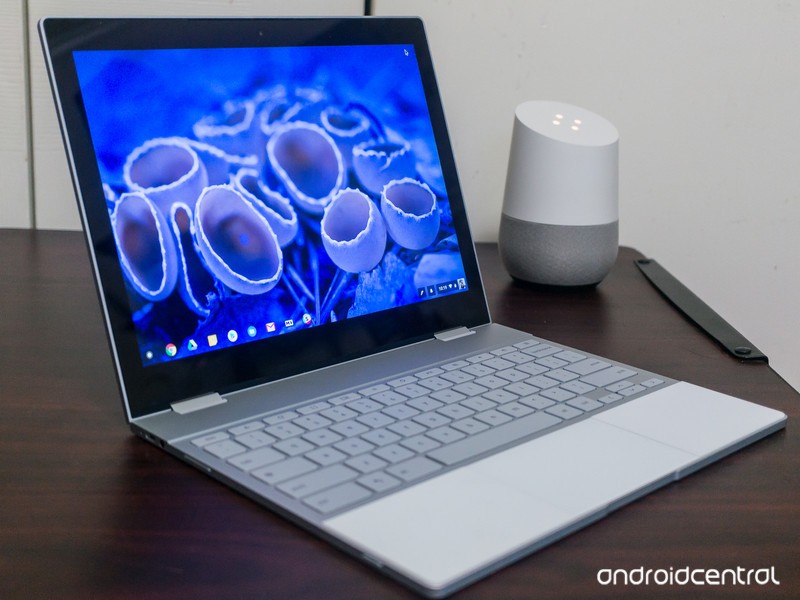
Not sure what’s new in Chrome OS? We’ve got you covered!
Chrome OS, Google’s own desktop operating system, receives regular updates to outfit it with new features, bug fixes, and more. There are three main levels of Chrome OS (Stable, Beta, and Developer) and while you can learn more about what these mean here, this guide will be updated regularly to highlight the main additions with each new release.
Since Google releases updates so frequently, we’ll only share them when something significant is added or patched as new builds are rolled out.
Without further ado, here’s what’s new in the Stable, Beta, and Developer Channels for Chrome OS!
Stable
June 7, 2018 — Progressive Web Apps can be installed and Tablet Mode gets split-screen support
Chrome OS’s Stable Channel was updated to 67.0.3396.78 on June 7, and it comes equipped with a host of new features.
One of the big highlights is the ability to download Progressive Web Apps as standalone applications — similar to how you’d download Android or regular Chrome OS apps. Progressive Web Apps are technically portals to websites but come with refined user interfaces and increased performance. They essentially give you desktop apps for things like Spotify, Flipboard, and more without developers having to create apps specifically for Chrome OS, meaning that we’ve just about ended the complaint that Chrome OS doesn’t have enough applications available for it.
Another big addition is that you can now use apps/websites in split-screen while in Tablet Mode. With devices like the HP Chromebook X2 and Acer Chromebook Tab 10 now around, a feature like this couldn’t have come at a better time.
Other goodies include a cleaner list of your Bluetooth devices, the ability to zip files on Google Drive via the built-in Files app, and new shortcuts that pop up when holding down your power button.
Read through the full changelog here
Beta
June 7, 2018 — All HTTP sites are now labeled as “Not Secure”
HTTPS is the future of website security, but for whatever reason, there are still some sites that continue to use the old HTTP standard.
As it stands right now, sites using HTTPS show a green “Secure” badge to the left of the domain. Starting with the Chrome OS 68 beta, that “Secure” badge is being removed and all HTTP sites wil show a “Not Secure” label so users can more easily identify if they’re on a site that’s not as safe as it should be.
Read through the full changelog here
Developer
July 11, 2018 — Android Nougat’s app shortcuts are now live!

App shorcuts, first introduced with Android Nougat, are finally making their way to Chrome OS.
On July 11, 2018, Chrome OS evangelist François Beaufort announced that they are now live in the Chrome OS Dev Channel.
To start using them, simply enable the flag chrome://flags/#enable-touchable-app-context-menu. Once that’s done, right-click on an Android app that’s pinned to your shelf or in your app drawer and you’ll see the app shortcuts menu pop up.
The flag is still experimental, so don’t be alarmed if things are a bit buggy right now.
June 8, 2018 — The Pixelbook’s power button can act as a physical two-factor authentication key
Two-factor authentication is a great way to secure your online presence, and one way to go about this is by using a USB key. If you’ve got a Pixelbook running the Developer Channel, you can now mimic the functionality of a USB U2F key with its power button.
To enable this, simply open a Chrome Shell and enter u2f_flags g2f. As with everything in the Developer Channel, this feature isn’t the most stable so consider having a USB key anyways just in case something goes wrong.
How to change your software channel on Chrome OS
Chromebooks
- The best Chromebooks
- Chromebooks in education: Everything you need to know
- Should you buy a Chromebook?
- Chromebook Buyers Guide
- Google Pixelbook review
- Join our Chromebook forums
Apple’s Morning Show Drama Starring Reese Witherspoon and Jennifer Aniston Gains Director Mimi Leder
Apple’s upcoming morning show drama, which is set to star Reese Witherspoon and Jennifer Aniston, will be directed by Mimi Leder, reports Variety.
Mimi Leder has directed TV shows that include “The Leftovers,” “Shameless,” and “ER,” along with movies that include “Pay It Forward,” “The Peacemaker,” and “Deep Impact.”
Image via Matt Baron/REX/Shutterstock
The morning show drama doesn’t have a title yet, but it is based on Brian Stelter’s book “Top of the Morning” and is said to provide a look into the cutthroat world of morning TV.
Stelter’s book, for example, “reveals the dark side of morning television” with exclusive details on present and past morning show stars like Matt Lauer, Katie Couric, Ann Curry, Meredith Vieira, and more.
Apple has already ordered two seasons of the show, which was one of the first that it picked up. In addition to starring, Reese Witherspoon and Jennifer Aniston will also executive produce.
Apple has more than a dozen television shows in the works, with details on each available in the original content section of our Apple TV roundup. Apple has not shared details on when its TV shows will launch, but rumors have suggested the first could come in March 2019.
Related Roundups: Apple TV, tvOS 12Tag: Apple’s Hollywood ambitionsBuyer’s Guide: Apple TV (Neutral)
Discuss this article in our forums
 AIVAnet