


New Spectre attack lets hackers steal data without having to run local code on PCs
A recent white paper released by researchers at the Graz University of Technology in Austria reveals a new attack called NetSpectre. Unlike the internet-based Spectre attack that requires a hacker to run code locally on the target PC, this version can steal data from the target PC’s memory without running any local code.
The base method of attack is nothing new. It’s based on how a CPU speculates where its current processing path will go. A chunk of its speed stems from how it can think ahead and test different routes (branches) to determine the quickest avenue to completion. While it’s testing these routes, the chip stores data in its local cache in an unprotected way.
Unfortunately, this is a problem that resides in all modern processors. In most cases, data can only be stolen if a hacker has physical access to the target PC to run malicious code. Hackers can also attack PCs remotely by running malicious JavaScript on their websites that you download as browser cache.
But with NetSpectre, there’s nothing to download. Instead, the attacker bombards the network ports of a target PC with malicious code. The good news is that this method takes an extremely long time to extract data from memory due to the noisy environment of the internet. For instance, one method directly targets the CPU’s cache at 15 bits per hour while another method targets a specific module (AVX2) at 60 bits per hour.
Of course, hackers don’t want everything stored in memory: They want the juicy bits. In addition to the slow data leak, they must sift through the garbage to pull out valuable, privileged items. Finding an encryption key in the slow data flow could take days versus accessing the same key by running malicious code locally on the target PC.
According to the paper, the NetSpectre attack consists of two components. The first is a leak gadget that pulls one or multiple bytes of data from memory, although single-bit gadgets are “most versatile.” The second component is the transmit gadget that makes the CPU’s state visible over the network, so the hacker can retrieve the data.
Hackers carry out the attack in four stages. First, they send the leak gadget to “mis-train” the processor’s predictive capability and then reset the environment to enable the encoding of leaked bits. After that, hackers exploit the Spectre Variant 1 vulnerability to leak data and use the transmit gadget to deliver the goods.
“As the network latency varies, the four steps have to be repeated multiple times to eliminate the noise caused by these fluctuations,” the report states. “Typically, the variance in latency follows a certain distribution depending on multiple factors, such as distance, number of hops, network congestion.”
But don’t worry: This isn’t a vulnerability that requires a new patch. Everything released for Meltdown and Spectre should protect your data from this new method. It’s also not in active use, but you should still make sure your PCs are armed with the latest Meltdown and Spectre updates.
Editors’ Recommendations
- How Chrome and other browsers came together to protect you from Spectre
- Google Chrome now consumes more memory due to a new Spectre fix
- You’ll want to perk up when it comes to the new ‘Lazy State’ Intel CPU bug
- Intel reportedly gears up to patch 8 Spectre Next Generation CPU flaws
- The sound of destruction: Malicious video, audio files could attack laptops
Connect the Dyson Pure Cool Link air purifier to your Wi-Fi for $299 today
Cool off with Dyson.
The Dyson Pure Cool Link Air Purifier is down to $299 on Amazon. This deal is price-matching Best Buy’s Black Friday in July sale. The $299 price is actually even better than Prime Day when the purifier dropped to $349. It’s also $80 better than the last regular deal.

This device is both a fan and an air purifier. It automatically detects your home’s air quality, and adjusts itself as needed to remove allergens and pollutants. You can also control it with your smartphone using the Dyson Link app. There’s even a special mode for nighttime, where this will continue to monitor the air and react when necessary, but at the quietest setting so as not to disturb your sleep. Your purchase is backed by a two-year warranty as well.
See on Amazon
Expand the reach of your network with a $100 Google Wifi router
Sometimes, one is all you need.
Google sells its mesh Wi-Fi system in one and three packs by default, though you can customize the systems to meet the needs of your home pretty easily. The single router normally sells for $129, and the 3-pack has settled down at around $280 recently. We tend to see various discounts on the 3-pack that bring it down to around the $260 mark, but the single unit tends to just sit around full retail price, or just drop by a few bucks. If you don’t have a large home or want to expand your current setup of Google Wifi routers, today’s the day to do it.

Amazon has the single Google Wifi router on sale for $99.99, which is $30 off the regular price. When comparing it to other wireless routers out there feature wise, this price is extremely competitive, except it offers a few things that some other systems won’t. Setting up a Google Wifi system is insanely easy, and everything can be done and managed right from your phone.
Once set up, Google will keep it up to date with OTA firmware updates that sometimes bring new features and enhanced controls to it. Basically, if you’re in the market for a new wireless router, this may be one of the best ways to go. Need a little more information on Google Wifi before you buy one? Check out our full review here and then head over to Amazon to grab one for yourself.
See at Amazon
Spigen Slim Armor CS case for Galaxy S9+ review: A slippery case for your secret stash

This wallet case doesn’t scream “I’ve got money in me”, but it likes to shine and slide around.
Good wallet cases are multitaskers, protecting your phone while keeping your cash and cards nearby. With a phone as big as the Samsung Galaxy S9+, a wallet case isn’t just a single card slot or squeezing some cash between the case and the back of our phone; you can legitimately use is as an ultra-minimalist wallet. Now, every wallet case has a decision to make: does it want to keep its slim figure, or does it want to keep its cards securely stashed away from hungry eyes? Spigen thinks that you should be able to have both, and while it come seriously close with the Slim Armor CS, it can’t quite have its cake and eat it, too.
Spigen Slim Armor CS case for Galaxy S9+

Price: $15.99-$17.99
Bottom line: This dual-layer case is a a twofer that keeps both your phone and your payment methods safe from prying eyes, but it’ll slip through your fingers and off your desk if you’re not careful with it.
The Good
- Wallet has room for two cards plus cash
- Durable hard plastic cover keeps what you’re carrying a secret
The Bad
- Feels bulky like a tank
- Flat, slick back slides across tables and slips out of pockets
See at Amazon

Spigen Slim Armor CS case for Galaxy S9+ What I like
Spigen makes excellent cases, and to its credit, the Slim Armor CS is solid, sturdy, and firm in the hand. It feels a bit like a tank, like it can protect your phone and your cards from anything. The buttons and ports on the Slim Armor CS are as expertly shaped and sculpted, though due to the added bulk of the hard-shell card slot on the back, the fingerprint sensor’s slope changes grades between the hard-plastic and the TPU inner sleeve. The edges of this case are all smooth, and the lip around the front still allows you to use the screen from edge to edge while using the lip on the top and bottom of the screen to keep the glass up off the table when you lay it face down.
The card slot that the CS is named for slides open and shut easily, with room for two cards and a some neatly-folded cash or three cards if you’re not the cash-carrying sort. The TPU sleeve that functions as back wall of the card slot is grippy enough that your cards and cash shouldn’t slide around and click against each other and the plastic in the card slot. And since this case completely covers the card slot, it better hides what valuables you’re carrying and doesn’t offer up the uneven edges and springy bulk wallet pouches perpetually suffer from.

Spigen Slim Armor CS case for Galaxy S9+ What I don’t like
Unfortunately, since the Slim Armor CS completely covers its bounty within its hard plastic shell, the Slim Armor CS really doesn’t do its first name justice. Yes, it feels slimmer than a wallet pouch or a fold-over wallet case, but it still feels like a tank: big and unwieldy, especially in smaller hands like mine. Another downside of the hard-shell card slot is that there’s no wiggle room on what will or won’t fit, so I hope you have digital insurance cards, because you don’t have room for them here. The smooth plastic back can and will slide off tabletops and out of your hands if you aren’t careful, and the card slot dominating the back of the phone discourages the use of Spigen’s new Style Ring Pop or any other phone grip.
My final complaint with the Slim Armor CS’s wallet function is that, while it does slide open and shut easily, there’s no CLICK when you open or shut it, and there’s no bump or readily noticeable tactile feedback when you slide it all the way shut. The two plastic teeth that the card slot cover grips on are shallow, and while I haven’t slid it open by accident that often, I still wonder how quickly that grip will start to weaken when using CS as an everyday wallet.

Spigen Slim Armor CS case for Galaxy S9+
If you’re looking for a case to keep your cards safely hidden during a night on the town, the Spigen Slim Armor CS case for Galaxy S9+ is a durable case that can double as a very minimal wallet and look good doing it. I’d just make sure to keep a tight grip on it, because its smooth back and wallet-hiding bulk make it easier to slip or drop.
3.5
out of 5
At $16 dollars, you can do a whole lot worse for a wallet case that is as well assembled as the nearly seamless Slim Armor CS, and while I wish its card slot was a little more clicky, I trust it with my most important cards, and with my Galaxy S9+. The Slim Armor CS comes in 5 shiny shades to match the various colors of the Galaxy S9+, though the Rose Gold is more suited to the Burgundy Red model than the Sunrise Gold.
See at Amazon
Become a certified Cisco engineer for only $49!
For over 30 years, Cisco Systems has been helping companies with their networking and communication by providing IT support. If you’ve ever worked in a traditional office setting, you’ve probably seen or used one of their systems in action.
Their technologies have become an essential component to much of the corporate world’s connectivity and efficient functionality. As such, there’s a constant and growing demand for certified Cisco engineers is constant and continually growing. It’s a great career path that features excellent compensation as you work your way up through the five levels: Entry, Associate, Professional, Expert, and Architect. So how does one become a certified Cisco engineer?
Prepare to earn certification to work with Cisco Networking Systems! Learn more
Typically you’d need to go through a Cisco certification program, which would typically cost you thousands of dollars — but not today! If you’re curious about a new career, Android Central Digital Offers has potentially the offer of a lifetime. Work towards your Cisco engineer certification at your own pace with lifetime access to the Ultimate Cisco Certification Super Bundle for only $49.

This nine-course bundle will provide you with intensive study materials. The courses cover:
- Cisco 100-105: Interconnecting Cisco Networking Devices Part 1 – ICND2 V3
- Cisco 100-105: Interconnecting Cisco Networking Devices Part 2 – ICND2 V3
- Cisco 210-260: Implementing Cisco Network Security
- Cisco 200-355: Implementing Cisco Wireless Networking Fundamentals
- Cisco 210-060: Implementing Cisco Collaboration Devices (CICD)
- Cisco 210-065: Implementing Cisco Video Network Devices (CIVND1 & CIVND2)
- Cisco 300-101: ROUTE – Implementing Cisco IP Routing
- Cisco 300-115: SWITCH – Implementing Cisco IP Switched Networks
- Cisco 300-135: TSHOOT – Troubleshooting And Maintaining Cisco IP Networks
Use coupon code DIGITALWEEK50 and take an extra 50 per cent off! Learn more
Typically, a bundle of courses and training of this scope would cost you well over $3000, but for a limited time offer you can get access to this fantastic bundle for just $49 — that’s a 98% discount off the regular price! And don’t forget to use coupon code DIGITALWEEK50 to save an additional 50% — you pay just $24.50! Act quickly
If you’re interested in forging a new career path for yourself, a career working with networking environments begins right here, right now.
MoviePass: Everything you need to know
Here’s your one-stop-shop for all the MoviePass news, controversies, and more.

Unless you’ve been living under a rock lately, there’s a good chance you’ve heard a thing or two about MoviePass. Although the company was founded way back in 2011, it’s picked up a lot of steam over the past year or so with its too-good-to-be-true offer of allowing you to see one movie per day for just $9.95/month.
MoviePass has become one of the most disruptive companies of recent memory, and whether you’re looking for the latest controversies or want to learn more about the service before you sign up, you’ve come to the right place.
Without further ado, this is everything you need to know about MoviePass!
The latest MoviePass news
July 27, 2018 — MoviePass experiences widespread outage due to a lack of cash; parent company borrows $5 million to keep the lights on
If you tried using your MoviePass last night, chances are things didn’t work out so well. At 5:12 PM ET on Thursday, July 26, MoviePass announced on its Twitter account that it was aware of “an issue that is preventing users from checking-in to movies.” In the interim, it was said you could still use the app at theaters that accept E-Ticketing with MoviePass without any problem.
Today, Business Insider confirmed that the reason for this outage was that MoviePass ran out of cash and couldn’t afford to pay its payment processor that handles the physical MoviePass cards.
Following this, parent company Helios and Matheson announced through an SEC filing that it’s decided to borrow $5 million in cash to keep things running. It’s being reported that some users are still unable to check-in to showtimes even after the additonal funds were borrowed, so keep an eye on MoviePass’s Twitter page for further updates.
July 12, 2018 — Support for IMAX and 3D movies will be available by September 3
While the addition of Peak Pricing isn’t the most welcome change to hit MoviePass, CEO Mitch Lowe recently shared some good news with Business Insider.
According to Lowe, MoviePass subscribers will be able to see IMAX, 3D, and other premium showings by Labor Day (September 3). A charge of $2 – $5 will be applied for these more expensive formats, but considering that IMAX tickets can cost as much as $20+ per ticket, that’s still a good value even with the $9.99/month recurring fee in mind.
As for MoviePass’s other new feature, Bring-A-Guest, that should also be rolled out around the same time.
Lastly, Lowe noted that Peak Pricing will be implemented for all MoviePass subscribers by the end of the month.
All the important details
There are two plans to choose from

Right now, you’ve got two options to choose from if you want to get MoviePass — MoviePass and MoviePass Unlimited.
The former of those two costs $7.95/month and lets you see three movies per month.
While it’s nice that MoviePass has this available if you want to save a couple bucks each month, I’d recommend going all the way with MoviePass Unlimited. For $9.95/month, you can watch one new movie per day in theaters every single day.
Both plans are billed monthly and can be canceled at any time.
See at MoviePass
E-ticketing makes everything easier

MoviePass is regularly partnering with more and more theater chains to support e-ticketing, and if you happen to live near one that offers this, you’re in for a real treat.
For theaters that don’t support e-ticketing, using MoviePass requires you to be within 100 yards of the theater you’re going to, check-in to the showtime on your phone, and then swipe your card to get your ticket. If the showing happens to sell out by the time you get to the theater, you can either choose another movie or call it a night.
However, if there’s a theater near you that does support e-ticketing, the process is way simpler. Once you find the showtime you want to go to, a “Get E-Ticket” button will pop up instead of the “Check In” one.
E-tickets can’t be canceled once you buy them, but they do have the added benefit of allowing you buy them wherever you are. Also, if you’re theater supports e-ticketing and reserved seating, you can even choose your seat right from the MoviePass app! Once you get to the theater, just type in the redemption code for your e-ticket or scan the QR code.
Right now, e-ticketing with MoviePass works at Goodrich Quality Theaters, Studio Movie Grill, and MJR Theaters.
Only 2D movies are supported, at least for now

As it currently stands, you can only use your MoviePass to watch regular 2D movies. In the near future, however, that will soon be changing.
By Labor Day (September 3), MoviePass will allow you to pay an upgrade fee to see RealD 3D, IMAX 2D, 3D, and other Premium Large Format movies.
That fee will range between $2 – $5 depending on what kind of premium show you’re seeing.
You can’t rewatch movies

As good of a deal as MoiePass is, it’s not without a few limits here and there — the first of which is the fact that you can’t rewatch movies.
MoviePass experimented with letting people rewatch the same movie over and over again for a few months but eventually decided to revoke the right to prevent ticket-scalping and other misuses of the service.
It would certainly be nice to have the option of seeing a movie again that you particularly like, but don’t expect this to come back anytime soon.
You can still benefit from your theater’s loyalty program

If your theater has a loyalty program that rewards you with points for buying tickets and concessions, you can link it up to your MoviePass account and still get rewarded for the tickets you “buy” with your MoviePass subscription.
As it currently stands, you can link loyalty programs from Goodrich Quality Theaters, D Place Entertainment, and Starlight Cinemas.
It’s an admittedly small list right now, but it’s one that should only grow more and more as time goes on.
What’s the deal with Peak Pricing?
MoviePass is always trying to find ways of adapting its business model as more and more people join, and one of those latest efforts is seen with Peak Pricing. On June 22, MoviePass said the following:
Under this plan, if the combination of demand for a title, date or part of day is higher, subscribers may be asked to pay a small additional fee depending on the level of demand. You can avoid this peak surcharge by choosing an alternative date or film.


In the MoviePass app, showtimes that are affected by Peak Pricing will be indicated by a red lightning bolt icon next to them. If a showtime isn’t currently in Peak Pricing but might enter it soon, you’ll see a grey icon.
The surcharge you’ll need to pay is entirely dependent on the movie and time, but as a point of reference, the screenshots MoviePass shared show a surcharge of $3.43. Thankfully, MoviePass will launch Peak Passes in the coming weeks that’ll allow you to waive the Peak Pricing fee once per month.
Peak Pricing officially launched on July 5 and is rolling out to users over the coming weeks. If you’re currently subscribed to an annual or quarterly plan, you won’t have to deal with Peak Pricing until your plan ends and renews.
Be mindful of the device authorization limit

If you’re someone that lives the two phone life or frequently goes from device to device, you’ll want to keep MoviePass’s device authorization limit in mind.
To “keep your account secure”, MoviePass only allows you to be signed into the MoviePass app on one phone at a time. However, if you do get a new phone or need to sign into another one for whatever reason, you can log into your account on another phone every 30 days.
Just download the app, enter your credentials, and confirm that you want to use that as your authorized device.
Updated July 12, 2018: Updated the plan information now that the iHeartRadio promo is over and added more details about premium movies.
How to clear search and location history in Google Maps on the web
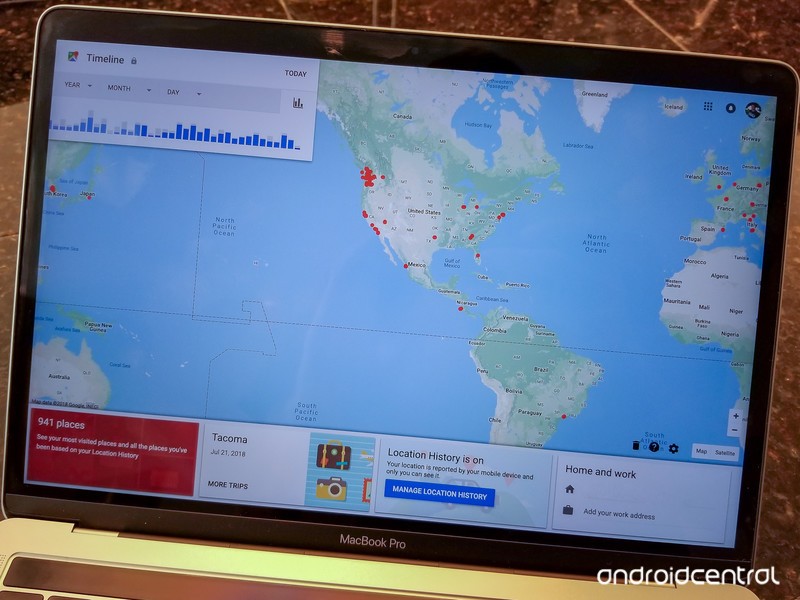
It takes some time, but you can completely control the location history Google collects from your devices.
We’ve already covered how to remove individual locations and history items from Google Maps on Android, but when you need to access and manage all of your location history, you need to hop onto the computer. As the old saying goes, “knowledge is power” — and we’re going to give you all of the tools necessary to know what information Google knows about your location, and how to clean it up or stop further reporting.
Accessing and managing your Google location history
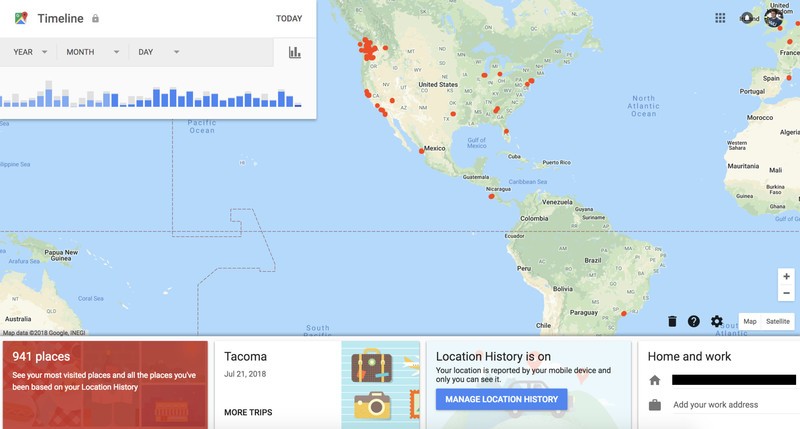
First thing’s first, you’ll need to make sure you’re signed into your Google account and go to the Google Location History dashboard on the web. On this page, you’ll see every bit of history Google has logged for where your Google-connected devices have been located, so long as you have opted in to location reporting on the device.
It can be a surprising experience to see the fine location information Google has on you.
You can go day-by-day through the history using the date picker on the left side of the screen, with the map populating the information collected on that day. Google does its best job at coordinating timestamps to show where you moved throughout that day, and associates them based on the pace of movement to try and determine if you were walking, riding a bike, riding transit or driving. If you have more than one Android device turned on with location reporting, your map will be far less useful for determining where you went — Maps is more likely to think you’re constantly bouncing back and forth between the location of the two devices.
If you don’t want Google to remember data from a specific day, use the date picker on the left to select the day and then click the trash icon next to the date. A pop-up window will ask you to confirm, and explain that you will never be able to retrieve the data. Once deleted, as far as Google’s concerned you never made those movements.
If for some reason you wish to delete all location data Google has from your devices, go back to the location dashboard home page and click the small trash icon in the bottom-right corner. Again you’ll be asked to confirm, and in this case you should think really hard about this decision — while it may be creepy to see Google have this data, it’s also very useful for many products that you use like Google Maps, Google Assistant and more.
Double check your phone’s location history settings


If looking at your location history is a bit of a shocking experience as to how much location data is being stored from your devices, you may want to consider looking at the location history settings on your devices. Though the interface may look slightly different depending on your phone, everyone can access the location history settings by going into their phone’s settings and tapping on the Google section (sometimes “Google Settings”). You can then tap Location and scroll down to Google Location History.
With just a few taps you can turn off location history — for a day or a month or as long as you want.
You’ll see a breakdown of every device that has your Google account (or multiple accounts, if you have them) on it and has location history turned on — in my case, it’s a lot of phones. You can choose whether each one is reporting its location to Google, and jump directly into Google Maps to see the latest timeline information for the phone you’re currently on. Here, you’ll be able to make edits and deletions, but not as quickly as you can on the web as detailed above.
If you want to temporarily turn off location history without deleting old history, you can do so by simply toggling off “Use Location History” at the top of the settings page.
Take the time, take control of your location history
Now that you have the tools and know-how, I encourage you to spend a little time checking your device’s settings and seeing what location information Google has collected from those devices. It isn’t always approachable or simple, but now that you know the right places to go you have the power to manage it yourself!
Update July 2018: Updated and improved with the latest links and information for taking control of your Google location history.
Best Gamepad for Oculus Go

Now that you’re acquainted with your Oculus Go, you want to find the best ways to enhance your experience. For some horror games like Doors of Silence, there are gamepad compatibility options you might want to take advantage of. Besides that, there are some games where the controls straight up don’t work. In this case, it’s nice to have a gamepad on hand for you to substitute with so you can still play your favorite titles.
- Best overall
- Best for portability
- Best value
Best overall
SteelSeries Stratus XL

See at Amazon
The folks at SteelSeries have a long history of quality controllers for mobile platforms, and the Stratus XL kicks that up a notch. Instead of focusing on portability and pocketability like the other controllers in this product line, SteelSeries focused on comfort and capability which makes it an incredible choice for the Oculus Go. It has all the quality of a major console controller, with great battery life and a $44.97 price tag to match.
It pairs instantly to your phone and works with dozens of Oculus games right out of the box. Stratus XL is an all around quality gamepad, with a layout that is easy to remember when you eyes are in VR.
Bottom line: If you want the best overall gamepad for your Oculus Go, SteelSeries is where you want to be.
One more thing: This version of the controller only comes in black. If you see a white version of this controller, it’s the iOS-only version and won’t work with the Oculus Go.
Why the SteelSeries Stratus XL is the best
Sometimes you need a pair of joysticks to get the job done.
While the Oculus Go comes with its own Remote, there are plenty of VR games you play on this headset which require or are enhanced by a good ol’ fashioned gamepad. It’s just not as enjoyable to play Minecraft with a motion controller, which is why Oculus supports games and gamers who prefer this gameplay mechanic.
Three things matter most when it comes to a VR-friendly gamepad — comfort, battery life, and durability. SteelSeries has checked all three boxes with the Stratus XL. This is an Xbox-esque gamepad that looks and feels familiar with a button layout you will quickly become comfortable with despite not being able to look down at it while in VR. This gamepad will easily survive the occasional drop when you are spooked in VR thanks to its rugged plastic design, and the use of standard thumbsticks means the chances of breaking them on a drop is unlikely. On average this controller will get you through 30 hours of constant use, which means the only way you’re charging this controller once a week is if you are really and truly invested in Minecraft. If you do run out of power in the middle of a game, a pair of AA batteries will have you back up and running in no time.
Best for portability
Moga Hero Power

See at Amazon
Haing an Xbox-style gamepad is great for familiarity, but the Oculus Go is a portable virtual reality platform and it makes sense that you’d want the gamepad to be equally as portable. That means it stows in a bag easily, and doesn’t take up a ton of space. Moga’s Hero Power gamepad offers this exact experience, with buttons and joysticks nearly flush with the casing and shorter palm grips that flow in line with the rest of the body. This gamepad also doubles as a more traditional phone gamepad with its foldable phone clip, which is pretty sweet when you consider it’ll only set you back $27.99!
Bottom line: If you value portability above all, Moga Hero Power is what you want.
Best value
Beboncool controller

See at Amazon
It’s portable, it’s plasticky, and at $25.99 it’s way cheaper than most other Bluetooth gamepads that play nice with the Oculus Go. Beboncool makes a bunch of gamepads for tablets and phones alike, but this smaller controller is perfect for portable Oculus Go gameplay. The battery is rated for 12 hours of constant gameplay, but the auto-off feature ensures you’ll only be using power when you’re actually playing.
Bottom line: If you want a better Oculus Go gameplay experience without spending a ton, Beboncool has you covered.
Conclusion
If you’re looking for console-class gaming on your Oculus Go, SteelSeries is where you want to spend your money. There’s always a place for portability, though, and Moga has what you need if you’re on the go. If all you really want is an affordable gamepad to save you from reaching for the Oculus Remote, Beboncool is a great gamepad at a reasonable price.
Best overall
SteelSeries Stratus XL
See at Amazon
The folks at SteelSeries have a long history of quality controllers for mobile platforms, and the Stratus XL kicks that up a notch. Instead of focusing on portability and pocketability like the other controllers in this product line, SteelSeries focused on comfort and capability which makes it an incredible choice for the Oculus Go. It has all the quality of a major console controller, with great battery life and a $35 price tag to match.
It pairs instantly to your phone and works with dozens of Oculus Go games right out of the box. Stratus XL is an all-around quality gamepad, with a layout that is easy to remember when your eyes are in VR.
Bottom line: If you want the best overall gamepad for your Oculus Go, SteelSeries is where you want to be.
One more thing: This version of the controller only comes in black. If you see a white version of this controller, it’s the iOS-only version and won’t work with the Oculus Go.
Updated July 2018:The prices on your available options have gone down — check out the amazing deals!
Oculus Go

- A parent’s guide to Oculus Go
- Oculus Go vs. Lenovo Mirage Solo
- Best Gamepad for Oculus Go
- Best Battery Backup for Oculus Go
Oculus Go 32GB
Oculus Go 64GB
Life is Strange for Android: Everything you need to know!

Unravel the mysteries of Arcadia Bay in Life is Strange!
Life is Strange is an episodic narrative-based adventure game that arrived on Android this summer. It was first released on PC and consoles back in 2015 where it earned cult-hit status for it’s beautiful hand drawn art style and an engaging storyline that branches off based on the decisions you make in the game. Broken in to five episodes, the game focuses on Max Caulfield as she discovers she has the mysterious power to rewind time and relive moments.
What’s the story about?

Without diving straight into too much of the main plot spoilers, Life is Strange follows Max shortly after her 18th birthday as she discovers a supernatural ability to rewind time and replay moments in her life. The story takes place over the course of a week in the seaside town of Arcadia Bay, Oregon, as Max attends Blackwell Academy for photography.
The main story has Max reconnecting with her childhood best friend, Chloe Price, as the two explore the limits of Max’s superpowers. During the first episode, Max discovers her powers and experiences weird visions from the future while simultaneously navigating the social world at a private school. The school is littered with missing posters for a girl names Rachel Amber, who just so happens to be Chloe’s best friend to replace Max when she moved away.

This game is all about exploring the environment, interacting with other characters, and discovering new information to push the story forward. Each episode features a series of major choices for Max to decide which will affect the story later on in a ‘butterfly effect’ manner, but with Max’s rewind abilities you’re able to peek forward and gain valuable information and then replay interactions to undo mistakes, answer questions correctly, and ultimately pick the decision (and associated consequences) that you’re most comfortable making.
The game is anchored around Max’s journal and photo collection, where you’ll always find your next objective and Max’s internal dialogue on the latest happenings in the game. This is a really great feature that manages to flesh out the story while also providing you with important context if you’re jumping back into the game.
You can play through each episode more than once

Each episode is about two hours to play through once, but you may find yourself going back and replaying key moments to see what happened in the alternate timelines. Most sections also have some optional photo opportunities that are shown as sketches in your journal. Match up the sketch with the right viewing angle and you should see a new “photo” action pop up.
When you go back to replay a section of an episode, you have the option of “collectible mode” which lets you go back with the intention of just collecting the optional photos for your journal, or you can re-write over your existing progress and replay a chapter to change the narrative’s course. Each episode has four or five major choices that have major consequences for the story, while there are dozens of smaller decisions you make that will subtly influence your options later on in the story. By going back and replaying an older section, you’ll be able to change the past and create a better (or worse) future world for the characters.
Controls optimized for mobile
Life is Strange follows in the Telltale-style adventure game tradition, which means it aims to plays like an extended cinematic scene, with you in control of what Max unfolding in front of you. For the times when you are in control of Max, Life is Strange gives you a but it’s worth noting that the controls here seem offers both a If you’ve previously played games by Telltale Games, you’ll feel very comfortable with the story-based gameplay but what’s best are the controls. There are three styles of on-screen controls available along with support for Bluetooth controllers. This is important as you’re often required to explore your surroundings and interact with other characters in a timely fashion so if you have a Bluetooth controller for your phone or tablet you’ll probably want to take it out for this one.
Can my phone play this game?

To play the game, you’ll need a device running Android 6.0 or later that supports OpenGL 3.1. Your phone will also need a 64-bit ARM processor and a minimum of 2GB of RAM. Square Enix recommends the game be played on a Samsung Galaxy S7 or Note 5 and up, Google Pixel or Pixel XL and up — basically any phone released in the past two years should be able to play the game just fine. Older devices might be able to run the game, but you may experience laggy frame rates or other bugs.
Verdict: You gotta play this game

Life is Strange is the type of game that’s designed to elicit a strong emotional response from the player. The game delivers a clever branching story backed by a catchy soundtrack and great sound design overall, with cinematography that does a great job of blending cut scenes with gameplay for a memorable gaming experience.
You can download and play the first episode for free with the remaining four episodes available via in-app purchases. You can check out the second episode for just $0.99 with the remaining episodes available for $4.99 or opt and get the season pass for $8.99 — the better deal if you fall in love with the game.
Download: Life is Strange (Free w/IAPs)
Android Gaming

- Best Android games
- Best free Android games
- Best games with no in-app purchases
- Best action games for Android
- Best RPGs for Android
- All the Android gaming news!
New partnership lets you use Samsung Pay’s MST chip with Chase Pay
You can now earn double the rewards with each purchase.
Samsung Pay is one of the best mobile payment solutions to-date, with its two most standout features being Samsung Rewards and its combo of NFC and MST technology that allows you to use it at virtually any sore. On July 27, Samsung announced a new partnership with Chase that brings these goodies over to Chase Pay.

Starting today, you can jump into the Samsung Pay app and link your Chase Pay account. Once this is done, you can use Chase Pay as your primary mobile payment app and make payments with either NFC or Samsung’s MST chip.
This is the first time we’ve seen Samsung open its MST technology to other apps outside of Samsung Pay, and although Chase is the only one that can use it right now, this has us hoping for similar partnerships with other brands down the road.
In addition to being able to use MST with Chase Pay, any payments you make after both accounts are linked will allow you to earn Samsung Rewards points and Chase Ultimate Rewards points in one transaction.
If you’re a Chase customer, have you linked your account yet?
Samsung’s Galaxy Watch could be the smartwatch we’ve been waiting for
 AIVAnet