


Amazon Fire TV Cube Video Review
You’ve read the review — now watch the video!
If there’s one thing we learned during Amazon Prime Day 2018, it’s that folks care a lot about Amazon Fire TV. And, specifically, the Amazon Fire TV Cube.
You’ve already read our full Fire TV Cube review at CordCutters.com, right? Good. (And if not, what are you waiting for?) Now it’s time for some video.
The short version? The Amazon Fire TV Cube is a great little way to combine all the power of a Fire TV 4K with the brains (and a bit of braun) of an Amazon Echo Dot — all in a package that’s still pretty easy on the wallet. Check it out!
Subscribe to Modern Dad on YouTubeCheck out CordCutters.com
Introducing CordCutters.com
- The hardware you need
- All about streaming services
- What channels are on which service
- FREE over-the-air TV
- How to watch sports
- Join the discussion
Get the latest deals
Destroy six pieces of paper at the same time with this $24 AmazonBasics paper shredder
Shhhhrrrreeeeeddddd it up.

Right now Prime members can pick up the AmazonBasics 6-sheet paper and credit card shredder for $23.74, which is just over $6 less than it normally sells for. If you aren’t already a Prime member, you can sign up for a free 30-day trial in order to take advantage of this discount and all the other Prime benefits. The shredder can crosscut up to six sheets at the same time, and credit cards one at a time.
It has a two-minute continuous run time with a 30-minute cooldown period. There’s an auto start and manual reverse feature to make it work best for you. The feed is 8.7 inches wide, and it sits on a 3.8-gallon bin to hold all of your shredded documents. It’s time to stop throwing away your banking statements and bills and start shredding them at home. It’s backed by a one-year warranty, so be sure to grab one now.
See at Amazon
How to tell when your phone’s battery has gone bad

Unlike diamonds, batteries aren’t forever. Here’s how to tell if yours is ready for a ride to the recycling center.
You’ll find plenty of online discussions, whether in forums or articles on websites like this one, about phone batteries. Almost all of them are about charging and stretching out the time between charging. That’s important information to know but there is also another problem you might face, especially if you keep the same phone for a couple of years: batteries don’t last forever.
Phone batteries are complicated

We’ve all either had to get a new battery for our car or know someone who has. Batteries are chemical power plants and once they have reached to point where they can no longer build a charge through their chemical reaction, they turn into a container for semi-toxic and expensive materials that don’t do anything. When that happens you need to provide a new battery if you want to continue to use the things that it powers. And be sure to recycle your old one properly, please.
You used to be able to change the battery yourself in a phone, but those days are never coming back.
Phones aren’t like cars, where changing the battery is as easy as disconnecting the old and connecting a new one. They used to be, but thinner phones and higher battery capacity demands meant that they are now small foil bags sealed up inside your phone. They are designed to last a specific number of charge cycles, and a charge cycle is taking the battery from its lowest point to its highest. It’s worth noting that this doesn’t mean zero to 100, even though the phone will report it that way. Batteries are designed to be used at 80% of the listed capacity (but still safe up to 125%) and never brought down to a zero-charge state. The circuitry inside your phone takes care of that and makes it simple for us by reporting the scale to 0-100.
The number of charging cycles that a battery is rated for is an approximation; they reported number is based on an average. There are ways to “game” the system when it comes to charging cycles, and you’ve probably seen advice that says to charge your phone a certain way to extend the usable life of the cell. These do work, but you won’t be able to get too much extra life from your phone’s original battery so it may not be worth it. You have to decide if micromanaging the way you charge your phone is worth another two or three months of life.
I just charge my phone whenever it needs it because life is too short. Hashtag YOLO.
Signs your battery is ready to move on

A battery doesn’t just suddenly die under normal circumstances; it gives some warning signs that it’s getting close. Sometimes batteries can just short or have another type of fault that kills them, but those instances aren’t very common. A lot of time and energy went into designing a safe and long-lasting battery for a phone.
You might notice when your battery is going downhill because it rapidly discharges while you’re using it. If you used to go half the day and your battery was still at 60%, for example, and it now hits 30% during the same time, it’s a sign that the battery is starting to sour. Other things like bad apps or a bad update can do this, too, so it can be tricky to diagnose.
Your phone’s battery will most likely die a slow, noticeable death.
You’ll also notice that it won’t charge completely. No matter how long you leave it plugged in it never says it is fully charged because it’s not. It can’t hold enough electrical energy to register as full by the electronics in your phone because the materials inside have degraded enough to affect performance.
One of the first warning signs is your phone losing charge right away. If you take your phone off the charger when it says the battery is at 100% and it immediately drops to 90% or 80%, the battery is getting a bit old. It’s normal for some phones to lose a few percentage points of battery charge right away (at least according to the battery gauge) but a drop of 10% or more is a sign of a problem.
If your phone is bulging or swelled up, stop using it right now.
If you notice your phone bulging in the middle or getting very hot on or off the charger, that’s a sign of a bad battery too, but you also need to stop using it right away and take it somewhere that a tech can look at it. We’ve all heard stories of phones bursting from a bad battery, and the whole Note 7 thing is still fresh in our minds. Phone batteries are safe when used as intended. Because of things like Samsung’s excellent response to Note 7s catching fire and bursting, they are safer now than ever before. But accidents and malfunctions happen. Don’t ignore any signs of excessive heat or swelling because nobody likes it when their pants (or anything else) catch fire.
You probably won’t see any of these signs for at least 18 months after you bought your phone if you bought it new. Battery life may be listed in charge cycles, but the goal is to make them last two years since that’s the standard length of a carrier contract. But if you really like your phone or really like not spending money on a new one, you will see your battery die eventually.
What can you do about it?

You used to be able to go online or take a trip to the carrier store and buy a new battery for your phone. Those days are gone and I doubt they will ever come back. But the battery in your phone probably can be changed by someone who knows what they are doing.
Changing the battery in a sealed phone isn’t hard for people who know what they are doing. Most of the time.
Most of us aren’t that person. Changing a phone battery isn’t hard on most models, but the way you open the two halves of a phone can be a little tricky. There may be hidden screws, plastic clips that are designed to never be unclipped, and there will be adhesive. Lots of sticky adhesive. I can change the battery on some phones here at my desk with a handful of simple tools; the Nexus 4 and iPhone 4 only take a few minutes to open and change things. Other phones I could never open without breaking the screen. I know because I’ve done it. Unless you’re still using a Nexus 4 or iPhone 4, forget changing the battery yourself.
Luckily, a person who can change a phone battery isn’t hard to find. If your phone is still covered under a warranty, you should talk to the people you bought it from first. Always. If you don’t, you’re probably going to lose that warranty, so do it.
If your phone no longer has a warranty, ask a friend if they have a “phone person” they trust. If not, it’s fairly safe to take a chance with someone who has a legitimate business repairing phones. Think about it. The little kiosk in the mall where someone will swap your battery in two hours while you shop wouldn’t be there if they weren’t able to do it successfully. Changing a battery is a mechanical thing — the phone comes apart a certain way, only a specific battery fits for a replacement, and the parts go back together the same way they came apart — only in reverse. For a “phone person,” it’s a simple job and the hardest part is making sure they don’t scratch the screen, and remembering to wipe the fingerprints off of everything when they are finished.
If your friends don’t have a “phone person” look on Google.
There are also plenty of national companies that specialize in phone repair. You’ll find them listed online or even in the Yellow Pages if you ever see an old actual phone book. You can look at review sites like Google Maps for an overview of customer experiences, and because these franchises all operate under a specific set of policies you can look them up to see what to expect. I’ve used this sort of service in an emergency, and a Puls agent in New Orleans was able to replace both the battery and the charging port on an iPhone 5s in just a couple of hours. I was hesitant, but it was either have the repair done that way or see my wife without her phone during a trip to Costa Rica. You would have done the same. It was good as new when finished, and it still works.
Your carrier may also have a phone repair center, even one on site in some locations. It’s worth talking to them about it.
The “unfixables”
Some phones, like the original HTC One M7 or the Nexus 6P, are built in a way that you probably won’t find someone willing to open them to change the battery. Don’t get mad at the person you’re asking to do the repairs, because some things aren’t meant to be opened. The original iPhone was notorious for being nigh impossible to change the battery unless someone was a professional with experience. A business that specializes in quick phone repairs on site can decide it’s not worth the risk of damaging the phone by trying it.
You can see a list of popular phones and their “repairability” scores at iFixit. The easiest phones to open are at the top and the hardest are at the bottom. If your phone is near the bottom of the list you’ll probably have to let a professional have the phone for a day or two and a service that fixes things while you wait isn’t going to be an option. They need to give you back your phone looking as good as it did when you gave it to them. That’s hard to do with some phones.
Buying a new phone isn’t the worst thing in the world. You might have to do it.
Finally, maybe it’s time to buy a new phone. Or a new-to-you phone, even. We have you covered with our comprehensive Smartphone Buyer’s Guide. You’ll find a phone that’s the best at almost any crieteria you have set, and you might even see something that you never thought of. A phone is more than a novelty in today’s society and is an important tool. It’s worth doing the research to find the one that fits you best.
Best Android Phone With a Headphone Jack in 2018
- Best overall
- Best for sound quality
- Best for business
- Best for less
Best overall
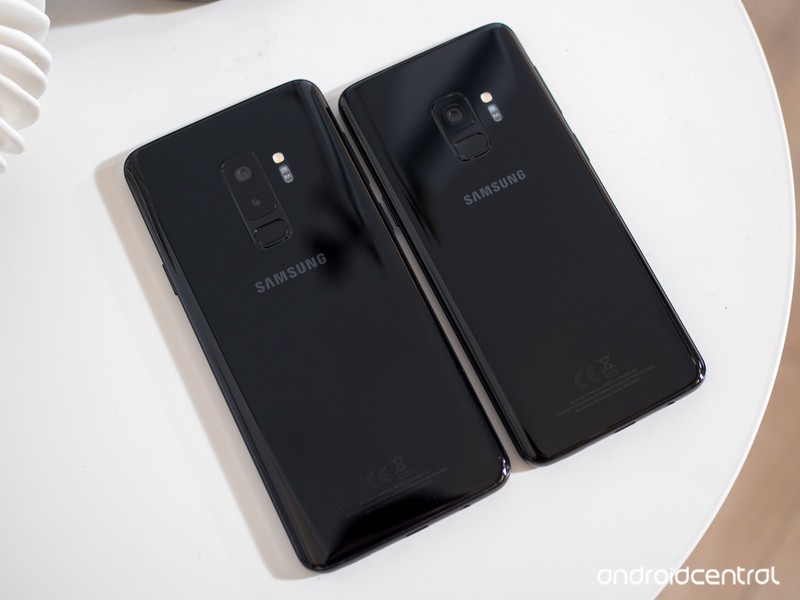
Samsung Galaxy S9 / S9+
See at Amazon
The Galaxy S9 and S9+ aren’t much different from their predecessors, but seeing as those were Samsung’s best-ever-selling phones that’s not a bad thing. These phones are all about giving you the most features in the most beautiful package. You get top-end specs across the board, plus all of the hardware features you expect: waterproofing, wireless charging, an SD card slot, a headphone jack and more.
The camera is all-new this year, with a sensor that does fantastic processing to remove noise and sharpen fine detail. It’s aided by a dual-aperture lens to get the best combination of light and detail in different shots, and in the case of the Galaxy S9+ is paired with a secondary telephoto lens for zoom and portrait mode shooting.
You don’t get the clean and simple software experience of the Pixel 2, which may take some extra customization and tweaking on your part, but the Galaxy S9 is far less polarizing overall — just about anyone looking for a high-end phone will love using the Galaxy S9 or S9+.
Bottom line: The Galaxy S9 and S9+ don’t require much thought — they can do everything, and look great doing it, with few real downsides.
One more thing: Consider paying the extra $120 for the Galaxy S9+, where you get more RAM, a bigger screen and longer battery life. It’s worth it for most people.
Best for sound quality
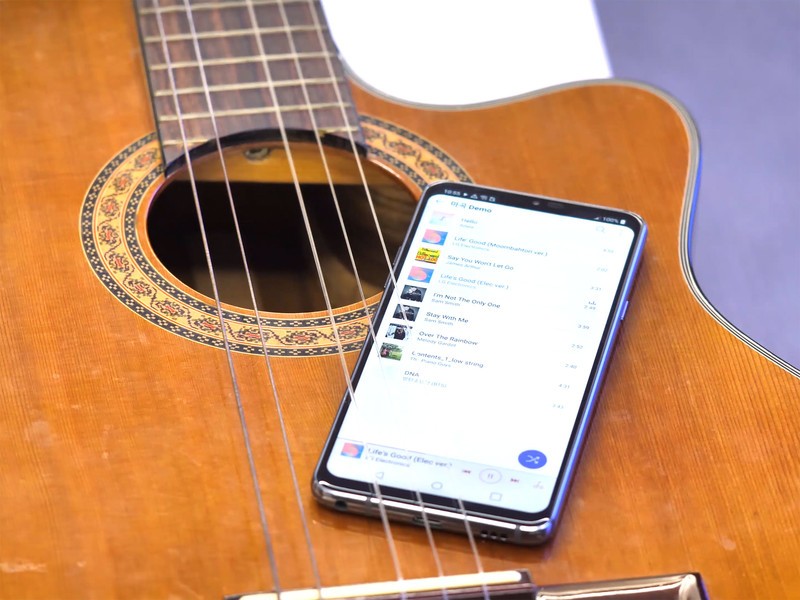
LG G7
See at B&H Photo
LG’s latest phone, the G7, has a headphone jack, a powerful amplifier, and a Quad DAC, to push some of the best audio we’ve ever heard in a phone. While it’s not as good overall as the Galaxy S9 and S9+, on audio quality alone the G7 has no peer (except other LG V-series phones).
With a 6.1-inch display, a super-fast Snapdragon 845 processor, 4GB of RAM, and a dual camera setup that will impress even the most vociferous critics, the LG G7 is, overall, an outstanding phone. But if you just want the best sound quality coming out of a phone headphone jack, the LG G7 is the phone for you.
Bottom line: LG does all of the basics amazingly well, and accents it with a nice body and super-capable pair of cameras.
One more thing: The G7 can even power high-impedance headphones from the headphone jack.
Best for business
BlackBerry KEY2

See at Amazon
Business folks don’t need to worry about Bluetooth — they just want to plug and play. The KEY2 continues BlackBerry Mobile’s tradition of offering incredible sounding phone calls through a precisely-tuned headpiece and, of course, a headphone jack. There’s even a pretty great pair of earbuds in the box — with a microphone and in-line remote — if you don’t have your own pair.
Bottom line: Along with the keyboard, the KEY2 keeps it fittingly retro with a great-sounding headphone jack.
One more thing: You can use the phone’s keyboard shortcuts to quickly launch your favorite music app.
Best for less
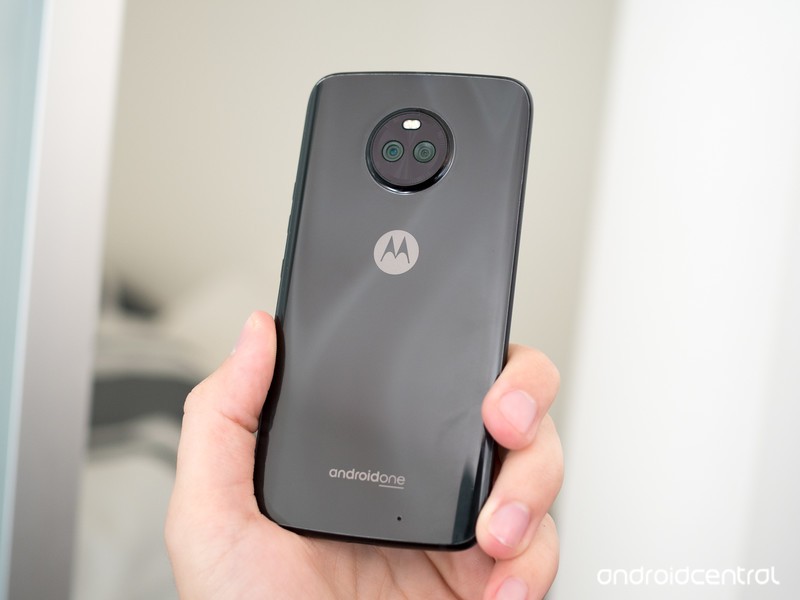
Moto X4
See at Amazon
The Moto X4 is all about providing a high-end feel without the coinciding price. It originally retailed at $399, but can often be had for well under $300 now just a handful of months after launch. At that price, it’s a fantastic phone — it has a beautiful metal-and-glass build, dual rear cameras, solid battery life and really good specs for the money. The software experience is typical clean Motorola, and runs buttery smooth thanks to some wonderful optimizations.
Unlike many of Motorola’s more expensive phones, the Moto X4 has also retained a headphone jack. And even with that, it’s still IP68 water and dust resistant.
Bottom line: The Moto X4 is a fantastic deal at under $300, providing a flagship-like experience in many respects for far less than half the price.
One more thing: You can get the Moto X4 from Amazon or Motorola directly, but also on Project Fi as an “Android One” version with a longer update runway.
Conclusion
When it comes to keeping the headphone jack around, Samsung still takes the cake with the Galaxy S9 and S9+ — they’re great phones overall that happen to also still hold onto this important port. The LG G7 is also a good phone that keeps the jack, and has best-in-class audio quality. On the cheaper side, the Moto X4 has a ton going for it and retains the headphone jack and IP68 water resistance at a sub-$300 price.
Best overall
Samsung Galaxy S9 / S9+
See at Amazon
The Galaxy S9 and S9+ aren’t much different from their predecessors, but seeing as those were Samsung’s best-ever-selling phones that’s not a bad thing. These phones are all about giving you the most features in the most beautiful package. You get top-end specs across the board, plus all of the hardware features you expect: waterproofing, wireless charging, an SD card slot, a headphone jack and more.
The camera is all-new this year, with a sensor that does fantastic processing to remove noise and sharpen fine detail. It’s aided by a dual-aperture lens to get the best combination of light and detail in different shots, and in the case of the Galaxy S9+ is paired with a secondary telephoto lens for zoom and portrait mode shooting.
You don’t get the clean and simple software experience of the Pixel 2, which may take some extra customization and tweaking on your part, but the Galaxy S9 is far less polarizing overall — just about anyone looking for a high-end phone will love using the Galaxy S9 or S9+.
Bottom line: The Galaxy S9 and S9+ don’t require much thought — they can do everything, and look great doing it, with few real downsides.
One more thing: Consider paying the extra $120 for the Galaxy S9+, where you get more RAM, a bigger screen and longer battery life. It’s worth it for most people.
Update July 2018: We’ve replaced the LG V30 with its newer, better counterpart, the LG G7. The rest of the list remains unchanged.
Disconnect VPN will keep your browsing private for life for just $40!
It’s probably trite and a bit cliché at this point, but we increasingly live our lives online. Our bank information, personal information, likes, dislikes, and more are all over the internet — often whether we like it or not. That’s all data, and nowadays, data is a commodity. Your information is being bought and sold. Sometimes it’s simply to show you catered ads; other times it’s for the stuff that after-school specials used to warn you about.
Block online trackers for life for $40 Learn more
What can you do to combat all of this online tracking? Do you turn to VPNs? Sure, but they don’t necessarily block tracking in every sense. Did you know that there are services and apps that actually block online trackers in order to keep your data safe?

Disconnect is one of the best tracker blockers around. It blocks tracking requests from connecting to any of your devices, thereby keeping your data safe. It even masks your location so that you can access websites as though you’re in another country (like a VPN). Apps like these have subscription rates, and some charge an arm and a leg. If you were to go directly to Disconnect for a lifetime subscription, you’d pay $500. Through Android Central Digital Offers, you’ll pay only $40, a savings of more than 90%.
Disconnect is available for iOS, Android, PC, and Mac, so you can cover all of your devices and keep your browsing habits private. If you often deal with sensitive information or would rather just keep your internet habits completely your own, you’ll need a quality tracker block, and Disconnect is one of the best around. Check it out at Android Central Digital Offers and save 90%.
Block online trackers for life for $40 Learn more
This $250 Asus Chromebook Flip can be used in tablet, stand, or laptop mode
Download apps directly from Google Play and more.

The Asus Chromebook Flip C101PA-DB02 is down to $249.99 at Amazon for a limited time. When not on sale, it can generally be found selling for up to $300.
The C101PA features a 360-degree hinge and a 10.1-inch touchscreen which allows you to use the device in tablet, stand, or laptop mode. It weighs just two pounds and is only .6 inches thick with a battery which can last for up to nine hours on a single charge. It features a Rockchip RK3399 Quad-Core 2.0 Ghz processor with 16GB of storage and 4GB RAM.
You’ll also want to note this Chromebook runs the Chrome OS operating system (not Windows or Mac), and can download apps directly from the Google Play Store to use on the device. You’ll also receive 100GB of Google Drive space with its purchase.
See at Amazon
Spigen Liquid Crystal Pixel 2 Case review: Clearly a great option
Puns aside, this is one of the best clear cases you can get.

Although the Pixel 2 may not be the most stunning phone ever created, it’s still a pleasing bit of technology to look at. The Just Black, Clearly White, and Kinda Blue colors all come with their own unique style, but if you throw a case on the phone to help keep it protected, these colors completely vanish.
Clear cases are often a favored solution by many that want to keep their gadgets protected without masking the design, and Spigen’s Liquid Crystal series is now available for the Pixel 2 as a way to do just that.
Here’s how it holds up.
Spigen Liquid Crystal Pixel 2 Case

Price: $11.99
Bottom line: If you’re in the market for a clear Pixel 2 case, get this one.
The Good
- Doesn’t add too much bulk
- The dot pattern helps to keep smudges at bay
- Offers a lot of extra grip
- Fingerprint sensor cutout and buttons feel good
The Bad
- Difficult to take off
- If you’ve got a white Pixel 2, you’ll see every little piece of dust possible
See at Amazon

Let your phone shine through
Spigen Liquid Crystal Pixel 2 Case What I like
When I think of clear cases, I usually don’t think of something that offers a lot of good protection for my phone. However, with Spigen’s Liquid Crystal Case, it’s the exact opposite.
Unlike some clear cases that feel really flimsy and cheaply-made, Spigen’s feels rigid, durable, and prepared to handle as many falls as your butterfingers will result in.
The case is made out of a TPU material, and thanks to the Air Cushion Technology, it’s designed to absorb the shock of drops to keep your phone safe at all times.
Clear cases also often have a tendency of showing every smudge imaginable, but to my delight, this is also a non-issue. You’ll still need to take a wipe to the back of this case every now and then to keep it looking as clean as you can, but it’s a task I’ve had to do far less often than I was anticipating. On a similar note, a dot pattern on the inside of the case works to prevent any unwanted watermarks on your phone.
Once the case is on, everything just works. It makes the Pixel 2 easier to hold thanks to the added grip, all of the buttons are easy to press, the cutout for the fingerprint sensor doesn’t mess up the swipe-down gesture for the notification panel, and Active Edge doesn’t require any additional force to trigger.

Going clear has an ugly side
Spigen Liquid Crystal Pixel 2 Case What I don’t like
All of that’s fine and dandy when you put the case on, but if you decide to take it off, be prepared for a challenge.
Putting the Liquid Crystal Case on the Pixel 2 is a breeze, but taking it off requires you to start pulling at just the right angle and then performing an assortment of finger gymnastics to pry it off without doing any sort of damage.
The reason this is so difficult likely has to do with the rigidity I mentioned above, and while that’s great for added protection, isn’t ideal if you ever find yourself is a scenario where you need to quickly take the case off.
Also, at least with my Clearly White Pixel 2, I’ve found that it can be a pain to get every last piece of hair and dust off the back of the phone and inside of the case to make sure I’m not showcasing a pile of gunk everywhere I go.
This isn’t really a knock against Spigen’s case specifically as every clear case has this issue, but it’s still something to keep in mind.

Spigen Liquid Crystal Pixel 2 Case
Clear cases aren’t my go-to choice if I’m looking to protect my phone, but if you do like that style and have a Pixel 2, Spigen’s Liquid Crystal is one of the best options you can find.
The case looks nice, feels great in the hand, and doesn’t compromise any features/usability for the phone.
4
out of 5
Add that together with decent protection and a price of just $11.99, and Spigen’s case is more than deserving of your attention.
See at Amazon
Google Pixel 2 and Pixel 2 XL
- Pixel 2 FAQ: Everything you need to know!
- Google Pixel 2 and 2 XL review: The new standard
- Google Pixel 2 specs
- Google Pixel 2 vs. Pixel 2 XL: What’s the difference?
- Join our Pixel 2 forums
Best Buy
Verizon
Google Store
Project Fi
Best Moto G6 Deals in 2018
Here’s where you can save even more on the already cheap Moto G6.

In 2018, one of the best values in smartphones is the Moto G6. Motorola’s Moto G line has been the gold-standard when it comes to affordable phones since 2013, and with the G6, that point is proven yet again.
Motorola’s retail pricing of $249 for the Moto G6 is already darn impressive, but if you know where to look, you can often get the phone for even less cash.
We’ve handpicked the absolute best Moto G6 deals for you, and without further ado, this is what we found.
Verizon
First up on this list, Verizon’s got a pretty killer deal if you don’t mind paying month-to-month for your phones.
If you open a new line of service at Verizon, you can pick up the Moto G6 for just $5/month. Over the course of 24 months, that comes out to just $120 out of your pocket (50% off the MSRP).
The new line requirement is a bummer, but if you were already planning on adding a new line or thinking about making the switch to Big Red, this is absolutely worth taking advantage of.
See at Verizon
Amazon
Amazon Prime comes with a seemingly endless list of benefits, one of which is access to its Prime Exclusive Android phones.
The Moto G6 was added to the Prime Exclusive lineup in late May, and so long as you’re a Prime subscriber, you can buy the phone unlocked for just $235.
A $15 discount isn’t quite as impressive as what Verizon’s offering, but even so, a deal’s a deal. If you do pick this up, just be aware that Amazon’s flavor of the G6 comes with built-in Alexa and a few Amazon apps (such as Kindle, Amazon Music, Prime Video, etc.).
See at Amazon
Moto G6, G6 Plus and G6 Play
- Moto G6 Plus review: Mastering the art of the mid-range phone
- Moto G6 review: Finding success in compromise
- Moto G6, G6 Play, and G6 Plus specs
- Join our Moto G6 forums
Amazon
This $9 under-desk headphone mount is a great addition to any workspace
Create a great place to stash your headphones.

The Anchor – Original Under-desk Headphone Mount by Elevation Labs is a great way to store your bulky headphones while keeping them within reach. At $12, it offers a pretty good value, but if you use the coupon code NOCLUTTER you can knock an extra couple bucks off its price, making it just $9.20 via Amazon.
The Anchor uses an ultra-secure 3M adhesive to mount to the bottom of your desk and it can hold two sets of headphones on it.
With nearly 1,700 reviews it maintains a 4.5 out of 5-star rating, so you’ll want to pick up one of these before the discount disappears.
See at Amazon
 AIVAnet