


Far Cry 5: Lost on Mars – what’s changed
Head to the red planet to stop an alien invasion.

The latest Far Cry 5 expansion is out for those who want to extend their time in its murderous world. It’s called Lost on Mars, and it’s not quite what we expected to see.
What’s new in Far Cry 5: Lost on Mars?
As the name implies, this DLC takes you to the planet Mars. As pilot Nick Ryes, you find yourself flying so close to the stratosphere that you’re teleported to the red planet by a character named Hur Drubman Jr. Hurk was seemingly on a mission in space when he was dismembered by martian arachnids.
That’s right — Lost on Mars is all about finding someone’s reproductive organ, and other weird body parts, too. (The term “space junk” suddenly takes on a whole new meaning.) Hurk himself is somehow still alive despite being little more than a floating head inside a space helmet at this point.
Alongside finding his fond parts, Hurk’s ultimate goal is to reactivate an alien AI he’s fallen in love with. To do so, you’ll be tasked with collecting power cores to reactivate the alien structures found on the planet.
Alien enemies

Your task won’t be a walk in the park. You’ll find resistance in the form of an arachnid army. Some of these guys have sniper rifles and hardened armor. And there are queens in the background controlling them.
You eventually learn about their true goal: a plot to take over the earth. Your job, of course, is to stop them.
Zero gravity
You’ll traverse the planes of Mars with your gravity belt and a wingsuit. The belt allows you to make some incredible leaps, and it’s not just for dodging incoming enemy fire.
Your first need is to keep your boots off the sand. Enemies can detect your presence if you’re walking, so you’ll want to be jumping around as much as you can. But more than that, you’ll need to use the belt to scale the various puzzle towers in the game to activate those power cores. It makes for some fun new gameplay possibilities that wouldn’t have made sense in the base game.
Space weapons
A trip to Mars wouldn’t be a trip to Mars without being able to use some alien weaponry. You’ll have your usual range of laser-equipped rifles, pistols, and the like, as well as some unique things like the Blaster of Disaster, Hellfire, and the Morphinator.
That last one is a grenade that summons chickens meant to distract the aliens. There’s also a power glove that basically turns you into Luke Cage.
Back on earth, you’ll get to play around with weapons named Obliteratorrrr, Taser Phazer Annihilazer, Nerve Reaper, and Grape Popper. Those cults haven’t seen crazy until they’ve seen you use some of this stuff.
Far Cry Arcade
Those who enjoy making custom maps using Far Cry Arcade will appreciate the addition of the Mars assets. You’ll be able to make cool sci-fi maps as a result.
When can you play it?
Lost on Mars is out now on PlayStation 4, Xbox One, and PC. You can buy the DLC for $10, but those who purchased the season pass for $30 will have access to it with no additional charge.
See at PlayStation Store
PlayStation 4

- PS4 vs. PS4 Slim vs. PS4 Pro: Which should you buy?
- PlayStation VR Review
- Playing PS4 games through your phone is awesome
Amazon
How to Use Screen Time in iOS 12
Apple in iOS 12 introduced Screen Time, which is designed to provide you with information on how you’re using your time on your iPhone and iPad.
With Screen Time, you can see how often you pick up your iOS device, which apps you’re using, which apps are sending the most notifications, and other details.
Subscribe to the MacRumors YouTube channel for more videos.
Accessing Screen Time
There’s no dedicated app for Screen Time, so it might not be immediately obvious how it’s accessed when you first install iOS 12. All Screen Time features are actually available in the Settings app.

Open up the Settings app.
Scroll down to the “Screen Time” section that’s grouped with Notifications, Sounds, and Do Not Disturb.
Tap on “Screen Time” to see your usage statistics.
Screen Time Syncing
Screen Time statistics are collected from all iOS devices running iOS 12 where you’re logged in with your iCloud account. That means it will aggregate data from all iPhones and iPads that you use during the course of a day.

You can view your data across all devices or on a per device basis. To view other devices, tap on the “All Devices” label on the main Screen Time screen and then choose “Devices” from the upper right hand corner.
Info Available in Screen Time
When you open up Screen Time, a chart is displayed with information on your last 24 hours of iPhone usage, organized by each individual app or which app category you’ve used the most, such as Productivity, Games, Creativity, or Messages.

If you tap on that chart, you can see even more information from either the last 24 hours or the last 7 days, including your longest usage setting, the number of times you picked up your device during the day, and how many notifications you got, along with details on which apps are sending you the most notifications.
Other Screen Time Features
In the Screen Time section, you can set scheduled Downtime for yourself to restrict yourself (or a child) from using apps outside of those that have been allowed with App Limits, you can set specific time limits on app categories like social networking or games, and you can access Content & Privacy Restrictions, useful if you’re managing a child’s device.

If you use Family Sharing with a spouse, friend, or child, and you’re the family manager, you’ll also see family members’ names listed under “Family” and will be able to see and control their app usage.
These features are relatively simple to use, but we’ll be looking into them in more depth in future how tos.
Disabling Screen Time
If you don’t want to use Screen Time, you can turn it off in the Settings app.

Open the Settings app.
Tap “Screen Time.”
Scroll down to “Turn Off Screen Time” and tap it.
Turning off Screen Time on your device will delete all app, website, and notification history. You can re-enable Screen Time at any time, but it does not save data nor does it begin collecting data until enabled.
Related Roundup: iOS 12
Discuss this article in our forums
With a public API, Venmo’s default privacy settings expose private user data
Those who use Venmo as their primary money-transfer app, may want to consider changing their privacy settings. After a security researcher analyzed over 200 million Venmo transactions back in 2017, it became clear the app exposes a large amount of private details about its users, The Guardian reports.
The project was created by Berlin-based researcher Hang Do Thi Duc, who highlighted all of her findings via a website called “Public by Default.” On the site, she explains how she was able to learn an ‘alarming amount’ about Venmo’s users by pulling a total of 207,984, 218 transactions all via the app’s public application programming interface (API) — which can be accessed by anyone.
Even though Venmo does allow you to choose what is or isn’t public, all transactions are public by default — which some users may not realize. To protect your information, you can choose to make any future transactions visible by only the sender and recipient — that way, they won’t show up on the public feed. There’s also the option to make all past transactions private as well.
Using the logged data via the API, Do Thi Duc was able to piece together the lives of five different Venmo users identified as: ‘The Cannabis Retailer,’ ‘The Corn Dealer,’ ‘The Lovers,’ ‘The YOLOist,’ and ‘The All Americans.’ Each one includes stories of who they are with specific details she was able to find simply by sifting through their transactions — including exactly how many transactions were carried out by each person in 2017. While she was also able to see full names, she did not publish that identifying information.
“This Venmo user — a young woman with a Greek last name — had 2,033 transactions in eight months’ time. And through her Venmo transactions emerges an unhealthy portrait. She loves Coca Cola (280 transactions) and pizza (209 transactions), and often goes for coffee with the same three friends. She also likes to eat a lot of sweets, especially donuts,” she writes about ‘The YOLOist.’
On the site, Do Thi Duc explains the project will hopefully shed light on the fact that companies should be putting user data protection first. While Venmo’s public feed seems harmless — and even a source of entertainment for some — we don’t truly realize how much information we’re sharing. This includes your first and last name, transaction history, and blatantly revealing where and with whom you’re spending your time by listing who it is the money is going to.
Editors’ Recommendations
- Venmo will no longer let you pay or charge your friends on its website
- Don’t wait for a money transfer in Venmo — just use its Mastercard debit card
- Flipboard’s latest update makes it easier to stay on top of all things tech
- Facebook fuels fake-news fight with fleet of fact checkers
- Twitter sold tweets to the guy who made the Cambridge Analytica app
Benchmark test shows Core i9 severely throttled in 15-inch MacBook Pro
YouTuber Dave Lee is reporting what we already expected would happen with Apple’s latest 15-inch MacBook Pro refresh with the Core i9-8950HK six-core processor crammed inside: Performance throttling. There is just simply not enough space in the 0.61-inch-tall chassis to sufficiently cool the chip, thus to prevent damage from overheating, the MacBook Pro throttles down its speed.
The Core i9-8950HK is Intel’s first “Core i9” chip for mobile, and one of the company’s first six-core chips for laptops. Launched in April, it has a base speed of 2.9GHz, a maximum speed of 4.8GHz, 12MB of cache, and an integrated UHD Graphics 630 component. It’s a powerhouse of a mobile chip, but because of the MacBook Pro’s thin environment, the chip reportedly isn’t reaching its potential.
According to Lee, you can see the throttling begin after a few seconds of rendering in Adobe Premiere. It can’t even maintain its base speed of 2.9GHz, he says, and forget about hitting that maximum turbo speed. To give a taste of the throttling problem, he provides a rendering test.
In a normal office environment, the Core i9 rendered a 4K clip (H.264) in 39 minutes and 37 seconds. That is a few minutes faster than the Core i7-7820HQ four-core chip in 2017’s 15-inch MacBook Pro, which rendered the same clip in 35 minutes and 22 seconds. But when he ran the same rendering test in an open freezer, the Core i9’s time dropped down to 27 minutes and 18 seconds. That’s a 12-minute 19-second difference.
“This degree of thermal throttling is not acceptable,” he says. “This is isn’t something Apple should put out on the market and just blindly sell to people because people that purchase this device will never know their laptop is throttling to this degree. This type of thermal throttling affects the end user.”
This is a significant problem. Professionals looking for high-performance laptops will see these six-core chips — Intel’s Core i7-8750H is the cheaper option of the two — as a selling point for their investment. The base configuration with the Core i7, 16GB of memory and 512GB of storage is $2,799. Bump that configuration up to the Core i9 and you’re paying $3,099. For that price, you should get every ounce of performance the six-core chip provides.
That said, if you’re only using the MacBook Pro with Intel’s Core i9 to troll Facebook or shop on Amazon, you will never see the throttling. But the MacBook Pro really doesn’t target the mainstream user: It’s a MacOS laptop built for professionals that likely use Final Cut, Adobe Premiere, and/or develop software. It’s the “extended computational work” where the MacBook Pro throttles the Core i9’s performance.
Unfortunately, he didn’t go into details about the Core i7’s performance, but the report is good food for thought if you were eyeing the Core i9 version and its hefty ball-and-chain price tag. We expect to see more benchmarks pop up over the coming weeks as testers get their hands on the new MacBook Pros released last week.
Editors’ Recommendations
- The MacBook Pro may finally get updated with faster processors
- Intel Core i5 vs i7
- Intel’s Core i9 for laptops is great, but it’s not a true Core i9
- Intel throws down a gauntlet with its 28-core extreme CPU
- Rumored six-core MacBook Pro could be the fastest Apple ever made
Best Cheap Bluetooth Speakers Under $50 in 2018

Want to fill your house with lovely music? Check out these wireless speakers!
Nothing makes a party better than some music. And nothing makes playing music easier than a Bluetooth speaker, especially as more and more phone manufacturers omit the 3.5mm headphone jack. Fortunately, you don’t need to spend a fortune just to make your tunes louder.
These are the best cheap Bluetooth speakers under $50!
- Anker Soundcore 2
- Anker Soundcore mini
- Anker Classic Portable Wireless Bluetooth Speaker
- AUKEY Bluetooth Stereo Speaker
- AUKEY Outdoor Speaker Wireless Bluetooth
-
ELEGIANT Bluetooth Computer Speakers
Anker Soundcore 2

Anker leads the pack when it comes to inexpensive accessories, and they have four great cheap speakers to choose from. “Cheap” doesn’t mean “junk”; these are well-built products that can withstand your day to day use. The best speaker for most people will be the standard Soundcore 2: this is a compact speaker that offers 24 hours of battery, 12 watts of sound, and surprisingly good bass for the size. The speaker is rated IPX5 water-resistant: don’t expect it to survive a raging river, but it’s fine to take in the shower. This speaker charges with Micro-USB, and features a 3.5mm input in addition to Bluetooth 4.2.
Anker’s Soundcore 2 speaker is available in black for $40, and in blue or red for $42.
See at Amazon
Anker Soundcore mini

If you need something even more compact, Anker still has you covered. Its Soundcore mini has a shorter battery life, doesn’t get as loud or as bassy, but is more compact in return. The cylindrical speaker fires your music up, with play/pause and volume buttons on the front. Around back you’ll find the Micro-USB charging port, 3.5mm input and microSD slot, and you can, of course, connect to your phone with Bluetooth 4.0. The battery allows for 15 hours of playtime, more than enough for most parties. There’s no official IP rating, so exercise caution if you want to use this while you shower.
The Anker Soundcore mini is available in black, gold, grey and pink for $30.
See at Amazon
Anker Classic Portable Wireless Bluetooth Speaker

If you want a bit of a different design, Anker’s Classic Portable Wireless Bluetooth Speaker is for you. This speaker is shaped like a cube instead of a cylinder, but the speaker still fires up to fill out your space. The play/pause and volume buttons are still accessible on the front, and the Micro-USB port, 3.5mm jack and power switch are still located on the back. The battery is good for between 15 and 20 hours of playback, depending on your volume. Once again there’s no IP rating, so don’t try to take this near the pool.
Anker’s Classic Portable Wireless Bluetooth Speaker is available in black for $28.
See at Amazon
AUKEY Bluetooth Stereo Speaker

AUKEY is another big name in the accessory space, and it offers great Bluetooth speakers as well. Its Bluetooth Stereo Speaker sounds great and looks classy, the two most important things for speakers to do. Playback controls are located on top, with the speakers facing outward to blast through your rooms. The Micro-USB charging port and 3.5mm input jack are located on the back, and you can, of course, connect to your phone with Bluetooth 4.0. Battery life is weak at only ten hours, so you’ll be making frequent use of that charging port. There’s no IP rating, so be cautious of where you use this speaker.
AUKEY’s Bluetooth Stereo Speaker is available in silver for $44.
See at Amazon
AUKEY Outdoor Speaker Wireless Bluetooth

If you need something with super long battery life, something that can take a beating — or both — AUKEY has another speaker just for you. Its Outdoor speaker offers 30 hours of playback and a rugged design that’ll gladly accompany you on a trip to the lake or up in the mountains. The Micro-USB charging port and 3.5mm audio jack are hidden behind a rubber door, and playback controls are on top. The speaker even features a threaded hole for mounting it to a tripod, bicycle, or another compatible accessory. There’s no official IP rating, but AUKEY says the speaker is “water-resistant.”
AUKEY’s Outdoor speaker is available for $47.
See at Amazon
ELEGIANT Bluetooth Computer Speaker

If you’re looking for something a bit more permanent — or need a speaker to pull double duty at your computer desk — ELEGIANT has the speaker for you. This speaker can be permanently placed to output music from your desktop, or it can come with you for parties. Battery life isn’t great at between five and ten hours, but if you keep this plugged in at your computer station a majority of the time that won’t be an issue. This can connect to devices with either Bluetooth 4.0 or a 3.5mm jack. Playback controls are on the back, but volume is controlled with a lovely knob on the right side. ELEGIANT doesn’t mention any sort of water resistance, so keep this away from the river.
ELEGIANT’s Bluetooth Computer Speaker is available for $40.
See at Amazon
What’s your pick?
Which cheap speaker do you like the most? Let us know down below!
Treat yourself to a refurbished Acer Chromebook 15 for just $225
A refurb worthy of your purchase!

Amazon currently has the Acer Chromebook 15 on sale for $224.99 in certified refurbished condition. It’s being sold directly from Acer’s recertified store and comes with a minimum of 90-days of warranty coverage in case you run into any issues, but each one is tested to work and look like new before as part of the refurbishment process. It has a 15-inch display, 4GB of RAM, 32GB of internal storage, and obviously runs Google’s ChromeOS.
There may not be a ton of local storage, but keep in mind that Google offers 100GB of Google Drive space to help keep your files backed up in the cloud. This price is good for today only, so be sure to grab one now!
See at Amazon
Best Verizon Wireless Deals & Promotions

No matter what T-Mobile says, you can actually find some pretty great deals on Verizon.
Verizon Wireless has some of the largest coverage for customers in the United States, and although T-Mobile likes to continually poke fun at the carrier for having high monthly rates, there are actually some really solid deals to be found if you know where to look.
You can typically find quite a few deals being run by Verizon at any given time, but if you only want to look at the best of the best and don’t have time to sift through the garbage, that’s where we come in.
These are best deals on Verizon Wireless right now.
Buy one top Android phone, get another for free!

As awesome as flagship smartphones are, their high prices are a pain in the butt — especially when buying more than one at the same time. Thankfully, Verizon’s got you covered no matter what you’ve got your eye on.
Right now, you can buy one flagship phone and get another one for free or with a heavy discount — no trade-in required. This promotion is available for the Google Pixel 2/2 XL, Samsung Galaxy S9/S9+, LG G7 ThinQ, Galaxy Note 8, and more.
The one caveat to this deal is that you’ll need to add one new line of service in order to be eligible, but assuming you need to add another line to your account or are looking to switch to Verizon, this is a great offer.
See at Verizon
Score $50 off the JBL Link 10, Link 20, and Link 300

Bluetooth speakers are essential for making the most out of your summer, and to help you do just that, Verizon’s offering $50 off the JBL Link 10, Link 20, and Link 300. As such, prices work out to $99, $149, and $199, respectively.
This offer is good through the rest of July, so be sure to act quickly if you want to take advantage of it.
Also, since none of the speakers require a data connection of any sort, you can purchase them and still get the discount even if you’re not a Verizon Wireless subscriber!
See at Verizon

Take $150 off the Galaxy Tab S3 w/ purchase of an Android phone

Android tablets may not be all that popular these days, but if you’re in the market for one, Samsung’s Galaxy Tab S3 is one of the best you can buy.
The Tab S3 is still pretty expensive on Verizon with a price of $599 on a two-year contract, but you can take $150 off when purchased with any Android phone.
That brings the tablet down to just $449, and while still not cheap, is a heck of a lot more affordable.
See at Verizon
Save $50 – $150 on the Asus ZenPad Z10

If the Galaxy Tab S3 is still more expensive than what you’re looking to spend on a new tablet, you may be interested in Asus’s ZenPad Z10.
The Z10 isn’t quite as flashy as the Tab S3, but it’s still worth a look thanks to its 10-inch IPS 2K display, DTS-HD premium audio, and up to 20 hours of battery life with regular use.
When you make 24 monthly payments on the ZenPad Z10, you can get it for just $11.66/month for a total savings of $50. If you don’t mind signing a two-year contract, you can pick it up for only $179.99 ($150 off the regular $329.99 retail price).
See at Verizon
Updated July 2018: Added new deals for July!
Carriers

- Which unlimited plan should you buy?
- Verizon’s Unlimited plans: Everything you need to know
- Everything you need to know about the T-Mobile ONE unlimited plan
- Everything you need to know about the AT&T Unlimited plan
- Everything you need to know about Sprint’s Unlimited Freedom plan
- Join the Discussion

Get the training required to pass the CompTIA Security+ exam for just $59!
When it comes to data security, CompTIA is the golden standard of certification. If you’re interested in a career in data security, you’ll need to pass the Security+ (SY0-501) exam
The problem here is that the training covers a broad range of topics and the courses required are usually not cheap. Right now, however, Android Central Digital Offers has a deal on the 2018 CompTIA Security Certification Training Bundle, you’ll pay just $59. That’s 98 percent off the regular price!

This training bundle contains 14 courses with over 140 hours of content included, which covers everything from everything you need to know to pass the various IT certification exams.
If you’re interested in becoming a certified data security specialist, this is the course you need. Don’t wait too long — this price is only here for a limited time.
See at Android Central Digital Offers
Samsung Galaxy X foldable phone: Rumors, Images, Details, and More!
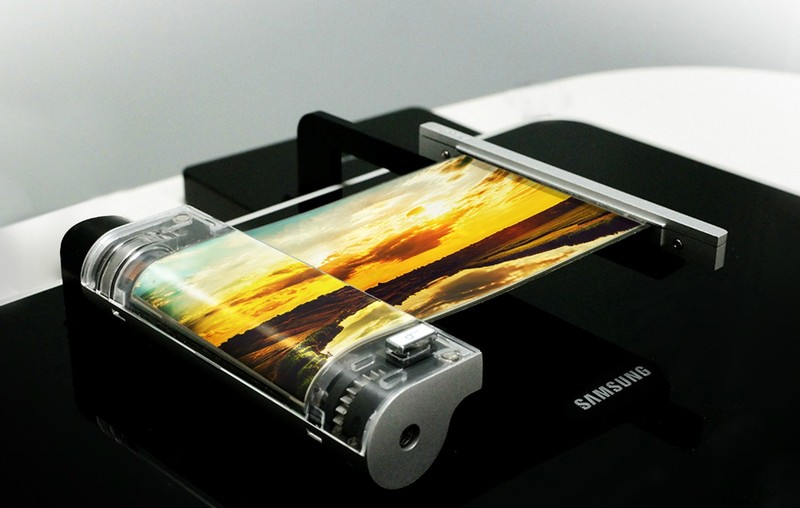
This will be the next big thing … at some point.
The mobile industry has been tracking this rumored Samsung “Galaxy X” prototype phone for several months, gradually pushing back the supposed launch timeline for what’s apparently to be a successor to the general “Galaxy S” line. But as waves of details about the upcoming Galaxy S9 and S9+ come in, we’re still struggling for details on what this supposed Galaxy X with a foldable display will be. Here’s the latest information.
The latest Galaxy X news
July 18, 2018 — Galaxy X reported to fold in the shape of a wallet, might cost over $1,500
A report from The Wall Street Journal surfaced this morning outlining a few key details we can expect from the Galaxy X. When describing the design of the phone, part of the report notes that:
The screen can be folded in half, like a wallet, these people said. When folded, the exterior of the phone boasts a small display bar on the front and cameras in the back, they added.
Furthermore, it’s said that the Galaxy X has a screen that measures in at 7-inches diagonally.
As for pricing and availability, WSJ notes that the Galaxy X has “taken on a greater sense of urgency in recent months” and that its price tag could reach well beyond $1,500. The phone’s expected to be released at some point in early 2019.
All the big details
Some background on Galaxy X rumors
No, you didn’t miss an announcement — Samsung didn’t have anything public to say about the Galaxy X (if that is its real name) at CES 2018. But as many companies do, Samsung took the opportunity of having so many high-up industry people together to show off what it’s working on to partners. According to The Investor, this year that included the Galaxy X. The device in question has a 7.3-inch display that can fold in the middle — multiple versions were shown, with different capabilities such as folding both inwards and outwards.
The inward-folding model (protecting the screen when closed) is reportedly the design with the most traction at the moment. The outward-folding one, on the other hand, includes “more advanced next-generation technology,” whatever that entails. The rest of the specs of the phone aren’t yet known, and considering how far out we are from a potential release — reportedly as late as early 2019 — those can and will change between now and then.
How will a ‘foldable’ phone actually work?
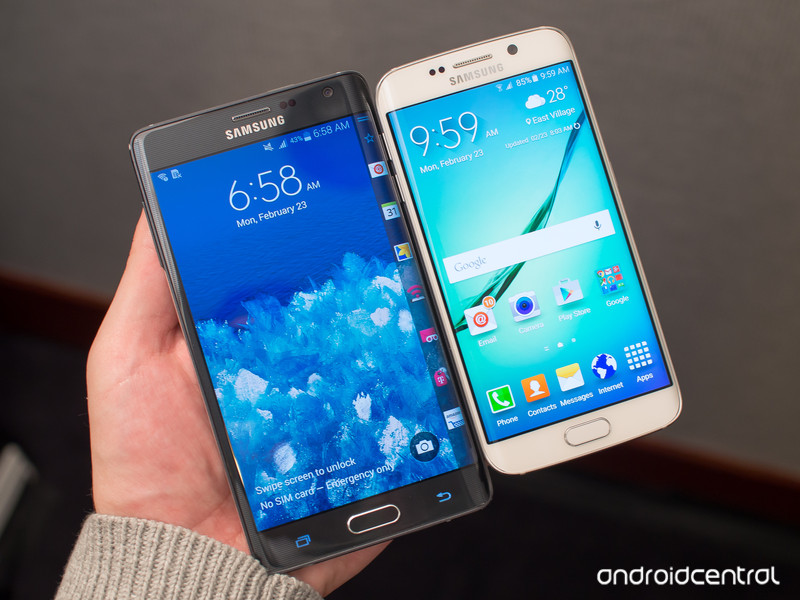
Samsung has of course been putting curved panels in production phones since the Galaxy Note Edge that eventually spawned into a phenomenon that has become a hallmark of Samsung’s high-end devices. The company has been experimenting with bendable OLED panels for years, going so far as to show them off publicly as technology demonstrations. But the question is whether it could make devices with displays that could be actively bent or folded thousands of times as a regular part of use. The display would have to be very robust, but then you also have the issue of what covers the display panel — typical Gorilla Glass wouldn’t do the trick.

LetsGoDigital has worked up renderings based on reports and patent filings that show the Galaxy X as a vertical-orientation phone, but with a hinge mechanism built into the sides of the phone. The phone would be rigid (and what looks to be extremely tall as well) when the display is extended and flat, but you could pull the top and bottom apart to expose the hinge to then bend while the screen follows suit.
Further renders show the phone while closed, which leaves a gap around the hinge portion not unlike a Microsoft Surface Book laptop. Large internal components would of course split between the top and bottom halves of the phone by the hinge.
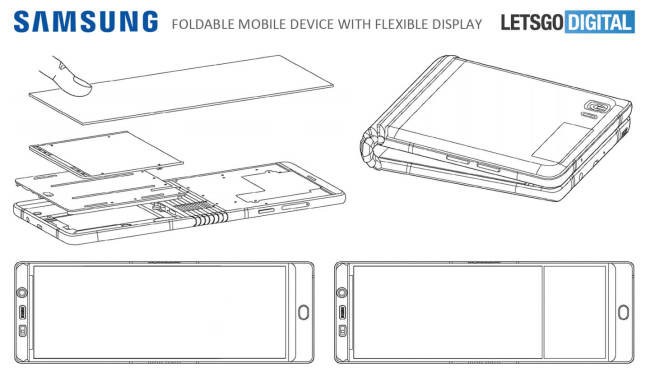
Early rumors pointed to a Galaxy X with a hinge and two displays, but now we’re talking about just one panel.
Early rumors of the Galaxy X pointed to some sort of announcement or teaser as early as late 2017, which obviously didn’t happen. But those same rumors questioned whether the Galaxy X was truly a “bendable” phone with a single screen, or simply a hinged device with two distinct panels — like the ZTE Axon M, for example. It seems now that Samsung’s going to attempt a full-on single bendable display. Other rumors also had indicated Samsung had a more tablet-shaped device with this bendable display technology in place, and that may still be on the table in different future devices, but in terms of the “Galaxy X” it looks to be a traditional vertical phone orientation.
When it will be announced
Our next best bet for when we’ll hear more about the Galaxy X will be MWC 2018, which kicks off at the end of February. That’s where Samsung has already said it will unveil the Galaxy S9 and S9+, and perhaps that will come along with a tease or some sort of information on what’s coming after that. Fingers crossed.
As for the full reveal, it’s more likely that we’ll be waiting until the second half of 2018. In its Q4 2017 earnings release, Samsung said it would be placing a higher emphasis on foldable OLED displays going forward and that those plans included debuting a foldable phone very soon. Based on this statement being made in January, it’s a good sign the Galaxy X could be revealed in 2018. An actual sales date could easily push into 2019.
Samsung Galaxy S9: Rumors, Specs, Release Date, and More!
Update February 2018: Updated with the latest rumors and information that has leaked in the past month.
Final Fantasy 7 Remake for PlayStation 4: Everything you need to know

Missed out on Final Fantasy 7 when it first released? Just want to revisit your favorite classic? Here’s everything you need to know about the Final Fantasy 7 Remake
I still remember when the Final Fantasy 7 Remake trailer debuted on Sony’s stage at E3 2015. I remember the disbelief at its existence; the utter awe of its cinematics; the complete euphoria of the crowd when the word “remake” appeared at the end of the trailer, squashing all thoughts that what they had just watched was for a movie or half-hearted remaster. It’s a complete remake, and Final Fantasy 7 deserves nothing less. (Hello Final Fantasy 7 PS4 port! At a time when the remake was kept under wraps, you were the last thing that people wanted.)
Whether you’re a new fan to the legendary JRPG franchise or returning to Midgar, here’s everything you need to know about the remake.
What is Final Fantasy 7
I’m sure for many that this title needs little introduction. Final Fantasy is one of the most iconic series in gaming, and Final Fantasy 7 is arguably its crown jewel, defining the childhoods of fans around the world when it first released over twenty years ago in 1997.
The attention surrounding it is probably why it was such a notable absence at E3 2018. The FF7 Remake is very much an evolution. In fact, it looks similar to what Capcom is doing with Resident Evil 2.
The story so far

Seeing the number 7 in its name may be intimidating, especially in a series that just released its 15th main installment, but don’t let that deter you. Final Fantasy 7 is very much its own independent, standalone story. Following mercenary Cloud Strife, Final Fantasy 7 features a battle of epic proportions between the rebel eco-terrorist organization AVALANCHE and the corrupt Shinra corporation, hell-bent on destroying the planet for its own gain.
The developers have hinted at slight story alterations or just adding more depth to its narrative in certain spots, but the main story beats will stay the same.
I don’t want the remake to end as something solely nostalgic. I want to get the fans of the original version excited. We’ll be making adjustments to the story with this thought in mind.
Though these weren’t explained thoroughly, I’d imagine these adjustments may be some added dialogue or filler cutscenes to flesh out the world and characters more. They want it to surprise players while still retaining what made it so special to begin with. So yes, you’ll still get one of the most shocking deaths in gaming history at the hands of Sephiroth.
Visuals: Midgar never looked so good

The graphics are being completely remade from the ground up using Unreal Engine 4. You won’t just be getting a slight bump in resolution or better texture quality. The Final Fantasy 7 Remake will look and feel like it was originally designed in the present, not over two decades ago. A far cry from its pixelated 1997 counterpart. This is a high-definition remake, meaning the visuals will be more realistic than ever. Still, Square Enix is working hard not to sacrifice some of its stylized nature. If you need a comparison, think closer to what Final Fantasy 15 looks like.
Every location and character will look just how you’d imagine them to be. No more polygonal messes. When you think of what Midgar would look like today if Square Enix had designed it in 2018, that’s what you’re getting.
A lot of us tend to remember our favorite childhood games through rose-colored glasses, conveniently forgetting how rough they looked and how janky they played. Our imagination is clouded by our nostalgia, but it soon it’ll be crystal clear.
Gameplay: A controversial evolution

Final Fantasy 7 originally featured an evolution of the turn-based combat system called Active Time Battle (ATB), which was similar to turn-based but with a few tweaks accounting for the timing of your actions. While turn-based combat was a staple of JRPGs, this is controversially changing in Final Fantasy 7’s remake. It will feature real-time action, though the “ATB gauge and Limit Breaks will appear with new ways to be used,” according to Producer Yoshinori Kitase.
Save for cutscenes and battles, the original gameplay was a mix of top-down/isometric viewpoints. Gameplay of the remake shows it will be more modern with a 3rd-person over-the-shoulder camera angle that is used in many action-adventure games today.
Wait, the game’s being split up?

As it turns out, the Final Fantasy 7 Remake won’t release all at once. At least, that’s what Producer Yoshinori Kitase seemed to state. In an interview with Dengeki Online, Kitase said “The idea that a remake of Final Fantasy VII would not fit into a single release was there from the very beginning. We still can’t share more information about its multiple parts, but please look forward to future announcements.”
The interview is originally in Japanese, but Gematsu has provided the proper translations.
Series creator Tetsuya Nomura further went on to explain that fitting everything into a single release and dedicating the appropriate time to do that would mean condensing certain aspects of the game and cutting out parts entirely. To mitigate this as much as possible, the decision was made to release in multiple parts. Nomura even refers to these sections as “episodes.”
Granted, this interview is from a few years ago, and the ever-changing technological landscape could have certainly affected these plans, but the studio has never communicated any differently up until this point. So for now, the game is being separated into different parts for release.
When can you play it?

If I could put that shrug emoji here, I would. Despite being announced over three years ago, we don’t have a firm release date for the Final Fantasy 7 Remake. In fact, we don’t even have a release window.
Game Director Tetsuya Nomura is currently focused on Kingdom Hearts 3, though that should change once KH3 finally launches on January 25, 2019. Final Fantasy 7’s remake is still very much in active development in the meantime, we just don’t have a solid timetable to go on.
Its reveal trailer interestingly noted that people would be able to “play it first on PlayStation 4,” with this specific wording calling into question whether it was merely a timed exclusive on Sony’s platform. Right now it’s only been confirmed for PlayStation 4, but a potential Xbox One release has not been ruled out.
While it doesn’t have a release date we can look forward to, you can pre-order the Final Fantasy 7 Remake for $59.99. Just don’t expect to jump into it soon. Right now you’ll have to settle for its Standard Edition as Square Enix has not announced any special or collector’s editions.
(The listing of December 31, 2018, on Amazon is a placeholder date, and is not indicative of its actual launch date.)
See on Amazon
 AIVAnet