


YouTube Music: Everything you need to know
YouTube Music is here — and it’s packing the biggest music library in the world.

YouTube is one of the most-viewed websites on the planet, and by far the most popular video platform today, so it’s no surprise that millions upon millions of users turn to it every day for music. It’s the default platform for music videos — especially viral music videos like This is America and Girls Like You — and it’s also a place to find just about any song, remix, mashup, or fan cover you could ever want. Whether you’re looking for lyrics to a song before karaoke night, music to sleep to, or a new remix to play at your next party, YouTube has what you’re looking for.
Now, YouTube is ready to make another run at a music app built upon their video empire with YouTube Music. It’s a music app with a truly unique interface, an unparalleled selection, and more than a few kinks to work out, but YouTube Music is here to stay and here to compete.
The latest YouTube Music news
July 17, 2018 — Google promises Android Auto support, better sound quality, SD card support, and more with future updates
There are plenty of areas in which Google can improve YouTube Music, and thanks to the team behind the app, we now have a short list of features to expect in future updates.
Over on the YouTube Music Help forum on Google Support, the YouTube Music team says that the following features will be available in no particular order over the coming months:
- Better audio quality, and ability to select the quality for downloading and streaming
- Sonos support
- Android Auto support
- SD card support for Android
- More obvious shuffle vs. play-in-order options for playlists
It’s unclear when exactly all of this will be available, but the option to save downloaded songs to an SD card is rolling out now.
June 18, 2018 — YouTube Music is coming to 12 new countries and becoming available to all inside the original “Early Access” countries
YouTube has opened up YouTube Music to 12 new countries , as well as ending its awkward and often confusing “Early Access” period and making the service available to everyone in its original five countries.
This brings the number of countries YouTube Music serves up to 17 — Australia, Austria, Canada, Denmark, Finland, France, Germany, Ireland, Italy, New Zealand, Norway, Mexico, Russia, South Korea, Spain, Sweden, Switzerland, the United Kingdom and the United States — and with the new YouTube Music also comes the new YouTube Premium pricing system.
All the big details
The service starts at $9.99/month — but no one should pay that

There’s no real sugar-coating it: using YouTube Music as a free user on Android is bad. There are ads every three to six songs, and you can’t leave the Now Playing screen, so it hogs your screen and your battery. YouTube Music is worlds better when you unlock its paid features. YouTube Premium is absolutely worth paying for.
YouTube Music Premium, however, is not.
For the love of Duarte, buy YouTube Premium instead of YouTube Music Premium
What’s happening to Google Play Music? Where’s my likes and playlists?

Google wants all of its Play Music subscribers to migrate over to YouTube Music at some point in 2019. That means YouTube Music will be adding most of Google Play Music’s tentpole features — the biggest of which is Google Play Music’s free 50,000 song music locker.
What does YouTube Music mean for Google Play Music
That said, Google Play Music and YouTube Music’s libraries and catalogs at the moment are completely disconnected and there’s quite a bit that has to happen before that can change. The library migration is a long ways off, but in the meantime, Play Music users get two music apps to play with instead of one. So which one should you use?
YouTube Music vs. Google Play Music: Which should you use?
A mixtape full of promise

YouTube Music is built on a gold mine. YouTube is not only the most used video platform in the world, it might be the biggest catalog of professional, semi-professional, and amateur music available in the world. This isn’t the first time Google has tried to capitalize on this, but this time is different. YouTube’s music team has finally gotten its act together and made us all a mixtape full of promises.
But can it follow through on them?
YouTube Music review: A mixtape full of promise
Getting started

YouTube Music is an adjustment from traditional music services — especially because it is based around video rather than audio — but thanks to the Google’s search prowess and downright uncanny predictions and recommendations, getting used to Google’s newest music service should be as painless as possible. And since it’s built around years of your YouTube history, YouTube Music already knows you better than you think.
Getting started with YouTube Music
Going offline

Networks fail. Your plane says it’s going to have Wi-Fi, but nope. You get stuck in the car with your parents in the middle of nowhere, and you’re outside cell range, and the radio stations are nothing but static and muffled AM country. Having music to listen to when you offline is important, and when the music service you’re using is based around video — which eats data like nobody’s business — how you save your music for offline playback is even more important.
How to download music for offline playback in YouTube Music
What is it missing?

YouTube Music is a brand-new service — albeit one built on an old app of the same name — and like most things that are shiny, new, and different, there are a lot of bugs to be worked out. There are a lot features that are still missing — from basic audio quality settings to more complicated endeavours like gapless playback and library management — and we’ve got a handy list of what’s missing and when we could maybe see some of it.
On that note — YouTube Music’s library does not include every video on YouTube, nor does it include every song and album on Google Play Music right now.
What YouTube Music still needs
Making the most of things

YouTube Music is “Early Access” right now, which means the service is essentially a beta and it is definitely buggy. While time and updates will fix some of those bugs, there are some things you can do to make the most of its current state.
6 tips and tricks for using YouTube Music
Also, even if you’ve never used YouTube Music before, it has years and years of your YouTube history to work off of. That means that YouTube Music could already have a good idea what you like, or it could have things completely wrong because you’ve mostly used YouTube to pull up music when your nieces are over or you’re hosting a party for your country-obsessed friends. Here’s how to help YouTube help you with better suggestions.
How to improve YouTube Music recommendations
Can it dethrone Spotify?

Spotify has spent the last decade building up a loyal user base, building algorithms that few companies can even begin to touch, and building up a reputation as the best brand in streaming music. YouTube, however, is one of the most used sites on the internet, period, a selection you can’t find anywhere else — a selection that will be absolutely unbeatable in the future — and Google is bringing its best algorithmic game with YouTube Music.
It’s still early days, but YouTube Music will be enough to dethrone Spotify soon?
YouTube Music vs. Spotify
Updated June 2018: We’ve reorganized and expanded this guide to better organize information for new, old, and prospective YouTube Music users as the service launches in a new batch of countries.
Details on Upcoming Amber Lake Chips Appropriate for 2018 MacBook Leak
Apple’s 12-inch MacBook lineup is expected to receive a refresh in 2018, and the new machines may use Intel’s upcoming 8th-generation 14nm++ Y-Series Amber Lake chips.
Details on the new chips leaked recently from Dell’s Chilean site and Romanian site NextLab501, as highlighted by MacRumors forum reader EugW.
Chips appropriate for the 12-inch MacBook include the 1.1GHz Core m3-8100Y, the 1.3GHz Core i5-8200Y, and the 1.5GHz Core i7-8500Y.
Core m3-8100Y
– 1.1 GHz – Base clock
– 2.7 GHz – 2-core Turbo
– 3.4 GHz – 1-core Turbo
Core i5-8200Y
– 1.3 GHz – Base clock
– 3.2 GHz – 2-core Turbo
– 3.9 GHz – 1-core Turbo
Core i7-8500Y
– 1.5 GHz – Base clock
– 3.6 GHz – 2-core Turbo
– 4.2 GHz – 1-core Turbo
Maximum clock speeds for the new Amber Lake chips suggest significant improvement in processor speeds over the 7th-generation Kaby Lake processors. For comparison’s sake, Turbo Boost topped out at 3.0GHz on the 1.2GHz entry-level processor, 3.2GHz on the mid-level 1.3GHz processor, and 3.6GHz on the 1.4GHz high-end chip option in the previous-generation machines.
All of the chips use Intel’s UHD 620 integrated graphics and are expected to be released in the third quarter of 2018, with the timing perfect for a fall refresh of the 12-inch MacBook.
Dell’s upcoming and as-of-yet-unannounced XPS 13 2-in-1 machine confirms the existence of the Core i5-8200Y and Core i7-8500Y processors, both of which are listed as processor options for the new device.
Intel first announced its upcoming Amber Lake chips at Computex, but thus far has not provided official info on the upcoming processors.
Rumors have not indicated when updates to the 12-inch MacBook will be available, but Apple could introduce refreshed machines alongside new iPhones in September, hold an event in October, or release them on a random date as it did with the recent MacBook Pro.
The recent launch of the MacBook Pro also hints at one new feature we could potentially be seeing in new 12-inch MacBook models aside from processor upgrades — a third-generation butterfly keyboard.
2015 and later 12-inch MacBook models have suffered from the same issues with keyboard failures, so it would make sense for Apple to include an updated keyboard in those machines as well, if, as speculated, the “quieter” third-generation MacBook Pro butterfly keyboard’s new silicone coverings do indeed prevent dust from infiltrating the keys.
Related Roundup: MacBookBuyer’s Guide: MacBook (Don’t Buy)
Discuss this article in our forums
Apple Increases Share of U.S. Smartphone Activations in Q2
During the second quarter of 2018, spanning from April to June, Apple’s iPhones accounted for 36 percent of total U.S. smartphone activations, an improvement over last year’s numbers where iPhone activations accounted for just over 30 percent of total activations, according to new numbers shared today by Consumer Intelligence Research Partners [PDF].
More customers are choosing iPhone over Samsung devices this year, and Apple’s higher number of activations came at Samsung’s expense. During the quarter, Samsung devices were also responsible for 36 percent of new activations, but for Samsung, that’s a solid decline from last year.
“Apple improved in part at Samsung’s expense, whose share of activations declined relative to both last quarter and last year,” said Mike Levin, Partner and Co-Founder of CIRP. “In a quarter without any significant phone launches, Samsung had market share only equal to Apple’s. A year ago, Samsung had a considerably greater share of sales.”
Apple devices and Samsung devices are the dominant brands, due to ongoing consolidation of the U.S. market. LG and Motorola, for example, have lost ground to Apple and Samsung over the course of the last year.
When it comes to operating systems, iOS and Android are, by far, the dominant operating systems in use. iOS accounted for 36 percent of activations during the quarter, while Android, which runs on an array of different smartphones from multiple manufacturers, accounted for 63 percent of U.S. activations.

Compared to last year, iOS’s share of activations grew, with CIRP citing increased customer loyalty to their operating system of choice. Given the sheer number of Android devices compared to iOS devices, it’s not surprising Android devices are responsible for approximately two thirds of activations.
Consumer Intelligence Research Partners regularly shares these surveys to monitor the state of the smartphone market. Findings are based on a survey of 500 subjects who activated new or used phones during the April to June 2018 period.
Discuss this article in our forums
Apple Releases Third Beta of macOS Mojave to Public Beta Testers
Apple today seeded the third beta of an upcoming macOS Mojave update to its public beta testing group, a week and a half after seeding the second macOS Mojave public beta. Today’s third public beta is the same as the fourth developer beta released yesterday, and makes macOS Mojave available for 2018 MacBook Pro models.
Beta testers who have signed up for Apple’s beta testing program can download the macOS Mojave beta through the Software Update mechanism in the Mac App Store. Subsequent betas are installed in a different way, using the Software Update icon in System Preferences.
Those who want to be a part of Apple’s beta testing program can sign up to participate through the beta testing website, which gives users access to iOS, macOS, and tvOS betas.
Potential beta testers should make a full Time Machine backup before installing macOS Mojave, and it should not be installed on a primary machine because betas are unstable and often have bugs.
macOS Mojave’s main new feature is a systemwide Dark Mode, which gives Mac users a new way to view the operating system. A revamped Mac App Store makes it easier than ever to discover great apps, while Dynamic Desktops give you wallpapers that subtly change throughout the day.
An improved Finder window with Gallery View, Sidebar, Quick Look, and Quick Actions makes it easier to manipulate, edit, and organize your files, while Desktop Stacks organizes all of the files on your desktop.

The Apple News, Stocks, Home, and Voice Memos apps have made their way to the Mac in Mojave, and for the first time, you can use Siri on Mac to control HomeKit products. Group FaceTime, an iOS 12 feature, is also available in Mojave and lets you chat with up to 32 people at one time.
Apple is keeping your data safer than ever with new security and privacy improvements, and Safari in macOS Mojave makes it much harder to track you through share/like buttons and via your system configuration.
macOS Mojave is compatible with 2015 and newer MacBooks, 2012 and newer MacBook Air, MacBook Pro, Mac mini, and iMac models, the 2017 iMac Pro, and Mac Pro models from late 2013 and mid-2010 and mid-2012 models with Metal-capable GPUs.
Mojave will be available in a beta capacity for the next several months so Apple can work out bugs ahead of a fall release.
Related Roundup: macOS Mojave
Discuss this article in our forums
To celebrate World Emoji Day, Apple debuts over 70 new emojis coming to iOS 12
In honor of “World Emoji Day,” Apple unveiled more than 70 new Apple emojis to use later this year. From different hairstyles to exotic animals, the company shared a first look at what we can expect to see on our keyboards very soon.
While Apple only teased a few designs, the latest additions are based on Unicode Version 11.0 — which includes more than 150 new emojis. This year’s library of images include even more ways for users to express themselves through messaging — with more emotions and personalization.
Among the new list of emoji characters Apple is releasing are new hair options. Those with red hair, curly hair, and gray hair will be happy to know there will soon be an icon for them to send to others. There will also be an emoji for those who are bald.
The options for smiley faces have expanded as well, that should better animate the way you feel. There’s a cold face (complete with icicles) for those days you’re feeling chilly, along with a party face when the balloon or confetti emojis don’t do justice. In addition, there will also be a face with hearts and a pleading face.
Aside from humans and emotions, there’s new animals to choose from as well — including a parrot, lobster, kangaroo, and a peacock. Apple also hasn’t forgotten one of the most important categories of emojis — food. To add to the menu of options already available, users will be able to select emojis of a mango, lettuce, cupcake, moon cake, and more.
Later this year, Apple also plans on releasing additional emojis for sports as well as new symbols, such as a softball, an infinity sign, and a nazar amulet — which protects against the evil eye. There will be new superhero emojis for both males and females as well.
The new icons will be released later this year for the iPhone, iPad, Apple Watch, and Mac in a free software update within iOS 12 — Apple’s latest operating system. While the new OS won’t be out until the fall, it’s currently available for download as a public beta for those who want to try it out before it’s released.
Aside from debuting tons of emoji designs on the special day, Apple also took to its leadership board to make a somewhat “minor” (but also funny) change to all of the executive profiles — by replacing each headshot with an executive’s respective Memojis instead. The new feature is part of its Animoji update in iOS 12, which allows iPhone X users to create customized characters of themselves to then send through iMessage.
Editors’ Recommendations
- Samsung tapped Hollywood talent to bring AR Emoji to life
- Mark your calendars — more than 150 new emojis are coming on June 5
- Google is replacing Android’s gun emoji with a water pistol
- Samsung could offer AR Emoji chatting as an alternative to video
- Emojis could change the way you use maps on your phone
Google Assistant’s new Visual Snapshot tab prepares you for the day

Ever wished you could just open one app and get an instant update of travel times, reservations, deliveries, and other useful tidbits about your day? Google is adding a feature to the Google Assistant which will allow you to do just that.
Visual Snapshots is a new feature rolling out this week, and you can access it by opening your Google Assistant (press and hold the home button), and tap the left icon in the top-right of the screen. It’s even easier to access on iOS devices, as it this information will pop up as soon as you open the app. Here’s what it will look like:

So what exactly will it show? Visual Snapshot will lead with travel times, to make sure you always know the best time to leave to get to the office on time, avoid traffic before an important meeting, or simply get home in time for dinner. The following pages will then be populated with your daily agenda, any reservations you might have made for dinners or movies, and even when deliveries are expected to arrive based on your emails.
Don’t worry too much if those particular cards aren’t of interest to you, as Google’s artificial intelligence will curate the cards based on your location, recent interactions, and time of day to make sure that it’s showing the cards that are the most relevant to you, at the right time.
Previous
Next
1 of 6


That’s not all either — Google Assistant will now also send you proactive notifications if some part of your plans needs to change. So if there’s heavy traffic on the way to the office, or if a flight is canceled, Google Assistant will make sure you’re aware of it, and that your plans need to change. You’ll even be notified of upcoming bills, so you know to make sure that you’ve got enough money in the account to pay everything off. You’ll need to make sure you’ve turned on proactive notifications.
Google is going to be adding even more functionality to this feature over time, and you can expect to see overviews of your notes from Google Keep, Todoist, Any.do, and other to-do apps pop up on your feed. So too will recommendations for new music and podcasts, as well as a discovery section to find things to do near you.
The feature is gradually rolling out this week for iOS and Android.
Editors’ Recommendations
- You can get Amazon Alexa push notifications on weather, package delivery, more
- How to use Google Assistant, plus all the ‘OK, Google’ commands you need to know
- The best iPhone apps available right now (July 2018)
- Here are the 20 best travel apps for vacations and trips
- The 100 best iPad apps for your Apple tablet
Build the smart home of your dreams for less with these Prime Day deals
Looking at Prime Day 2018 for the smart home deals? Haven’t invested in a voice-control ecosystem yet or just need some more lights you can schedule on and off anytime you want? We’ve seen quite a few smart home deals that could definitely help make your life a little easier.
A smart home really isn’t worth it if you can’t say “Alexa, turn on my living room lights.” Start with the Echo Dot for its lowest price since last year’s Black Friday at just $30. There are several Alexa-enabled devices on sale today since it’s sort of Amazon’s big day. Amazon’s newest hardware, the Fire TV Cube, is also on sale for $90.
Once you have your hub, you can start adding items to it. Plenty of TP-Link smart bulbs are on sale right now. Get white A19 bulbs for $18 or multi-color BR30 bulbs for $35. These are great options because they don’t require a separate hub and will easily connect to your Echo Dot once you’ve connected them to your Wi-Fi network.
Of course, TP-Link bulbs aren’t as advanced as the Philips Hue system. The Hue ecosystem has a ton of options, including a 2-bulb starter kit that comes with an Echo Dot for just $120 total. The starter kit comes with the Philips Hue Bridge that will control up to 50 bulbs and unite them with your Echo Dot for voice control. With your Bridge in place, you can add plenty of smart bulbs to it including $37 A19 color bulbs, $23 dimmable candle bulbs, and more.
Smart lights and bulbs are the simple way to start to your smart home, but there’s plenty more you can do. Add smart functionality to your door with the August 3rd-gen smart lock bundle for $238. With this, you’ll be able to check that your front door is locked from any room in the house or even while you’re away from home. It works with Alexa voice control and lets you track everyone coming and going.
Enhance your safety whether you’re home or not with smart security systems, too. The Blink XT 3-camera system is down to $230 today. Some of the Blink XT kits have already sold out, and some are back-ordered, but these prices are legit the best we’ve seen. You’ll be able to use this camera to monitor movement inside and out, get push notifications, and store video footage for viewing later. Add some spotlight cameras from Ring on sale for $140 and you’ll be able to see who is messing around in the dark, whether it’s a raccoon, your children sneaking out, or someone trying to get in.
All of these deals are just the tip of the iceberg for smart home possibilities. We’ll keep adding more smart home deals to this roundup as we find them, so be sure to check back for more.
Net neutrality could be making a comeback thanks to newly introduced bill
The bill’s being led by Republican Representative Mike Coffman.
Net neutrality may be no more, but thanks to the efforts of various members throughout the government, steps are being taken to reinstate its principles back into the country. On July 17, Representative Mike Coffman announced his bill to push forward with these efforts.

The bill, referred to as The 21st Century Internet Act, aims to bring back the guidelines that were introduced in 2015 with the FCC’s Open Internet Order. As such, Coffman aims to stop ISPs from being able to throttle network speeds, block content, and offer fast lanes to those with more cash.
As noted in a letter sent to FCC Chairman Ajit Pai, Coffman said:
The Internet has been and remains a transformative tool, and I am concerned any action you may take to alter the rules under which it functions may well have significant unanticipated negative consequences. I believe Congress can find the right balance of light-touch regulatory authority while celebrating the same open Internet protections that exist today.
In addition to the net neutrality laws we previously had, Coffman plans on going a step further by deeming it illegal for ISPs to partake in “unfair or deceptive acts or practices.”
The 21’s Century Internet Act is going to be faced with an uphill battle before it even makes it to the floor, but this isn’t the only bill that’s in motion to revert Pai’s repeal. The California Senate passed a vote in late May to restore net neutrality in the state, and on May 16, the national Senate officially voted 52-47 in favor of bringing the legislation back.
Net neutrality, consolidation, monopolies, and you
How to clear search and location history in Google Maps on Android
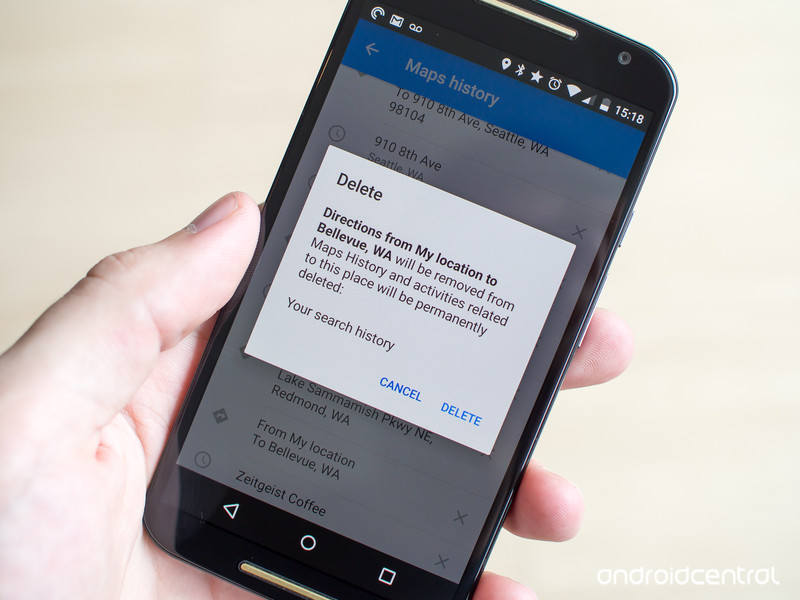
Just because you searched for it once doesn’t mean it has to live on forever.
We all search for plenty of wacky and one-time things in Google Maps, and despite what Google thinks we don’t always want that sitting in our history forever. There are also plenty of times when we navigate somewhere that we’ll never go back to, and there’s no reason to have it saved in the app’s history. And of course sometimes we just enter the wrong address — we don’t need that coming back up later as a suggested destination.
Though the real power to wipe this all out from your account lies on the web, you can quickly remove specific searches and locations that you’ve recently navigated to right from Maps on your phone. Let us show you how to do it.
How to clear your Google Maps history on your phone
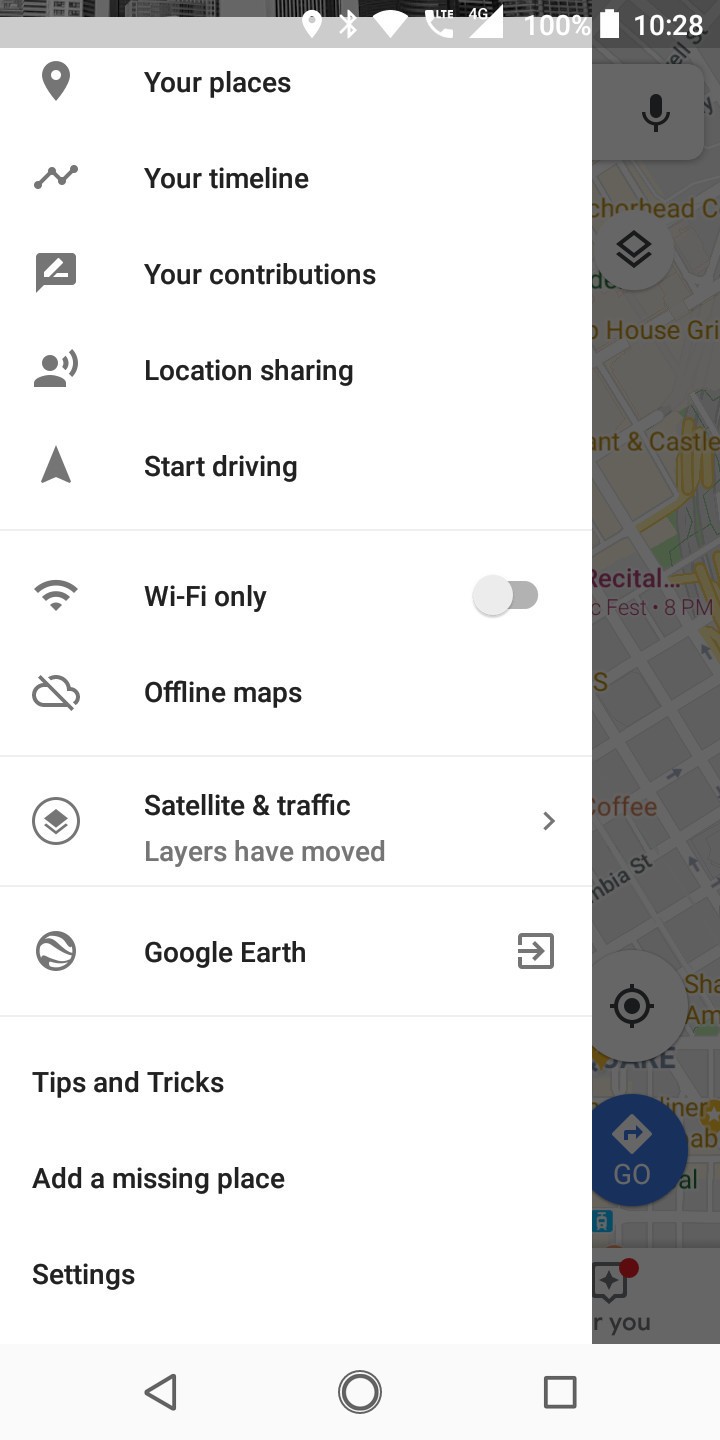

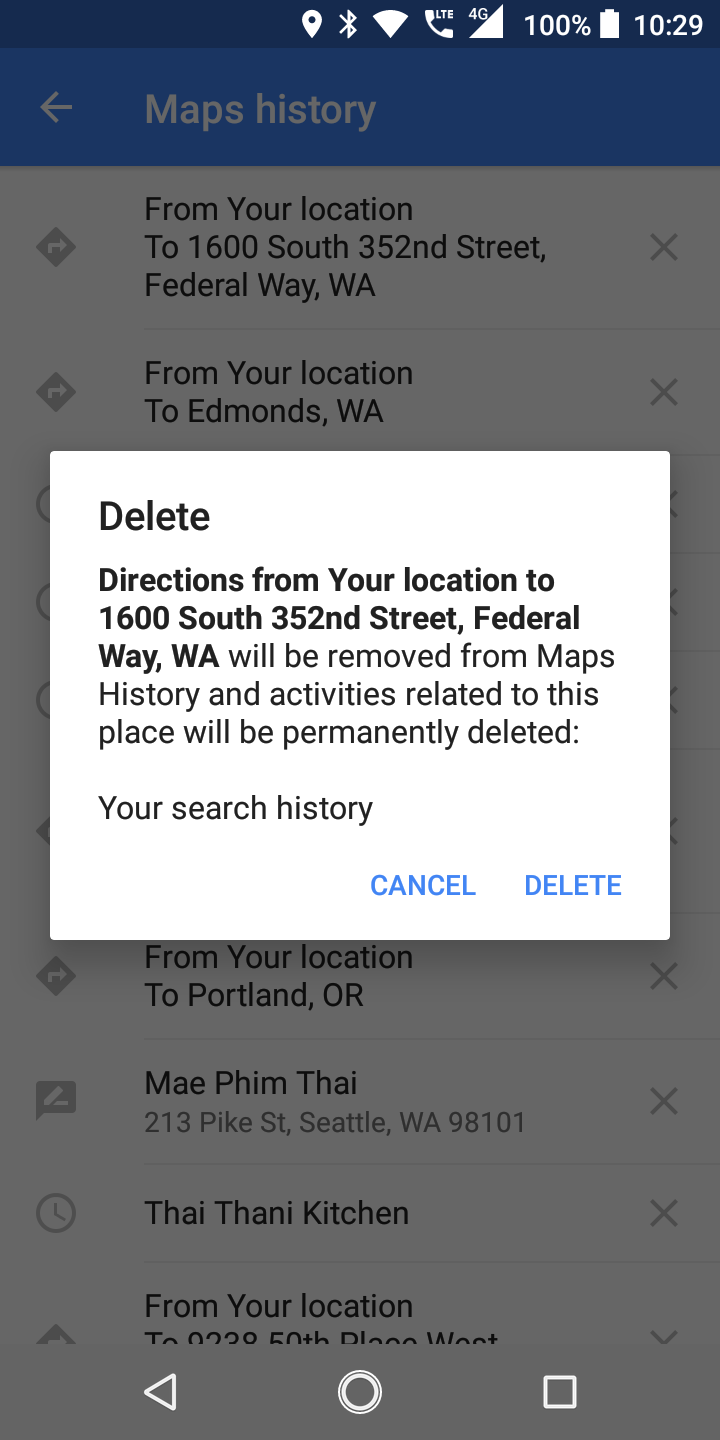
If you want to clear out individual items in your search or location history in Google Maps, it takes just a few moments:
Open Google Maps, swipe in from the left edge and tap Settings.
Tap Maps history to see a scrolling list of every search you’ve made and destination you’ve routed to.
To remove an item, simply tap the x at the right of the entry.
- A box will pop up confirming the item you’re about to delete, and you can tap Delete to confirm.
If you deleted a search, it will no longer show up as a suggested entry when you go to make new searches.
And if you deleted a route, it will no longer show up when getting directions to a location nearby.
Of course this is really only an option if you have just a few different recent locations to remove — you won’t want to be endlessly scrolling through and deleting individual items from your phone. For a more comprehensive look at your location history for all devices connected to your Google Account, be sure to check out the Google Maps history dashboard on the web and adjust your location settings on your phone accordingly.
Update July 2018: Google Maps has changed slightly, and so we’ve updated this guide to reflect the steps for clearing your history in the latest version.
Samsung Galaxy Tab S4 rumors: Release date, specs, price, and features!
This will probably be the Android tablet to buy in 2018.

Android tablets are pretty much MIA in 2018. Huawei’s got a few different models to check out and Amazon’s still pushing its Fire lineup, but that’s about it.
Within the next couple of months or so, however, Samsung will once again throw its hat in this ring with the Galaxy Tab S4 — a successor to last year’s Galaxy Tab S3. Here’s what we know about the device so far!
The latest Galaxy Tab S4 news
July 17, 2018 — Snapdragon 835, 10.5-inch 16:10 display, and more revealed in full spec leak
If you’ve been waiting for a huge Galaxy Tab S4 spec dump, today’s your lucky day.
The folks at SamMobile recently got their hands on a full specification lowdown for the tablet, and as we were expecting, this will be one of the most powerful Android tablets you can buy in 2018.
Starting first with the display, the Tab S4 will have a 10.5-inch Super AMOLED panel with a 16:10 aspect ratio and 2560 x 1600 resolution. Under the hood is the Snapdragon 835 processor, 4GB RAM, 64GB of storage, and a 7,300 mAh battery.
Other specs include Bluetooth 5.0, 13MP rear camera, 8MP front camera, Samsung DeX support, and Android 8.1 Oreo.
July 11, 2018 — Galaxy Tab S4 shown off in white w/ keyboard and pen accessories

A little over a week since that first render was released, Evan Blass how now taken to Twitter to share two more pictures of the Tab S4.
The first of the two photos (the one at the very top of this article) shows the Tab S4 in what’s likely a first-party keyboard cover next to an official pen/stylus.
The other render gives us another look at the back of the tablet, this time showing it in a white paint job.
All the big details
What specs are we anticipating?
Samsung’s Galaxy Tab tablets typically come equipped with top-of-the-line specifications, and with the tab S4, that’s no different.
The below specs are what we’re anticipating thanks to the rumor mill, and while Samsung has confirmed none of them, we’re reasonably sure this is what we’ll be seeing when the Tab S4 is announced.
| Operating system | Android 8.1 Oreo |
| Processor | Qualcomm Snapdragon 835 |
| Screen | 10.5-inch 2560 x 1600 Super AMOLED panel 16:10 aspect ratio |
| RAM | 4GB LPDDR4X |
| Storage | 64GB |
| Cameras | 13MP rear 8MP front |
| Battery | 7,300 mAh |
| Connectivity | USB 3.1 3.5mm headphone jack Bluetooth 5.0 Wi-Fi 802.11 ac |
| Security | Iris scanning |
When will the Galaxy Tab S4 be released?
Similar to the upcoming Galaxy Watch, there are two possibilities as to when we’ll get our first official look at the Galaxy Tab S4.
Samsung’s holding an event on August 9 to announce the Note 9, and while there’s a chance we could see the Tab S4 here, I bet that Samsung will keep this event exclusive for Note 9 talk.
Instead, I think it’s more likely that the Tab S4 will be unveiled during IFA. This is also where Samsung will probably announce the Galaxy Watch and the trade show’s scheduled to take place between August 31 and September 5.
How much will it cost?
As great of a tablet as the Tab S3 was, we were never fans of its $599 asking price.
Samsung was clearly trying to compete with the iPad Pro with that pricing, but in 2018, I can’t imagine anyone willing to hand over $600+ for an Android tablet.
Since the specs for the Tab S4 are still up in the air, it’s difficult to say what the price tag will look like. If Samsung’s once again trying to target the iPad Pro market, we could be looking at something between $600 and $650. If it wants to instead go for the regular iPad, it’ll likely be priced around $350 or so.
Updated July 17, 2018: Added a spec sheet based on current rumors.
 AIVAnet