


Nest Hello vs. Ring Pro: Say hello to the new best connected doorbell
 Nest Hello, left, and Ring Pro.
And just like that, I have a new favorite video doorbell.
Ring has made quite the name for itself the past couple years thanks to its stable of video doorbells, DIY security cameras — and I’d say some damned good marketing. So good, in fact, that Amazon reportedly scooped up the company for something like $1 billion.
But Nest Hello is here. It’s the first doorbell from the company that brought you the world’s sexiest smart thermostat, with all the back-end power that a Google-owned organization can possibly throw at it.
The result? I now have a new favorite doorbell.
Subscribe to Modern Dad on YouTube!
Tale of the tape
| Price | $229 | $249 |
| Camera | 1600×1200 | 1080p |
| Field of view | 160 degrees | 160 degrees |
| Wifi | 802.11ac | 802.11n |
| Live view | Yes | Yes |
| Continuous recording | Yes | No |
| Face recognition | Yes | No |
| Subscriptions | Start at $5 a month | Start at $3 a month |
| Where to buy | Nest | Amazon |
Why Nest Hello wins
Installation is a wash. Nest Hello and Ring Pro install with nearly identical processes. You’ll need a low-voltage doorbell system already in place — because how else would you get power to the thing, right? And if you’re handy and basic home improvement wiring stuff, you can get either doorbell up and running in about 20 minutes or so. (Maybe a tad longer — I’ve installed a half-dozen of these things at this point and have gotten pretty quick about it.)
In terms of pure looks, Nest wins out. Both doorbells are the only ones I haven’t looked at with a sense of disgust — seriously, there are some bad video doorbells out there — but Nest is just a sexier piece of hardware, hands down.
But it’s in the operation where things really stand out.
Most important, it’s the camera. Nest Hello has some HDR processing, and it’s readily apparent. My covered front porch tends to be backlit a lot, and Nest Hello handles that much better than Ring Pro.


Then there are the notifications. Ring is pretty aggressive with them, though it does have an excellent (new) snooze functionality. But Nest Hello wins out with facial recognition. It sees a face, you give it a name, and then you get smart notifications, telling you who’s at the door.
Ring Pro is pretty darn good. Nest Hello is better.
Ring has optional chimes, so you can hear notifications throughout a home. Nest Hello can use any of the three Google Home speakers. That means a $29 Google Home Mini can do that much more. And if someone the doorbell recognizes rings the bell, it’ll announce them by name. Which is ridiculously cool.
Then there’s the connection. I don’t know if it’s the difference between Ring Pro being an 802.11n device and Nest Hello being 802.11ac-compatible, or if it’s some other server magic from a Google-owned company, but Nest Hello hasn’t suffered from anywhere near the lag or outright disconnections that Ring Pro has.
Ring wins out in terms of subscription service, at least as far as price is concerned. Just $3 a month (or $30 a year) stores recorded events (motion, rings, and live viewing) for 60 days. Nest Aware starts $5 a month (or $50 a year) and gives you five days of recording. That’s five days of continuous recording, though. Not just events.
The bottom line
I’ve used every doorbell Ring has produced. At the time of this writing, I’ve had Nest Hello for a week. And while I still say ecosystem wins out — if you have a bunch of Ring equipment already, stay with a Ring doorbell — Nest Hello wins the head to head competition.
See at Nest
Best Amazon Prime Day Deals 


Samsung SmartThings Home Monitoring Kit
$99.99
$199.99
Save $100
This kit comes with the essential SmartThings Hub, along with two Multipurpose sensors, a motion sensor and an outlet at its lowest price ever.

Harry Potter 8-film Collection 4K UHD
$79.99
$155.74
Save $76
Prepare for Fantastic Beasts 2 with over $50 off this Harry Potter set which comprises the original eight films of the series.

Asus FX503VD 15.6-inch powerful gaming laptop
$729.00
$925.00
Save $196
We’ve never seen this laptop drop this low even during last year’s Black Friday.

LifeStraw Personal Water Filter
$9.99
$16.89
Save $7
This product can filter 4,000 liters with proper use and maintenance, with the ability to remove 99.999999% of waterborne bacteria.
- Top Deals
- Amazon Devices
- TVs
- Smart Home
- Unlocked Smartphones
- Kitchen
- Audio & Headphones
- Gaming
- Home Improvement / DIY
- Everyday Essentials
- Kids & Toys
- Entertainment
- Fashion
Check out more Amazon Prime Day deals!
Modern Dad
- Subscribe on YouTube
- See the gear
Subscribe to the Modern Dad newsletter!
Microsoft Recommends All Customers Upgrade to Skype 8 With Skype 7 Set to Be Sunset in September
Microsoft today highlighted Skype 8 and recommended that customers upgrade to the new software as the company plans to retire Skype 7, aka Skype classic, later this year.
Skype 8 includes free HD video and screensharing calls with up to 24 people, reaction options for messages in conversations and @mentions to get someone’s attention in a group chat, a chat media gallery for viewing photos and links, customizable themes, a notification panel, and options to share photos, videos, and files over Skype that are up to 300MB in size.
In the future, Microsoft plans to add additional features that include read receipts, private conversations with end-to-end encryption, call recording, profile invites, and group links for initiating a call with multiple people. Skype 8 features are also rolling out on the iPad starting today.
Microsoft is encouraging all Skype users to update to the new 8.0 version of the software as earlier versions of Skype will stop working on September 1, 2018. Microsoft says it is discontinuing older versions of Skype in order to provide the best possible Skype experience with no quality or reliability issues.
Note: A previous version of this post listed the 8.0 update as new, due to the fact that Microsoft published a blog post announcing it as new this morning. Our readers have pointed out that Skype 8 has been available for some time, with 8.25 listed as the current version of the software.
Tags: Skype, Microsoft
Discuss this article in our forums
Review: Belkin’s Boost Up Wireless Charging Stand and Pad Feature 7.5W Speeds and Quality Designs, but Price is High
Belkin was one of the first companies to come out with a faster 7.5W wireless charger for the iPhone X, iPhone 8, and iPhone 8 Plus after wireless charging launched, and the company has now had time to create a second round of wireless chargers with a more refined design.
Released this spring, the $60 Belkin Boost Up Bold Wireless Charging Pad and the $70 Belkin Boost Up Wireless Charging Stand are Belkin’s newest wireless chargers designed for the iPhone, offering up the same 7.5W charging capability in a better package.
Both of these chargers are 7.5W, which means they’re able to charge an iPhone with Qi wireless charging capabilities at a faster speed than traditional 5W chargers. I tested Belkin’s two new chargers with an iPhone drained to 1 percent, and both charged up to right around 40 percent after an hour, which is in line with other summertime 7.5W charging speeds that I’ve seen.
Belkin advertises these chargers as 10W, but 7.5W is the maximum charging speed for iPhones. So if you have a Samsung device or something else that also charges via Qi and can charge at a faster speed, Belkin’s charging pad and stand can charge those electronics at their maximum charging speed too.
Wireless charging speeds can vary quite a bit depending on factors like temperature, so you’re not always going to see a lot of difference between 5W and 7.5W chargers as explained in our wireless charging guide.
For example, the original Belkin charger I have can charge my iPhone to about 46-48 percent in an hour during the wintertime (when it’s ~65 degrees), but those speeds drop when the ambient temperature is higher in my apartment in the summer and I see a smaller difference between 5W and 7.5W.
In general, I’ve found it’s better to use a 7.5W charger to eke out every bit of speed that you can, but on the whole, there’s not going to be a huge difference between 5W charging speeds and 7.5W charging speeds, and bells and whistles like fans and power management options (Belkin claims optimized performance via “premium shielding” and “precision resistors”) don’t seem to make a noticeable difference.
With performance not drastically different between wireless chargers – and to be clear, Belkin’s are charging at 7.5W – choosing a charger comes down to factors like price point and design. Belkin’s not going to win in the former category, but when it comes to design, these are well thought out.
Belkin’s Boost Up Bold Wireless Charging Pad
The Belkin Boost Up Bold Wireless Charging Pad is similar to the original Belkin Boost Up Wireless Charging Pad sold at Apple retail stores in that it offers the same simple, round shape, but it’s smaller, which makes it easier to use.

I’ve used an original Belkin Boost Up Wireless Charging Pad on my nightstand for months, and it’s been a frustrating experience just because it’s so large. Finding the sweet spot on the charger to get my iPhone X to charge is one of my absolute least favorite late night activities, and with a smaller area for the Bold Charging Pad, I am able to get my iPhone X situated in the dark much more quickly.
 New charging pad on left, old charging pad on right
Belkin sells the Boost Up Wireless Charging Pad in pink, black, or white, and each is made from plastic and rubber. At the base, there’s a rubber bottom to keep the Charging Pad in place on a desk or a nightstand, and there’s a matching rubber ring at the top to prevent the iPhone from slipping when it’s placed on the charger.

The rest of the top of the charger is a soft, smooth material that has a subtle Belkin logo, and all in all, it’s a clean, attractive charger with no obvious branding.
The side of the Charging Pad is made from a shinier plastic that goes well with the matte top, and an unobtrusive LED at the side comes on when the iPhone is in the right spot, which lets you confirm that it’s being charged. I like the soft light that’s included on the charger – it’s not overly bright while providing me with charging status at a glance.

This same LED will light up if a foreign object like keys or coins are placed on the charger that could potentially affect wireless charging speeds.

At the back of the Charging Pad, there’s a single hole for the power source. All 7.5W chargers need ~18W+ power adapters to charge at maximum speeds, so Belkin has included its own 22.5W adapter. The adapter has a rather large power brick for a wireless charger, which may be of concern if you have limited plug space. It otherwise has a long 1.5m cord that can reach a power strip underneath a desk.
Belkin’s Boost Up Wireless Charging Stand
Belkin’s Boost Up Wireless Charging Stand, available in black or white, is the first stand-style wireless charging device that Belkin has designed for the iPhone. Rather than laying flat, the iPhone sits upright in Belkin’s Charging Stand in either portrait or landscape orientation.

Design wise, the Charging Stand looks similar to the Boost Up Bold Charging Pad, but with a plastic frame to hold it upright. The charging surface of the stand is just a bit larger than the pad’s surface, but the overall footprint is larger because of the design of the frame.
The frame extends several inches behind the charger and about an inch in front of it to provide stability. Each portion of the stand that makes contact with a desk or a nightstand is covered in a grippy rubber material to keep it in place, while the front of the stand and the charging portion are both covered in a soft, smooth silicone-style material.

An iPhone can either rest on the bottom of the stand’s frame while in Portrait orientation, or lay across the top of the frame while in landscape orientation. While the iPhone isn’t going to go anywhere on its own, it’s not as stable as a flat design just because the iPhone is in an upright position. That said, though, the design of the frame means that it’s not going to move from slight bumps.

There are two LEDs on the Charging Stand’s surface, one visible when the iPhone is in portrait orientation and one visible when it’s in landscape orientation. These use the same soft light as the Charging Pad, providing a way for you to tell if your device is charging without a glaringly bright LED drawing your eye at night.
The Boost Up Wireless Charging Stand ships with the same 22.5W adapter and power cord that comes with the Charging Pad.
Though the Charging Stand has a larger footprint than the Wireless Charging Pad and other similar flat wireless charging options, I liked that it was impossible to place my iPhone in the wrong spot. That made it perfect for nightstand use, because I can just drop my iPhone in place without needing to worry that it’s not getting power overnight.

I was also able to glance over and unlock it with Face ID in some situations without even picking up the iPhone, just because of its upright position.
It would be nice if Belkin had made the stand adjustable in some way to let people change the angle of the iPhone if desired, but by default, it’s in an ideal position for movie watching in landscape mode if you also want your Charging Stand to double as a regular stand.
Bottom Line
At $60 for the Boost Up Wireless Charging Pad and $70 for the Boost Up Wireless Charging Stand, Belkin is charging a lot more than some other companies. At this point, you can get a 7.5W charger for $20 to $40 from Amazon. Not all of those are Apple certified, of course, which is worth noting.
Belkin does have Apple approval for its wireless chargers, and both the pad and the stand come with the Belkin Connected Equipment Warranty. Belkin says if your device is damaged by an electrical charge while properly connected to the charger, it will repair or replace it up to a value of $2,500. I don’t know of anyone who has had an iPhone damaged by a wireless charger, but I guess it could happen.
Clear Apple certification is one benefit of the Wireless Charging Pad and the Wireless Charging Stand, but design is another. Most of the cheap chargers on Amazon all look and function the same. Belkin’s Wireless Charging Stand, though, offers a unique, hassle-free design that looks nice on a desk and provides the convenience of not having to fuss with positioning.
The Wireless Charging Pad isn’t quite as unique looking, but it features a solid build with grippiness in all the right places, along with a size that isn’t overwhelming to also make for easier positioning.
These chargers aren’t going to be for everyone because there are much cheaper options on the market, but for customers who want the peace of mind of Apple certification or more thoughtful design elements, the Belkin Boost Up Wireless Charging Pad and the Boost Up Wireless Charging Stand may be worth paying a premium for.
How to Buy
You can buy the Boost Up Wireless Charging Pad ($60) and the Boost Up Wireless Charging Stand ($70) from the Belkin website.
Note: Belkin provided MacRumors with a Boost Up Wireless Charging Pad and a Boost Up Wireless Charging Stand for the purpose of this review. No other compensation was received.
Tags: Belkin, wireless charging
Discuss this article in our forums
Apple Seeds Fourth Beta of macOS 10.14 Mojave to Developers
Apple today seeded the fourth beta of an upcoming macOS Mojave update to developers for testing purposes, two weeks after releasing the third beta and more than a month after introducing the software at the Worldwide Developers Conference.
macOS Mojave introduces a new method of installing software updates, so after you’ve installed the appropriate profile from the Apple Developer Center, additional betas can be downloaded clicking on the Apple in the menu bar, choosing “About This Mac” and clicking “Software Update.” Alternatively, open System Preferences and choose the “Software Update” icon.
Today’s beta is available for the 2018 MacBook Pro, so those who have purchased one of Apple’s machines can now try it with macOS Mojave.
The macOS Mojave update brings a long-awaited systemwide Dark Mode, with Mojave users able to choose between a light theme or the new dark theme, which changes the color of the dock, menu bar, apps, and other elements. Dark Mode is accompanied by Dynamic Desktops, aka wallpapers that subtly change throughout the day.
Stacks, a new desktop organization system, keeps all of your desktop files neat and organized, while Finder has been enhanced with a Gallery View, a Sidebar, a revamped Quick Look option and Quick Actions, so you can do more in the Finder window than ever before.
Screenshots can now be edited using Markup tools and a new management options that also allow for easy screen recording, while Continuity camera, a new feature, allows you to import photos and document scans directly from an iPhone or iPad to the Mac.

The Apple News, Stocks, Home, and Voice Memos apps have been ported from iOS to macOS as part of a multiyear project Apple is working on to make it easier to bring iOS apps to Macs, and Apple has introduced several new privacy protections to keep your data safer than ever.
Apple is also making it harder for websites to track you with a range of new Safari tools, and it’s also easier to make and store secure, hard-to-guess passwords for each and every website.
Apple has added an entirely revamped Mac App Store to macOS Mojave that makes it easier to discover apps with a featured section and specific categories for games, creative apps, productivity apps, apps for developers, and more.
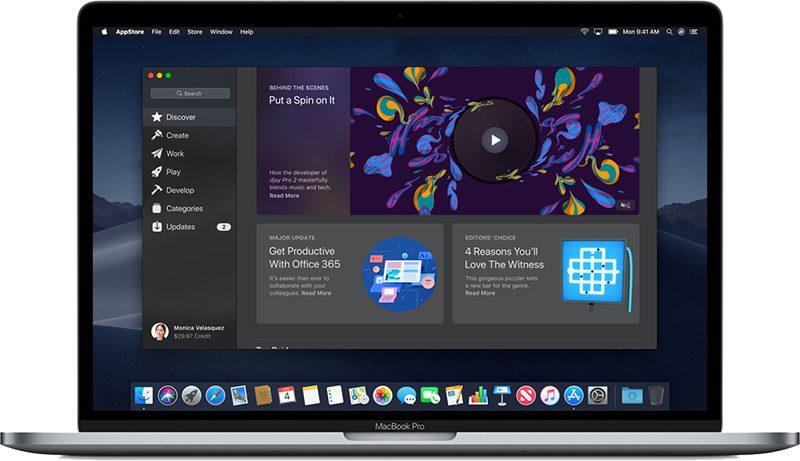
macOS Mojave is available to developers and public beta testers to work out bugs and other issues ahead of an upcoming fall public release.
Related Roundup: macOS Mojave
Discuss this article in our forums
2018 13-Inch MacBook Pro Teardown Finds Larger Battery, Redesigned Power Adapter, Tweaked Top Case and More
iFixit on Friday started a teardown on the new 2018 MacBook Pro, discovering a new silicone membrane underneath the keyboard keys, which the site believes is an ingress-proofing measure to prevent the keys from seizing up when exposed to small particulates.
That was by far the most interesting bit of information about the new MacBook Pro models, but iFixit has now finished a teardown of the 13-inch MacBook Pro and has a few other tidbits to share.
Both the new 13 and 15-inch MacBook Pro models are using higher capacity batteries, with iFixit discovering a larger 58wh, 232.7 gram 6-cell battery in the 13-inch model, up from the 5 cell 196.7 gram battery in the 2017 model. Though the battery is heavier, the MacBook Pro has not changed in weight, nor has battery life changed.
It’s not entirely clear where Apple made up for the extra weight, but iFixit says Apple “shaved some mass” from the top case of the device.

The speakers in the new machine are longer and narrower, bumping right up against the logic board, and an internal connector used for diagnostics has been removed.
Apple added a new T2 chip in the 2018 MacBook Pro, which is the same chip first used in the iMac Pro. It houses the Secure Enclave and allows for on-the-fly encryption in addition to consolidating several controllers including the system management controller, image signal processor, audio controller, and SSD controller.

It also enables “Hey Siri” functionality, a feature that wasn’t even added to the iMac Pro. While the T2 chip is a new addition, the design of the heat sink system has not changed.
Apple shipped the 13-inch MacBook Pro with a new A1947 power adapter, which iFixit says offers more shielding and impact-resistant foam rubber inside, but with a plastic USB-C port rather than a metal one.

As with prior MacBook Pro models, the RAM, processor, and SSD are soldered down, and the keyboard, battery, and speakers are all one unit, which means none of these components are user replaceable and repairs are difficult. For that reason, iFixit gave the 2018 MacBook Pro a repairability score of 1 out of 10, the same score earned by the 2017 model.
For further details on all of the components in the new 13-inch MacBook Pro, make sure to check out iFixit’s full teardown. For additional info on Apple’s new 2018 MacBook Pro models, visit our MacBook Pro roundup.
Related Roundup: MacBook ProTag: iFixitBuyer’s Guide: MacBook Pro (Buy Now)
Discuss this article in our forums
The BlackFly by Opener is a flying car that could turn us all into pilots
Previous
Next
1 of 8

Opener

Opener

Opener

Opener

Opener

Opener

Opener

Opener
Forget self-driving cars. The race to build the first flying car is now very much on. This week, California-based startup Opener officially threw its hat in the flying car ring with the debut of BlackFly, heralded as “the world’s first ultralight all-electric fixed-wing vertical take-off and landing (VTOL) aircraft.” The single-seat aircraft (or car, depending on how you slice it), does not require its driver to have a pilot’s license, nor does it require any “special skills,” the company says. However, BlackFly operators will be required to complete the FAA Private Pilot written exam, as well as company-mandated vehicle familiarization and operator training, CEO Marcus Leng says.
The BlackFly should be able to travel distances of up to 25 miles, and reach a top speed of 62 miles per hour. The vehicle will also boast a Super Charging option, which means that it will take less than half an hour to re-power its battery. It also promises a low noise signature. Owners will be able to geofence their BlackFlys, ensuring that they stay within a predetermined area. And if all else fails, there will be an automatic return-to-home button and ballistic parachute option available.
“Opener is re-energizing the art of flight with a safe and affordable flying vehicle that can free its operators from the everyday restrictions of ground transportation,” said Leng. “We will offer competitive pricing in an endeavor to democratize three-dimensional personal transportation. Safety has been our primary driving goal in the development of this new technology. Opener will be introducing this innovation in a controlled and responsible manner.”
For the last nine years, Opener has remained in stealth mode as it developed its zero-emission flying car. Eventually, the BlackFly will cost the same amount as a sports utility vehicle, though early adopters will likely have to pay more. Moving forward, Opener hopes to bring its “highly efficient” vehicles into commuting networks, which would be powered by renewable energy and require a small percent of the power currently needed to move individuals from Point A to Point B.
 Opener
“The future of aviation begins today,” said Alan Eustace, Director at Opener and former senior vice president of knowledge at Google. “The dream of flight, which was so difficult and expensive to obtain, will soon be within the reach of millions. Opener is putting the fun back into flying and opening up a new world of possibilities.”
Editors’ Recommendations
- Kitty Hawk’s personal flying vehicle takes to the skies
- Yuneec Breeze review
- U.K. drone company sets flying record that could be a big boost for autonomy
- Drones are no longer crash-test dummies thanks to MIT’s new VR training platform
- Germany plans to put Airbus and Audi’s cool flying taxi concept into the sky
Cloud-based call recording is coming to Skype, but will you use it?
Before the month is out, Microsoft’s Skype video and voice chat client will have the ability to record calls without the need for any third-party applications. Stored in the cloud, the recordings will be available on any supporting devices, including those on Windows, MacOS, iOS, Android, and Linux operating systems. The question is, with so many strong, existing options for call recording, will Skype callers actually use the new feature?
Recording calls in Skype is something that a large body of users have wanted for some time and for many it’s been a puzzle why it’s a feature that has only been available to Skype Business users. To get around that lack of functionality, a number of third-party options have sprung up. We certainly have our favorite ways of recording Skype calls, but with a built-in recording function, they become less of a necessity.
When implemented, the call recording function will be triggered by a single button press and all parties within the call — whether video or voice-only — will be notified that it is being recorded. As The Verge highlights, all video and voice streams will be incorporated into the same recording, so if the person recording wants the video streams to be separate, they may need to do that themselves in later editing.
The Skype recording feature is set to be rolled out to users all over the world by the end of July and is part of several major updates Microsoft is making to the service. Read receipts for instant messages was the most recent addition and a recent Insider build showed off the new look and customization features that the VOIP client will soon have. In a plan to compete with the growth of livestreaming platforms like YouTube and Twitch, Microsoft is also adding a “Content Creator” mode, which will make it possible to integrate video from tools like Xsplit, Wirecast, and Vmix into Skype.
But even with all of these features, Skype is far from the only VOIP service in town. There are a number of great alternatives you can pick from — these are our current favorites.
Editors’ Recommendations
- How to record a Skype call
- How to record calls on your iPhone
- Skype introduces read receipts, but don’t worry, you can disable them
- Here’s how to block an unwanted number on any smartphone
- D-Link’s new smart home security cams match affordability with Alexa and Assistant
Live Channels is the best thing on Android TV you’re not using
 Live Channels on Android TV. It’s awesome.
It’s just one more frustrating thing about the smart TV OS that doesn’t get the recognition it deserves.

Android TV itself isn’t anywhere near as popular as it should be. Let’s just get that out of the way. And we’re not even going to worry about whose fault it is.
If you are a proud owner of Android TV, however — be it built in to your set or through an NVIDIA Shield — you’ve probably come across the Live Channels app. And it’s either the greatest thing you’ve ever seen, or completely worthless. (OK, it’s actually a little of both.)
Live Channels is one of those apps that attempts to aggregate multiple sources of video in one place. And it does that. And it does that pretty well, actually.
The problem? Too few are using the damn thing.
Read at CordCutters.com: Android TV’s Live Channels is a great app that you’re probably not using
Introducing CordCutters.com
- The hardware you need
- All about streaming services
- What channels are on which service
- FREE over-the-air TV
- How to watch sports
- Join the discussion
Get the latest deals
Raspberry Pi 3 Model B vs. 3 B+: Which should you buy?

Changes to the network interface and a small processor revision sound minor but could make a difference for your project.
We don’t expect to see an all-new model Raspberry Pi until late 2019 according to the company’s roadmap, but the Raspberry Pi Foundation released a bit of a version bump with the new Raspberry Pi 3 B+. In the smartphone world that + means you should expect something bigger, but in this case, the differences are a bit more nuanced. Let’s take a peek at what’s new for the 3 B+ and see if you should look for one to build your next project instead of just grabbing a tried and trusted Raspberry Pi 3 and start wiring things.
See at Amazon
Raspberry Pi 3B vs. 3 B+
Tiny cosmetic changes aside, there are two important differences between the 3 and the 3 B+: a new network interface and a slight processor revision. These changes aren’t enough to rip out your Pi from any existing projects, but they could matter for whatever you have planned next. Especially if you’re building your own Internet of Things device like a remote sensor or camera controller.
The changes to the network interface are a much bigger deal than the SoC bump so we’ll start there. The model 3 B+ brings three important changes to networking:
- PoE (Power over Ethernet) is supported via a stand-alone 4-pin connector. Of course, the connector also supports the use of a HAT (Hardware Attached on Top) and the company’s GitHub page has been updated with the new details.
- Gigabit Ethernet is supported by the new Ethernet connector. Speeds on the Pi’s slim hardware won’t reach the maximum, but it’s claimed to average around 300Mb/second. No more jamming up your traffic by having a slow 100Base “Fast Ethernet” device on your 1000Base network.
- Dual-band 802.11ac Wi-Fi is now standard via a new wireless chip, and the same antenna design used on the Pi Zero is built into the PCB. The placement and design on the new chip also allow the B 3+ to meet the FCC’s modular conformance compliance requirements which would eliminate the usual long wait times for approval if you’re thinking of integrating a Pi into a commercial product.
The processor upgrade isn’t enough to warrant a new part number, but the SoC package itself has visibly changed so you might need a new heatsink of your project calls for one. The revision (marked as a020d3 if you happen to have access to the Broadcom specifications) brings one thing to the Broadcom BCM2837 SoC — it’s now clocked at a maximum of 1.4GHz instead of 1.2GHz.
A 200 MHZ jump usually brings a significant performance increase. In early tests based on a beta release of the OS, pure data-driven benchmarks like verifying prime numbers show a performance boost of 15%. Unfortunately, the CPU is rarely the bottleneck on a small single board computer and without changes like a new storage interface adapter or a bump in the SoC cache, you probably won’t see much real-world benefit.
Do I need a model 3 B+?

The big draw though, and why you might want to consider sourcing a Raspberry Pi B 3+, is PoE. In case you aren’t familiar, PoE allows you to power a device over its Ethernet connection. It’s a boon to DIY’ers and Makers because it means you only need to run a single wire for networking and power and that you can control the power programmatically without wiring in any sort of switch or relay.
You probably don’t need the 3 B+, but you should buy it anyway.
With a standard model 3 B, you would have to use an enclosure big enough to accommodate a special splitter or use an enclosure that has PoE integrated. That’s an increase in cost and takes away a bit of the usability a small single board computer has due to its size. If you’re planning on building any sort of remote smart IoT box you’re better served to buy a 3 B+. If you don’t use PoE now, you still have the option in the future without any changes to the board.
The changes to the network interfaces also mean a 3 B+ is the right board if you’re building your own NAS or media streaming box using a Raspberry Pi. Clients can take advantage of the faster and wider Wi-Fi connection, and the new NIC supports 9KB “Jumbo” frames in addition to a 1000Base-TX network. Jumbo frames allow for more than the standard 1500 bytes of Ethernet payload per packet, and in this case payloads up to (theoretically) 9 KB (9000 bytes) are supported. These changes mean that any streaming box driven by a Raspberry Pi 3 B+ can send and receive data faster over an Ethernet connection.
More: How to install Kodi on the Raspberry Pi
The best thing about the changes between the two is that all accessories, like enclosures or HATs, built for the model 3 B will also fit the model 3 B+. Even if your project doesn’t require a new NIC or PoE, that means you could buy a 3 B+ anyway in case you want to use it for something else in the future. And that’s what I would recommend. You can pick up a kit that includes the board, a power supply with its own noise filter, a clear enclosure, and two aluminum heatsinks for about $50 from Amazon. If you only need the board itself, you can get one for about $40 from Amazon. These prices are just a dollar or two more than the model 3 B, so it’s a no-brainer unless you have a specific need for the wireless and network chips used on the older model.
Whatever you buy, do us all a favor and share once you’re finished doing something cool with it!
See at Amazon
Samsung Galaxy S10: News, Rumors, Release Date, Specs, and More!
2019 is going to be the year of Samsung.

Samsung’s Galaxy S phones always give us something exciting to look forward to at the beginning of each year, and 2019 officially marks the 10-year anniversary of when the first Galaxy S flagship was released.
Similar to what Apple did with the iPhone X, we’re expecting the Galaxy S10 to be truly special. The Galaxy S9 and S8 were both excellent phones, but in honor of such a big anniversary, Samsung will likely pull out all the stops to release a truly special and jaw-dropping gadget.
If you’re ready to learn more about the Galaxy S10 and find out what we could look forward to next February, here’s everything you need to know.
The latest Galaxy S10 news
July 16, 2018 — New report says Samsung will use Qualcomm’s in-display fingerprint sensor tech for the S10, Note 10, and more
We’ve already been expecting Samsung to introduce an in-display fingerprint sensor with the S10 series for some time, but thanks to a new report from Ming Chi Kuo at TF Securities, we now have specifics as to what kind of tech will be used for this system.
Per Kuo:
We expect Samsung will promote the ultrasonic FOD aggressively starting from 2019. Shipments of models equipped with this function are likely to reach 60mn units; specifically, the high-end S10 models.
Furthermore, Kuo goes on to say that this technology will also be present in “the most high-end model of the A series” as well as the Galaxy Note 10.
These ultrasonic sensors are developed by Qualcomm, and unlike optical ones from Synaptics, can even measure things like your heart-rate and current blood flow.
July 6, 2018 — The three S10 models will use a mixture of side-mounted and in-display fingerprint sensors
Late last month, a report came out suggesting that Samsung will release three different models of the Galaxy S10 — including Beyond 0, Beyond 1, and Beyond 2. Now, according to reliable Samsung tipster Ice Universe, we have new details on how the fingerprint sensor situation will be handled.
For Beyond 0, the cheapest of the three models, there will be “side fingerprints. “Although we don’t know for sure, this will likely be similar to the fingerprint sensor found on the Moto Z3 Play. As for the Beyond 1 and Beyond 2, it’s noted that we’ll see in-display fingerprint sensors.
Lastly, Ice Universe also confirms that Beyond 0 and 1 will have dual rear cameras while Beyond 2 will offer a triple camera setup.
All the important details
How many versions is Samsung going to launch?

For the past four years, Samsung’s launched two models of its Galaxy S series:
- 2015 — Galaxy S6 and S6 Edge
- 2016 — Galaxy S7 and S7 Edge
- 2017 — Galaxy S8 and S8 Plus
- 2018 — Galaxy S9 and S9 Plus
With the Galaxy S10 in 2019, Samsung is expected to shake-up its formula by releasing three different models at the same time — codenamed Beyond 1, Beyond 2, and Beyond 3.
Beyond 1 and Beyond 2 will be similar to older S flagships with the former having a flat screen while the other has Samsung’s iconic curved display. Beyond 3 is where Samsung’s putting all the marbles, with things like a larger screen and triple camera system on the back.
When will the Galaxy S10 be released?
Perhaps the biggest question on your mind is “When will I be able to buy the Galaxy S10?”.
Save for the Galaxy S8 that was announced at its own special event, Samsung usually unveils its Galaxy S flagship phones during Mobile World Congress each year.
MWC 2019 is scheduled to take place between February 25 and 28 in Barcelona, and there’s a good chance that’s where we’ll get our first look at the S10. To back up this thought, reliable leaker Ice Universe said on July 5 that the S10 will be unveiled at MWC — just a month before the Galaxy X.
As for when you’ll be able to purchase the S10, it should officially launch around two or three weeks from when it’s announced. Should Samsung decide to reveal the phone during MWC, that’d place it with a launch date of around early-March.
How much will the S10 cost?
When it comes to price, that’s where things could get interesting next year.
Samsung’s only ever released one or two variants of its S flagships at a time, such as the S7/S7 Edge, S8/S8 Plus, etc. However, as noted above, the Galaxy S10 series will likely consist of three different phones.
This could result in vastly different pricing across all models, and depending on how you look at things, that’s either a dream come true or a nightmare.
The Samsung Galaxy S9 has a starting price of $720, and my guess is that the lowest-end Galaxy S10 will come in with a similar or slightly lower price of around $650-$700. The mid-tier S10 will probably cost a bit less than the S9+ at $800-$820, whereas the highest-end variant may very-well sell for $999.
Samsung Galaxy S9 and S9+
- Galaxy S9 and S9+: Everything you need to know!
- Galaxy S9 review: A great phone for the masses
- Complete Galaxy S9 and S9+ specs
- Galaxy S9 vs. Galaxy S8: Should you upgrade?
- Join our Galaxy S9 forums
Verizon
AT&T
T-Mobile
Sprint
 AIVAnet