


Apple Watch Series 3 Featured in Three New ‘Close Your Rings’ Ads
Apple has shared three new Close Your Rings ads on its YouTube channel in Australia, highlighting the Activity app on Apple Watch.
The fast-paced, 15-second videos each feature a different person — Eric, Atilla, and Yocelin — as they go about their busy days, closing their Move, Exercise, and Stand rings on the Apple Watch Series 3 in the process.
Eric bikes, walks his dog, purchases seafood, cooks, walks the stairs, and dances. Atilla runs, swims, plays table tennis, and shops. Yocelin plays basketball, dances, draws, tries on new clothes, and practises yoga.
Apple has been using the slogan “Close Your Rings” as part of a fitness-oriented marketing campaign for the past few years, including a series of Apple Watch Series 2 ads last year and a dedicated page on its website.
Apple Watch users can close the Move ring by hitting their personalized daily goal for active calories burned, close the Exercise ring by completing at least 30 minutes of daily activity, and close the Stand ring by getting up and moving around for at least one minute during 12 different hours in the day.
Apple Watch users can also complete Monthly Challenges and earn Achievements badges by repeatedly closing the rings in the Activity app, and compete with friends and family, making it a motivating feature for many wearers.
These ads likely represent one of the final marketing campaigns for the Apple Watch Series 3, with new larger-display Series 4 models expected in September. The videos have yet to be uploaded to Apple’s main YouTube channel in the United States, or elsewhere, but they likely will be soon.
Related Roundups: Apple Watch, watchOS 4, watchOS 5Tag: Apple adsBuyer’s Guide: Apple Watch (Caution)
Discuss this article in our forums
Deals: Up to $500 Off 2017 MacBook Pro at Best Buy and $100 iTunes Gift Cards for $85 at PayPal
Best Buy today kicked off its latest discount event, marking down prices on MacBook Pros, Apple TVs, Beats headphones, and more for two days only. For students who don’t mind purchasing last year’s MacBook Pro models, Best Buy’s new sale is particularly noteworthy since you can get as much as $350 off certain configurations and an extra $150 off with Student Deals.
Note: MacRumors is an affiliate partner with these vendors. When you click a link and make a purchase, we may receive a small payment, which helps us keep the site running.
The cheapest model available is the 13-inch/8GB RAM/256GB SSD/3.1 GHz configuration, priced at $1,399.99 for students and parents of students, down from $1,799.99. Check out more of the MacBook Pros and other products on sale in the list below, and head over to Best Buy to place your orders before the offers expire tomorrow, July 17 at 11:59 p.m. PT.
-
MacBook Pro – Students save up to $500 / as low as $1,399.99
-
Apple Watch Series 3 – Save $50 / $279 for 38mm Aluminum and $309 for 42mm Aluminum
-
iPhone 7 and 7 Plus – Save $200 when you buy and activate on a monthly installment plan
-
Apple TV – Fourth generation for $139.99, down from $149.99
-
BeatsX – $94.99 in select colors, down from $149.99
-
DJI – Save up to $300 / Mavic Pro Quadcopter Fly More Combo for $999.99, down from $1,299.99
-
UE Roll 2 – $45.99, down from $99.99
-
Linksys – Velop Tri-Band Mesh Wi-Fi System (3 Pack) for $399.99, down from $479.99
If you’ve been waiting for the next 15 percent discount on App Store and iTunes gift cards, PayPal’s Digital Gifts eBay store today has launched its newest sale. For a limited time, anyone with a PayPal account can get a digital $100 iTunes gift card for $85, and you’ll receive the code for the iTunes credit via email within a few hours after the purchase.

The credit will only be valid on purchases made on the United States App and iTunes stores. PayPal’s iTunes gift card sales are limited and typically tend to last for a day or two, so be sure to visit PayPal’s Digital Gifts eBay store and place your order soon if you want to stock up on some iTunes credit, or send it as a gift to a friend or family member.
Today is also the beginning of Amazon Prime Day, which has a collection of Amazon’s own devices discounted this morning and will see an official kickoff later today at 3 p.m. ET. We’ll be keeping track of many of Amazon’s best tech sales in a live blog that will go up later today, and for more information on the latest discounts and offers be sure to head to our full Deals Roundup.
Related Roundup: Apple Deals
Discuss this article in our forums
Techy and trendy? That’s the new Emporio Armani Connected smartwatch
Emporio Armani is back with a new touchscreen smartwatch, and like the last model, the new model looks stunning. The design isn’t the only thing to change either, as the watch now has the right tech features to accompany the sweet looks. However, before you get too excited, the 2018 Emporio Armani Connected watch still uses the Qualcomm Snapdragon 2100 platform, rather than a new or alternative system.
What does the new Armani Connected watch have that the previous edition didn’t? First, there is a heart rate sensor on the back of the case, ready to help build up a better picture of your fitness during workouts. Then it has GPS inside so you don’t always need your phone to help navigate, and finally it has NFC technology for use with Google Pay. The body is now water resistant enough to swim with the watch too. These features may sound basic for a smartwatch; but until now smartwatches from fashion brands — which means they look good — have not usually included them.
However, all are available on many other smartwatches, up to and including the latest $250 Mobvoi Ticwatch Pro, so why buy the new Emporio Armani Connected? Its simple: Design. The first touchscreen EA Connected watch is still a beauty — understated, stylish, slim, and in the black color scheme, a real stealth machine — and the company has built on this for the 2018 model. The stainless steel case comes in silver, gold, grey, or black, and with either a mono link bracelet, a Milanese loop, or a leather strap.
The horns extend out from the case to grip the strap, rather than forming a solid piece on the first watch, and the buttons are mounted flush to the body for a more cohesive look. The promotional images show a great looking watch face that includes traditional elements with designs only possible with a digital display. It looks great, and the EA logo takes center stage, so your mates will all know how flashy you are.
We’re finding it hard to choose between the silver or black version for attractiveness, but the mono loop metal strap is a surefire winner on either. Emporio Armani has chosen Google’s Wear OS operating system for the watch, but has not released in-depth technical details such as the case size, internal RAM and storage, or battery life. The price is also unknown, but the first model started out at $395, so expect the new version to be around the same. It’ll be available online at Emporio Armani in July.
Editors’ Recommendations
- The best Apple Watch faces
- Mobvoi Ticwatch Pro Review
- The time is right to take advantage of these Apple Watch deals for July 2018
- Fitbit has already shipped a million Versa smartwatches
- Casio G-Shock GBA-800 review
Samsung Galaxy On6 review: Old wine, new bottle
Samsung’s latest budget phone is underwhelming to say the least.
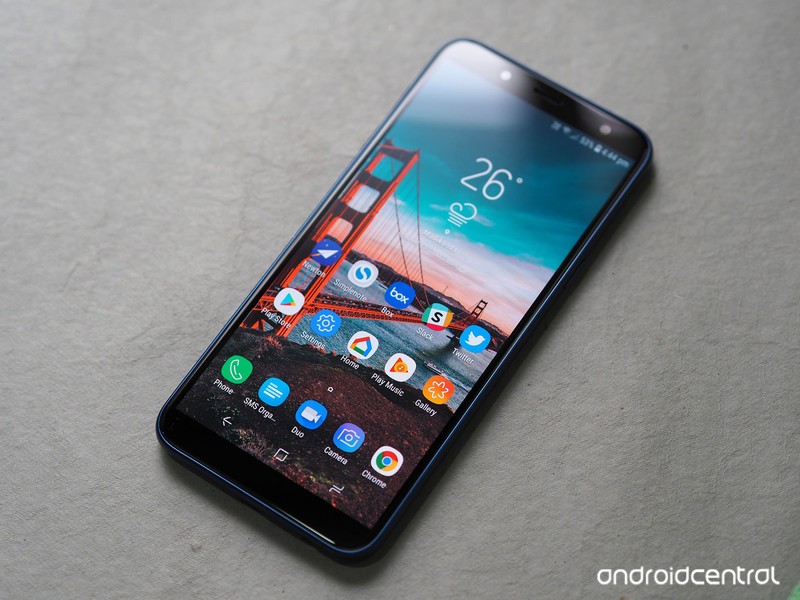
The one constant in the Indian handset segment over the years has been Samsung. The last five years saw local manufacturers like Micromax, Intex, and Lava fade into obscurity as they failed to meet the challenge put forth by their Chinese rivals, but Samsung has weathered the storm unscathed.
Sure, the South Korean manufacturer is no longer India’s top smartphone brand, but its market share is still holding steady at 31% — Xiaomi had to steal market share away from other players to get to 34%. Things haven’t changed much for Samsung either; whereas everyone else is pushing the barrier for value in the budget segment, Samsung is content rolling out underwhelming devices in the Galaxy J series year in, year out.
Take for instance the latest entrant in the series, the Galaxy J6. The device shares a similar design aesthetic as its predecessors, and while there’s a new 18.5:9 panel up front, the rest of the hardware seems derivative. That would automatically make any other device a flop in this highly competitive segment, but it looks like Samsung is the one manufacturer that can get away with launching lackluster devices and still manage to rake in millions of sales.
On the subject of sales, the Galaxy On6 is identical to the Galaxy J6, with the only difference being that the former is sold online while the latter is primarily targeted at the offline segment. It’s baffling that Samsung felt the need to create a new name for an existing product just to list it online, but this isn’t the first time the company has done so. As we’ll see later on, it’s not just the name that’s being recycled here.
Samsung Galaxy On6

Price: ₹14,490 ($215)
Bottom line: The Galaxy On6 gets full marks for effort, but it falls behind its rivals in several key areas, making it a poor recommendation in 2018.
Pros:
- Super AMOLED display
- Dedicated MicroSD slot
- All-day battery life
Cons:
- No ambient light sensor
- Dated chipset
- Mediocre camera
- No fast charging
- No dual-band Wi-Fi
See at Flipkart
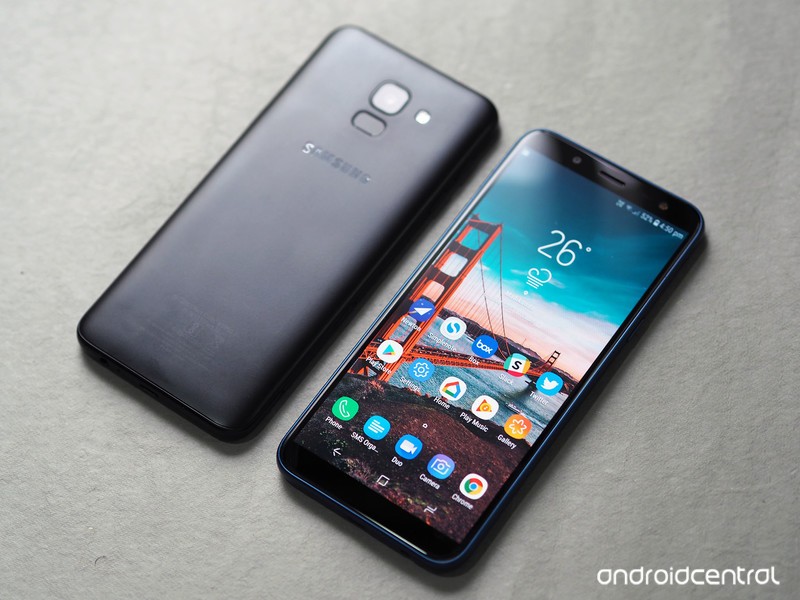
Samsung Galaxy On6 What I like
The one redeeming factor on the Galaxy On6 is the display: the device features a 5.45-inch 18.5:9 panel, and the reduced bezels at the front mean there’s no home button anymore. The fingerprint sensor is now located at the back of the device, and you also get a face unlock feature. The feature is dicey as it had issues with authenticating my facial features in anything other than ideal lighting conditions, but it’s a feature that actually made its way onto the device, unlike so many others.
The screen itself is noteworthy, as it is a Super AMOLED panel. But this being Samsung, it is an HD+ display (1440×720) and not a Full HD panel, but it is a step in the right direction. It isn’t a curved panel like the Galaxy S9, and has larger bezels at the top and bottom, but it is better than the 16:9 panels Samsung used in the last generation. Colors are vibrant, and while the panel itself is great, it is let down by the omission of a few key sensors.
The Galaxy On6 brings the Infinity Display to the budget category.
You’ll also get a full day’s worth of usage out of the 3000mAh battery, as it’s driving an HD+ panel and the Exynos 7870 is geared toward efficiency. But the downside on the battery front is that there’s no fast charging.
Another point in favor of the Galaxy On6 is that it has two SIM card slots as well as a dedicated MicroSD card slot. There are two trays located at the bottom left corner of the device, with the first tray facilitating the primary SIM card and the second slotting in the secondary SIM card as well as the MicroSD card.
The phone comes with the latest version of Samsung Experience (9.0) — based on Android 8.0 Oreo — out of the box, along with the June 1, 2018 security patch. The user interface is similar to what you get on the much more premium Galaxy S9, and Bixby Home is also present on the device.
A new software addition to Samsung’s budget phones is Samsung Mall, which is an aggregator that pulls in items from several sources like Amazon, Jabong, Flipkart, and the like. The idea is that instead of searching on each individual platform, you use a service like Samsung Mall to find the product you’re looking for. There’s also an image recognition feature that works astonishingly well — just take a photo of an item of clothing or any physical product, and Samsung will serve up suggestions.
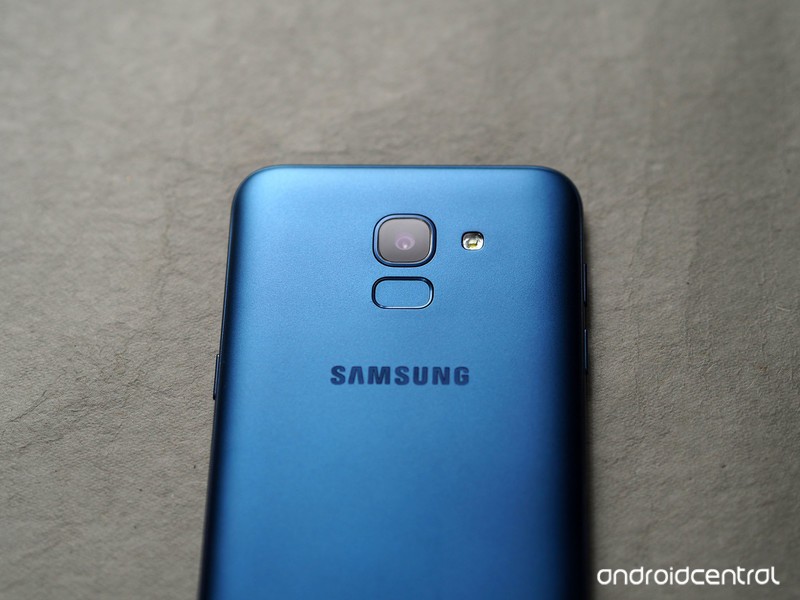
Samsung Galaxy On6 What needs work
The Galaxy On6 is powered by the Exynos 7870 Octa, a chipset that first made its debut back in 2016. That’s not a bad thing in and of itself — the Snapdragon 625 launched in Q2 2016, and it’s still featured in Xiaomi phones today — but the main issue with the Exynos is that it wasn’t great when it launched two years ago, and it hasn’t aged well since. But Samsung is unwilling to change, and as such its 2018 budget series is powered by a chipset that wasn’t good enough even in 2016.
How does a phone in 2018 not have an ambient light sensor or gyroscope?
Samsung continues to omit basic sensors in its Galaxy J series, with the J6 missing out on the ambient light sensor. So when you’re using the phone outdoors, you’ll have to adjust the brightness manually. There’s no gyroscope either, so you won’t be able to see your orientation in navigation apps like Google Maps.
Also, the Galaxy On6 doesn’t have dual-band Wi-Fi, so Wi-Fi connectivity is limited to the 2.4GHz. I’ve used a few $100 phones that don’t offer the feature, but at the On6’s price point it is yet another omission.



Then there’s the camera. Samsung’s budget phones weren’t really known for their camera prowess, but the 13MP primary camera isn’t quite as good as the rest of the devices in this category. Images come out muddy and there’s a lot of noise, and that’s just for the daylight shots.
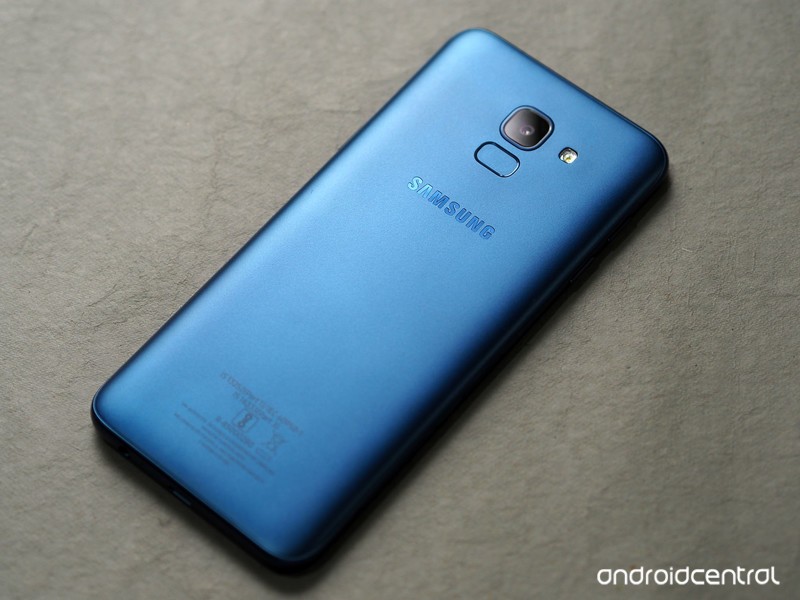
Samsung Galaxy On6 Review
Samsung made the right call to go with the 18.5:9 panel on the Galaxy On6, but the internal hardware itself is overdue a refresh. The camera doesn’t hold up to other devices in this category, and while you’ll get a day’s worth of usage out of the 3000mAh battery, ASUS and Xiaomi are offering phones that consistently deliver two-day battery life in this segment.
There really is no reason to pick up the Galaxy On6 in lieu of the Redmi Note 5 Pro, ASUS ZenFone Max Pro M1, the Nokia 6.1, or the Moto G6. There’s no shortage of great budget phones in India, and you’re better off buying any of the aforementioned phones over the Galaxy On6.
3
out of 5
The Galaxy On6 misses the mark in a lot of categories, and the fact that it’s missing basic features like an ambient light sensor and gyroscope make it a poor recommendation. Thankfully, there are plenty of great alternatives available at the same price point. If you’re unwilling to wait for a flash sale to pick up the Redmi Note 5 Pro or the ZenFone Max Pro M1, the Moto G6 is a great choice.
See at Amazon
How to take screenshots in Android P
Here’s everything you need to know about screenshots in Android P!

Android P brings a lot of new features and changes to our favorite mobile OS, and one of the most basic elements of Android — taking screenshots — hasn’t been left out.
Google’s vastly improved the screenshot-taking and editing experience in Android P compared to past versions, and today, I’m going to walk you through all the changes to keep an eye out for.
Without further ado, let’s get started!
Quick note — the steps shown below are based on a Pixel 2 running Android P. The core elements should remain intact for your device, but depending on the manufacturer, things could look slightly different from phone to phone.
How to take a screenshot
In Android P there are two ways to take a screenshot — the old-fashioned way and a new method.
Starting first with the combo we’ve known for years now, you can take a screenshot by holding the power button and volume-down buttons at the same time. That hasn’t changed at all in Android P, and while it still works just fine, the new way might be even easier for you.
Hold down the power button until you see the pop-up menu on the left.
Tap Screenshot.
Once you do this, a screenshot will be captured.
How to edit a screenshot using the built-in Markup tool
No matter how you take a screenshot in Android P, there’s now a built-in feature called Markup that allows you to quickly edit screenshots right after you take them.
After taking a screenshot, you’ll get a notification. From that notification, tap the Edit button.


From here, you’ve got a full set of tools for making whatever edits you’d like. Here’s a quick overview of what you can do:
- Crop your screenshots by dragging any of the arrows found on all four corners.
- Write on screenshots with a pen and highlighter tool
- Change the color of the pen/highlighter (black, red, yellow, green, blue, purple, white)
- Undo and redo edits


After you’re done editing a screenshot, you can either save it to Google Photos or instantly share it wherever or with whomever you’d like.
That’s it!
With that said, that’s everything you need to know when it comes to taking screenshots on a phone running Android P.
Have more questions? Leave a comment down below and let us know what’s on your mind!
Android P: Everything you need to know about Android 9
Android P
- Android P: Everything you need to know
- Android P Beta hands-on: The best and worst features
- All the big Android announcements from Google I/O 2018
- Will my phone get Android P?
- How to manually update your Pixel to Android P
- Join the Discussion
Treat yourself to Toshiba’s 50-inch 4K Fire TV for just $290 today
You can clearly see this is a deal.

As part of its Prime-exclusive deals of the day, Amazon has Toshiba’s 50-inch 4K Fire TV on sale for $289.99, which is $110 lower than it normally sells for. This TV was only just released at the end of May and has never had a price drop prior to this one. The TV set itself has a beautiful 4K panel, 3 HDMI ports (including 1 with ARC), a USB, composite, optical, antenna, audio output, and an Ethernet port.
The Fire TV software brings smart features to the TV like the ability to stream your favorite media from popular services like Hulu, Netflix, SHOWTIME, STARZ, and more. The included Voice Remote with Alexa lets you find something to watch by simply asking for it, and you can even switch apps, play music, and control smart home devices using it as well.
Amazon also has a bunch of its other hardware on sale for all-time low prices, like the Fire TV Stick, Echo Dot, Cloud Cam and more. Be sure to check them out.
See at Amazon
Apple Restructures Sales Team in India Amid Sluggish Growth
Apple sold fewer than a million iPhones in India in the first half of 2018, according to Bloomberg. The company has suffered slowing sales in the world’s second largest smartphone market, which has reportedly seen three high-ranking sales executives leave Apple as the company restructures its operations there.
Among the executives who’ve departed are its national sales and distribution chief, the head of its commercial channels and mid-market business, and the head of telecom carrier sales, said the people, who asked not to be identified discussing internal matters. Apple’s Indian sales team is now undergoing a restructuring, one of the people said.
Apple has a 2 percent market share in India, according to Counterpoint Research. It sold 3.2 million iPhones in the country in 2017, but high tariffs on imported electronic devices continue to push consumers toward cheaper alternatives from Xiaomi, Samsung, and other phone makers. In February, India announced the latest tax increase on imported mobile phones from 15 percent to 20 percent, and that came under two months after the previous increase.
Last year, Apple started manufacturing the iPhone SE and iPhone 6S in India in an effort to exempt the phones from import duties and reduce their price, but the company’s facilities have yet to start running at full capacity. Apple doesn’t manufacture its latest iPhone models domestically, so they still incur import levies.
“iPhone India sales were weak in the first half of 2018 and, even if they show a big jump in the traditionally strong second half, Apple will still fall short of last year,” said Neil Shah, a research director with Counterpoint who spoke to Bloomberg.
Apple CEO Tim Cook has made upbeat comments about the company’s performance in the Indian market, despite Apple’s sluggish growth and single-digit market share.
Cook believes that young, aspiring Indians will look to upgrade their devices as they move up the socio-economic ladder, but sales have yet to reflect that prediction. Apple has also faced criticism for the poor performance of core services like Apple Maps and Siri in India, suggesting the Apple ecosystem has yet to align well to the usage and value of Indian users.
Tag: India
Discuss this article in our forums
How to Use the New Photos App Features in iOS 12
In iOS 12, Apple has introduced some new features to the Photos app that aim to make it easier for you to search, share, and enjoy your photo collection. Here’s how to make the most of them.
The most prominent addition in the Photos app is a new For You tab, which replaces the old Memories and Shared tabs and brings together their features – along with any iCloud Shared Albums you may have – in a single scrolling panel.
For You Tab: Sharing Suggestions
Top of the For You tab is where your latest Sharing Suggestions appear. If the app recognizes someone in the photos it will ask if you want to share the collection with them, otherwise an option to “Share with friends?” is shown.
The great thing about sharing photos this way in iOS 12 is that if your friends have any pictures that are from the same event, time, or location, they will also be prompted to send those back to you, allowing you to fill any holes in your collection.

Tap the Sharing Suggestions card and you’ll be taken to a screen where you can choose the pictures you want to share. Tap Select and then tap any photos you don’t want to include, or choose Deselect All and then tap the ones you want to share.
Choose Next to select people in your contacts that you want to share the pictures with. Tap Share in Messages when you’re done – just note that anyone with access to the shared photo link will be able to view the photos.
For You Tab: Memories
Immediately below Sharing Suggestions you’ll find Memories, which curates various photos and videos you’ve taken in the past into specific memory collections. Without any steps required on your part, Memories gives you an automatic homemade movie from these past family gatherings or vacations.
Tap a memory and you’ll see a list of all the photos and videos contained in the memory (tap Show More to see more than a summary), the geographic location the pictures were taken, nearby photos, and related memories you might be interested in.

If you press the play button to begin viewing a memory, you can also use a number of customization options to edit it. For more on editing memories in Photos, see our dedicated tutorial.
Note that tapping Select on this page and deleting a photo doesn’t just remove it from the memory, but also deletes it from your iPhone and iCloud Library. The last two options at the very bottom of the screen let you favorite the memory or delete it permanently.
If your device supports 3D Touch, you can also hard press on any memory in the For You tab to get a preview of its contents, and then swipe up for options to add it to your favorite memories, delete the memory, or block it.
For You Tab: Shared Album Activity
At the bottom of the For You tab is any Shared Album Activity related to your iCloud account.

This lists iCloud albums shared by you as well as albums shared with you by other users. From here you can view photos and videos, “like” them with a thumbs up, and read comments or add your own.
How to Use Enhanced Search
In iOS 12, the Photos search function in the Search tab is more intelligent than before, so it’s easier to find the most relevant photos to you from events, people, or places.

You can also combine multiple search terms to narrow down your results. Simply start typing a person’s name, a date, a place, or a word like “cat”, “beach”, “waistcoat”, or “selfie”, and the Photos app will offer up similar or identical indexed search terms that you can tap to add to the search field.
Related Roundup: iOS 12Tag: Photos
Discuss this article in our forums
Tech Armor claims its new screen protector improves performance, so we tested it
Tech Armor Enhance Screen Protector Embedded with Clear Technology for iPhone X.
Tech Armor has a new screen protector for various iPhone devices called the Enhance, but the company claims it does more than protect your smartphone’s screen. The Enhance Screen Protector Embedded with Clear Technology reportedly shields your brain from cellphone radiation and improves the phone’s signal strength, while extending battery life in the process. Skeptical? So were we, so we decided to try it out and see if there are any truths to these promises.
Smartphones and radiation
But first, we need to talk about radiation. Smartphones emit radio frequency (RF) energy, a form of non-ionizing electromagnetic radiation. There have been scores of studies exploring the health risks of exposure to this radiation from smartphones — such as whether you can get cancer from prolonged cellphone use — but the consensus from the scientific community suggests there is no evidence linking the two. The U.S. Food and Drug Administration has the following statement on its website:
“According to current data, the FDA believes that the weight of scientific evidence does not show an association between exposure to radio frequency from cell phones and adverse health outcomes. Still, there is consensus that additional research is warranted to address gaps in knowledge, such as the effects of cell phone use over the long-term and on pediatric populations.”
“Still, there is consensus that additional research is warranted to address gaps in knowledge.”
The Federal Communications Commission, the Centers for Disease Control and Prevention (CDC), the National Institute of Environmental and Health Sciences, the National Cancer Institute, and the World Health Organization all provide similar statements, including that more research is needed.
The U.S. Federal Trade Commission even has a website warning people of cellphone radiation scams, advising people against radiation shields as “there is no scientific proof that so-called shields significantly reduce exposure from these electromagnetic emissions.”
“In fact, products that block only the earpiece – or another small portion of the phone – are totally ineffective because the entire phone emits electromagnetic waves,” according to the FTC. “What’s more, these shields may interfere with the phone’s signal, cause it to draw even more power to communicate with the base station, and possibly emit more radiation.”
Tech Armor’s method
The Enhance is a screen protector that’s available for the iPhone X, iPhone 6, iPhone 7, iPhone 8 (including all the Plus models), as well as the iPhone SE and iPhone 5S. It has the same defensive strength as Tech Armor’s other screen protectors, it looks ordinary, and it’s applied the same way. Tech Armor claims Enhance can do three additional things.
The first is it can redirect harmful radiation. The screen protector — which covers the entire phone — acts as a barrier between your head and the RF emissions (when you hold the phone up for phone calls). The embedded Clear Technology in the Enhance will redirect up to “100 percent” of those emissions away to the sides and rear of the phone, away from your brain.
The technology that enables this isn’t new — it’s called a band-pass filter, and it’s currently used in cellphone towers to reject frequencies within a certain range to filter out unwanted emissions, and pushes the signals towards a specified direction. Tech Armor told Digital Trends the folks at Clear Technology helped translate this tech into the screen protector using carbon nanotubes. These are microscopic in size and the team was able to print it on the screen protector glass in a transparent manner.
We have no way to test if the Enhance really does push away RF energy, but even if it does, the overwhelming consensus suggests there is no consistent link between RF energy from smartphones and health risks. That being said, if it provides some peace of mind for you, we can’t argue against it. We decided to test Tech Armor’s two other claims that stem from redirecting the RF energy: Better battery life and stronger cell signal.
The test
We slapped the Enhance screen protector onto an iPhone X on AT&T, and compared it with an iPhone X without any screen protector on the same network (and same plan). We went to various locations where we often had low signal to test whether cell signal improved with the Enhance. The idea is that the “redirected emissions concentrate the phone’s signal to provide a stronger signal for both calls and data downloads,” according to Tech Armor. Whereas Tech Armor’s claims are based on controlled lab environments, we used a real-world approach (minus the radiation testing, which we had no way of testing at press time).
Did it work? It’s hard to tell. In most of our test locations, we found a negligible difference of signal strength between the two; we’d often have the same amount of bars on both iPhone X devices.
In one area where we frequently encountered low signal strength, the iPhone X with Enhance (right) showed no improvement. This was our usual experience.
But in one instance, the iPhone X with the Enhance screen protector fluctuated between three and four bars of connectivity, while the other iPhone stayed at 2 bars. The improved connectivity was sustained for more than an hour, so there very may well be some truth to this claim. Did we notice a difference in our day-to-day experience with the phone and screen protector? No, we didn’t start suddenly seeing a dramatic improvement in our cell signal everywhere.
Interestingly, in one spot where we consistently had two bars of service, the iPhone X with Enhance (right) did show significant signal improvement of three or four bars.
When your smartphone is struggling to find cell signal, it chews through more battery life. Tech Armor claims that since the cell signal is stronger with the Enhance, you should see up to 40 percent longer battery life. We set both our iPhone X devices to similar configurations, and played a 10-hour long YouTube video through a LTE data connection — this is when we noticed the slightly stronger service on the Enhance screen protector. The two iPhone devices consistently had a 2 percent difference in battery life, with the Enhance-covered iPhone X edging out ever so slightly. Still, the differences are negligible, and we don’t think you’ll see a drastic improvement in battery life here.
Should you buy it?
The Enhance screen protector costs $30 from Tech Armor’s website, and it’s available now. It’s more expensive than the bulk of screen protectors on the market, but you can also find ones from other manufacturers that cost $40 or more. (You can see a selection of our favorite iPhone X screen protectors, ranging from less than $10 to $30 and up.)
Stripping away all the claims Tech Armor makes, the screen protector itself is anti-smudge and anti-scratch ballistic glass, so it should keep your screen free from scratches. If you don’t care about cellphones and the RF energy they emit, or don’t particularly think the signal and battery improvements are worth the price, then there are far more affordable options you can buy. However, if you are concerned about potentially harmful radiation coming out from your smartphone, this screen protector should give you peace of mind if the price tag is agreeable. In the end, you are purchasing a high quality screen protector, and that should be the main draw.
Editors’ Recommendations
- Apple iPhone X Plus: News, rumors, specs, and more
- Here’s everything we know about the Samsung Galaxy S10
- Here’s everything we know about the 2019 iPhone
- Everything you need to know about the performance dip on your iPhone
- SBode M400 Bluetooth speaker review
Amazon Prime Day kicks off in India — here are the best deals
Amazon’s 36-hour deal extravaganza is now live, and we’ve rounded up the best deals.

Amazon’s Prime Day is now live in India, and over the next 36 hours the retailer is discounting hundreds of thousands of products across categories. Alongside the deals, Amazon is using its sale as a platform to launch new products, notably the red OnePlus 6. The limited-edition color option is now listed exclusively on Amazon, and if previous launches are any indication, it’s likely to sell out in a matter of days.
The red variant of the OnePlus 6 comes with 8GB of RAM and 128GB of internal storage, and is available right now for ₹39,999. Amazon is also incentivizing usage of Alexa — use any four Alexa skills in the 36-hour window and you’ll win ₹200 in cashback credited to your Amazon Pay account. As usual, there are limitations associated with what skills you can use, but it’s an easy way to pick up ₹200 if you have an Echo device.
Haven’t bought into the Echo family yet? Prime Day is the best time to pick up an Alexa-enabled speaker, with the Echo available for ₹6,999, ₹3,000 off its retail price. The Echo Dot is available for just ₹2,449, making it an affordable entry into the Alexa ecosystem. If you’re looking for a headset for travel, the Bose QuietComfort 25 is available for 50% off, bringing it down to just ₹12,600. It’s not the latest from Bose, but at that price it’s a steal. If you’re looking for a wireless option, the Sony WH1000XM2 is available for ₹22,990, ₹9,000 off its retail price.
Kindle e-readers are also going up for sale, and you can pick up an annual Kindle Unlimited subscription for ₹1,388. The base Kindle is available for ₹4,699, the Kindle Paperwhite is up for sale for just ₹8,249, and you’ll be able to pick up an Oasis for ₹18,699.
Here’s a look at some of the best deals currently live:
- Red OnePlus 6 – ₹39,999 – Debuting today
- Honor 7X – ₹11,999 – ₹1,000 off
- Huawei P20 Pro – ₹59,999 – ₹5,000 off
- Huawei P20 Lite – ₹17,999 – ₹2,000 off
- Sony WH1000XM2 – ₹22,990 – ₹9,000 off
- Bose QuietComfort 25 – ₹12,600 – ₹12,600 off
- Sennheiser HD 4.50 SE – ₹7,490 – ₹7,500 off
- JBL 2.0 Wireless Sound Bar with Built in Dual Base Port – ₹7,999 – ₹3,991 off
- Bose SoundLink Mini II Wireless Bluetooth Speakers – ₹12,960 – ₹3,240 off
- Amazon Echo – ₹6,999 – ₹3,000 off
- Amazon Echo Dot – ₹2,449 – ₹2,000 off
- Amazon Fire TV Stick – ₹2,799 – ₹1,200 off
- Kindle – ₹4,699 – ₹1,300 off
- Kindle Paperwhite – ₹8,249 – ₹2,750 off
- Kindle Oasis – ₹18,699 – ₹3,300 off
There are plenty of non-tech deals up for grabs too. If you’re a LEGO fan, the Taj Mahal — one of the largest LEGO sets ever — is available direct from Amazon for ₹38,079. It isn’t affordable by any means, but this is the first time the set has been available for under 40K.
I’ll be updating the list with more deals as they go live, so check back often to see the latest deals during Prime Day. The Echo Spot will be up for sale at a discounted rate later today, and Amazon is set to add more products over the course of the day.
See at Amazon India
Amazon Prime

- Benefits of Amazon Prime
- Get a free 30-day Amazon Prime trial
- Top microSD cards
- Top-selling battery packs
- Top charging cables
 AIVAnet