


What’s new in Chrome OS (Stable, Beta, and Developer Channels)
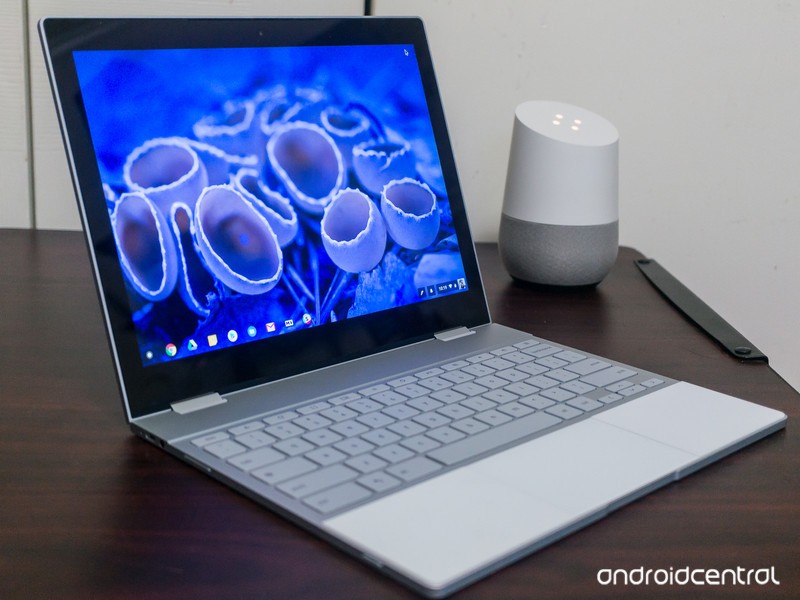
Not sure what’s new in Chrome OS? We’ve got you covered!
Chrome OS, Google’s own desktop operating system, receives regular updates to outfit it with new features, bug fixes, and more. There are three main levels of Chrome OS (Stable, Beta, and Developer) and while you can learn more about what these mean here, this guide will be updated regularly to highlight the main additions with each new release.
Since Google releases updates so frequently, we’ll only share them when something significant is added or patched as new builds are rolled out.
Without further ado, here’s what’s new in the Stable, Beta, and Developer Channels for Chrome OS!
Stable
June 7, 2018 — Progressive Web Apps can be installed and Tablet Mode gets split-screen support
Chrome OS’s Stable Channel was updated to 67.0.3396.78 on June 7, and it comes equipped with a host of new features.
One of the big highlights is the ability to download Progressive Web Apps as standalone applications — similar to how you’d download Android or regular Chrome OS apps. Progressive Web Apps are technically portals to websites but come with refined user interfaces and increased performance. They essentially give you desktop apps for things like Spotify, Flipboard, and more without developers having to create apps specifically for Chrome OS, meaning that we’ve just about ended the complaint that Chrome OS doesn’t have enough applications available for it.
Another big addition is that you can now use apps/websites in split-screen while in Tablet Mode. With devices like the HP Chromebook X2 and Acer Chromebook Tab 10 now around, a feature like this couldn’t have come at a better time.
Other goodies include a cleaner list of your Bluetooth devices, the ability to zip files on Google Drive via the built-in Files app, and new shortcuts that pop up when holding down your power button.
Read through the full changelog here
Beta
June 7, 2018 — All HTTP sites are now labeled as “Not Secure”
HTTPS is the future of website security, but for whatever reason, there are still some sites that continue to use the old HTTP standard.
As it stands right now, sites using HTTPS show a green “Secure” badge to the left of the domain. Starting with the Chrome OS 68 beta, that “Secure” badge is being removed and all HTTP sites wil show a “Not Secure” label so users can more easily identify if they’re on a site that’s not as safe as it should be.
Read through the full changelog here
Developer
July 11, 2018 — Android Nougat’s app shortcuts are now live!
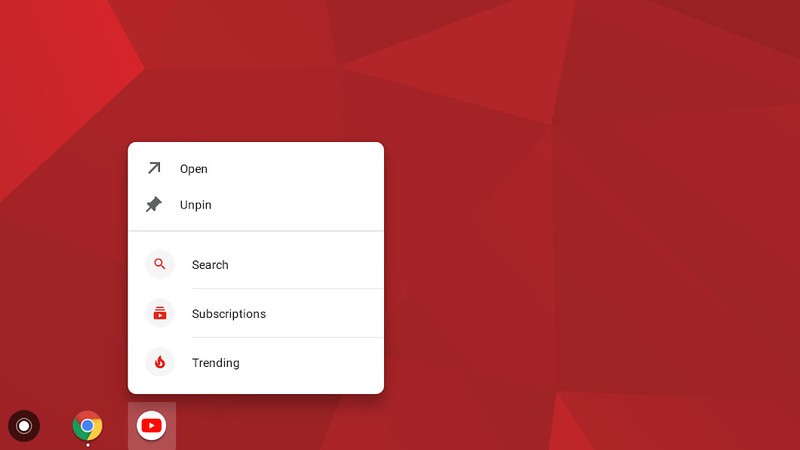
App shorcuts, first introduced with Android Nougat, are finally making their way to Chrome OS.
On July 11, 2018, Chrome OS evangelist François Beaufort announced that they are now live in the Chrome OS Dev Channel.
To start using them, simply enable the flag chrome://flags/#enable-touchable-app-context-menu. Once that’s done, right-click on an Android app that’s pinned to your shelf or in your app drawer and you’ll see the app shortcuts menu pop up.
The flag is still experimental, so don’t be alarmed if things are a bit buggy right now.
June 8, 2018 — The Pixelbook’s power button can act as a physical two-factor authentication key
Two-factor authentication is a great way to secure your online presence, and one way to go about this is by using a USB key. If you’ve got a Pixelbook running the Developer Channel, you can now mimic the functionality of a USB U2F key with its power button.
To enable this, simply open a Chrome Shell and enter u2f_flags g2f. As with everything in the Developer Channel, this feature isn’t the most stable so consider having a USB key anyways just in case something goes wrong.
How to change your software channel on Chrome OS
Chromebooks
- The best Chromebooks
- Chromebooks in education: Everything you need to know
- Should you buy a Chromebook?
- Chromebook Buyers Guide
- Google Pixelbook review
- Join our Chromebook forums
Apple’s Morning Show Drama Starring Reese Witherspoon and Jennifer Aniston Gains Director Mimi Leder
Apple’s upcoming morning show drama, which is set to star Reese Witherspoon and Jennifer Aniston, will be directed by Mimi Leder, reports Variety.
Mimi Leder has directed TV shows that include “The Leftovers,” “Shameless,” and “ER,” along with movies that include “Pay It Forward,” “The Peacemaker,” and “Deep Impact.”
Image via Matt Baron/REX/Shutterstock
The morning show drama doesn’t have a title yet, but it is based on Brian Stelter’s book “Top of the Morning” and is said to provide a look into the cutthroat world of morning TV.
Stelter’s book, for example, “reveals the dark side of morning television” with exclusive details on present and past morning show stars like Matt Lauer, Katie Couric, Ann Curry, Meredith Vieira, and more.
Apple has already ordered two seasons of the show, which was one of the first that it picked up. In addition to starring, Reese Witherspoon and Jennifer Aniston will also executive produce.
Apple has more than a dozen television shows in the works, with details on each available in the original content section of our Apple TV roundup. Apple has not shared details on when its TV shows will launch, but rumors have suggested the first could come in March 2019.
Related Roundups: Apple TV, tvOS 12Tag: Apple’s Hollywood ambitionsBuyer’s Guide: Apple TV (Neutral)
Discuss this article in our forums
When sci-fi meets reality: Adobe re-imagines AR from ‘Terminator 2’
The science-fiction film, Terminator 2: Judgment Day, has been credited for introducing ground-breaking visual effects in cinema. What’s perhaps more intriguing is that the film was released in 1991, when the computers used to make those effects are now less sophisticated than the iPhone in your pocket. So, what if the visual effects designers could re-imagine one of those computer-generated elements, using more powerful hardware and software that’s available today? To find out, Adobe tasked Territory Studio, a motion design and visual effects company, with remaking the augmented reality (AR) system used by the cyborgs in the film. The result is a highly polished, fictional graphical user interface that’s much more appropriate — and believable — for a Terminator from the future.
The assignment seems relatively straightforward: redo the UX system from the scene where the T-800 Terminator, played by Arnold Schwarzenegger, scans a row of motorcycles to find the fastest ride for the chase. Adobe has been making software for creating these kinds of fictional computer systems for years, including After Effects, the program used to animate the computer screens in the original Jurassic Park. But to reimagine the iconic Terminator scene, the software giant asked Territory Studio to complete the task using only Adobe XD, one of the company’s newest programs. XD is designed for prototyping user experiences, from websites to apps, but with the Terminator project, Adobe wanted to test out the software’s capabilities for science-fiction storytelling.
 The AR system from Terminator 2, and the reimagined version by Territory.
Territory Studio set out to keep the original integrity of the James Cameron production, including using the same background footage of the row of Harleys and a Plymouth sedan, while adding a modern take. With experience working on screen effects, from Blade Runner 2049 to Ready Player One, Territory Studio is no stranger to designing fictional computer systems. But Adobe XD was another story, and the design team had no experience with XD prior to the project.
Adobe XD uses tools designed to quickly create prototypes, including options to create repeating elements and style assets that can change a single repeated color or typeface across the design at once. With those shortcuts, Adobe suggests that XD left more space to imagine what an updated Terminator might see.
“A tool like Adobe XD allows a studio to iterate very quickly, to have access to a range of features for a more detailed and rich experience,” Talin Wadsworth, the lead designer for Adobe XD, told Digital Trends. “[Territory Studio] found it helped push this further, faster, using features like repeat grid, global color and style assets, and interactive prototyping, to create a dynamic experience…They were able to imagine more of what the operating system for the Terminator might be like.”
The resulting retake displays more information than the original imaginary system. Using multiple layers, the re-imagined UX helps to further the idea that the Terminator has many more capabilities than the average person, all for assessing information in real time.
Previous
Next
1 of 4


Adobe / Territory Studios


When the visual effects designers created the fictional AR technology for Terminator 2 in 1991 — as well as the original Terminator in 1984 — they relied mostly on their imaginations. Fast-forward to the present, AR has moved from concept to actual technology, from heads-up displays in cars and Google Glass to Pokemon Go on phones and AR headsets. While the imagined AR of the original Terminator movies were cool for the time, it now feels a bit outdated. Adobe says, as the sci-fi of the past pushes toward reality, this Terminator project serves as a reminder to continue imagining future technology.
The remake won’t actually show up in a future re-release of the movie. Instead, it’s more of an exercise to see what creatives could come up with when given new tools. But it’s not common for filmmakers to go back to their old movies and do some reimagining. Most notable is director George Lucas, who reworked select scenes with new special effects when the original Star Wars trilogy were re-released, using more advanced tools.
“It’s not only up to us,” Marti Romances, Territory Studio co-founder and creative director, said in a blog post. “Anyone can have a go at inventing something. We are all inventors. For people to put their ideas out there and to do what they would like to do, even if it sounds crazy. Create new things, go crazy, and have great ideas. You never know if that’s going to become a reality.”
Adobe XD — which is now free in a pared-down Starter Plan — is offering access to the different assets used to re-imagine the Terminator 2 scene. A free Terminator 2-themed UI kit is available to download from Adobe starting today.
Editors’ Recommendations
- New Adobe XD Starter Plan opens user experience design to all
- Adobe’s next big software secret? An augmented reality tool called Project Aero
- Lightroom CC gets synced presets on mobile and batch editing on desktop
- There’s an entire photo studio in your phone with this AR app
- The best Dolby Atmos movies, from ‘Mad Max: Fury Road’ to ‘Gravity’
Want to file a formal complaint with the FCC? That’ll be $225, please
On Thursday, July 12, the U.S. Federal Communications Commission (FCC) will vote on a new rule that may make it more difficult for consumers to file complaints and get their grievances resolved against an offending telephone, internet service, or cable provider. Critics argued that the new rule, if approved by the commissioners, goes contrary to the purpose of the FCC to regulate communications and hear complaints when they arise.
The commissioners will vote on new changes to how informal and formal complaints are handled. Under the new rule, informal complaints filed with the agency will be sent back to the original company to handle. Many argue that consumers often file a complaint with the FCC as a last resort because they couldn’t get a satisfactory resolution with the offending company, and sending the complaint back to the original company without any intervention essentially removes the FCC from the equation.
If a consumer could not get the issue resolved by filing an informal complaint, they could also escalate the issue by filing a formal complaint. Under the new rule, there will be a $225 filing fee for the commissioners to consider the formal complaint. The agency argues that the fee will help it streamline complaints, but the new rule may make it cost prohibitive for some to file a formal complaint in order to get their issue quickly resolved.
The new rule would also free the agency from having to read public comments. While the agency was required to read the more than 20 million comments last December when it rolled back net neutrality rules, under the new rules, the commissioners would not have to read through public comments at all, TechSpot reported.
Ahead of Thursday’s vote, Congressmen Greg Walden, R-Ore., and Frank Pallone, D-N.J., from the House Committee on Energy and Commerce wrote a letter to FCC Chairman Ajit Pai urging him to reconsider the vote. The congressmen noted that the FCC’s role is to ensure that consumers receive fair and honest treatment from their service providers.
“Creating a rule that directs FCC staff to simply pass consumers’ informal complaints on to the company and then to advise consumers that they file a $225 formal complaint if not satisfied ignores the core mission of the FCC — working in the public interest,” the letter stated. “We worry that the proposed change signals that the FCC no longer intends to play this role, and will instead simply tell consumers with limited means and time that they need to start an expensive and complicated legal process. Such an outcome is neither compelled by statue nor a wise public policy decision.”
Editors’ Recommendations
- FCC’s net neutrality rules officially end, but 18 ISPs promise to stay honest
- Robocall case results in record $120 million fine for Florida man
- Microsoft’s Surface Tablet clears final hurdle before launch
- Facebook and Twitter introduce new tools regarding ad transparency
- FCC puts a date on net neutrality’s tombstone ahead of Senate vote
LG Fortune 2 review

Research Center:
LG Fortune 2
Good budget phones are a dime a dozen, but start creeping under $150 and lower, and your choices start to dwindle. Mobile Virtual Network Operators (MVNOs) like Boost Mobile and Cricket Wireless sell affordable data plans and phones you can’t get anywhere else. These phones can sometimes surprise us with their capabilities, but more often than not they offer poor performance and unusable cameras.
The LG Fortune 2 is no exception. Exclusive to Cricket Wireless, the Fortune 2 only costs $100, but it lacks features you can find on other $100 phones such as a fingerprint sensor. Performance isn’t terrible, but it can get frustrating, and you won’t want to share most of the photos that come out of its camera. It’s not all bad, though, as the display is solid, and so is the phone’s battery life. Let’s take a closer look.
Basic, but comfortable and lightweight
The LG Fortune 2 looks like a phone from 2015. It has incredibly chunky bezels on the front, a stark contrast from many of the phones releasing this year with slim edges around the screen. An earpiece and front-facing camera sit up top, and the corners of the front are rounded as well as the edges. It’s comfortable to hold and lightweight, with a 5-inch screen that’s big enough for watching videos and movies.


A volume rocker sits high on the left edge, which can be a little tough to reach, but the power button is on the rear, which is unique to LG. It’s easy to access. On the bottom is a 3.5mm headphone jack next to a MicroUSB charging port. We’d have liked to see the more universal USB Type-C port, but even Motorola hasn’t fully added it into its range of budget 2018 phones.
The 5-inch screen has a 16:9 aspect ratio, and a 1,280 x 720 pixel resolution. The screen is vibrant and colorful, and we didn’t have much trouble seeing content in direct sunlight. Despite the lower resolution, images and text look sharp, and we were satisfied watching videos on this screen.
Despite the lower resolution, images and text look sharp, and we were satisfied watching videos on this screen.
Head over to the back, and the Fortune 2 isn’t terribly unattractive. There’s a lot going on, with a single-lens camera sitting high up top, as well as a flash and power below. There’s also the LG logo, along with a Cricket Wireless logo. On the left bottom corner is the phone’s only speaker. This is as basic as smartphone design gets, but we’re not expecting much for a $100 phone. The gray color is a little dull, but we do like the textured pattern.
When listening to music using the speaker while holding the phone, we sometimes ended up blocking the sound, which is a little frustrating. We wish LG opted for a front-facing speaker instead, especially since there’s plenty of space with those bezels. As for sound quality, the Fortune 2 doesn’t get loud enough to hear outdoors with lots of ambient noise, but it should be plenty loud indoors. The audio sounds surprisingly decent, though it’s still a tad muffled at louder volumes. You’re better off plugging in earbuds or getting a cheap Bluetooth speaker.
It’s unfortunate that the power button doesn’t double as a fingerprint sensor, unlike many other LG smartphones. The Alcatel 1X Android Go smartphone costs $100 and manages to include a fingerprint sensor, so we’d have liked to see one here as well. it’s tough to break the habit of constantly placing our finger on the lock button to gain access to our phone, and who wants to use pins anymore?
Middling performance
The Fortune 2 is powered by Qualcomm’s Snapdragon 425 processor with 2GB of RAM. Scrolling through the user interface isn’t fluid, and apps are slow to open. It’s all manageable, but you may get frustrated when scrolling through apps like Facebook, or when you open apps like Twitter or Instagram and refresh the feed after a long day of not checking in. We didn’t run into any problems that rendered the phone unusable, and we easily lost track of time playing The Sims Mobile without any issues.


Accessing the Settings menu is a little sluggish. When searching through or tapping on a section, we sometimes had to wait for menus to fully load, which could take a few seconds.
Here are few benchmark results:
- AnTuTu 3DBench: 36,514
- Geekbench 4 CPU: 657 single-core, 1,785 multi-core
The AnTuTu score sits right below phones with the slightly-better Snapdragon 430 processor, like the Moto G6 Play. Benchmark scores are good for comparisons, but they don’t reflect real-world performance. In our experience, the LG Fortune 2 is a decent performer for people who use their smartphones lightly — to message others, place calls, and use a few social media apps.
LG Fortune 2 Compared To

Land Rover Explore

Motorola Moto E4

Google Pixel

Lenovo Moto G4 Play

HTC One A9

Huawei P8 lite

Motorola Moto G (2015)

YotaPhone 2

Mlais M9

ZTE Blade S6

Asus PadFone X

HTC One M8 Harman Kardon Edition

Sprint Vital

Sony Xperia ZL

Samsung Galaxy S4
We downloaded our most-used apps on the device, and we noticed the more we tacked on, the slower the phone became. If you’re a power user that cycles through multiple apps, or if you like to use intensive apps, you may want a budget phone that’s a little more powerful like the Nokia 6.1.
One problem we do have with the phone’s specifications is the amount of storage provided. You only get 16GB, and it’s incredibly easy to fill that space up. Thankfully, the Fortune 2 does have a Smart Cleaning feature that optimizes storage, and you can save more space if you use a service like Google Photos. There is a MicroSD card slot that lets you add up to 32GB of additional storage.
Android 7.0 Nougat and bloatware
The LG Fortune 2 runs Android 7.0 Nougat — specifically 7.1.2 which was the last update to come to the 2017 operating system. It’s disappointing to see this phone launch without the latest version of Android, and it’s soon going to be out of date by two versions when Android 9.0 P releases in August. It’s unacceptable, even if the phone costs $100. Don’t expect to get any updates.
It’s disappointing to see this phone launch without the latest version of Android.
The software experience is similar to other LG phones. It’s simple to use, it looks contemporary, and there are a few customization options. LG’s KnockON feature turns the display on when you double tap the screen, which is handy when the phone is resting on a table.
What we don’t like so much is the amount of bloatware that’s pre-installed. You’ll be dealing with apps like Deezer, Final Fantasy XV, TopBuzz Lite, and Yahoo! Finance, which is annoying. Thankfully, it’s easy to uninstall all of them other than Visual Voicemail and the myCricket app.
Poor camera
The camera is always the Achilles’ heel on budget smartphones, especially in low-light environments. The LG Fortune 2 is no different. The 8-megapixel rear-facing camera can take some respectable photos in broad daylight, but it starts to churn out less than ideal results as soon as the sun starts to go down.
Even with decent lighting, images start to get grainy, fuzzy, and blurry. This is exacerbated in low light. Any overhead lighting overpowers the entire scene, ultimately making the photos unrecognizable.
Previous
Next
1 of 14


With a 5-megapixel front-facing camera, selfies look good when you look at them at a distance. Look closer and you’ll see that they too are blurry and grainy. Even with lots of natural light, selfies end up looking a bit washed out.
The camera app itself is surprisingly quick to open, and snapping a photo is swift. It’s a shame many of the results from the camera aren’t good enough to share anywhere.
Day-long battery
With a 2,500mAh battery powering the LG Fortune 2, we were able to get a full day out of the smartphone. That includes emails notifications, using social media, taking photos, and messaging. On average, we found that our device was at about 85 percent by noon (having taken it off the charger at about 8:45 a.m.), and by the end of the workday at 5 p.m., it was around 68 percent.
This phone can probably last a little more on a second day, but otherwise you should be able to comfortably use this phone for a full day.
By 8 p.m., the phone hit 49 percent — this was after using it more on our commute home followed by running errands, as we caught up on Instagram, news, and simultaneously listened to music on Spotify. By the time we got ready for bed at around midnight, the Fortune 2 sat at 28 percent. Not bad. With lighter use, this phone can probably last a little more on a second day, but otherwise you should comfortably be able to use this phone for a full day.
Price, availability, and warranty information
The LG Fortune 2 costs $100, and it’s only available through Cricket Wireless.
LG offers a one-year limited warranty that covers defects in material and workmanship. It doesn’t cover any accidental damage or wear and tear to the device. If you need warranty service, you’ll need to ship your device to LG’s customer service department.
Our Take
The LG Fortune 2 faces stiff competition, and even for its low price tag, it simply doesn’t do enough.
Is there a better alternative?
Yes. We’re currently in the process of testing the Nokia 3.1, which costs $150, as well as the Moto E5 Play (known as the Moto E5 Cruise on Cricket for $100). We can say for certain that both of these phones will offer you better value for the money over the LG Fortune 2.
If you can spend a little more, we recommend taking a look at the $250 Moto G6, the $270 Nokia 6.1, and the $200 Honor 7X. They’re all good performers with decent cameras, and solid battery life.
How long will it last?
The LG Fortune 2 is made of plastic so you won’t have to worry about shattering it easily, though you still may want to nab a case. Since it is unlikely to receive any software updates, and performance will wane the more you use it, we expect the phone to last a year or two before you’ll want to upgrade it.
Should you buy it?
No, there are better phones you can buy for $100.
The 20 best mods for ‘Grand Theft Auto V’
The PC version of Grand Theft Auto V offers many advantages over the console release. Better graphics, improved multiplayer, and support for higher resolutions are among them. Yet all of these pale in comparison to the most important advantage of all: Modifications.
An open-world game like GTA V begs to be modded, and on PC, that’s possible. Naturally, it has led to plenty of insanity that can multiply the game’s fun factor or increase its longevity. Here are the 20 must-have mods every player needs to install.
Script Hook V and Native Trainer
If you’re going to download any mods, download this first. Script Hook V makes the game’s scripts available to others, and so is a requirement for some GTA V mods (often, they’ll bundle the scripthook .dll just to be sure). This mod also gives you access to a feature-rich trainer that can turn you into a virtual god.
Complex Control
Grand Theft Auto V might be the most successful video game of all time, but Epic Games’ Fortnite is the biggest game in the world at the moment, so it only makes sense to combine the two! The “Complex Control” mod is a single-player “royale-lite” that spawns your character in a random location on the game’s enormous map, and you win if you’re able to stay in the last designated zone for four seconds. Though you won’t be able to play an actual battle royale match against other people, the proof-of-concept offered in Complex Control has us hoping for a full-on battle royale mode in the next Grand Theft Auto game.
HD Universe Carl Johnson
Grand Theft Auto: San Andreas is one of the best games available on the PlayStation 2, and protagonist Carl Johnson, or “C.J.,” is a large part of its appeal. Since Grand Theft Auto V takes place in the same general area, the “HD Universe Carl Johnson” mod essentially allows you to take the open-world experience from San Andreas and bring it into the current generation. You’re free to customize his hairdo just like you could in the original game, and meticulous work has been done to the tattoos on his arms and chest.
Super Mario Plumbers
“It’s a-me, get out of the car before I shoot you!” No one should be surprised that Mario and his pals made their way into Grand Theft Auto V, but we’re still impressed by what “Super Mario Plumbers” offers. Complete with classic Super Mario Bros. sound effects, you’re free to explore Los Santos as the classic mustachioed plumber, beat up random pedestrians, speed along the streets, and get into far more trouble than the Mushroom Kingdom would ever allow. If you get sick of Mario, the mod also includes other favorites like Luigi, Wario, and — of course — Waluigi.
Iron Man Mark 50
If the rocket launchers, planes, and explosives already available in Grand Theft Auto V aren’t enough for you, consider installing “Iron Man Mark 50.” Based on the suit Tony Stark wears in Avengers: Infinity War, it includes enormous wings on the back and transforms you into a walking weapon, capable of hovering in the air while you blast away at oncoming traffic with missiles. We’re not sure if you’ll survive the wrath of Thanos if you happen to run into him on the streets of Los Santos, but you’ll be able to cause quite a bit of chaos beforehand.
Psychokinetic
Ever since the film Chronicle released, we’ve wanted to control objects with our minds, and the “Psychokinectic” mod turns you into a terrifying being with telekinetic abilities. With the mod installed, you’re free to float throughout the city, pick up dozens of cars or people, and send them flying without worrying about whether or not anyone survives or explodes. Dropping trucks into crowded parking lots can result in some huge explosions, and if you run out of vehicles to throw, you can just send fireballs hurling down at your “enemies” instead.
Marlowe Valley Safehouse
This mod turns Marlowe Valley into a luxurious safehouse that also happens to have an airport and adjacent runway. With garages — including a tuning garage — and parking spaces to store more than 50 cars, Marlowe Valley becomes a hideout fit for a high roller. There’s even a military bunker, apartment, and a garden area designed for festivities. You’ll need the Menyoo mod to make it work.
Liberty City
The Liberty City mod turns the world of GTA V into GTA IV, resetting the game map as Grand Theft Auto IV’s Liberty City. The mod is currently in Alpha, and thus has some kinks that need to be worked out. It’s an interesting experiment that is certainly worth checking out for those interested in returning to the iconic Liberty City. There’s also a different Liberty City mod on the horizon to look out for.
World Improvement
GTA V already looks phenomenal, and even functions as somewhat of a moving portrait when you aren’t around, but this mod boosts the realism. It focuses on small details, like additional trees in places like Rockford Hills. It also adds new characters, and AI routines, such as police searches through Paleto Forest and car crashes around Los Santos. The best part about this mod? It receives new updates to introduce tiny — but profound — details regularly, so Los Santos will evolve, just like a real city would.
Superhot
The Superhot mod transplants Superhot’s innovative time-stopping mechanics into GTA V. When you stop moving, time stands still. While it seems like an odd choice for an open-world game like GTA V, the Superhot mod feels right at home when in close quarters combat. When back in the long game, you can toggle the mod off with the press of a button and resume normal play.
GTA RPG
GTA V has a rich, open-world narrative, but it remains relatively linear throughout. The GTA V RPG mod adds a non-linear story and skill progression system that makes it feel closer to Fallout than Grand Theft Auto. For starters, you can choose between three character classes. As you progress through missions using the mod’s quest system, you use skill trees to upgrade your character and weapons. There’s even dialogue trees with NPCs, and randomly-generated loot and items.
The Red House
If you find that replaying single player missions is growing stale, The Red House mod features an abundance of new content to stave off boredom. The mod adds more than 20 missions to the game, including a new heist. Some missions even include NPC bodyguards that assist you in your endeavors. An update, called the “Blue House,” added a set of stealth-oriented missions to the mod. All in all, the mission variety is solid, and well worth your time.
Open All Interiors
Are you tired of not being able to enter the Sandy Shores sheriff department, or any other locked building? The Open All Interiors mod gives you full range of access to those previously off-limits places. What’s most remarkable part is that the mod repopulates all these spaces, even the ones which were removed before launch and never meant to be seen.
Map Editor
Your wish is your command with this GTA V map editor. With the use of a free-roaming cam, you can easily place cars, ramps, and even animals throughout Los Santos, then hop in and play with your experiments. It’s a robust tool with a myriad of options, but best of all, it’s intuitive and simple to use.
Endeavor Menu
The Endeavor mod gives you a well-designed debug menu, with the power to summon any asset from the game whenever you want, turning Los Santos into your personal playground. Toggle it on and you can easily make any vehicle, gun, or item materialize in front of your eyes. You can also elevate your character to max stats, and remove police officers from the game. There are some zany aspects of it, too, like granting you the ability to drive across water, or the power to shoot bags of cash from your gun.
Pedestrian Riot
GTA: San Andreas had a cheat that made pedestrians go bonkers. It was hilarious to watch. Predictably, an intrepid modder has gone out of his way to re-create that experience. With the flip of a switch you can send everyone into insanity, creating chaos wherever you go. The mod gives them weapons, too, so be careful!
Field-of-view mod
For the first time ever in the series, GTA V offers a first-person mode. Far from a tack-on, Rockstar put a lot of effort into making it work just like a real first-person shooter. One thing they missed, though, is dynamic field-of-view adjustment. The default FOV is a bit narrow, which makes some players feel claustrophobic, and others motion sick. With this mod you can change the FOV to whatever setting is comfortable for you.
Bodyguard Menu
Why go it alone, when you can have a team backing you up? This mod can spawn a variety of NPCs who will follow you around and assist you in whatever you’re doing. You can command them to do your bidding, or just stand around in formation looking tough. Up to seven bodyguards will follow you, but you can still spawn more after that. Creating an army just after you rouse up a 4-star police rating can be a literal riot.
Police Mod
Why does Grand Theft Auto assume you want to be a criminal? With this mod you can act as the long arm of the law. It lets you skin yourself as a cop, spawn a partner, choose a police vehicle, and listen to a police scanner. You can’t pull over vehicles or go on missions just yet. Hopefully that will be possible in future versions.
Heist Vehicles Spawn Naturally
Heists are a popular feature in GTA V’s online mode. Many of them include unique vehicles. But what if you’re not interested in online play, and still want to use the vehicles? This mod lets you do just that. It doesn’t just give them to you off the bat, though; they spawn in certain areas for you to discover. Or if you just want to jump in, you can view the modder’s list of locations.
Updated on 7-10-2018 by Gabe Gurwin: Added five new mods
Editors’ Recommendations
- You’ll be able to run your own nightclub in ‘Grand Theft Auto Online’
- ‘Cyberpunk 2077’ preview
- Everything you need to know about ‘Fallout 76’
- EA shows more ‘Anthem’ and ‘Battlefield V’ at E3 2018, debuts all-access subscription
- The 20 best Nintendo Switch games you can buy today
Money-laundering ‘Bitcoin Maven’ receives one-year prison sentence
A federal judge sentenced Theresa Tetley, also known as the “Bitcoin Maven,” to one year in federal prison for operating an illegal money business. Federal prosecutors charged the former stockbroker with operating an unregistered money transmission business and laundering Bitcoin in at least one case that comes from proceeds from narcotics activity.
As part of her sentence, U.S. District Judge Manual Real also ordered Tetley to forfeit 40 Bitcoins — worth approximately $270,000 — along with nearly $300,000 in cash and 25 gold bars. Federal authorities were already in possession of those assets after they had seized them last year as part of the investigation.
The former stockbroker made more than $300,000 each year as a result of trading Bitcoin, court documents revealed, by running a Bitcoin-for-cash exchange service. However, Tetley did not register her business with the Financial Crimes Enforcement Network (FinCEN), and she also did not implement any mechanism to prevent money laundering. Tetley promoted her business on localbitcoins.com, and the government alleged that she had exchanged between $6 million to $9.5 million for customers, charging higher rates than competitors who were registered with FinCEN.
“As a result of operating this unregistered business, Tetley facilitated laundering for one individual who is suspected of receiving Bitcoin from unlawful activity, such as sales of drugs on the dark web,” the government said in a case that was prosecuted by Assistant United States Attorney Puneet Kakkar of the Organized Crime Drug Enforcement Task Force Section. “In the course of her business, Tetley also conducted an exchange of Bitcoin-for-cash for an undercover agent who represented that his Bitcoin were the proceeds of narcotics trafficking.”
Tetley was arrested following a March 2017 sting operation where a Drug Enforcement Agency officer had approached Tetley posing as a drug dealer. In that instance, Tetley had agreed to exchange the agent’s Bitcoin, which was represented to come from trafficking drugs, for $300,000 in cash that delivered in two Trader Joe’s paper shopping bags. The government also alleged that Tetley exchanged more than $6 million for William Farber, a man that was charged last year for running a drug ring, the Los Angeles Times reported.
The Justice Department argued that Tetley should be sentenced to a longer term because she had knowledge that the funds came from illegal means. During her sentencing, Tetley asked for leniency, NBC Los Angeles reported. “But I screwed up epically,” she told the court. “It quickly became a business — and I broke all sorts of laws. I have learned my lessons.”
Even though the case against Tetley is said to be the first of its kind in the Central District of California, there have been similar cases in other parts of the country.
Editors’ Recommendations
- Bitcoin put him on the street. Then it made him a fortune
- From the doctor to the DMV, blockchain can make governments swift and secure
- Bitcoin’s profitability called into question as energy consumption rises
- How to buy Bitcoin
- ‘World of Warcraft’ DDoS attacker gets a year in prison, nearly $30,000 fine
Want to file a formal complaint with the FCC? That’ll be $225, please
On Thursday, July 12, the U.S. Federal Communications Commission (FCC) will vote on a new rule that may make it more difficult for consumers to file complaints and get their grievances resolved against an offending telephone, internet service, or cable provider. Critics argued that the new rule, if approved by the commissioners, goes contrary to the purpose of the FCC to regulate communications and hear complaints when they arise.
The commissioners will vote on new changes to how informal and formal complaints are handled. Under the new rule, informal complaints filed with the agency will be sent back to the original company to handle. Many argue that consumers often file a complaint with the FCC as a last resort because they couldn’t get a satisfactory resolution with the offending company, and sending the complaint back to the original company without any intervention essentially removes the FCC from the equation.
If a consumer could not get the issue resolved by filing an informal complaint, they could also escalate the issue by filing a formal complaint. Under the new rule, there will be a $225 filing fee for the commissioners to consider the formal complaint. The agency argues that the fee will help it streamline complaints, but the new rule may make it cost prohibitive for some to file a formal complaint in order to get their issue quickly resolved.
The new rule would also free the agency from having to read public comments. While the agency was required to read the more than 20 million comments last December when it rolled back net neutrality rules, under the new rules, the commissioners would not have to read through public comments at all, TechSpot reported.
Ahead of Thursday’s vote, Congressmen Greg Walden, R-Ore., and Frank Pallone, D-N.J., from the House Committee on Energy and Commerce wrote a letter to FCC Chairman Ajit Pai urging him to reconsider the vote. The congressmen noted that the FCC’s role is to ensure that consumers receive fair and honest treatment from their service providers.
“Creating a rule that directs FCC staff to simply pass consumers’ informal complaints on to the company and then to advise consumers that they file a $225 formal complaint if not satisfied ignores the core mission of the FCC — working in the public interest,” the letter stated. “We worry that the proposed change signals that the FCC no longer intends to play this role, and will instead simply tell consumers with limited means and time that they need to start an expensive and complicated legal process. Such an outcome is neither compelled by statue nor a wise public policy decision.”
Editors’ Recommendations
- FCC’s net neutrality rules officially end, but 18 ISPs promise to stay honest
- Robocall case results in record $120 million fine for Florida man
- Microsoft’s Surface Tablet clears final hurdle before launch
- Facebook and Twitter introduce new tools regarding ad transparency
- FCC puts a date on net neutrality’s tombstone ahead of Senate vote
AT&T makes deal to sell the Magic Leap One Creator Edition AR headset in U.S.
AT&T signed a deal to be the exclusive wireless distributor of Magic Leap’s products in the United States. First up to bat will be the Magic Leap One Creator Edition headset that will be sold in select stores in Atlanta, Boston, Chicago, Los Angeles, and San Francisco. AT&T will add additional markets at a later date.
“We’re designing and offering the future of entertainment and connectivity, and this exclusive arrangement — in combination with our 5G leadership position — will open up new opportunities and experiences,” AT&T CEO John Donovan said in a statement.
Magic Leap One is a lightweight augmented reality headset that throws digital objects into your view of the real world. The device includes cameras for full-room tracking and spatial awareness, meaning it can detect objects such as chairs, boxes, bushes, and so on. The camera can also record video, which lights a red LED while recording.
Unfortunately, we don’t know the hardware powering the upcoming AR headset, but a livestream demonstration on Twitch in June gives us a better look at what’s to come. For starters, the headset won’t support prescription glasses. Instead, you’ll need to purchase subscription lenses that you manually insert into the device … or wear contact lenses.
Even more, Magic Leap One is designed for indoor use only. Attached to the headset will be a hockey puck-style miniature PC, aka the Light Pack, that clips onto your pocket: It doesn’t support clipping onto a belt. Moreover, despite its size, you can’t slip it into your pocket because it’s a miniature computer that requires ventilation. Shoving it into your pocket will overheat the device.
On a connectivity front, the Light Pack will include a Wi-Fi connection for networking, Bluetooth for peripherals, a USB-C port, and a headphone jack. The headset will provide audio “holes” rather than built-in headphones to generate “sound fields” (3D spatial audio?). The headset itself will ship in two sizes.
Bundled with the headset and Light Pack will be several swappable brow and nose pieces to better fit your face. Also included are a controller supporting six-degree-of-freedom while providing trigger and bumper buttons on the bottom, a single button on the top that may serve as a “home” button, and a touchpad sporting glowing LED markers.
To make the augmented reality aspect come alive, the headset relies on the company’s proprietary digital light-field photonics.
“Our light-field photonics generate digital light at different depths and blend seamlessly with natural light to produce lifelike digital objects that coexist in the real world,” the company says. “This advanced technology allows our brain to naturally process digital objects the same way we do real-world objects, making it comfortable to use for long periods of time.”
Right now, Magic Leap is only serving up a Creator Edition model for developers. Both the price and release date are unknown, but at least now we know who will distribute the headset in North America. AT&T’s involvement indicates Magic Leap One Creator Edition will have cellular connectivity and access to AT&T’s “content platform.”
Editors’ Recommendations
- AR/VR headset creator Magic Leap partners with AT&T on upcoming release
- iPhone X: Here’s everything you need to know about Apple’s best phone yet
- Leap Motion’s AR table tennis is a long way from your parents’ Pong
- Gaming-focused Red Magic Phone offers monstrous specs for just $400
- Android P beta 3: Everything you need to know
Best Google Wifi Mounts in 2018

Whether you live in a house or an apartment, there are plenty of options for mounting your Google Wifi!
The Google Wifi isn’t a bad looking router (or three) on its own, and it’s pretty easy to stick it anywhere in your house without offending anyone. However, every home is different and you might want something a little more elegant and organized than just plonking a node down on a window sill.
Thanks to its popularity and the fact it’s a pretty simple shape, there are plenty of options out there for mounting the Google Wifi to a wall or even a ceiling. None are very expensive and there’s something out there to suit all tastes.
Here, we’ve rounded up the best of the bunch.
- Wall Mount Holder for Google Wifi System by Koroao
- Mount Genie The Spot
- Echogear Outlet Shelf
- Deeroll Wall Mount
- OkeMeeo Google WiFi Wall Mount
- LykusSource Wall Mount
- Anco Precision Wall Mount for Google WiFi
- HumanCentric Google WiFi Mount
Wall Mount Holder for Google Wifi System by Koroao

This mount from Koroao is good for both walls and ceilings, and completely hides the base and cables of the Google Wifi. It attaches using two screws and has silicon pads on the rear to help keep a slip-free fit.
There’s a little notch on the mount just large enough to feed the power cable and Ethernet cable through. It’s all plastic, all white like the Google Wifi and only costs $13. Or you can get a two pack for $19 and a three pack for $26, which is excellent considering you likely don’t just have a single Google Wifi.
See at Amazon
Mount Genie The Spot

If you just want to mount your Google Wifi close to a wall outlet or you want to hide the cables easily, The Spot is the mount for you. It’s a mount with an additional bracket which will rest around the plug of your Google Wifi, supporting the unit below the socket powering it.
The Google Wifi just drops in, but the neat thing about this mount is that the rear of it has enough space to coil up the excess power cable completely out of sight. So you end up with a really neat and tidy setup.
But, if you need the network cable, there’s still a cutout on the bottom to feed that through. And it costs less than $10, which makes it a great value as well.
See at Amazon
Echogear Outlet Shelf

This isn’t just a mount for your Google Wifi, but it’ll do a great job of it anyway. The Echogear Outlet Shelf is designed to hold anything up to 10lbs in weight, which can include a Google Home or Amazon Echo, even a Sonos One, or, keeping with the theme, your Google Wifi nodes.
It’s a simple plastic shelf that fits around a wall outlet and has cable routing built in to keep everything tidy.
It’s a novel way to keep cable mess under control, and the most technical thing you’ll need to do is remove the existing wall plate around your outlet. A great little mount for $15.
See at Amazon
Deeroll Wall Mount

The most simple and minimalist mount in the list, this wall mount from Deeroll is a semi-circle that screws to the wall and you just sort of drop the Google Wifi in on its side.
The plastic used to make it is a similar material and a perfect color match to the Google Wifi, and from the front, it almost disappears entirely. Despite this, there’s enough space at the back to wind the excess power cable around and keep it all looking neat.
A single mount costs just $9, but if you need more, you can get a three pack for $24 and save a little bit over buying them individually.
See at Amazon
OkeMeeo Google Wifi Wall Mount

If you want a super clean wall setup, OkeMeeo has you covered. Its mount works on walls or ceilings and allows you to route the power and Ethernet cables. It mounts with one screw, and you can remove the Google WiFi without taking the mount down if you need to do so. There are also four silicon pads on the back side so your wall and ceiling don’t get scratched up. This isn’t a complete in-wall solution, but it’s a nice middle ground for both homeowners and apartment dwellers.
OkeMeeo’s Google Wifi Wall Mount is available in a single pack for $12, and a three-pack for $23.
See at Amazon
LykusSource Wall Mount

Another in-between mount is from LykusSource. Its wall mount attaches to the wall with four small screws, and it has built-in cable management for the power supply. This is strictly a wall mount since it’s basically a small shelf, so look elsewhere if you want something for the ceiling. You still get easy access to the Ethernet ports if you need them, and you can clearly see the status light to figure out why your Wi-Fi isn’t working.
LykusSource’s Wall Mount is available in a single pack for $8.50, a two-pack for $15, and a three-pack for $21.
See at Amazon
Anco Precision Wall Mount

One more mount that’s strictly for walls is from Anco. Rather than a shelf, this is more of a cradle for the router. You can leave the cables loose, run them behind the walls or invest in a cable channel. You have easy access to all the ports at the bottom, so you can still plug your laptop into Ethernet if need be. Once the router is mounted, it’s just a white dot on your wall. Since the router is in plain view, you won’t have any reception problems with any of your devices.
Arco’s Precision Wall Mount is available in a single pack for $9, a two-pack for $15 and a three-pack for $20.
See at Amazon
HumanCentric Google WiFi Wall Mount

If you want something really custom, HumanCentric has the mount for you. You’ll need to route your power and Ethernet cables behind the wall for this mount, so it’s not for apartment dwellers. This will work on either walls or ceilings, so feel free to mount it wherever you get the best reception. It includes washers, screws, drywall mounts, and everything else you’ll need to mount it — minus a drill — so no need to make a trip to the hardware store. Once it’s mounted, it’s mounted — no taking the Google WiFi out without the mount.
HumanCentric’s Google WiFi Wall Mount is available in a single pack for $10.
See at Amazon
Updated July 2018: This article was updated to include awesome new mounts like the Anco Precision, HumanCentric, OkeMeeo and LykusSource mounts. We also updated the prices of existing mounts.
Google Hardware

- Google Wifi review
- Google Home review
- Chromecast Ultra: all you need to know
- Which Chromecast should you buy?
Google Wifi: Google
Amazon
Google Home: Google
Best Buy
Chromecast Ultra: Google
Best Buy
 AIVAnet