


Fans petition Microsoft to save the Surface Phone from cancellation
Surface Phone fans are hoping that a grassroots campaign will help persuade Microsoft to reverse its reported decision on cancelling its unannounced dual-screen computing device. A Change.org petition is asking hopeful buyers of the Surface Phone to add their signatures in an effort to convince Microsoft to continue its course in launching the project later this year, which was known by its Andromeda code name.
“All the fans of Windows Phone want Microsoft to release the Surface Phone aka Surface Andromeda Phone Project that has been leaking out lately with the phone screen that can turn into a tablet,” the petition reads. “Money is power and if a lot of people want a Surface phone like the ones in the leaks then they will be forced into action as everyone knows Microsoft wouldn’t be able to give a reason on why not to do it to there [sic] investors, as its too much of a money opportunity to miss.”
The original writer of the Change.org petition, Zachary Hinski, speculates that consumers may not mind paying $799-$999 for the device. That cost would be in line with the price for some of today’s flagship phones, including iPhone models from Apple, but it’s unclear if Microsoft would be able to get the price that low, given the innovative size and components that would have gone into the design.
Although Microsoft never formally announced that it was working on such a device, recent leaks suggest that the Surface Phone would be a “disruptive” device that can transform into five distinct modes thanks to a 360-degree hinge. However, unlike convertible notebooks today, the Surface Phone would come in a more compact design that’s said to be pocketable, allowing it to look and feel more like a smartphone when it’s closed.
Most recently, it was reported that Microsoft is rethinking its Surface Phone strategy. “This is partially because of scheduling and quality, sources say, but more so because there’s still no compelling reason for Microsoft to come to market with its current iteration of a small, dual-screen mobile device,” ZDNet reports. However, ZDNet said that this doesn’t mean that the Surface Phone has canceled and it could still launch at some point in the future with a form factor that is more like a small foldable PC rather than a phone-sized device.
Technically, since Microsoft never formally announced the device, the Surface Phone was never really “canceled” by the company. For his part, Hinski said that he created the petition as a survey “to see how many people would buy this phone if Microsoft would release it.” At the time of this posting, the petition had 250 supporters.
Editors’ Recommendations
- Dell is reportedly working on its dual-screen version of the Surface Phone
- Microsoft leak hints dual-screen Andromeda device targets launch later this year
- Code in latest Windows 10 preview hints at a Surface Phone
- Microsoft calls its foldable Andromeda device “disruptive”
- Microsoft’s new USB-C port could enable even slimmer Surface products
Fans petition Microsoft to save the Surface Phone from cancellation
Surface Phone fans are hoping that a grassroots campaign will help persuade Microsoft to reverse its reported decision on cancelling its unannounced dual-screen computing device. A Change.org petition is asking hopeful buyers of the Surface Phone to add their signatures in an effort to convince Microsoft to continue its course in launching the project later this year, which was known by its Andromeda code name.
“All the fans of Windows Phone want Microsoft to release the Surface Phone aka Surface Andromeda Phone Project that has been leaking out lately with the phone screen that can turn into a tablet,” the petition reads. “Money is power and if a lot of people want a Surface phone like the ones in the leaks then they will be forced into action as everyone knows Microsoft wouldn’t be able to give a reason on why not to do it to there [sic] investors, as its too much of a money opportunity to miss.”
The original writer of the Change.org petition, Zachary Hinski, speculates that consumers may not mind paying $799-$999 for the device. That cost would be in line with the price for some of today’s flagship phones, including iPhone models from Apple, but it’s unclear if Microsoft would be able to get the price that low, given the innovative size and components that would have gone into the design.
Although Microsoft never formally announced that it was working on such a device, recent leaks suggest that the Surface Phone would be a “disruptive” device that can transform into five distinct modes thanks to a 360-degree hinge. However, unlike convertible notebooks today, the Surface Phone would come in a more compact design that’s said to be pocketable, allowing it to look and feel more like a smartphone when it’s closed.
Most recently, it was reported that Microsoft is rethinking its Surface Phone strategy. “This is partially because of scheduling and quality, sources say, but more so because there’s still no compelling reason for Microsoft to come to market with its current iteration of a small, dual-screen mobile device,” ZDNet reports. However, ZDNet said that this doesn’t mean that the Surface Phone has canceled and it could still launch at some point in the future with a form factor that is more like a small foldable PC rather than a phone-sized device.
Technically, since Microsoft never formally announced the device, the Surface Phone was never really “canceled” by the company. For his part, Hinski said that he created the petition as a survey “to see how many people would buy this phone if Microsoft would release it.” At the time of this posting, the petition had 250 supporters.
Editors’ Recommendations
- Dell is reportedly working on its dual-screen version of the Surface Phone
- Microsoft leak hints dual-screen Andromeda device targets launch later this year
- Code in latest Windows 10 preview hints at a Surface Phone
- Microsoft calls its foldable Andromeda device “disruptive”
- Microsoft’s new USB-C port could enable even slimmer Surface products
Samsung sees a second-quarter slump, due in part to slow Galaxy S9 sales
After four quarters of record profits, it looks like things are about to change for Samsung. The South Korean tech giant released its earnings guidance of 14.8 trillion South Korean won ($13.2 billion) in operating profit from 58 trillion won (51.8 billion) in revenue for the second quarter of 2018. Samsung will report final results for Q2 later this month.
While the guidance shows an 11 percent increase in profit year over year, it also shows a 0.7 percent decrease in overall sales for the period ending June 30. The guidance is a far cry from analysts predictions of a 60.3 trillion won revenue with 15.1 trillion won in profit.
Industry analysts believe the lower-than-expected figures for the second quarter can be attributed to low sales of the Samsung Galaxy S9 as well as pricing volatility for memory chips.
According to Lee Seung-woo of Eugene Investments, sales of the Galaxy S9 have been sluggish. He expects the Samsung to ship about 31 million Galaxy S9 handsets in 2018. That number falls far below Samsung’s sales target of 43 million Galaxy S9 handsets.
In addition to slow sales for the Galaxy S9, analysts also believe pricing volatility for memory chips could be wreaking havoc on Samsungs earnings for the second quarter. Much of Samsung’s earnings success over the last four quarters can be attributed to its thriving components business.
Samsung Electronics became the No. 1 supplier of semiconductors worldwide in 2017 and its sales of memory chips continue to outpace its competitors by a long shot. However, prices for NAND memory has fallen drastically in recent months and analysts believe DRAM chips will fall 10 to 15 percent in the coming months as well.
Slow sales and components pricing may not be Samsung’s only challenges in the coming quarters. Earlier in 2018, it was believed the majority of Apple’s upcoming 2018 iPhone models would use Samsung’s OLED displays. However, analysts now believe a greater proportion of the upcoming handsets will have less expensive LCD displays.
Samsung may see a boost in fourth-quarter sales, though. The company is expected to announce new hardware in August, including the Galaxy Note 9, Samsung Gear S4, and Samsung Galaxy Tab S4. The products would likely go on sale at the end of the third quarter in time for the holiday shopping season.
Editors’ Recommendations
- Samsung beats Apple in smartphone activations during the first quarter
- Apple reveals healthy iPhone sales as Cook hints at more handset variations
- Shrinking demand forces Apple to slow down iPhone X production
- Despite PC industry’s flat year-to-year growth, HP dominated first-quarter sales
- Ford to stop making almost all cars
Best Cases for Nokia 2 in 2018

Protect your phone with the best available options
Now that you have your Nokia 2 you want to make sure it’s protected. Another bonus when looking for phone cases is to see if it has the ability to serve as a useful tool for your daily life as well. Sometimes that means sacrificing a bit of the extra protection you might get with other cases, but that is worth it to some of us.
Continue on below to weigh your options for these phenomenal phone cases to see which one is the best for you!
- Linkertech dual layer
- Feitenn Nokia 2 wallet case
- KuGi SS
- Screen protector
Note: This buyer’s guide is for the Nokia 2 (2017), not the newer Nokia 2.1 (2018).
Linkertech dual layer

This case is the closest you’re going to get to something like an Otterbox for your Nokia 2. It comes in two parts, where the inner piece is a thermoplastic polyurethane (TPU) and the outer piece is a hard plastic that clips onto it. TPU is a semi-hard silicone used in cases to protect your phone better from accidental drops by providing shock-absorption. One of the amazing parts is that you’ll be getting this dual-layer protection without the case making your phone too bulky.
While there isn’t much in the means of added features, the Linkertech case does come with a built-in kick-stand. That means you’ll be able to prop up your phone to watch some movies. But, the best part of this phone case is that you can get it for just $7.95 on Amazon in the colors black, red, or blue!
See on Amazon.
Feitenn Nokia 2 wallet case

Here we have the iconic phone case that also serves as a wallet. There is TPU inside of the case that is sealed in with leather, but it is much thinner than you would get in the Linkertech case. With two slots for cards and a larger slot to put some cash inside, the case makes it practical to keep all of your personal items in one holder. While you won’t have the same amount of protection as a thicker case, you’ll certainly be saving yourself a lot of anxiety knowing everything is all in one place.
The Feitenn is perfect for traveling or a night out with your friends. It even has a built-in feature for you to fold the crease and turn it into a kickstand for your phone. It comes in three different colors — black, blue, or orange — that you can find on Amazon for the great price of $8.79.
See on Amazon.
KuGi SS

Lastly, we have the KuGi SS phone case, which offers a decent amount of protection in an almost-unnoticeable design. KuGi SS has a thin layer of TPU coated with a soft material to ensure your case will be almost as thin as your phone and slick to the touch. If you’re the type of person that just wants a basic phone case that gives your Nokia protection and gets the job done, the KuGi is the one for you.
For $8.50 on Amazon you can get your hands on one that’s either navy blue, brown, white or orange.
See on Amazon.
Screen protectors

Last but not least, you want to complete your phone case with some tempered glass. These stick-on options act as a second form of protection to go over the screen of your phone and prevent scratches and cracks. Tempered glass will fit inside all options that were listed and you’ll hardly realize it’s there. This way, the next time you drop your phone and realize you’ve cracked the entire screen, you can take comfort knowing it’s just the second screen.
You can find a 2-pack on Amazon for $6.99 so when the first one gets ruined you already have a backup in your drawer. Trust me, the money spent on getting these cases are well worth the possible hundreds of dollars it will cost to replace the actual screen of your phone. It’s definitely worth the investment.
See on Amazon.
How to download YouTube videos to watch offline

There’s so much to watch on YouTube, you can’t possibly watch it all.
We can stay up from dawn till dusk and we will never run out of YouTube videos to watch, but what do you do when you have to stray from your faithful Wi-Fi? What do you do when you’re going to be out in the countryside with spotty data — or even worse, on a Wi-Fi-less plane? You download some YouTube videos for offline playback, of course.
Downloading YouTube videos to watch offline can save you oodles of data if you have the presence of mind to download while you’re on good Wi-Fi, and in areas where data connections can be spotty as best, offline might be the only real way to watch YouTube. Here’s how — and who — can download videos in YouTube for offline playback.
- Who can download videos to play offline
- How to download a video to play offline
- How to download a playlist to play offline
- How to change your download video quality
- How to schedule offline downloads for Wi-Fi
Who can download videos to play offline

There are two categories of YouTube users that offline playback are available to: YouTube Premium members and YouTube users in select developing countries.
YouTube accepts that in many countries of the world, mobile data is a precious commodity — assuming mobile data is available at all in some places — but YouTube still wants people in these countries to be able to enjoy YouTube. To that end, in over 120 countries/territories around the world, users can download YouTube videos for offline playback without a subscription. This includes most of Africa, Asia, the Middle East and the Caribbean, and in countries like India, YouTube’s offline features are widely used and have some extra features that YouTube offline in YouTube Premium countries do not, like Smart Offline.
See if you live in a country that can use YouTube offline without a subscription

YouTube Premium is YouTube’s subscription service that removes ads across YouTube’s apps and enables premium features, including background playback and offline playback. YouTube Premium also give users premium service on YouTube Music (except in South Korea) and Google Play Music, which makes YouTube Premium the best deal in streaming today. YouTube Premium is $11.99/month for individual subscribers and $17.99/month for a family plan with up to 6 users, and it’s available in the following countries:
- Australia
- Austria
- Canada
- Finland
- France
- Germany
- Ireland
- Italy
- Mexico
- New Zealand
- Norway
- Russia
- South Korea
- Spain
- Sweden
- United Kingdom
- United States
Read more: YouTube Premium is Google’s streaming future
If you’re not on either of these lists, then I’m sorry, but you cannot download videos for offline use through YouTube’s apps. There are third-party solutions of varying legality available to help you download YouTube videos on Android, but we cannot vouch for any of them.
How to download a video to play offline
Should you be lucky enough to have the option of saving YouTube videos for offline viewing, here’s how to start downloading videos.
Open YouTube.
Tap on a video you want to download for offline viewing.
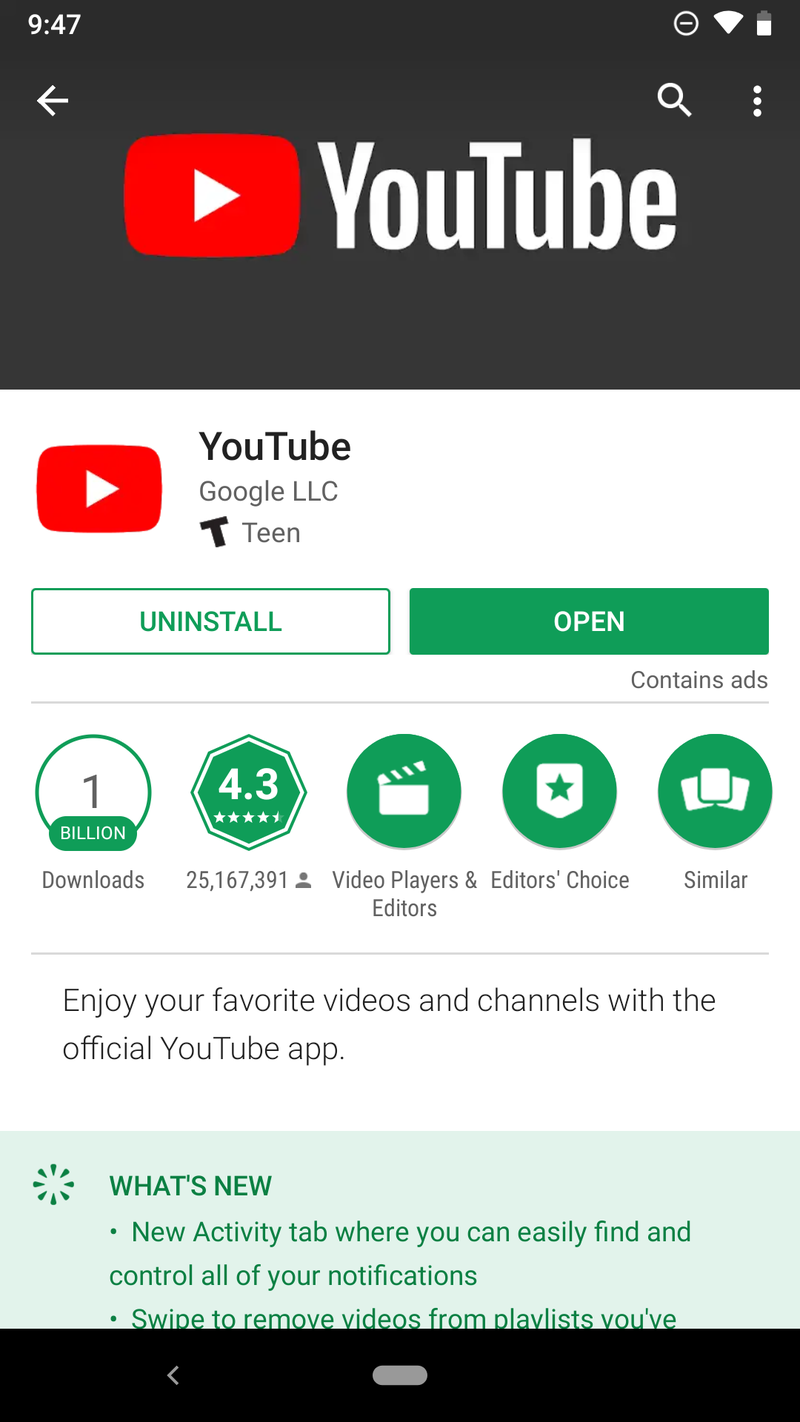

Tap Download, between the Share and Add to buttons below the video’s title.
Tap the video quality you wish to download your video in.
Tap OK.


Depending on the data settings you’ve set for offline videos, YouTube will automatically begin downloading the video or wait for Wi-Fi to begin downloading.
How to download a playlist to play offline
If you’ve got an entire playlist you want to watch offline, you can download that playlist without having to individually download every single video.
Tap on a playlist you want to download for offline viewing.
Tap Download, between the Shuffle and Edit buttons on the playlist screen.


Tap the quality you wish to download your video in.
Tap OK.
A pop-up will appear warning you that downloading a playlist can take a lot of time and data. Tap OK to proceed with the download.


How to change your YouTube download quality
By default, after you pick the video quality for your first downloaded YouTube video, all other videos will download at the same quality, but you can change that quality — or tell YouTube to ask you the quality every time — by taking a quick trip into YouTube’s settings. You can also tell YouTube to download on your SD card if your phone has one.
Open YouTube.
Tap your avatar in the top right corner.
Tap Settings.
Tap Background & downloads.


Under Download, tap Video quality.
Tap the quality you wish to download at, or if you’d prefer to choose every time, tap Ask each time.


If you have a phone with a microSD card, you’ll see a toggle on this same screen to Use SD card for YouTube downloads. If the toggle is blue, videos are downloading to the SD card. You can also see how much space your downloads are taking up by looking at the Available storage bars at the bottom of the screen.
How to schedule offline downloading for Wi-Fi
Not everyone can afford unlimited data plans, so if you want to download videos for offline viewing without burning precious mobile data, YouTube can wait to download that video until you’re off paid data and onto Wi-Fi.
Open YouTube.
Tap your avatar in the top right corner.
Tap Settings.
Tap Background & downloads.
Under Download, tap Download over Wi-Fi only to toggle it on.

Questions?
Let us know in the comments below.
Read more: Everything you need to know about YouTube
Updated July 2018: This article has been refreshed and expanded, especially in regard to what users in what countries can use YouTube offline features.
Grab the Yi Compact 1080p dashboard camera for just $26
You can never be too safe!

The Yi Compact 1080p dashboard camera is down to $25.99 with code COUM4NCB on Amazon. That is $14 off the normal price and the best we’ve ever seen. This deal beats other recent deals by a few bucks.
The Yi Compact has only been around for about a month now but it’s right in line with the other Yi dash cameras as great budget alternatives to far-more-expensive options like the Garmin 65W. With this camera, you get 1080p at 30 frames per second, a 130-degree wide angle lens, and night vision. It has a 2.7-inch LCD screen with easy-to-use navigation. The built-in Wi-Fi lets you connect to the smartphone app that lets you download and share videos. Users give it 3.8 stars based on 247 reviews.
You will need an SD card to record your footage onto, so grab the $23 Samsung EVO Select 64GB card with your new dash cam.
See at Amazon
HTC just had its biggest drop in sales in more than two years
Sales fell by 62% this past June.
It’s no secret that HTC has been struggling for quite some time, but the past few days have been particularly brutal on the company. On July 6, the Taiwan-based OEM announced that its sales for June have fallen by a whopping 62%.
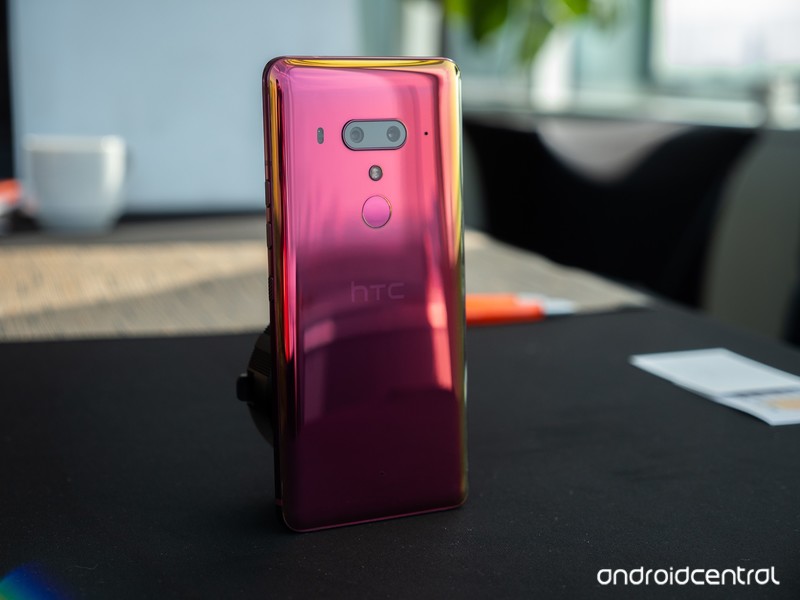
That drop in sales is the biggest HTC’s seen in over two years, with the exact number being $2.2 billion NT compared to $6.9 billion NT from June of last year.
Per an analyst from Trendforce:
In the high-end segment, the sales of their flagship phone this year has been lower than expected, leading to lower market share. As for HTC’s middle-end and entry-level series, the new models feature neither new specs nor high performance-price ratio, influencing the sales.
HTC’s most recent flagship, the U12+, proved to be quite the letdown in our full review. Although it’s a fast performer and has a great design, its poor battery life and game-breaking pressure-sensitive “buttons” result in a product that is far from justifying its $800 price tag.
Just four days ago, HTC also announced that it was laying off 1,500 employees from its manufacturing division in an effort to become profitable.
Things haven’t looked good for HTC for a while, but between the massive layoffs and dwindling sales numbers, the end might be sooner than we thought for the brand that used to be the king of the Android world.
HTC U12+ review: Buttonless blunder
V-Moda Crossfade 2 Wireless Codex Edition review: Exquisite sound, supreme comfort
V-Moda’s Crossfade 2 gets an upgrade for 2018.

V-Moda initially started out with headphones aimed at DJs and music producers, and got its first break in consumer tech making third-party headphones for iPhones and iPods. Over the years, the brand became associated with flamboyant designs that offered a high degree of customization, and that’s the case with its latest product as well.
The Crossfade 2 Codex is an upgraded variant of last year’s Crossfade 2 Wireless that offers AptX and AAC codec compatibility as standard. V-Moda is slotting in the headset at the same $350 price point as last year, and V-Moda is kicking off an upgrade program for those looking to make the switch from its earlier products. This is the Crossfade 2 Wireless Codex Edition.
V-Moda Crossfade 2 Wireless Codex Edition

Price: $350
Bottom line: The Crossfade 2 Codex Edition builds on the standard model by offering AptX and AAC support across all color options. Otherwise, this is the same great headset that V-Moda fans have come to love.
The Good
- Balanced sound signature
- AptX and AAC compatibility
- Extraordinary build quality
- Comfortable fit
- All-day battery life
The Bad
- Mushy volume controls
- Charges over Micro-USB
See at Best Buy

V-Moda Crossfade 2 Codex What I love
As the name suggests, the Crossfade 2 Codex is all about high-fidelity codecs. Unlike the standard Crossfade 2 — which limited AptX compatibility to the rose gold option — all models of the Crossfade 2 Codex feature AptX as well as AAC, bringing improved audio quality to both Android and iOS devices.
When paired with a device that has more than one codec, like the Pixel 2, the headphones will let you choose the codec you’d like to use. And in an event where neither codec is available, the Crossfade 2 Codex will fall back to SBC, the universal Bluetooth streaming codec that’s present on all phones.
Unlike V-Moda’s earlier offerings, the tonal signature is surprisingly balanced, with a wide soundstage comprising of tight lows, clear mids, and crisp highs. Kavinsky’s synthesized vocals in Nightcall are wonderfully detailed, and the bass is powerful while not being too overbearing. Listening to Queen’s A Night at the Opera is a delight — there’s clear instrument separation, and the headset manages to do a great job capturing Freddie Mercury’s remarkable vocal range.
The Crossfade 2 Codex gets incredibly loud — it’s one of the loudest headsets I’ve used — and thankfully the sound doesn’t get distorted at high volumes. I haven’t faced any issues with Bluetooth connectivity either in the week I used the headset.
The Crossfade 2 Codex is built like a tank and fits like a glove.
As for the design itself, the Crossfade 2 Codex features a metal frame with exposed screws on either ear pad. The headset is one of the most durable you’ll find in the market today — it even sports a MIL-STD-810G rating — and it can withstand a lot of abuse. The aluminum frame makes the Codex one of the heavier options in this segment, coming in at 309g.
That said, there’s more than adequate padding around the headband, and the ear pads offer memory foam cushioning that provides a comfortable fit. In fact, the Crossfade 2 Codex fits so snug that I didn’t face any discomfort even after prolonged listening sessions. V-Moda touts a 14-hour battery life, more than enough to last an entire day. I got well over 12 hours of music playback from a full charge, and the battery life should be more than adequate for most use cases.
A 30-minute charge provides up to four hours’ worth of music playback, and a full charge takes a smidgen under three hours. Of course, if you’re running low on battery life, you can always plug in the included audio cable and turn the Crossfade 2 Codex into a wired headset. The Codex becomes an even better headset thanks to the improved frequency response.
As the Codex edition is essentially an upgraded variant of the standard Crossfade 2, V-Moda is rolling out a Da Vinci Codex Upgrade Program that lets current Crossfade 2 owners make the switch for just $100. Those rocking a first-gen Crossfade will be able to get their hands on the Crossfade 2 Codex for $150.
V-Moda is also throwing in custom 3D printed or laser-engraved shields — valued at $70 — for free with every purchase of the Crossfade 2 Codex. You’ll be able to customize the shields over on V-Moda’s website, or walk into a Microsoft or Best Buy Magnolia store to choose from the options on offer.
Talking about customization, there’s a whole range of shields available for the Crossfade 2, ranging all the way up to $26,000 for a set of platinum shields. That may be a bit ostentatious on a $350 headset, but the sheer variety of options available means there’s something for everyone. The Crossfade 2 Codex comes with a standard one-year warranty, and like other V-Moda gear, it is covered by the brand’s Immortal Life program, which offers a 50% discount on a replacement pair should the headset get damaged while out of warranty.

V-Moda Crossfade 2 Codex What needs work
My main issue with the Crossfade 2 Codex is the fact that the music playback and volume buttons aren’t tactile enough. The buttons are located at the top of the right ear pad, and the single button that controls music playback is flanked by the volume buttons. The positioning of the buttons as well as their tactile feedback leaves a lot to be desired, and it’s the one area where the V-Moda lags behind its competitors.
I used Sony’s MDR-1000X for the better part of last year, and its touch-sensitive gesture scheme is still one of the best around. V-Moda could benefit with a similar implementation on upcoming Crossfade models.
Another issue on the Crossfade 2 Codex is that the headset doesn’t automatically power down when you end the Bluetooth connection. The power toggle is located at the bottom of the right ear pad, and unlike the MDR-1000X, you have to manually turn off the headset after a listening session. Having failed to do that the first day, I came back to a headset with a fully depleted battery.
I also dislike the fact that the headset charges over Micro-USB, but it looks like it will be another generation before audio manufacturers make the switch to USB-C.

V-Moda Crossfade 2 Wireless Codex Edition Review
The Crossfade 2 Codex is what the standard model should have been from the beginning. By offering AptX and AAC compatibility, V-Moda is making what is one of the best headsets in this segment even better.
If you already have the rose gold Crossfade 2 and use an Android phone, there’s little reason to pick up the Codex edition. But if you’re using the variant without AptX or use an iPhone along with Android, the Crossfade 2 Codex becomes a much more attractive option.
4.5
out of 5
The Crossfade 2 Codex is one of the best wireless options available today: it is built to last decades, the sound quality is exceptional, and the inclusion of AptX as well as AAC makes it a great choice for both Android and iOS users.
See at Best Buy
Apple Releases Second Beta of macOS Mojave to Public Beta Testers
Apple today seeded the second beta of an upcoming macOS Mojave update to its public beta testing group, one week after seeding the first macOS Mojave public beta. Today’s second public beta is the same as the third developer beta, released earlier this week.
Beta testers who have signed up for Apple’s beta testing program will be able to download the macOS Mojave beta through the Software Update mechanism in the Mac App Store. Subsequent betas are installed in a different way, using the Software Update icon in System Preferences.
Those who want to be a part of Apple’s beta testing program can sign up to participate through the beta testing website, which gives users access to iOS, macOS, and tvOS betas.
Potential beta testers should make a full Time Machine backup before installing macOS Mojave, and it should not be installed on a primary machine because betas are unstable and often have many bugs.
macOS Mojave’s main new feature is a systemwide Dark Mode, which gives Mac users a new way to view the operating system. A revamped Mac App Store makes it easier than ever to discover great apps, while Dynamic Desktops give you wallpapers that subtly change throughout the day.
An improved Finder window with Gallery View, Sidebar, Quick Look, and Quick Actions makes it easier to manipulate, edit, and organize your files, while Desktop Stacks organizes all of the files on your desktop.

The Apple News, Stocks, Home, and Voice Memos apps have made their way to the Mac in Mojave, and for the first time, you can use Siri on Mac to control HomeKit products. Group FaceTime, an iOS 12 feature, is also available in Mojave and lets you chat with up to 32 people at one time.
Apple is keeping your data safer than ever with new security and privacy improvements, and Safari in macOS Mojave makes it much easier to track you through share/like buttons and via your system configuration.
macOS Mojave is compatible with 2015 and newer MacBooks, 2012 and newer MacBook Air, MacBook Pro, Mac mini, and iMac models, the 2017 iMac Pro, and Mac Pro models from late 2013 and mid-2010 and mid-2012 models with Metal-capable GPUs.
Mojave will be available in a beta capacity for the next several months so Apple can work out bugs ahead of a fall release.
Related Roundup: macOS Mojave
Discuss this article in our forums

