


Samsung Galaxy S9 vs. Galaxy S8: Should you upgrade?
This one is a tough sell — but a sell Samsung isn’t really trying to make in the first place.
It doesn’t take long to realize the Galaxy S9 is very similar to its predecessor. Hand the two phones to an average person, and they wouldn’t likely know which one is the “newer” device. They have extremely similar designs, the software is near-identical and the insides haven’t dramatically changed either.
Nevertheless, people who love their Galaxy S8 are likely to be interested in anything Samsung has to offer, and will want to know whether the next flagship is worth their time and money. Here’s what you can expect when looking to upgrade from the Galaxy S8 to the Galaxy S9.
What’s the same
Samsung seems happy with its current design language because it kept things nearly identical for its 2018 flagship. The Galaxy S9 is almost the exact same physically as the outgoing Galaxy S8, with only a 1.2 mm reduction in height and 8-gram increase in weight separating the two. The metal and glass are both thicker, but you’d be hard-pressed to tell if someone didn’t let you in on the secret. You may notice the subtle change from a glossy to lightly textured finish on the metal — but the actual feel of it isn’t much different.
Physically, these two phones are nearly identical.
That means that the screen size remains the same at 5.8-inches in the Samsung standard 18.5:9 aspect ratio, with the same resolution, curved sides, rounded corners, and Gorilla Glass covering. The buttons all remain in near-identical positions, including the Bixby button on that left side underneath the volume rocker. Inside you have the same 64GB storage (plus SD card slot), 4GB of RAM, wireless charging, fast charging and all of the other Samsung standards. It also notably did not improve charging speeds, leaving things at Quick Charge 2.0 levels.
The important thing to note here is that nothing has gotten worse or less capable for 2018 — Samsung only built upon and improved from the Galaxy S8. In a way that’s a feature of this release, as so many times we see companies try to push the envelope year-over-year in a way that ends up leaving behind well-liked features from previous versions. So, look on the bright side.
What’s different
The most substantial change in the Galaxy S9 is an all-new camera setup, comprised of a new “Super Speed” Dual Pixel sensor and a lens with a physically variable aperture. The sensor offers dramatically reduced grain and improved fine edge processing, which was a sore spot of the Galaxy S8 in low-light scenes. Speaking of, the move to an f/1.5 aperture also lets in more light in badly lit scenes, giving that improved sensor even more to work with. The result is notably improved low-light photography that’s among the best in the industry. The new sensor also gives the Galaxy S9 a 960 fps super slow-motion mode, going well beyond the Galaxy S8 for a super dramatic effect.
Lots of subtle improvements, and absolutely no downside.
Even though the battery hasn’t gotten any larger, the Galaxy S9 has more efficient processor that can help a little with overall longevity. Whether you get the Snapdragon 845 or Exynos 9 version, both processors are more frugal with power for normal tasks, which in the end will save you battery (though the Snapdragon model seems to be the better of the two this year). Just how much is really going to depend on how you use the phone, but considering the rest of the experience has remained effectively constant, don’t expect this to be a massive improvement.
Samsung’s only claimed improvement with the 5.8-inch display for 2018 is a bump in brightness, but at a 15% increase that’s pretty substantial. That puts the GS9’s display roughly on par with the Galaxy Note 8 in overall brightness, and that’s noticeable over the Galaxy S8. The Galaxy S9 bests the S8 and the Note 8 with audio, though, firing up a second speaker above the screen for stereo sound that’s louder and has crucial stereo separation.
And it’s a relatively small thing, but the one real change to the usability of the Galaxy S9 is its fingerprint sensor, which is far easier to reach and use than on the Galaxy S8. It makes the swipe-down gesture for the notification shade useful, and generally reduces frustration when you’re trying to unlock your phone — something you do hundreds of times a day.
Should you upgrade?

I’ll say it right away: most people who have a Galaxy S8 shouldn’t expect to upgrade to a Galaxy S9. And with all of Samsung’s product decisions and messaging around the Galaxy S9 launch, it doesn’t expect many people to make the one-year upgrade either. There’s a massive base of Galaxy S6 and Galaxy S7 owners out there that are being targeted here, getting a refreshed and improved Galaxy S8 that’ll still look fantastic compared to those older phones.
If you bought your Galaxy S8 on Day 1 last year and have had it for well over a year now, you may be willing to sell off your phone to a third party and pay up the difference, but even in that case you’re looking at hundreds of dollars of outlay to get this newer phone that isn’t that much better. The one thing you could say for upgrading is that the Galaxy S9 does everything the S8 does, plus more — you don’t lose anything in the upgrade process. Even with that in mind, it’s tough to argue that a new camera system, moved fingerprint sensor, slightly faster processor and brighter screen is worth the hundreds of dollars it’ll cost to make the jump.
Samsung Galaxy S9 and S9+
- Galaxy S9 and S9+: Everything you need to know!
- Galaxy S9 review: A great phone for the masses
- Complete Galaxy S9 and S9+ specs
- Galaxy S9 vs. Galaxy S8: Should you upgrade?
- Join our Galaxy S9 forums
Verizon
AT&T
T-Mobile
Sprint
Update July 2018: Updated to reflect the Galaxy S8’s age and new pricing.
Inbox by Gmail Finally Gains Support for iPhone X
The Inbox by Gmail app for iOS devices was today updated with support for the iPhone X, a full eight months after the larger-screened iPhone launched.
Since November 2017, Inbox by Gmail has received 13 updates, none of which included iPhone X support until today. Inbox is one of Google’s last apps to get iPhone X support, with most other apps updated earlier in the year.
Before update on left, after update on right
Following today’s update, the Inbox by Gmail app will no longer display black bars at the top and the bottom of the app, with your list of emails taking up the full length of the screen.
According to Google’s release notes, no other new features were included in today’s update.
Google today also updated its standard Gmail app for iOS, introducing support for high-priority notifications for important messages.
Inbox by Gmail can be downloaded from the App Store for free. [Direct Link]
Gmail can be downloaded from the App Store for free. [Direct Link]
Tags: Google, Inbox by Gmail, Gmail
Discuss this article in our forums
MoviePass Now Charging Extra Fees for Popular Showtimes
MoviePass in June said that it would introduce surge pricing for moviegoers watching movies at peak times, and as of today, those new surcharges have gone into effect.
In an email sent out to customers and a new section on its website, MoviePass explains that its new “Peak Pricing” system may require subscribers to “pay a small additional fee depending on level of demand” for a movie.
MoviePass claims that peak pricing provides “additional flexibility” for MoviePass and its users around popular movies and times for which there is limited inventory.
The service says that to avoid fees, subscribers should choose an alternative date or film, with one fee waiver per subscriber available each month. MoviePass has provided little detail on the new fee system. Peak pricing fees are determined “based on movie demand and popularity” with movies that are in demand for “title, date, or time of day” impacted.
Specific surcharge fees have not been outlined by MoviePass, but a screenshot of the peak pricing feature shared by MoviePass displays a $3.43 fee for seeing “Avengers: Infinity War.” Extra fees will be charged to the credit card on file with MoviePass.
Peak pricing will be rolling out for all MoviePass users “in the coming weeks” for all theaters, with MoviePass planning to provide details on which films will be subjected to peak pricing and how much they will cost in the MoviePass app.
Movies affected by peak pricing will feature a red lightning icon when prices have gone up, and a gray lightning icon when prices will soon surge.
MoviePass subscribers who were promised unlimited films for their monthly fee with no restrictions at the time of sign up will likely be unhappy with the new fees. MoviePass says that even with fees, the service is still cheaper than traditional movie tickets.
Even with the peak pricing fee, you will be paying less for the ticket than you would if you bought it at retail price, and in the coming weeks, every subscriber will be able to waive one peak fee per month. That said, if you would like to avoid paying the fee, you can choose an alternate title or showtime!
In the future, MoviePass plans to introduce features that include Bring a Guest for purchasing an additional ticket, and extra fees for IMAX and 3D movie showings. These new options will allow MoviePass to better compete with AMC, which recently launched its Stubs A-List service.
With Stubs A-List, customers can see three movies per week for $19.95 per month, with no restrictions on times or repeat movies. Stubs A-List includes IMAX, Dolby Cinema, RealD 3D, Prime, and Big D movies at no extra charge.
Tag: MoviePass
Discuss this article in our forums
Twitterrific Outlines Changes to Push Notifications and Live Streaming Ahead of Twitter API Updates
Twitterrific today updated its Twitter clients for iOS and Mac devices to implement some changes to the way the service works ahead of upcoming API changes that will go live on August 16, 2018.
Starting on that date, Twitterrific says that its iOS app will no longer be able to receive and display native notifications. Users will not be notified when someone likes their tweet, quotes a tweet, replies to their tweet, sends a direct message, retweets, or follows them.
As a result, Twitterrific’s Today center widget and Apple Watch app, which rely on these features, are being retired.
Users will continue to receive push notifications until August 16, but after that date, the feature will vanish. Twitterrific is removing the Push Notification in-app purchase for new users.
Twitter’s upcoming changes also remove live streaming for third-party apps on both iOS and Mac, which will impact how Twitterrific works. Once the API is dismantled, tweets and direct messages will be delayed by a minute or two.
As of today’s update, Twitterrific says the apps will still attempt to live stream tweets, but will revert to refreshing every two minutes if it is unable to connect to a live stream. Live streaming will also continue to be available until August 2018.
In most use cases you probably won’t notice the difference, except in cases like live events or with popular searches that update frequently. On the plus side, this change means that Lists can finally auto-refresh themselves like other timelines – something that had been sorely missing for a long time.
For users who want to continue to get push notifications, Twitterrific recommends installing the official Twitter client for notifications while continuing to use Twitterrific for everything else.
Twitter shared full details on its upcoming API changes back in May. Twitter is offering premium and enterprise API access to developers, but prices are prohibitively high. There is no replacement for the current live streaming API, which Twitter says is only used by 1 percent of monthly active apps.
Tags: Twitter, Twitteriffic
Discuss this article in our forums
BBC turns to California court in bid to find ‘Doctor Who’ leaker
BBC America
The BBC is turning to the California Federal Court to help it discover who leaked footage from an upcoming season of Doctor Who, one of its most successful shows.
The footage, which lasts just short of a minute, reportedly shows the new Doctor Who — Jodie Whittaker — along with two photos of the actor. The content was shared on the Tapatalk app, which offers people easy access to forums from across the web.
California-based Tapatalk isn’t accused of any malpractice, indeed, the app’s terms and conditions warns users against sharing copyrighted material.
Representing the show, BBC Studios is asking the court to force Tapatalk to release data that could reveal the source of the leak, BBC News reported this week.
The British media giant said in a statement that it will “strive to protect our program-makers, audiences and license fee payers from any breaches of security — ensuring Doctor Who fans enjoy the final and fully completed version of the episode when it premieres.”
According to the BBC, the leaked footage had not completed the production process and therefore lacked the proper color grading. It also included “temporary music.” Such characteristics could help to pinpoint the perpetrator, the BBC said, as they may help to identify where along the production process the leak occurred.
Another clue could come from the discovery that a “small number” of people on text and chat app Discord had talked about the leaked content prior to its appearance on Tapatalk.
The link to the footage has since been removed from Tapatalk, and BBC Studios has been working to remove the content from various social media services and other websites.
The BBC’s long-running sci-fi series has built up a huge fanbase over the years, with leaks proving to be something of an occasional problem for the show. But it’s not always mysterious miscreants spoiling the fun. In 2014, BBC Worldwide, which merged with BBC Studios in April, was forced to issue a public apology after it accidentally gave online access to five scripts and six unfinished episodes from an upcoming season.
More recently, the Doctor himself, then Peter Capaldi, unexpectedly revealed during an interview that he was retiring from the show before any official announcement had been made.
Steven Moffat, at the time Doctor Who‘s showrunner, said of Capaldi’s surprise revelation: “In this world where … it is absolutely impossible to keep secrets, there was no point in trying. I’d far rather nobody knew until the regeneration. That would be so exciting, but we just can’t do it.”
The next season of Doctor Who, which stars Whittaker as the first female Doctor in its 55-year history, airs in the fall.
Editors’ Recommendations
- Tesla crashes into parked police car in California; driver says Autopilot was on
- Britain’s best-known money-saving expert sues Facebook over fake ads
- California’s pro-net neutrality bill passes the Senate
- Monkeys cannot own a copyright, judges rule in infamous monkey selfie lawsuit
- Google and ‘Google, You Owe Us’ begin $4.3 billion court battle
Intel 9th-generation CPUs are refreshes with slight clock speed bumps
The next-generation of Intel CPUs isn’t going to be its long-awaited Cannon Lake design, which drops the die size to 10nm, but instead will be a refresh of the 8th-generation. New leaked details suggest they will be a little faster than their predecessors, with a slight increase to clock speed. The absence of details on top end chips does suggest Core i7 CPUs could have a higher core-count than previous processors.
AMD’s launch of the Ryzen CPU line in 2017 lit a fire under Intel like we haven’t seen in a long time. It increased core counts in its mainstream CPUs for the first time in years and even rushed out a (bogus) supercooled 28-core chip showcase at Computex to try and steal AMD’s Threadripper 2 thunder. It may be that the 9th-gen refresh is another attempt to combat AMD, which launched a Zen+ version of its Ryzen CPUs earlier this year.
Although Intel hasn’t made any kind of official announcement about its 9th-gen chips, it did leak a couple of documents which were rather revealing. The first showed up in a microcode revision document for Spectre vulnerabilities. It has since been edited, but as with everything that lands on the internet, someone grabbed a screenshot of it — this time it was Videocardz.
The CPUs listed under Coffee Lake S (6+2) includes the i5-9400, i5-9400T, i5-9500, i5-9600, and i5-9600K. The i3-9000 and i3-9100 were listed under the Coffee Lake S (4+2) category. The lack of mention of any Core i7 CPUs suggests that it’s possible that the higher-end mainstream CPUs will offer eight-cores, but that’s pure speculation at this point.
Another document leaked by Intel and since removed, is a much more detailed specifications document. Once again grabbed by Videocardz, it confirms that the Intel 9th-gen chips are refreshes of existing 8th-gen hardware. It also tells us that we can expect slight clock speed boosts because of that, with base clocks at the low end being nudged up by 100MHz, while turbo clocks at the top end saw a slightly more impressive 200MHz increase.
Core counts, power draws, and cache sizes all stay the same across generations, so it may be that the Intel 9th-generation CPUs don’t offer a huge performance improvement over existing CPUs from the 8000 series.
Editors’ Recommendations
- Intel Core i5 vs i7
- Intel’s powerful new 8-core processor could land in desktops this September
- Intel throws down a gauntlet with its 28-core extreme CPU
- Intel Anniversary Edition 5GHz six-core CPU hits 7.2GHz in supercooled overclock
- AMD vs. Intel
The new, cheap Surface tablets could cut corners on processing power
Mark Coppock/Digital Trends
You can’t have something for nothing, and that looks set to be the case with the upcoming low-cost Surface tablets Microsoft is reportedly working on. Reportedly, the way it’s looking to get the cost of the convertible tablet down to under $400 is by fitting them with Pentium Silver N5000 and Pentium Gold Y-series CPUs. While they match up favorably with the Core m3 processor used in the base-model Surface Pro, they fall well short of the Core i5 CPUs used in the slightly more costly models.
While this is disappointing for anyone who was hoping for a viable alternative to the Surface Pro for general computing purposes, it shouldn’t come as too much of a surprise if you consider the purpose of the rumored new Surface line. Microsoft is looking to compete directly with Apple’s iPad hardware. Those tablets are relatively low cost and offer reasonable power, but they don’t compete with laptops. The whole point is to keep costs down, and Pentium Silver and Gold chips could be a great way to offer that whilst introducing the benefits of brand new CPU technologies.
Whichever configuration new Surface buyers opt for, they should get far more powerful hardware than the last Surface tablet, the Surface 3. Although we liked that 2015 convertible tablet with its Intel Atom CPU, the three-year-old hardware doesn’t hold up to the newer Pentium chips. The Atom and Pentium Silver chips have four cores, where the Gold chips have two (with support for hyperthreading), but the newer architectures are significantly more powerful in all scenarios than the older Atom chip.
That said, those hoping for real power will want to opt for heftier devices, as these chips are not designed to be workhorses. While perfectly capable for watching Netflix or writing up documents, more intense tasks will certainly stress the system. As Engadget points out though, that’s not a problem, as Microsoft’s simply wants students and budget tablet users to consider it instead of the Apple alternative hardware.
For everyone else, there’s fantastic convertible laptops in the Surface line like the Surface Book 2, which sports industry leading battery life and real performance hardware.
Editors’ Recommendations
- Is Microsoft planning a $400 Surface tablet?
- Laptop buying guide
- 5 things the rumored Surface tablet will need to beat the iPad
- Microsoft Surface Pro (2017) review
- Memorial Day discounts have begun and here are our favorite laptop picks
Some Android apps could be secretly recording your phone’s screen
Is it paranoia if they’re actually out to get you? According to a year-long study, thousands of Android apps could be secretly recording your phone screen’s interactions, and sending that information to analytics companies to improve the ads sent your way.
People have been concerned that their phones have been physically watching them and eavesdropping on their conversation for years, and much has changed to stop that from happening. However, the idea that software would watch your phone’s screen and actions hasn’t been as big of a deal — but that could be about to change, as one study of 17,260 apps revealed that a number of those were secretly recording user behavior and habits, and sending it on to other companies. Those companies would then use the data to alter and refine their advertising profiles, leading to those oddly specific ads for items similar to those you’d been looking at a few hours earlier.
It’s important to note that none of the tested apps — which included apps from the Google Play Store, App China, Mi.com, and Anzhi — attempted to access the device’s microphone or send audio files. Instead, the testing program noted that multiple apps would share screen recordings with third parties. With that said, it’s also important to realize the limitations of the testing software. The software was set up to monitor files sent by apps, and did not possess the capabilities to create user accounts and passwords — essentially limiting the portions of an app it could test. The research team has also admitted that the test doesn’t prove that physical eavesdropping isn’t also taking place — it just proves the test wasn’t able to detect any instances of it happening.
That means information sent by a food delivery app, GoPuff, to analytics company AppSee included more sensitive user data — in this case, the zip codes of users. While this is apparently against AppSee’s terms of service, and personal data can be blocked by client apps, it’s not difficult to see how this sort of screen recording could be used to garner even more sensitive user data. In the overwhelming majority of cases, password entries are shown for a second before being replaced by an asterisk — and morally bankrupt individuals could use this same technique to harvest user passwords on a huge scale. Worryingly, the study states that these risks seem inherent in Android’s software, and highlights the lack of any user oversight, with no permissions needed and no warning taking place during the screen-capturing process.
Editors’ Recommendations
- Ugly, weird, and expensive: The craziest phone designs ever
- Here are the best waterproof phones you can buy right now
- HTC U12 Plus review
- 8 tricky Samsung Galaxy S8 problems, and what to do about them
- Can Google really save us from wasting time, or are we on our own?
Best Workout Cases for Samsung Galaxy S9 and S9+
Make your Galaxy S9 an even better gym companion with these workout cases!

If you’re trying to live a healthier life, your smartphone can be an excellent tool for aiding you on your journey. The Galaxy S9 and S9+ are especially great for this, as they can not only track your steps but also keep tabs on your heart thanks to the built-in heart sensor.
However, while the Galaxy S9/S9+ may have the tech to make them great workout companions, their glass designs aren’t a good fit for the gym or running trail. To better outfit them for these scenarios, these are the top workout cases we recommend picking up!
- JEMACHE Galaxy S9 Armband
- Revere Sport Universal Sports Armband
- Encased Galaxy S9+ Armband Set
- LOVPHONE Galaxy S9 Armband
- i2 Gear Running & Exercise Armband
JEMACHE Galaxy S9 Armband

The first case on our list comes from JEMACHE, and if you’re looking for one of the most complete workout cases/armbands around, this is it.
JEMACHE’s case is made out of a breathable neoprene material, and with this, the case stays odor-free, lightweight, and is soft against your skin. The material can be stretched to get the perfect fit, and after a few intense workout sessions, you can throw it on the washer without having to worry about it getting ruined.
There’s a reflective strip to help keep you visible when it gets dark out, there’s a slot for storing a house or car key, volume control indicators, and cable management for your headphones/earbuds.
There are three two colors to choose from and you’ll only have to pay around $11.
See at Amazon
Revere Sport Universal Sports Armband
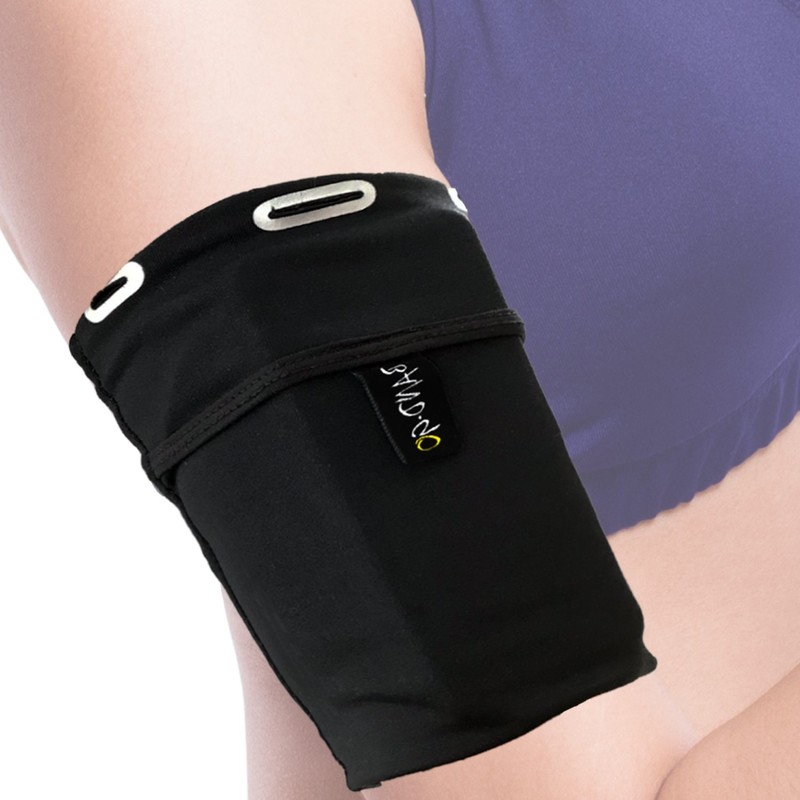
As great as JEMACHE’s case is, there’s no denying it can be a bit much if you like your accessories to be as simple and minimalistic as can be. If that sounds like you, Revere Sport’s Universal Sports Armband is a great choice.
Available in X-Small, Small, Medium, Large, and X-Large sizes, this slim and lightweight sleeve sits snugly on your arm while offering a safe and secure pocket for your phone.
There’s no cutout for the S9’s screen, but that’s the whole point of this band. It’s designed to be as slim and minimalistic as possible, and in those regards, it does a great job. The $15 price tag might seem like a lot for something along these lines, but you’re bound to get plenty of use out of it before you’ll need to look for a replacement.
See at Amazon
Encased Galaxy S9+ Armband Set

If you’ve got a bit more cash to spend and don’t mind some added bulk if it means added protection for your phone, the Encased Galaxy S9+ Armband Set is a fantastic addition to any workout.
There are actually two parts to this case, the first of which is — well — a case! Unlike the other options we’ve talked about so far, this is a fully-fledged case that you can put on your S9+ and take with you wherever you go. However, when it comes time for a workout, you can attach it to the included Clip’N’Go armband that secures it to your arm.
This two-in-one-design is something of a dream come true, and while the ~$17 price is a tad high, this is more than worth the money.
Take note that this case is only available for the larger Galaxy S9+!
See at Amazon
LOVPHONE Galaxy S9 Armband Set

Going back to more affordable options, LOVPHONE’s workout case comes in at a little under $9 and has just about every feature you could ask for.
Neoprene material that’s water resistant? Check. A PVC screen protector that keeps your display safe from scratches and sweat? Yep. Special cutout on the back for the S9’s fingerprint sensor? You betcha. Adjustable velcro strap and reflective strip to keep you visible at night? Of course!
Add all of that together with your choice of three colors (Gray, Rosy, and Blue) and you end up with a lot of case for not a ton of cash.
See at Amazon
i2 Gear Running & Exercise Armband

Rounding out our list, we’ve got the i2 Gear Running & Exercise Armband. Before we tell you the price, here’s everything i2 Gear’s included.
The material that’s used is a lycra neoprene that’s comfortable and washable, the armband can be easily adjusted to get the perfect fit, and there’s also a night reflector to help keep you safe on your evening runs.
You’ll also find a plastic screen protector to guard your Galaxy S9 against sweat, a small pocket for a key, and five different color options.
Depending on which color you choose, you could spend as little as $8. It should go without saying, but that’s an absolute steal considering everything you’re getting.
See at Amazon
What do you choose?
What workout case did you end up picking for your Galaxy S9? Did you find an even better one that’s not on our list? Sound off in the comments below!
Samsung Galaxy S9 review, 3 months later: Holding the high standard
Samsung Galaxy S9 and S9+
- Galaxy S9 and S9+: Everything you need to know!
- Galaxy S9 review: A great phone for the masses
- Complete Galaxy S9 and S9+ specs
- Galaxy S9 vs. Galaxy S8: Should you upgrade?
- Join our Galaxy S9 forums
Verizon
AT&T
T-Mobile
Sprint
Learn the ins and outs of data visualization tool Tableau 10 for just $19
Data is becoming ever more important in the corporate sector, driving decisions made by executives worldwide. Instead of poring over countless spreadsheets, data visualization tools provide clear and concise insights. Tableau 10 is one such tool, and while it’s a powerful asset, it takes a bit of training to operate.
Visualize your data and take your business to the next level with Tableau 10 Learn more
Whether you’re looking to pad your resume or improve your own business, Tableau 10 can help. Instead of attempting to figure out how it works on your own, why not invest in a bundle of courses that will teach you the ins and outs? Right now, Android Central Digital Offers has a deal on a Tableau 10 training bundle complete with five courses. Instead of paying the regular price of about $624, you’ll instead pay just $19. That’s 96 percent off the regular price. If you use code JULY4TH at checkout, you’ll save an additional 15 percent, bringing the final price down to $16.15.

The bundle contains 184 lessons that can be accessed forever, spread out over these five courses:
- Tableau 10 Business Intelligence Solutions: Volume 1
- Tableau 10 Business Intelligence Solutions: Volume 2
- Mastering Tableau 10
- Tableau For Absolute Beginners
- Tableau 10 Desktop Training
Use code JULY4TH at checkout to save an additional 15 percent! Learn more
Whether you’re looking to add to your resume or to boost your own business, learning how to get the most out of Tableau 10 doesn’t have to cost hundreds. Jump on this bundle, and you’ll get the entire thing for just $16.15.
 AIVAnet