


Google Assistant: Everything you need to know
There’s a lot going on with the Google Assistant — let’s break down the important stuff.

In May 2016, we got our very first taste of the Google Assistant with the debut of Allo. The Assistant was a big draw to Allo at the time, with Google marketing it as a helpful bot that could make restaurant reservations, search the web, and more within your conversations.
Since then, the Assistant has gained heaps of new features and expanded to smartphones, tablets, speakers, and more. Google’s shown no interest in slowing down development for the Assistant, meaning that it’s likely here for the long-haul.
Whether this is your first encounter with it or you just need a quick refresher, here’s everything you need to know about the Google Assistant.
June 26, 2018 — All Google Home speakers now support Spanish
While users have been able to talk to Assistant in Spanish on their phones, we’re just now getting the ability to do the same on Google Home speakers.
Now, users in the United States, Spain, Mexico and other countries can choose to speak to Google Assistant in Spanish. If you want to change what language Google Home uses, open the Home app on your phone. The tap Settings -> Preferences -> Español.
All Google Home Speakers now support Spanish
June 12, 2018 — Google Home can now handle up to three commands at once
It can get old trying to ask multiple questions to our smart speakers — “What’s the weather” and “How’s my schedule” — but nowGoogle Home can understand up to three commands. Now, you can get your calendar, find out the weather and start playing music by only saying “Okay Google” once.
Another new feature is support for Multiple Actions. So now, instead of asking, “What’s the weather in New York and the weather in San Francisco?”, you can ask, “What’s the weather in New York and San Francisco?” This is a subtle change, but it makes conversing with Google Assistant much more like conversing with a human.
Google Home can now handle up to three commands at once
May 9, 2018 — Google announced a heap of new features at I/O

To little surprise, the Google Assistant was the star of the show for a good chunk of I/O’s opening keynote this year.
A lot of new features were announced for the Assistant, including new voices, the ability to ask follow-up questions without having to say “Hey, Google” each time, and an option for making your own custom Routines.
However, the most exciting thing was a system called Google Duplex. With this, the Assistant can call businesses and make appointments/reservations on your behalf. It’s wickedly cool and definitely one of the wildest things to come out of this year’s conference.
What’s new in Google Home and Assistant at Google I/O 2018
Google Now paved the way for Google Assistant


The Google Now page compared to the new Google Feed.
Before there was the Google Assistant, we had Google Now. Google Now was introduced to the world all the way back in 2012, offering contextual info through the Google Now page and helpful answers to random questions with an “OK Google” voice command.
A lot of what made Google Now so great can still be found in the Google Assistant today, with the exception of the Google Now page. The Google Now page used to be home to cards showcasing the weather, information on packages that had shipped from online orders, boarding passes, and more. It’s since been replaced by the Google Feed – a collection of news stories Google thinks you’ll be interested in – and it’s definitely the biggest departure between the two services.
The Google Assistant as a whole is still more powerful than Google Now ever was, but long-time Android users like myself are still mourning the loss of that Now page. RIP, old friend.
Read more: Google Now is being left to wither and die as Google Assistant takes the focus
It’s available on just about everything
In just a few short years, the Google Assistant’s gone from being exclusive to a now-failed chat app to being integrated into just about anything you can think of.
You’ll find Google Assistant built right into most Android phones, it’s the star of the show for the Google Home lineup, and it’s even making its way into sound bars.
Here’s the full list of devices with Google Assistant
Setting up the Google Assistant is as easy or complex as you want
When you set up a device for the first time that has the Assistant, getting started is pretty simple. Accessing it is just a voice command or tap away depending on what gadget you’re using, but if you want to really fine-tune your experience, Google’s got you covered.
Take a quick dive into your Assistant settings and you’ll find options for just about everything – including your weather preferences, changing the Assistant’s voice, retraining your voice model, picking out preferred news sources, and much more.
How to set up and customize Google Assistant
Google Assistant is available in multiple regions and languages
Of course, a smart voice assistant isn’t any good if you can’t actually use it. Fortunately, Google Assistant will be available in 52 countries —adding 38 countries this year — and 17 languages by the end of 2018.
More: Google Assistant will expand to 38 countries and 17 languages in 2018
Google Home’s the premier way to get the Assistant in your house (at least for now)

It’s great to have the Google Assistant on your phone, but if you want to truly experience just how helpful it can be, you’ll want to consider picking up a Google Home.
Google Home is Google’s line of smart speakers that put the Assistant on full-display, allowing you to control smart devices, ask random questions, set timers, play music, and more by just using your voice.
You can spend as little as $49 for the Google Home Mini, $129 for the original Google Home, or a whopping $399 for the Google Home Max.
However, as great as the Home series is, don’t forget that Smart Displays are just on the horizon.
Announced at CES 2018, Smart Displays are essentially smart speakers with the Google Assistant and a touch screen display that can show you helpful visuals when talking to them. It’s basically Google’s answer to the Amazon Echo Show and Echo Spot, and we can’t wait to see more from them.
Everything you need to know about Google’s Home speakers
Then again, is an always-listening speaker the right fit for your home?
However, the convenience of a Google Home (or any smart speaker for that matter) does come at the cost of privacy. Speakers like the Google Home are “always listening”, meaning they’re constantly on the lookout for a hot word to know when you’re talking to it (such as “Ok, Google” and “Hey, Google”).
This means the microphone on a Google Home is always active, but it’s not necessarily storing all the audio it hears when it doesn’t detect its hot word.
Most all speakers allow you to restore some privacy by being able to mute the microphone, but if you want to start asking the Assistant questions, you’ll need to unmute it first.
To learn more about these “always listening” speakers, I’ll pass the mic over to Jerry
Big upgrades are coming to the Assistant on Wear OS


Switching gears for a second, the Google Assistant on Wear OS (formerly Android Wear) is about to get a big upgrade.
In the near future, the Assistant on Wear OS will support Assistant Actions (basically apps for the Assistant) and give you the option to hear its responses through your watch’s speaker or a pair of connected Bluetooth headphones.
Along with this, Google will be adding something called “smart suggestions.” After asking the Assistant for the weather, for example, you’ll see little bubbles for “weather tonight”, “use celsius”, and more so you can continue the conversation with just the tap of your finger. Google Assistant on Android offers something similar, and it’s a great tool to have.
IFTTT supercharges the Assistant’s usefulness

IFTTT (If This Then That) is a powerful online tool that allows you trigger something (that) if a certain event (this) happens. You can connect IFTTT to the Google Assistant to create your own recipes using this formula, and it can allow for some incredibly helpful combinations.
Some of our favorite uses for IFTTT and the Assistant include adding contacts to your Google account, setting your Google Calendar status to Busy for a certain period of time, and much, much more.
Getting started with IFTTT can take some time and patience if you’re new to it, but once you’re all set up and ready to go, it can prove to be a lifesaver.
How to connect Google Home and IFTTT to do amazing things with your connected tech
You’ll get the same experience no matter what devices you use
With so many devices capable of running the Assistant, it’d be easy to think that the experience you get on one gadget would be different from another. This is something that Google struggled with for a while at first, but we’re finally in a position where the Assistant experience you get on a smart speaker, for example, is the same you’ll get on your phone.
There are a handful of features here and there that still create for some discrepency, but for the most part, the Assistant you use on your Pixel 2 is the same one found on Google Home.
Google Home and Google Assistant finally offer the same experience
Google Duplex is actually going to be a thing

Google showed off Duplex — Google Assistant making natural-sounding phone calls on your behalf — at I/O 2018, but quickly noted that it was just an experiment. Flash forward a couple months, and Google announced that certain users have started testing Duplex, and a public release will be here in the next few months. Before you know it, Google Assistant will be able to book hotels, dinner reservations, hair appointments and more without you lifting a finger.
More: What is Google Duplex?
Updated July 2018: Added the Google Duplex and language support sections, as well as links to recent Assistant news.
Treat your computer to one of SanDisk’s SSD Plus drives for as low as $35
Experience the speed for yourself.

Amazon has a few different SanDisk SSD Plus internal solid-state drives on sale with prices starting at just $34.99. Several of these price drops bring this popular drive down to a new low for the storage capacity, meaning you won’t want to miss out. The 120GB variant is currently down to $34.99 from an average price of closer to $52, and the 240GB option is available for $53.99 from an regular price of $72. If you can spare the extra $19, it’s well worth investing in the 240GB drive to ensure you have plenty of local storage.
There’s also a 1TB drive which is on sale for $219.99. This is $30 lower than it normally sells for, and happens to be the first price drop on this recently-released drive. If you’re dealing with slow storage in your current laptop, it’s time to ditch it and swap in a new SSD for yourself. Doing something as simple as replacing your spinning drive with a solid-state one can make a huge impact on your machine’s performance and load times. You don’t have to take my word for it, try it for yourself with one of these discounted drives.
See at Amazon
Apple Registers Several New Mac and iPad Models in Eurasia
Apple has registered new tablets and Macs with the Eurasian Economic Commission (EEC) this week, indicating that refreshes could be on the horizon. The filings, uncovered by French website Consomac, are legally required for any devices with encryption sold in Armenia, Belarus, Kazakhstan, Kyrgyzstan, and Russia.
iPad Pro concept (right) by Álvaro Pabesio
The five Mac model numbers are A1931, A1932, A1988, A1989 and A1990, indicating two distinct ranges. The last three numbers may relate to expected refreshes for the 13-inch MacBook Pro (with and without Touch Bar) and the 15-inch MacBook Pro, while the first two could reference a refreshed 12-inch MacBook and a potential replacement for the aging MacBook Air, which Apple has been gradually phasing out.
Apple is rumored to be planning to introduce the new entry-level 13-inch MacBook in the second half of 2018, which would serve as a replacement for the MacBook Air. Details have been scant about the rumored machine, but it could turn out to belong to the 12-inch MacBook family, and the model numbers A1931 and A1932 potentially reflect this.
It’s not known what the rumored 13-inch MacBook would be priced at, but the MacBook Air sells for $999, a price point Apple has thus far been unable to match with the 12-inch MacBook and the MacBook Pro.
The five new iPad model numbers are harder to decipher, but Apple is expected to launch new models of iPad Pro later this year featuring slimmer edges, a faster processor, a custom Apple-built GPU, and a TrueDepth camera with support for Face ID.

One report has claimed one of the new iPad Pro models will have a display that measures in at approximately 11 inches, which is in line with reports suggesting the device could have slimmer bezels.
Perhaps the most curious details in the EEC filing are the OS references, with macOS 10.13 and iOS 11 given for the Mac and iPad models, respectively. It’s conceivable Apple could refresh its Mac line before macOS Mojave is ready, but launching new iPad Pro models before the launch of iOS 12 seems less likely, given the number of features Apple is introducing in the new OS to accommodate iPads with Face ID and no Home button.
However, strings of code have been found in iOS 11 referring to a “modern iPad”, which mirrors the “modern iPhone” nomenclature Apple used to refer to the iPhone X ahead of its release, so nothing is certain.
It’s also worth noting that Apple registered several new models of iPhone with the EEC back in April that have yet to appear, so extrapolating launch dates from the filing is particularly difficult. Suffice to say Apple’s Mac line-up is overdue an upgrade, while new iPads are expected to launch sometime around September.
Related Roundups: MacBook Air, MacBook Pro, MacBookTag: EECBuyer’s Guide: MacBook Air (Don’t Buy), MacBook Pro (Don’t Buy), MacBook (Don’t Buy)
Discuss this article in our forums
Outlook Web Mail Service To Gain Highly Requested ‘Dark Mode’
Enthusiasm for interface dark modes appears to be catching. The Verge reports that Microsoft is planning to introduce such a mode to its Outlook.com web mail service, which has around 400 million active users.
The dark mode for Outlook.com is one of the most highly requested features for Microsoft’s web mail service, according to listings on the Outlook.com feedback site.
The https://t.co/0b8YLi7Qx0 Halloween theme is quite something pic.twitter.com/JIMc3ZSlPS
— Tom Warren (@tomwarren) October 27, 2017
Testing of the new color scheme – reminiscent of last year’s Outlook Halloween theme – has been underway over the last few months, according to Microsoft, which has already started teasing the new-look web interface online.
Responding to a feedback post, one Outlook.com team member had this to say:
One reason for the delay is our insistence that we deliver the best Dark Mode of any leading email client (you’ll understand when you see it, I guarantee). The sneak preview you saw last year at Halloween was a prototype that required a lot more work to be ready for prime time. We’ve redesigned the colors and code multiple times and are proud to enter the final stretch.
Many MacRumors readers will no doubt be aware of the desktop Dark Mode that Apple is introducing in macOS Mojave. While the company is yet to have announced a similar mode for iOS, many third-party mobile apps have already adopted the color scheme, including Twitter, Reddit, Twitch, and YouTube.
Related Roundup: macOS Mojave
Discuss this article in our forums
Intel Reportedly Halts Development of 5G Modem After Losing Apple’s iPhone Business
Apple has informed Intel that it will not use the chipmaker’s 5G mobile modem in its 2020 iPhones, according to a new report.
Israeli website CTech by Calcalist reported on Wednesday that it had reviewed internal communications from Intel and spoken to “people familiar with the matter”, leading it to conclude that Intel will not provide the 5G modems for Apple’s 2020 mobile devices.
Apple has notified Intel it will not use a mobile modem developed by the chipmaker in its next-generation mobile device, Intel executives said in the communications. Further development of the modem component internally called “Sunny Peak” is halted and Intel’s team working on the product will be redirected to other efforts, the executives said.
Calcalist said the communications it had seen described Apple as the “key mobile customer” and the “main volume driver” for the “Sunny Peak” 5G mobile modem, underlining the impact the loss of business would have on the chipmaker.
Apple was also said to be facing a “massive effort” to launch 5G in its mobile products, with Intel executives blaming the company’s decision not to use its modems on “many factors”, including the introduction of a faster WiGig (802.11ad) Wi-Fi standard, which brought “new and unanticipated challenges”.
In a response to Calcalist’s request for comment, an Intel spokesman said the company does not comment on matters relating to its customers.
The news follows one analyst’s prediction last week that Apple could choose to use modems manufactured by MediaTek instead of Intel in future iPhones.
Northland analyst Gus Richard gave no timeline for the predicted switch, but with deals for 2018 iPhones already established, any impact was expected no earlier than 2019.
Apple added Intel as a manufacturer only a couple of years ago, after previously relying solely on Qualcomm for its modem chips. Current iPhones use LTE chips from both companies, but Apple is embroiled in a lawsuit with Qualcomm and is rumored to be planning to ditch their chips, too.
Apple is believed to be developing its own modem chips, but it will need to continue to use third-party chips until its in-house solution is ready to be deployed in iOS devices.
Current rumors suggest Intel will supply approximately 70 percent of LTE chips for Apple’s 2018 lineup, with the rest of the chips coming from Qualcomm.
Apple is also moving away from Intel chips in its Mac lineup, with rumors indicating the company is developing its own custom chips that could appear in Macs as early as 2020.
Tag: Intel
Discuss this article in our forums
Watch Airbus give its whale-shaped Beluga plane a cute makeover
Airbus
Airbus’s Beluga aircraft is named after the Arctic whale that it resembles, and just in case anyone was in any doubt about just how similar the two look, the plane maker recently gave its new BelugaXL aircraft the cutest makeover ever.
According to Airbus, 20,000 employees were allowed to vote on six different liveries, with 40 percent choosing the smiley whale face as their favorite.
The company recently tweeted a short video, complete with several time-lapse sequences, showing the new livery being applied to its very first BelugaXL aircraft.
The team had a whale of a time getting the new #BelugaXL ready for the big reveal! Say hello to the next generation of airlifters. pic.twitter.com/3quQU34h2M
— Airbus (@Airbus) July 3, 2018
The enormous and unusual-looking plane has been in service for the last 20 years, flying huge aircraft components such as fuselage sections, wings, and tails from European suppliers to Airbus’s assembly plants in Toulouse, France, and Hamburg, Germany.
Airbus decided to build the largest Beluga to date — the aptly named BelugaXL — to ramp-up capacity requirements for the company beyond 2019.
“The new oversize air transporters are based on the A330-200 Freighter, with a large re-use of existing components and equipment,” Airbus explains on its website, adding that the first of five BelugaXLs will undergo test flights this summer before entering into service in 2019.
The front of the 184-foot-long (56 meters) Beluga opens up, allowing cargo to be loaded into the cavernous “bubble” space. The plane’s cockpit is placed lower than usual in order to avoid the need to disconnect electrical, hydraulic, and flight control systems every time cargo is loaded and unloaded.
Compared to the current Beluga, the new XL version can take 6 tons of extra cargo, increasing the limit to 53 tons. It’s also 20 feet (6.1 meters) longer and 3 feet (1 meter) wider than its predecessor, allowing Airbus to make further efficiency improvements when it comes to moving large airplane parts.
The new design will, for example, be able to carry two Airbus A350 wings instead of just the one as with the current Beluga.
It’ll also be able to transport sections of the double-decker A380 — currently the world’s largest passenger plane — allowing the aircraft manufacturer to simplify some of its up-to-now highly complex logistical operations that involve driving the A380’s wings and fuselage through the narrow streets of French villages on their way to the Airbus assembly site in Toulouse.
Editors’ Recommendations
- Airbus’ odd-looking BelugaXL aircraft is one step closer to its maiden flight
- Sleep tight: Airbus wants to fill plane cargo holds with beds
- Norway tests its first all-electric plane, hopes for passenger flights by 2025
- Airbus’ latest A350 aircraft to break record for longest commercial flight
- Kitty Hawk’s personal flying vehicle takes to the skies
Who controls the tech inside us? Budding biohackers are shaping ‘cyborg law’
Karen Sandler Getty
Karen Sandler has a complicated relationship with her pacemaker. On the one hand, the device has the power to save her life. On the other, it sometimes suddenly and unnecessarily shocks her, mistaking a slight aberration in her heartbeat as a call for help.
Sandler was pregnant during two of those occasions, when the pacemaker detected her heart palpitations (which aren’t abnormal in expecting mothers) and delivered an unwarranted jolt. Worried that the device would misfire again, Sandler asked the manufacturer for access to its source code, hoping to reconfigure the implant to suit her condition. The manufacturer denied her request.
“As the law stands, cyborgization promises to make us both more vulnerable and more powerful.”
“The only way that we could solve that problem was to have my cardiologist prescribe me heart medication, which slowed down my heart rate so much that I had a hard time walking up a flight of stairs,” Sandler tells Digital Trends. “The sole point of that medication was to prevent me from getting unnecessary treatment from my device.”
Sandler now serves as the executive director of Software Freedom Conservancy, a not-for-profit organization that promotes free and open source software, supports open source projects, and encourages policies more pertinent to the way we engage with technology in the present day.
She’s one of a handful of modern-day cyborgs fighting for control of the tech that’s in their bodies. This might seems like an esoteric issue — a topic that impacts the fraction of the population fitted with a medical device, prosthesis, or experimental implant — but as the number of people who are tethered to a device of some kind increases, cyborg rights and cyborg laws are bound to affect us all.
Cyborg society
We live in a society of cyborgs. Look at any bus stop or coffee shop — it’s clear we’re deeply, viscerally, compellingly intertwined with the technology around us. From the cellphone that’s rarely out of reach, to the myriad data and metadata that weave together tapestries of our behavioral patterns and whereabouts, tech tools have become disembodied digital organs, like little minds in the palm of our hands.
blackzheep / 123RF
“As the law stands, our cyborgization — our reliance on a 24/7 technological interfaces, whether physically incorporated into our bodies or not — promises to make us both more vulnerable and more powerful,” says Jane Chong, a lawyer and co-author of a Brookings Institute report on cyborg law.
Cyborg right’s are not a new issue. For decades, people have equated the rights of cyborgs with the rights of humans in general.
“More vulnerable because we may be subject to new forms of compromise and exploitation, whether it’s our privacy that’s at stake or something else, like our right to make autonomous decisions regarding our health and health data. And more powerful because we may be able to put up new barriers when it comes to the government’s ability to access information that it could previously have obtained by way of, say, a search warrant based on probable cause.”
This newfound technological power and vulnerability may need a whole new set of laws and regulations, according to Chong, ones aimed at protecting individuals (their data and enhancements) in a society rife with surveillance and digitization.
A brief history of cyborg rights
Cyborg right’s are not a new issue. For decades, people have equated the rights of cyborgs with the rights of humans in general. In her 1984 essay, “A Cyborg Manifesto,” feminist and literary theorist Donna Haraway claimed with conviction that we “are all chimeras, theorized and fabricated hybrids of machine and organism; in short, we are cyborgs.”
The topic made national headlines in 2002, when Steve Mann, a Canadian engineering professor and longtime cyborg, who wears a web of wires and electronics to augment his senses, was accosted by airport security, strip-searched, and injured in the process. Beyond his physical and psychological distress, Mann calculated $56,800 in damages to his equipment. Ten years later, he was assaulted in a McDonalds in Paris, France because employees objected to his digital eye glasses.
Steve Mann, Sequential Wave Imprinting
And the first government-recognized cyborg was announced in 2013, when Neil Harbisson, a colorblind artist and co-founder of the Cyborg Foundation, whose cranial antenna implant lets him detect color, lobbied the United Kingdom to let him take his passport photo with his device attached.
But cyborg rights have only recently begun to be argued in America’s highest court.
In 2014, the United States Supreme Court ruled that police officers couldn’t search a cellphone that was seized during an arrest, because cellphones are such intimate parts of our being that it would undermine the Fourth Amendment. “Modern cellphones…are now such a pervasive and insistent part of daily life that the proverbial visitor from Mars might conclude they were an important feature of human anatomy,” wrote Chief Justice John Roberts.
“People today have very few rights to the proprietary information implanted in them.”
The Supreme Court followed up that landmark decision with another one this June, ruling that police need to obtain a warrant to access cellphone data from carriers. By adopting digital-age privacy rules, the justices made the legal case for how our devices are extensions of our mind beyond the body. After previously referring to the cellphone as “a feature of human anatomy,” Roberts wrote that the cellphone “faithfully follows its owner beyond public thoroughfares and into private residences, doctor’s offices, political headquarters, and other potentially revealing locales.”
The rights of individuals to argument their bodies with technology is also being argued abroad. In March, an Australian biohacker named Meow-Ludo Disco Gamma Meow-Meow was fined $220 for breaching the terms of use of a public transport company, Opal Card, after he implanted the chip from his metro card into his hand. He was required to pay an additional $1,000 in court costs on top of that. But after appealing his conviction, a district court judge overturned the conviction, citing Meow-Meow’s good character and the “highly unusual [case] involving a unique set of circumstances.”
Neil Harbisson (left), giving a talk at the Science Museum, London in 2015. Wikimedia
This case might no be as unusual as the Australian judge thinks. Biohackers around the world — not least among them, our own Emerging Tech editor — have embedded NFC chips and rice-sized RFID tags into the flesh of their hands, using the tiny implants to open apps, unlock doors, and store personal data.
Entire countries are even on board. Last year, Sweden began a trial using NFC implants for public transport. Around 1,500 test subjects had an NFC chip embedded under their skin, enabling them to check in at train stations simply by swiping their hand.
“Implants and other physical modifications are interesting because the body is in many respects a protected space under our laws,” Chong says. “We are going to see the emergence of a lot of gradations in that protection.”
Companies over consumers?
Historically, the company’s right to its proprietary information has trumped a consumer’s right to know the ins and outs of their device, according to Chris Hables Gray, a cyborg researcher at the University of California, Santa Cruz. Gray worries that new technologies that are more integrated with the human mind and body are still regulated as if they’re old technologies, with their clear distinction between what’s human and what’s machine.
“People today have very few rights to the proprietary information implanted in them,” Gray says. “It’s a real problem of capitalist priorities dominating over the rights of individuals to control their own destiny.”
Surveilluminescent wand: When moved through space in a long-exposure photograph, it makes the sightfield of a surveillance camera visible. Wikimedia
Karen Sandler replaced her pacemaker after giving birth, opting for a new manufacturer, but still faces certain vulnerabilities that she says could be mitigated with access to the source code.
“Almost every pacemaker on the market now broadcasts by default,” she explains. “They have a wireless interface that’s always open to connection, and currently there’s no encryption on most of these devices so they’re entirely exploitable.”
“The fundamental issue is we need a new baseline of guaranteed rights.”
Pacemakers contain personal information — including a person’s name, heart condition, and doctor. A bad actor who decided to hack into a broadcasting implant could both access this information and manipulate the device to make it malfunction.
“Right now we basically have the worst of both worlds,” Sandler says. “We have no real security on these devices, which means that anyone with over-the-counter equipment can take control and deliver even fatal shocks … And we have code that is not available for us to review. So we have no transparency and no security.”
What cyborg rights might look like
A few quick fixes would help address Sandler’s concerns. Among them, she says consumers should have the right to not broadcast data from their medical devices. Source code should also be made available for review by researchers, who could be given access to the code under a non-disclosure agreement, allowing them to test for vulnerabilities, share their findings with manufacturers, and only go public if the company fails to fix the product.
For Chris Hables Gray, a much more comprehensive reworking of the law is in order, which grants broader liberties and freedom to all individuals. He laid those ideas out in his Cyborg Bill of Rights.
“The fundamental issue is that we need a new baseline of guaranteed rights that aren’t covered, but that we wish might have been covered, by the constitution or other statements of rights,” Gray says.
Linda MacDonald Glenn, a lawyer and bioethicist at California State University, Monterey Bay, agrees. She points out that laws evolve to reflect changing norms and insists that in our hyperconnected times we’ll need a significant shift towards laws that accommodate people and technology as one.
Accountability and responsibility may be some of the biggest hurdles for cyborgs going forward.
“Traditionally under the law there’s been this dichotomy,” she says. “Either you’re a person or you’re property. Perhaps it is time for the law to take this from a different approach. That is, rather than looking at it as a dichotomy, we might want to look at it as more of a continuum,” in which devices begin to blend with the personhood of their owner.
However, Glenn admits there could is a “dark side” to the continuum idea, which could lead to classifications of things as “not quite human” or “less than human.”
Questions about accountability and responsibility may be some of the biggest hurdles to emerge when shifting certain rights from companies to consumers, according to Kevin Warwick, a professor of cybernetics often regarded as the world’s first cyborg. Although Warwick supports Sandler’s right to inspect (and perhaps even alter) her pacemaker’s software, he points out how that might complicate questions of accountability if the device were to malfunction.
Kevin Warwick, the world’s first cyborg and a former Professor of Cybernetics at the University of Reading, England. Kevin Warwick
“There are all sorts of legal issues there if she did have the and she decided to reprogram it so it worked in a different way,” Warwick says. “Who has the responsibility if she subsequently became ill or even died from it? Who bears the responsibility if she has taken over?”
These are the types of questions lawyers and lawmakers will argue over as we push further into the digital age. Their answers will shape the way we live as increasingly technological beings.
Editors’ Recommendations
- Meet the Australian ‘techno-artist’ growing a web-connected ear on his arm
- It took them 15 years to hack a master key for 40,000 hotels. But they did it
- MIT can charge implants with external wireless power from 125 feet away
- Technology makes our lives easier, but is it at the cost of our humanity?
- The new ‘Terminator’ movie: Everything we know so far
Jaybird Run Review: Truly wireless headphones done right
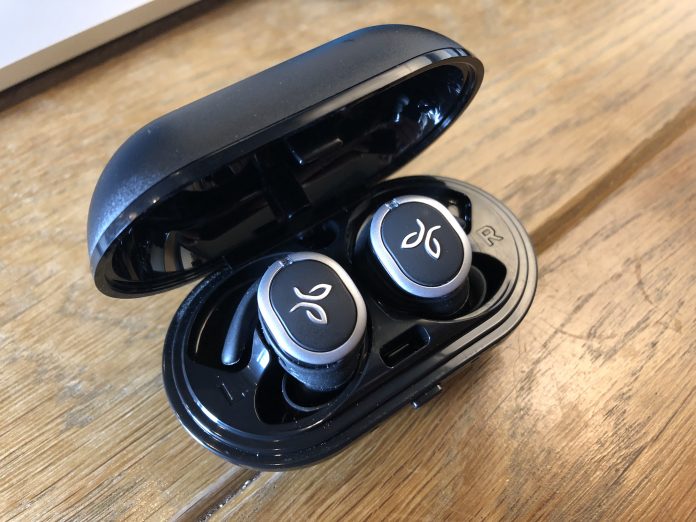

Ever since Apple released the AirPods, Android users have been hoping for a proper competitor. We have seen options from Bragi, Samsung, and others, but nothing really has stuck with us.
READ MORE: Zolo Liberty+ Headphones Review
Then, Jaybird decided to jump on the hype train with the Jaybird Run. These headphones are completely wireless, come with a charging case, and come from a trusted brand.
In fact, Jaybird has been one of the de-facto choices for Bluetooth headphones if you want to move out of the budget market. But how well do the Jaybird Run really stand up?
Design
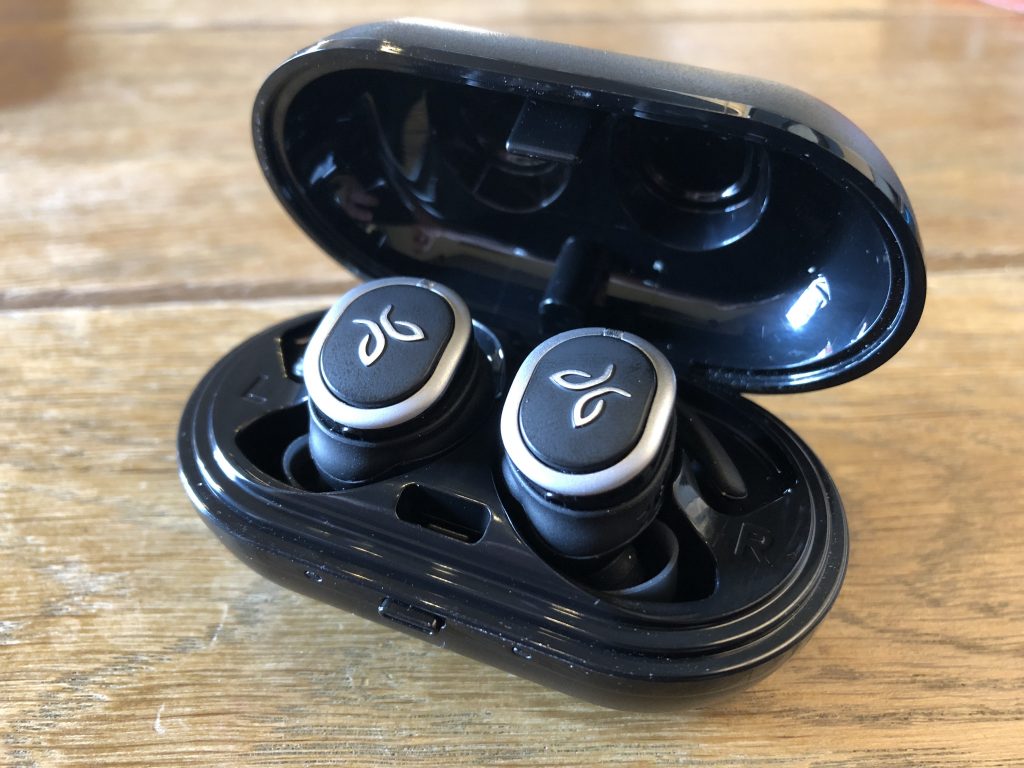
When you unpackage the Run for the first time, you will notice that these are a bit bulky. You can thank the included battery for that, but it won’t take away from how good these look.
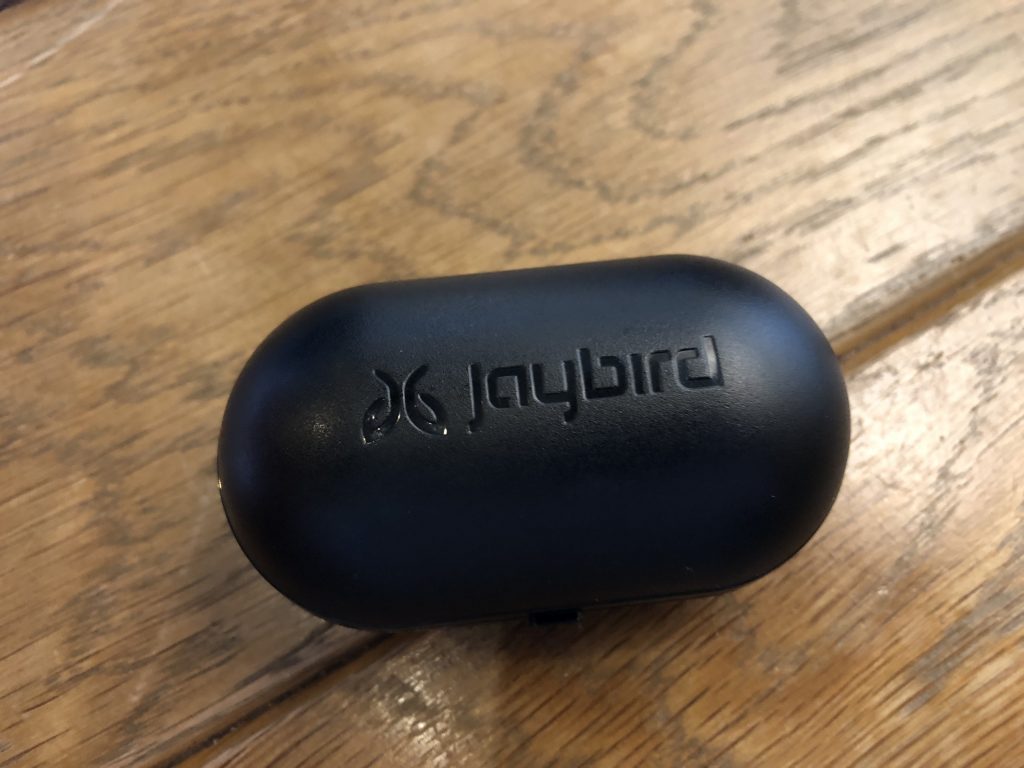
No, the Run won’t turn any heads and make you rush to your local Best Buy to pick up a set. But it’s a muted design that you would expect to see from Jaybird.
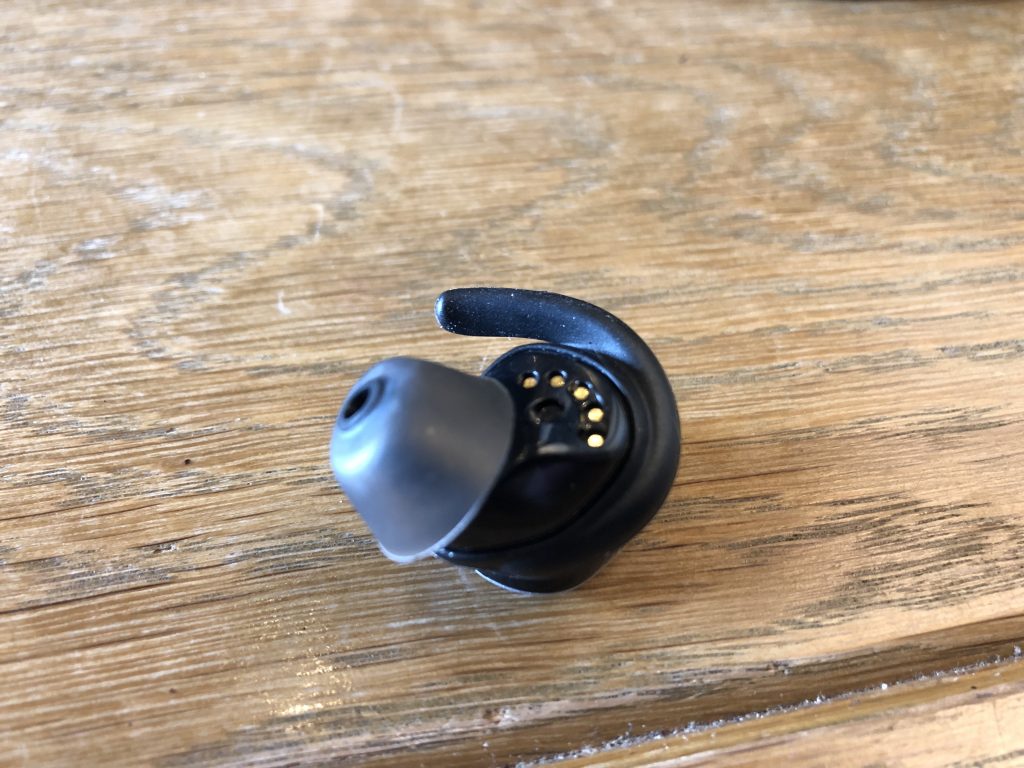
Inside the packaging, you receive the left and right earbuds, charging case/cable, along with a few different ear-tips. This is a much-welcome addition so that you can get the perfect fit. There are even “fins” that will fit into a groove and help provide a better fit in your ears.
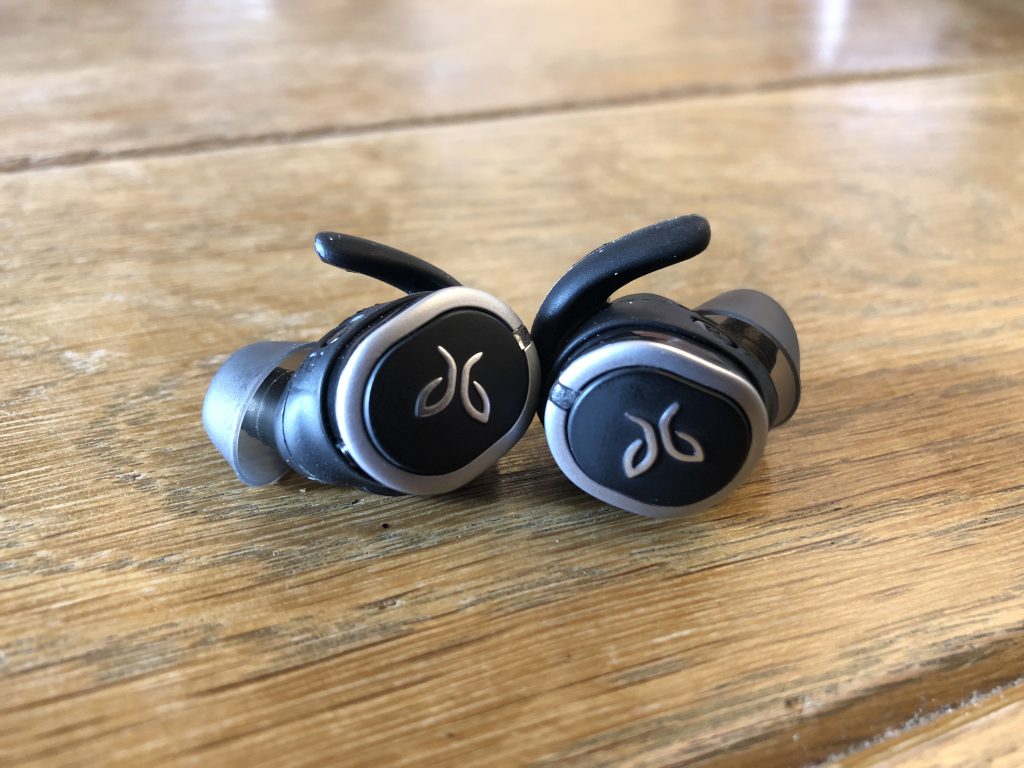
On the outside of each headphone, you will see the Jaybird logo with a small LED placed at the top. The LED allows you to gauge battery life, along with pairing status and more.
On the inside of each headphone, you’ll find the charging pins so that you can use the charging case on the go. You will also find some labeling to let you know which headphone goes where.
Usability
The pairing process for the Jaybird Run is pretty simple. Before getting started, you’ll want to download the free Jaybird MySound app from the Play Store.
This will assist in the pairing process, along with including some extra goodies. Once the Run are charged up and ready to go, you can take them out of the case and power them on with the button on the outside.

That’s right, the big Jaybird logo on the outside of each earbud is actually a button. A long press of the button turns it on, and will also put it into pairing mode for the first time.
After these have been connected to your smartphone of choice, you can get started. Which brings us to the MySound application.
From within the app, you create and customize different sound presets. This will be super helpful so that your music sounds as crisp and clear as you want it to.
Overall, the pairing process is extremely easy, even if you want to pair it with more devices. There are even community playlists and EQ presets for you to save and take advantage of.
For those who rely on Jaybird for workout headphones, have no fear. The Run is both sweat-proof and water resistant. These will keep going, regardless of whether you’re running in the rain or pumping some iron in the gym.
Battery life
When it comes to these truly wireless Bluetooth headphones, the biggest question is battery life. Jaybird claims that the Run will last for up to four hours before needing to be recharged.
In our testing, the Run came close to this on a regular basis. At times we would see shorter battery life, but that was largely due to the EQ being put to work for bass-heavy music.
Listening to softer content such as podcasts and audiobooks gained us as much as an extra 45 minutes of usage. I look at this as a benefit due to the fact that the MySound allows for so much customization.
The included battery case will provide up to 8 extra hours of charge. Meaning that you can swing for two more playing sessions with the Run before having to completely charge everything.
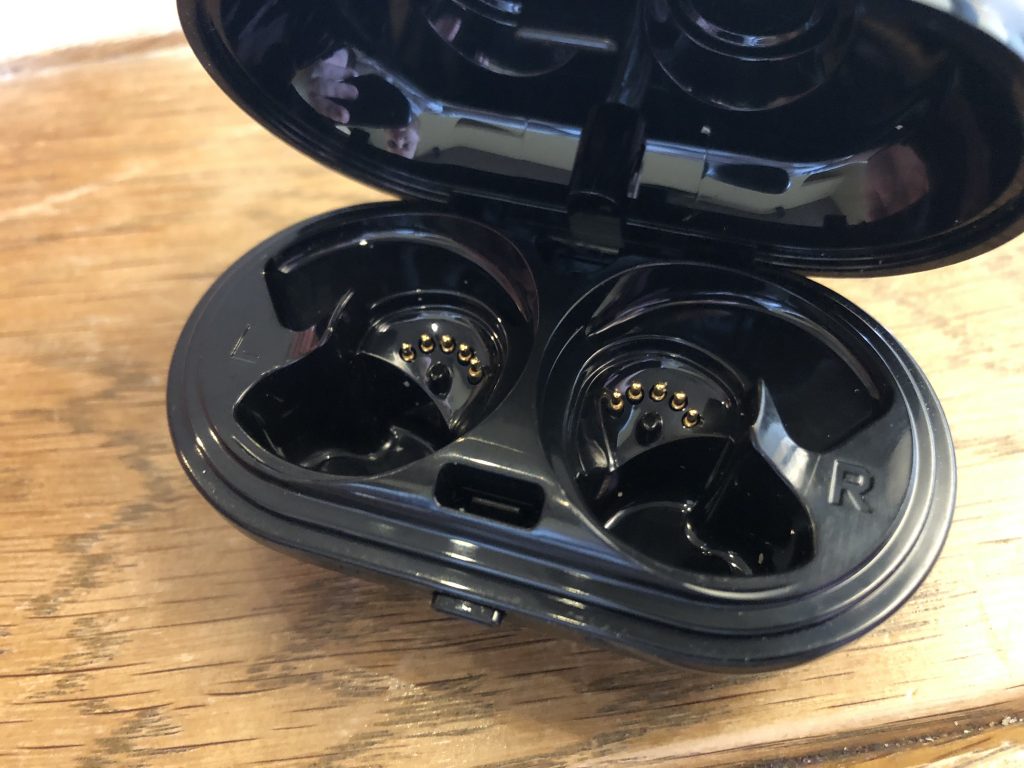
But what makes life even better for Run owners is the Fast charge capabilities. If you’re going out for a bit, you can throw the Run in the charging case for 5 minutes and get an extra hour of play time.
That’s pretty impressive and is something that more of these headphones manufacturer’s should do.
Sound
The next big question when it comes to these headphones is the sound. Did Jaybird sacrifice anything to join the truly wireless headphone push?
In my experiences with the Run, the short answer is no. Of course, these headphones aren’t studio quality, but they will definitely hype you up during a run or workout.
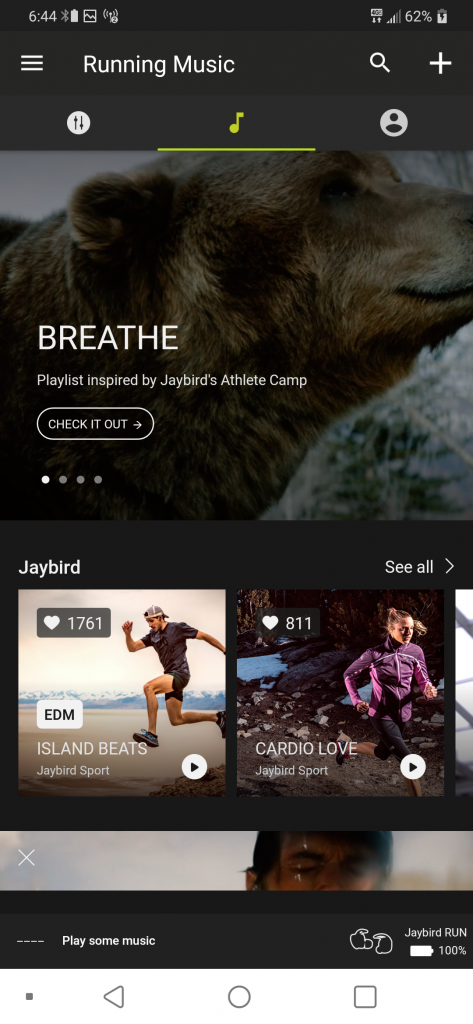
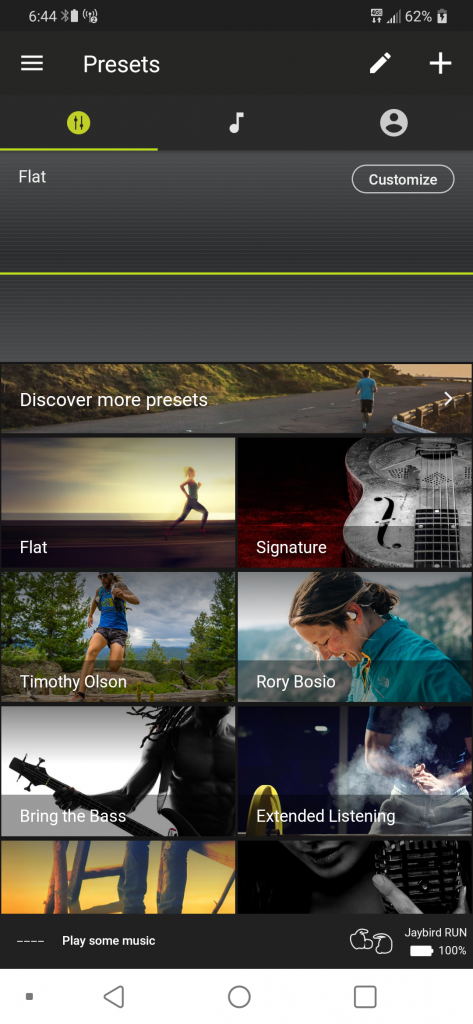
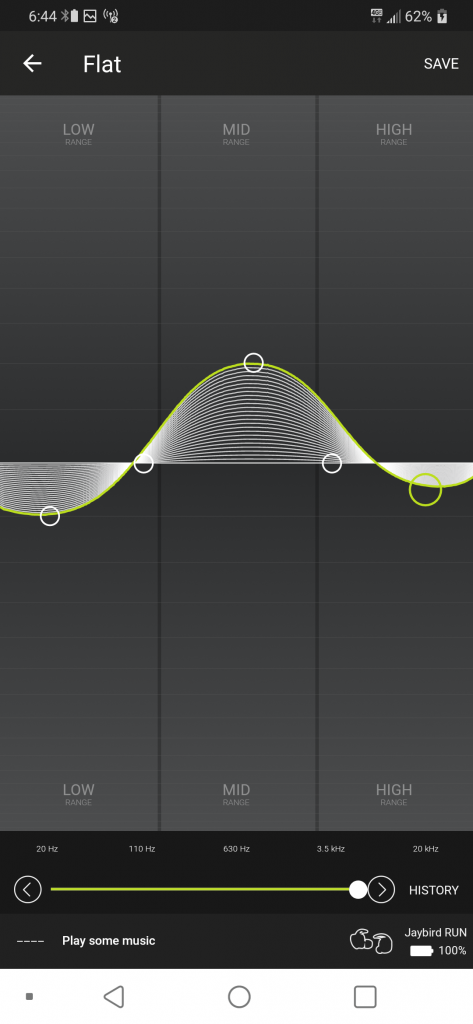
Listening to some Rap or Dubstep? Pump up the base a bit. Listening to a podcast? Use the proper preset or create one for your personalized listening experience.
We can’t say enough good things about being able to customize presets to your needs. You won’t have to worry about being “stuck” with bass that is too heavy or treble that is too high.
Jaybird really hit the nail on the head with the Run and these are some of the best sounding earbuds on the market.
Conclusion
Jaybird is killing the game, as it has been for quite some time. With the release of the Jaybird Run, the company is finally moving out of the wired era, and into the wireless age.
Despite being the company’s first such iteration, you can definitely tell that some cues have been taken from previous products. But in the end, what you get is a solid product from a company that you trust and love.
The biggest gripe is one that we haven’t mentioned. Price. The Jaybird Run are priced at $180, which is $30 more than the AirPods and Zolo Liberty+.
But what you get for that $180 is a high-quality product that will survive anything that you throw at it. If you want to pick up a set for yourself, hit the button below and let us know what you think.
Buy the Jaybird Run!
PG&E applies to build Tesla’s largest-yet battery farm for Silicon Valley
Tesla’s largest-ever Powerpack installation may be coming to north-central California. Pacific Gas and Electric Company (PG&E) applied to the California Public Utilities Commission (CPUC) for approval for a utility-owned 182.5 MW energy storage farm using Tesla Powerpacks at the company’s South Bay – Moss Landing Energy Storage site.
PG&E also sought approval for three third-party owned energy storage projects. One of the third-party projects will have a larger initial capacity than the Tesla project. The Tesla project, however, would have an expansion capacity of 1.1 GW.
The storage projects’ purpose is to help keep electrical power levels even for PG&E customers. The storage facilities would feed power to the grid when consumption exceeds normal levels and during blackouts or other service interruptions.
The three additional projects and their respective storage capacities are Dynegy Marketing and Trade, LLC, 300 MWh; Hummingbird Energy Storage LLC, 75 MW; and Micronoc Inc., 10 MW. All four projects would use lithium-ion battery storage technology and be located in the utility’s South Bay – Moss Landing area, which services from the South Bay area south to California’s central coast. The coverage area encompasses Silicon Valley.
Additional mega-energy farm utility projects
Recurrent Energy’s 350 MW solar power and battery farm
Chernobyl nuclear exclusion zone solar farm
Tesla giant Australia battery reduced service costs by 90 percent
Get in on the action with community solar marketplaces
The projects will have enough storage capacity to provide power to the region’s electrical grid for four hours. If the Tesla project expands to the max, its discharge duration will increase to six hours and provide six times as much energy as the initial installation.
Tesla’s 100 MW battery farm in South Australia, switched on December 1, 2018, has already proved its value. In the first four months of service, the costs for ancillary services to fill in for power interruptions in the region decreased by a full 90 percent, according to McKinsey and Co.
PG&E is looking for improved service and reduced costs from the proposed projects.
“Energy storage plays an increasingly important role in California’s clean energy future, and while it has been a part of PG&E’s power mix for decades – starting with the Helms Pumped Storage Plant in the 1980’s – recent decreases in battery prices are enabling energy storage to become a competitive alternative to traditional solutions. As a result, we believe that battery energy storage will be even more significant in enhancing overall grid reliability, integrating renewables, and helping customers save energy and money,” said Roy Kuga, vice president, Grid Integration and Innovation, PG&E.
Editors’ Recommendations
- Tesla’s giant Australian battery reduced service costs by 90 percent
- World’s largest battery on a desert solar farm would triple Tesla’s record
- California prepares to lead the nation in solar-equipped housing
- Powered by a laser, this insect-sized RoboFly can take off and land wirelessly
- The best solar chargers for your smartphone or tablet
How to fix the most common Windows 10 installation problems
Like any complex piece of software, Windows 10 and its installation process is vulnerable to mistakes, glitches, and hardware errors. That being the case, here are some of the most commonly-encountered problems that arise when installing or upgrading to the new version of Windows. If you’ve got Windows 10 installation problems, you’ve come to the right place.
Side note: If the latest version of Windows 10 is experiencing widespread problems, you may also want to wait. The April 2018 update alone had the potential to wipe all the data from your desktop or break Chrome. Not an ideal outcome! It’s a good idea to research the latest update first to see if there are any notable issues, a sign that you should perhaps hold off on the update anyway and check back later to see if a trouble-free version is available.
Run the Windows Update troubleshooter
Windows 10 includes a troubleshooter that can automatically detect and try to fix problems with updates and patches. If the problem isn’t clear and you aren’t sure what to do next, try running this troubleshooter. It doesn’t always find a solution, but it’s a good place to start.
Step 1: Head to your search box and type in “Troubleshoot.” Select the “Troubleshoot” option that awaits in System Settings.
Step 2: A new troubleshooting window will open. In the first section, called “Get up and running,” you should see an option for “Windows Update.” Select it.
Step 3: A new button should now appear that says “Run the troubleshooter.” Select it to automatically start the troubleshooter and see how it can help.
Step 4: A new troubleshooter window will now open as Windows 10 scans for any problems. If it finds any issues — and it will look for everything from missing updates to corrupted files — then it will notify you and ask if you want to “Apply this fix” or “Skip this fix.” Since you are trying to fix your update, it’s a good idea to always choose the “Apply” option here.
When finished, the troubleshooter with give you a list of any problems found and fixed, at which point you can select “Close” to end the process. If the troubleshooter did find and fix notable issues, you should now try your update process again.
Low disk space
Windows 10 requires quite a bit of free disk space on your hard or solid state drive in order to install. The 32-bit version of the OS — used mostly on tablets and less expensive laptops at this point — needs 16GB of free space, the 64-bit version needs 20GB. If you’re installing from a file stored on your computer itself with the Microsoft upgrade tool, you’ll need an additional two to 4GB just for the installation files.
If you have a full storage drive, or a small one to begin with, you’ll need to make some room. The quickest way to do this is to uninstall space-hogging programs. Robust 3D games and complex packages like Adobe Creative Suite take up gigabytes of space. Uninstall them and be sure to back up any save files or settings. Don’t worry, you can re-install them from the installation discs or with a download once Windows 10 is properly set up.
Should you still need more space, it’s recommended you remove files in the following order: video files, audio files, images of all kinds, then documents, and other files. An external USB hard drive is the quickest and easiest way to accomplish this — simply save any files you can’t delete to the external media, and they’ll be easy to restore once you’ve installed Windows 10. Afterward, empty the Recycle Bin to clear the deleted files, or run a program like CCleaner to clear out your browser caches, logs, and other things that take up storage space.
To check your progress, click the Start button, type “This PC,” and click the result. The drive labeled “Windows” is what Windows 10 will install to — make sure you’ve got at least 20GB free just to be safe.
ISO image issues
If you’ve used the Microsoft Media Creation tool to burn a disc or create a bootable USB drive to install Windows 10, it’s possible that the media itself is damaged or corrupt. This will result in a failed or damaged installation. Sadly, it’s extremely difficult or impossible to modify the files once they’re written to the disc or drive. You’ll need to run the tool again to install Windows 10, which may necessitate access to another laptop or installing your older version of Windows again.
If you continue to experience problems after creating multiple installation media and trying to install Windows 10 more than once, you may have a persistent hardware problem. The CD/DVD burner or the USB drive you’re using may be faulty. If possible, try using a different USB drive or an external disc burner.
Thankfully, you might be able to just install Windows 10 from an ISO image, which you can grab here, for free. Fire it up, follow the prompts, and it’ll tell you if you’ll be able to install your new operating system without the use of external media like flash drives and discs.
Error codes
Sometimes during the Windows installation process, the program will stop and display an error code. There are hundreds of possible error codes and at least as many potential problems. The best thing to do in this situation is to write down the code — you may not be able to copy it from the display screen — and search the internet for the core problem, and hopefully, a solution.
Here are some of the steps you can take if there’s no reliable information for your specific code:
- Unplug any unnecessary devices from your computer, like flash drives and dongles. Laptops should have nothing plugged in at all (except a power cord), and desktops should only have a monitor, mouse, and keyboard attached.
- For desktops, remove or disconnect any unnecessary internal hardware. If your PC includes an integrated graphics card or sound card on the motherboard, remove any standalone cards. Unplug any secondary storage drives (but not the primary OS drive), disc drives, card readers, and extra hardware such as a fan controller or USB extension connected to a PCI port.
- If you’re upgrading your PC and you’ve selected a standard upgrade that preserves your programs, remove unnecessary programs before beginning the installation process. Anti-virus programs and drivers for devices like game controllers seem to have the most trouble during the upgrade process.
- If your Windows install or upgrade doesn’t complete, or if you have issues with startup, you might want to disable hibernation, which you can do by typing “powercfg /h off” into a Command Prompt window.
- Alternately, simply install the operating system “cleanly,” preserving your personal files but not the programs. To do so, select “Custom: Install Windows” instead of “Upgrade” during the setup process. You can re-install your programs later.
Microsoft also offers a list of potential Windows 10 installation error codes, and what they mean.
Incompatible hardware
Windows 10 runs on a variety of hardware, including Atom-based tablets and other low-power systems, but it does have minimum requirements. If your computer has a processor with a speed of less than 1GHz — or RAM totaling less than 1GB for the 32-bit version or 2GB for the 64-bit version — the setup wizard will not allow you to complete the installation. Desktop users can often upgrade their RAM or processor, but laptop users who don’t meet the minimum requirements are probably out of luck.
For a look at how much RAM you really need, check out our guide to all things memory.
Editors’ Recommendations
- How to convert FLAC to MP3
- Windows update not working? Here’s how to fix it
- How to reset your iPhone
- Following battery backlash, Apple offers a $50 refund to some customers
- The most common Nintendo Switch problems, and how to fix them
 AIVAnet