


Verizon and AT&T will stop selling real-time location data of its users
T-Mobile’s conducting an “internal review” into the matter.
Last May, U.S. carriers came under fire after it was discovered that they were tracking real-time location info of their subscribers and then selling that information to third parties. Following a heap of backlash over security and privacy concerns, both Verizon and AT&T have confirmed they’re ending this practice.

First reported by The Associated Press, Verizon sent a letter to Oregon Democratic Senator Ron Wyden (who’s been particularly critical of this topic) on June 15 announcing that it would stop selling this data to brokers who then sell it to other companies.
Shortly after Verizon made this announcement, AT&T followed suit and confirmed it was doing the same thing.
As for T-Mobile and Sprint, things are still up in the air. Although T-Mobile hasn’t permanently stopped selling real-time user location, it did say in a statement to The Verge that:
While we continue to review the facts and determine next steps, as of May 25th we have suspended all services with LocationSmart. Our ongoing internal review also includes our relationship with Zumigo and, if warranted, we will take additional action.
Sprint hasn’t made any official statement on the matter, but if/when that changes, we’ll update this article accordingly.
While @Verizon & @ATT have now pledged to stop selling customer location data to shady middlemen, @TMobile & @sprint seem content to keep selling customers’ private information, Americans’ privacy be damned.
— Ron Wyden (@RonWyden) June 19, 2018
LocationSmart, one of the companies Verizon, AT&T, and other carriers sell location info to, can use this information to pinpoint the real-time location of someone in just under 15 seconds. The data is obtained using cell towers, and while it’s slower and less accurate than GPS, allows the tracking to happen seamlessly in the background without alerting the person in question.
This is a huge move from Verizon and AT&T, and I expect we’ll hear from T-Mobile and Sprint following in their footsteps shortly. U.S. carriers are still going to collect your location info, but the fact that they’re no longer selling it to other businesses is a big step forward.
What do you think of this news?
All major U.S. carriers give your real-time location info to third parties
Carriers

- Which unlimited plan should you buy?
- Verizon’s Unlimited plans: Everything you need to know
- Everything you need to know about the T-Mobile ONE unlimited plan
- Everything you need to know about the AT&T Unlimited plan
- Everything you need to know about Sprint’s Unlimited Freedom plan
- Join the Discussion

Jump Force for PlayStation 4: Everything you need to know
Naruto, Goku, and more are coming to the same fighting game.

Anime fans know all too well how heated discussions over crossover battles can get. Can anyone beat Naruto? Is Goku the strongest Super Saiyan? What would happen if these two iconic characters clash?
While we’re often left to our own devices to imagine these things – there’s a whole YouTube series on it, even – Bandai Namco is finally making it possible to let you figure it out in video game form. That’s thanks to Jump Force, a new fighting game that features popular anime characters from the weekly Shonen Jump manga publication. Let’s jump right into everything you need to know about it!
What is Jump Force?
Jump Force is an anime lover’s dream. Nostalgic feelings of those Saturday mornings you spent watching Goku charge up his powers for 8 episodes of Dragon Ball Z or Naruto finally getting a handle on his nine-tailed fox rush through your veins. You live for those anime fights.
And until now, those anime fights were mostly contained within their own universes. Now you can bring these characters into the same fighting game and have them battle it out for real.
Anime showdown

For now, we know that Jump Force features characters from four popular anime and manga series. Those would be Naruto, Dragon Ball Z, One Piece, and Death Note. You’ll be able to fight with various popular characters from those series, with Naruto and Sasuke from Naruto, Goku and Frieza from Dragon Ball Z, and Luffy and Zoro from One Piece being confirmed.
Ryuk and Light Yagami from Death Note are confirmed as in-game characters, however, it’s noted that they won’t be playable. We’re not sure what sort of role they’ll have in the game. They could be support characters that you call on to help you during battle, but there has been no specific mention of their exact intent.
The characters emerge with a high degree of detail and a mouth-watering graphical art style. It’s weird to see some of these characters in 3D for the first time – the 3D version of Luffy, for instance, felt like a big shock – but Bandai Namco has seemingly done an excellent job with character modeling to make each character feel familiar. It’s also impressive how cohesive everything looks despite these characters coming from vastly different styles of animation and art.
Inviting gameplay
Jump Force is a 3vs3 Tag Battle fighting game played on a circular 3D plane akin to the Naruto Storm games, meaning you will select an opening fighter and two other characters to be tagged in at any time during a fight. Curiously enough, all three of your fighters share the same health bar, so tagging fighters in is less about extending your health pool and more about allowing you to pull off cool tag team combos or managing matchups.
To that end, Jump Force won’t be difficult for anyone to get into. Early gameplay shows that it’s an approachable fighting game. You can button mash and pull off some meaty combos if you’re not big on learning the intricacies of fighting game mechanics. Each face button on the controller can be mashed to pull off different moves.
That’s not to say there won’t be an opportunity for more engaging combat, though. Advanced mechanics such as tag juggling and a special meter will give more serious players an edge, though it doesn’t look like it’ll be so much of an edge that a newcomer will feel oppressed.
Some may write Jump Force off for that reason, and that’s fine. But it’s clear that Bandai Namco found it important to let even the most casual anime fan enjoy this rare mashup game.
When can you play it?
Jump Force is scheduled to launch in 2019. There’s no hard release date set just yet, but we do know it’ll be available on the PlayStation 4, Xbox One, and PC once it finally arrives. You can pre-order the game at Amazon.com right now for $59.99.
See at Amazon
Be sure to keep it tuned here for further updates about the game as we’re sure to learn more about the roster, fighting mechanics, and pre-order bonuses as we inch toward release.
MacRumors Exclusives: Save 20% on Elevation Lab’s ‘DraftTable’ and 40% on RAVPower’s 7.5W Charger
There are a few exclusive deals we have to share today, beginning with a partnership with accessory company Elevation Lab. Over on Amazon, our readers can purchase Elevation Lab’s DraftTable or DraftTable Kit for 20 percent off, marking the accessories down to $39.96 and $55.96 respectively. Just head to Amazon and enter the code MACLAB20 during the checkout process before the code expires on Friday, June 22 at 11:59 p.m. PT.
DraftTables work with all sizes of iPad Pro (and even accommodate the iPad mini) and are designed to ensure a rock-solid base for working on Apple’s tablet, with wide angle adjustment that ensures comfort for all-day workflows. The slightly more expensive DraftTable Kit also includes Elevation Lab’s ArmRest so you can draw for hours without fatigue and the PencilStand which locks to a flat surface so it can’t tip over.
In our second exclusive deal this week, we’ve partnered with RAVPower to kick off a string of exclusive discounts that will be launching every week over the course of the summer. Things are starting with a 40 percent discount on RAVPower’s 7.5W HyperAir Fast Wireless Charging Pad that’s compatible with iPhone X, 8, and 8 Plus, and can be purchased for just $23.99 with code MACRUMP34, down from $39.99 — the best price in the accessory’s history according to the company.
This sale will last through next Monday, June 25 at 11:59 p.m. PT, and then one week from today we’ll continue the RAVPower sale event with another exclusive discount for our readers. We’ll be keeping a tab on the sale in our Deals Roundup as it continues, so be sure to head there for the latest information.

In other RAVPower discount news, the company also released a new collection of exclusive discount codes for our readers, with savings as high as 36 percent off:
- Dual USB Car Charger with 3ft Lightning Cable – $8.39 with code RUMORS025, down from $11.99
- Ultra-Slim Wireless Charging Pad – $8.49 with code RUMORS083, down from $11.99
- 2-Pack 3ft + 6ft MFi Certified iPhone Cables – $11.99 with code RUMORS003, down from $15.99
- 40W 4-Port USB Wall Charger – $13.99 with code RUMORSC26, down from $17.99
- 10,000 mAh Portable Charger – $20.99 with code RUMORS077, down from $29.99
- 10,000 mAh Solar Portable Charger – $23.99 with code RUMORS082, down from $29.99
- 10W Fast Wireless Charging Pad – $23.99 with code RUMORS066, down from $37.99
- 22,000 mAh Power Bank with USB-C – $37.49 with code RUMORS009, down from $49.99
- 10,400 mAh 7.5W Portable Charger – $49.99 with code RUMORS080, down from $65.99
- 27,000 mAh AC Plug Universal Power Bank – $99.99 with code RUMORS055, down from $129.99
These codes will be available for our readers for most of the summer, expiring on July 31 at 11:59 p.m. PT. As usual, you can head over to our full Deals Roundup for even more sales going on this week, including discounts on Mac software from StackSocial, a one-day Amazon Gold Box deal on a Late 2015 5K iMac, and more.
Related Roundup: Apple Deals
Discuss this article in our forums
watchOS 5 Beta 2 Includes Functional Walkie-Talkie App
In the first watchOS 5 beta, the Walkie-Talkie app, which is one of the key new features in the update, was unavailable and said only “Coming Soon,” but in the second watchOS 5 beta, the Walkie-Talkie feature is available.
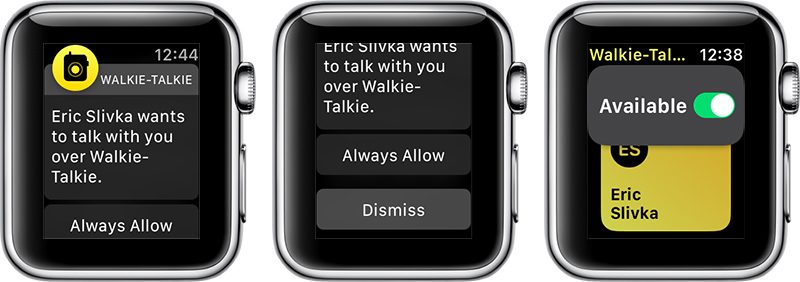
When you launch the Walkie-Talkie app after installing the second beta update, you’ll be able to scroll through your contacts and choose a person to connect to. The person on the receiving end of your Walkie-Talkie message will hear their Apple Watch beep and then they’ll see a screen that will allow them to approve a connection.
At the current time, it appears that you can only choose “always allow” when opting to enable a connection with a person.
Once a two-way connection is established, you simply press and hold down on the talk button to communicate, as does the person on the other end. Conversations, which we’ve been testing, are crisp and clear even over long distances.
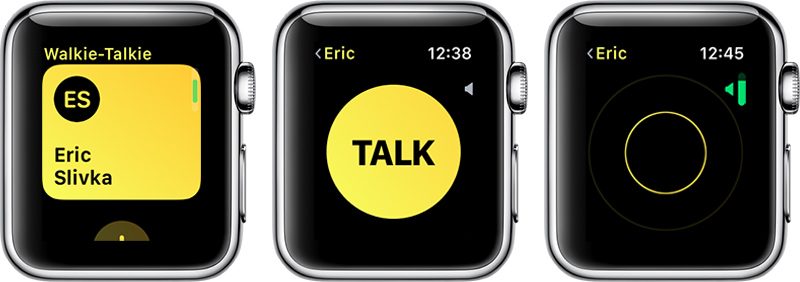
If your Apple Watch is on silent mode, Walkie-Talkie ignores it, so you’re still going to hear Walkie-Talkie beeps and incoming conversations. The same is true for Do Not Disturb Mode and Theater Mode, but there is a Walkie-Talkie volume toggle accessible by turning the Digital Crown. With a push-to-talk connection turned on, you and the person you’re connected to can chat at any time, with no additional approval options available.
You can have multiple Walkie-Talkie conversations going at once, with each conversation listed in the app.
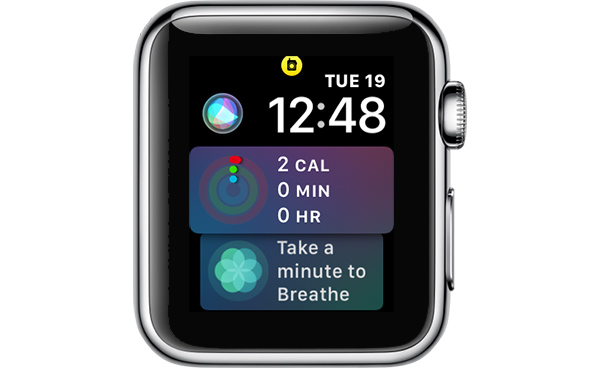
While a Walkie-Talkie conversation is enabled with another person, both of you will see a yellow Walkie-Talkie icon at the top of the Apple Watch.
If you want to mute a Walkie-Talkie conversation so you can no longer be contacted, you can scroll up on the Walkie-Talkie app interface and toggle off the “Available” icon. When unavailable, if someone tries to speak to you, they’ll see a message that you are unavailable, and you’ll receive a notification.
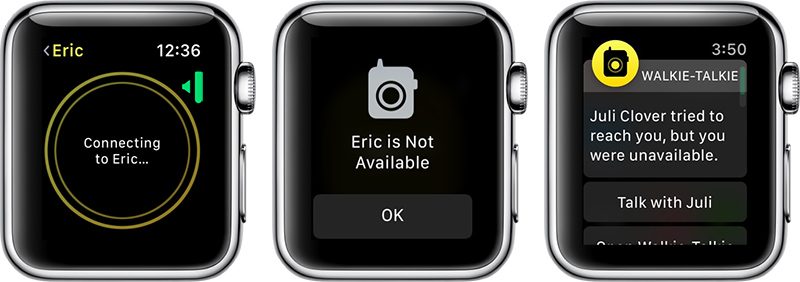
If you want to resume your conversations with people, you can turn the toggle back to “Available” and everything will work as normal. Both people in the conversation need to have themselves set to “Available” in the Walkie-Talkie app for it to be fully functional.
Walkie-Talkie and the other watchOS 5 features will be limited to developers until watchOS 5 is released in the fall, as Apple does not provide betas of watchOS to the public.
Related Roundups: Apple Watch, watchOS 4, watchOS 5Buyer’s Guide: Apple Watch (Neutral)
Discuss this article in our forums
What’s New in iOS 12 Beta 2: Screen Time Updates, Battery Usage Tweaks and More
Apple this morning released the second beta of iOS 12 to developers, and as expected, there are tweaks and changes to many of the new features introduced in iOS 12.
Changes to Screen Time include new options to sort by device and view additional details on a per app basis, while tweaks made to Battery Usage make it easier to see which apps are eating up battery. There are several other smaller changes in iOS 12 beta 2, which we’ve listed below.
– Battery Usage – The charts for activity and battery level for the last 24 hours have been redesigned in iOS 12 beta 2, and some of the wording has been updated in this section.
– Screen Time – Apple has removed a toggle for clearing Screen Time data, and the interface for adding time limits to apps from the main Screen Time screen has been tweaked. In the first beta, when you tapped an app it went right into the limits interface, but now tapping on an app displays more info on the app, including daily average use, developer, category, and more, and lets you tap to set a limit. There’s also a new splash screen when opening Screen Time for the first time.

– Screen Time By Device – There’s now an option to view activity on a single device or all devices.

– Notifications – There’s a new toggle in the Notifications section of the Settings app that allows you to toggle off Siri Suggestions for individual apps. In iOS 12, Siri makes suggestions about limiting the notifications you receive from apps that aren’t often used.
– Password AutoFill – There’s a new interface for autofilling a password saved in iCloud Keychain.

– Voice Memos – There’s a new introductory splash screen for Voice Memos in iOS 12 beta 2.
– Face ID – When unlocking content using Face ID, the iPhone X now says “Scanning with Face ID.”
– Photos – The text size for the “Media Types” and “Albums” listings in the Photos app is now much bigger, making it easier to read.
– Photos Search – In iOS 12 beta 2, Photos appears to support more advanced searches. For example, if you search for a specific date like July 10, it will show all photos from all years taken on July 10. This is different than the behavior in iOS 12 beta 1.
– iPhone apps on iPad – When you open iPhone apps on the iPad, like Instagram, they’re now displayed in a modern device size (iPhone 6) in both 1x and 2x mode.

There are also multiple known issues in the second developer beta of iOS 12, with full details available from Apple’s developer site. We’ve listed a handful of the more prominent problems users might run into:
- The Weather widget is not functional.
- Universal Links might not open the expected target app.
- Netflix might unexpectedly quit when downloading a video.
- Twitter might display a blank login screen.
- Playback might not pause when one AirPod is removed from your ears.
- CarPlay might not connect to certain vehicles.
- Group FaceTime calls can’t be initiated between iOS 12 beta 2 and iOS 12 beta 1. FaceTime calls may also be interrupted by a poor connection message, and FaceTime might unexpectedly quit.
- Screen Time must be re-enabled after installing iOS 12 beta 2, and all Screen Time settings are reset after updating.
- Voice Memos might not sync between devices even when iCloud syncing is enabled.
iOS 12 is limited to developers at the current time, but Apple has promised a public beta for its public beta testing group before the end of June, so we could be seeing a public beta as soon as later this week.
Related Roundup: iOS 12
Discuss this article in our forums
Google’s A.I. tools can predict death risks more accurately than hospitals
Google is beating hospitals at their own game — at least when it comes to death risk assessment. Google’s Medical Brain team has begun training its artificial intelligence system to evaluate the risk of death among hospital patients, and results for the time being are more accurate than those provided by existing medical tools.
Google first detailed its new system in a paper published in the Journal Nature in May. At the time, company researchers noted, “These models outperformed traditional, clinically used predictive models in all cases. We believe that this approach can be used to create accurate and scaleable predictions for a variety of clinical scenarios.”
The results, of course, are rather morbid. Alas, Google’s algorithms aren’t looking for ways to save people — just how likely they are to beat the odds. In one major case study, Google used its A.I. to evaluate a patient with breast cancer. In the 24 hours after she was admitted to the hospital, Google’s system gave her a 19.9-percent chance of dying in the hospital, significantly higher than the 9.3 percent chance the hospital’s Early Warning Score submitted. Unfortunately, less than two weeks later, the patient passed away.
So how did Google do it? The A.I. examined the 175,639 data points found in the patient’s electronic medical records, which included interpreting and evaluating handwritten notes. As Google says, the inclusion of all this information is what differentiates this A.I. from previous approaches.
“In general, prior work has focused on a subset of features available in the EHR, rather than on all data available in an EHR, which includes clinical free-text notes, as well as large amounts of structured and semi-structured data,” Google’s paper reads.
In total, Google has analyzed 216,221 hospitalizations and 114,003 patients, which comes to more than 46 billion data points from all EHRs. And its results are particularly promising for healthcare professionals. Google’s ability to efficiently and accurately parse through stacks and stacks of data could be a real boon to hospitals, ultimately resulting in improved patient care.
Moving forward, Google wants to work on A.I. tools that can predict not only death risk, but also symptoms and diseases. The tech giant is no stranger to working in the healthcare industry, especially as related to prediction. Earlier in 2018, DeepMind worked with the Department of Veterans Affairs, examining its 700,000 medical records and predicting potentially fatal changes in patients’ conditions. And Google also wants to provide doctors with a voice recognition system that would cut down on the time-intensive practice of writing notes.
Editors’ Recommendations
- The tech behind cryptocurrency could save lives by fixing medical records
- Doctors can steer this robot through your guts with an Xbox-style controller
- Fitbit to use Google Cloud to share medical data with doctors
- Google done weaponizing A.I., will still work with military and governments
- Ditch all romaine lettuce and check your eggs — a bad month for food recalls
Wait, what? These ridiculous hacks will make you do a double-take
Hacking is serious business these days: There’s always another attack that might have stolen your online information, another device that may be spying on you, or another vulnerability that you have to watch out for until it gets patched. That’s no fun.
That makes it easy to forget the first hacks were jokes and pranks, invented by coders looking to push a computer to its limit. While most of the world has forgotten that, some still hack with a more lighthearted approach. Here’s what happens when digital attacks get silly.
The “Godzilla ATTACK!” road warning
Sometimes the simplest hacks are the best. Take this 2014 hack of traffic warning signs—which are programmed with basic warnings about serious traffic issues or repair ahead. This hack replaced the warning on a San Francisco sign with, “Godzilla Attack! Turn Back!”
Interestingly, this coincided with other traffic sign attacks on the other side of the country, so we’re guessing someone was passing along an easy way to break traffic software security. State and federal agencies heaved heavy sighs, and put the signs on a long, long list of, “Things way overdue for security upgrades.” But we’re giving this prank extra points, because it was relatively harmless and probably made the drive home more enjoyable. It also spawned a series of amusing copy-cat road sign hacks.
Wait, what? These ridiculous hacks will make you do a double-take
Hacking is serious business these days: There’s always another attack that might have stolen your online information, another device that may be spying on you, or another vulnerability that you have to watch out for until it gets patched. That’s no fun.
That makes it easy to forget the first hacks were jokes and pranks, invented by coders looking to push a computer to its limit. While most of the world has forgotten that, some still hack with a more lighthearted approach. Here’s what happens when digital attacks get silly.
The “Godzilla ATTACK!” road warning
Sometimes the simplest hacks are the best. Take this 2014 hack of traffic warning signs—which are programmed with basic warnings about serious traffic issues or repair ahead. This hack replaced the warning on a San Francisco sign with, “Godzilla Attack! Turn Back!”
Interestingly, this coincided with other traffic sign attacks on the other side of the country, so we’re guessing someone was passing along an easy way to break traffic software security. State and federal agencies heaved heavy sighs, and put the signs on a long, long list of, “Things way overdue for security upgrades.” But we’re giving this prank extra points, because it was relatively harmless and probably made the drive home more enjoyable. It also spawned a series of amusing copy-cat road sign hacks.
Adobe Spark Post is finally available on Android
You can download the open beta right now.
Adobe Spark Post (a graphic design suite) has been making headlines with its iOS app for some time, and after building up a following there, fans have been demanding that Adobe make an Android version of it. After months and months of patiently waiting, that day has finally come.

You can download Adobe Spark Post for Android right now, and while not every single feature from its iOS counterpart is here, Adobe plans on changing that soon. Spark Post is releasing as an open beta initially, but it’ll only stay that way as Adobe puts the finishing touches here and there.
In its current form, the Spark Post Android app gives you access to all of the filters, fonts, colors, shapes, and templates you’d find in the iOS version. The UI has been updated to adhere to Material Design guidelines, and features such as Magic Text, auto-resize, and more are all here.


In the near future, Adobe says it plans on adding animations, an icon library, integration with Adobe Stock, and plenty of other goodies.
If there are certain features you’d like to see added before others, you can send Adobe your feedback and help pave the future for Spark Post’s Android presence.
Download: Adobe Spark Post (free)
Google Podcasts: Everything you need to know!
An AI-powered app that syncs with your Google Home.

Google has been slowly dipping its toes into the warming podcast waters of the past few years, first bringing native support to Google Play Music and then, more recently, launching playback, curation, and downloads within the Google Feed.
Now, Google is launching a dedicated app for podcasts, and here’s what you need to know!
The latest Google Podcasts news
June 19, 2018 — Google Podcasts launches on Android

Google is taking the wraps off its long-awaited Podcasts app, which is now available. The app, which is detailed below, syncs between Google Home devices and phones using Google Assistant.
What is Google Podcasts?


It’s an app that’s very similar to the functionality you’ll find when searching for podcasts on the mobile web right now. That means Google not only finds the podcast you were searching for, but using what it calls “AI-powered features,” it curates personalized recommendations of other shows that you’ll like, too.
Where is it available?
Google says it’s available in 47 Play Store languages. It should be available in your country, but if it isn’t let us know in the comments below!
How many podcasts are there in Google Podcasts?
Around two million, according to Google, and that number should expand very quickly.
What’s the interaction with Google Assistant and Google Home?

Glad you asked! For the first time, Google Podcasts will allow synchronization between a Google Home and your phone, since Assistant is the link between them. That means that if you’re listening to a show on a Home and need to leave, you can continue listening on the phone.
Right now, the synchronization only appears to be one-directional. I can ask my Google Home to “resume playing ‘This American Life’” and it picks up where my phone left off, but the progress doesn’t appear to be synching back to my phone.
What other features does Google Podcasts have?


Not a whole lot. Once you start playing a podcast, you can tap to go back 10 seconds or forward 30 seconds. you can speed up or slow down playback between 0.5x and 2x. You can play and download podcasts for listening later on, and you can mark a podcast as played.
In the settings, you can decide when podcasts will be removed from your device, either after they’re played or after they’ve been inevitably neglected.
Is there much of a difference between Google Podcasts in search and Google Podcasts the app?
Not really, but the latter is a bit more robust. Right now, podcasts in search is a bit hidden because it’s only accessible when you search for a particular podcast and somehow, often accidentally, navigate to the main portal. It’s not a great experience.
On the other hand, Google Podcasts is a native app that feels very much at home on a modern Android phone. It’s designed with Material Theme, which helps it fit in with recent Google releases like Tasks, and there are more personalization elements.
How does Google Podcasts compare to popular Android apps like Pocket Casts and Stitcher?
It’s a bit more bare bones, as most Google products are when they first launch, but the goal with Google Podcasts is to provide a unified experience between the phone and Google Assistant-based products like speakers.
Where can I download it?
Right here!
Download Google Podcasts (free)
 AIVAnet