


Goodbye, MSN: Microsoft rebrands news service, releases app on Android and iOS
On Wednesday, June 20, Microsoft announced the launch of Microsoft News — the new name for its news engine that runs MSN.com, Microsoft Edge, Windows 10, and more. In addition, the company also released its newly revamped Microsoft News app, formerly known as the MSN News app, for iOS and Android.
Whether you’re on a desktop or your smartphone, Microsoft News allows you to customize the news you receive. You can personalize your feed by selecting specific interests to follow and it also prioritizes your chosen topics all via the Microsoft Edge Start page.
In terms of changes to the interface, the Microsoft News app has been designed to include more of a modern look. The update also offers a few new features to allow for a better overall user experience.
For starters, users have the ability to tailor the app to their interests the same way they would with the desktop version. In your news feed, you can now follow categories such as world news, fitness, personal finance, lifestyle, and more. There is the option to follow local news options for top cities as well. All of your preferences also sync across the app and web.
When it comes to the interface, Microsoft News has a new dark theme mode available along with continuous reading for a smoother experience. You can also configure breaking news alerts to your device in order to stay on top of what is currently happening.
Microsoft News pulls content across more than 1,000 publishers and 3,000 brands. On a daily basis, the news team receives over 100,000 pieces of content which is then scanned by Microsoft’s artificial intelligence to determine its popularity, topic, and how timely it is. From there, it moves on to 800 editors all across the world to curate the stories on MSN.com and on the new mobile app.
Microsoft isn’t the only company to give its news app an overhaul. At this year’s Google I/O, the tech giant unveiled its redesigned news app — Google News — which replaced the Google Play Newsstand app.
As with Microsoft News, Google’s news app also provides a customized user experience. But rather than going through the process of choosing specific topics manually, it uses activity from your Google account to curate your content.
Editors’ Recommendations
- Flipboard’s latest update makes it easier to stay on top of all things tech
- The Google News App fuels your interests, provides a balanced perspective
- Google News receives a major overhaul, replaces Google Play Newsstand
- Windows is back on your phone, and this time it’s a good thing
- There’s a whole world outside Windows, and Microsoft finally gets it
Goodbye, MSN: Microsoft rebrands news service, releases app on Android and iOS
On Wednesday, June 20, Microsoft announced the launch of Microsoft News — the new name for its news engine that runs MSN.com, Microsoft Edge, Windows 10, and more. In addition, the company also released its newly revamped Microsoft News app, formerly known as the MSN News app, for iOS and Android.
Whether you’re on a desktop or your smartphone, Microsoft News allows you to customize the news you receive. You can personalize your feed by selecting specific interests to follow and it also prioritizes your chosen topics all via the Microsoft Edge Start page.
In terms of changes to the interface, the Microsoft News app has been designed to include more of a modern look. The update also offers a few new features to allow for a better overall user experience.
For starters, users have the ability to tailor the app to their interests the same way they would with the desktop version. In your news feed, you can now follow categories such as world news, fitness, personal finance, lifestyle, and more. There is the option to follow local news options for top cities as well. All of your preferences also sync across the app and web.
When it comes to the interface, Microsoft News has a new dark theme mode available along with continuous reading for a smoother experience. You can also configure breaking news alerts to your device in order to stay on top of what is currently happening.
Microsoft News pulls content across more than 1,000 publishers and 3,000 brands. On a daily basis, the news team receives over 100,000 pieces of content which is then scanned by Microsoft’s artificial intelligence to determine its popularity, topic, and how timely it is. From there, it moves on to 800 editors all across the world to curate the stories on MSN.com and on the new mobile app.
Microsoft isn’t the only company to give its news app an overhaul. At this year’s Google I/O, the tech giant unveiled its redesigned news app — Google News — which replaced the Google Play Newsstand app.
As with Microsoft News, Google’s news app also provides a customized user experience. But rather than going through the process of choosing specific topics manually, it uses activity from your Google account to curate your content.
Editors’ Recommendations
- Flipboard’s latest update makes it easier to stay on top of all things tech
- The Google News App fuels your interests, provides a balanced perspective
- Google News receives a major overhaul, replaces Google Play Newsstand
- Windows is back on your phone, and this time it’s a good thing
- There’s a whole world outside Windows, and Microsoft finally gets it
An all-in-one botnet is on the rise packing a scary buffet of attacks
pwstudio/123RF
A new “complicated” botnet called MyloBot is on the rise packing the largest arsenal to date, targeting Windows-based PCs to steal data, shutting down networks, and more. Discovered by Deep Instinct, the underlying malware can evade detection, deliver numerous payloads, and even delete other malware discovered on target PCs.
Although Deep Instinct’s report doesn’t say how PCs obtain the malware, it sits quietly on the target PC for 14 days to avoid detection locally and from network-based scanning. After that, MyloBot shuts down Windows Defender and Windows Update, blocks specific ports in the Windows firewall, and shuts down and deletes any running application listed in the “%APPDATA%” folder.
The end result is a PC under complete control by the hacker(s), which then joins a growing network of internet-connected PCs, aka a botnet. MyloBot connects directly to the hacker’s command-and-control servers that download additional payloads depending on the current attack. Thus, MyloBot serves as a botnet-as-a-service gateway designed for any hacker with any kind of attack in exchange for the right price.
“This can result in the loss of a tremendous amount of data, the need to shut down computers for recovery purposes, which can lead to disasters in enterprises,” says Deep Instinct security researcher Nipravsky. “The fact that the botnet behaves as a gate for additional payloads, puts the enterprise in risk for leak of sensitive data as well, following the risk of keyloggers / banking trojans installations.”
To avoid detection, MyloBot uses a method called code injection where hackers can inject malicious code into legitimate Windows processes to cause havoc without being detected. Another method is called process hollowing, a method of launching a Windows process in a suspended state but replacing its data stored in memory with malicious code. MyloBot can even execute code from memory so there’s no evidence of foul play on the PC’s local storage.
Given MyloBot attempts to serve as an all-in-one botnet, it will seek out the competition on target PCs. During the installation process, it scans local folders where malware typically reside, and terminates and deletes any competing malware it finds, giving it full control of the target PC in order to grow its army of “zombie computers.”
Nipravsky says MyloBot is powered by individuals residing on the dark web: A portion of the internet where you should never traverse. That said, this all-in-one botnet that seeks out and eliminates the competition is believed to be fueled by money, as the bigger the MyloBot botnet-as-a-service grows, the more money the hackers will stuff in their pockets.
“The dark web plays a critical part in the spread of malware: Its rather simple accessibility of services and knowledge has made it easy for any attacker to gain much more abilities in minimum effort,” Nipravsky writes.
Currently the malware isn’t widespread, but its command-and-control servers came online sometime around the beginning of 2016 at the very least. The author(s) behind MyloBot is/are unknown for now, but evidence leans toward a well-resourced operation powered by someone who “knows what they’re doing.”
Editors’ Recommendations
- New malware will crash your PC if you try to thwart its digital coin mining
- Hackers modify ransomware to deliver a Coinhive cryptocurrency-mining payload
- Cryptojacking is the new ransomware. Is that a good thing?
- Patch your Windows 10 PC, now! Hackers are exploiting a zero-day flaw
- U.S. claims North Korea has been silently infiltrating networks since 2009
An all-in-one botnet is on the rise packing a scary buffet of attacks
pwstudio/123RF
A new “complicated” botnet called MyloBot is on the rise packing the largest arsenal to date, targeting Windows-based PCs to steal data, shutting down networks, and more. Discovered by Deep Instinct, the underlying malware can evade detection, deliver numerous payloads, and even delete other malware discovered on target PCs.
Although Deep Instinct’s report doesn’t say how PCs obtain the malware, it sits quietly on the target PC for 14 days to avoid detection locally and from network-based scanning. After that, MyloBot shuts down Windows Defender and Windows Update, blocks specific ports in the Windows firewall, and shuts down and deletes any running application listed in the “%APPDATA%” folder.
The end result is a PC under complete control by the hacker(s), which then joins a growing network of internet-connected PCs, aka a botnet. MyloBot connects directly to the hacker’s command-and-control servers that download additional payloads depending on the current attack. Thus, MyloBot serves as a botnet-as-a-service gateway designed for any hacker with any kind of attack in exchange for the right price.
“This can result in the loss of a tremendous amount of data, the need to shut down computers for recovery purposes, which can lead to disasters in enterprises,” says Deep Instinct security researcher Nipravsky. “The fact that the botnet behaves as a gate for additional payloads, puts the enterprise in risk for leak of sensitive data as well, following the risk of keyloggers / banking trojans installations.”
To avoid detection, MyloBot uses a method called code injection where hackers can inject malicious code into legitimate Windows processes to cause havoc without being detected. Another method is called process hollowing, a method of launching a Windows process in a suspended state but replacing its data stored in memory with malicious code. MyloBot can even execute code from memory so there’s no evidence of foul play on the PC’s local storage.
Given MyloBot attempts to serve as an all-in-one botnet, it will seek out the competition on target PCs. During the installation process, it scans local folders where malware typically reside, and terminates and deletes any competing malware it finds, giving it full control of the target PC in order to grow its army of “zombie computers.”
Nipravsky says MyloBot is powered by individuals residing on the dark web: A portion of the internet where you should never traverse. That said, this all-in-one botnet that seeks out and eliminates the competition is believed to be fueled by money, as the bigger the MyloBot botnet-as-a-service grows, the more money the hackers will stuff in their pockets.
“The dark web plays a critical part in the spread of malware: Its rather simple accessibility of services and knowledge has made it easy for any attacker to gain much more abilities in minimum effort,” Nipravsky writes.
Currently the malware isn’t widespread, but its command-and-control servers came online sometime around the beginning of 2016 at the very least. The author(s) behind MyloBot is/are unknown for now, but evidence leans toward a well-resourced operation powered by someone who “knows what they’re doing.”
Editors’ Recommendations
- New malware will crash your PC if you try to thwart its digital coin mining
- Hackers modify ransomware to deliver a Coinhive cryptocurrency-mining payload
- Cryptojacking is the new ransomware. Is that a good thing?
- Patch your Windows 10 PC, now! Hackers are exploiting a zero-day flaw
- U.S. claims North Korea has been silently infiltrating networks since 2009
Intel’s hyperthreading blocked on OpenBSD amid hints of new Spectre-like bugs
The maintainer of open source Unix-like operating system, OpenBSD, has announced that it will disable hyperthreading on Intel CPUs because of security concerns. It claims that simultaneous multithreading creates a potential new attack vector for Spectre-like exploits, and plans to expand its disabling of multithreading technologies to other chip manufacturers in the near future.
The problems presented by exploits like the original Spectre, its variants, and follow-up bug discoveries are worrisome. They allow for data theft at a level close to the hardware itself, which is why it will take a full hardware refresh to fully expunge them from consumer systems. While patches and firmware upgrades can mitigate them, new exploits built around similar attack vectors are appearing all of the time and the actions of the OpenBSD maintainer suggests that new Spectre-like flaws may be set for reveal in the near future.
“SMT (simultaneous multithreading) implementations typically share TLBs and L1 caches between threads,” reads the post by OpenBSD maintainer Mark Kettenis. “This can make cache timing attacks a lot easier and we strongly suspect that this will make several Spectre-class bugs exploitable.”
With that in mind, OpenBSD’s latest version disables hyperthreading on compatible Intel CPUs. That’s just the start though, as OpenBSD will also disable multithreading capabilities on CPUs from other manufacturers in the near future.
What’s most interesting about this announcement though, is that it hints at the possibility of new, Spectre-linked bugs. As The Register points out, Kettenis doesn’t give much validation for why this drastic step has been taken, but another post on Seclists discussing it suggests we may learn more on June 27. While there has been some suggestion that the performance impact from disabling hyperthreading shouldn’t be dramatic, if a problem with such technologies is extended to other hardware manufacturers and other operating systems, it could be much more impactful. Intel and AMD have recently entered what some are calling a new core war, where top-tier CPUs are touted for their ever-growing numbers of cores, and with multithreading, much larger thread counts too.
If multithreading was to become a technology that was problematic for security with existing hardware, that could dampen the marketing efforts of both companies considerably. Perhaps AMD even more so, as its Ryzen CPUs are built upon the foundation of strong multithreaded performance thanks to higher core and thread counts than their Intel counterparts.
Editors’ Recommendations
- AMD says the patches for its recent Ryzen flaws are almost ready
- New Spectre-like bug could mean more performance-degrading patches
- AMD has a fix for Spectre variant II, but will motherboard makers support it?
- Intel reportedly gears up to patch 8 Spectre Next Generation CPU flaws
- You’ll want to perk up when it comes to the new ‘Lazy State’ Intel CPU bug
Microsoft News now official, rolling out to everyone on iOS and Android

Meet the refreshed platform powering all of Microsoft’s news services across devices.
Microsoft today unveiled its latest news venture, appropriately under the banner of Microsoft News. The refreshed platform, Microsoft says, will power all of its news content across its news apps on Android and iOS, as well as MSN on the web and the News app on Windows 10.
Microsoft has been telegraphing this refresh for a while. The first major step came when the MSN News apps for Android and iOS saw a design overhaul in January, bringing a much more modern look on mobile devices. Last week, Microsoft took things a step further by rebranding both apps under the Microsoft News moniker for beta testers. Now, the overhauled design and new name are rolling out to everyone across both platforms.


The News app on Windows 10 and MSN on the web will keep their names, but Microsoft News now will be the “news engine” that powers both. From Microsoft:
Microsoft News represents the ways we keep people informed across the web, phone and PC, using our long-tested approach of curating news via publishing partnerships, human editors, and AI. We work with more than a thousand premium publishers and more than 3,000 brands in all major global markets – like USA Today, The New York Times, FOX News, The Washington Post, The Guardian, Le Monde, Die Welt, El País, BBC News, Kyodo News, and many more – to aggregate the best news, videos, photos and other content and deliver it, for free, to people all over the world.
Going forward, you’ll be able to personalize the news experience across both the mobile apps and MSN, selecting what interests you. Microsoft will be curating feeds with a mixture of AI and editors, leveraging the AI to scan and process the type of content and deciding what’s important or fresh. From there, a team of more than 800 editors around the world will curate top stories throughout each day.
You can check out the refresh now at MSN.com, as well as the refreshed apps on Android and iOS.
See at Google play See at the App Store
3 Reasons To Buy Amazon’s Cloud Cam and 2 Reasons Not To

Powered by Alexa and customizable to fit your specific needs.
The Amazon Cloud Cam is the first branded plug-and-play camera released by the behemoth online retailer, and overall it’s a great option for anyone shopping for home security cameras.
There’s a number of compelling features that make the Amazon Cloud Cam a top consideration — and only a few drawbacks that might make you take pause. Let’s dive in!
Better price than the top competition

If the bottom line factor for your decision is price, the Amazon Cloud Cam can’t be beat. Priced at just $119 each, it beats out its top competition from Arlo and Nest Cam. If you’re planning to install more than one throughout your home, the deals simply get even better: buy two for $199.99 or three for $289.97.
You’re able to connect up to three cameras with 24 hours of cloud storage, alert notifications, and unlimited sharing included with your purchase, but if you want more advanced features or support for more cameras you will require a subscription plan — and I’ll be touching on those a bit further down.
- Amazon Cloud Cam vs. Nest Cam vs. Arlo: Which connected camera should you buy?
Works with your other Alexa-enabled products

One of the killer features of the Amazon Cloud Cam is the compatibility with Alexa. You probably expected that, but depending on the number of Alexa-enabled products you have in your house it could be a real game-changer.
You can tell Alexa to cast your Cloud Cam to your Fire TV, Fire Tablet, Echo Show, or Echo Spot to quickly see what’s happening in another room in your house — perfect for those times when your kids have been a little too quiet in their playroom.
This is where Amazon’s low-cost hardware really comes in handy, as you can pick up a Fire Tablet for $50 and get good use out of it just for monitoring your Cloud Cam on top of its other features. Amazon also offers a bundle that includes an Echo Show and Amazon Cloud Cam for just $300. Considering that the Echo Show itself sells for $229, that’s a great deal if you’re already somewhat committed to Amazon’s AI assistant ecosystem and are looking to build onto it.
Two-way communication, Person detection, and Zones
Another benefit of going with Amazon is the number of smart features included in its products. The Amazon Cloud Cam allows for two-way communication, meaning you’ll be able to send and receive audio using the camera’s built-in microphone and speaker.
Amazon Cloud Cam has some great premium features.
Other great features include person detection, which allows your Amazon Cloud Cam to use facial recognition to detect and tell the difference between a member of your family or an intruder. This means you won’t get alert notifications every time your kid comes home from school — unless that’s something that you want.
Another great feature designed to cut down on unnecessary alert notifications is Zones, which let you go into the Amazon Cloud Cam app and highlight areas of the camera’s viewing angle that it doesn’t need to monitor for movement alerts. This could be a ceiling fan that would otherwise constantly trigger the movement detection or a window that looks out on the street with passing pedestrians and cars.
These features highlight the incredible AI computing that powers Amazon’s products, but if you’re thinking they’re included for free, well…
The subscription service is expensive but necessary if you want the best features
Amazon offers three levels of subscription plans: Basic which includes 7 days of cloud storage, support for three cameras and the Person detection and Zones features for $6.99 a month (or $70 for the year), Extended which offers 14 days of cloud storage, support for up to five cameras and the advanced features for $9.99 a month (or $100 for the year), or the Pro level which supports up to 10 Cloud Cams and includes all the advanced features for $19.99 a month (or $200 for the year).
By comparison, Nest Cam offers a similar subscription plan model that’s a bit more expensive for the top-tiers but also allows for 24/7 continuous recording (Amazon only offers clip recording) and a cheaper basic option at just $5 a month, or $50 for the year.
Arlo’s cloud subscription plans start out offer 7 days of cloud recording and support for up to 5 cameras for free, with the mid-range tier offering 30-days of cloud recording and support for up to 10 cameras for $99, which is equivalent to Amazon’s Pro-level subscription but at half the price.
So while you might initially save money on hardware, Amazon certainly intends to make up the difference through its subscription service — but if the features offer exactly what you’re looking for it might be easy for you to justify the cost.
Ask yourself if you want Amazon peeking into your home

This one is a bit of a dilemma that we should always consider when dealing with Amazon, a company that ultimately wants to sell you more things. If you already have Amazon products in your home — and there’s a lot of options out there — chances are you’ve already considered this and are fine with it.
But when there are other options out there, it’s worth considering whether you want to install cloud cameras controlled by Amazon. Amazon states in its Cloud Cam Terms of Service that it will “process and retain your Cloud Cam Recordings in the cloud to provide and improve our products and services” — that’s a pretty vague statement when we’re talking about a company whose main service is getting you to buy more things.
See at Amazon
What do you like (or not like) about Amazon’s Cloud Cam?
The connected camera market is exploding, and Amazon is a reliable, trustworthy name that offers a good, affordable product. Do you use a connected camera, or a Cloud Cam in particular? Let us know in the comments!
Google’s Flutter pushes forward with its first Release Preview
On June 20, the team behind Flutter announced that its development platform was officially exiting the beta stage it entered in February and moving into Release Preview 1.
Flutter is a mobile UI framework that aims to help developers make high-quality apps that work on both Android and iOS as easily and seamlessly as possible. There was a sizable showcase for Flutter during Google I/O in May, and since then, the Flutter team says it’s seen a 50% increase for its active user-base.
Release Preview 1 is a big milestone for Flutter, with Editor Tim Sneath saying that it “signals our confidence in the stability and quality of what we have, and our focus on bug fixing and stabilization.”
Anyone using the Flutter beta can upgrade to Release Preview 1 by entering the command $ flutter upgrade, and once you do, you’ll have access to an updated extension for Visual Studio Code, improvements to the video playback package, a new tool that allows you to add Flutter widgets to existing Android/iOS apps, and more.
There have already been a number of apps created using Flutter, and as the software keeps progressing through Release Previews and eventually enters a stable channel, it’s going to be immensely exciting to see what else developers create with it.
Google Podcasts: Everything you need to know!
Switch up your Fitbit Versa with a Milanese Stainless Steel Band from $2
You’re just $2 away from refreshing the look of your Fitbit.
Swees at Amazon has a variety of Fitbit Versa Milanese Stainless Steel Replacement Bands on sale from $2 when you enter promo code 5ATTMQ3O during checkout. There are two sizes available too so you can find the right fit for yourself.
 The least expensive option on sale is the Silver band which drops to $2 with the code. Other than the look, these bands are all made and function the same way. It features a strong magnetic closure and is constructed of woven stainless steel metal.
The options without added jewels, like Black, Champagne, and Rose Gold, fall to $2.50 with the code, while the bands with jewels are priced up to $3.50. Either way, you’re getting a great deal here no matter which band you go for.
Each of these bands comes with a one-year warranty.
See at Amazon
Metro: Exodus for PlayStation 4 – Hands-on impressions from E3 2018

Metro: Exodus promises freedom of choice and a challenge of a scavenging system, but it’s hard to get a good grasp of it from one demo
After several years of silence, Metro: Exodus reemerged from its nuclear bunker and is ready to continue the story originally conceived in the novels of Dmitry Glukhovsky. Its trailers have thus far promised a challenging scavenging and crafting system needed to fuel the game’s combat, but there’s far more to it than that.
I went hands-on with Metro: Exodus at E3 2018 and learned more about the game’s promises of freedom for the player to choose their own path. Rather than offering dialogue trees for good or evil, Metro wants your actions to matter. Are you a peacemaker? An explorer? Or a heartless killer? Sometimes you may want to be one, but the choices before you aren’t always immediately obvious.
See at Amazon
New beginnings
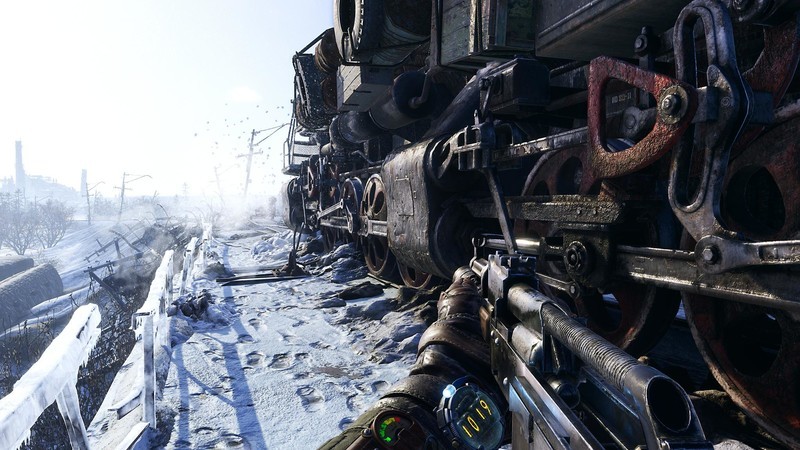
Metro: Exodus is set two years after Metro: Last Light and 23 years after a massive nuclear war that reduced Russia to a devastated wreck. You play as Artyom, who has joined the Spartan Rangers in their exodus from Moscow aboard a train called the Aurora, hoping to find a place to rebuild somewhere to the east. The story spans a full year of their travels, beginning in a harsh nuclear winter and continuing through each of the four seasons.
I was free to explore a huge area as I liked, with the understanding that some things like textures or collisions may be unfinished.
My demo took place at an encounter called The Bridge, where the titular landmark had collapsed and groups of people (hostile? no?) were out camping on the track. In order to bypass the obstructions, our engineer needed to do some work on the train, so I was sent out into the wilderness to determine if the nearby settlers were friends or foes. But had I not wanted to take that route, I didn’t have to!
The demo I was given was qualified by the presenters was something a bit different: rather than a narrowly-focused and polished demo of a small segment, I was free to explore a huge area as I liked, with the understanding that some things like textures or collisions may be unfinished. Even with the qualifier, the world looked lovely, snowy, and diverse despite the bleak terrain, though I did run into long loading screens and some collision issues as promised. I’m not worried on those fronts, though. Metro is allegedly content complete, leaving the team a whopping eight months to launch to polish, polish, polish.
Into the winter

I like to do what I’m told, so after my partner Anna yelled at me for ignoring the objective, I turned around and followed her into an area of deserted houses, picking up some crafting materials along the way. Having never played a Metro game, I was pleased to find that combat wasn’t around literally every last corner, though I had to keep my guard up. Metro is just as much about how you choose to interact with those you encounter as it is about fighting off wasteland horrors or those who want to stop you from finishing your objectives, as I’d soon find out.
You can fight your way through a lot in Metro: Exodus, but you can also approach situations from different angles.
After climbing into a small boat (don’t swim in Metro, trust me) and rowing across a small body of water I came to a strange, ramshackle church, where I was told all would be well if I came in peace. I sheathed my weapon in compliance. You can fight your way through a lot in Metro: Exodus, but you can also approach situations from different angles. With my weapon put away, I slowly guided my boat into a bizarre church service where the congregation followed the pastor in decrying technology with loud chants.
As I neared a spot to dock, though, things changed. A little girl came in and yelled at the congregation that they were wrong and that she refused to believe them, then scampered up the stairs. My boat was suddenly locked down between two doors that dropped, and I was forced to disembark and chase the girl up the stairs. I wasn’t fully sure if the congregation had intended to trap me, was mad at the girl, or if I had made a bad choice by following her, but I headed up and encountered the child and her mother, who desperately needed help to escape the weird cult they were in. I was told to make my escape first, but with the compound now hostile, that would prove a challenging task.
Choice or no choice?

At this point, I felt I had no choice but to fight. Gun combat is solid in Metro, and I was given a few different weapon choices along the way, but if you’re not actively picking up crafting supplies to augment your equipment and create more ammo, you’ll have a bad time…just like I did. I ran out of ammo just as I killed enough enemies to force everyone else to surrender, so I didn’t need to bother with whether or not to kill the remaining enemies, now on their knees and begging for mercy. I eventually found a new boat to escape in and headed out, Anna reassuring me over the radio that she would take care of the girl and her mother.
As I approached the Aurora again, I was waylayed by a huge mutant sea monster bursting up from the depths and trying to capsize my boat. With no ammo left, I thought for sure I was done for, but I was pulled from the water by another comrade and pointed in the direction of the Aurora on land. There, I met the mother and daughter, who were able to give me directions into the city to an engineer who could repair the train, which is about where my demo finally timed out.
Overall
I feel like I barely got a taste of Metro: Exodus, and that my lack of experience with other games in the series may have hurt me a bit. I spent a lot of time just sort of aimlessly trying to understand my objective, which can sometimes just be chalked up to the demo but could also be a result of the game’s density. Looking around the snowy world I was dropped in, I could see multiple major landmarks and several minor ones within a few minutes’ distance, and had I traveled to any of those others instead of the weird church, I may have encountered a different story entirely (while drawing the ire of my boss on the Aurora, probably). I’m curious to learn more about how decision-making and exploration affect things, as they’ll be what make Metro: Exodus stand out rather than its fairly standard, if resource-draining combat.
When can I embark on an exodus, too?
Metro: Exodus launches on February 22, 2019 for PlayStation 4 starting at $59.99.
See at Amazon
Need direction?
Have more questions about Metro: Exodus? Bust out the compass and map and leave a comment; I’ll try to help you out!
 AIVAnet