


EU’s controversial meme-banning copyright law passes first hurdle
The European Union’s Legal Affairs Committee, known as JURI, voted on June 20 in favor of new controversial internet legislation that is designed to protect copyright holders but may have the adverse consequence of stifling an open internet and banning memes. The Copyright Directive includes two broad articles that require internet companies to install content filters to prevent the unauthorized upload of copyrighted content in the EU.
In order for the changes to pass, the legislation still needs approval from 28 EU governments in a plenary vote. If the European Parliament votes to pass this legislation in the future, these tougher copyright restrictions could, in theory, provide a model for U.S. legislators moving forward.
At the heart of the EU debate is Article 13, which is opposed by the Electronic Frontier Foundation (EFF), as well as by academics, researchers, and even Tim Berners-Lee, the inventor of the World Wide Web. “By requiring Internet platforms to perform automatic filtering of all of the content that their users upload, Article 13 takes an unprecedented step toward the transformation of the internet from an open platform for sharing and innovation, into a tool for the automated surveillance and control of its users,” the EFF wrote in an open letter ahead of the JURI vote, noting that the burden of monitoring the internet to prevent the upload of copyrighted materials falls squarely on the shoulders of small European businesses and startups. The EFF argued that larger American companies could afford to bear the cost of compliance.
“The damage that this may do to the free and open internet as we know it is hard to predict, but in our opinions could be substantial,” the letter continued. The committee passed Article 13 in a 15-to-10 vote, The Guardian reported. ”
The second controversial provision of the legislation is Article 11, which The Verge describes as a Link Tax. Article 11 requires companies like Facebook and Google to buy licenses from publishers before linking to their stories. These articles essentially reverse precedents set by EU courts. In a 2016 decision, the court ruled that simply linking to copyrighted materials does not count as infringement. In a separate 2012 ruling, the EU court in Luxembourg said that sites should not be compelled to install or otherwise operate content filters to check for privacy.
While the new legislation is intended to update copyright laws in the age of the internet to ensure that content creators are fairly paid for their contribution, critics fear that the laws could limit the sharing of information, which could affect memes and other types of content. “The UN’s special rapporteur on freedom of expression, David Kaye, has also raised concerns about ‘prepublication censorship,’ given that automatic filters may be unable to correctly identify fair comment, satire, criticism, and parody,” The Guardian said.
In addition to a vote from the European Parliament, the new Copyright Directive could still be subjected to closed-door negotiations between legislators and member states known as trilogue negotiations. If the trilogue process commences, it would increase the likelihood that the Copyright Directive becomes law, The Verge reported. There currently isn’t a timeline for when a plenary vote is expected to occur, but it could happen between December of this year and the first half of 2019.
Editors’ Recommendations
- Blockchain may power future elections, but it’s no silver bullet for fraud
- Congress has until Monday to save net neutrality and keep the internet open
- Nissan used social media to create a tricked-out overlanding vehicle
- You can now add Polls to your Stories on Facebook Messenger
- California prepares to lead the nation in solar-equipped housing
Get a peek at some of our favorite emerging tech on display at CE Week 2018
Each summer, some of the most exciting tech startups make their way to New York City for CE Week. For its twelfth anniversary, CE Week is moving uptown to the Javits Center for its biggest show yet. In between listening to fascinating discussions from tech leaders, we walked the halls of CE Week to take a look at the exciting products making their way to store shelves. Here are a few of our favorites.
AirSelfie 2
If you’ve ever wanted to get a group selfie but realized your arms aren’t quite long enough, then AirSelfie 2 may be the perfect alternative. It’s a tiny selfie drone you control with your smartphone that’s packing a 12 megapixel camera. Photos are sent directly to the Airselfie app, where you have option of sharing them on social media or saving them to your phones photo gallery.
AirSelfie 2 is available online and select retailers. Pricing starts at $200 for the drone and you can purchase it with an optional powerbank for $250.
Lotus by Seam
While we’re seeing tons of new safety wearables in 2018, very few are as gorgeous and versatile as the Lotus by Seam. In addition to providing location data to friends and loved ones, Lotus also provides an audio recording when activated. For emergency situations, Lotus can automatically dial your primary contact and allows you to communicate using its built-in speaker. And in addition to all its safety features, Lotus also offers Google Assistant integration.
Lotus is expected to go on sale later this summer for $120. The wearable is available in two gender-neutral colors and clips directly onto clothing. An optional watch and necklace accessory will also be available from the Seam website.
3Doodler
Launched from a massively successful Kickstarter campaign in 2013, 3Doodler is an interactive 3D pen. Sort of like a glue gun on steroids, the 3Doodler allows users to create three-dimensional objects using heated plastic tubes.
There are currently three different versions of the 3Doodler available online: The 3Doodler Start has no hot parts and is meant primarily for children, while the 3Doodler Create Plus uses more versatile plastic tubing and is deaigned for older children and adults. Finally, the 3Doodler Pro is targeted toward creative professionals and can use speciality materials like wood, bronze, and copper to create 3D objects and renderings.
Owl Car Cam
While there are dozens of car cams on the market, the Owl Car Cam is one of our favorites. It’s a gorgeous, always-on car cam with a few tricks up its sleeve. In addition to filming both the inside and outside of your vehicle, the camera also offers awesome theft deterrent and social sharing features.
The Owl Car Cam sells online for $350. If you want to learn all about its awesome features, check out our full review.
Somnox
Last but not least is Somnox, our favorite sleep robot. Somnox uses relaxing melodies and simulated breathing to help you get a better night’s sleep. The peanut-shaped robot is controlled entirely from your smartphone and you can adjust the breathing settings as well as turn off the melodies completely.
Somnex is available for pre-order starting at around $550.
Editors’ Recommendations
- Huawei P20 Pro vs. the P20: Which smartphone is the right Huawei to go?
- Need coffee now? These are the best Keurig machines
- LG V35 ThinQ hands-on review
- The best shows on Hulu right now (May 2018)
- Apple HomePod vs. Amazon Echo vs. Google Home: Which is best?
Windows update not working? Here’s how to fix it
Windows Update is sometimes underestimated as a cornerstone of your system’s integrity and security. Microsoft regularly delivers security patches, hotfixes, and software updates through Windows Update, and so if this service stops running or is turned off, then Windows can become vulnerable to bugs and security holes. The update process has been greatly streamlined for Windows 10, but that doesn’t mean it’s always problem-free, especially when it comes to compatibility and patches.
Here, we’ll show you how to get Windows Update working again when it fails, and what to do if it looks like an update is causing problems.
Manage when automatic updates reboot your machine
You can’t permanently turn off automatic updates in Windows 10, but you can manage when your machine reboots after installing an update. That way, you can at least make sure your machine doesn’t restart during your workday or whenever is least convenient. Here’s how:
Step 1: Go to or search for “Settings.” Then select “Update & Security” options.
Step 2: Select the “Windows Update” tab at the top of the list on the left-hand side. Then, click “Change active hours” at the bottom of the window.
Step 3: This will bring up a window called “Active hours,” which will let you set a start and end time for when restarts will occur. Keep in mind that this doesn’t change when updates are installed, but only when your machine will automatically restart — and then, only when you’re not actively using it. Select your preferred times, and click “Save.”
Step 4: If an update has already been scheduled, then you can select “Restart options” from the main Windows Update settings page to select a custom restart time. Just toggle the setting on, and then select your preferred time and day.
Mark Coppock/Digital Trends
Step 5: Finally, you can defer system upgrades for a period of time if you so choose, or pause them temporarily. Keep in mind that there are separate settings for major updates, like the April Update, and for quality updates like security updates.
To defer upgrades, select “Advanced options” on the main Windows Update page. Use the drop-down lists to decide how many days you want to defer them for.
You can also use this menu to make other adjustments to the way updates are applied, including whether they’re automatic or manually triggered and even the option to pause them entirely.
Run the Windows Update Troubleshooter
Microsoft knows that sometimes updates bring along a few unwanted issues, which is why the company created the Windows Update Troubleshooter. This tool will run through your basic operating system parameters and look for any obvious problems that may be keeping Windows Update from functioning correctly. If it can, the troubleshooter will also fix them automatically, or at least let you know what the issue is.
Try this analysis early on if you’re experiencing update issues. Head over to Microsoft’s support page and click “Download troubleshooter for Windows 10” — the tool should take care of the rest. It might ask you for administrator privileges to perform a deeper check, but beyond giving it permission to do so, you don’t need to do anything else.
It won’t solve every problem, but it’s a great place to start and will usually provide useful information even if it can’t offer a fix.
Check your installation error code
If your update fails or creates problems, it will often give you an installation error code. The codes don’t tell you much by themselves, but they do include a lot of useful info if you hop online and consult Microsoft’s guide on the matter. Below, we’ve included a table highlighting some of the more common errors.
0x80073712
A file needed by Windows Update is likely damaged or missing.
0x800F0923
This might indicate that a driver or other software on your PC isn’t compatible with the upgrade to Windows 10. For info about how to fix this problem, contact Microsoft support.
0x80200056
This could mean that the upgrade process was interrupted because you accidentally restarted your PC or signed out of your PC. Try upgrading again and make sure your PC is plugged in and stays turned on.
0x800F0922
This error might mean that your PC couldn’t connect to the Windows Update servers. If you’re using a VPN connection to connect to a work network, disconnect from the network and turn off the VPN software (if applicable) and try upgrading again. The error could also mean there isn’t enough free space in the System Reserved partition. You might be able to fix this problem by using third-party software to increase the size of the System Reserved partition.
0xC1900208 – 0x4000C
This could indicate that an incompatible app installed on your PC is blocking the upgrade process from completing. Check to make sure that any incompatible apps are uninstalled and then try upgrading again.
0xC1900200 – 0x20008
0xC1900202 – 0x20008
This may signify that your PC doesn’t meet the minimum requirements to download or install the upgrade to Windows 10.
0x80070070 – 0x50011
0x80070070 – 0x50012
0x80070070 – 0x60000
This likely indicates that your PC doesn’t have enough space available to install the upgrade. Free some space on the drive and try again.
Note that this guide is designed specifically for Windows 10. Error codes may not mean the same thing in other versions of Windows.
If all else fails, these quick fixes might do it
Have all the automatic checks and codes failed you? It’s time to go back to the tried-and-true methods, the tricks that have been solving update errors since the update was first invented. Here are a few options that may work for you.
Reboot your computer
This is a surprisingly effective method that will solve a host of computer issues — and it often works for Windows Update. When you encounter an error message, reboot your machine and try to run the updates again. If you haven’t run Windows Update for some time, then you might have to repeat this process several times before all updates have been installed.
Do you have enough disk space?
One scenario in which updates may fail is when your system drive is running out of space. Double-check that you have at least 10GB of free space. If that could be the culprit, perform a disk cleanup to remove files. To do so, type “Disk Cleanup” into Cortana’s search box, click Disk Cleanup to start the utility, and, if requested, select your system drive (usually C:). Afterward, specify the type of files that you want to get rid of and select “OK.” Try to stay away from important system files.
Alternatively, third-party software like CCleaner can be great for freeing up extra space on your system. For more information on this topic, check out our more complete guide on managing Windows 10’s storage space.
Is malware causing the issue?
Malware can change critical system files and break Windows services, meaning it’s a good idea to run a malware scanner to make sure your system isn’t compromised. If you don’t have any sort of antivirus software, check out some of our personal favorites for Windows-based machines. After all, sorting through heaps and heaps of software is never fun — neither is paying.
Contact Microsoft support
If you’ve done everything you can, it’s time to contact Microsoft support and see if they can pinpoint the issue. Head over to the company’s contact page, where you can start a chat, request a callback, or schedule a call. There’s also an option to ask the community, which may be a bit more time-consuming but can be useful if others have already encountered and fixed the update issue.
Editors’ Recommendations
- How to download the Windows 10 April 2018 Update
- Patch for April 2018 Update sends Windows 10 into infinite boot loop
- The 5 best features of the Windows 10 April 2018 Update
- Microsoft preps next Windows update, as latest build breaks Chrome browser
- Everything you need to know about the Windows 10 April 2018 Update
SmokeBot robot can see things human firefighters can’t in smoke-filled rooms
Örebro University
Along with dirty and dull work, robots are also ideal for dangerous tasks, where it’s preferable to risk a machine than send in humans. Chief among these? Entering smoke-filled buildings where a fire has broken out to aid with rescue operations. Previously, we’ve written about two humanoid robots designed to carry out this task, including a robot built by the U.S. Navy and one developed by researchers in Italy. Now there’s a new entry on the scene — and it could help save lives.
Called SmokeBot, it’s a smaller robot than its rivals, although one that could nonetheless be extremely useful in an emergency situation like a house fire or indoor gas leak. SmokeBot is able to see and navigate in smoky areas while plotting maps of its surroundings for assisting fire services or search-and-rescue teams. To do this, it uses a combination of gas sensors, radar, a laser scanner, and a thermal camera. A similar robot is already being used by rescue services in Vienna, but it is only equipped with a robot arm and regular camera.
“We target robots operating in low-visibility environments, a scenario where robots could be very helpful, but in which it was not possible to use them prior to SmokeBot,” Achim Lilienthal, project coordinator and professor of Computer Science at Sweden’s Örebro University, told Digital Trends. “To enable using robots in low-visibility scenarios — with a lot of smoke or dust, for example — we developed novel sensors and perception and cognitive approaches tailored to those sensors.”
With a view toward its possible firefighting applications, the team built their prototype to incorporate an active heat shield, along with the ability to autonomously find areas with a WiFi connection. If it loses connection with the team controlling it via remote control, SmokeBot can navigate back to whichever point it last had good internet reception.
While such a robot would probably be too slow-moving to assist in the most critical and urgent of rescue missions, it could nonetheless be a useful tool for firefighting. The team also plans to incorporate similar technology into future drones, although Lilienthal noted that, at present, “the sensors are currently too heavy for drones.” Further development could allow this research to additionally be applied to lightweight flying robots to help them function in low-visibility scenarios.
Editors’ Recommendations
- Some folks still think it’s a good idea to fly drones over wildfires
- Smart door attachment slows house fires with devilishly simple technique
- Powered by a laser, this insect-sized RoboFly can take off and land wirelessly
- A lightweight sensor can help sniff out survivors in disaster zones
- This bird-inspired morphing drone can slim down to fit through tight spaces
Microsoft’s ‘Andromeda’ device may be a phone after all
Ryan Smalley | Behance
Unnamed sources claim that the latest prototype of Microsoft’s unannounced “Andromeda” device includes telephony capabilities. It won’t be a re-entry into the smartphone business, but rather a new entry in its “always-connected” initiative currently inhabited by laptops sporting Qualcomm Snapdragon processors and 4G LTE connectivity. Andromeda is expected to appear toward the end of 2018.
Although we don’t know much about Andromeda, Microsoft’s patents showcase a foldable device sporting two screens. It relies on a “live hinge” that brings both screens together to create a seamless, one-screen tablet experience. One configuration shows the device folding with the screens facing back to back so you can hold it like a smartphone. Reverse the fold with the screens facing each other and you put the device in standby mode, eliminating the need for a protective case.
But Microsoft isn’t targeting another mobile phone, but to change the market much like Apple did with the original iPhone in 2007. Microsoft seeks a Windows 10 device you can slip into your pocket, but use as a smartphone, a small Mini iPad-sized tablet, and a 2-in-1 with a touch-based keyboard.
“Mobile phone displays have increased in size to the point where they can now consume almost an entire front surface of a phone. In some cases, further increases in display size would detract from other capabilities of the devices, such as its pocket-size form factor,” one patent states.
Andromeda will supposedly be one of the first devices based on Microsoft’s new Windows Core OS modular platform, a version of Windows that works on any device type or architecture. That means Microsoft will no longer need to maintain a version of Windows for x86-based AMD and Intel processors, and a version for ARM-based Qualcomm and Samsung processors. Even more, its modular design enables the addition and removal of components, depending on the underlying device.
For example, Andromeda will supposedly rely on a new adaptable user interface called Andromeda OS. Based on Composable Shell, or CShell, this interface can adapt and scale on any device so you will have the same Windows experience on a laptop, smartphone, tablet, and Xbox console. But don’t worry: Microsoft isn’t making a drastic interface change as seen with Windows 8.
Ultimately, Windows Core OS means devices won’t include unnecessary built-in features. The platform will be smaller in size on the device’s local storage and supposedly faster given there won’t be unnecessary features and processes running in the background, slowing Windows. Windows Core OS will be the next step in Microsoft’s “One OS” vision, merging its OneCore and Universal Windows Platform into a single “one OS to rule them all” package.
Whether or not Andromeda will actually behave like a telephone is unknown for now. We can’t help but suspect that it will be revealed during the next Snapdragon developer conference in December sporting Qualcomm’s Snapdragon 845 chip.
Microsoft and Qualcomm originally introduced their “always-connected” initiative in December 2017: Windows 10 PCs with Snapdragon chips, 4G LTE connectivity, and an insane battery life of more than 20 hours.
Editors’ Recommendations
- 5 things the rumored Surface tablet will need to beat the iPad
- Acer Switch 7 Black Edition vs. Microsoft Surface Pro
- Is Microsoft planning a $400 Surface tablet?
- GoPro Hero (2018) Review
- Google Pixelbook now on sale for $750, its lowest price ever
Microsoft’s Windows Andromeda device may pack telephony capability
Ryan Smalley | Behance
Unnamed sources claim that the latest prototype of Microsoft’s unannounced “Andromeda” device includes telephony capabilities. It won’t be a re-entry into the smartphone business, but rather a new entry in its “always-connected” initiative currently inhabited by laptops sporting Qualcomm Snapdragon processors and 4G LTE connectivity. Andromeda is expected to appear toward the end of 2018.
Although we don’t know much about Andromeda, Microsoft’s patents showcase a foldable device sporting two screens. It relies on a “live hinge” that brings both screens together to create a seamless, one-screen tablet experience. One configuration shows the device folding with the screens facing back to back so you can hold it like a smartphone. Reverse the fold with the screens facing each other and you put the device in standby mode, eliminating the need for a protective case.
But Microsoft isn’t targeting another mobile phone, but to change the market much like Apple did with the original iPhone in 2007. Microsoft seeks a Windows 10 device you can slip into your pocket, but use as a smartphone, a small Mini iPad-sized tablet, and a 2-in-1 with a touch-based keyboard.
“Mobile phone displays have increased in size to the point where they can now consume almost an entire front surface of a phone. In some cases, further increases in display size would detract from other capabilities of the devices, such as its pocket-size form factor,” one patent states.
Andromeda will supposedly be one of the first devices based on Microsoft’s new Windows Core OS modular platform, a version of Windows that works on any device type or architecture. That means Microsoft will no longer need to maintain a version of Windows for x86-based AMD and Intel processors, and a version for ARM-based Qualcomm and Samsung processors. Even more, its modular design enables the addition and removal of components, depending on the underlying device.
For example, Andromeda will supposedly rely on a new adaptable user interface called Andromeda OS. Based on Composable Shell, or CShell, this interface can adapt and scale on any device so you will have the same Windows experience on a laptop, smartphone, tablet, and Xbox console. But don’t worry: Microsoft isn’t making a drastic interface change as seen with Windows 8.
Ultimately, Windows Core OS means devices won’t include unnecessary built-in features. The platform will be smaller in size on the device’s local storage and supposedly faster given there won’t be unnecessary features and processes running in the background, slowing Windows. Windows Core OS will be the next step in Microsoft’s “One OS” vision, merging its OneCore and Universal Windows Platform into a single “one OS to rule them all” package.
Whether or not Andromeda will actually behave like a telephone is unknown for now. We can’t help but suspect that it will be revealed during the next Snapdragon developer conference in December sporting Qualcomm’s Snapdragon 845 chip.
Microsoft and Qualcomm originally introduced their “always-connected” initiative in December 2017: Windows 10 PCs with Snapdragon chips, 4G LTE connectivity, and an insane battery life of more than 20 hours.
Editors’ Recommendations
- 5 things the rumored Surface tablet will need to beat the iPad
- Acer Switch 7 Black Edition vs. Microsoft Surface Pro
- Is Microsoft planning a $400 Surface tablet?
- GoPro Hero (2018) Review
- Google Pixelbook now on sale for $750, its lowest price ever
Here’s a real version of that endlessly spinning top from ‘Inception’
Remember how, in Christopher Nolan’s Inception, Leonardo DiCaprio’s character Dom Cobb uses a spinning top to work out whether he’s awake or dreaming? If the top spins a few times and then topples over, Cobb knows he’s awake. If it keeps spinning in perpetuity, he understands that he’s asleep. Well, the team behind a new Kickstarter campaign just blurred the lines between reality and the dreamworld in a big way — courtesy of a metal top that’s capable of spinning for hours on end.
Called Limbo, the metal spinning top achieves this by way of a hidden silent mechanism which functions as a gyro, and keeps the top running for as long as the battery still has some juice left in it. Inside the top, there’s a rechargeable battery, a special asymmetric flywheel motor, a high-end motion sensor, and an advanced system-on-a-chip which constantly monitors Limbo’s stability and applies dozens of motion corrections every second.
Essentially, the in-built accelerometer senses the direction and spin speed of the top, and then uses an algorithm to adjust the power of its motor accordingly. When Limbo senses that it is slowing down, the motor accelerates — and so does the top.
“What makes Limbo so magical is its ability to learn and adapt to the surface it’s spinning on,” Tom Ben Yehuda, chief technology officer at manufacturer Fearless Toys Ltd., told Digital Trends. “It was surprising even for us to witness how clever the control algorithms proved to be. We’ve tried to spin it on some really crazy objects. The first time we spun Limbo on a tomato it was really confused, but in a few seconds time the algorithm figured out the surface and it was like, ‘yeah, I can do that!’
Yehuda said that the biggest engineering challenge of the project was squeezing its myriad components into less than three cubic centimeters of space, the equivalent of roughly half a teaspoon. The finished assembly weighs only around 16 grams in an effort to maximize its efficiency.
If you’re in doubt about how well it works, don’t be: The team has just received an official record from the team at the Guinness World Record for longest spinning mechanical top. Their record? 27 hours, 9 minutes and 24 seconds. Considering most tops spin for mere minutes, that’s astonishing.
As ever, we offer our usual cautions about the potential risks of pledging for crowdfunding campaigns. However, if you’re keen to get your hands on a Limbo spinning top, you can head over to the project’s Kickstarter page. A Limbo top starts at $49, although you’ll have to be quick to secure this price point. Shipping is set to take place in December.
Editors’ Recommendations
- Awesome Tech You Can’t Buy Yet: Smart Rubik’s Cubes, diving drones, robot artists
- LG V35 ThinQ: Here’s everything you need to know about LG’s newest flagship
- Acer Nitro 5 Spin review
- Here’s what we know about the Atari VCS retro hybrid console
Oppo Find X hands-on review
Research Center:
Oppo Find X
It’s hard not to be excited by the Oppo Find X. It has a space-age style that will turn heads, flagship specifications that’d make the Galaxy S9 Plus think twice before asking for a fight, and a spotlight feature that’s both pure Oppo, and a fun solution to current smartphone design challenges. What’s not to like? Well, the price isn’t one we’re keen on, but more on that later.
Comfortable design
Get the Oppo Find X in your hand and you’ll want it to stay there. This is a supremely comfortable phone to hold, masterfully shaped to match the palm of your hand without spilling over due to size, or slipping out due to a glossy body. It’s still reflective, a fingerprint magnet, and shiny, but it never wanted to break free from our grip.
This is a supremely comfortable phone to hold.
We’ve seen two colors — a red and a purple — but these bright hues are only accented on the main body, before coming into their own along the sides. It looks stunning.
It’s at this point you’ll notice something different about the Find X. There’s no camera on the back or the front. Has Oppo gone mad? The camera is quite often our number one reason for choosing one device over another, and getting rid of it would be like zapping phones back in time by more than a decade. No, Oppo has brought back a feature we loved the first time we saw it on the Oppo N3 in 2014 — a motorized camera array.
Andy Boxall/Digital Trends
It’s about as flashy as phone features get. Tap the camera icon and the top of the phone silently rises out of the body, revealing a dual-lens camera on the back and a single lens over the screen. The raised camera section is about a centimeter in height, and by the time the camera app is opened and the viewfinder active, it has completed its mechanical mission. It’s not irritatingly long to wait, but it’s definitely not as fast as direct access to the camera from a home screen, such as in iOS.
Oppo’s confident on the reliability of the mechanism, and said it has been tested to 300,000 extensions.
We know what you’re thinking. This is a gadget waiting to go wrong. Hopefully not. Oppo’s confident on the reliability of the mechanism, and said it has been tested to 300,000 extensions, which Oppo claims is the equivalent to about five years of average use. It doesn’t wobble around, and it doesn’t poke out so far that you’ll worry about it snapping off. However, there is a gap between it and the body when extended that could let dirt and grime accumulate over time, and of course its existence means the phone is not water resistant.
Full screen display, ‘O-Face’
However, these are the compromises one must make to have the front of the phone made up of entirely all screen — a 93.8 percent screen-to-body ratio — without the dreaded notch. Oppo has also implemented face unlock, which it has made the mistake of calling O-Face, reducing the feature to little more than a tasteless joke. It’s a shame, because O Face works rather well. We registered our face and tried it out. Wake the phone and the camera array rises before recognizing you and unlocking the phone.
Put alongside the iPhone X, the time difference is minimal and there was no need to swipe the screen to complete the action on the Find X. There’s no fingerprint sensor on the Find X, but Oppo says the 3D scanning camera is secure enough for use with payments. We couldn’t find a manual override to keep the camera extended, making it slow to use in environments where you may want to take a photo quickly. There is a shortcut on the lock screen, but O Face had usually unlocked the screen before we swiped it, slowing the process of opening the camera.
Software and specs
The software on the Find X we tried was still being finalized, and it’s also the Chinese version of Oppo’s Color OS user interface. The Find X will be sold in France, Spain, Italy, and the Netherlands — Oppo’s first major entry into Europe — and eventually in the U.K. and the U.S. too. When it does arrive, Google Play will be installed, along with Google Assistant, Google Lens, and an alternate version of Color OS.
Oppo Find X Compared To
Samsung Galaxy S9
Nokia 7 Plus
HTC U12 Plus
LG G7 ThinQ
Moto Z3 Play
LG V35 ThinQ
Motorola Moto G6
Moto G6 Plus
Xiaomi Mi Mix 2S
Honor 10
Moto E5 Plus
Sony Xperia XA2 Ultra
Huawei P20 Pro
Nuu G3
Cat S61
Oppo is also introducing artificial intelligence features with the Find X, including scene recognition in the camera, and special portrait lighting modes. We tried this out briefly after launch and it recognized an indoor environment, and food too. It wasn’t as fast as the Huawei AI system, nor as doddering as LG’s. The AI, along with the phone itself, is driven by a Snapdragon 845 processor and 8GB of RAM, plus 256GB of internal storage. This is a seriously high-spec device.
Price and availability
High-end specifications, cutting-edge design, and motorized cameras also mean a high price tag. The Find X will cost 1,000 euros when it goes on sale in August, which converts over to $1,156. That’s iPhone X money, making the Find X very expensive indeed. Apple gets to charge that because it’s Apple. Oppo doesn’t have the same brand recognition yet, so the Find X — despite all its flash and ability — will be a hard sell.
A special edition phone made in collaboration with Lamborghini will be a harder sell at about $1,965.
A special edition phone made in collaboration with Lamborghini will be an even harder sell at 1,700 euros, or about $1,965; but it does have one supremely desirable feature — Super VOOC charging. The Find X has standard fast-charging VOOC, which is Oppo’s speedy battery charging technology. We saw Super VOOC demonstrated at MWC 2016, and this is the first time it will be used in a production phone. It charges the battery from zero to 100 percent in just 35 minutes. That’s a hugely desirable feature. The Lamborghini special edition has a textured carbon fiber body too.
The partnership was touted along the same lines as that between Porsche Design and Huawei, with Lamborghini saying the Find X was the first collaboration between the two companies. It’s not known how much input Lamborghini had in the design, and the only model of the phone we’ve seen was set behind glass, but the design looked identical.
The Find X is genuinely exciting. Whether it’s 1,000 euros worth of exciting will only become clear when we’ve spent some more time with the phone, and most importantly seen the final Euro/US version of the software. But the joy of seeing the camera rise and fall isn’t going to quickly get old, and we suspect we’ll see many of the design elements from the Find X in other devices in the future.
Instagram’s IGTV is a new Stories-like home for vertical long-form videos
Instagram is celebrating a billion users by giving video platforms a twist with a new app designed for vertical, mobile-first video. On Wednesday, June 20, Instagram officially launched the previously rumored IGTV, a spot for vertical videos up to one hour in length with Story-like fullscreen swipe controls. The new video-focused platform that Instagram co-founder and CEO Kevin Systrom calls “our most exciting feature to date” is both a separate app and accessible inside Instagram.
Rather than working as a YouTube or Facebook Watch clone, IGTV feels more like a mix between Stories and the more traditional online video platforms because of both the user interface and the fact that IGTV is a mobile-first platform. That smartphone focus means IGTV uses the vertical videos that don’t require rotating the device for a full-screen view.
Instead of interrupting that full-screen view with navigation controls, IGTV uses swipe-based gestures to navigate to different videos. The app will open directly into a video that starts playing automatically, not a home screen to pick and choose videos. A swipe up, Instagram says, will pull up additional videos, sectioned off into tabs for different categories, including For You, Following, Popular, and Continue Watching. That swipe up navigation also includes a search tool.
While the full-screen design and gestures feel more like watching Stories, IGTV borrows a few more expected features from platforms like YouTube and Vimeo. The platform is divided into channels, with one channel for each user. And while IGTV is designed for mobile viewing, the videos can be uploaded through the app or from a desktop.
IGTV has a one-hour time limit, a big jump from Instagram’s one-minute cap on videos shared inside the feed. The videos also have the same like, comment, and direct shortcuts as content in the Instagram feed.
IGTV will be a separate Instagram app, but the long-form videos will also be integrated into Instagram itself. Instagram shared a screenshot showing the familiar Instagram but with an icon for IGTV with pop-out notifications.
IGTV continues the focus on video for Instagram’s parent company, Facebook. As video stats for online interaction continue to climb, Facebook has made several moves to encourage video sharing across the company’s different platforms. On Tuesday, June 19, Facebook expanded videos with new polls and an interactive game show-like feature for creatives. Instagram’s one-minute cap has kept the video focus on short-form sharing — at the company’s latest earnings call, Mark Zuckerberg had called Stories the future of video sharing.
The popularity of Instagram Stories over other apps variations suggests a video app with similar features may do well among the Instagram crowd, but just how well is yet to be determined. Instagram is a popular home for professional photographers as well as casual users and social influencers — IGTV’s vertical format could mean more influencers sharing than pro-videographers. nstagram says IGTV is coming out “over the next few weeks” for both iOS and Android.
Editors’ Recommendations
- Shop Stories, not stores, with Instagram’s latest update
- You might soon be watching a lot more video on Instagram
- From video chat to AR filters, Instagram builds long list of new tools
- Upload Stories faster — or preview the entire thing — with new Instagram tools
- Don’t drown your phone for an Instagram — GoPro now has Stories built in
Best Car Chargers for Google Pixel and Pixel 2
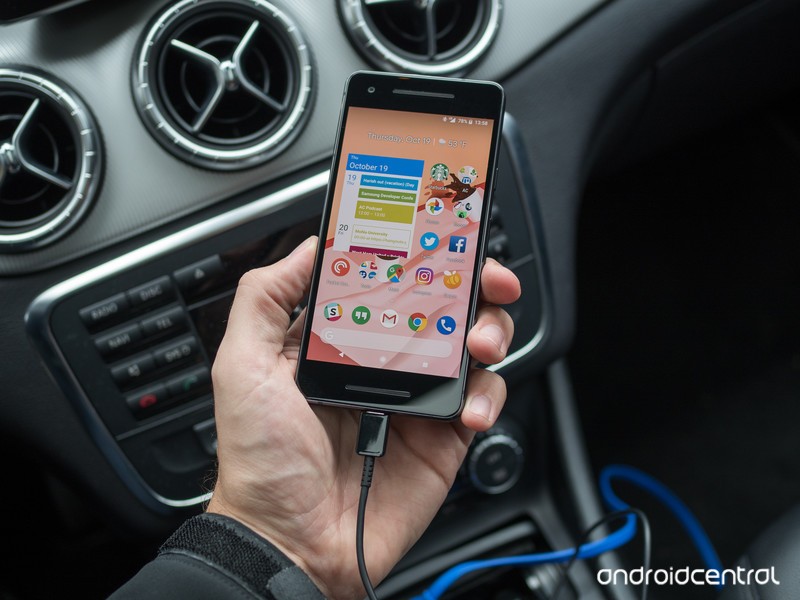
Here are our favorite USB car chargers to keep your Pixel topped up on the road.
We’ve all been there (some of us more than others): you hop in your car ready hit the road, and then you check your phone — it’s dying at a rapid pace! You’ve barely enough battery to get to your destination, let alone for the rest of the day once you get there.
Well, that’s what car chargers are for, and if you have a Google Pixel or Pixel 2, this list should be particularly resonant for you. Here are some of the best car chargers you can buy for your Pixel or Pixel 2.
- Aukey USB-C PD
- Aukey Quick Charge 3.0
- Spigen 30W
Aukey Car Charger with 27W USB-C PD and 5V/2.4A USB-A

Aukey’s charger features both a USB-C port and a USB-A port, which is great for giving you the best options to charge all modern phones. You can charge your Pixel or Pixel 2 over USB-C at a full 27W, which is the “rapid charge” rate you’d get from the in-box wall charger. At the same time, you can charge another device over USB-A at a respectable 5V/2.4A — enough to get any other phone charged up pretty quickly. This is the way to go if you have multiple devices (or people) in the car with different charging systems.
With 27W of output, this Aukey charger can even charge up USB-C tablets and laptops, which is another big plus.
The fastest possible charging speeds, plus an extra USB port for your copilot’s phone, wrapped up into one small device that barely protrudes from your car’s outlet. All this for just $20. Remember, you’ll have to bring your own USB-C cable to use this charger.
See at Amazon
Aukey Car Charger with 5V/3A USB-C and Quick Charge 3.0 USB-A
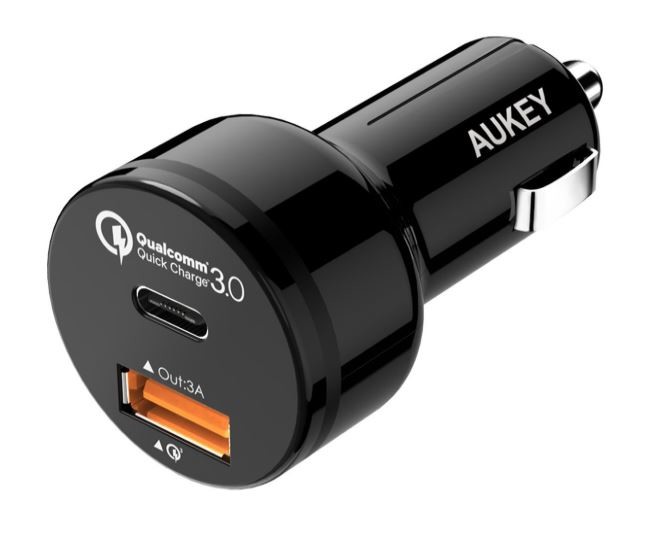
Aukey makes a slightly different version of its car charger, and you have to look at the details to tell which one you’re getting — the quickest way to tell is that this model has Quick Charge 3.0 branding. The rest of the casing is the same, which is to say it’s compact and doesn’t stand out.
This version of the charger has a USB-C port with 15W of output, which will still charge up your Pixel or Pixel 2 quickly but doesn’t match wall charging speeds. In return, the USB-A port below it has Quick Charge 3.0, which will charge most other modern Android phones extremely fast, just as they would from a wall charger.
It’s a small trade-off, and really depends whether you value being able to rapidly charge your Pixel or other USB-C PD devices more than getting top-speed phone charging on the USB-A port. It’s also a tad cheaper, coming in at $16.
See at Amazon
Spigen 30W Quick Charge 3.0 Dual USB-A car charger
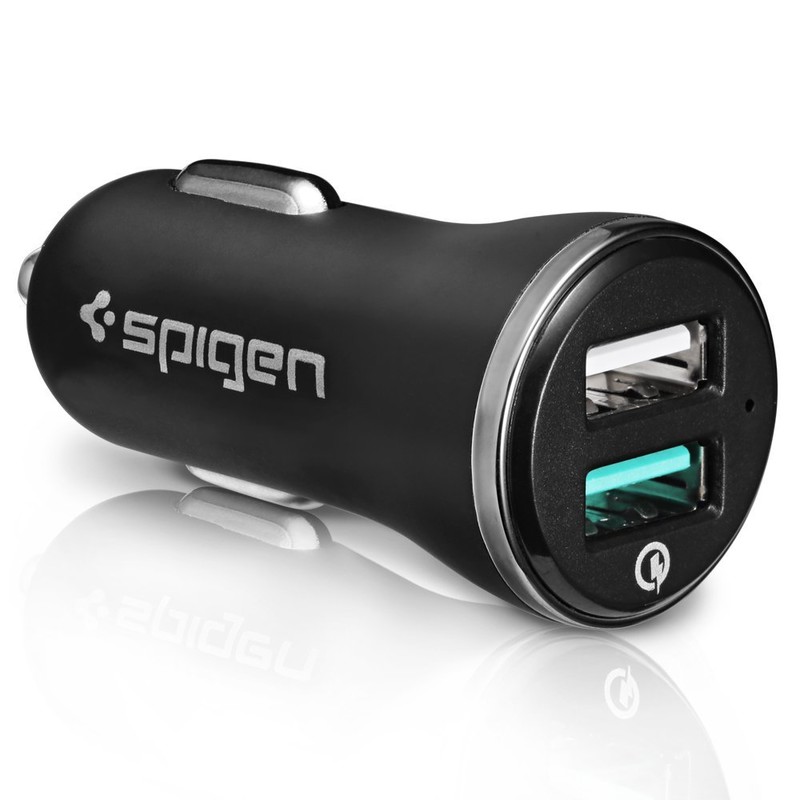
Spigen is a popular brand in smartphone accessories, and its dual USB car charger is a high-quality part that won’t overheat your Pixel or Pixel 2. While it’s not USB-C PD compliant since it uses USB-A, it supports Qualcomm’s Quick Charge 3.0 standard, which still offers pretty quick speeds for Pixels and can also charge up other phones extra fast.
The beauty of the Spigen charger is that it supports a total of 30W between the two ports, so even with two phones plugged in they’ll both charge up at the maximum rate. The best part? It’s only $10 — for some people, that’s worth giving up USB-C PD for.
See at Amazon
Your picks?
Are you using an awesome USB-C charger that we didn’t mention? Let us know in the comments below!
Google Pixel 2 and Pixel 2 XL
- Pixel 2 FAQ: Everything you need to know!
- Google Pixel 2 and 2 XL review: The new standard
- Google Pixel 2 specs
- Google Pixel 2 vs. Pixel 2 XL: What’s the difference?
- Join our Pixel 2 forums
Best Buy
Verizon
Google Store
Project Fi
Update June 2018: Belkin’s car charger has been removed, replaced by a new Aukey charger that has both 27W USB-C PD and a second USB port for another device. The original Aukey charger and inexpensive Spigen option remain.
 AIVAnet